key JEEP CHEROKEE 1994 Service Manual PDF
[x] Cancel search | Manufacturer: JEEP, Model Year: 1994, Model line: CHEROKEE, Model: JEEP CHEROKEE 1994Pages: 1784, PDF Size: 77.09 MB
Page 1013 of 1784
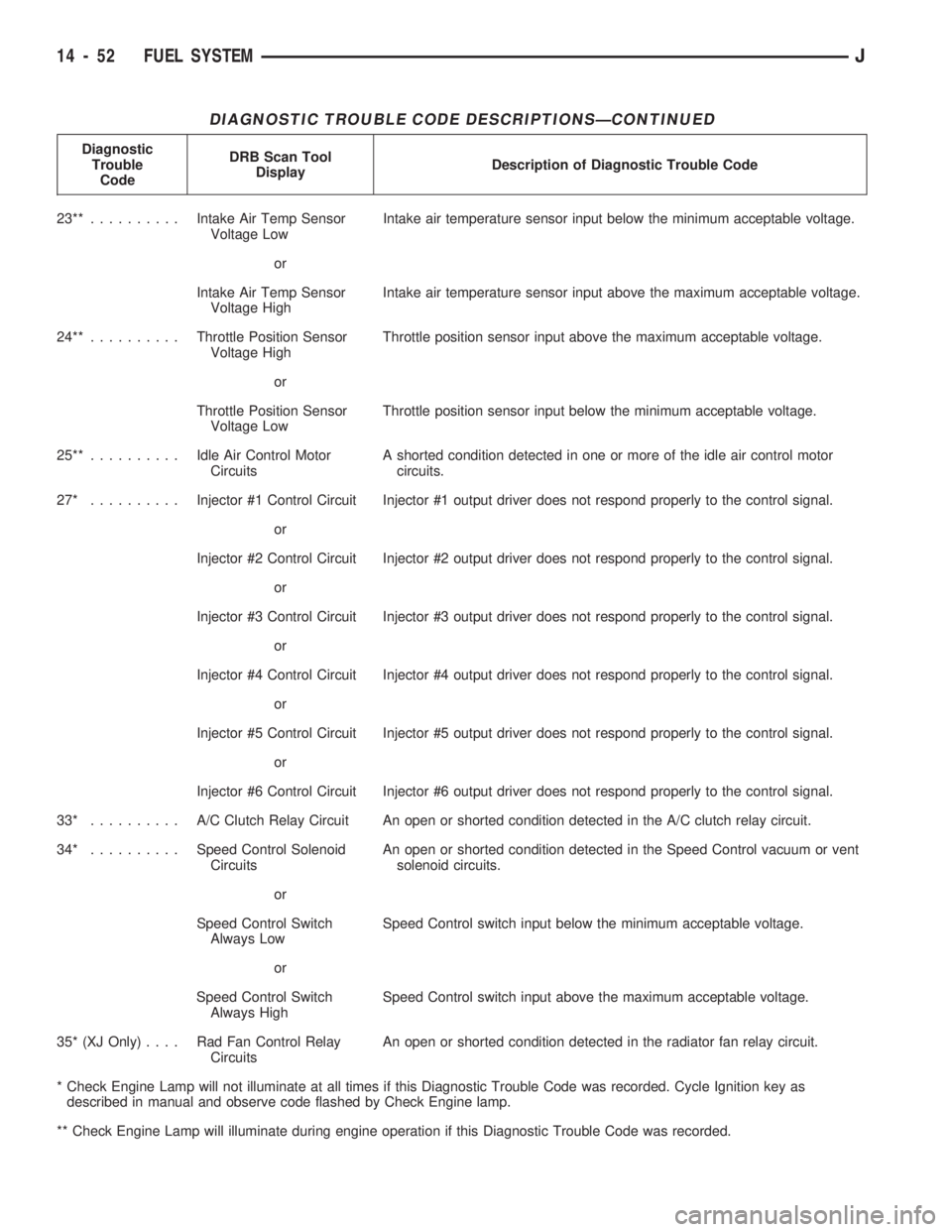
DIAGNOSTIC TROUBLE CODE DESCRIPTIONSÐCONTINUED
Diagnostic
Trouble
CodeDRB Scan Tool
DisplayDescription of Diagnostic Trouble Code
23**..........Intake Air Temp Sensor
Voltage LowIntake air temperature sensor input below the minimum acceptable voltage.
or
Intake Air Temp Sensor
Voltage HighIntake air temperature sensor input above the maximum acceptable voltage.
24**..........Throttle Position Sensor
Voltage HighThrottle position sensor input above the maximum acceptable voltage.
or
Throttle Position Sensor
Voltage LowThrottle position sensor input below the minimum acceptable voltage.
25**..........Idle Air Control Motor
CircuitsA shorted condition detected in one or more of the idle air control motor
circuits.
27* ..........Injector #1 Control Circuit Injector #1 output driver does not respond properly to the control signal.
or
Injector #2 Control Circuit Injector #2 output driver does not respond properly to the control signal.
or
Injector #3 Control Circuit Injector #3 output driver does not respond properly to the control signal.
or
Injector #4 Control Circuit Injector #4 output driver does not respond properly to the control signal.
or
Injector #5 Control Circuit Injector #5 output driver does not respond properly to the control signal.
or
Injector #6 Control Circuit Injector #6 output driver does not respond properly to the control signal.
33* .......... A/CClutch Relay Circuit An open or shorted condition detected in the A/C clutch relay circuit.
34* ..........Speed Control Solenoid
CircuitsAn open or shorted condition detected in the Speed Control vacuum or vent
solenoid circuits.
or
Speed Control Switch
Always LowSpeed Control switch input below the minimum acceptable voltage.
or
Speed Control Switch
Always HighSpeed Control switch input above the maximum acceptable voltage.
35* (XJ Only).... RadFanControl Relay
CircuitsAn open or shorted condition detected in the radiator fan relay circuit.
* Check Engine Lamp will not illuminate at all times if this Diagnostic Trouble Code was recorded. Cycle Ignition key as
described in manual and observe code flashed by Check Engine lamp.
** Check Engine Lamp will illuminate during engine operation if this Diagnostic Trouble Code was recorded.
14 - 52 FUEL SYSTEMJ
Page 1014 of 1784
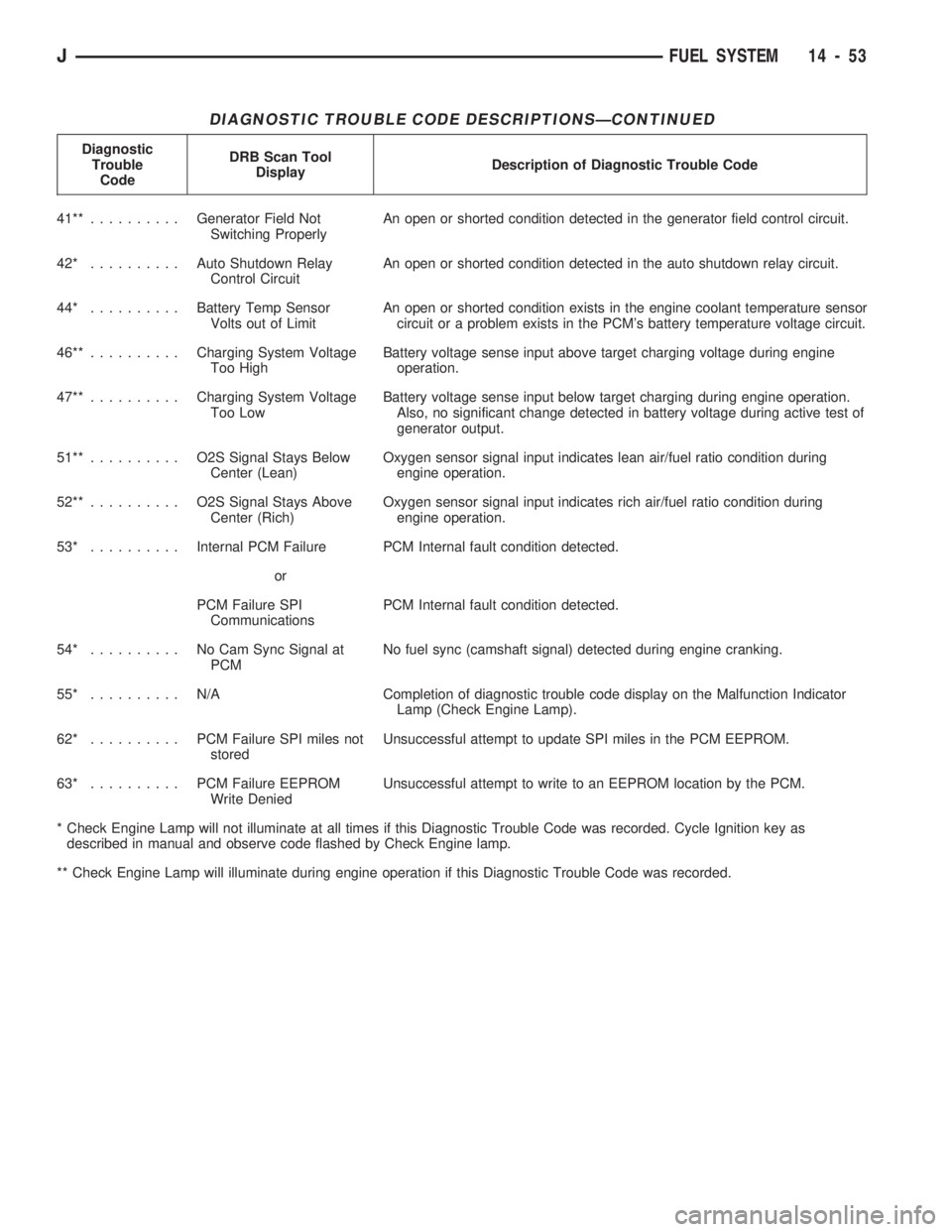
DIAGNOSTIC TROUBLE CODE DESCRIPTIONSÐCONTINUED
Diagnostic
Trouble
CodeDRB Scan Tool
DisplayDescription of Diagnostic Trouble Code
41**..........Generator Field Not
Switching ProperlyAn open or shorted condition detected in the generator field control circuit.
42* ..........Auto Shutdown Relay
Control CircuitAn open or shorted condition detected in the auto shutdown relay circuit.
44* ..........Battery Temp Sensor
Volts out of LimitAn open or shorted condition exists in the engine coolant temperature sensor
circuit or a problem exists in the PCM's battery temperature voltage circuit.
46**..........Charging System Voltage
Too HighBattery voltage sense input above target charging voltage during engine
operation.
47**..........Charging System Voltage
Too LowBattery voltage sense input below target charging during engine operation.
Also, no significant change detected in battery voltage during active test of
generator output.
51**.......... O2SSignal Stays Below
Center (Lean)Oxygen sensor signal input indicates lean air/fuel ratio condition during
engine operation.
52**.......... O2SSignal Stays Above
Center (Rich)Oxygen sensor signal input indicates rich air/fuel ratio condition during
engine operation.
53* ..........Internal PCM Failure PCM Internal fault condition detected.
or
PCM Failure SPI
CommunicationsPCM Internal fault condition detected.
54* .......... NoCamSync Signal at
PCMNo fuel sync (camshaft signal) detected during engine cranking.
55* .......... N/ACompletion of diagnostic trouble code display on the Malfunction Indicator
Lamp (Check Engine Lamp).
62* .......... PCMFailure SPI miles not
storedUnsuccessful attempt to update SPI miles in the PCM EEPROM.
63* .......... PCMFailure EEPROM
Write DeniedUnsuccessful attempt to write to an EEPROM location by the PCM.
* Check Engine Lamp will not illuminate at all times if this Diagnostic Trouble Code was recorded. Cycle Ignition key as
described in manual and observe code flashed by Check Engine lamp.
** Check Engine Lamp will illuminate during engine operation if this Diagnostic Trouble Code was recorded.
JFUEL SYSTEM 14 - 53
Page 1039 of 1784
pump. The power steering pump is a constant flow
rate and displacement, vane-type pump. The internal
parts in the housing operate submerged in fluid. The
flow control orifice is part of the high pressure line
fitting. The pressure relief valve inside the flow con-
trol valve limits the pump pressure.
Power steering pumps have different pres-
sure rates and are not interchangeable with
other pumps.
The power steering pump is connected to the steer-
ing gear via high pressure and return hose. The
pump shaft has a pressed-on drive pulley that is belt
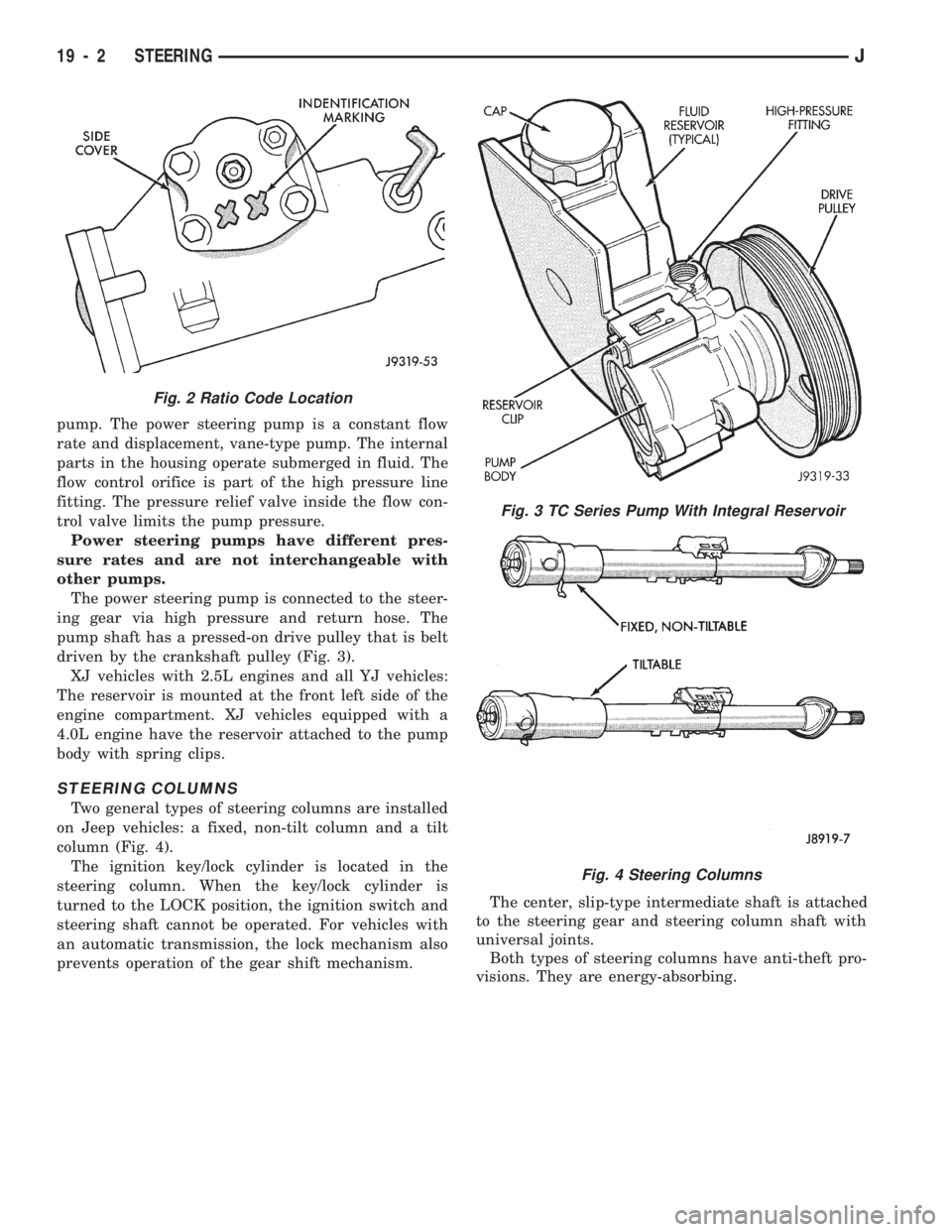
driven by the crankshaft pulley (Fig. 3).
XJ vehicles with 2.5L engines and all YJ vehicles:
The reservoir is mounted at the front left side of the
engine compartment. XJ vehicles equipped with a
4.0L engine have the reservoir attached to the pump
body with spring clips.
STEERING COLUMNS
Two general types of steering columns are installed
on Jeep vehicles: a fixed, non-tilt column and a tilt
column (Fig. 4).
The ignition key/lock cylinder is located in the
steering column. When the key/lock cylinder is
turned to the LOCK position, the ignition switch and
steering shaft cannot be operated. For vehicles with
an automatic transmission, the lock mechanism also
prevents operation of the gear shift mechanism.The center, slip-type intermediate shaft is attached
to the steering gear and steering column shaft with
universal joints.
Both types of steering columns have anti-theft pro-
visions. They are energy-absorbing.
Fig. 3 TC Series Pump With Integral Reservoir
Fig. 4 Steering Columns
Fig. 2 Ratio Code Location
19 - 2 STEERINGJ
Page 1083 of 1784
(3) Remove the steering column mounting bracket
to instrument panel nuts. Lower the steering column.
Refer to Steering Column Removal .
(4) Disconnect the park-lock cable from the steer-
ing column and bracket.
(5) Remove the center console and related trim.
(6) Pull the carpet backward to expose the cable at
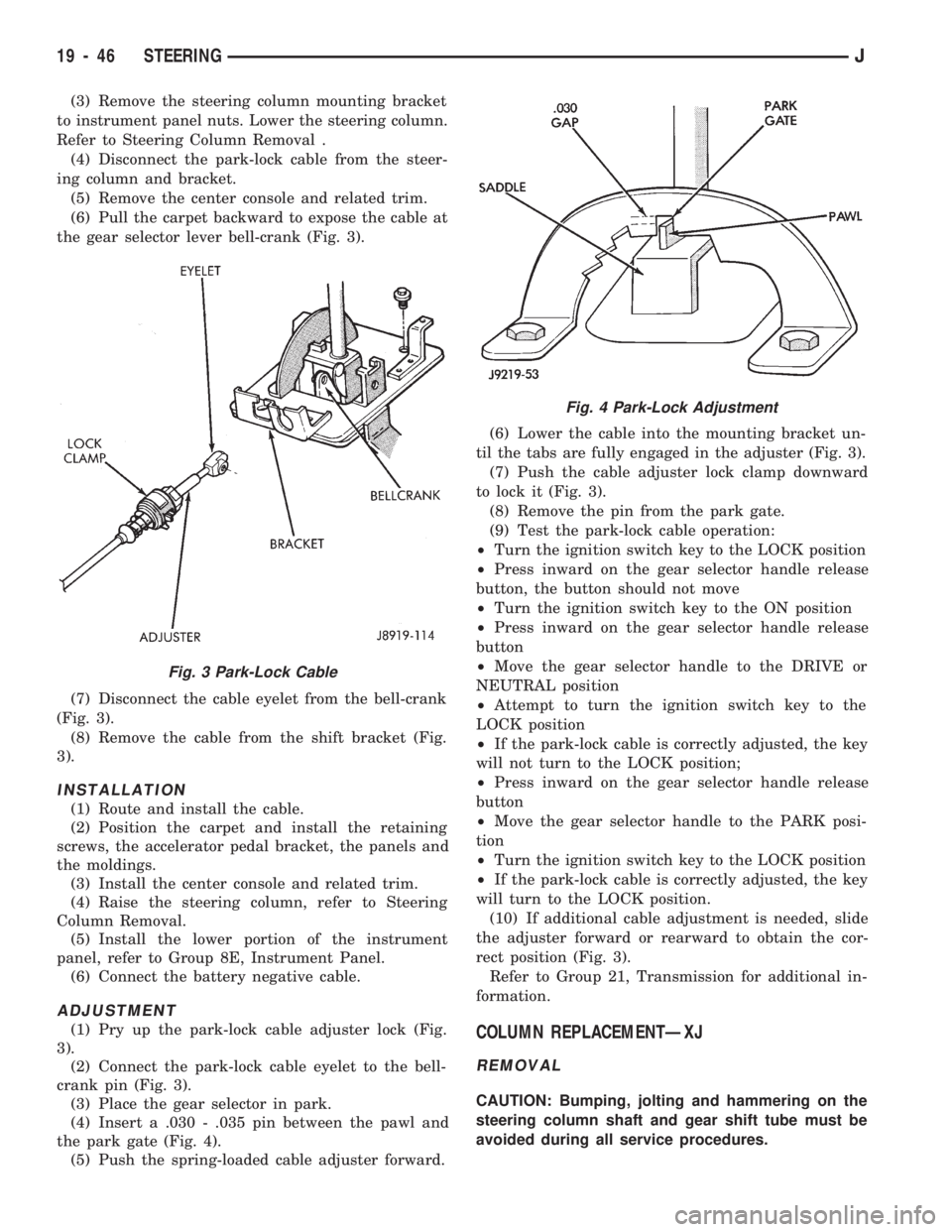
the gear selector lever bell-crank (Fig. 3).
(7) Disconnect the cable eyelet from the bell-crank
(Fig. 3).
(8) Remove the cable from the shift bracket (Fig.
3).
INSTALLATION
(1) Route and install the cable.
(2) Position the carpet and install the retaining
screws, the accelerator pedal bracket, the panels and
the moldings.
(3) Install the center console and related trim.
(4) Raise the steering column, refer to Steering
Column Removal.
(5) Install the lower portion of the instrument
panel, refer to Group 8E, Instrument Panel.
(6) Connect the battery negative cable.
ADJUSTMENT
(1) Pry up the park-lock cable adjuster lock (Fig.
3).
(2) Connect the park-lock cable eyelet to the bell-
crank pin (Fig. 3).
(3) Place the gear selector in park.
(4) Insert a .030 - .035 pin between the pawl and
the park gate (Fig. 4).
(5) Push the spring-loaded cable adjuster forward.(6) Lower the cable into the mounting bracket un-
til the tabs are fully engaged in the adjuster (Fig. 3).
(7) Push the cable adjuster lock clamp downward
to lock it (Fig. 3).
(8) Remove the pin from the park gate.
(9) Test the park-lock cable operation:
²Turn the ignition switch key to the LOCK position
²Press inward on the gear selector handle release
button, the button should not move
²Turn the ignition switch key to the ON position
²Press inward on the gear selector handle release
button
²Move the gear selector handle to the DRIVE or
NEUTRAL position
²Attempt to turn the ignition switch key to the
LOCK position
²If the park-lock cable is correctly adjusted, the key
will not turn to the LOCK position;
²Press inward on the gear selector handle release
button
²Move the gear selector handle to the PARK posi-
tion
²Turn the ignition switch key to the LOCK position
²If the park-lock cable is correctly adjusted, the key
will turn to the LOCK position.
(10) If additional cable adjustment is needed, slide
the adjuster forward or rearward to obtain the cor-
rect position (Fig. 3).
Refer to Group 21, Transmission for additional in-
formation.COLUMN REPLACEMENTÐXJ
REMOVAL
CAUTION: Bumping, jolting and hammering on the
steering column shaft and gear shift tube must be
avoided during all service procedures.
Fig. 3 Park-Lock Cable
Fig. 4 Park-Lock Adjustment
19 - 46 STEERINGJ
Page 1087 of 1784
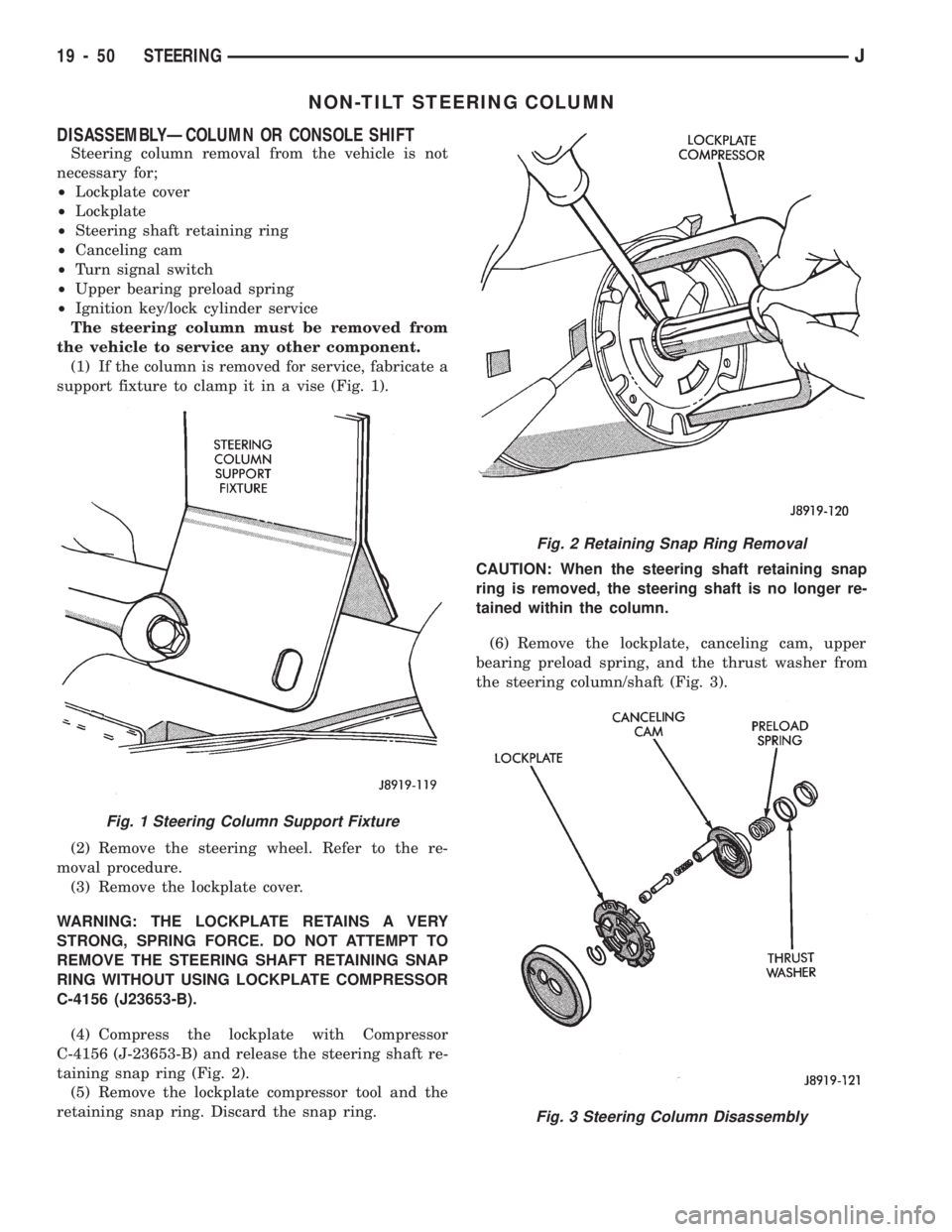
NON-TILT STEERING COLUMN
DISASSEMBLYÐCOLUMN OR CONSOLE SHIFT
Steering column removal from the vehicle is not
necessary for;
²Lockplate cover
²Lockplate
²Steering shaft retaining ring
²Canceling cam
²Turn signal switch
²Upper bearing preload spring
²Ignition key/lock cylinder service
The steering column must be removed from
the vehicle to service any other component.
(1) If the column is removed for service, fabricate a
support fixture to clamp it in a vise (Fig. 1).
(2) Remove the steering wheel. Refer to the re-
moval procedure.
(3) Remove the lockplate cover.
WARNING: THE LOCKPLATE RETAINS A VERY
STRONG, SPRING FORCE. DO NOT ATTEMPT TO
REMOVE THE STEERING SHAFT RETAINING SNAP
RING WITHOUT USING LOCKPLATE COMPRESSOR
C-4156 (J23653-B).
(4) Compress the lockplate with Compressor
C-4156 (J-23653-B) and release the steering shaft re-
taining snap ring (Fig. 2).
(5) Remove the lockplate compressor tool and the
retaining snap ring. Discard the snap ring.CAUTION: When the steering shaft retaining snap
ring is removed, the steering shaft is no longer re-
tained within the column.
(6) Remove the lockplate, canceling cam, upper
bearing preload spring, and the thrust washer from
the steering column/shaft (Fig. 3).
Fig. 2 Retaining Snap Ring Removal
Fig. 3 Steering Column Disassembly
Fig. 1 Steering Column Support Fixture
19 - 50 STEERINGJ
Page 1088 of 1784
(7) Remove the hazard warning switch knob. Press
the knob inward and remove it from the column by
turning it counterclockwise.
(8) Remove the turn signal/wiper/cruise control
stalk by pulling it out straight from the column.
Wiper must be in the off position.
(9) Disconnect the turn signal wire harness con-
nector from the bracket.
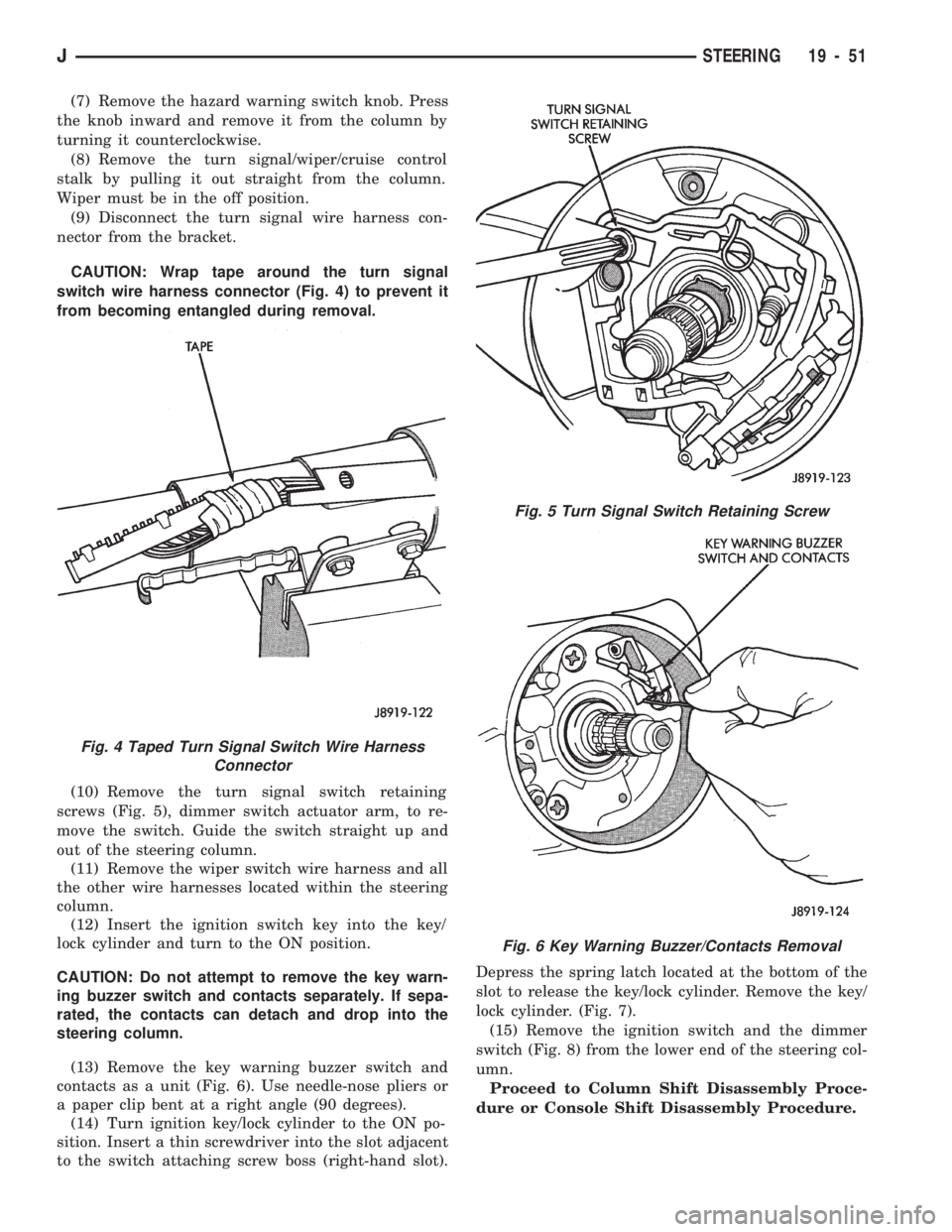
CAUTION: Wrap tape around the turn signal
switch wire harness connector (Fig. 4) to prevent it
from becoming entangled during removal.
(10) Remove the turn signal switch retaining
screws (Fig. 5), dimmer switch actuator arm, to re-
move the switch. Guide the switch straight up and
out of the steering column.
(11) Remove the wiper switch wire harness and all
the other wire harnesses located within the steering
column.
(12) Insert the ignition switch key into the key/
lock cylinder and turn to the ON position.
CAUTION: Do not attempt to remove the key warn-
ing buzzer switch and contacts separately. If sepa-
rated, the contacts can detach and drop into the
steering column.
(13) Remove the key warning buzzer switch and
contacts as a unit (Fig. 6). Use needle-nose pliers or
a paper clip bent at a right angle (90 degrees).
(14) Turn ignition key/lock cylinder to the ON po-
sition. Insert a thin screwdriver into the slot adjacent
to the switch attaching screw boss (right-hand slot).Depress the spring latch located at the bottom of the
slot to release the key/lock cylinder. Remove the key/
lock cylinder. (Fig. 7).
(15) Remove the ignition switch and the dimmer
switch (Fig. 8) from the lower end of the steering col-
umn.
Proceed to Column Shift Disassembly Proce-
dure or Console Shift Disassembly Procedure.
Fig. 4 Taped Turn Signal Switch Wire Harness
Connector
Fig. 5 Turn Signal Switch Retaining Screw
Fig. 6 Key Warning Buzzer/Contacts Removal
JSTEERING 19 - 51
Page 1089 of 1784
COLUMN SHIFT DISASSEMBLY
(1) Remove the gear selector lever upper pivot pin
and the selector lever.
(2) Remove the upper bearing thrust washer.
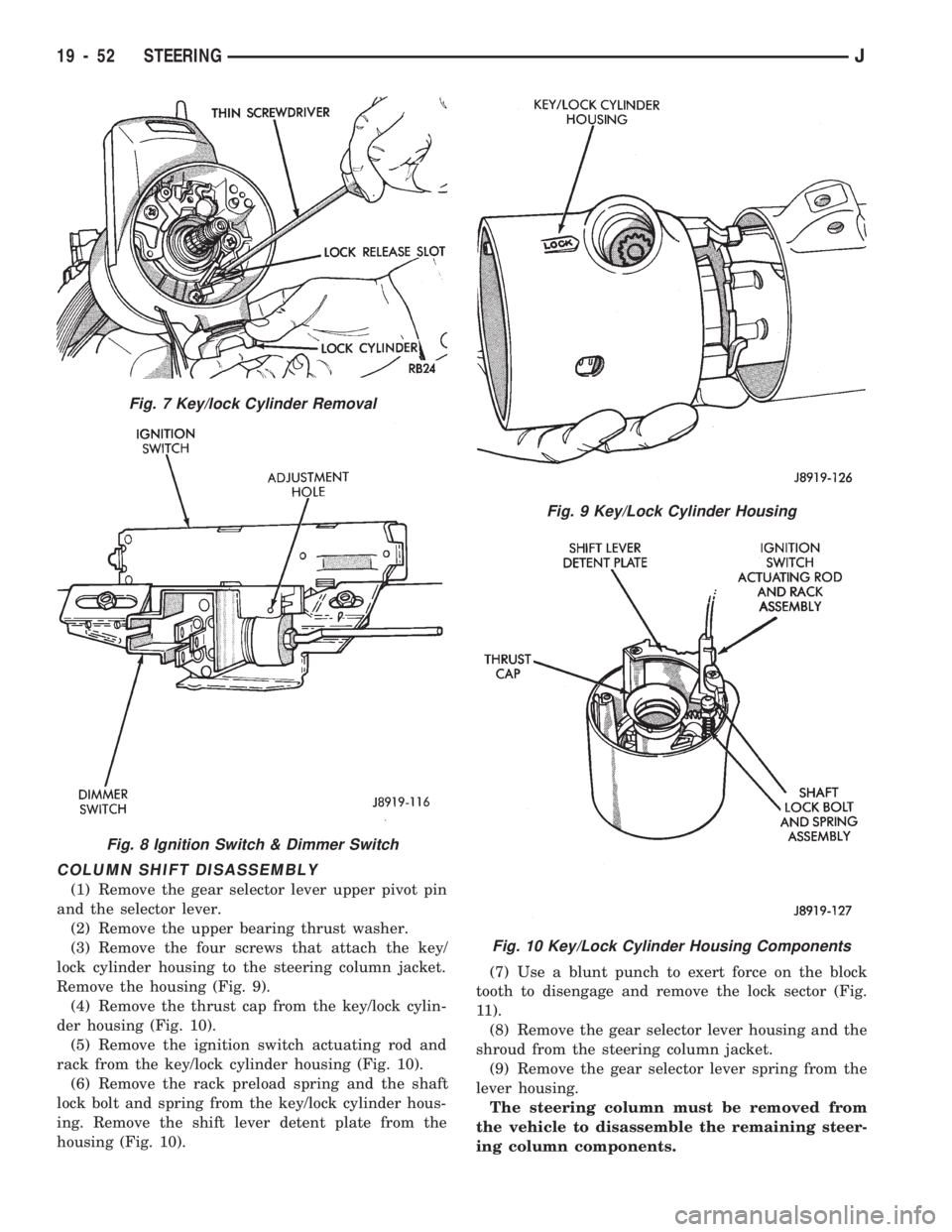
(3) Remove the four screws that attach the key/
lock cylinder housing to the steering column jacket.
Remove the housing (Fig. 9).
(4) Remove the thrust cap from the key/lock cylin-
der housing (Fig. 10).
(5) Remove the ignition switch actuating rod and
rack from the key/lock cylinder housing (Fig. 10).
(6) Remove the rack preload spring and the shaft
lock bolt and spring from the key/lock cylinder hous-
ing. Remove the shift lever detent plate from the
housing (Fig. 10).(7) Use a blunt punch to exert force on the block
tooth to disengage and remove the lock sector (Fig.
11).
(8) Remove the gear selector lever housing and the
shroud from the steering column jacket.
(9) Remove the gear selector lever spring from the
lever housing.
The steering column must be removed from
the vehicle to disassemble the remaining steer-
ing column components.
Fig. 7 Key/lock Cylinder Removal
Fig. 8 Ignition Switch & Dimmer Switch
Fig. 9 Key/Lock Cylinder Housing
Fig. 10 Key/Lock Cylinder Housing Components
19 - 52 STEERINGJ
Page 1090 of 1784
(10) Remove the steering shaft (if not previously
removed).
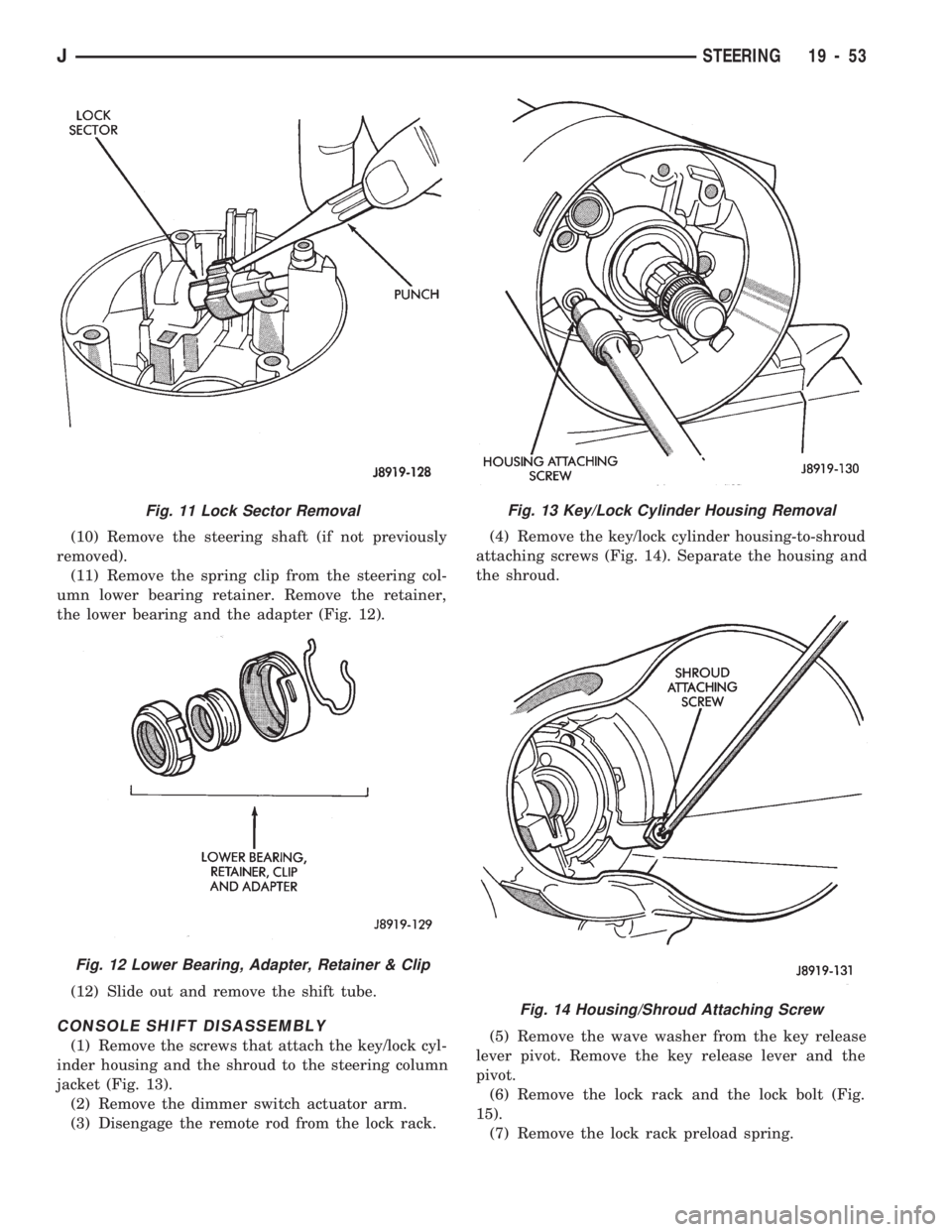
(11) Remove the spring clip from the steering col-
umn lower bearing retainer. Remove the retainer,
the lower bearing and the adapter (Fig. 12).
(12) Slide out and remove the shift tube.
CONSOLE SHIFT DISASSEMBLY
(1) Remove the screws that attach the key/lock cyl-
inder housing and the shroud to the steering column
jacket (Fig. 13).
(2) Remove the dimmer switch actuator arm.
(3) Disengage the remote rod from the lock rack.(4) Remove the key/lock cylinder housing-to-shroud
attaching screws (Fig. 14). Separate the housing and
the shroud.
(5) Remove the wave washer from the key release
lever pivot. Remove the key release lever and the
pivot.
(6) Remove the lock rack and the lock bolt (Fig.
15).
(7) Remove the lock rack preload spring.
Fig. 11 Lock Sector Removal
Fig. 12 Lower Bearing, Adapter, Retainer & Clip
Fig. 13 Key/Lock Cylinder Housing Removal
Fig. 14 Housing/Shroud Attaching Screw
JSTEERING 19 - 53
Page 1091 of 1784
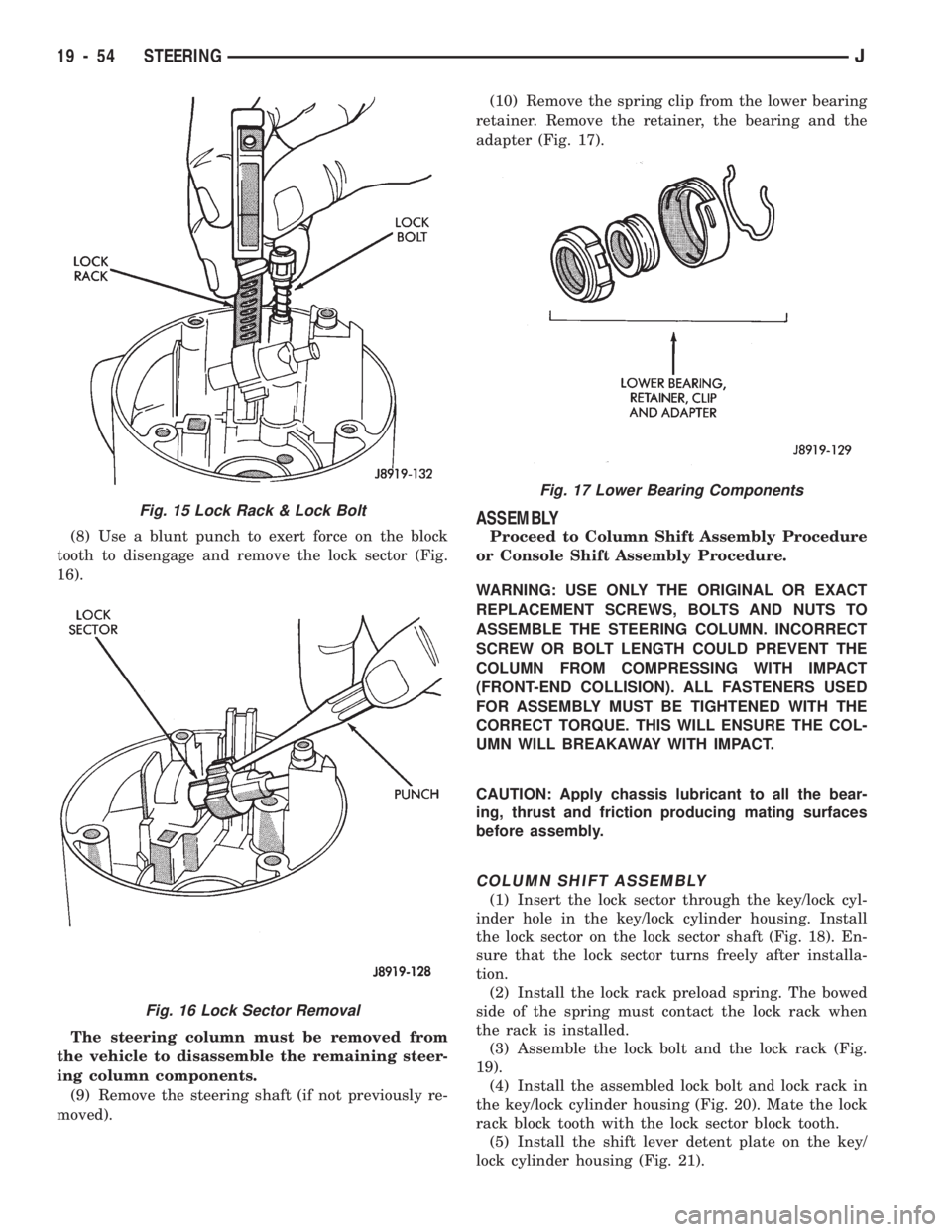
(8) Use a blunt punch to exert force on the block
tooth to disengage and remove the lock sector (Fig.
16).
The steering column must be removed from
the vehicle to disassemble the remaining steer-
ing column components.
(9) Remove the steering shaft (if not previously re-
moved).(10) Remove the spring clip from the lower bearing
retainer. Remove the retainer, the bearing and the
adapter (Fig. 17).
ASSEMBLY
Proceed to Column Shift Assembly Procedure
or Console Shift Assembly Procedure.
WARNING: USE ONLY THE ORIGINAL OR EXACT
REPLACEMENT SCREWS, BOLTS AND NUTS TO
ASSEMBLE THE STEERING COLUMN. INCORRECT
SCREW OR BOLT LENGTH COULD PREVENT THE
COLUMN FROM COMPRESSING WITH IMPACT
(FRONT-END COLLISION). ALL FASTENERS USED
FOR ASSEMBLY MUST BE TIGHTENED WITH THE
CORRECT TORQUE. THIS WILL ENSURE THE COL-
UMN WILL BREAKAWAY WITH IMPACT.
CAUTION: Apply chassis lubricant to all the bear-
ing, thrust and friction producing mating surfaces
before assembly.
COLUMN SHIFT ASSEMBLY
(1) Insert the lock sector through the key/lock cyl-
inder hole in the key/lock cylinder housing. Install
the lock sector on the lock sector shaft (Fig. 18). En-
sure that the lock sector turns freely after installa-
tion.
(2) Install the lock rack preload spring. The bowed
side of the spring must contact the lock rack when
the rack is installed.
(3) Assemble the lock bolt and the lock rack (Fig.
19).
(4) Install the assembled lock bolt and lock rack in
the key/lock cylinder housing (Fig. 20). Mate the lock
rack block tooth with the lock sector block tooth.
(5) Install the shift lever detent plate on the key/
lock cylinder housing (Fig. 21).
Fig. 17 Lower Bearing Components
Fig. 15 Lock Rack & Lock Bolt
Fig. 16 Lock Sector Removal
19 - 54 STEERINGJ
Page 1092 of 1784
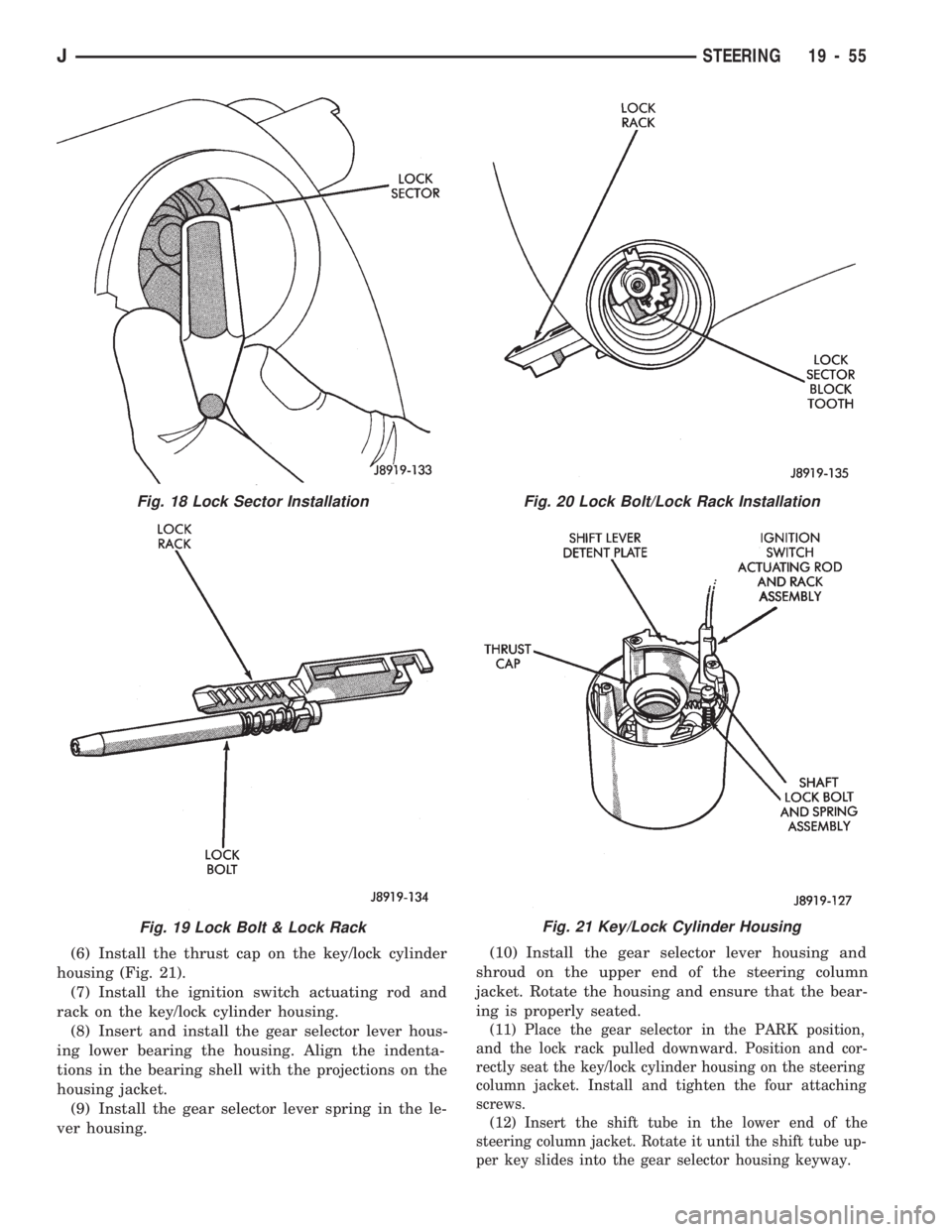
(6) Install the thrust cap on the key/lock cylinder
housing (Fig. 21).
(7) Install the ignition switch actuating rod and
rack on the key/lock cylinder housing.
(8) Insert and install the gear selector lever hous-
ing lower bearing the housing. Align the indenta-
tions in the bearing shell with the projections on the
housing jacket.
(9) Install the gear selector lever spring in the le-
ver housing.(10) Install the gear selector lever housing and
shroud on the upper end of the steering column
jacket. Rotate the housing and ensure that the bear-
ing is properly seated.
(11) Place the gear selector in the PARK position,
and the lock rack pulled downward. Position and cor-
rectly seat the key/lock cylinder housing on the steering
column jacket. Install and tighten the four attaching
screws.
(12) Insert the shift tube in the lower end of the
steering column jacket. Rotate it until the shift tube up-
per key slides into the gear selector housing keyway.
Fig. 18 Lock Sector Installation
Fig. 19 Lock Bolt & Lock Rack
Fig. 20 Lock Bolt/Lock Rack Installation
Fig. 21 Key/Lock Cylinder Housing
JSTEERING 19 - 55