cycle JEEP CHEROKEE 2015 KL / 5.G Owners Manual
[x] Cancel search | Manufacturer: JEEP, Model Year: 2015, Model line: CHEROKEE, Model: JEEP CHEROKEE 2015 KL / 5.GPages: 772, PDF Size: 18.21 MB
Page 17 of 772
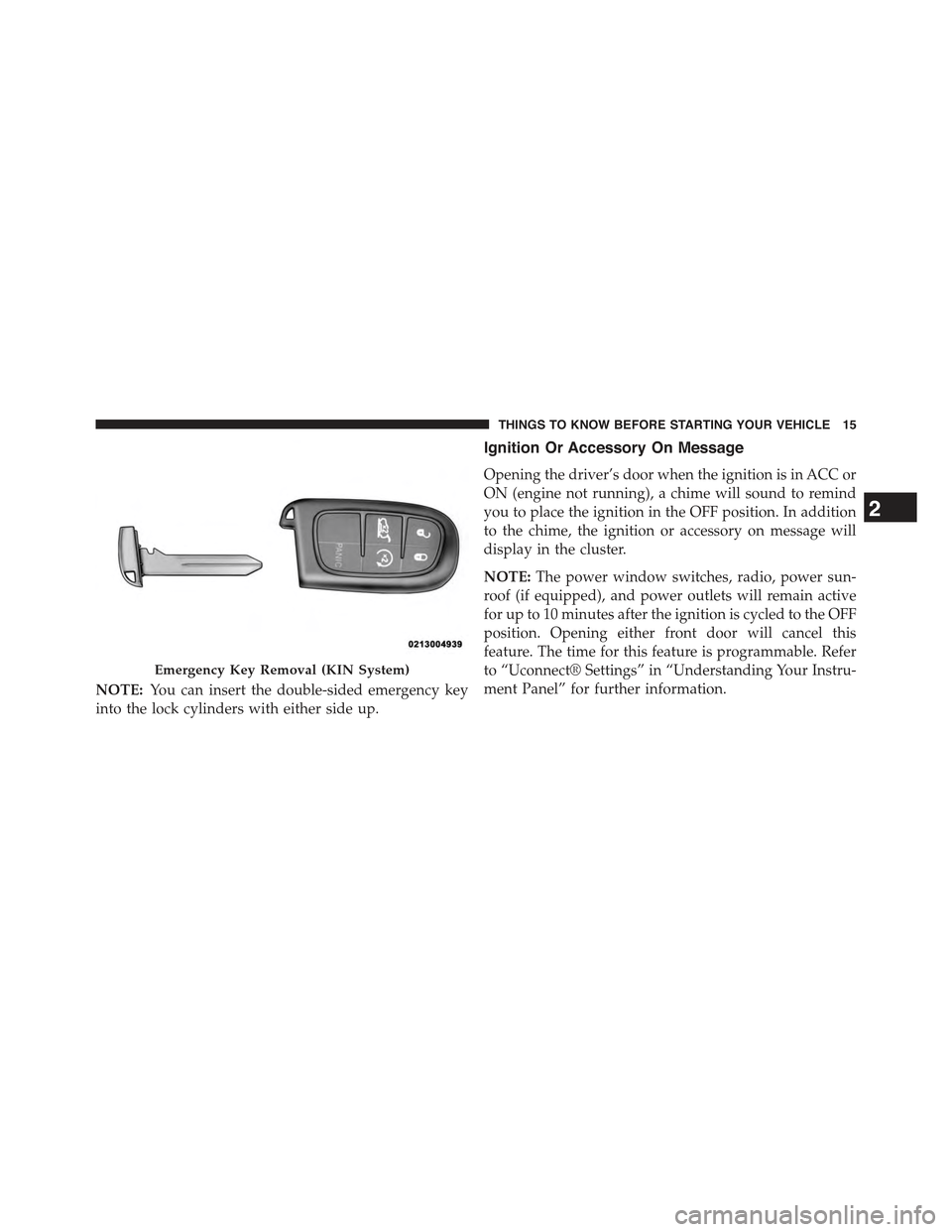
NOTE:You can insert the double-sided emergency key
into the lock cylinders with either side up.
Ignition Or Accessory On Message
Opening the driver’s door when the ignition is in ACC or
ON (engine not running), a chime will sound to remind
you to place the ignition in the OFF position. In addition
to the chime, the ignition or accessory on message will
display in the cluster.
NOTE:The power window switches, radio, power sun-
roof (if equipped), and power outlets will remain active
for up to 10 minutes after the ignition is cycled to the OFF
position. Opening either front door will cancel this
feature. The time for this feature is programmable. Refer
to “Uconnect® Settings” in “Understanding Your Instru-
ment Panel” for further information.
Emergency Key Removal (KIN System)
2
THINGS TO KNOW BEFORE STARTING YOUR VEHICLE 15
Page 21 of 772
•This device must accept any interference that may be
received, including interference that may cause unde-
sired operation.
NOTE:Changes or modifications not expressly approved
by the party responsible for compliance could void the
user’s authority to operate the equipment.
VEHICLE SECURITY ALARM — IF EQUIPPED
The Vehicle Security Alarm monitors the vehicle doors
for unauthorized entry and the Keyless Enter-N-Go™
Start/Stop button for unauthorized operation. While the
Vehicle Security Alarm is armed, interior switches for
door locks and liftgate release are disabled. If something
triggers the alarm, the Vehicle Security Alarm will pro-
vide the following audible and visible signals: the horn
will pulse, the park lamps and/or turn signals will flash,
and the Vehicle Security Light in the instrument cluster
will flash.
Rearming Of The System
If something triggers the alarm, and no action is taken to
disarm it, the Vehicle Security Alarm will turn the horn
off after 29 seconds, 5 seconds between cycles, up to 8
cycles if the trigger remains active and then the Vehicle
Security Alarm will rearm itself.
To Arm The System
Follow these steps to arm the Vehicle Security Alarm:
1. Make sure the vehicles ignition is cycled to the “OFF”
position (refer to#Starting Procedures#in#Starting
And Operating#for further information).
•For vehicles equipped with Keyless Enter-N-Go™,
make sure the vehicle ignition system is OFF.
•For vehicles not equipped with Keyless Enter-N-
Go™, make sure the vehicle ignition system is OFF
and the key is physically removed from the ignition.
2
THINGS TO KNOW BEFORE STARTING YOUR VEHICLE 19
Page 22 of 772
2. Perform one of the following methods to lock the
vehicle:
•Push LOCK on the interior power door lock switch
with the driver and/or passenger door open.
•Push the LOCK button on the exterior Passive Entry
Door Handle with a valid Key Fob available in the
same exterior zone (refer to#Keyless Enter-N-Go™#
in#Things To Know Before Starting Your Vehicle#for
further information).
•Push the LOCK button on the Remote Keyless Entry
(RKE) transmitter.
3. If any doors are open, close them.
To Disarm The System
The Vehicle Security Alarm can be disarmed using any of
the following methods:
•Press the UNLOCK button on the Remote Keyless
Entry (RKE) transmitter.
•Grasp the Passive Entry Unlock Door Handle with a
valid Key Fob available in the same exterior zone (if
equipped), refer to#Keyless Enter-N-Go™#in#Things
To Know Before Starting Your Vehicle#for further
information.
•Cycle the vehicle ignition system out of the OFF
position.
•For vehicles equipped with Keyless Enter-N-Go™ ,
press the Keyless Enter-N-Go™ Start/Stop button
(requires at least one valid Key Fob in the vehicle).
•For vehicles not equipped with Keyless Enter-N-
Go™ , insert a valid key into the ignition switch and
turn the key to the ON position.
20 THINGS TO KNOW BEFORE STARTING YOUR VEHICLE
Page 27 of 772
To Lock The Doors And Liftgate
Push and release the LOCK button on the RKE transmit-
ter to lock all doors and liftgate. The turn signal lights
will flash and the horn will chirp to acknowledge the
signal.
If the vehicle is equipped with Passive Entry, refer to
“Keyless Enter-N-Go™” in “Things To Know Before
Starting Your Vehicle” for further information.
Sound Horn With Lock
This feature will cause the horn to chirp when the doors
are locked with the RKE transmitter. This feature can be
turned on or turned off. To change the current setting,
refer to “Uconnect® Settings” in “Understanding Your
Instrument Panel” for further information.
Using The Panic Alarm
To turn the Panic Alarm feature on or off, push and hold
the PANIC button on the RKE transmitter for at least one
second and release. When the Panic Alarm is activated,
the turn signals will flash, the horn will pulse on and off,
and the interior lights will turn on.
The Panic Alarm will stay on for three minutes unless
you turn it off by either pushing the PANIC button a
second time or drive the vehicle at a speed of 15 MPH
(24 km/h) or greater.
NOTE:
•The interior lights will turn off if you cycle the ignition
switch to the ACC or ON/RUN position while the
Panic Alarm is activated. However, the exterior lights
and horn will remain on.
•You may need to be less than 35 ft (11 m) from the
vehicle when using the RKE transmitter to turn off the
Panic Alarm due to the radio frequency noises emitted
by the system.
2
THINGS TO KNOW BEFORE STARTING YOUR VEHICLE 25
Page 33 of 772
WARNING!
•Do not start or run an engine in a closed garage or
confined area. Exhaust gas contains Carbon Mon-
oxide (CO) which is odorless and colorless. Carbon
Monoxide is poisonous and can cause serious in-
jury or death when inhaled.
•Keep Remote Keyless Entry (RKE) transmitters
away from children. Operation of the Remote Start
System, windows, door locks or other controls
could cause serious injury or death.
Remote Start Abort Message On Electronic
Vehicle Information Center (EVIC) or Driver
Information Display (DID) — If Equipped
The following messages will display in the EVIC/DID if
the vehicle fails to remote start or exits remote start
prematurely:
•Remote Start Aborted — Door Ajar
•Remote Start Aborted — Hood Ajar
•Remote Start Aborted — Fuel Low
•Remote Start Aborted — Liftgate Ajar
•Remote Start Disabled — Start Vehicle To Reset
•Remote Start Aborted — Too Cold
•Remote Start Aborted — Time Expired
The message will stay active until the ignition is turned to
the ON/RUN position.
To Enter Remote Start Mode
Push and release the REMOTE START button on
the RKE transmitter twice within five seconds.
The vehicle doors will lock, the parking lights
will flash and the horn will chirp twice (if
programmed). Then, the engine will start and the vehicle
will remain in the Remote Start mode for a 15 minute cycle.
2
THINGS TO KNOW BEFORE STARTING YOUR VEHICLE 31
Page 34 of 772
NOTE:
•If an engine fault is present or fuel level is low, the
vehicle will start and then shut down in 10 seconds.
•The park lamps will turn on and remain on during
Remote Start mode.
•For security, power window and power sunroof op-
eration (if equipped) are disabled when the vehicle is
in the Remote Start mode.
•The engine can be started two consecutive times with
the RKE transmitter. However, the ignition must be
cycled by pushing the START/STOP button twice (or
the ignition switch must be cycled to the ON/RUN
position) before you can repeat the start sequence for a
third cycle.
To Exit Remote Start Mode Without Driving The
Vehicle
Push and release the REMOTE START button one time or
allow the engine to run for the entire 15-minute cycle.
NOTE:To avoid unintentional shutdowns, the system
will disable the one time push of the REMOTE START
button for two seconds after receiving a valid Remote
Start request.
To Exit Remote Start Mode And Drive The Vehicle
Before the end of 15-minute cycle, push and release the
UNLOCK button on the RKE transmitter to unlock the
doors and disarm the Vehicle Security Alarm (if
equipped). Then, prior to the end of the 15-minute cycle,
push and release the START/STOP button. If the START/
STOP button is not present, insert the Key Fob into the
ignition switch and turn the switch to the ON/RUN
position.
32 THINGS TO KNOW BEFORE STARTING YOUR VEHICLE
Page 35 of 772
NOTE:
•For vehicles not equipped with the Keyless Enter-N-
Go™ feature, the ignition switch must be in the
ON/RUN position in order to drive the vehicle.
•For vehicles not equipped with the Keyless Enter-N-
Go™ feature, the message “Remote Start Active —
Insert Key and Turn To Run” will display in the
EVIC/DID until you insert the key. Refer to “Elec-
tronic Vehicle Information Center (EVIC)” or “Driver
Information Display” in “Understanding Your Instru-
ment Panel” for further information.
•For vehicles equipped with the Keyless Enter-N-Go™
feature, the message “Remote Start Active — Push
Start Button” will display in the EVIC/DID until you
push the START button.
Remote Start Comfort Systems — If Equipped
When remote start is activated, the heated steering
wheel, and driver heated seat features will automatically
turn on in cold weather. In warm weather, the driver
vented seat feature will automatically turn on when the
remote start is activated. These features will stay on
through the duration of remote start or until the ignition
switch is cycled to the ON/RUN position.
The Remote Start Comfort System can be activated and
deactivated through the Uconnect® SETTINGS. For more
information on Remote Start Comfort System operation
refer to “Uconnect® Settings” in “Understanding Your
Instrument Panel.”
Remote Start Windshield Wiper De–Icer
Activation — If Equipped
When Remote Start is active and the outside ambient
temperature is less than 40° F (4.4° C), the wiper De-Icer
2
THINGS TO KNOW BEFORE STARTING YOUR VEHICLE 33
Page 46 of 772
WINDOWS
Power Windows
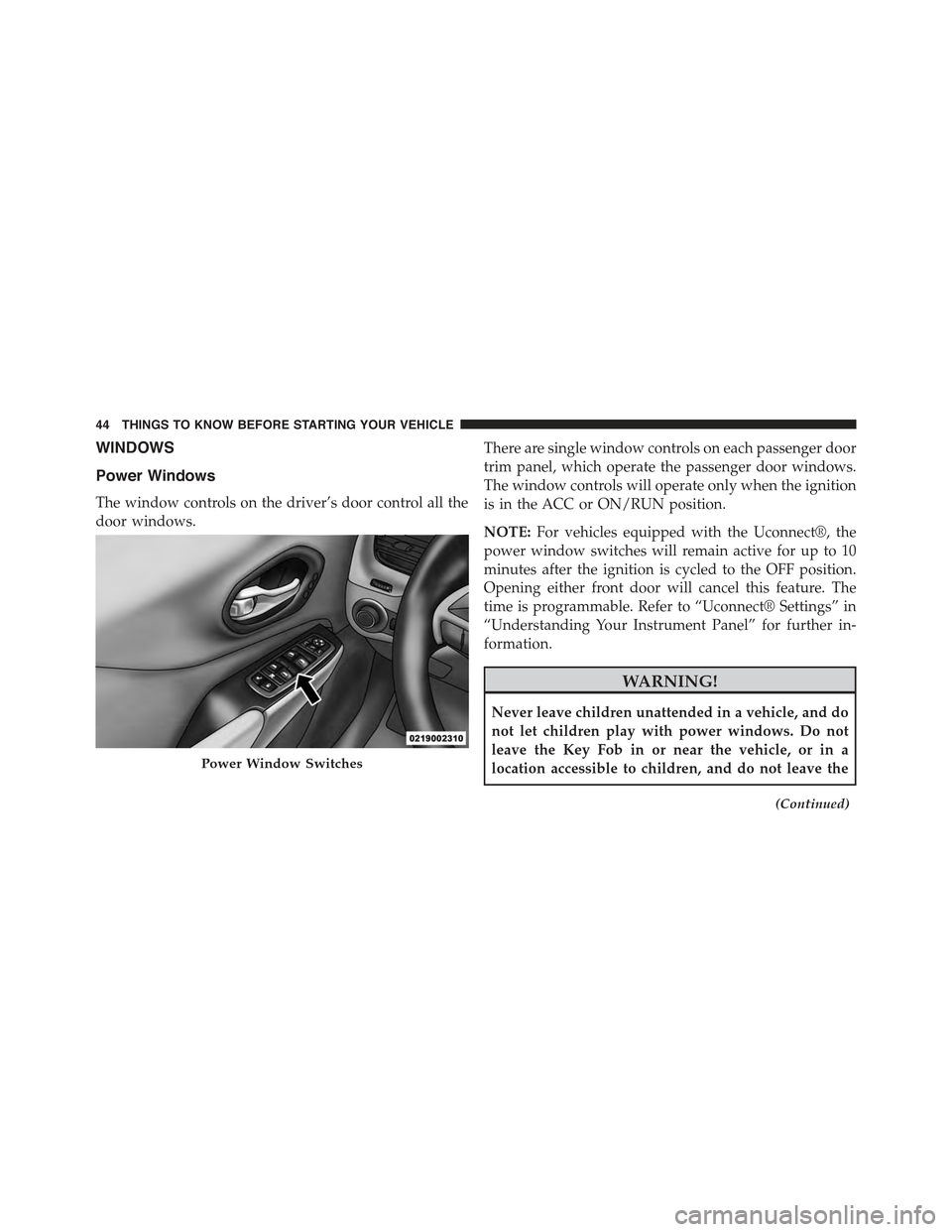
The window controls on the driver’s door control all the
door windows.
There are single window controls on each passenger door
trim panel, which operate the passenger door windows.
The window controls will operate only when the ignition
is in the ACC or ON/RUN position.
NOTE:For vehicles equipped with the Uconnect®, the
power window switches will remain active for up to 10
minutes after the ignition is cycled to the OFF position.
Opening either front door will cancel this feature. The
time is programmable. Refer to “Uconnect® Settings” in
“Understanding Your Instrument Panel” for further in-
formation.
WARNING!
Never leave children unattended in a vehicle, and do
not let children play with power windows. Do not
leave the Key Fob in or near the vehicle, or in a
location accessible to children, and do not leave the
(Continued)
Power Window Switches
44 THINGS TO KNOW BEFORE STARTING YOUR VEHICLE
Page 53 of 772
•The power liftgate must be in the full open position for
rear liftgate close button on the left rear trim, near the
liftgate opening to operate. If the liftgate is not fully
open, push the Liftgate button on the Key Fob to fully
open the liftgate, and then push it again to close.
•If the electronic liftgate release is pushed while the
power liftgate is closing, the liftgate will reverse to the
full open position.
•If the electronic liftgate release is pushed while the
power liftgate is opening, the liftgate motor will dis-
engage to allow manual operation.
•If the power liftgate encounters multiple obstructions
within the same cycle, the system will automatically
stop and the liftgate must be opened or closed manu-
ally.
•If your liftgate is power closing and you put the
vehicle in gear, the liftgate will continue to power
close. However, vehicle movement may result in a
detection of an obstruction.
WARNING!
•Driving with the liftgate open can allow poisonous
exhaust gases into your vehicle. You and your
passengers could be injured by these fumes. Keep
the liftgate closed when you are operating the
vehicle.
•If you are required to drive with the liftgate open,
make sure that all windows are closed, and the
climate control blower switch is set at high speed.
Do not use the recirculation mode.
2
THINGS TO KNOW BEFORE STARTING YOUR VEHICLE 51
Page 137 of 772
WARNING!(Continued)
•Modifications to any part of the 9-1-1 Call system
could cause the air bag system to fail when you
need it. You could be injured if the air bag system
is not there to help protect you.
9-1-1 Call System Limitations
Vehicles sold in Canada and MexicoDO NOThave 9-1-1
Call system capabilities.
9-1-1 or other emergency line operators in Canada and
Mexico may not answer or respond to 9-1-1 system calls.
If the 9-1-1 Call system detects a malfunction, any of the
following may occur at the time the malfunction is
detected, and at the beginning of each ignition cycle:
•The Rearview Mirror light located between the Assist
and 9-1-1 buttons will continuously be illuminated
red.
•The Phone Screen will display the following message
“Vehicle phone requires service. Please contact your
dealer.”
•An In-Vehicle Audio message will state “Vehicle phone
requires service. Please contact your dealer.”
WARNING!
•Ignoring the Rearview Mirror light could mean you
will not have 9-1-1 Call services. If the Rearview
Mirror light is illuminated, have an authorized
dealer service the 9-1-1 Call system immediately.
•The Occupant Restraint Control module turns on
the air bag Warning Light on the instrument panel
if a malfunction in any part of the system is
detected. If the air bag Warning Light is illumi-
nated, have an authorized dealer service the ORC
system immediately.
3
UNDERSTANDING THE FEATURES OF YOUR VEHICLE 135