change time JEEP COMPASS 2015 1.G Owners Manual
[x] Cancel search | Manufacturer: JEEP, Model Year: 2015, Model line: COMPASS, Model: JEEP COMPASS 2015 1.GPages: 560, PDF Size: 11.51 MB
Page 20 of 560
starting your vehicle. The remaining keys must then be
reprogrammed. All vehicle keys must be taken to an
authorized dealer at the time of service to be repro-
grammed.
General Information
The Sentry Key® system complies with FCC rules part 15
and with RSS-210 of Industry Canada. Operation is
subject to the following conditions:
•This device may not cause harmful interference.
•This device must accept any interference that may be
received, including interference that may cause unde-
sired operation.
NOTE:Changes or modifications not expressly approved
by the party responsible for compliance could void the
user’s authority to operate the equipment.
VEHICLE SECURITY ALARM — IF EQUIPPED
This Vehicle Security Alarm monitors the doors, liftgate,
and ignition switch for unauthorized operation.
When the alarm is activated, the interior switches for
door locks are disabled. The Vehicle Security Alarm
provides both audio and visual signals, the horn will
sound, the headlights, park lamps and/or turn signals
will flash repeatedly for three minutes. If the disturbance
is still present (driver’s door, passenger door, other doors,
ignition) after three minutes, the parking lights and tail
lights will flash for an additional 15 minutes.
To Arm The System
1. Remove the key from the ignition switch and get out
of the vehicle.
2. Lock the door using either the power door LOCK
switch or the Remote Keyless Entry (RKE) transmitter
and close all doors.
18 THINGS TO KNOW BEFORE STARTING YOUR VEHICLE
Page 23 of 560
To Unlock The Doors And Liftgate
Push and release the UNLOCK button on the RKE
transmitter once to unlock the driver ’s door, or twice
within five seconds to unlock all doors and liftgate. The
turn signal lights will flash to acknowledge the unlock
signal. The illuminated entry system will also turn on.
Remote Key Unlock, Driver Door/All First Press
This feature lets you program the system to unlock either
the driver ’s door or all doors on the first push of the
UNLOCK button on the RKE transmitter. To change the
current setting, proceed as follows:
•For vehicles equipped with the Electronic Vehicle
Information Center (EVIC), refer to “Electronic Vehicle
Information Center (EVIC)/Personal Settings
(Customer-Programmable Features)” in “Understand-
ing Your Instrument Panel” for further information.
•For vehicles not equipped with the EVIC, perform the
following steps:
1. Push and hold the LOCK button on a programmed
RKE transmitter for at least 4 seconds, but no longer
than 10 seconds. Then, push and hold the UNLOCK
button while still holding the LOCK button.
2. Release both buttons at the same time.
3. Test the feature while outside of the vehicle by push-
ing the LOCK/UNLOCK buttons on the RKE trans-
mitter with the ignition switch in the LOCK position
and the key removed.
4. Repeat these steps if you want to return this feature to
its previous setting.
2
THINGS TO KNOW BEFORE STARTING YOUR VEHICLE 21
Page 24 of 560
NOTE:Pushing the LOCK button on the RKE transmitter
while you are inside the vehicle will activate the Vehicle
Security Alarm. Opening a door with the Vehicle Security
Alarm activated will cause the alarm to sound. Push the
UNLOCK button to deactivate the Vehicle Security
Alarm.
Illuminated Approach — If Equipped
This feature activates the headlights for up to 90 seconds
when the doors are unlocked with the RKE transmitter.
The time for this feature is programmable on vehicles
equipped with the EVIC. Refer to “Electronic Vehicle
Information Center (EVIC)/Personal Settings (Customer-
Programmable Features)” in “Understanding Your In-
strument Panel” for further information.
NOTE:None of the courtesy lights will operate if the
dimmer control is in the “defeat” position (extreme
downward position), unless the overhead map/reading
lights are turned on manually.
To Lock The Doors And Liftgate
Push and release the LOCK button on the RKE transmit-
ter to lock all doors and liftgate. The turn signal lights
will flash and the horn will chirp to acknowledge the
signal.
Sound Horn With Remote Key Lock
This feature will cause the horn to chirp when the doors
are locked with the RKE transmitter. This feature can be
turned on or turned off. To change the current setting,
proceed as follows:
•For vehicles equipped with the EVIC, refer to “Elec-
tronic Vehicle Information Center (EVIC)/Personal
Settings (Customer-Programmable Features)” in “Un-
derstanding Your Instrument Panel” for further infor-
mation.
22 THINGS TO KNOW BEFORE STARTING YOUR VEHICLE
Page 25 of 560
•For vehicles not equipped with the EVIC, perform the
following steps:
1. Push the LOCK button on a programmed RKE trans-
mitter for at least 4 seconds, but no longer than
10 seconds. Then, push the PANIC button while still
holding the LOCK button.
2. Release both buttons at the same time.
3. Test the feature while outside of the vehicle by push-
ing the LOCK button on the RKE transmitter with the
ignition switch in the LOCK position and the key
removed.
4. Repeat these steps if you want to return this feature to
its previous setting.
NOTE:Pushing the LOCK button on the RKE transmitter
while you are in the vehicle will activate the Vehicle
Security Alarm. Opening a door with the Vehicle Security
Alarm activated will cause the alarm to sound. Push the
UNLOCK button to deactivate the Vehicle Security
Alarm.
Flash Lights With Remote Key Lock/Unlock
This feature will cause the turn signal lights to flash when
the doors are locked or unlocked with the RKE transmit-
ter. This feature can be turned on or turned off. To change
the current setting, proceed as follows:
•For vehicles equipped with the EVIC, refer to “Elec-
tronic Vehicle Information Center (EVIC)/Personal
Settings (Customer-Programmable Features)” in “Un-
derstanding Your Instrument Panel” for further infor-
mation.
2
THINGS TO KNOW BEFORE STARTING YOUR VEHICLE 23
Page 101 of 560
Exhaust Gas
WARNING!
Exhaust gases can injure or kill. They contain carbon
monoxide (CO), which is colorless and odorless.
Breathing it can make you unconscious and can
eventually poison you. To avoid breathing (CO),
follow these safety tips:
•Do not run the engine in a closed garage or in
confined areas any longer than needed to move
your vehicle in or out of the area.
•If you are required to drive with the trunk/liftgate/
rear doors open, make sure that all windows are
closed and the climate control BLOWER switch is set
at high speed. DO NOT use the recirculation mode.
•If it is necessary to sit in a parked vehicle with the
engine running, adjust your heating or cooling
controls to force outside air into the vehicle. Set the
blower at high speed.
The best protection against carbon monoxide entry into
the vehicle body is a properly maintained engine exhaust
system.
Whenever a change is noticed in the sound of the exhaust
system, when exhaust fumes can be detected inside the
vehicle, or when the underside or rear of the vehicle is
damaged, have a competent mechanic inspect the com-
plete exhaust system and adjacent body areas for broken,
damaged, deteriorated, or mispositioned parts. Open
seams or loose connections could permit exhaust fumes
to seep into the passenger compartment. In addition,
inspect the exhaust system each time the vehicle is raised
for lubrication or oil change. Replace as required.
2
THINGS TO KNOW BEFORE STARTING YOUR VEHICLE 99
Page 120 of 560
•A maximum of 2,000 entries per phone will be down-
loaded and updated every time a phone is connected
to the Uconnect® Phone.
•Depending on the maximum number of entries down-
loaded, there may be a short delay before the latest
downloaded names can be used. Until then, if avail-
able, the previously downloaded phonebook is avail-
able for use.
•Only the phonebook of the currently connected mobile
phone is accessible.
•Either the mobile phone’s phonebook or the mobile
phone’s SIM card phonebook is downloaded.
•This downloaded phonebook cannot be edited or
deleted on the Uconnect® Phone. These can only be
edited on the mobile phone. The changes are trans-
ferred and updated to Uconnect® Phone on the next
phone connection.
Edit Uconnect® Phonebook Entries
NOTE:Editing phonebook entries is recommended
when the vehicle is not in motion. Automatic down-
loaded phonebook entries cannot be deleted or edited.
•Push thebutton to begin.
•After the “Ready” prompt and the following beep, say
“Phonebook Edit.”
•You will then be asked for the name of the phonebook
entry that you wish to edit.
•Next, choose the number designation (home, work,
mobile, or other) that you wish to edit.
•When prompted, recite the new phone number for the
phonebook entry that you are editing.
11 8 U N D E R S TA N D I N G T H E F E AT U R E S O F Y O U R V E H I C L E
Page 145 of 560
WARNING!
Any voice commanded system should be used only
in safe driving conditions following all applicable
laws, including laws regarding phone use. Your at-
tention should be focused on safely operating the
vehicle. Failure to do so may result in a collision
causing serious injury or death.
When you push the Voice Commandbutton, you
will hear a beep. The beep is your signal to give a
command.
NOTE:If you do not say a command within a few seconds,
the system will present you with a list of options.
If you would like to interrupt the system while it lists
options, push the Voice Commandbutton, listen
for the beep, and say your command.
Pushing the Voice Commandbutton while the
system is speaking is known as “barging in.” The
system will be interrupted, and after the beep, you can
add or change commands. This will become helpful
once you start to learn the options.
NOTE:At any time, you can say the words “Cancel,”
“Help” or “Main Menu.”
These commands are universal and can be used from any
menu. All other commands can be used depending upon
the active application.
When using this system, you should speak clearly and at
a normal speaking volume.
The system will best recognize your speech if the win-
dows are closed, and the heater/air conditioning blower
is set to low.
3
UNDERSTANDING THE FEATURES OF YOUR VEHICLE 143
Page 153 of 560
Heated Seats — If Equipped
On some models, the front driver and passenger seats
may be equipped with heaters in both the seat cushions
and seatbacks. The controls for the front heated seats are
located on the center instrument panel area.
You can choose from HIGH, LOW or OFF heat settings.
Amber indicator lights in each switch indicate the level of
heat in use. Two indicator lights will illuminate for
HIGH, one for LOW and none for OFF.
Press the switch once to select HIGH-level
heating. Press the switch a second time to select
LOW-level heating. Press the switch a third
time to shut the heating elements OFF.
When the HIGH-level setting is selected, the heater will
provide a boosted heat level during the initial stages of
operation. Then, the heat output will drop to the normal
HI-level. If the HI-level setting is selected, the system will
automatically switch to LOW-level after approximately
30 minutes of continuous operation. At that time, the
display will change from HI to LO, indicating the change.
When the LOW-level heating is selected, the system
automatically turns the heater and the indicator light
OFF after approximately 30 minutes of continuous op-
eration.
NOTE:Once a heat setting is selected, heat will be felt
within two to five minutes.
WARNING!
•Persons who are unable to feel pain to the skin
because of advanced age, chronic illness, diabetes,
spinal cord injury, medication, alcohol use, exhaus-
tion or other physical condition must exercise care
when using the seat heater. It may cause burns
even at low temperatures, especially if used for
long periods of time.
(Continued)
3
UNDERSTANDING THE FEATURES OF YOUR VEHICLE 151
Page 167 of 560
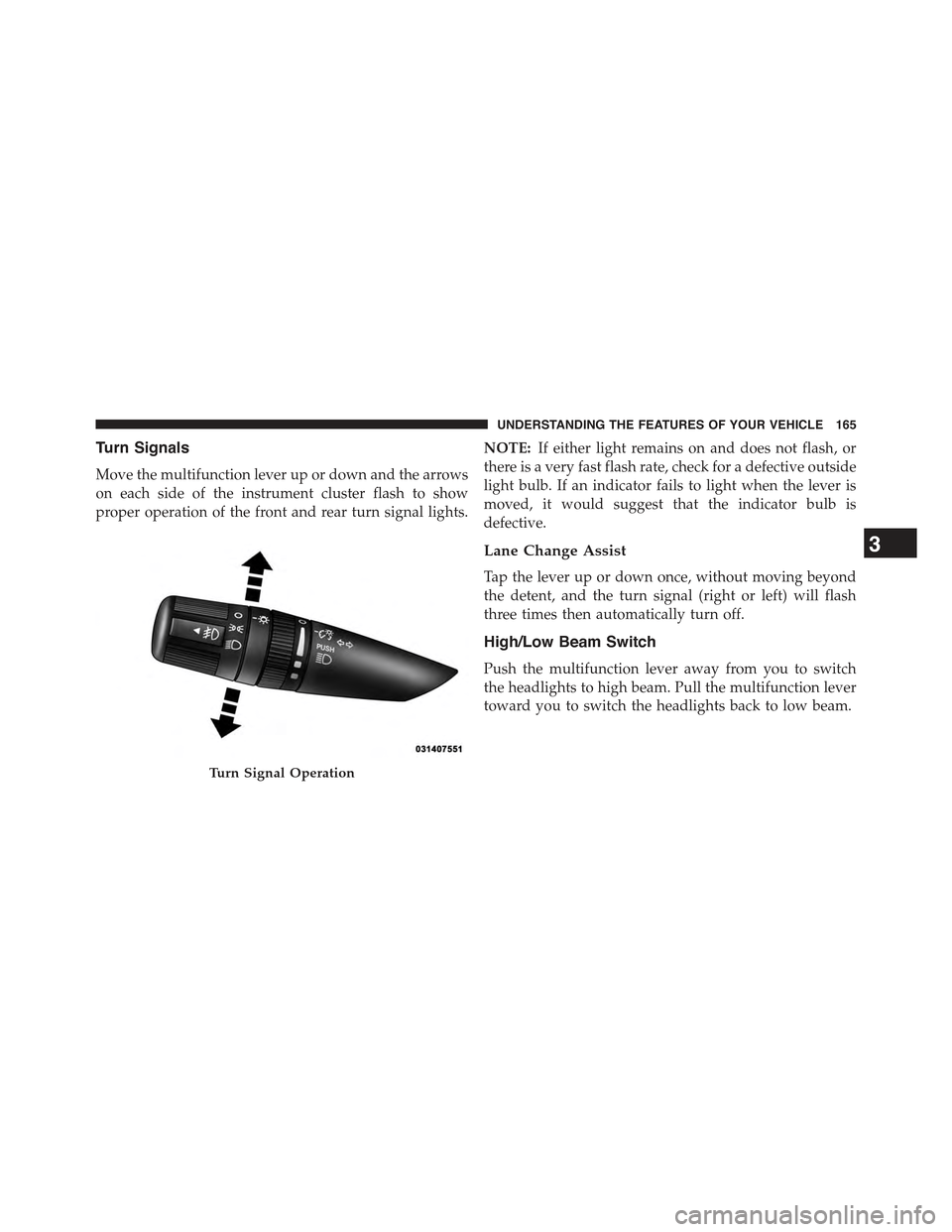
Turn Signals
Move the multifunction lever up or down and the arrows
on each side of the instrument cluster flash to show
proper operation of the front and rear turn signal lights.
NOTE:If either light remains on and does not flash, or
there is a very fast flash rate, check for a defective outside
light bulb. If an indicator fails to light when the lever is
moved, it would suggest that the indicator bulb is
defective.
Lane Change Assist
Tap the lever up or down once, without moving beyond
the detent, and the turn signal (right or left) will flash
three times then automatically turn off.
High/Low Beam Switch
Push the multifunction lever away from you to switch
the headlights to high beam. Pull the multifunction lever
toward you to switch the headlights back to low beam.
Turn Signal Operation
3
UNDERSTANDING THE FEATURES OF YOUR VEHICLE 165
Page 187 of 560
4. Watch for the HomeLink® indicator to change flash
rates. When it changes, it is programmed. It may take
up to 30 seconds or longer in rare cases. The garage
door may open and close while you are programming.
5. Push and hold the programmed HomeLink® button
and observe the indicator light.
•If the indicator light stays on constantly, program-
ming is complete and the garage door/device should
activate when the HomeLink® button is pushed.
•To program the two remaining HomeLink® buttons,
repeat each step for each remaining button. DO NOT
erase the channels.
If you unplugged the garage door opener/device for
programming, plug it back in at this time.
Reprogramming A Single HomeLink® Button
(Canadian/Gate Operator)
To reprogram a channel that has been previously trained,
follow these steps:
1. Cycle the ignition to the ON/RUN position.
2. Push and hold the desired HomeLink® button until
the indicator light begins to flash after 20 seconds.Do
not release the button.
3.Without releasing the buttonproceed with
“Canadian/Gate Operator Programming” step 2 and
follow all remaining steps.
3
UNDERSTANDING THE FEATURES OF YOUR VEHICLE 185