warning JEEP COMPASS 2023 Manual Online
[x] Cancel search | Manufacturer: JEEP, Model Year: 2023, Model line: COMPASS, Model: JEEP COMPASS 2023Pages: 344, PDF Size: 18.8 MB
Page 125 of 344
STARTING AND OPERATING123
Setting The Following Distance In ACC
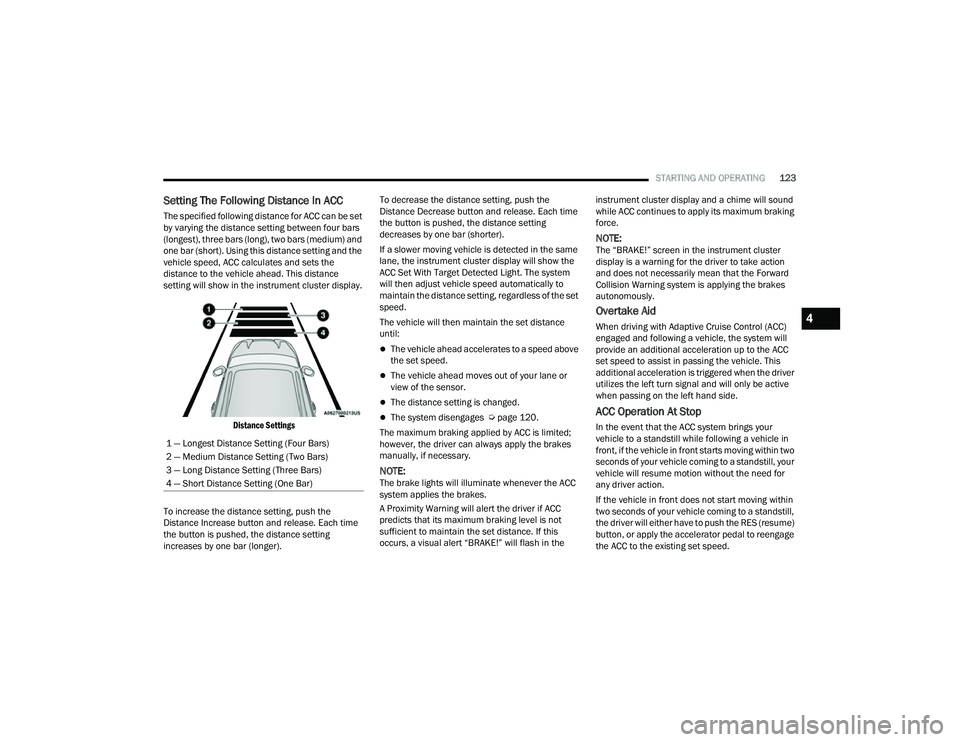
The specified following distance for ACC can be set
by varying the distance setting between four bars
(longest), three bars (long), two bars (medium) and
one bar (short). Using this distance setting and the
vehicle speed, ACC calculates and sets the
distance to the vehicle ahead. This distance
setting will show in the instrument cluster display.
Distance Settings
To increase the distance setting, push the
Distance Increase button and release. Each time
the button is pushed, the distance setting
increases by one bar (longer). To decrease the distance setting, push the
Distance Decrease button and release. Each time
the button is pushed, the distance setting
decreases by one bar (shorter).
If a slower moving vehicle is detected in the same
lane, the instrument cluster display will show the
ACC Set With Target Detected Light. The system
will then adjust vehicle speed automatically to
maintain the distance setting, regardless of the set
speed.
The vehicle will then maintain the set distance
until:
The vehicle ahead accelerates to a speed above
the set speed.
The vehicle ahead moves out of your lane or
view of the sensor.
The distance setting is changed.
The system disengages Ú
page 120.
The maximum braking applied by ACC is limited;
however, the driver can always apply the brakes
manually, if necessary.
NOTE:The brake lights will illuminate whenever the ACC
system applies the brakes.
A Proximity Warning will alert the driver if ACC
predicts that its maximum braking level is not
sufficient to maintain the set distance. If this
occurs, a visual alert “BRAKE!” will flash in the instrument cluster display and a chime will sound
while ACC continues to apply its maximum braking
force.
NOTE:The “BRAKE!” screen in the instrument cluster
display is a warning for the driver to take action
and does not necessarily mean that the Forward
Collision Warning system is applying the brakes
autonomously.
Overtake Aid
When driving with Adaptive Cruise Control (ACC)
engaged and following a vehicle, the system will
provide an additional acceleration up to the ACC
set speed to assist in passing the vehicle. This
additional acceleration is triggered when the driver
utilizes the left turn signal and will only be active
when passing on the left hand side.
ACC Operation At Stop
In the event that the ACC system brings your
vehicle to a standstill while following a vehicle in
front, if the vehicle in front starts moving within two
seconds of your vehicle coming to a standstill, your
vehicle will resume motion without the need for
any driver action.
If the vehicle in front does not start moving within
two seconds of your vehicle coming to a standstill,
the driver will either have to push the RES (resume)
button, or apply the accelerator pedal to reengage
the ACC to the existing set speed.
1 — Longest Distance Setting (Four Bars)
2 — Medium Distance Setting (Two Bars)
3 — Long Distance Setting (Three Bars)
4 — Short Distance Setting (One Bar)
4
22_MP_OM_EN_USC_t.book Page 123
Page 126 of 344
124STARTING AND OPERATING
NOTE:After the ACC system holds your vehicle at a stand -
still for approximately three consecutive minutes,
the parking brake will be activated, and the ACC
system will be cancelled.
While ACC is holding your vehicle at a standstill, if
the driver seat belt is unbuckled or the driver door
is opened, the parking brake will be activated, and
the ACC system will be cancelled.
Display Warnings And Maintenance
“WIPE FRONT RADAR SENSOR IN FRONT OF
VEHICLE” WARNING
The “ACC Unavailable Wipe Front Radar Sensor”
warning will display and a chime will sound when
conditions temporarily limit system performance.
This most often occurs at times of poor visibility,
such as in snow or heavy rain. The ACC system may
also become temporarily blinded due to obstructions, such as mud, dirt or ice. In these
cases, the instrument cluster display will display
the above message and the system will deactivate.
This message can sometimes be displayed while
driving in highly reflective areas (i.e. ice and snow,
or tunnels with reflective tiles). The ACC system will
recover after the vehicle has left these areas.
Under rare conditions, when the radar is not
tracking any vehicles or objects in its path this
warning may temporarily occur.
NOTE:If the “ACC Unavailable Wipe Front Radar Sensor”
warning is active, Fixed Speed Cruise Control is still
available.
If weather conditions are not a factor, the driver
should examine the sensor. It may require cleaning
or removal of an obstruction. The sensor is located
in the center of the vehicle behind the lower grille.
To keep the ACC system operating properly, it is
important to note the following maintenance
items:
Always keep the sensor clean. Carefully wipe the
sensor lens with a soft cloth. Be cautious not to
damage the sensor lens.
Do not remove any screws from the sensor.
Doing so could cause an ACC system malfunc
-
tion or failure and require a sensor realignment.
If the sensor or front end of the vehicle is
damaged due to a collision, see an authorized
dealer for service.
Do not attach or install any accessories near the
sensor, including transparent material or after -
market grilles. Doing so could cause an ACC
system failure or malfunction.
When the condition that deactivated the system is
no longer present, the system will return to the
“Adaptive Cruise Control Off” state and will resume
function by simply reactivating it.
NOTE:
If the “ACC Unavailable Wipe Front Radar
Sensor” message occurs frequently (e.g. more
than once on every trip) without any snow, rain,
mud, or other obstruction, have the radar
sensor realigned at an authorized dealer.
Installing a snow plow, front-end protector, an
aftermarket grille or modifying the grille is not
recommended. Doing so may block the sensor
and inhibit ACC operation.
WARNING!
When the ACC system is resumed, the driver
must ensure that there are no pedestrians,
vehicles or objects in the path of the vehicle.
Failure to follow these warnings can result in a
collision and death or serious personal injury.
22_MP_OM_EN_USC_t.book Page 124
Page 127 of 344
STARTING AND OPERATING125
“CLEAN FRONT WINDSHIELD” WARNING
The “ACC Limited Functionality Clean Front
Windshield” warning will display and a chime will
sound when conditions temporarily limit system
performance. This most often occurs at times of
poor visibility, such as in snow or heavy rain and
fog. The ACC system may also become temporarily
blinded due to obstructions, such as mud, dirt, or
ice on windshield and fog on the inside of glass. In
these cases, the instrument cluster display will
read “ACC Limited Functionality Clean Front
Windshield” and the system will have degraded
performance.
This message can sometimes be displayed while
driving in adverse weather conditions. The ACC
system will recover after the vehicle has left these
areas. Under rare conditions, when the camera is
not tracking any vehicles or objects in its path this
warning may temporarily occur.
If weather conditions are not a factor, the driver
should examine the windshield and the camera
located on the back side of the inside rearview
mirror. They may require cleaning or removal of an
obstruction. When the condition that created limited
functionality is no longer present, the system will
return to full functionality.
NOTE:If the “ACC Limited Functionality Clean Front Wind
-
shield” message occurs frequently (e.g. more than
once on every trip) without any snow, rain, mud, or
other obstruction, have the windshield and forward
facing camera inspected at an authorized dealer.
SERVICE ACC WARNING
If the system turns off, and the instrument cluster
display reads “ACC Unavailable Service Required”
or “Cruise Unavailable Service Required”, there
may be an internal system fault or a temporary
malfunction that limits ACC functionality. Although
the vehicle is still drivable under normal
conditions, ACC will be temporarily unavailable. If
this occurs, try activating ACC again later, following
an ignition cycle. If the problem persists, see an
authorized dealer.
Precautions While Driving With ACC
In certain driving situations, ACC may have
detection issues. In these cases, ACC may brake
late or unexpectedly. The driver needs to stay alert
and may need to intervene. The following are
examples of these types of situations:
TOWING A TRAILER
Towing a trailer is not recommended when
using ACC.
OFFSET DRIVING
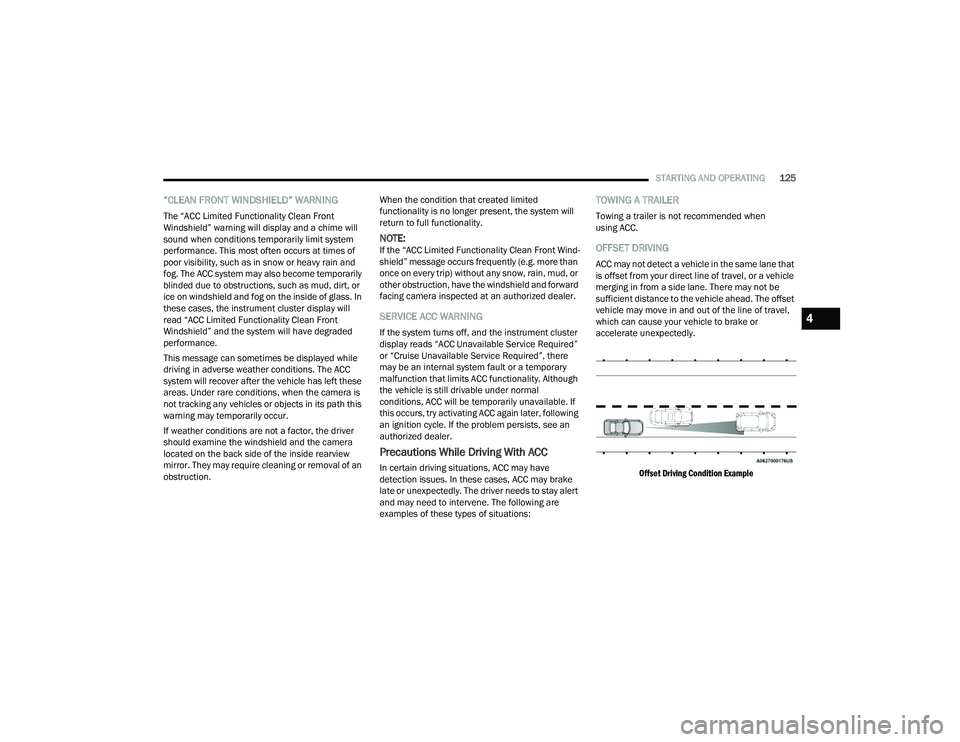
ACC may not detect a vehicle in the same lane that
is offset from your direct line of travel, or a vehicle
merging in from a side lane. There may not be
sufficient distance to the vehicle ahead. The offset
vehicle may move in and out of the line of travel,
which can cause your vehicle to brake or
accelerate unexpectedly.
Offset Driving Condition Example
4
22_MP_OM_EN_USC_t.book Page 125
Page 131 of 344
STARTING AND OPERATING129
(Continued)
HIGHWAY ASSIST SYSTEM — IF EQUIPPED
OPERATION
The Highway Assist system (HAS) is combined with
the Adaptive Cruise Control (ACC) system, and
centers the vehicle in the driving lane while
traveling on controlled access highways at speeds
up to 90 mph (145 km/h).
For ACC system operating instructions and system
limitations, see Ú page 118.
NOTE:
The driver should always obey traffic laws and
speed limits. Never drive above applicable
speed limit restrictions.
The driver can override HAS at any time by
braking, accelerating, or steering the vehicle.
Just like ACC, HAS will maintain a set speed as long
as the set distance between your vehicle and the
vehicle in front is maintained. HAS will also keep
your vehicle centered between the lane lines, and
monitor for other vehicles in adjacent lanes by
utilizing the Blind Spot Monitoring sensors. HAS uses sensors within the steering wheel to
measure driver attentiveness. HAS requires the
driver’s hands on the steering wheel at all times.
The system will generally aim to keep the vehicle
centered in the lane, but when the driver turns the
steering wheel (e.g. to move further away from a
large vehicle in the next lane) the system will
reduce its control and enter "co-steering" mode.
While in co-steering mode, the system will provide
reduced assistance and allow the driver to control
the path of the vehicle. Once the driver stops
providing input to the steering wheel, the system
will require a few seconds to fully resume lane
centering assistance, especially during curves.
WARNING!
The Highway Assist system is a convenience
system. It is not a substitute for active driver
involvement. It is always the driver’s
responsibility to be attentive of road traffic,
weather conditions, vehicle speed, distance to
the vehicle ahead, position in the lane compared
to other vehicles, and brake operation to ensure
safe operation of the vehicle under all road
conditions. Your complete attention is always
required while driving to maintain safe control of
your vehicle. Failure to follow these warnings can
result in a collision and death or serious
personal injury.
You should turn off the Highway Assist system:
When driving in complex driving situations
(e.g. urban environments, construction zones,
etc.), adverse weather (e.g. rain, snow, fog,
sleet, dust), or adverse road conditions
(e.g. heavy traffic, worn or missing lane
markings, etc.).
When entering a highway off ramp, when
driving on roads that are, icy, snow covered, or
slippery.
When circumstances do not allow safe driving
at a constant speed.
WARNING!
4
22_MP_OM_EN_USC_t.book Page 129
Page 133 of 344
STARTING AND OPERATING131
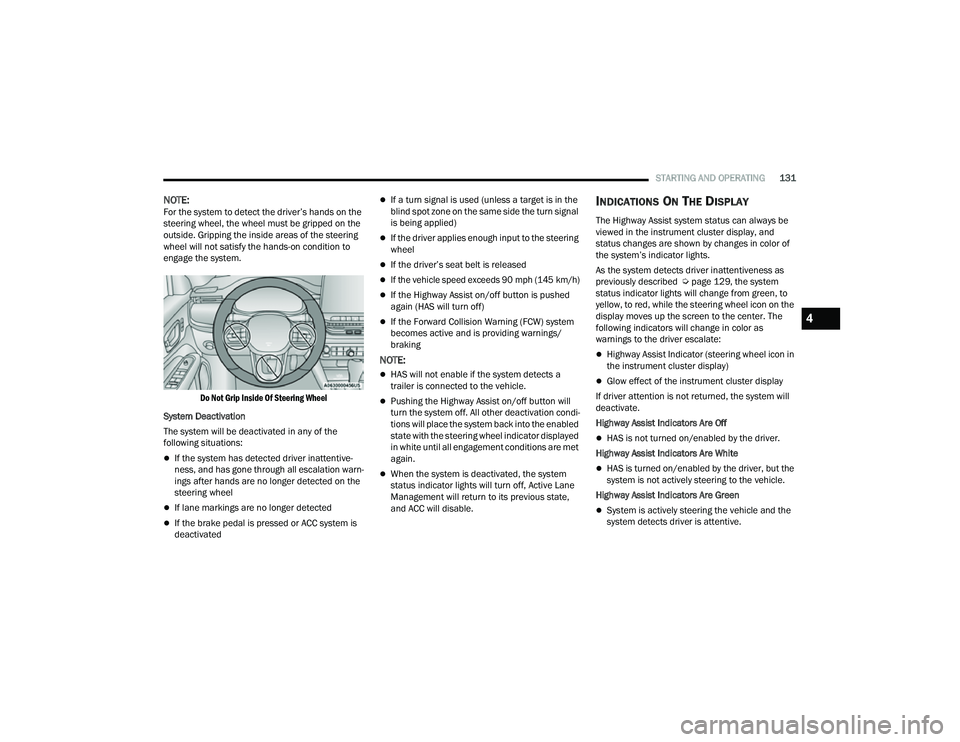
NOTE:For the system to detect the driver’s hands on the
steering wheel, the wheel must be gripped on the
outside. Gripping the inside areas of the steering
wheel will not satisfy the hands-on condition to
engage the system.
Do Not Grip Inside Of Steering Wheel
System Deactivation
The system will be deactivated in any of the
following situations:
If the system has detected driver inattentive -
ness, and has gone through all escalation warn -
ings after hands are no longer detected on the
steering wheel
If lane markings are no longer detected
If the brake pedal is pressed or ACC system is
deactivated
If a turn signal is used (unless a target is in the
blind spot zone on the same side the turn signal
is being applied)
If the driver applies enough input to the steering
wheel
If the driver’s seat belt is released
If the vehicle speed exceeds 90 mph (145 km/h)
If the Highway Assist on/off button is pushed
again (HAS will turn off)
If the Forward Collision Warning (FCW) system
becomes active and is providing warnings/
braking
NOTE:
HAS will not enable if the system detects a
trailer is connected to the vehicle.
Pushing the Highway Assist on/off button will
turn the system off. All other deactivation condi -
tions will place the system back into the enabled
state with the steering wheel indicator displayed
in white until all engagement conditions are met
again.
When the system is deactivated, the system
status indicator lights will turn off, Active Lane
Management will return to its previous state,
and ACC will disable.
INDICATIONS ON THE DISPLAY
The Highway Assist system status can always be
viewed in the instrument cluster display, and
status changes are shown by changes in color of
the system’s indicator lights.
As the system detects driver inattentiveness as
previously described Ú page 129, the system
status indicator lights will change from green, to
yellow, to red, while the steering wheel icon on the
display moves up the screen to the center. The
following indicators will change in color as
warnings to the driver escalate:
Highway Assist Indicator (steering wheel icon in
the instrument cluster display)
Glow effect of the instrument cluster display
If driver attention is not returned, the system will
deactivate.
Highway Assist Indicators Are Off
HAS is not turned on/enabled by the driver.
Highway Assist Indicators Are White
HAS is turned on/enabled by the driver, but the
system is not actively steering to the vehicle.
Highway Assist Indicators Are Green
System is actively steering the vehicle and the
system detects driver is attentive.
4
22_MP_OM_EN_USC_t.book Page 131
Page 134 of 344
132STARTING AND OPERATING
(Continued)
Highway Assist Indicators Are Yellow
Driver inattentiveness has been detected,
warning the driver to place hands on the
steering wheel.
Highway Assist Indicators Are Red
Driver inattentiveness is still being detected,
warning the driver to place hands on the
steering wheel.
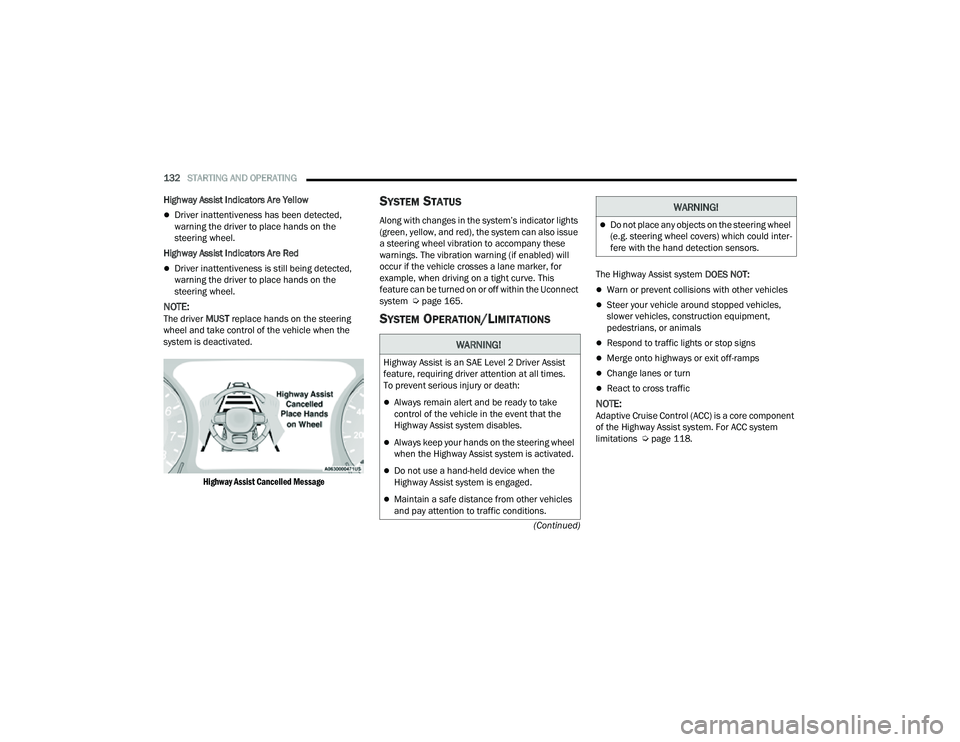
NOTE:The driver MUST replace hands on the steering
wheel and take control of the vehicle when the
system is deactivated.
Highway Assist Cancelled Message
SYSTEM STATUS
Along with changes in the system’s indicator lights
(green, yellow, and red), the system can also issue
a steering wheel vibration to accompany these
warnings. The vibration warning (if enabled) will
occur if the vehicle crosses a lane marker, for
example, when driving on a tight curve. This
feature can be turned on or off within the Uconnect
system Ú page 165.
SYSTEM OPERATION/LIMITATIONS
The Highway Assist system DOES NOT:
Warn or prevent collisions with other vehicles
Steer your vehicle around stopped vehicles,
slower vehicles, construction equipment,
pedestrians, or animals
Respond to traffic lights or stop signs
Merge onto highways or exit off-ramps
Change lanes or turn
React to cross traffic
NOTE:Adaptive Cruise Control (ACC) is a core component
of the Highway Assist system. For ACC system
limitations Úpage 118.
WARNING!
Highway Assist is an SAE Level 2 Driver Assist
feature, requiring driver attention at all times.
To prevent serious injury or death:
Always remain alert and be ready to take
control of the vehicle in the event that the
Highway Assist system disables.
Always keep your hands on the steering wheel
when the Highway Assist system is activated.
Do not use a hand-held device when the
Highway Assist system is engaged.
Maintain a safe distance from other vehicles
and pay attention to traffic conditions.
Do not place any objects on the steering wheel
(e.g. steering wheel covers) which could inter -
fere with the hand detection sensors.
WARNING!
22_MP_OM_EN_USC_t.book Page 132
Page 135 of 344
STARTING AND OPERATING133
The Highway Assist system may have limited or
reduced functionality when one of the following
conditions occur:
The vehicle’s radar sensors and/or forward
facing camera is damaged, covered, misaligned,
or obstructed (e.g. by mud, ice, snow, etc.)
Driving near highway toll booths
NOTE:If damage to the windshield occurs, have the
windshield replaced by an authorized dealer as
soon as possible.
PARKSENSE FRONT/REAR PARK ASSIST
SYSTEM — IF EQUIPPED
The ParkSense Park Assist system provides visual
and audible indications of the distance between
the rear, and if equipped, the front fascia/bumper
and a detected obstacle when backing up or
moving forward (e.g. during a parking maneuver).
NOTE:
The system is provided to assist the driver and
not to substitute the driver.
The driver must stay in full control of the
vehicle's acceleration and braking and is
responsible for controlling the vehicle's move -
ments Ú page 137. ParkSense will retain the last system state
(enabled or disabled) from the last ignition cycle
when the ignition is changed to the ON/RUN
position.
ParkSense is active in DRIVE or REVERSE, as long
as the system is on. The system will remain active
until the vehicle speed is increased to
approximately 7 mph (11 km/h) or above. While in
REVERSE and above the system's operating speed,
a warning will appear in the instrument cluster
display indicating the vehicle speed is too fast. The
system will become active again if the vehicle
speed is decreased to speeds less than
approximately 6 mph (9 km/h).
PARKSENSE SENSORS
The six ParkSense sensors (four when vehicle is
not equipped with front sensors), located in the
rear fascia/bumper, and the six ParkSense
sensors located in the front fascia/bumper,
monitor the area in front and behind the vehicle
that is within the sensors’ field of view. The front
sensors detect obstacles from approximately
12 inches (30 cm) up to 47 inches (120 cm) from
the front fascia/bumper. The rear sensors can
detect obstacles from approximately 12 inches
(30 cm) up to 79 inches (200 cm) from the rear
fascia/bumper. These distances depend on the
location, type and orientation of the obstacle in the
horizontal direction.
PARKSENSE WARNING DISPLAY
The ParkSense Warning screen will only be
displayed if “Sound and Display” is selected from
the Customer - Programmable Features section of
the Uconnect system Ú
page 165.
The ParkSense Warning screen is located within
the instrument cluster display Ú page 77. It
provides visual warnings to indicate the distance
between the rear fascia/bumper and/or front
fascia/bumper and the detected obstacle.
PARKSENSE DISPLAY
The warning display will turn on indicating the
system status when the vehicle is in REVERSE or
when the vehicle is in DRIVE and an obstacle has
been detected.
The system will indicate a detected obstacle by
showing a single arc in the left and/or right front or
rear regions based on the object’s distance and
location relative to the vehicle.
If an object is detected in the left and/or right rear
region, the display will show a single arc in the
left and/or right rear region and the system will
produce a tone. As the vehicle moves closer to the
object, the display will show the single arc moving
closer to the vehicle and the tone will change from
a single 1/2 second tone to slow, to fast, to
continuous.
4
22_MP_OM_EN_USC_t.book Page 133
Page 137 of 344
STARTING AND OPERATING135
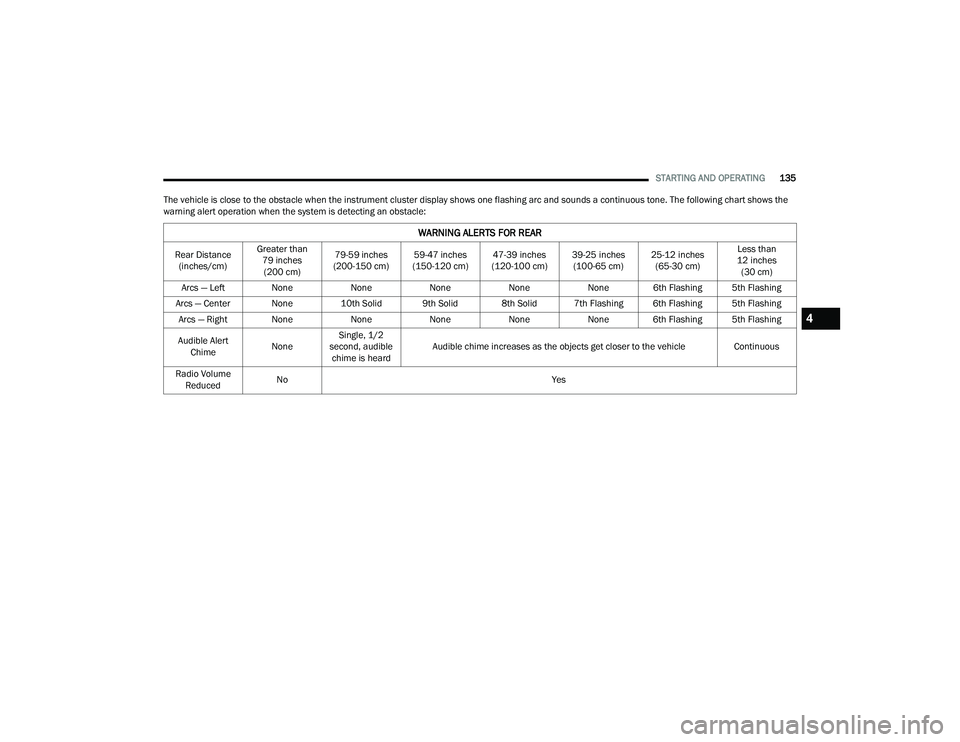
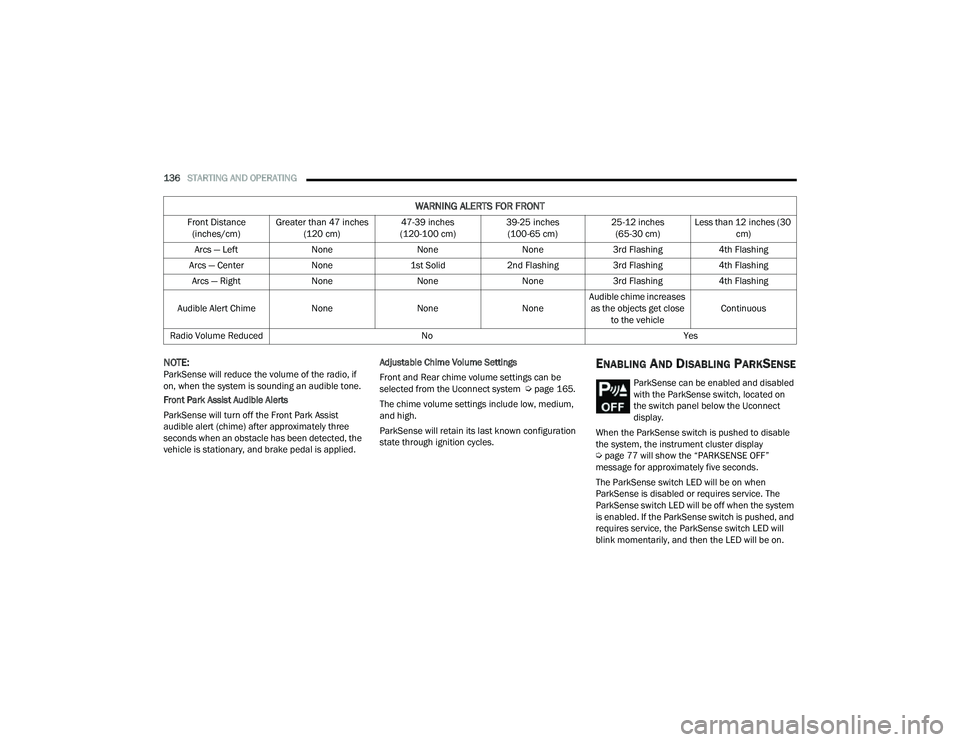
The vehicle is close to the obstacle when the instrument cluster display shows one flashing arc and sounds a continuous tone. The following chart shows the
warning alert operation when the system is detecting an obstacle:
WARNING ALERTS FOR REAR
Rear Distance (inches/cm) Greater than
79 inches (200 cm) 79-59 inches
(200-150 cm) 59-47 inches
(150-120 cm) 47-39 inches
(120-100 cm) 39-25 inches
(100-65 cm) 25-12 inches
(65-30 cm) Less than
12 inches (30 cm)
Arcs — Left None NoneNoneNoneNone 6th Flashing 5th Flashing
Arcs — Center None 10th Solid 9th Solid 8th Solid 7th Flashing 6th Flashing 5th Flashing
Arcs — Right None NoneNoneNoneNone 6th Flashing 5th Flashing
Audible Alert Chime NoneSingle, 1/2
second, audible chime is heard Audible chime increases as the objects get closer to the vehicle
Continuous
Radio Volume Reduced No
Yes
4
22_MP_OM_EN_USC_t.book Page 135
Page 138 of 344
136STARTING AND OPERATING
NOTE:ParkSense will reduce the volume of the radio, if
on, when the system is sounding an audible tone.
Front Park Assist Audible Alerts
ParkSense will turn off the Front Park Assist
audible alert (chime) after approximately three
seconds when an obstacle has been detected, the
vehicle is stationary, and brake pedal is applied. Adjustable Chime Volume Settings
Front and Rear chime volume settings can be
selected from the Uconnect system Ú
page 165.
The chime volume settings include low, medium,
and high.
ParkSense will retain its last known configuration
state through ignition cycles.ENABLING AND DISABLING PARKSENSE
ParkSense can be enabled and disabled
with the ParkSense switch, located on
the switch panel below the Uconnect
display.
When the ParkSense switch is pushed to disable
the system, the instrument cluster display
Ú page 77 will show the “PARKSENSE OFF”
message for approximately five seconds.
The ParkSense switch LED will be on when
ParkSense is disabled or requires service. The
ParkSense switch LED will be off when the system
is enabled. If the ParkSense switch is pushed, and
requires service, the ParkSense switch LED will
blink momentarily, and then the LED will be on.
WARNING ALERTS FOR FRONT
Front Distance (inches/cm) Greater than 47 inches
(120 cm) 47-39 inches
(120-100 cm) 39-25 inches
(100-65 cm) 25-12 inches
(65-30 cm) Less than 12 inches (30
cm)
Arcs — Left NoneNoneNone3rd Flashing 4th Flashing
Arcs — Center None1st Solid2nd Flashing 3rd Flashing4th Flashing
Arcs — Right NoneNoneNone3rd Flashing 4th Flashing
Audible Alert Chime NoneNoneNoneAudible chime increases
as the objects get close to the vehicle Continuous
Radio Volume Reduced No Yes
22_MP_OM_EN_USC_t.book Page 136
Page 139 of 344
STARTING AND OPERATING137
(Continued)
SERVICE THE PARKSENSE PARK ASSIST
S
YSTEM
During vehicle start up, when the ParkSense
System has detected a faulted condition, the
instrument cluster will actuate a single chime,
once per ignition cycle, and it will display the
"PARKSENSE UNAVAILABLE SERVICE REQUIRED"
message for five seconds.
If "PARKSENSE UNAVAILABLE WIPE REAR
SENSORS" or "PARKSENSE UNAVAILABLE WIPE
FRONT SENSORS" appears in the instrument
cluster display make sure the outer surface and
the underside of the rear fascia/bumper and/or
front fascia/bumper is clean and clear of snow,
ice, mud, dirt or other obstruction and then cycle
the ignition. If the message continues to appear
see an authorized dealer.
If the "PARKSENSE UNAVAILABLE SERVICE
REQUIRED" message appears in the instrument
cluster display, see an authorized dealer.
CLEANING THE PARKSENSE SYSTEM
Clean the ParkSense sensors with water, car wash
soap and a soft cloth. Do not use rough or hard
cloths. Do not scratch or poke the sensors.
Otherwise, you could damage the sensors.
PARKSENSE SYSTEM USAGE
P
RECAUTIONS
NOTE:
Ensure that the front and rear fascias/bumpers
are free of snow, ice, mud, dirt and debris to
keep the ParkSense system operating properly.
Jackhammers, large trucks, and other vibrations
could affect the performance of ParkSense.
When you turn ParkSense off, the instrument
cluster display will read “PARKSENSE OFF.”
Furthermore, once you turn ParkSense off, it
remains off until you turn it on again, even if you
cycle the ignition.
ParkSense, when on, will reduce the volume of
the radio when it is sounding a tone.
Clean the ParkSense sensors regularly, taking
care not to scratch or damage them. The
sensors must not be covered with ice, snow,
slush, mud, dirt or debris. Failure to do so can
result in the system not working properly. The
ParkSense system might not detect an obstacle
behind or in front of the fascia/bumper, or it
could provide a false indication that an obstacle
is behind or in front of the fascia/bumper.
Use the ParkSense switch to turn the ParkSense
system off if objects such as bicycle carriers,
etc. are attached to the rear fascia/bumper.
Failure to do so can result in the system misin -terpreting a close object as a sensor problem,
causing the “ParkSense Unavailable Service
Required” message to be displayed in the
instrument cluster display.
NOTE:If any objects are attached to the bumper within a
6.5 ft (2 m) field of view, they will interfere and
cause false alerts and possibly blockage.
There may be a delay in the object detection
rate if the object is moving.
The rear sensors are automatically deactivated
when the trailer’s electric plug is inserted in the
vehicle’s tow socket. The front sensors stay
active and can provide acoustic and visual
warnings. The rear sensors are automatically
reactivated when the trailer's cable plug is
removed.
WARNING!
Drivers must be careful when backing up even
when using ParkSense. Always check carefully
behind your vehicle, look behind you, and be
sure to check for pedestrians, animals, other
vehicles, obstructions, and blind spots before
backing up. You are responsible for safety and
must continue to pay attention to your
surroundings. Failure to do so can result in
serious injury or death.
4
22_MP_OM_EN_USC_t.book Page 137