cruise control JEEP GLADIATOR 2023 User Guide
[x] Cancel search | Manufacturer: JEEP, Model Year: 2023, Model line: GLADIATOR, Model: JEEP GLADIATOR 2023Pages: 448, PDF Size: 17.37 MB
Page 177 of 448
STARTING AND OPERATING175
To Accelerate For Passing
While the Cruise Control is set, press the
accelerator to pass as you would normally. When
the pedal is released, the vehicle will return to the
set speed.
USING CRUISE CONTROL ON HILLS
The transmission may downshift on hills to
maintain the vehicle set speed.
The Cruise Control system maintains speed up and
down hills. A slight speed change on moderate hills
is normal. On steep hills, a greater speed loss or
gain may occur so it may be preferable to drive
without Cruise Control.
To Resume Speed
To resume a previously set speed, push the RES
button and release. Resume can be used at any
speed above 20 mph (32 km/h).
To Deactivate
A soft tap on the brake pedal, pushing the CANC
(cancel) button, or normal brake pressure while
slowing the vehicle will deactivate the Cruise
Control without erasing the set speed from
memory.
The following conditions will also deactivate the
Cruise Control without erasing the set speed from
memory:
Vehicle parking brake is applied
Stability event occurs
Gear selector is moved out of DRIVE
Engine overspeed occurs
Clutch pedal is pressed (manual transmission
only)
Vehicle is operating at a low RPM (manual trans -
mission only)
Pushing the on/off button or placing the ignition in
the OFF position, erases the set speed from
memory.
ADAPTIVE CRUISE CONTROL (ACC)
Adaptive Cruise Control (ACC) increases the driving
convenience provided by Cruise Control while
traveling on highways and major roadways.
However, it is not a safety system and not designed
to prevent collisions. The Cruise Control function
performs differently if your vehicle is not equipped
with ACC Ú page 173.
ACC will allow you to keep Cruise Control engaged
in light to moderate traffic conditions without the
constant need to reset your speed. ACC utilizes a
radar sensor and a forward-facing camera
designed to detect a vehicle directly ahead of you
to maintain a set speed.
NOTE:
If the ACC sensor detects a vehicle ahead, ACC
will apply limited braking or accelerate (not to
exceed the original set speed) automatically to
maintain a preset following distance, while
matching the speed of the vehicle ahead.
Any chassis/suspension or tire size modifica -
tions to the vehicle will affect the performance
of the Adaptive Cruise Control and Forward Colli -
sion Warning system.
Fixed Speed Cruise Control (ACC not enabled)
will not detect vehicles directly ahead of you.
Always be aware of the feature selected
Ú page 432.
WARNING!
Cruise Control can be dangerous where the
system cannot maintain a constant speed. Your
vehicle could go too fast for the conditions, and
you could lose control and have an accident. Do
not use Cruise Control in heavy traffic or on
roads that are winding, icy, snow-covered or
slippery.
4
23_JT_OM_EN_USC_t.book Page 175
Page 178 of 448
176STARTING AND OPERATING
(Continued)
Adaptive Cruise Control (ACC) Operation
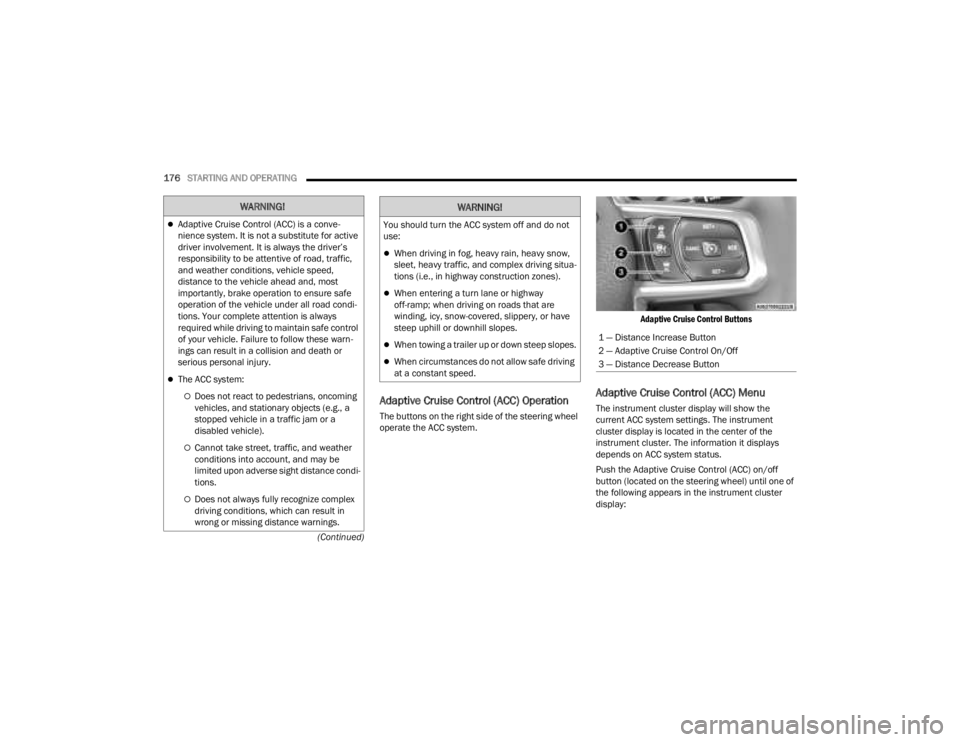
The buttons on the right side of the steering wheel
operate the ACC system.
Adaptive Cruise Control Buttons
Adaptive Cruise Control (ACC) Menu
The instrument cluster display will show the
current ACC system settings. The instrument
cluster display is located in the center of the
instrument cluster. The information it displays
depends on ACC system status.
Push the Adaptive Cruise Control (ACC) on/off
button (located on the steering wheel) until one of
the following appears in the instrument cluster
display:
WARNING!
Adaptive Cruise Control (ACC) is a conve
-
nience system. It is not a substitute for active
driver involvement. It is always the driver’s
responsibility to be attentive of road, traffic,
and weather conditions, vehicle speed,
distance to the vehicle ahead and, most
importantly, brake operation to ensure safe
operation of the vehicle under all road condi -
tions. Your complete attention is always
required while driving to maintain safe control
of your vehicle. Failure to follow these warn -
ings can result in a collision and death or
serious personal injury.
The ACC system:
Does not react to pedestrians, oncoming
vehicles, and stationary objects (e.g., a
stopped vehicle in a traffic jam or a
disabled vehicle).
Cannot take street, traffic, and weather
conditions into account, and may be
limited upon adverse sight distance condi -
tions.
Does not always fully recognize complex
driving conditions, which can result in
wrong or missing distance warnings.
You should turn the ACC system off and do not
use:
When driving in fog, heavy rain, heavy snow,
sleet, heavy traffic, and complex driving situa -
tions (i.e., in highway construction zones).
When entering a turn lane or highway
off-ramp; when driving on roads that are
winding, icy, snow-covered, slippery, or have
steep uphill or downhill slopes.
When towing a trailer up or down steep slopes.
When circumstances do not allow safe driving
at a constant speed.
WARNING!
1 — Distance Increase Button
2 — Adaptive Cruise Control On/Off
3 — Distance Decrease Button
23_JT_OM_EN_USC_t.book Page 176
Page 179 of 448

STARTING AND OPERATING177
Adaptive Cruise Control Off
When ACC is deactivated, the display will read
“Adaptive Cruise Control Off.”
Adaptive Cruise Control Ready
When ACC is activated, but the vehicle speed
setting has not been selected, the display will read
“Adaptive Cruise Control Ready.”
Adaptive Cruise Control Set
When the SET (+) or the SET (-) button (located on
the steering wheel) is pushed, the display will read
“ACC SET.”
When ACC is set, the set speed will show in the
instrument cluster display.
The ACC screen may display once again if any of
the following ACC activity occurs:
System Cancel
Driver Override
System Off
ACC Proximity Warning
ACC Unavailable Warning
The instrument cluster display will return to the last
display selected after five seconds of no ACC
display activity.
Activating Adaptive Cruise Control (ACC)
The minimum set speed for the ACC system is
20 mph (32 km/h).
When the system is turned on and in the ready
state, the instrument cluster displays “ACC Ready.”
When the system is off, the instrument cluster
displays “Adaptive Cruise Control (ACC) Off.”
NOTE:You cannot engage ACC under the following condi -
tions:
When in 4WD Low
When the brakes are applied
When the parking brake is applied
When the automatic transmission is in PARK,
REVERSE or NEUTRAL
When the manual transmission is in first gear
When the vehicle speed is below 20 mph
(32 km/h) (manual transmission)
When the vehicle speed is below the minimum
speed range
When the brakes are overheated
When the driver’s door is open at low speeds
When the driver’s seat belt is unbuckled at low
speeds
When ESC Full Off mode is active
When Off Road+ (if equipped) is active
To Activate/Deactivate
Push and release the Adaptive Cruise Control
(ACC) on/off button. The ACC menu in the
instrument cluster display will read “ACC Ready.”
To turn the system off, push and release the
Adaptive Cruise Control (ACC) on/off button again.
At this time, the system will turn off and the
instrument cluster display will read “Adaptive
Cruise Control (ACC) Off.”
To Set A Desired Speed
When the vehicle reaches the speed desired, push
the SET (+) button or the SET (-) button and
release. The instrument cluster display will show
the set speed.
NOTE:Fixed Speed Cruise Control can be used without
ACC enabled. To change between the different
modes, push the ACC on/off button which turns
the ACC and the Fixed Speed Cruise Control off.
WARNING!
Leaving the Adaptive Cruise Control (ACC)
system on when not in use is dangerous. You
could accidentally set the system or cause it to
go faster than you want. You could lose control
and have a collision. Always leave the system off
when you are not using it.
4
23_JT_OM_EN_USC_t.book Page 177
Page 180 of 448

178STARTING AND OPERATING
Pushing the Fixed Speed Cruise Control on/off
button will result in turning on (changing to) Fixed
Speed Cruise Control mode.
If ACC is set when the vehicle speed is below
20 mph (32 km/h), the set speed will default to
20 mph (32 km/h).
NOTE:Fixed Speed Cruise Control cannot be set below
20 mph (32 km/h).
If either system is set when the vehicle speed is
above 20 mph (32 km/h), the set speed shall be
the current speed of the vehicle.
NOTE:
Keeping your foot on the accelerator pedal can
cause the vehicle to continue to accelerate
beyond the set speed. If this occurs, the message “DRIVER OVERRIDE” will display in the
instrument cluster display.
If you continue to accelerate beyond the set
speed while ACC is enabled, the system will not
be controlling the distance between your vehicle
and the vehicle ahead. The vehicle speed will
only be determined by the position of the accel-
erator pedal.
To Cancel
The following conditions cancel the ACC or Fixed
Speed Cruise Control systems:
The brake pedal is applied
The CANC (cancel) button is pushed
The Anti-Lock Brake system (ABS) activates
The gear selector is removed from the DRIVE
position
The braking temperature exceeds normal range
(overheated)
The Electronic Stability Control/Traction Control
system (ESC/TCS) activates
The vehicle parking brake is applied
A Trailer Sway Control (TSC) event occurs
The driver switches ESC to Full Off mode
The vehicle speed is less than 15 mph (24 km/h)
(manual transmission only)
The clutch is pressed for more than 10 seconds
(manual transmission only)
The vehicle is placed in NEUTRAL for more than
10 seconds (manual transmission only)
The driver shifts to FIRST gear (manual trans
-
mission only)
Vehicle is operating at a low RPM (manual trans -
mission only)
When Off Road+ (if equipped) is enabled
The following conditions will only cancel the ACC
system:
Driver seat belt is unbuckled at low speeds
Driver door is opened at low speeds
To Turn Off
The system will turn off and clear the set speed in
memory if:
The Adaptive Cruise Control (ACC) on/off button
is pushed
The Fixed Speed Cruise Control on/off button is
pushed
The ignition is placed in the OFF position
4WD Low is engaged
To Resume
If there is a set speed in memory push the RES
(resume) button and then remove your foot from
the accelerator pedal. The instrument cluster
display will display the last set speed.
WARNING!
In Fixed Speed Cruise Control mode (ACC not
enabled), the system will not react to vehicles
ahead. In addition, the proximity warning does
not activate and no alarm will sound even if you
are too close to the vehicle ahead since neither
the presence of the vehicle ahead nor the
vehicle-to-vehicle distance is detected. Be sure
to maintain a safe distance between your vehicle
and the vehicle ahead. Always be aware which
mode is selected.
23_JT_OM_EN_USC_t.book Page 178
Page 181 of 448

STARTING AND OPERATING179
Resume can be used at any speed above 20 mph
(32 km/h) when only Fixed Speed Cruise Control is
being used.
Resume can be used at any speed above 0 mph
(0 km/h) when ACC is active.
NOTE:
While in ACC mode when the vehicle comes to a
complete stop longer than two seconds, the
system will cancel. The driver will have to apply
the brakes to keep the vehicle at a standstill.
ACC cannot be resumed if there is a stationary
vehicle in front of your vehicle in close proximity.
To Vary The Speed Setting
To Increase Or Decrease The Set Speed
After setting a speed, you can increase the set
speed by pushing the SET (+) button, or decrease
speed by pushing the SET (-) button.
U.S. Speed (mph)
Pushing the SET (+) , or SET (-) button once will
result in a 1 mph speed adjustment. Each
subsequent tap of the button results in an
adjustment of 1 mph.
If the button is continually pushed, the set
speed will continue to adjust in 5 mph incre -
ments until the button is released. The new set
speed is reflected in the instrument cluster
display.
Metric Speed (km/h)
Pushing the SET (+) , or SET (-) button once will
result in a 1 km/h speed adjustment. Each
subsequent tap of the button results in an
adjustment of 1 km/h.
If the button is continually pushed, the set
speed will continue to adjust in 10 km/h incre -
ments until the button is released. The new set
speed is reflected in the instrument cluster
display.
NOTE:When you override and push the SET (+) or SET (-)
button, the new set speed will be the current speed
of the vehicle.
When ACC Is Active
When you use the SET (-) button to decelerate, if
the engine’s braking power does not slow the
vehicle sufficiently to reach the set speed, the
brake system will automatically slow the
vehicle.
The ACC system applies the brake down to a full
stop when following a vehicle in front. If your
vehicle follows a vehicle ahead to a standstill,
your vehicle brakes will release two seconds
after coming to a full stop.
The ACC system maintains set speed when
driving uphill and downhill. However, a slight
speed change on moderate hills is normal. In
addition, downshifting may occur while climbing
uphill or descending downhill. This is normal
operation and necessary to maintain set speed.
When driving uphill and downhill, the ACC
system will cancel if the braking temperature
exceeds normal range (overheated).
WARNING!
The Resume function should only be used if
traffic and road conditions permit. Resuming a
set speed that is too high or too low for
prevailing traffic and road conditions could
cause the vehicle to accelerate or decelerate too
sharply for safe operation. Failure to follow these
warnings can result in a collision and death or
serious personal injury.
4
23_JT_OM_EN_USC_t.book Page 179
Page 183 of 448
STARTING AND OPERATING181
brakes will release. A cancel message will display
on the instrument cluster display and produce a
warning chime. Driver intervention will be required
at this moment.
While ACC with Stop is holding your vehicle at a
standstill, if the driver seat belt is unbuckled or the
driver door is opened, the ACC with Stop system
will cancel and the brakes will release. A cancel
message will display on the instrument cluster
display and produce a warning chime. Driver
intervention will be required at this moment.
Display Warnings And Maintenance
“WIPE FRONT RADAR SENSOR IN FRONT OF
VEHICLE” WARNING
The “ACC/FCW Unavailable Wipe Front Radar
Sensor” warning will display and a chime will
sound when conditions temporarily limit system
performance. This most often occurs at times of poor visibility,
such as in snow or heavy rain. The ACC system may
also become temporarily blinded due to
obstructions, such as mud, dirt or ice. In these
cases, the instrument cluster display will display
the above message and the system will deactivate.
This message can sometimes be displayed while
driving in highly reflective areas (i.e. ice and snow,
or tunnels with reflective tiles). The ACC system will
recover after the vehicle has left these areas.
Under rare conditions, when the radar is not
tracking any vehicles or objects in its path this
warning may temporarily occur.
NOTE:If the “ACC/FCW Unavailable Wipe Front Radar
Sensor” warning is active, Fixed Speed Cruise
Control is still available.
If weather conditions are not a factor, the driver
should examine the sensor. It may require cleaning
or removal of an obstruction. The sensor is located
in the center of the vehicle behind the lower grille.
To keep the ACC system operating properly, it is
important to note the following maintenance
items:
Always keep the sensor clean. Carefully wipe the
sensor lens with a soft cloth. Be cautious not to
damage the sensor lens.
Do not remove any screws from the sensor.
Doing so could cause an ACC system malfunc
-
tion or failure and require a sensor realignment.
If the sensor or front end of the vehicle is
damaged due to a collision, see an authorized
dealer for service.
Do not attach or install any accessories near the
sensor, including transparent material or after -
market grilles. Doing so could cause an ACC
system failure or malfunction.
When the condition that deactivated the system is
no longer present, the system will return to the
“Adaptive Cruise Control Off” state and will resume
function by simply reactivating it.
NOTE:If the “ACC/FCW Unavailable Wipe Front Radar
Sensor” message occurs frequently (e.g. more
than once on every trip) without any snow, rain,
mud, or other obstruction, have the radar sensor
realigned at an authorized dealer.
WARNING!
When the ACC system is resumed, the driver
must ensure that there are no pedestrians,
vehicles or objects in the path of the vehicle.
Failure to follow these warnings can result in a
collision and death or serious personal injury.
4
23_JT_OM_EN_USC_t.book Page 181
Page 206 of 448
204STARTING AND OPERATING
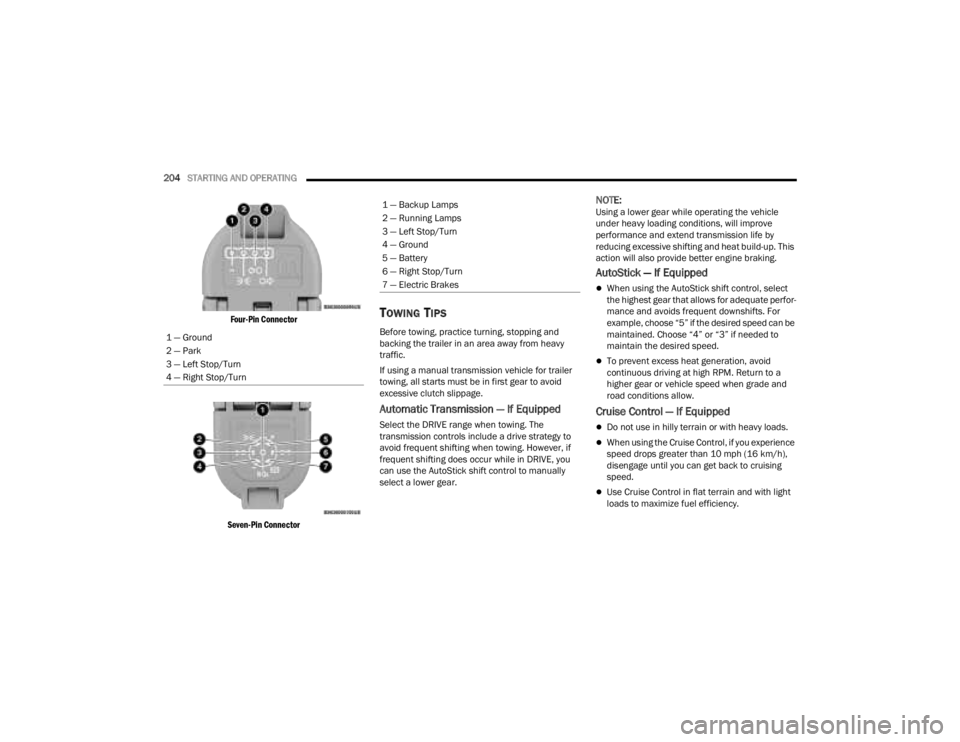
Four-Pin Connector
Seven-Pin Connector
TOWING TIPS
Before towing, practice turning, stopping and
backing the trailer in an area away from heavy
traffic.
If using a manual transmission vehicle for trailer
towing, all starts must be in first gear to avoid
excessive clutch slippage.
Automatic Transmission — If Equipped
Select the DRIVE range when towing. The
transmission controls include a drive strategy to
avoid frequent shifting when towing. However, if
frequent shifting does occur while in DRIVE, you
can use the AutoStick shift control to manually
select a lower gear.
NOTE:Using a lower gear while operating the vehicle
under heavy loading conditions, will improve
performance and extend transmission life by
reducing excessive shifting and heat build-up. This
action will also provide better engine braking.
AutoStick — If Equipped
When using the AutoStick shift control, select
the highest gear that allows for adequate perfor -
mance and avoids frequent downshifts. For
example, choose “5” if the desired speed can be
maintained. Choose “4” or “3” if needed to
maintain the desired speed.
To prevent excess heat generation, avoid
continuous driving at high RPM. Return to a
higher gear or vehicle speed when grade and
road conditions allow.
Cruise Control — If Equipped
Do not use in hilly terrain or with heavy loads.
When using the Cruise Control, if you experience
speed drops greater than 10 mph (16 km/h),
disengage until you can get back to cruising
speed.
Use Cruise Control in flat terrain and with light
loads to maximize fuel efficiency.
1 — Ground
2 — Park
3 — Left Stop/Turn
4 — Right Stop/Turn
1 — Backup Lamps
2 — Running Lamps
3 — Left Stop/Turn
4 — Ground
5 — Battery
6 — Right Stop/Turn
7 — Electric Brakes
23_JT_OM_EN_USC_t.book Page 204
Page 392 of 448

390SERVICING AND MAINTENANCE
F74 ––Spare*
F75 ––Spare*
F76 –20 Amp Yellow ECM (GAS)/PCM (DSL)
F77 –10 Amp Red Heated Mirrors
F78 ––Spare*
F79 –20 Amp Yellow SMART BAR CTRL MOD
F80 –15 Amp Blue Powertrain Control Module (PCM)/Solenoid 1 2 Block Shift
F81 30 Amp Pink –REAR DEFROSTER (EBL)
F82 30 Amp Pink –FUEL HTR*
F83 60 Amp Yellow –GLOW PLUG*
F84 30 Amp Pink –UREA HTR CTRL UNIT*
F85 –10 Amp Red PM SENSOR*
F86 ––Spare*
F87 –10 Amp Red SUPPLY/PURGING PMP*
F88 20 Amp Blue –NOx SENSOR #1/#2*
F89 –10 Amp RedSteering Column Control Module (SCCM)/Cruise Control
(CRUISE CTL)/Digital TV (DTV)/Airbag Disable Lamp
F90 20 Amp Blue –TRAILER TOW PARK LMP*
F91 –20 Amp Yellow Horn
F92 40 Amp Green –HD ACCY #2*
Cavity Cartridge Fuse Micro Fuse Description
* If Equipped
23_JT_OM_EN_USC_t.book Page 390
Page 435 of 448

433
INDEX
A
About Your Brakes......................................... 418Accessory Drive Belt Inspection..................... 372Adaptive Cruise Control (ACC)
(Cruise Control).............................................. 173Adding Engine Coolant (Antifreeze)............... 378Adding Fuel.......................................... 191, 192Additives, Fuel............................................... 419Advance Phone Connectivity......................... 252Air BagAir Bag Operation...................................... 308Air Bag Warning Light............. 132, 306, 309Enhanced Accident Response......... 317, 352Event Data Recorder (EDR)....................... 352Front Air Bag................................... 307, 309If Deployment Occurs................................ 316Knee Impact Bolsters................................ 314Maintaining Your Air Bag System.............. 317Maintenance............................................. 317Redundant Air Bag Warning Light.............307Transporting Pets...................................... 329Air Bag Light........................................ 306, 329Air Cleaner, Engine (Engine Air Cleaner
Filter)............................................................. 366Air Conditioner Maintenance......................... 372Air Conditioner Refrigerant.................. 372, 373
Air Conditioner System................................. 372Air Conditioning Filter..............................68, 373Air Conditioning System................................... 67Air Conditioning, Operating Tips....................... 67Air Filter........................................................ 366Air PressureTires......................................................... 402AlarmArm The System.......................................... 23Disarm The System..................................... 23Security Alarm............................................. 23Alterations/ModificationsVehicle......................................................... 11Android Auto........................................ 254, 255Android Auto™
S
........................................ 254Antifreeze (Engine Coolant)................. 377, 423Disposal................................................... 378Anti-Lock Brake System (ABS)............. 135, 279Apple CarPlay....................................... 254, 257Apple CarPlay®
S
...................................... 256Assist, Hill Start............................................. 283Audio Settings............................................... 240Audio Systems (Radio).................................. 214Auto Down Power Windows............................. 81Automatic Dimming Mirror............................... 51Automatic Door Locks...................................... 27
Automatic Headlights.......................................58Automatic High Beams.....................................58Automatic Temperature Control (ATC)..............67Automatic Transmission................................ 157Adding Fluid.............................................. 382Autostick................................................... 160Fluid And Filter Change............................. 382Fluid Change............................................. 382Fluid Level Check............................. 381, 382Fluid Type........................................ 382, 426Gear Ranges............................................. 157Special Additives...................................... 381Automatic Transmission Limp Home Mode... 159AutoPark....................................................... 145AUX..................................................................71Auxiliary Electrical Outlet (Power Outlet)..........77Auxiliary Power Outlet......................................77Auxiliary Switches............................................79Axle Fluid....................................................... 426Axle Lock.............................................. 165, 166
B
Battery.......................................................... 364Charging System Light.............................. 133Keyless Key Fob Replacement....................16Bed Lights........................................................59
11
23_JT_OM_EN_USC_t.book Page 433
Page 436 of 448

434
Belts, Seat
..................................................... 329Blind Spot Monitoring.................................... 287Bluetooth Connecting To A Particular Mobile Phone Or Audio Device After Pairing
................248Body Mechanism Lubrication........................ 374B-Pillar Location............................................. 400Brake Assist System...................................... 280Brake Control System.................................... 280Brake Fluid.......................................... 380, 426Brake System...................................... 380, 418Anti-Lock (ABS).......................................... 418Fluid Check............................................... 380Master Cylinder......................................... 380Parking...................................................... 152Warning Light............................................ 132Brake/Transmission Interlock....................... 157Bulb Replacement............................... 392, 393Bulbs, Light.......................................... 330, 392Bumper End Cap Removal............................. 208
C
Camera, Rear................................................ 189Capacities, Fluid............................................ 423Caps, FillerFuel........................................................... 191Oil (Engine)................................................ 362Radiator (Coolant Pressure)...................... 378Car Washes................................................... 412Carbon Monoxide Warning............................ 331
Carpet Safety Information............................. 414Carpeting...................................................... 415CD................................................................. 242Cellular Phone.............................................. 276Center High Mounted Stop Light................... 395Certification Label......................................... 195Chains, Tire................................................... 408Charge Air Cooler.......................................... 379Chart, Tire Sizing........................................... 397Checking Your Vehicle For Safety................. 328Checks, Safety.............................................. 328Child Restraint.............................................. 318Child RestraintsBooster Seats........................................... 321Child Seat Installation.............................. 327How To Stow An unused ALR Seat Belt.... 325Infant And Child Restraints....................... 320Locating The LATCH Anchorages.............. 324Lower Anchors And Tethers For Children.. 322Older Children And Child Restraints......... 320Seating Positions...................................... 321Clean Air Gasoline......................................... 419CleaningWheels..................................................... 407Climate Control................................................ 61Automatic.................................................... 62Manual........................................................ 64CNG And LP Fuel System Modifications........ 420Cold Weather Operation............................... 146Compact Spare Tire...................................... 406
Connected Services...................................... 258Connected Services FAQ............................... 272Connected Services Features....................... 261Connected Services, Getting Started............ 260Connected Services, Introduction................. 258ConnectorUCI...............................................................71Universal Consumer Interface (UCI).............71Console............................................................69Floor............................................................69Contract, Service........................................... 430Controls........................................................ 234Cooling Pressure Cap (Radiator Cap)............ 378Cooling System............................................. 377Adding Coolant (Antifreeze)...................... 378Coolant Level............................................ 379Cooling Capacity....................................... 423Disposal Of Used Coolant......................... 378Drain, Flush, And Refill............................. 377Inspection........................................ 377, 379Points To Remember................................ 379Pressure Cap............................................ 378Radiator Cap............................................. 378Selection Of Coolant (Antifreeze)......................... 377, 423, 424Corrosion Protection..................................... 411Cruise Control (Speed
Control)............................. 139, 140, 141, 173Customer Assistance.................................... 428Cybersecurity................................................ 214
23_JT_OM_EN_USC_t.book Page 434