power steering JEEP GLADIATOR 2023 User Guide
[x] Cancel search | Manufacturer: JEEP, Model Year: 2023, Model line: GLADIATOR, Model: JEEP GLADIATOR 2023Pages: 448, PDF Size: 17.37 MB
Page 213 of 448

STARTING AND OPERATING211
Hill Climbing
Hill climbing requires good judgment and a good
understanding of your abilities and your vehicle's
limitations. Hills can cause serious problems.
Some are just too steep to climb and should not be
attempted. You should always feel confident with
the vehicle and your abilities. You should always
climb hills straight up and down. Never attempt to
climb a hill on an angle.
BEFORE CLIMBING A STEEP HILL
As you approach a hill, consider its grade or
steepness. Determine if it is too steep. Look to see
what the traction is on the hill side trail. Is the trail
straight up and down? What is on top and the other
side? Are there ruts, rocks, branches or other
obstacles on the path? Can you safely recover the
vehicle if something goes wrong? If everything
looks good and you feel confident, shift the
transmission into a lower gear with 4L engaged,
and proceed with caution, maintaining your
momentum as you climb the hill.
DRIVING UP HILL
Once you have determined your ability to proceed
and have shifted into the appropriate gear, line
your vehicle up for the straightest possible run.
Accelerate with an easy constant throttle and apply
more power as you start up the hill. Do not race
forward into a steep grade; the abrupt change of grade could cause you to lose control. If the front
end begins to bounce, ease off the throttle slightly
to bring all four tires back on the ground. As you
approach the crest of the hill, ease off the throttle
and slowly proceed over the top. If the wheels start
to slip as you approach the crest of a hill, ease off
the accelerator and maintain headway by turning
the steering wheel no more than a quarter turn
quickly back and forth. This will provide a fresh
"bite" into the surface and will usually provide
enough traction to complete the climb. If you do
not make it to the top, place the vehicle in
REVERSE and back straight down the grade using
engine resistance along with the vehicle brakes.
DRIVING DOWNHILL
Before driving down a steep hill, you need to
determine if it is too steep for a safe descent. What
is the surface traction? Is the grade too steep to
maintain a slow, controlled descent? Are there
obstacles? Is it a straight descent? Is there plenty
of distance at the base of the hill to regain control
if the vehicle descends too fast? If you feel
confident in your ability to proceed, then make sure you are in 4L and proceed with caution. Allow
engine braking to control the descent and apply
your brakes, if necessary, but do not allow the tires
to lock.
DRIVING ACROSS AN INCLINE
If at all possible, avoid driving across an incline. If
it is necessary, know your vehicle's abilities. Driving
across an incline places more weight on the
downhill wheels, which increases the possibilities
of a downhill slide or rollover. Make sure the
surface has good traction with firm and stable
soils. If possible, transverse the incline at an angle
heading slightly up or down.WARNING!
Never attempt to climb a hill at an angle or turn
around on a steep grade. Driving across an
incline increases the risk of a rollover, which may
result in severe injury.
WARNING!
Do not descend a steep grade in NEUTRAL. Use
vehicle brakes in conjunction with engine
braking. Descending a grade too fast could
cause you to lose control and be seriously
injured or killed.
WARNING!
Driving across an incline increases the risk of a
rollover, which may result in severe injury.
4
23_JT_OM_EN_USC_t.book Page 211
Page 215 of 448

STARTING AND OPERATING213
CROSSING DITCHES, STREAMS, SHALLOW
RIVERS OR OTHER FLOWING WATER
Flowing water can be extremely dangerous. Never
attempt to cross a fast running stream or river
even in shallow water. Fast moving water can
easily push your vehicle downstream, sweeping it
out of control. Even in very shallow water, a high
current can still wash the dirt out from around your
tires putting you and your vehicle in jeopardy.
There is still a high risk of personal injury and
vehicle damage with slower water currents in
depths greater than the vehicle's running ground
clearance. You should never attempt to cross
flowing water which is deeper than the vehicle's
running ground clearance. Even the slowest
current can push the heaviest vehicle downstream
and out of control if the water is deep enough to
push on the large surface area of the vehicle's
body. Before you proceed, determine the speed of
the current, the water's depth, approach angle,
bottom condition and if there are any obstacles.
Then cross at an angle heading slightly upstream
using the low and slow technique.
After Driving Off-Road
Off-road operation puts more stress on your
vehicle than does most on-road driving. After going
off-road, it is always a good idea to check for
damage. That way you can get any problems taken
care of right away and have your vehicle ready
when you need it.
Completely inspect the underbody of your
vehicle. Check tires, body structure, steering,
suspension, driveline, and exhaust system for
damage.
Inspect the radiator for mud and debris and
clean as required.
Check threaded fasteners for looseness, partic -
ularly on the chassis, drivetrain components,
steering, and suspension. Retighten them, if
required, and torque to the values specified in
the Service Manual.
Check for accumulations of plants or brush.
These things could be a fire hazard. They might
hide damage to fuel lines, brake hoses, axle
pinion seals, and propeller shafts.
After extended operation in mud, sand, water, or
similar dirty conditions, have the radiator, fan,
brake rotors, wheels, brake linings, and axle
yokes inspected and cleaned as soon as
possible.
NOTE:Inspect the clutch vent holes in the manual trans -
mission bell housing for mud and debris and clean
as required.
If you experience unusual vibration after driving
in mud, slush or similar conditions, check the
wheels for impacted material. Impacted mate -
rial can cause a wheel imbalance and freeing
the wheels of it will correct the situation.
CAUTION!
Muddy waters can reduce the cooling system
effectiveness by depositing debris onto the
radiator.
WARNING!
Never drive through fast moving deep water. It
can push your vehicle downstream, sweeping it
out of control. This could put you and your
passengers at risk of injury or drowning.
WARNING!
Abrasive material in any part of the brakes may
cause excessive wear or unpredictable braking.
You might not have full braking power when you
need it to prevent a collision. If you have been
operating your vehicle in dirty conditions, get
your brakes checked and cleaned as necessary.
4
23_JT_OM_EN_USC_t.book Page 213
Page 226 of 448

224MULTIMEDIA
Seats & Comfort/Auto-On Comfort Systems
AUX Switches
When Seats & Comfort/Auto-On Comfort Systems button is pressed on the touchscreen, the system displays the options related to the vehicle’s comfort
systems when remote start has been activated or the vehicle has been started.
NOTE:Depending on the vehicle’s options, feature settings may vary.
Setting Name Description
Auto-On Driver Heated/Ventilated Seat & Heated Steering Wheel With Vehicle
Start This setting will activate the vehicle’s comfort system and heated seats or
heated steering wheel when the vehicle is remote started or ignition is
started. The “Off” setting will not activate the comfort systems. The “Remote
Start” setting will only activate the comfort systems when using Remote Start.
The “All Start” setting will activate the comfort systems whenever the vehicle
is started.
When the AUX button is pressed on the touchscreen, the system displays the options related to the four vehicle AUX switches:
NOTE:Depending on the vehicle’s options, feature settings may vary.
Setting Name
Description
AUX 1-4 This setting will adjust the type and power source for the four vehicle AUX
switches. There are two types: “Latching” and “Momentary”. The power
source for the AUX switches can either be set to run off the “Battery” or from
the “Ignition”. In addition to setting the type and power source, you can set if
the vehicle will recall the previous state at which the AUX switches were set.
The Recalled Last State setting can be set to “On” or “Off”. Last state
conditions are met only if the type is set to Latching and the power source is
set to Ignition.
23_JT_OM_EN_USC_t.book Page 224
Page 256 of 448
254MULTIMEDIA
SIRI® EYES FREE — IF EQUIPPED
When used with your Apple® iPhone® connected
to your vehicle via Bluetooth®, Siri lets you use
your voice to send text messages, select media,
place phone calls and much more. Siri uses your
natural language to understand what you mean
and responds back to confirm your requests. The
system is designed to keep your eyes on the road
and your hands on the wheel by letting Siri help you
perform useful tasks.
To enable Siri, push and hold, then release the
Uconnect Voice Recognition (VR) button on the
steering wheel. After you hear a double beep, you
can ask Siri to play podcasts and music, get
directions, read text messages, and many other
useful requests.
BLUETOOTH® COMMUNICATION LINK
Mobile phones may lose connection to the
Uconnect Phone. When this happens, the
connection can generally be re-established by
restarting the mobile phone. Your mobile phone is
recommended to remain in Bluetooth® ON mode.
POWER-UP
After switching the ignition key from OFF to either
the ON/RUN or ACC position, or after a language
change, you must wait at least 15 seconds prior to
using the system Ú page 432.
ANDROID AUTO™ & APPLE CARPLAY® —
IF EQUIPPED
ANDROID AUTO™
Use this QR code to access your
digital experience.
Android Auto™ is a feature of your
Uconnect system, and your
Android™ 6.0 or higher powered
smartphone with a data plan, that
allows you to project your
smartphone and a number of its apps onto the
touchscreen radio display. Android Auto™ brings
you useful information, and organizes it into simple
cards that appear just when they are needed.
Android Auto™ can be used with speech
technology, the steering wheel controls, the knobs
and buttons on your radio faceplate, and the radio
display’s touchscreen to control many of your
apps. To use Android Auto™, perform the following
procedure:
NOTE:Feature availability depends on your carrier and
mobile phone manufacturer. Some Android Auto™
features may or may not be available in every
region and/or language.
1. Download the Android Auto™ app from the
Google Play store on your Android™-powered
smartphone.
2. Connect your Android™-powered smartphone to one of the media USB ports in your vehicle.
If the Android Auto™ app was not downloaded,
the first time you plug your device in the app
begins to download. Your vehicle should be in
PARK the first time you use the app.
NOTE:Be sure to use the factory-provided USB cable that
came with your phone, as aftermarket cables may
not work.
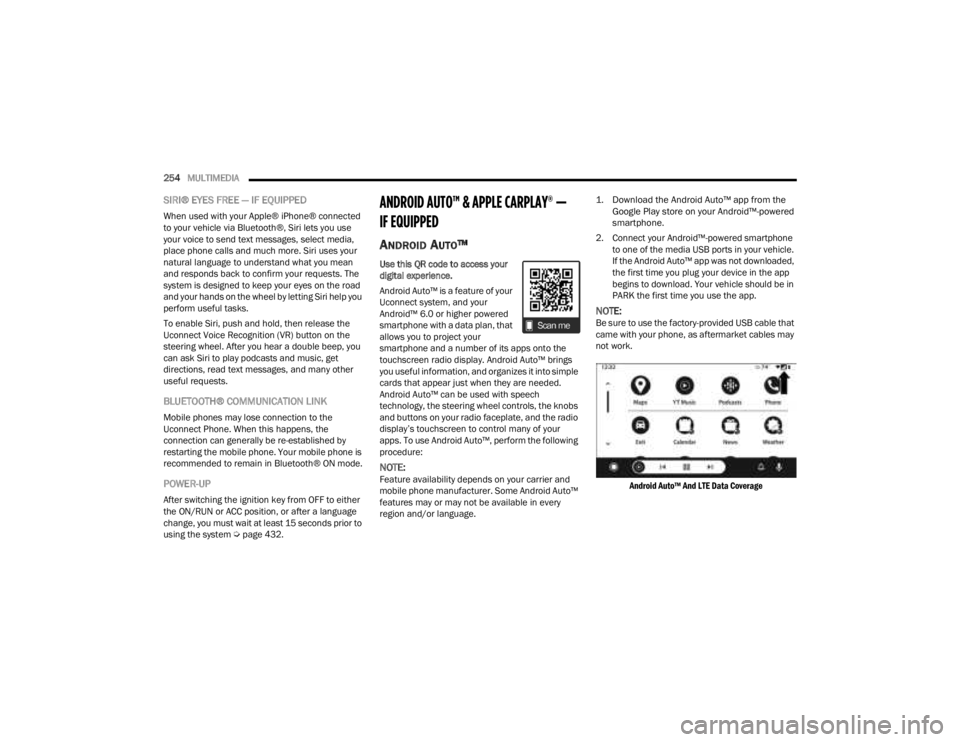
Android Auto™ And LTE Data Coverage
23_JT_OM_EN_USC_t.book Page 254
Page 258 of 448
256MULTIMEDIA
Android Auto™ allows you to use your voice to
interact with its best-in-class speech technology
through your vehicle’s voice recognition system,
and use your smartphone’s data plan to project
your Android™-powered smartphone and a
number of its apps onto your Uconnect
touchscreen. Connect your Android™ 6.0 or higher
to one of the media USB ports, using the
factory-provided USB cable, and press the new
Android Auto™ icon that replaces your Phone icon
on the main menu bar to begin Android Auto™.
Push and hold the VR button on the steering wheel,
or press and hold the Microphone icon within
Android Auto™, to activate its VR, which recognizes
natural voice commands, to use a list of your
smartphone’s features:
Maps
Music
Phone
Text Messages
Additional Apps
NOTE:
To use Android Auto™ on your car display, you’ll
need an Android™ phone running Android™ 6.0
or higher, an active data plan, and the Android
Auto™ app.
To wirelessly use Android Auto™ on your car
display, you need a compatible Android™ smart -
phone with an active data plan. You can check which smartphones are compatible at g.co/
androidauto/requirements.
Android™ is a trademark of Google Inc.
APPLE CARPLAY®
Use this QR code to access your
digital experience.
Uconnect works seamlessly with
Apple CarPlay®, the smarter,
more secure way to use your
iPhone® in the car, and stay
focused on the road. Use your
Uconnect Touchscreen display, the vehicle's knobs
and controls, and your voice with Siri to get access
to Apple Music®, Maps, Messages, and more.
NOTE:Feature availability depends on your carrier and
mobile phone manufacturer. Some Apple
CarPlay® features may or may not be available in
every region and/or language.
To use Apple CarPlay®, make sure you are using
iPhone® 5 or later, have Siri enabled in Settings,
ensure your iPhone® is unlocked for the very first
connection only, and then use the following
procedure:
1. Connect your iPhone® to one of the media USB ports in your vehicle.
NOTE:Be sure to use the factory-provided Lightning cable
that came with your phone, as aftermarket cables
may not work.
2. Once the device is connected and recognized, the Phone icon on the drag & drop menu bar
changes to the Apple CarPlay® Icon.
NOTE:Apple CarPlay® is set to launch immediately. You
can also launch it by pressing the Apple CarPlay®
icon on the touchscreen.
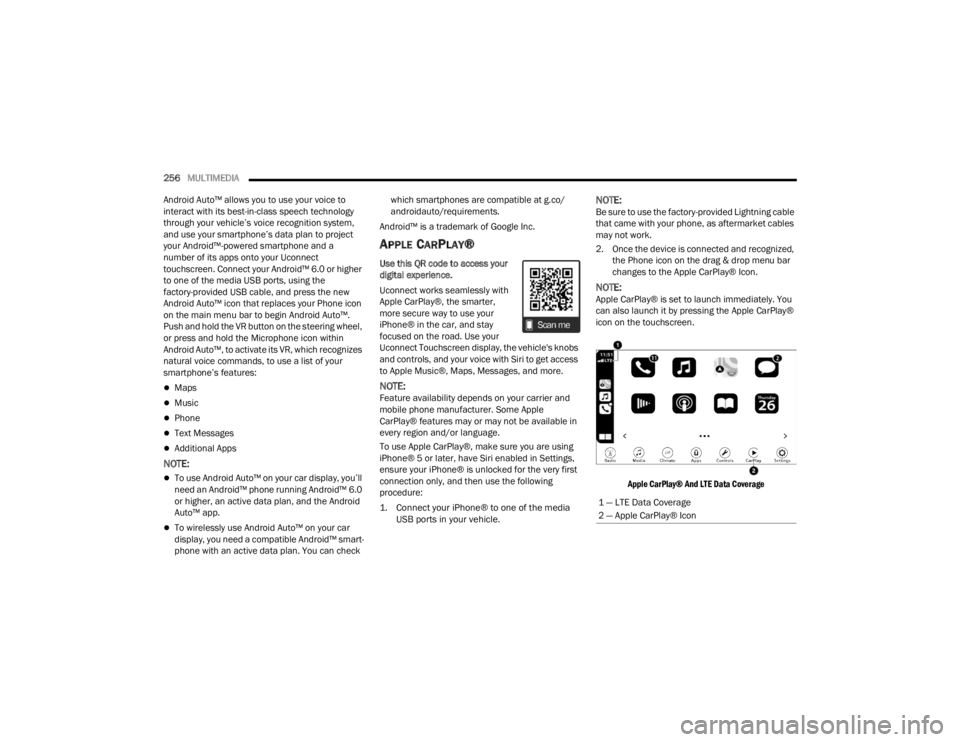
Apple CarPlay® And LTE Data Coverage
1 — LTE Data Coverage
2 — Apple CarPlay® Icon
23_JT_OM_EN_USC_t.book Page 256
Page 283 of 448

SAFETY281
power to lessen the chance that wheel lift will
occur. ERM can only reduce the chance of wheel
lift occurring during severe or evasive driving
maneuvers; it cannot prevent wheel lift due to
other factors, such as road conditions, leaving the
roadway, striking objects or other vehicles.
NOTE:ERM is disabled any time the ESC is in “Full Off”
mode (if equipped). See Ú page 281 for a
complete explanation of the available ESC modes.
Electronic Stability Control (ESC)
The ESC system enhances directional control and
stability of the vehicle under various driving
conditions. ESC corrects for oversteering or
understeering of the vehicle by applying the brake of the appropriate wheel(s) to counteract the
above conditions. Engine power may also be
reduced to help the vehicle maintain the desired
path.
Oversteer — when the vehicle is turning more
than appropriate for the steering wheel position.
Understeer — when the vehicle is turning less
than appropriate for the steering wheel position.
ESC uses sensors in the vehicle to determine the
vehicle path intended by the driver and compares
it to the actual path of the vehicle. When the actual
path does not match the intended path, ESC
applies the brake of the appropriate wheel to
assist in counteracting the oversteer or understeer
condition.
The ESC Activation/Malfunction Indicator Light
located in the instrument cluster will start to flash
as soon as the ESC system becomes active. The
ESC Activation/Malfunction Indicator Light also
flashes when the Traction Control System (TCS) is
active. If the ESC Activation/Malfunction Indicator
Light begins to flash during acceleration, ease up
on the accelerator and apply as little throttle as
possible. Be sure to adapt your speed and driving
to the prevailing road conditions.
WARNING!
Many factors, such as vehicle loading, road
conditions and driving conditions, influence the
chance that wheel lift or rollover may occur. ERM
cannot prevent all wheel lift or rollovers,
especially those that involve leaving the roadway
or striking objects or other vehicles. The
capabilities of an ERM-equipped vehicle must
never be exploited in a reckless or dangerous
manner which could jeopardize the user's safety
or the safety of others.
WARNING!
Electronic Stability Control (ESC) cannot
prevent the natural laws of physics from acting
on the vehicle, nor can it increase the traction
afforded by prevailing road conditions. ESC
cannot prevent accidents, including those
resulting from excessive speed in turns, driving
on very slippery surfaces, or hydroplaning. ESC
also cannot prevent accidents resulting from
loss of vehicle control due to inappropriate
driver input for the conditions. Only a safe,
attentive, and skillful driver can prevent acci -
dents. The capabilities of an ESC equipped
vehicle must never be exploited in a reckless or
dangerous manner which could jeopardize the
user’s safety or the safety of others.
Vehicle modifications, or failure to properly
maintain your vehicle, may change the handling
characteristics of your vehicle, and may nega -
tively affect the performance of the ESC system.
Changes to the steering system, suspension,
braking system, tire type and size or wheel size
may adversely affect ESC performance. Improp -
erly inflated and unevenly worn tires may also
degrade ESC performance. Any vehicle modifi-
cation or poor vehicle maintenance that
reduces the effectiveness of the ESC system
can increase the risk of loss of vehicle control,
vehicle rollover, personal injury and death.
6
23_JT_OM_EN_USC_t.book Page 281
Page 308 of 448
306SAFETY
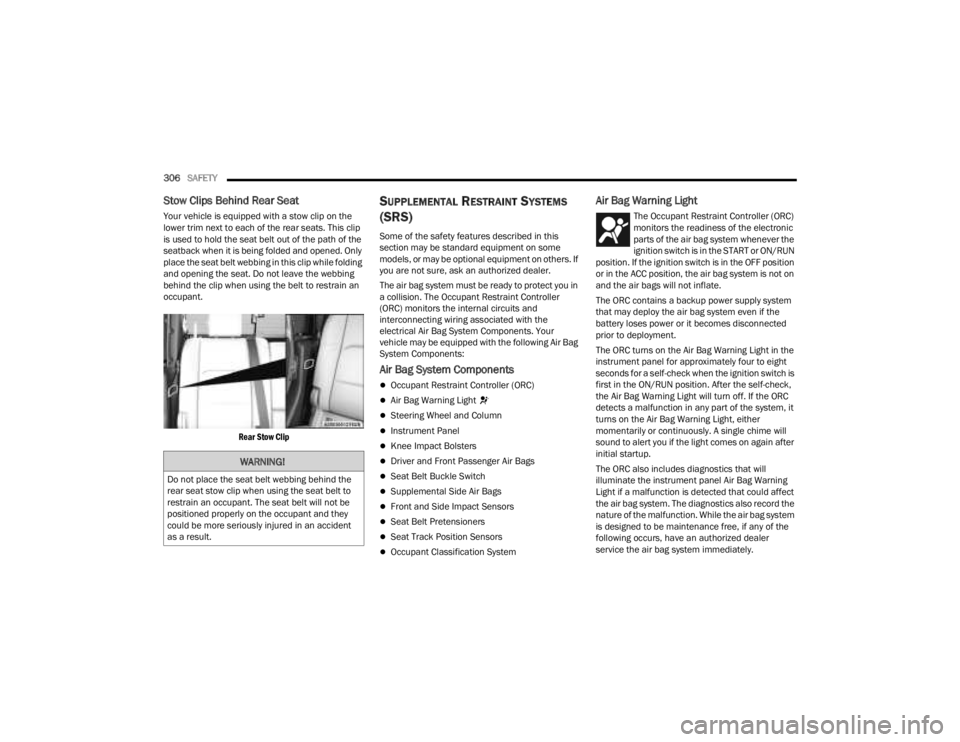
Stow Clips Behind Rear Seat
Your vehicle is equipped with a stow clip on the
lower trim next to each of the rear seats. This clip
is used to hold the seat belt out of the path of the
seatback when it is being folded and opened. Only
place the seat belt webbing in this clip while folding
and opening the seat. Do not leave the webbing
behind the clip when using the belt to restrain an
occupant.
Rear Stow Clip
SUPPLEMENTAL RESTRAINT SYSTEMS
(SRS)
Some of the safety features described in this
section may be standard equipment on some
models, or may be optional equipment on others. If
you are not sure, ask an authorized dealer.
The air bag system must be ready to protect you in
a collision. The Occupant Restraint Controller
(ORC) monitors the internal circuits and
interconnecting wiring associated with the
electrical Air Bag System Components. Your
vehicle may be equipped with the following Air Bag
System Components:
Air Bag System Components
Occupant Restraint Controller (ORC)
Air Bag Warning Light
Steering Wheel and Column
Instrument Panel
Knee Impact Bolsters
Driver and Front Passenger Air Bags
Seat Belt Buckle Switch
Supplemental Side Air Bags
Front and Side Impact Sensors
Seat Belt Pretensioners
Seat Track Position Sensors
Occupant Classification System
Air Bag Warning Light
The Occupant Restraint Controller (ORC)
monitors the readiness of the electronic
parts of the air bag system whenever the
ignition switch is in the START or ON/RUN
position. If the ignition switch is in the OFF position
or in the ACC position, the air bag system is not on
and the air bags will not inflate.
The ORC contains a backup power supply system
that may deploy the air bag system even if the
battery loses power or it becomes disconnected
prior to deployment.
The ORC turns on the Air Bag Warning Light in the
instrument panel for approximately four to eight
seconds for a self-check when the ignition switch is
first in the ON/RUN position. After the self-check,
the Air Bag Warning Light will turn off. If the ORC
detects a malfunction in any part of the system, it
turns on the Air Bag Warning Light, either
momentarily or continuously. A single chime will
sound to alert you if the light comes on again after
initial startup.
The ORC also includes diagnostics that will
illuminate the instrument panel Air Bag Warning
Light if a malfunction is detected that could affect
the air bag system. The diagnostics also record the
nature of the malfunction. While the air bag system
is designed to be maintenance free, if any of the
following occurs, have an authorized dealer
service the air bag system immediately.
WARNING!
Do not place the seat belt webbing behind the
rear seat stow clip when using the seat belt to
restrain an occupant. The seat belt will not be
positioned properly on the occupant and they
could be more seriously injured in an accident
as a result.
23_JT_OM_EN_USC_t.book Page 306
Page 319 of 448
SAFETY317
(Continued)
Enhanced Accident Response System
In the event of an impact, if the communication
network remains intact, and the power remains
intact, depending on the nature of the event, the
Occupant Restraint Controller (ORC) will determine
whether to have the Enhanced Accident Response
System perform the following functions:
Cut off fuel to the engine (if equipped)
Cut off battery power to the electric motor (if
equipped)
Flash hazard lights as long as the battery has
power
Turn on the interior lights, which remain on as
long as the battery has power or for 15 minutes
from the intervention of the Enhanced Accident
Response System
Unlock the power door locks
Your vehicle may also be designed to perform any
of these other functions in response to the
Enhanced Accident Response System:
Turn off the Fuel Filter Heater, Turn off the HVAC
Blower Motor, Close the HVAC Circulation Door
Cut off battery power to the:
Engine
Electric Motor (if equipped)
Electric power steering
Brake booster
Electric park brake
Automatic transmission gear selector
Horn
Front wiper
NOTE:After an accident, remember to cycle the ignition to
the STOP (OFF/LOCK) position and remove the key
from the ignition switch to avoid draining the
battery. Carefully check the vehicle for fuel leaks in
the engine compartment and on the ground near
the engine compartment and fuel tank before
resetting the system and starting the engine. If
there are no fuel leaks or damage to the vehicle
electrical devices (e.g. headlights) after an
accident, reset the system by following the
procedure described below. If you have any doubt,
contact an authorized dealer.
Enhanced Accident Response System
Reset Procedure
In order to reset the Enhanced Accident Response
System functions after an event, the ignition switch
must be changed from ignition START or ON/RUN
to ignition OFF. Carefully check the vehicle for fuel
leaks in the engine compartment and on the
ground near the engine compartment and fuel
tank before resetting the system and starting the engine. After an accident, if the vehicle will not
start after performing the reset procedure, the
vehicle must be towed to an authorized dealer to
be inspected and to have the Enhanced Accident
Response System reset.
Maintaining Your Air Bag System
WARNING!
Modifications to any part of the air bag system
could cause it to fail when you need it. You
could be injured if the air bag system is not
there to protect you. Do not modify the compo
-
nents or wiring, including adding any kind of
badges or stickers to the steering wheel hub
trim cover or the upper passenger side of the
instrument panel. Do not modify the front
fascia/bumper, vehicle body structure, or add
aftermarket side steps or running boards.
It is dangerous to try to repair any part of the
air bag system yourself. Be sure to tell anyone
who works on your vehicle that it has an air
bag system.
6
23_JT_OM_EN_USC_t.book Page 317
Page 355 of 448
353
SERVICING AND MAINTENANCE
SCHEDULED SERVICING — GASOLINE
ENGINE
Your vehicle is equipped with an automatic oil
change indicator system. The oil change indicator
system will remind you that it is time to take your
vehicle in for scheduled maintenance.
Based on engine operation conditions, the oil
change indicator message will illuminate. This
means that service is required for your vehicle.
Operating conditions such as frequent short-trips,
trailer tow, or extremely hot or cold ambient
temperatures will influence when the “Change Oil”
or “Oil Change Required” message is displayed.
Have your vehicle serviced as soon as possible,
within the next 500 miles (805 km).
On vehicles equipped with an instrument cluster
display, “Oil Change Required” will be displayed
and a single chime will sound, indicating that an oil
change is necessary. On vehicles not equipped with an instrument
cluster display, “Change Oil” will flash in the
instrument cluster odometer and a single chime
will sound, indicating that an oil change is
necessary.
An authorized dealer will reset the oil change
indicator message after completing the scheduled
oil change. To reset the system follow the steps
described Ú
page 122.
NOTE:Under no circumstances should oil change
intervals exceed 10,000 miles (16,000 km),
12 months or 350 hours of engine run time,
whichever comes first. The 350 hours of engine
run or idle time is generally only a concern for fleet
customers. Once A Month Or Before A Long Trip:
Check engine oil level.
Check windshield washer fluid level.
Check the tire pressures and look for unusual
wear or damage, rotate at the first sign of irreg
-
ular wear.
Check the fluid levels of the coolant reservoir,
brake master cylinder, and power steering, and
fill as needed.
Check function of all interior and exterior lights.
8
23_JT_OM_EN_USC_t.book Page 353
Page 364 of 448
362SERVICING AND MAINTENANCE
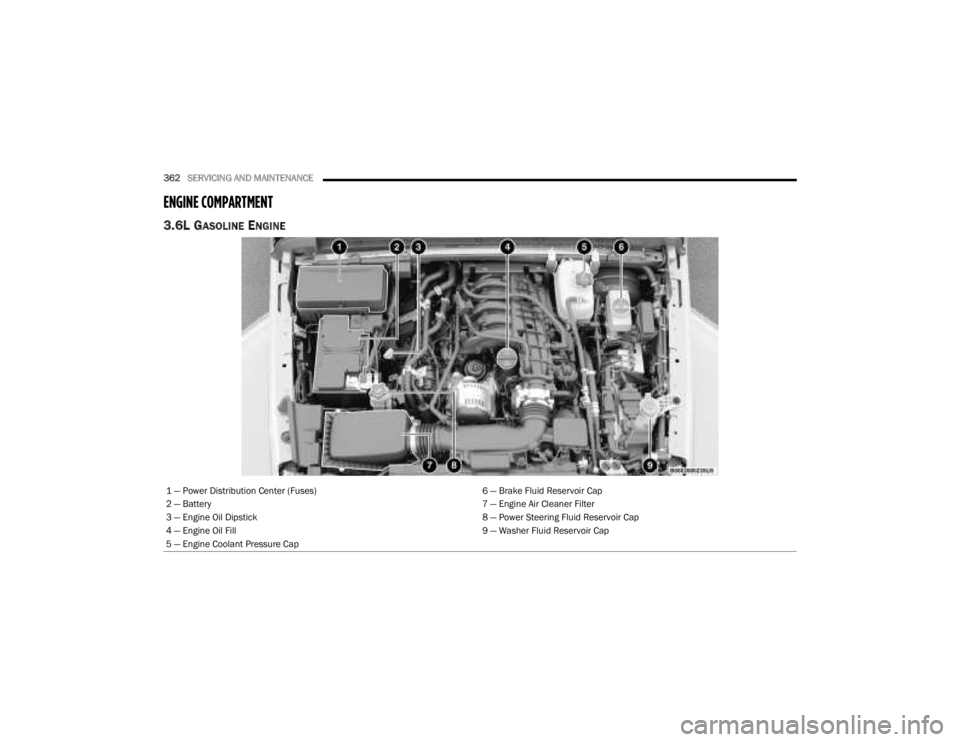
ENGINE COMPARTMENT
3.6L GASOLINE ENGINE
1 — Power Distribution Center (Fuses) 6 — Brake Fluid Reservoir Cap
2 — Battery 7 — Engine Air Cleaner Filter
3 — Engine Oil Dipstick 8 — Power Steering Fluid Reservoir Cap
4 — Engine Oil Fill 9 — Washer Fluid Reservoir Cap
5 — Engine Coolant Pressure Cap
23_JT_OM_EN_USC_t.book Page 362