sunroof JEEP GRAND CHEROKEE 2013 Owner handbook (in English)
[x] Cancel search | Manufacturer: JEEP, Model Year: 2013, Model line: GRAND CHEROKEE, Model: JEEP GRAND CHEROKEE 2013Pages: 408, PDF Size: 3.21 MB
Page 150 of 408
If the buffeting occurs with the sunroof open,
adjust the sunroof opening to minimize the
buffeting or open any window.
Sunroof MaintenanceUse only a non-abrasive cleaner and a soft
cloth to clean the glass panel.
Ignition OFF OperationThe power sunroof switches can be programmed to
remain active for up to approximately ten minutes
after the ignition switch has been turned OFF.
Refer to “Electronic Vehicle Information Center
(EVIC)/Customer-Programmable Features (Sys-
tem Setup)” in “Understanding Your Instrument
Panel” for further information.
NOTE:
Opening either front door will cancel this
feature.
Sunroof Fully ClosedPress the switch forward and release to ensure
that the sunroof is fully closed.
ELECTRICAL POWER
OUTLETS
Your vehicle is equipped with 12 Volt (13 Amp)
power outlets that can be used to power cellular
phones, small electronics and other low pow-
ered electrical accessories. The power outlets
are labeled with either a “key” or a “battery”
symbol to indicate how the outlet is powered.
Power outlets labeled with a “key” are powered
when the ignition switch is in the ON or ACC
position, while the outlets labeled with a “bat-
tery” are connected directly to the battery and
powered at all times.
NOTE:
•All accessories connected to the “bat-
tery” powered outlets should be removed
or turned off when the vehicle is not in
use to protect the battery against dis-
charge.
• To ensure proper operation a MOPAR®
knob and element must be used.
CAUTION!
Power outlets are designed for accessory
plugs only. Do not insert any other object in
the power outlets as this will damage the
outlet and blow the fuse. Improper use of the
power outlet can cause damage not covered
by your New Vehicle Limited Warranty.
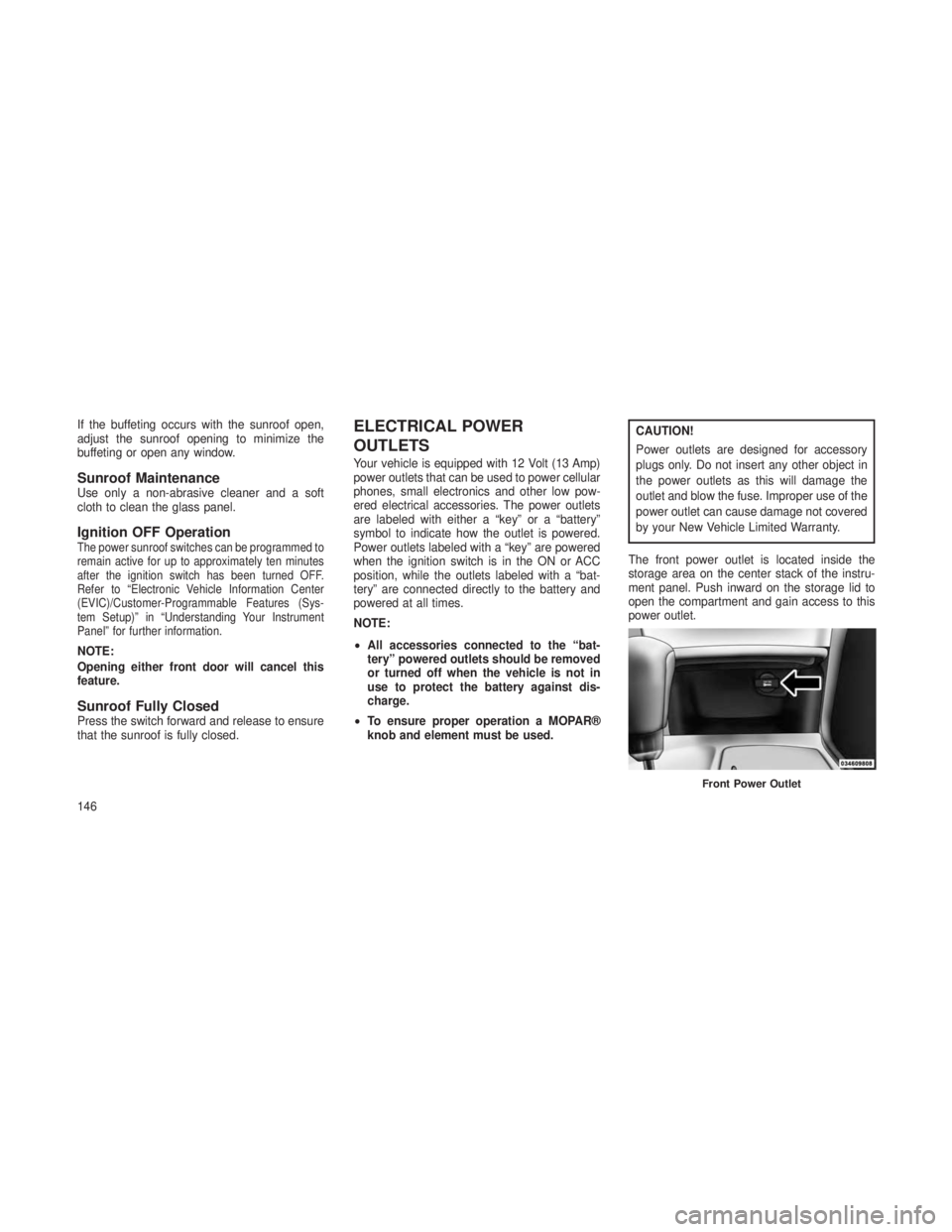
The front power outlet is located inside the
storage area on the center stack of the instru-
ment panel. Push inward on the storage lid to
open the compartment and gain access to this
power outlet.
Front Power Outlet
146
Page 192 of 408

Key-Off Power DelayWhen this feature is selected, the power window
switches, radio, hands-free system (if equipped),
DVD video system (if equipped), power sunroof (if
equipped), and power outlets will remain active
for up to 10 minutes after the ignition switch is
turned OFF. Opening either front vehicle door will
cancel this feature. To make your selection, scroll
up or down until the preferred setting is high-
lighted, then press and release the SELECT
button until a check-mark appears next to the
setting, showing that the setting has been se-
lected.
Illuminated Approach
When this feature is selected, the headlights will
activate and remain on for 0, 30, 60, or 90 sec-
onds when the doors are unlocked with the RKE
transmitter. To make your selection, scroll up or
down until the preferred setting is highlighted,
then press and release the SELECT button until
a check-mark appears next to the setting, show-
ing that the setting has been selected.Hill Start Assist (HSA) — If Equipped
When this feature is selected, the HSA system
is active. Refer to “Electronic Brake Control
System” in “Starting And Operating” for system
function and operating information. To make
your selection, press and release the SELECT
button until a check-mark appears next to the
feature showing the system has been activated
or the check-mark is removed showing the
system has been deactivated.
Keyless Enter-N-Go™ (Passive Entry)
This feature allows you to lock and unlock the
vehicle’s door(s) without having to press the
RKE transmitter lock or unlock buttons. To make
your selection, press and release the SELECT
button until a check-mark appears next to the
feature showing the system has been activated
or the check-mark is removed showing the
system has been deactivated. Refer to “Keyless
Enter-N-Go™” in “Things To Know Before Start-
ing Your Vehicle”.
Display Units of Measure In
The EVIC, odometer, and Uconnect® gps (if
equipped) can be changed between English
and Metric units of measure. To make your
selection, press and release the SELECT but-
ton until “ENGLISH” or “METRIC” appears.
Display Fuel Saver — If Equipped
The “ECO” message is located in the Compass/
Temperature display; this message can be
turned on or off. To make your selection, press
and release the SELECT button until a check-
mark appears next to the setting, showing that
the setting has been selected.
Calibrate Compass
Refer to “Compass Display” for more information.
Compass VarianceRefer to “Compass Display” for more information.
SOUND SYSTEMS
Refer to your Sound Systems Booklet.
188
Page 336 of 408
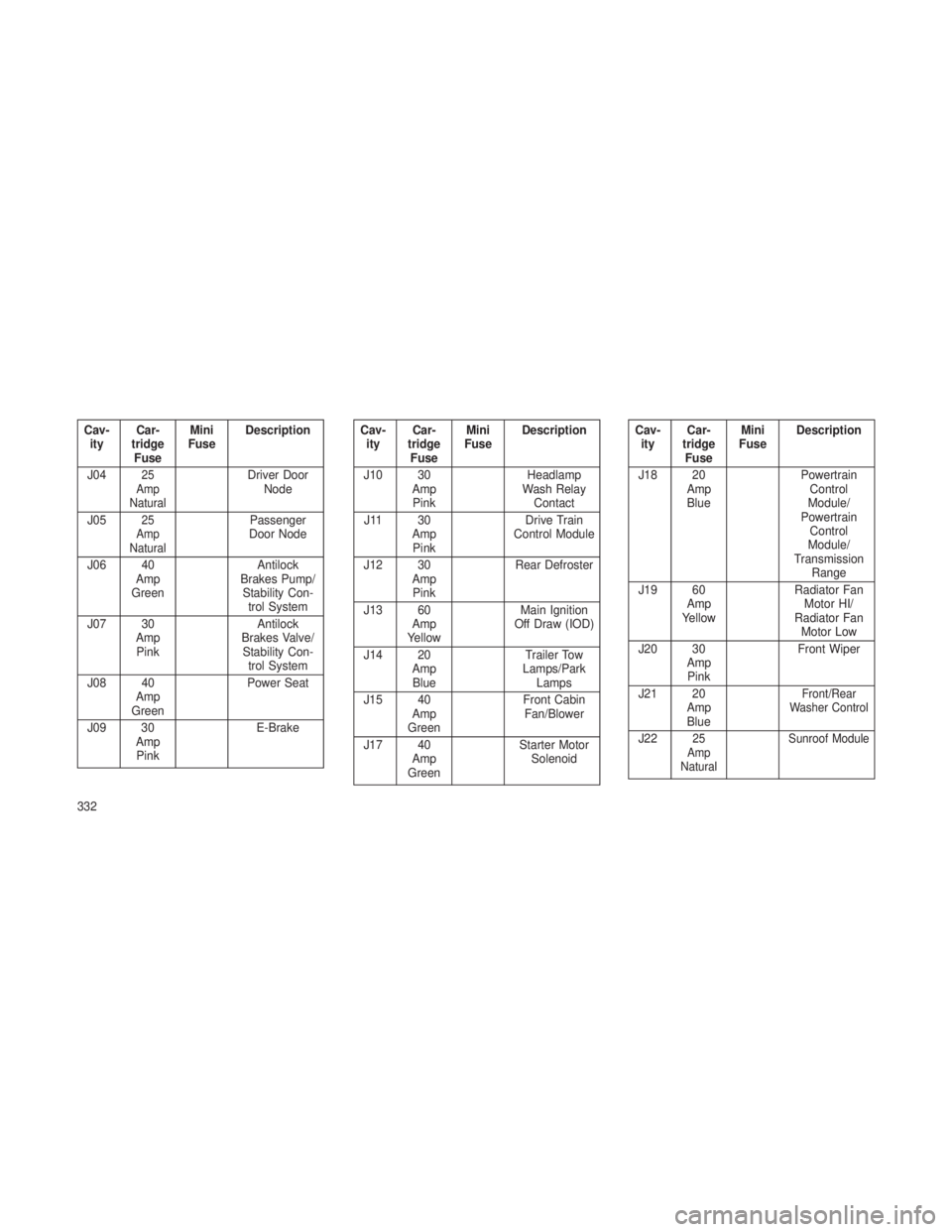
Cav-ity Car-
tridge Fuse Mini
Fuse Description
J04
25
Amp
NaturalDriver Door Node
J05
25
Amp
NaturalPassenger
Door Node
J06 40 Amp
Green Antilock
Brakes Pump/ Stability Con- trol System
J07 30 AmpPink Antilock
Brakes Valve/ Stability Con- trol System
J08 40 Amp
Green Power Seat
J09 30 AmpPink E-Brake
Cav-
ity Car-
tridge Fuse Mini
Fuse Description
J10 30 AmpPink Headlamp
Wash Relay Contact
J11 30 AmpPink Drive Train
Control Module
J12 30 AmpPink Rear Defroster
J13 60 Amp
Yellow Main Ignition
Off Draw (IOD)
J14 20 AmpBlue Trailer Tow
Lamps/Park Lamps
J15 40 Amp
Green Front Cabin
Fan/Blower
J17 40 Amp
Green Starter Motor
SolenoidCav-ity Car-
tridge Fuse Mini
Fuse Description
J18 20 AmpBlue Powertrain
Control
Module/
Powertrain Control
Module/
Transmission Range
J19 60 Amp
Yellow Radiator Fan
Motor HI/
Radiator Fan Motor Low
J20 30 AmpPink Front Wiper
J21 20 AmpBlue
Front/Rear
Washer Control
J2225
Amp
Natural Sunroof Module
332
Page 403 of 408
Odometer...................164
Trip ................... .164
Off-Pavement Driving (Off-Road) ......245
Off-Road Driving (Off-Pavement) ......245
Oil Change Indicator .............177
Oil Change Indicator, Reset .........177
Oil, Engine ................. .313
Capacity .................340
Change Interval ..........177, 313
Diesel ...................314
Dipstick ................. .313
Disposal .................315
Filter ...................315
Filter Disposal ..............315
Identification Logo ............313
Materials Added to ...........315
Recommendation .........314, 340
Synthetic .................315
Viscosity ..............314, 340
Oil Filter, Selection ..............315
Onboard Diagnostic System .........312
Operating Precautions ............312
Operator Manual (Owner’s Manual) ......6
Outside Rearview Mirrors ...........71
Overdrive ................231, 236
Overdrive OFF Switch .........231, 236
Overhead Console ..............140 Overheating, Engine
..........167, 294
Owner’s Manual (Operator Manual) ......6
Paint Care ................. .328
Paint Damage ................328
Parking Brake ................ .250
Park Sense System, Rear ..........134
Passing Light .................112
Personal Settings ...............184
Pets .......................58
Phone, Cellular ................. 7
2
Phone, Hands-Free (Uconnect®) .......72
Power Door Locks ................22
Lift Gate ..................29
Mirrors ...................71
Outlet (Auxiliary Electrical Outlet) . . .146
Seats ................ .94, 95
Steering ..............248, 250
Sunroof ...............142, 144
Tilt/Telescoping Steering Column ....116
Windows ..................26
Pregnant Women and Seat Belts .......41
Preparation for Jacking ...........295
Pretensioners Seat Belts .................37 Programmable Electronic Features
.....184
Programming Transmitters (Remote Keyless Entry) ...............19
Quadra-Lift ................. .241
Quadra-Trac .................237
Radial Ply Tires ................261
Radiator Cap (Coolant Pressure Cap) . . .323
Radio Operation ...............209
Radio (Sound Systems) ...........188
Rain Sensitive Wiper System ........114
Rear Axle (Differential) ............325
Rear Camera .................139
Rear Cupholder ................149
Rear Fog Lights ...............168
Rear Park Sense System ..........134
Rear Seat, Folding ..............100
Rear Window Features ...........154
Rear Wiper/Washer .............154
Recorder, Event Data .............49
Recreational Towing .............287
Shifting into Transfer Case
Neutral (N) ................288
Shifting out of Transfer Case
Neutral (N) ................290
399