warning JEEP GRAND CHEROKEE 2023 Owners Manual
[x] Cancel search | Manufacturer: JEEP, Model Year: 2023, Model line: GRAND CHEROKEE, Model: JEEP GRAND CHEROKEE 2023Pages: 424, PDF Size: 15.48 MB
Page 159 of 424
STARTING AND OPERATING157
As the system detects driver inattentiveness as
previously described Ú page 152, the system
status indicator lights will change from green, to
yellow, to red. The following indicators will change
in color as warnings to the driver escalate:
Active Driving Assist Indicator (steering wheel
icon in the instrument cluster display or Head
Up Display [if equipped])
Glow effect of the instrument cluster display
For Hands-Free ADA only, light strips in the
driver and front passenger’s door panels (red
and green only)
For Base ADA, if driver attention is not returned,
the system will deactivate.
For Hands-Free ADA, if driver attention is not
returned, the system will perform a Stop-In-Lane
maneuver. Once the vehicle is at a standstill, the
vehicle will be shifted to PARK and the Electric Park
Brake (EPB) will be applied. Then, the vehicle will
attempt to place an emergency call through the
Assist and SOS system. If too many Stop-In-Lane
maneuvers are initiated, or if one is completed, the
system will be unavailable until the ignition is
cycled OFF, then back to ON.
Active Driving Assist Indicators Are Off
ADA is not turned on/enabled by the driver. Active Driving Assist Indicators Are White
ADA is turned on/enabled by the driver, but the
system is not actively steering and providing
speed control for the vehicle.
Active Driving Assist Indicators Are Green
System is actively steering and providing speed
control for the vehicle and the system detects
driver is attentive.
Active Driving Assist Indicators Are Yellow
Driver inattentiveness has been detected,
warning the driver to place hands on the
steering wheel, or look back toward the road (if
equipped with the Hands-Free system).
Active Driving Assist Indicators Are Red
Driver inattentiveness is still being detected, or
driver take-over is being requested, warning the
driver to place hands on the steering wheel, or if
equipped with the Hands-Free system, take
control of the vehicle.
NOTE:For both Base ADA and Hands-Free ADA, the driver
MUST replace hands on the steering wheel and
take control of the vehicle when the system is
deactivated.
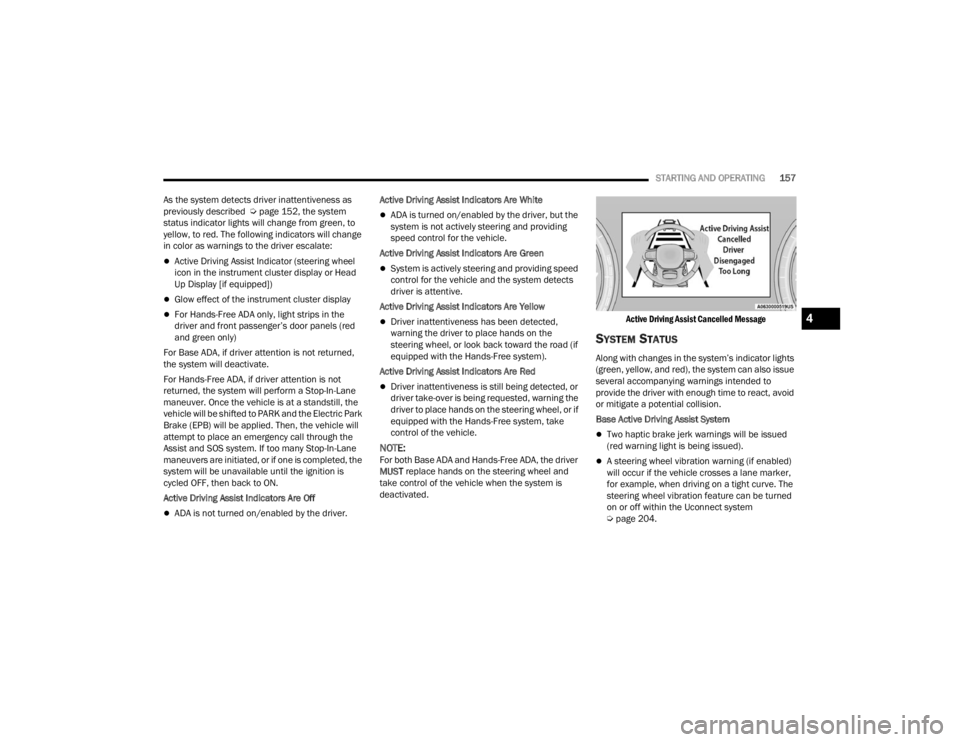
Active Driving Assist Cancelled Message
SYSTEM STATUS
Along with changes in the system’s indicator lights
(green, yellow, and red), the system can also issue
several accompanying warnings intended to
provide the driver with enough time to react, avoid
or mitigate a potential collision.
Base Active Driving Assist System
Two haptic brake jerk warnings will be issued
(red warning light is being issued).
A steering wheel vibration warning (if enabled)
will occur if the vehicle crosses a lane marker,
for example, when driving on a tight curve. The
steering wheel vibration feature can be turned
on or off within the Uconnect system
Ú
page 204.
4
23_WL_OM_EN_USC_t.book Page 157
Page 160 of 424

158STARTING AND OPERATING
(Continued)
Hands-Free Active Driving Assist System
Two haptic brake jerk warnings will be issued
(red warning light is being issued).
A seat vibration warning will occur (red warning
light is being issued).
The driver can take control of the vehicle at
anytime to override the warnings by pressing the
gas or brake pedal, moving the steering wheel, and
being attentive to the road.
SYSTEM OPERATION/LIMITATIONS
The Base Active Driving Assist and Hands-Free
Active Driving Assist systems DO NOT:
Warn or prevent collisions with other vehicles
Steer your vehicle around stopped vehicles,
slower vehicles, construction zones or equip -
ment, pedestrians, or animals
Respond to traffic lights or stop signs
Merge onto highways or exit off ramps
Change lanes (exception: Hands-Free, only
when initiated by the driver)
React to cross traffic
NOTE:Adaptive Cruise Control (ACC) is a core component
of ADA. For ACC system limitations Ú page 142.
The Active Driving Assist system may have limited
or reduced functionality when one of the following
conditions occur:
The vehicle’s radar sensors and/or forward
facing camera is damaged, covered,
misaligned, or obstructed (e.g. by mud, ice,
snow, etc.)
WARNING!
Active Driving Assist is an SAE Level 2 Driver
Assist feature, requiring driver attention at all
times. To prevent serious injury or death:
Always remember that the Active Driving
Assist system is a convenience system that
cannot accurately detect all situations.
Complete attention is always required while
driving, even when using the Active Driving
Assist system.
Always remain alert and be ready to take
control of the vehicle in the event that the
Active Driving Assist system deactivates, or
otherwise lacks full functionality as described
further before and after this statement.
Always keep your hands on the steering wheel
when the Base Active Driving Assist system is
activated.
Always keep your eyes on the road when the
Hands-Free Active Driving Assist system is
activated.
Maintain a safe distance from other vehicles
and pay attention to traffic conditions.
Do not use a hand held device when either
Base, or Hands-Free Active Driving Assist
system is engaged.
Always pay attention to the road when the
Hands-Free Active Driving Assist system is
engaged. The Active Driving Assist system will
not steer to avoid safety hazards, construction
zones, objects, or road impediments. You
need to take control to steer and brake the
vehicle in such situations, and when merging
into traffic, exiting the highway, making a turn
for crossing traffic, or stopping for traffic
control devices.
Do not place any objects on the steering wheel
(e.g. steering wheel covers) which could inter -
fere with the hand detection sensors.
WARNING!
23_WL_OM_EN_USC_t.book Page 158
Page 162 of 424

160STARTING AND OPERATING
For limitations of this system and
recommendations, see Ú page 166.
ParkSense will retain the last system state
(enabled or disabled) from the last ignition cycle
when the ignition is changed to the ON/RUN
position.
ParkSense can be active only when the gear
selector is in REVERSE or DRIVE. If ParkSense is
enabled at one of these gear selector positions,
the system will remain active until the vehicle
speed is increased to approximately 7 mph
(11 km/h) or above. The system will become active
again if the vehicle speed is decreased to less than
approximately 6 mph (9 km/h). A display warning
will appear in the instrument cluster display if the
vehicle is in REVERSE and the speed exceeds
7 mph (11 km/h).
PARKSENSE SENSORS
The four ParkSense sensors located in the rear
fascia/bumper, and the six ParkSense sensors
located in the front fascia/bumper, monitor the
area in front and behind the vehicle that is within
the sensors’ field of view. The front sensors detect
obstacles from approximately 12 inches (30 cm)
up to 47 inches (120 cm) from the front fascia/
bumper. The rear sensors can detect obstacles
from approximately 12 inches (30 cm) up to
79 inches (200 cm) from the rear fascia/bumper.
These distances depend on the location, type and
orientation of the obstacle in the horizontal
direction.
NOTE:If the vehicle is equipped with ParkSense Active
Park Assist, there will be six ParkSense sensors
located in the rear fascia/bumper.
PARKSENSE DISPLAY
The warning display will turn on indicating the
system status when the vehicle is in REVERSE or
when the vehicle is in DRIVE and an obstacle has
been detected.
The system will indicate a detected obstacle by
showing a single arc in the left and/or right front or
rear regions based on the object’s distance and
location relative to the vehicle.
If an object is detected in the left and/or right rear
region, the display will show a single arc in the left
and/or right rear region and the system will
produce a tone. As the vehicle moves closer to the
object, the display will show the single arc moving
closer to the vehicle and the tone will change from
a single 1/2 second tone to slow, to fast, to
continuous.
23_WL_OM_EN_USC_t.book Page 160
Page 164 of 424

162STARTING AND OPERATING
The vehicle is close to the obstacle when the instrument cluster display shows one flashing arc and sounds a continuous tone. The following chart shows the
warning alert operation when the system is detecting an obstacle:
NOTE:ParkSense will reduce the volume of the radio, if on, when the system is sounding an audio tone.
WARNING ALERTS FOR REAR
Rear Distance (inches/cm) Greater than
79 inches(200 cm) 79-59 inches
(200-150 cm) 59-47 inches
(150-120 cm) 47-39 inches
(120-100 cm) 39-25 inches
(100-65 cm) 25-12 inches
(65-30 cm) Less than
12 inches (30 cm)
Audible Alert Chime NoneSingle 1/2
Second Tone Slow
Slow FastFastContinuous
Arcs-Left NoneNoneNoneNoneNone 6th Flashing 5th Flashing
Arcs-Center None 10th Solid 9th Solid 8th Solid 7th Flashing 6th Flashing 5th Flashing
Arcs-Right NoneNoneNoneNoneNone 6th Flashing 5th Flashing
Radio Volume Reduced No
Yes YesYesYesYesYes
WARNING ALERTS FOR FRONT
Front Distance
(inches/cm) Greater than 47 inches
(120 cm) 47-39 inches
(120-100 cm) 39-25 inches
(100-65 cm) 25-12 inches (65-30 cm) Less than 12 inches
(30 cm)
Audible Alert Chime NoneNoneNone FastContinuous
Arcs-Left NoneNoneNone3rd Flashing 4th Flashing
Arcs-Center None1st Solid2nd Flashing 3rd Flashing4th Flashing
Arcs-Right NoneNoneNone3rd Flashing 4th Flashing
Radio Volume Reduced NoNoNo Yes Yes
23_WL_OM_EN_USC_t.book Page 162
Page 165 of 424

STARTING AND OPERATING163
Front Park Assist Audible Alerts
ParkSense will turn off the Front Park Assist
audible alert (chime) after approximately three
seconds when an obstacle has been detected, and
the vehicle is stationary.
Adjustable Chime Volume Settings
Front and rear chime volume settings can be
selected from the Uconnect system Ú page 204.
The chime volume settings include low, medium,
and high.
ParkSense will retain its last known configuration
state through ignition cycles.
PARKSENSE WARNING DISPLAY
The ParkSense Warning screen is located within
the instrument cluster display Ú page 98. It
provides visual warnings to indicate the distance
between the rear fascia/bumper and/or front
fascia/bumper and the detected obstacle.
ENABLING AND DISABLING PARKSENSE
ParkSense can be enabled and disabled
with the ParkSense switch located on the
switch panel above the Uconnect display.
When the ParkSense switch is pushed to enable
the system, the instrument cluster will display the
system state. When the ParkSense switch is pushed to disable
the system, the instrument cluster will display the
“PARKSENSE OFF” message for approximately two
seconds. When the gear selector is moved to
REVERSE and the system is disabled, the
instrument cluster display will display the
“PARKSENSE OFF” message for as long as the
vehicle is in REVERSE.
NOTE:When ParkSense is disabled and the gear selector
is moved to the DRIVE position, no warning
message will be displayed.
The ParkSense switch LED will be on when
ParkSense is disabled or requires service. The
ParkSense switch LED will be off when the system
is enabled. If the ParkSense switch is pushed, and
the system requires service, the ParkSense switch
LED will blink momentarily, and then the LED will
be on.
SERVICE THE PARKSENSE PARK ASSIST
S
YSTEM
During vehicle start-up, when the ParkSense
System has detected a faulted condition, the
instrument cluster will actuate a single chime,
once per ignition cycle, and it will display a pop-up.
The pop-up will include up to two faults. Possible
fault messages are "PARKSENSE UNAVAILABLE
WIPE REAR SENSORS", "PARKSENSE
UNAVAILABLE WIPE FRONT SENSORS", or "PARKSENSE UNAVAILABLE SERVICE REQUIRED.”
The pop-up message will display for five seconds.
When the gear selector is moved to REVERSE and
the system has detected a faulted condition, the
instrument cluster display will display a
"PARKSENSE UNAVAILABLE WIPE REAR SENSORS",
"PARKSENSE UNAVAILABLE WIPE FRONT SENSORS"
or "PARKSENSE UNAVAILABLE SERVICE REQUIRED"
pop-up message for five seconds. After five seconds,
a vehicle graphic will be displayed with
"UNAVAILABLE" at either the front or rear sensor
location depending on where the fault is detected.
The system will continue to provide arc alerts for the
side that is functioning properly. These arc alerts will
interrupt the "PARKSENSE UNAVAILABLE WIPE REAR
SENSORS", "PARKSENSE UNAVAILABLE WIPE
FRONT SENSORS", or "PARKSENSE UNAVAILABLE
SERVICE REQUIRED" messages if an object is
detected within the five second pop-up duration. The
vehicle graphic will remain displayed for as long as
the vehicle is in REVERSE.
If "PARKSENSE UNAVAILABLE WIPE REAR
SENSORS" or "PARKSENSE UNAVAILABLE WIPE
FRONT SENSORS" appears in the instrument
cluster display make sure the outer surface and
the underside of the rear fascia/bumper and/or
front fascia/bumper is clean and clear of snow,
ice, mud, dirt or other obstruction and then cycle
the ignition. If the message continues to appear
see an authorized dealer.
4
23_WL_OM_EN_USC_t.book Page 163
Page 166 of 424

164STARTING AND OPERATING
If the "PARKSENSE UNAVAILABLE SERVICE
REQUIRED" message appears in the instrument
cluster display, see an authorized dealer.
CLEANING THE PARKSENSE SYSTEM
Clean the ParkSense sensors with water, car wash
soap and a soft cloth. Do not use rough or hard
cloths. Do not scratch or poke the sensors.
PARKSENSE SYSTEM USAGE
P
RECAUTIONS
NOTE:
Ensure that the front and rear fascia/bumper
are free of snow, ice, mud, dirt and debris to
keep the ParkSense system operating properly.
Jackhammers, large trucks, and other vibra -
tions could affect the performance of
ParkSense.
When you turn ParkSense off, the instrument
cluster will display “PARKSENSE OFF.” Further -
more, once you turn ParkSense off, it remains
off until you turn it on again, even if you cycle the
ignition.
When you move the gear selector to the
REVERSE position and ParkSense is turned off,
the instrument cluster will display “PARKSENSE
OFF” for as long as the vehicle is in REVERSE.
ParkSense, when on, will reduce the volume of
the radio when it is sounding a tone.
Clean the ParkSense sensors regularly, taking
care not to scratch or damage them. The
sensors must not be covered with ice, snow,
slush, mud, dirt or debris. Failure to do so can
result in the system not working properly. The
ParkSense system might not detect an obstacle
behind or in front of the fascia/bumper, or it
could provide a false indication that an obstacle
is behind or in front of the fascia/bumper.
Use the ParkSense switch to turn the ParkSense
system off if objects such as bicycle carriers,
trailer hitches, etc., are placed within 12 inches
(30 cm) of the rear fascia/bumper. Failure to do
so can result in the system misinterpreting a
close object as a sensor problem, causing the
“PARKSENSE UNAVAILABLE SERVICE
REQUIRED” message to be displayed in the
instrument cluster.
ParkSense should be disabled when the liftgate
is in the open position. An opened liftgate could
provide a false indication that an obstacle is
behind the vehicle.
WARNING!
Drivers must be careful when backing up even
when using ParkSense. Always check carefully
behind your vehicle, look behind you, and be
sure to check for pedestrians, animals, other
vehicles, obstructions, and blind spots before
backing up. You are responsible for safety and
must continue to pay attention to your
surroundings. Failure to do so can result in
serious injury or death.
Before using ParkSense, it is strongly recom -
mended that the ball mount and hitch ball
assembly be disconnected from the vehicle
when the vehicle is not used for towing.
Failure to do so can result in injury or damage
to vehicles or obstacles because the hitch ball
will be much closer to the obstacle than the
rear fascia when the vehicle sounds the
continuous tone. Also, the sensors could
detect the ball mount and hitch ball assembly,
depending on its size and shape, giving a false
indication that an obstacle is behind the
vehicle.
23_WL_OM_EN_USC_t.book Page 164
Page 167 of 424

STARTING AND OPERATING165
SIDE DISTANCE WARNING SYSTEM
The Side Distance Warning system detects the
presence of side obstacles near the vehicle using
the parking sensors located in the front and rear
fascia/bumpers.
Side Distance Warning Display
The Side Distance Warning screen will only be
displayed if this feature is enabled within Uconnect
Settings Úpage 204.
The system warns the driver with an acoustic
signal and, when enabled, with visual indications
on the instrument cluster display. When the vehicle is in DRIVE, the Side Distance
Warning volume/chime will match the Front
ParkSense volume and chime type.
When the vehicle is in REVERSE, the Side Distance
Warning volume/chime will match the Rear
ParkSense volume and chime type.NOTE:ParkSense will reduce the volume of the radio if on
when the system is sounding an audible tone. An
audible tone will only sound if a collision is
possible.
Activation/Deactivation
The system can operate only after driving a short
distance and if the vehicle speed is between 0 and
7 mph (0 and 11 km/h). The system can be
activated/deactivated via the Settings menu of the
Uconnect system. If the ParkSense System is
deactivated via the ParkSense hard switch, then
the Side Distance Warning system will
automatically be deactivated.
Message on the display for Side Distance Warning
feature:
“Wipe Sensors” — This message is displayed in the
case of a failure of the Side Distance Warning
system sensors. Free the bumpers of any
obstacles, ensure that the front and rear fascia/
bumper are free of snow, ice, mud, dirt and debris
to keep the ParkSense system operating properly.
“System Not Available” — This message is
displayed if the Side Distance Warning system is
not available. The failed operation of the system
might be due to the insufficient voltage from the
battery or other failures on the electrical system.
Contact an authorized dealer as soon as possible
to have the electrical system checked.CAUTION!
ParkSense is only a parking aid and it is
unable to recognize every obstacle, including
small obstacles. Parking curbs might be
temporarily detected or not detected at all.
Obstacles located above or below the sensors
will not be detected when they are in close
proximity.
The vehicle must be driven slowly when using
ParkSense in order to be able to stop in time
when an obstacle is detected. It is recom
-
mended that the driver looks over his/her
shoulder when using ParkSense.
WARNING ALERTS
Distance
(inches/cm) Less than
12 inches
(30 cm)12 –
24 inches
(30–60 cm)
Arcs-Left Flashing Flashing
Arcs-Right Flashing Flashing
Audible Alert
Chime ContinuousFast audible
chime as the
objects get
close to the
vehicle
Radio Volume
Reduced Yes
Yes
4
23_WL_OM_EN_USC_t.book Page 165
Page 168 of 424

166STARTING AND OPERATING
ParkSense Usage Precautions
Some conditions may influence the performance
of the Side Distance Warning system:
NOTE:
Ensure that the front and rear fascia/bumper
are free of snow, ice, mud, dirt and debris to
keep the ParkSense system operating properly.
Construction equipment, large trucks, and other
vibrations could affect the performance of
ParkSense.
When you turn ParkSense off, the message to
appear in the instrument cluster display will
read “PARKSENSE OFF.” Furthermore, once you
turn ParkSense off, it remains off until you turn
it on again, even if you cycle the ignition key.
ParkSense, when on, will reduce the volume of
the radio when it is sounding a tone.
Clean the ParkSense sensors regularly, taking
care not to scratch or damage them. The
sensors must not be covered with ice, snow,
slush, mud, dirt or debris. Failure to do so can
result in the system not working properly. The
ParkSense system might not detect an obstacle
behind or in front of the fascia/bumper, or it
could provide a false indication that an obstacle
is behind or in front of the fascia/bumper.
The presence of a tow hook without a trailer may
interfere with the correct operation of the
parking sensors. Before using the ParkSense system, it is recommended to remove the
removable tow hook ball assembly and any
attachments from the vehicle when it is not
used for towing operations.
PARKSENSE ACTIVE PARK ASSIST SYSTEM —
IF EQUIPPED
The ParkSense Active Park Assist system is
intended to assist the driver during parallel and
perpendicular parking maneuvers by identifying a
proper parking space, providing audible/visual
instructions, and controlling the steering wheel.
The ParkSense Active Park Assist system is
defined as “semi-automatic” since the driver
maintains control of the accelerator, gear selector
and brakes. Depending on the driver's parking
maneuver selection, the ParkSense Active Park
Assist system is capable of maneuvering a vehicle
into a parallel or a perpendicular parking space on
either side (i.e., driver side or passenger side).
WARNING!
Drivers must be careful when backing up even
when using ParkSense. Always check carefully
behind your vehicle, look behind you, and be
sure to check for pedestrians, animals, other
vehicles, obstructions, and blind spots before
backing up. You are responsible for safety and
must continue to pay attention to your
surroundings. Failure to do so can result in
serious injury or death.
Before using ParkSense, it is strongly recom
-
mended that the ball mount and hitch ball
assembly be disconnected from the vehicle
when the vehicle is not used for towing.
Failure to do so can result in injury or damage
to vehicles or obstacles because the hitch ball
will be much closer to the obstacle than the
rear fascia when the vehicle sounds the
continuous tone. Also, the sensors could
detect the ball mount and hitch ball assembly,
depending on its size and shape, giving a false
indication that an obstacle is behind the
vehicle.
CAUTION!
ParkSense is only a parking aid and it is unable
to recognize every obstacle, including small
obstacles. Parking curbs might be temporarily
detected or not detected at all. Obstacles
located above or below the sensors will not be
detected when they are in close proximity.
The vehicle must be driven slowly when using
ParkSense in order to be able to stop in time
when an obstacle is detected. It is recom -
mended that the driver looks over his/her
shoulder when using ParkSense.
23_WL_OM_EN_USC_t.book Page 166
Page 172 of 424

170STARTING AND OPERATING
When the system instructs the driver to remove
their hands from the steering wheel, the driver
should check their surroundings and begin to
back up slowly.
The ParkSense Active Park Assist system will
allow a maximum of eight shifts between DRIVE
and REVERSE. If the maneuver cannot be
completed within eight shifts, the system will
cancel and the instrument cluster display will
instruct the driver to complete the maneuver
manually.
The system will cancel the maneuver if the
vehicle speed exceeds 5 mph (7 km/h) during
active steering guidance into the parking space.
The system will provide a warning to the driver
at 3 mph (5 km/h) that tells them to slow down.
The driver is then responsible for completing the
maneuver if the system is canceled.
If the system is canceled during the maneuver
for any reason, the driver must take control of
the vehicle.EXITING THE PARKING SPACE
NOTE:The function does not work for exiting a perpen -
dicular parking space, but only exiting parallel
parking spaces.
Activation
To activate this function, push the Active
ParkSense switch once. After selection, the system
activates and warns the driver on the instrument
cluster display about the operations that have to
be carried out to perform the maneuver correctly.
WARNING!
Drivers must be careful when performing
parallel or perpendicular parking maneuvers
even when using the ParkSense Active Park
Assist system. Always check carefully behind
and in front of your vehicle, look behind and in
front of you, and be sure to check for pedes -
trians, animals, other vehicles, obstructions,
and blind spots before backing up and moving
forward. You are responsible for safety and
must continue to pay attention to your
surroundings. Failure to do so can result in
serious injury or death.
Before using the ParkSense Active Park Assist
system, it is strongly recommended that the
ball mount and hitch ball assembly be discon -
nected from the vehicle when the vehicle is
not used for towing. Failure to do so can result
in injury or damage to vehicles or obstacles
because the hitch ball will be much closer to
the obstacle than the rear fascia when the
vehicle sounds the continuous tone. Also, the
sensors could detect the ball mount and hitch
ball assembly, depending on its size and
shape, giving a false indication that an
obstacle is behind the vehicle.
CAUTION!
The ParkSense Active Park Assist system is
only a parking aid and it is unable to recognize
every obstacle, including small obstacles.
Parking curbs might be temporarily detected
or not detected at all. Obstacles located above
or below the sensors will not be detected
when they are in close proximity.
The vehicle must be driven slowly when using
the ParkSense Active Park Assist system in
order to be able to stop in time when an
obstacle is detected. It is recommended that
the driver looks over his/her shoulder when
using the ParkSense Active Park Assist
system.
23_WL_OM_EN_USC_t.book Page 170
Page 173 of 424
STARTING AND OPERATING171
Selection Of The Maneuver Side
Use the direction indicators to choose the direction
that you want to perform the maneuver. Use the
right arrow indicator to perform the maneuver to
the right side and use the left arrow indicator to
perform the maneuver to the left.
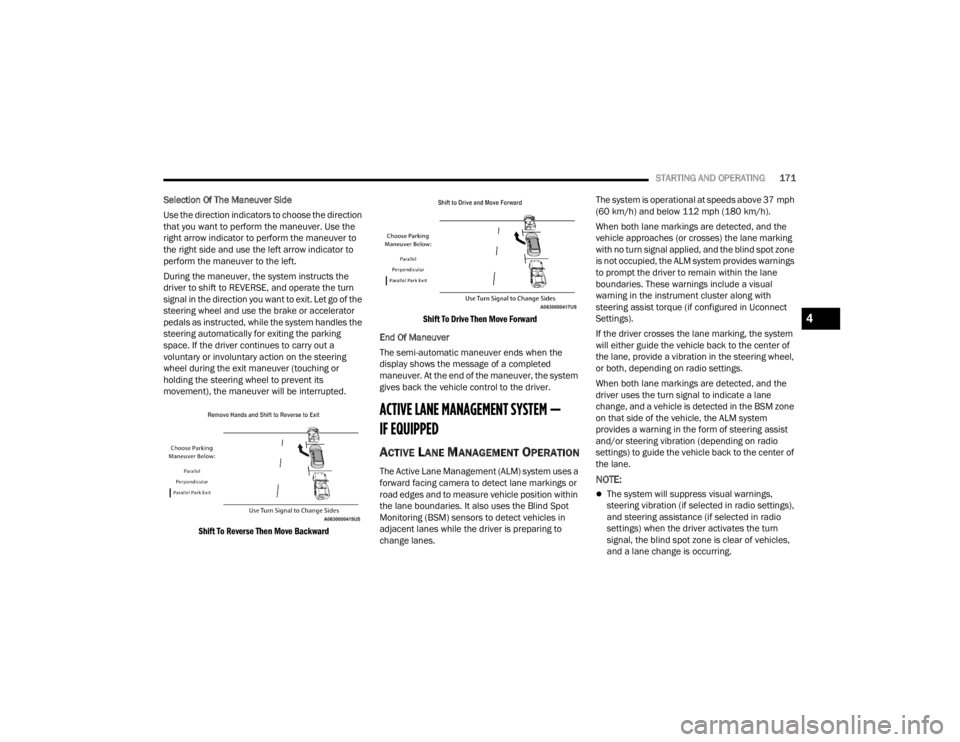
During the maneuver, the system instructs the
driver to shift to REVERSE, and operate the turn
signal in the direction you want to exit. Let go of the
steering wheel and use the brake or accelerator
pedals as instructed, while the system handles the
steering automatically for exiting the parking
space. If the driver continues to carry out a
voluntary or involuntary action on the steering
wheel during the exit maneuver (touching or
holding the steering wheel to prevent its
movement), the maneuver will be interrupted.
Shift To Reverse Then Move Backward Shift To Drive Then Move Forward
End Of Maneuver
The semi-automatic maneuver ends when the
display shows the message of a completed
maneuver. At the end of the maneuver, the system
gives back the vehicle control to the driver.
ACTIVE LANE MANAGEMENT SYSTEM —
IF EQUIPPED
ACTIVE LANE MANAGEMENT OPERATION
The Active Lane Management (ALM) system uses a
forward facing camera to detect lane markings or
road edges and to measure vehicle position within
the lane boundaries. It also uses the Blind Spot
Monitoring (BSM) sensors to detect vehicles in
adjacent lanes while the driver is preparing to
change lanes. The system is operational at speeds above 37 mph
(60 km/h) and below 112 mph (180 km/h).
When both lane markings are detected, and the
vehicle approaches (or crosses) the lane marking
with no turn signal applied, and the blind spot zone
is not occupied, the ALM system provides warnings
to prompt the driver to remain within the lane
boundaries. These warnings include a visual
warning in the instrument cluster along with
steering assist torque (if configured in Uconnect
Settings).
If the driver crosses the lane marking, the system
will either guide the vehicle back to the center of
the lane, provide a vibration in the steering wheel,
or both, depending on radio settings.
When both lane markings are detected, and the
driver uses the turn signal to indicate a lane
change, and a vehicle is detected in the BSM zone
on that side of the vehicle, the ALM system
provides a warning in the form of steering assist
and/or steering vibration (depending on radio
settings) to guide the vehicle back to the center of
the lane.NOTE:
The system will suppress visual warnings,
steering vibration (if selected in radio settings),
and steering assistance (if selected in radio
settings) when the driver activates the turn
signal, the blind spot zone is clear of vehicles,
and a lane change is occurring.
4
23_WL_OM_EN_USC_t.book Page 171