climate control JEEP GRAND CHEROKEE 2023 User Guide
[x] Cancel search | Manufacturer: JEEP, Model Year: 2023, Model line: GRAND CHEROKEE, Model: JEEP GRAND CHEROKEE 2023Pages: 424, PDF Size: 15.48 MB
Page 72 of 424
70GETTING TO KNOW YOUR VEHICLE
The Three-Zone and Four-Zone ATC system allows
for adjustment of the rear climate controls from
the front ATC panel.
To change the rear system settings:
Press the “Rear” button on the touchscreen to
display the rear climate controls. The control
functions now operate the rear system.
Press the “Front” button on the touchscreen to
return to the front climate controls.
NOTE:If equipped with a Four-Zone ATC system, the left
and right sides of the rear passenger zones can be
adjusted separately from the front or rear ATC
panel.
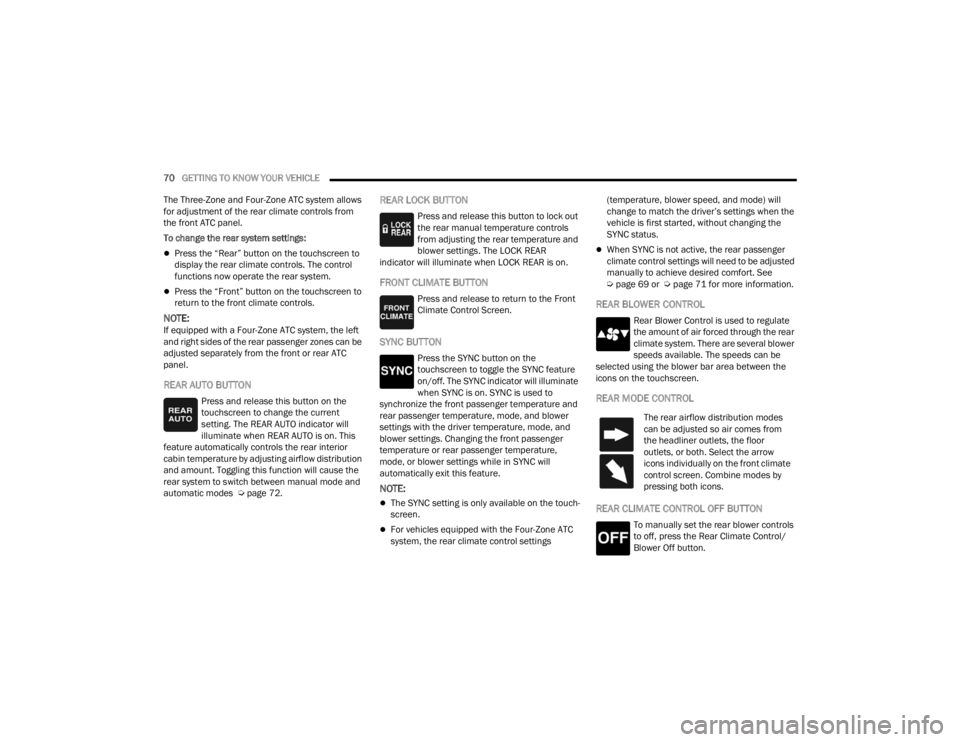
REAR AUTO BUTTON
Press and release this button on the
touchscreen to change the current
setting. The REAR AUTO indicator will
illuminate when REAR AUTO is on. This
feature automatically controls the rear interior
cabin temperature by adjusting airflow distribution
and amount. Toggling this function will cause the
rear system to switch between manual mode and
automatic modes Ú page 72.
REAR LOCK BUTTON
Press and release this button to lock out
the rear manual temperature controls
from adjusting the rear temperature and
blower settings. The LOCK REAR
indicator will illuminate when LOCK REAR is on.
FRONT CLIMATE BUTTON
Press and release to return to the Front
Climate Control Screen.
SYNC BUTTON
Press the SYNC button on the
touchscreen to toggle the SYNC feature
on/off. The SYNC indicator will illuminate
when SYNC is on. SYNC is used to
synchronize the front passenger temperature and
rear passenger temperature, mode, and blower
settings with the driver temperature, mode, and
blower settings. Changing the front passenger
temperature or rear passenger temperature,
mode, or blower settings while in SYNC will
automatically exit this feature.
NOTE:
The SYNC setting is only available on the touch -
screen.
For vehicles equipped with the Four-Zone ATC
system, the rear climate control settings (temperature, blower speed, and mode) will
change to match the driver’s settings when the
vehicle is first started, without changing the
SYNC status.
When SYNC is not active, the rear passenger
climate control settings will need to be adjusted
manually to achieve desired comfort. See
Ú
page 69 or Ú page 71 for more information.
REAR BLOWER CONTROL
Rear Blower Control is used to regulate
the amount of air forced through the rear
climate system. There are several blower
speeds available. The speeds can be
selected using the blower bar area between the
icons on the touchscreen.
REAR MODE CONTROL
REAR CLIMATE CONTROL OFF BUTTON
To manually set the rear blower controls
to off, press the Rear Climate Control/
Blower Off button.
The rear airflow distribution modes
can be adjusted so air comes from
the headliner outlets, the floor
outlets, or both. Select the arrow
icons individually on the front climate
control screen. Combine modes by
pressing both icons.
23_WL_OM_EN_USC_t.book Page 70
Page 73 of 424
GETTING TO KNOW YOUR VEHICLE71
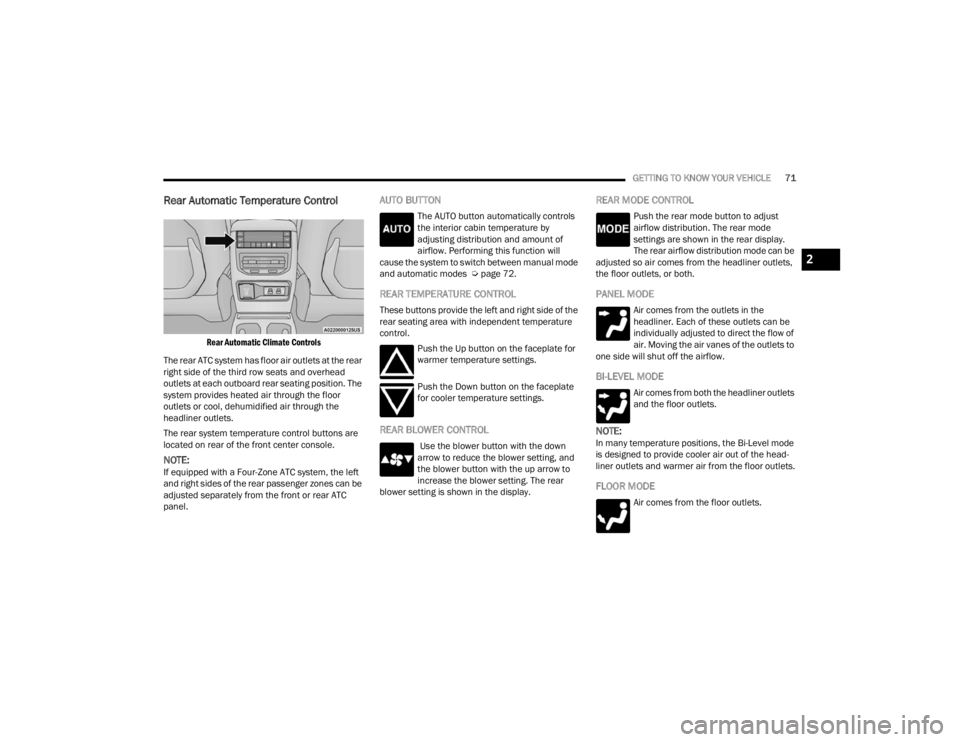
Rear Automatic Temperature Control
Rear Automatic Climate Controls
The rear ATC system has floor air outlets at the rear
right side of the third row seats and overhead
outlets at each outboard rear seating position. The
system provides heated air through the floor
outlets or cool, dehumidified air through the
headliner outlets.
The rear system temperature control buttons are
located on rear of the front center console.
NOTE:If equipped with a Four-Zone ATC system, the left
and right sides of the rear passenger zones can be
adjusted separately from the front or rear ATC
panel.
AUTO BUTTON
The AUTO button automatically controls
the interior cabin temperature by
adjusting distribution and amount of
airflow. Performing this function will
cause the system to switch between manual mode
and automatic modes Ú page 72.
REAR TEMPERATURE CONTROL
These buttons provide the left and right side of the
rear seating area with independent temperature
control.
Push the Up button on the faceplate for
warmer temperature settings.
Push the Down button on the faceplate
for cooler temperature settings.
REAR BLOWER CONTROL
Use the blower button with the down
arrow to reduce the blower setting, and
the blower button with the up arrow to
increase the blower setting. The rear
blower setting is shown in the display.
REAR MODE CONTROL
Push the rear mode button to adjust
airflow distribution. The rear mode
settings are shown in the rear display.
The rear airflow distribution mode can be
adjusted so air comes from the headliner outlets,
the floor outlets, or both.
PANEL MODE
Air comes from the outlets in the
headliner. Each of these outlets can be
individually adjusted to direct the flow of
air. Moving the air vanes of the outlets to
one side will shut off the airflow.
BI-LEVEL MODE
Air comes from both the headliner outlets
and the floor outlets.
NOTE:In many temperature positions, the Bi-Level mode
is designed to provide cooler air out of the head -
liner outlets and warmer air from the floor outlets.
FLOOR MODE
Air comes from the floor outlets.
2
23_WL_OM_EN_USC_t.book Page 71
Page 74 of 424

72GETTING TO KNOW YOUR VEHICLE
REAR TEMPERATURE LOCK
The Rear Temperature Lock symbol on
the rear display is illuminated when the
rear controls are locked by the front
system.
Rear Lock
Pressing the Rear Temperature Lock button on the
Uconnect touchscreen will illuminate a lock symbol
in the rear display. The rear temperature and air
source are then controlled from the front Uconnect
system.
Rear seat occupants can only adjust the rear ATC
control when the Rear Temperature Lock button is
turned off.
The rear ATC is located on the rear of the front
center console.
Press the Rear Temperature Lock button on the
front Uconnect touchscreen a second time to
turn the Rear Temperature Lock icon off in the
rear display.
Push a rear blower button, adjust the tempera -
ture using the rear up and down arrows, and
select a control mode to suit the rear occupant’s
needs.
ATC is selected by pushing the AUTO button on
the rear climate control faceplate. Once the desired temperature is shown on the rear
display, the ATC System will automatically achieve
and maintain that comfort level. When the system
is set up for your comfort level, it is not necessary
to change the settings. You will experience the
greatest efficiency by simply allowing the system to
function automatically.
AUTOMATIC TEMPERATURE CONTROL
(ATC)
Automatic Operation
1. Push the AUTO button on the front Automatic
Temperature Control (ATC) Panel and the
word “AUTO” will illuminate in the front ATC
display, along with two temperatures for the
driver and front passenger. The system will
then automatically regulate the amount of
airflow.
2. Adjust the temperature you would like the system to maintain, by adjusting the driver,
passenger, and rear temperatures. Once the
desired temperature is displayed, the system
will achieve and automatically maintain that
comfort level.
3. When the system is set up for your comfort level, it is not necessary to change the
settings. You will experience the greatest
efficiency by simply allowing the system to
function automatically.
NOTE:It is not necessary to move the temperature
settings. The system automatically adjusts the
temperature, mode and fan speed to provide
comfort as quickly as possible.
To provide you with maximum comfort in the
automatic mode, during cold start-ups, the blower
fan will remain on low until the engine warms up.
The fan will engage immediately if the Defrost
mode is selected, or by changing the front blower
knob setting.
Manual Operation Override
This system offers a full complement of manual
override features. The AUTO symbol in the front
ATC display will be turned off when the system is
being used in the manual mode.
NOTE:The system will not automatically sense the
presence of fog, mist or ice on the windshield.
Defrost mode must be manually selected to clear
the windshield and side glass.
CLIMATE VOICE RECOGNITION
Adjust vehicle temperatures hands-free and keep
everyone comfortable while you keep moving
ahead (if vehicle is equipped with climate
controls).
23_WL_OM_EN_USC_t.book Page 72
Page 75 of 424

GETTING TO KNOW YOUR VEHICLE73
Push the VR button. After the beep, say one of the
following commands:
“ Set the driver temperature to 70 degrees ”
“Set the passenger temperature to 70 degrees ”
Did You Know: Voice Command for Climate may
only be used to adjust the interior temperature of
your vehicle. Voice Command will not work to
adjust the heated seats or steering wheel if
equipped.
OPERATING TIPS
NOTE:Refer to the chart at the end of this section for
suggested control settings for various weather
conditions.
Summer Operation
The engine cooling system must be protected with
a high-quality antifreeze coolant to provide proper
corrosion protection and to protect against engine
overheating. OAT coolant (conforming to
MS.90032) is recommended. For more
information, see Ú page 401.
Winter Operation
To ensure the best possible heater and defroster
performance, make sure the engine cooling
system is functioning properly and the proper
amount, type, and concentration of coolant is
used. Use of the Air Recirculation mode during
Winter months is not recommended, because it
may cause window fogging.
Vacation/Storage
For information on maintaining the Climate Control
system when the vehicle is being stored for an
extended period of time, see Ú page 392.
Window Fogging
Vehicle windows tend to fog on the inside in mild,
rainy, and/or humid weather. To clear the
windows, select Defrost or Mix mode and increase
the front blower speed. Do not use the
Recirculation mode without A/C for long periods,
as fogging may occur.
Outside Air Intake
Make sure the air intake, located directly in front of
the windshield, is free of obstructions, such as
leaves. Leaves collected in the air intake may
reduce airflow, and if they enter the air distribution
box, they could plug the water drains. In Winter
months, make sure the air intake is clear of ice,
slush, and snow.
Cabin Air Filter
The Climate Control system filters out dust and
pollen from the air. Contact an authorized dealer to
service your cabin air filter, and to have it replaced
when needed.
Stop/Start System — If Equipped
While in an Autostop, the Climate Control system
may automatically adjust airflow to maintain cabin
comfort. Customer settings will be maintained
upon return to an engine running condition.
Windshield Wiper De-Icer — If Equipped
The Windshield Wiper De-Icer is a heating element
located at the base of the windshield.
It operates automatically once the following
conditions are met:
Activation By Front Defrost
The Windshield Wiper De-Icer activates auto -
matically during a cold weather manual start
with full defrost, and when the ambient
temperature is below 33°F (0.6°C) .
CAUTION!
Interior air enters the Rear Automatic
Temperature Control system through an intake
grille, located in the right side trim panel behind
the third row seats. The heater outlets are
located in the right side trim panel, just behind
the rear doors. Do not block or place objects
directly in front of the inlet grille or heater
outlets. The electrical system could overload
causing damage to the blower motor.
2
23_WL_OM_EN_USC_t.book Page 73
Page 79 of 424
GETTING TO KNOW YOUR VEHICLE77
Sun Screen Extended
To lower the sun screen, gently lift the tab upward
to disengage the hooks, and feed the screen back
into the base sill.
USB/AUX CONTROL
This feature allows an external USB device to be
plugged into one of the USB ports, located in the
center stack of the instrument panel.
Plugging in a smartphone device to a USB port will
activate Android Auto™ or Apple CarPlay®
features, if equipped. For further information, refer
to “Android Auto™” or “Apple CarPlay®” in the
Uconnect Radio Instruction Manual.
NOTE:Two devices can be plugged in at the same time,
and both ports will provide charging capabilities.
Only one port can transfer data to the system at a
time. For example, if a device is plugged into the Type A
USB port and another device is plugged into the
Type C USB port, a message will appear and allow
you to select which device to use.
The following messages will appear when a
non-phone device is plugged into the smaller and
larger USB ports, and when a phone device is
plugged into the smaller and larger USB ports:
“A new device is now connected. Previous
connection was lost.”
“(Phone Name) now connected. Previous
connection was lost.”
“Another device is in use through the same USB
port. Please disconnect the first device to use
the second device.”
Plugging in a phone or another USB device may
cause the connection to a previous device to be
lost.
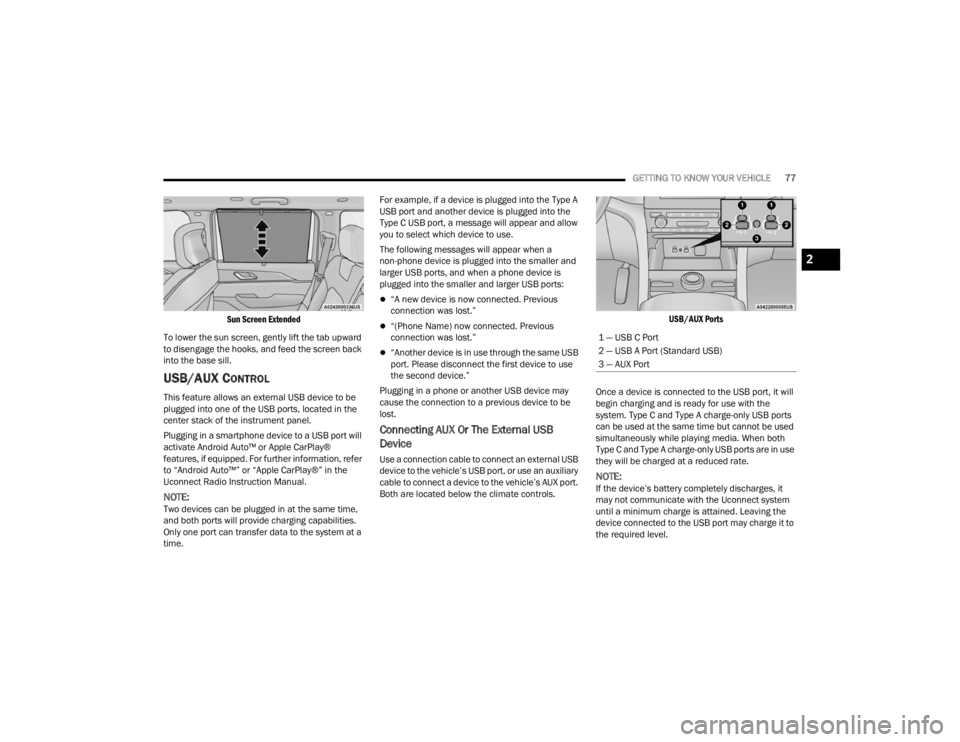
Connecting AUX Or The External USB
Device
Use a connection cable to connect an external USB
device to the vehicle’s USB port, or use an auxiliary
cable to connect a device to the vehicle’s AUX port.
Both are located below the climate controls.
USB/AUX Ports
Once a device is connected to the USB port, it will
begin charging and is ready for use with the
system. Type C and Type A charge-only USB ports
can be used at the same time but cannot be used
simultaneously while playing media. When both
Type C and Type A charge-only USB ports are in use
they will be charged at a reduced rate.
NOTE:If the device’s battery completely discharges, it
may not communicate with the Uconnect system
until a minimum charge is attained. Leaving the
device connected to the USB port may charge it to
the required level.
1 — USB C Port
2 — USB A Port (Standard USB)
3 — AUX Port
2
23_WL_OM_EN_USC_t.book Page 77
Page 81 of 424
GETTING TO KNOW YOUR VEHICLE79
(Continued)
ignition switch is in the ON/RUN position, while the
outlets labeled with a battery symbol are
connected directly to the battery and powered at
all times.
NOTE:
All accessories connected to the battery
powered outlets should be removed or turned
off when the vehicle is not in use to protect the
battery against discharge.
Do not exceed the maximum power of 160 W
(13 Amp) at 12 Volt. If the 160 W (13 Amp)
power rating is exceeded the fuse protecting the
system needs to be replaced.
Power outlets are designed for accessory plugs
only. Do not insert any other object in the power
outlets as this will damage the outlet and blow
the fuse. Improper use of the power outlet can
cause damage not covered by your New Vehicle
Limited Warranty.
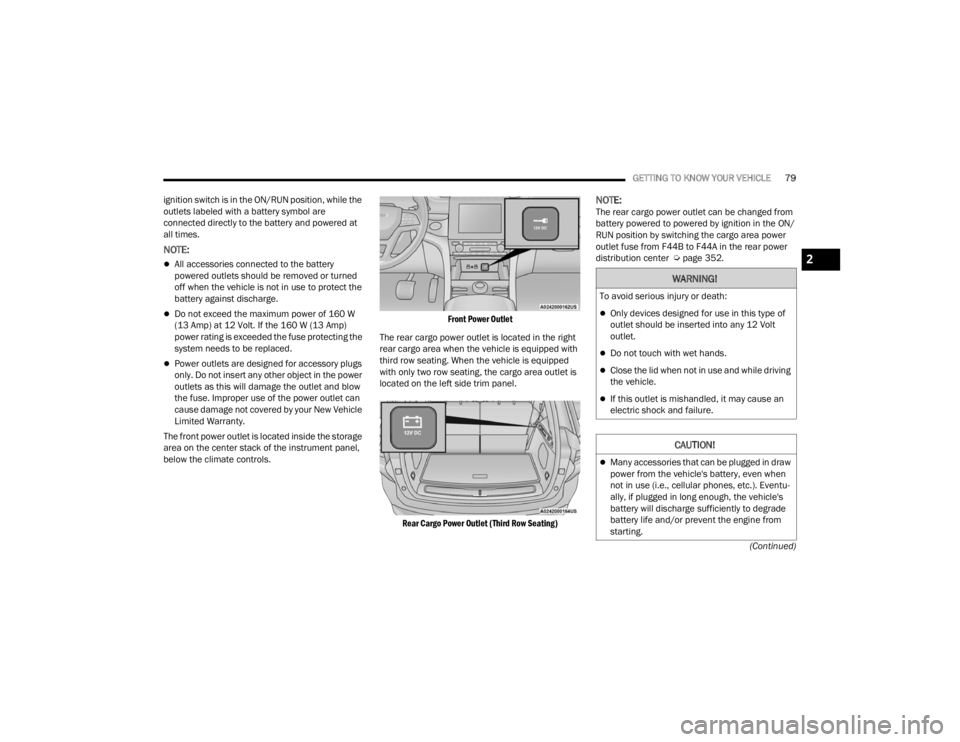
The front power outlet is located inside the storage
area on the center stack of the instrument panel,
below the climate controls.
Front Power Outlet
The rear cargo power outlet is located in the right
rear cargo area when the vehicle is equipped with
third row seating. When the vehicle is equipped
with only two row seating, the cargo area outlet is
located on the left side trim panel.
Rear Cargo Power Outlet (Third Row Seating)
NOTE:The rear cargo power outlet can be changed from
battery powered to powered by ignition in the ON/
RUN position by switching the cargo area power
outlet fuse from F44B to F44A in the rear power
distribution center Ú page 352.
WARNING!
To avoid serious injury or death:
Only devices designed for use in this type of
outlet should be inserted into any 12 Volt
outlet.
Do not touch with wet hands.
Close the lid when not in use and while driving
the vehicle.
If this outlet is mishandled, it may cause an
electric shock and failure.
CAUTION!
Many accessories that can be plugged in draw
power from the vehicle's battery, even when
not in use (i.e., cellular phones, etc.). Eventu -
ally, if plugged in long enough, the vehicle's
battery will discharge sufficiently to degrade
battery life and/or prevent the engine from
starting.
2
23_WL_OM_EN_USC_t.book Page 79
Page 82 of 424
80GETTING TO KNOW YOUR VEHICLE
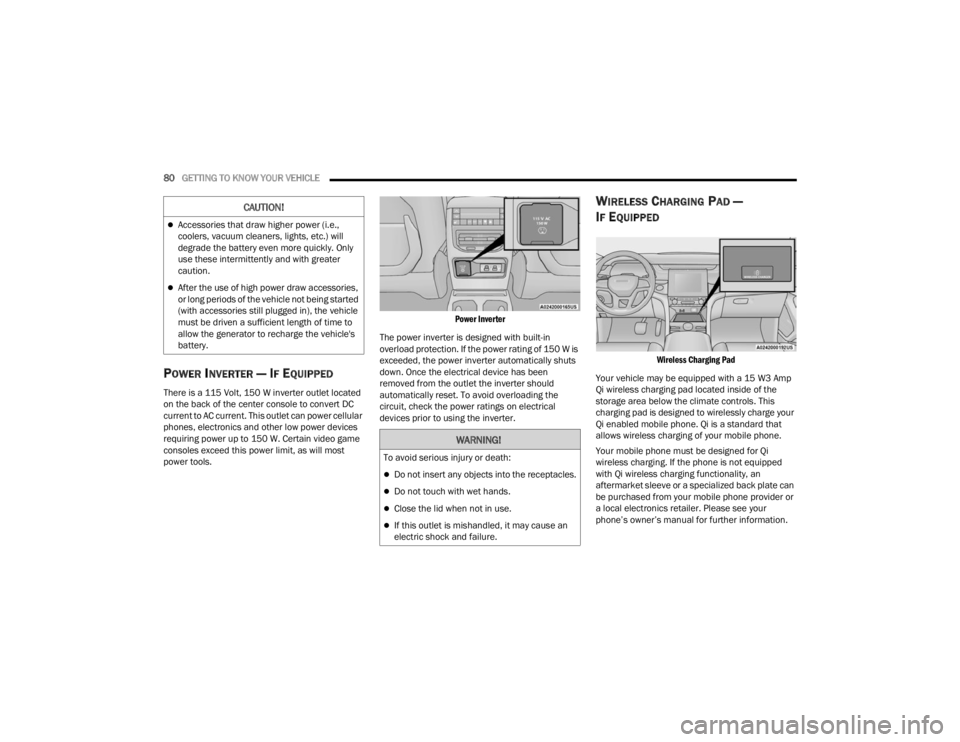
POWER INVERTER — IF EQUIPPED
There is a 115 Volt, 150 W inverter outlet located
on the back of the center console to convert DC
current to AC current. This outlet can power cellular
phones, electronics and other low power devices
requiring power up to 150 W. Certain video game
consoles exceed this power limit, as will most
power tools.
Power Inverter
The power inverter is designed with built-in
overload protection. If the power rating of 150 W is
exceeded, the power inverter automatically shuts
down. Once the electrical device has been
removed from the outlet the inverter should
automatically reset. To avoid overloading the
circuit, check the power ratings on electrical
devices prior to using the inverter.
WIRELESS CHARGING PAD —
I
F EQUIPPED
Wireless Charging Pad
Your vehicle may be equipped with a 15 W3 Amp
Qi wireless charging pad located inside of the
storage area below the climate controls. This
charging pad is designed to wirelessly charge your
Qi enabled mobile phone. Qi is a standard that
allows wireless charging of your mobile phone.
Your mobile phone must be designed for Qi
wireless charging. If the phone is not equipped
with Qi wireless charging functionality, an
aftermarket sleeve or a specialized back plate can
be purchased from your mobile phone provider or
a local electronics retailer. Please see your
phone’s owner’s manual for further information.
Accessories that draw higher power (i.e.,
coolers, vacuum cleaners, lights, etc.) will
degrade the battery even more quickly. Only
use these intermittently and with greater
caution.
After the use of high power draw accessories,
or long periods of the vehicle not being started
(with accessories still plugged in), the vehicle
must be driven a sufficient length of time to
allow the generator to recharge the vehicle's
battery.
CAUTION!
WARNING!
To avoid serious injury or death:
Do not insert any objects into the receptacles.
Do not touch with wet hands.
Close the lid when not in use.
If this outlet is mishandled, it may cause an
electric shock and failure.
23_WL_OM_EN_USC_t.book Page 80
Page 92 of 424

90GETTING TO KNOW YOUR VEHICLE
NOTE:
Opening or closing the Hands-Free Liftgate
requires a valid Passive Entry key fob within 5 ft
(1.5 m) of the liftgate handle. If a valid Passive
Entry key fob is not within 5 ft (1.5 m), the lift -
gate will not respond to any kicks.
The Hands-Free Liftgate feature may be turned
on or off through the Uconnect system
Ú page 204.
The Hands-Free Liftgate feature should be
turned off during jacking, tire changing, manual
car wash, and vehicle service.
The Hands-Free Liftgate feature can be acti -
vated by any metallic object making a similar
in-and-out motion under the rear fascia/
bumper, such as cleaning using a metal broom.
The Hands-Free Liftgate will only operate when
the transmission is in PARK.
If anything obstructs the Hands-Free Liftgate
while it is opening or closing, the liftgate will
automatically reverse to the closed/open posi -
tion, provided it meets sufficient resistance.
There are pinch sensors attached to the side of
the liftgate opening. Light pressure anywhere
along these strips will cause the liftgate to
return to the open position.
If the power liftgate encounters multiple
obstructions within the same cycle, the system
will automatically stop. If this occurs, the liftgate
must be operated manually.
The power liftgate will release, but not power
open, in temperatures below −12°F (−24°C).
Be sure to remove any buildup of snow or ice
from the liftgate before opening the liftgate.
If the liftgate is left open for an extended period
of time (approximately one hour), the liftgate
may need to be closed manually to reset power
liftgate functionality. Gas props support the liftgate in the open position.
However, because the gas pressure drops with
temperature, it may be necessary to assist the
props when opening the liftgate in cold weather.
NOTE:Allow the power system to open the liftgate.
Manually pushing or pulling the liftgate may
activate the liftgate obstacle detection feature and
stop the power operation or reverse its direction.
CARGO AREA FEATURES
Cargo Storage
The load floor is designed for a maximum load of
300 lb (136 kg).
If equipped, there may be a removable storage bin
located on the left side of the rear cargo area.
WARNING!
Driving with the liftgate open can allow
poisonous exhaust gases into your vehicle.
You and your passengers could be injured by
these fumes. Keep the liftgate closed when
you are operating the vehicle.
If you are required to drive with the liftgate
open, make sure that all windows are closed,
and the climate control blower switch is set at
high speed. Do not use the recirculation
mode.
WARNING!
During power operation, personal injury or cargo
damage may occur. Ensure the liftgate travel
path is clear. Make sure the liftgate is closed
and latched before driving away.
23_WL_OM_EN_USC_t.book Page 90
Page 124 of 424

122STARTING AND OPERATING
4. If the engine fails to start after eight attempts, allow the starter to cool for at least
10 minutes, then repeat the Extended Park
Starting procedure.
IF ENGINE FAILS TO START
If the engine fails to start after you have followed
the “Normal Starting” procedure and has not
experienced an Extended Park condition as
defined previously, it may be flooded. Push the
accelerator pedal all the way to the floor and hold
it there while the engine is cranking. This should
clear any excess fuel in case the engine is flooded.
The starter motor will engage automatically, run for
10 seconds, and then disengage. Once this occurs,
release the accelerator pedal and brake pedal,
wait 10 to 15 seconds, then repeat the “Normal
Starting” procedure.
COLD WEATHER OPERATION
(B
ELOW –22°F OR −30°C)
To ensure reliable starting at these temperatures,
use of an externally powered electric engine block
heater (available from an authorized dealer) is
recommended.
AFTER STARTING
The idle speed is controlled automatically, and it
will decrease as the engine warms up.
ENGINE BREAK-IN RECOMMENDATIONS
A long break-in period is not required for the engine
and drivetrain (transmission and axle) in your
vehicle.
Drive moderately during the first 300 miles
(500 km). After the initial 60 miles (100 km),
speeds up to 50 or 55 mph (80 or 90 km/h) are
desirable.
Brief full-throttle acceleration within the limits of
local traffic laws contributes to a good break-in.
Wide-open throttle acceleration in low gear can be
detrimental and should be avoided.
The engine oil installed in the engine at the factory
is a high-quality energy conserving type lubricant.
Oil changes should be consistent with anticipated
climate conditions under which vehicle operations
will occur Ú page 338.
CAUTION!
To prevent damage to the starter, do not crank
continuously for more than 10 seconds at a
time. Wait 10 to 15 seconds before trying again.
WARNING!
Never pour fuel or other flammable liquid into
the throttle body air inlet opening in an
attempt to start the vehicle. This could result
in flash fire causing serious personal injury.
Do not attempt to push or tow your vehicle to
get it started. Vehicles equipped with an auto -
matic transmission cannot be started this
way. Unburned fuel could enter the catalytic
converter and once the engine has started,
ignite and damage the converter and vehicle.
If the vehicle has a discharged battery,
booster cables may be used to obtain a start
from a booster battery or the battery in
another vehicle. This type of start can be
dangerous if done improperly Ú page 320.
CAUTION!
To prevent damage to the starter, do not
continuously crank the engine for more than 10
seconds at a time. Wait 10 to 15 seconds before
trying again.
23_WL_OM_EN_USC_t.book Page 122
Page 239 of 424

MULTIMEDIA237
Some options for a network connection are:
Wi-Fi Hotspot using a capable smartphone (if
activated, it will show as a possible network for
the system on the screen).
Outside connection like a home Wi-Fi network.
In-vehicle Wi-Fi.
NOTE:When a network is connected to the system for the
first time, an over-the-air-software update will take
place using the Wi-Fi connection. It is recom -
mended that an unlimited Wi-Fi connection, if
available, be used during this update. After this
first-time update, updates will only occur when one
is available.
Account Sign-in
The next step will be the option to sign in to your
Amazon account.
There are two options to sign into the system:
I already have an Amazon account: Sign in with
an already existing Amazon account
I am new to Amazon: Create a new Amazon
Account
If “I am new to Amazon” is selected, follow the
on-screen steps to set up an Amazon account with
the system. Parental Controls
Another feature that will appear during this first
time set up is parental controls.
When the parental controls page appears, it will
give the options “Enable Parental Controls” and
“No Parental Controls”. If “Enable Parental
Controls” is selected, follow the on-screen steps to
set up parental controls for the system.
ALEXA VOICE CONTROL
A feature with Rear Seat Entertainment with Fire
TV built-in that enhances your experience is Alexa.
It is simple to get started using this feature. Push
the Microphone button at the top of the Voice
Remote with Alexa to activate Alexa and get
started.
LISTEN VIA VEHICLE SPEAKERS
A feature within Rear Seat Entertainment with Fire
TV built-in is the front radio Listen feature. On the
front radio Home screen for Fire TV, select the
Listen button in the top right corner on either card
for Screen 1 or 2. This will allow you to have either
rear screen play audio through all the speakers in
the vehicle.
QUICK MENU
Accessing the quick menu will give you more
options for Fire TV.
To access the quick menu, tap the screen and it
will appear. The quick menu is also accessible by
pushing the Gear/Settings button on the Voice
Remote with Alexa.
Some options of the quick menu are:
Power — This will power the screen off.
On-Screen Remote
— This will bring up the
on-screen remote to use with the system.
Back — This will let you go back a page.
Home — This will take you to the Home screen.
Gear/Settings — This will let you access certain
settings in the system. For more setting options,
select “Settings” within the on-screen Gear/
Settings menu.
Vehicle — This will bring up the Vehicle menu.
From here you can adjust rear climate controls
and the Are We There Yet? app.
5
23_WL_OM_EN_USC_t.book Page 237