lock JEEP GRAND CHEROKEE 2023 Service Manual
[x] Cancel search | Manufacturer: JEEP, Model Year: 2023, Model line: GRAND CHEROKEE, Model: JEEP GRAND CHEROKEE 2023Pages: 424, PDF Size: 15.48 MB
Page 89 of 424
GETTING TO KNOW YOUR VEHICLE87
HOOD
OPENING THE HOOD
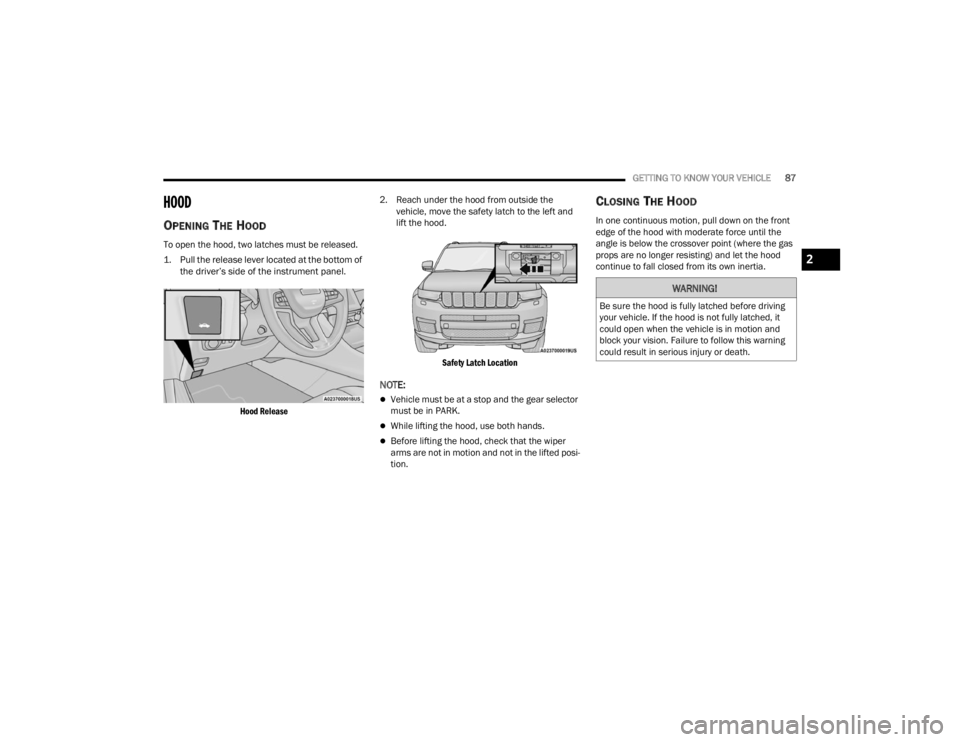
To open the hood, two latches must be released.
1. Pull the release lever located at the bottom of
the driver’s side of the instrument panel.
Hood Release
2. Reach under the hood from outside the
vehicle, move the safety latch to the left and
lift the hood.
Safety Latch Location
NOTE:
Vehicle must be at a stop and the gear selector
must be in PARK.
While lifting the hood, use both hands.
Before lifting the hood, check that the wiper
arms are not in motion and not in the lifted posi -
tion.
CLOSING THE HOOD
In one continuous motion, pull down on the front
edge of the hood with moderate force until the
angle is below the crossover point (where the gas
props are no longer resisting) and let the hood
continue to fall closed from its own inertia.
WARNING!
Be sure the hood is fully latched before driving
your vehicle. If the hood is not fully latched, it
could open when the vehicle is in motion and
block your vision. Failure to follow this warning
could result in serious injury or death.
2
23_WL_OM_EN_USC_t.book Page 87
Page 90 of 424
88GETTING TO KNOW YOUR VEHICLE
LIFTGATE
TO UNLOCK/OPEN THE LIFTGATE
The power liftgate may be opened by
pushing the liftgate button on the key fob
or by pushing the electronic liftgate
release button.
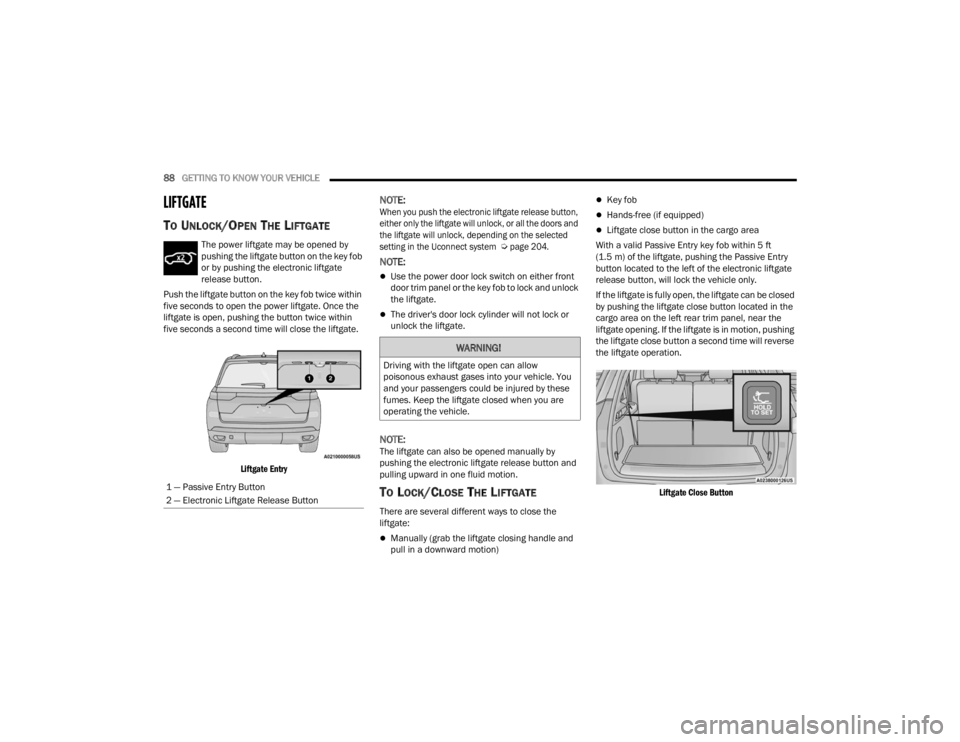
Push the liftgate button on the key fob twice within
five seconds to open the power liftgate. Once the
liftgate is open, pushing the button twice within
five seconds a second time will close the liftgate.
Liftgate Entry
NOTE:
When you push the electronic liftgate release button,
either only the liftgate will unlock, or all the doors and
the liftgate will unlock, depending on the selected
setting in the Uconnect system
Ú
page 204.
NOTE:
Use the power door lock switch on either front
door trim panel or the key fob to lock and unlock
the liftgate.
The driver's door lock cylinder will not lock or
unlock the liftgate.
NOTE:The liftgate can also be opened manually by
pushing the electronic liftgate release button and
pulling upward in one fluid motion.
TO LOCK/CLOSE THE LIFTGATE
There are several different ways to close the
liftgate:
Manually (grab the liftgate closing handle and
pull in a downward motion)
Key fob
Hands-free (if equipped)
Liftgate close button in the cargo area
With a valid Passive Entry key fob within 5 ft
(1.5 m) of the liftgate, pushing the Passive Entry
button located to the left of the electronic liftgate
release button, will lock the vehicle only.
If the liftgate is fully open, the liftgate can be closed
by pushing the liftgate close button located in the
cargo area on the left rear trim panel, near the
liftgate opening. If the liftgate is in motion, pushing
the liftgate close button a second time will reverse
the liftgate operation.
Liftgate Close Button
1 — Passive Entry Button
2 — Electronic Liftgate Release Button
WARNING!
Driving with the liftgate open can allow
poisonous exhaust gases into your vehicle. You
and your passengers could be injured by these
fumes. Keep the liftgate closed when you are
operating the vehicle.
23_WL_OM_EN_USC_t.book Page 88
Page 96 of 424

94GETTING TO KNOW YOUR VEHICLE
(Continued)
To move the crossbars, loosen the attachments,
located at the upper edge of each crossbar,
approximately eight turns using the anti-theft
wrench provided with the Mopar® crossbars.
Then, move the crossbar to the desired position,
keeping the crossbars parallel to the rack frame.
Once the crossbar is in the desired position,
retighten with the wrench to lock the crossbar into
position.
NOTE:If any cargo (or any metallic object) is placed over
the satellite radio antenna (if equipped), you may
experience interruption of satellite radio reception.
For improved satellite radio reception, place the
rear crossbar in the forward of the two rear
crossbar positions.
WARNING!
Cargo must be securely tied down before driving
your vehicle. Improperly secured loads can fly off
the vehicle, particularly at high speeds, resulting
in personal injury or property damage. Follow
the roof rack cautions when carrying cargo on
your roof rack.
CAUTION!
To prevent damage to the roof of your vehicle,
do not carry any loads on the roof rack without
the crossbars installed. The load should be
secured and placed on top of the crossbars,
not directly on the roof. If it is necessary to
place the load on the roof, place a blanket or
some other protection between the load and
the roof surface.
To avoid damage to the roof rack and vehicle,
do not exceed the maximum roof rack load
capacity of 150 lb (68 kg). Always distribute
heavy loads as evenly as possible and secure
the load appropriately.
Long loads which extend over the windshield,
such as wood panels or surfboards, or loads
with large frontal area should be secured to
both the front and rear of the vehicle.
Travel at reduced speeds and turn corners
carefully when carrying large or heavy loads
on the roof rack. Wind forces, due to natural
causes or nearby truck traffic, can add sudden
upward lift to a load. This is especially true on
large flat loads and may result in damage to
the cargo or your vehicle.
The use of vehicle systems that would adjust
the ride heights (such as Selec-Terrain modes
Rock or Sand/Mud) is not recommended
when using the Roof Luggage Rack to carry a
load.
CAUTION!
23_WL_OM_EN_USC_t.book Page 94
Page 104 of 424

102GETTING TO KNOW YOUR INSTRUMENT PANEL
Unstored Messages Until RUN
These messages deal primarily with the Remote
Start feature. This message type is displayed
until the ignition is in the RUN state. Examples of
this message type are “Remote Start Canceled - Door Ajar” and “Press Brake Pedal and Push
Button to Start”.
Five Second Unstored Messages
When the appropriate conditions occur, this
type of message takes control of the main display area for five seconds and then returns to
the previous screen. An example of this
message type is “Automatic High Beams On”.
Includes the following, but not limited to:
The Reconfigurable Telltales section is divided into the white or yellow telltales area on the left, and the green or red telltales area on the right. Vehicle Speed is Too High to Shift to R
Front Seat Belts UnbuckledDriver Seat Belt Unbuckled
Doors Open Passenger Seat Belt UnbuckledTraction Control Off
Vehicle Speed Too High To Shift to D Washer Fluid LowOil Pressure Low
Hood Open Oil Change DueFuel Low
Shift Not Allowed Service Anti-lock Brake SystemService Electronic Throttle Control
Service Shifter Service Power SteeringCruise Off
Vehicle Speed is Too High to Shift to P Cruise ReadyACC Override
Service Transmission Cruise Set To XXX mph or km/hClose Fuel Door
Liftgate Open Vehicle Not In ParkService Tire Pressure System
Door Open Park Brake EngagedBrake Fluid Low
Service Air Bag Warning Light Lights OnEngine Temperature Hot
Remote Start Disabled Start To Reset Right Front Turn Signal Light OutRight Rear Turn Signal Light Out
Service Air Bag System Left Front Turn Signal Light OutLeft Rear Turn Signal Light Out
Remote Start Canceled Liftgate Open Ignition OnCheck The Rear Seat
Remote Start Canceled Time Expired Remote Start Active Push Start ButtonRemote Start Canceled Fuel Low
Remote Start Canceled Hood Open Remote Start Canceled Door Open
23_WL_OM_EN_USC_t.book Page 102
Page 106 of 424
104GETTING TO KNOW YOUR INSTRUMENT PANEL
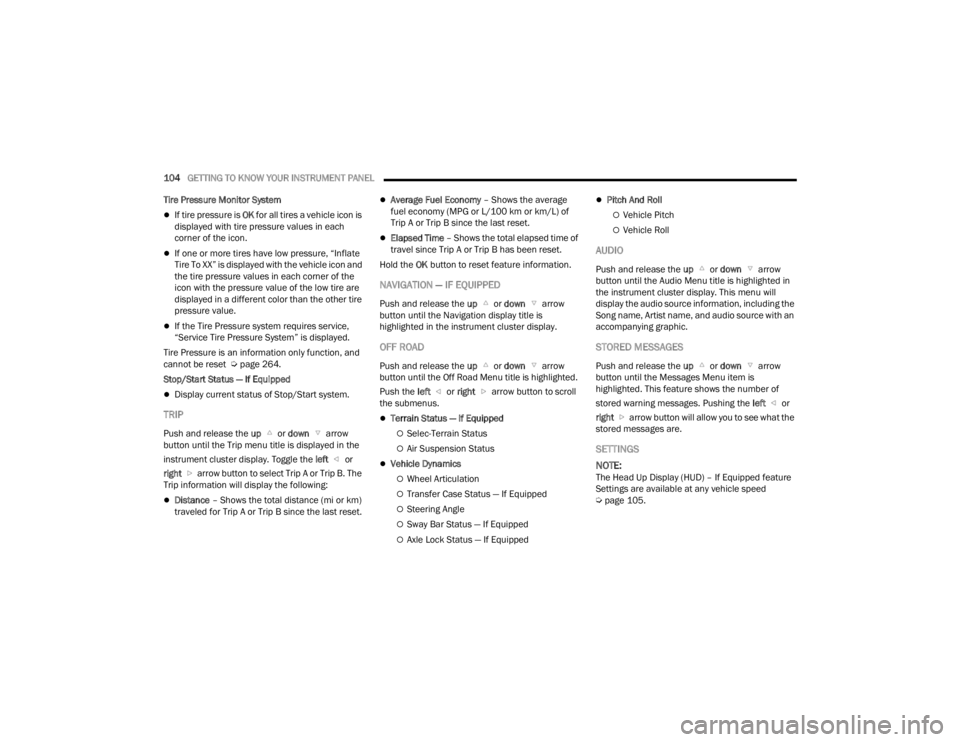
Tire Pressure Monitor System
If tire pressure is OK for all tires a vehicle icon is
displayed with tire pressure values in each
corner of the icon.
If one or more tires have low pressure, “Inflate
Tire To XX” is displayed with the vehicle icon and
the tire pressure values in each corner of the
icon with the pressure value of the low tire are
displayed in a different color than the other tire
pressure value.
If the Tire Pressure system requires service,
“Service Tire Pressure System” is displayed.
Tire Pressure is an information only function, and
cannot be reset Ú page 264.
Stop/Start Status — If Equipped
Display current status of Stop/Start system.
TRIP
Push and release the up or down arrow
button until the Trip menu title is displayed in the
instrument cluster display. Toggle the left or
right arrow button to select Trip A or Trip B. The
Trip information will display the following:
Distance – Shows the total distance (mi or km)
traveled for Trip A or Trip B since the last reset.
Average Fuel Economy – Shows the average
fuel economy (MPG or L/100 km or km/L) of
Trip A or Trip B since the last reset.
Elapsed Time – Shows the total elapsed time of
travel since Trip A or Trip B has been reset.
Hold the OK button to reset feature information.
NAVIGATION — IF EQUIPPED
Push and release the up or down arrow
button until the Navigation display title is
highlighted in the instrument cluster display.
OFF ROAD
Push and release the up or down arrow
button until the Off Road Menu title is highlighted.
Push the left or right arrow button to scroll
the submenus.
Terrain Status — If Equipped
Selec-Terrain Status
Air Suspension Status
Vehicle Dynamics
Wheel Articulation
Transfer Case Status — If Equipped
Steering Angle
Sway Bar Status — If Equipped
Axle Lock Status — If Equipped
Pitch And Roll
Vehicle Pitch
Vehicle Roll
AUDIO
Push and release the up or down arrow
button until the Audio Menu title is highlighted in
the instrument cluster display. This menu will
display the audio source information, including the
Song name, Artist name, and audio source with an
accompanying graphic.
STORED MESSAGES
Push and release the up or down arrow
button until the Messages Menu item is
highlighted. This feature shows the number of
stored warning messages. Pushing the left or
right arrow button will allow you to see what the
stored messages are.
SETTINGS
NOTE:
The Head Up Display (HUD) – If Equipped feature
Settings are available at any vehicle speed
Ú page 105.
23_WL_OM_EN_USC_t.book Page 104
Page 110 of 424
108GETTING TO KNOW YOUR INSTRUMENT PANEL
WARNING LIGHTS AND MESSAGES
The warning/indicator lights will illuminate in the
instrument panel together with a dedicated
message and/or acoustic signal when applicable.
These indications are indicative and precautionary
and as such must not be considered as exhaustive
and/or alternative to the information contained in
the Owner’s Manual, which you are advised to read
carefully in all cases. Always refer to the
information in this chapter in the event of a failure
indication. All active telltales will display first if
applicable. The system check menu may appear
different based upon equipment options and
current vehicle status. Some telltales are optional
and may not appear.
RED WARNING LIGHTS
Active Driving Assist - Driver
Inattentiveness Warning Light
This light illuminates when driver
inattentiveness has been continually
detected, warning the driver to place
their hands on the steering wheel.
Air Bag Warning Light
This warning light will illuminate to
indicate a fault with the air bag, and will
turn on for four to eight seconds as a bulb
check when the ignition is placed in the
ON/RUN position. This light will illuminate with a single chime when a fault with the air bag has been
detected, it will stay on until the fault is cleared. If
the light is either not on during startup, stays on, or
turns on while driving, have the system inspected
at an authorized dealer as soon as possible.
Brake Warning Light
This warning light monitors various brake
functions, including brake fluid level and
parking brake application. If the brake
light turns on it may indicate that the
parking brake is applied, that the brake fluid level
is low, or that there is a problem with the Anti-Lock
Brake System reservoir.
If the light remains on when the parking brake has
been disengaged, and the fluid level is at the full
mark on the master cylinder reservoir, it indicates
a possible brake hydraulic system malfunction or
that a problem with the Brake Booster has been
detected by the Anti-Lock Brake System (ABS) /
Electronic Stability Control (ESC) system. In this
case, the light will remain on until the condition has
been corrected. If the problem is related to the
brake booster, the ABS pump will run when
applying the brake, and a brake pedal pulsation
may be felt during each stop.
The dual brake system provides a reserve braking
capacity in the event of a failure to a portion of the
hydraulic system. A leak in either half of the dual
brake system is indicated by the Brake Warning
Light, which will turn on when the brake fluid level in the master cylinder has dropped below a
specified level.
The light will remain on until the cause is corrected.
NOTE:The light may flash momentarily during sharp
cornering maneuvers, which change fluid level
conditions. The vehicle should have service
performed, and the brake fluid level checked.
If brake failure is indicated, immediate repair is
necessary.
Vehicles equipped with the Anti-Lock Brake System
(ABS) are also equipped with Electronic Brake
Force Distribution (EBD). In the event of an EBD
failure, the Brake Warning Light will turn on along
with the ABS Light. Immediate repair to the ABS
system is required.
Operation of the Brake Warning Light can be
checked by turning the ignition switch from the OFF
position to the ON/RUN position. The light should
illuminate for approximately two seconds. The light
should then turn off unless the parking brake is
WARNING!
Driving a vehicle with the red brake light on is
dangerous. Part of the brake system may have
failed. It will take longer to stop the vehicle. You
could have a collision. Have the vehicle checked
immediately.
23_WL_OM_EN_USC_t.book Page 108
Page 113 of 424
GETTING TO KNOW YOUR INSTRUMENT PANEL111
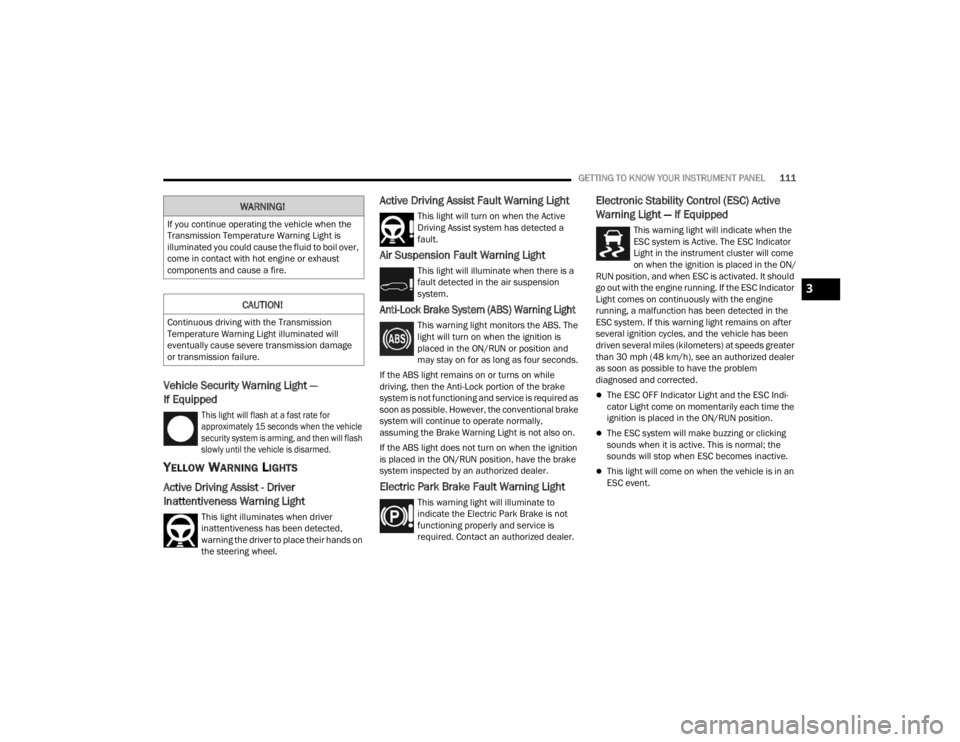
Vehicle Security Warning Light —
If Equipped
This light will flash at a fast rate for
approximately 15 seconds when the vehicle
security system is arming, and then will flash
slowly until the vehicle is disarmed.
YELLOW WARNING LIGHTS
Active Driving Assist - Driver
Inattentiveness Warning Light
This light illuminates when driver
inattentiveness has been detected,
warning the driver to place their hands on
the steering wheel.
Active Driving Assist Fault Warning Light
This light will turn on when the Active
Driving Assist system has detected a
fault.
Air Suspension Fault Warning Light
This light will illuminate when there is a
fault detected in the air suspension
system.
Anti-Lock Brake System (ABS) Warning Light
This warning light monitors the ABS. The
light will turn on when the ignition is
placed in the ON/RUN or position and
may stay on for as long as four seconds.
If the ABS light remains on or turns on while
driving, then the Anti-Lock portion of the brake
system is not functioning and service is required as
soon as possible. However, the conventional brake
system will continue to operate normally,
assuming the Brake Warning Light is not also on.
If the ABS light does not turn on when the ignition
is placed in the ON/RUN position, have the brake
system inspected by an authorized dealer.
Electric Park Brake Fault Warning Light
This warning light will illuminate to
indicate the Electric Park Brake is not
functioning properly and service is
required. Contact an authorized dealer.
Electronic Stability Control (ESC) Active
Warning Light — If Equipped
This warning light will indicate when the
ESC system is Active. The ESC Indicator
Light in the instrument cluster will come
on when the ignition is placed in the ON/
RUN position, and when ESC is activated. It should
go out with the engine running. If the ESC Indicator
Light comes on continuously with the engine
running, a malfunction has been detected in the
ESC system. If this warning light remains on after
several ignition cycles, and the vehicle has been
driven several miles (kilometers) at speeds greater
than 30 mph (48 km/h), see an authorized dealer
as soon as possible to have the problem
diagnosed and corrected.
The ESC OFF Indicator Light and the ESC Indi -
cator Light come on momentarily each time the
ignition is placed in the ON/RUN position.
The ESC system will make buzzing or clicking
sounds when it is active. This is normal; the
sounds will stop when ESC becomes inactive.
This light will come on when the vehicle is in an
ESC event.
WARNING!
If you continue operating the vehicle when the
Transmission Temperature Warning Light is
illuminated you could cause the fluid to boil over,
come in contact with hot engine or exhaust
components and cause a fire.
CAUTION!
Continuous driving with the Transmission
Temperature Warning Light illuminated will
eventually cause severe transmission damage
or transmission failure.
3
23_WL_OM_EN_USC_t.book Page 111
Page 116 of 424
114GETTING TO KNOW YOUR INSTRUMENT PANEL
also reduces fuel efficiency and tire tread life, and
may affect the vehicle’s handling and stopping
ability.
Please note that the TPMS is not a substitute for
proper tire maintenance, and it is the driver’s
responsibility to maintain correct tire pressure,
even if underinflation has not reached the level to
trigger illumination of the TPMS low tire pressure
telltale.
Your vehicle has also been equipped with a TPMS
malfunction indicator to indicate when the system
is not operating properly. The TPMS malfunction
indicator is combined with the low tire pressure
telltale. When the system detects a malfunction,
the telltale will flash for approximately one minute
and then remain continuously illuminated. This
sequence will continue upon subsequent vehicle
start-ups as long as the malfunction exists. When
the malfunction indicator is illuminated, the
system may not be able to detect or signal low tire
pressure as intended. TPMS malfunctions may
occur for a variety of reasons, including the
installation of replacement or alternate tires or
wheels on the vehicle that prevent the TPMS from
functioning properly. Always check the TPMS
malfunction telltale after replacing one or more
tires or wheels on your vehicle to ensure that the
replacement or alternate tires and wheels allow
the TPMS to continue to function properly.
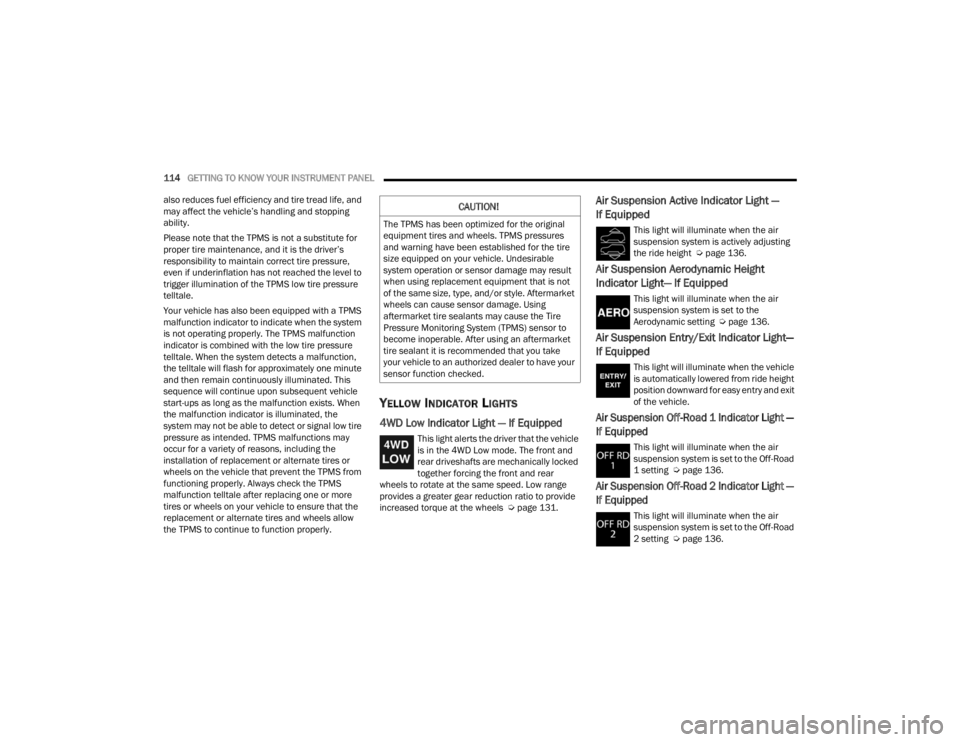
YELLOW INDICATOR LIGHTS
4WD Low Indicator Light — If Equipped
This light alerts the driver that the vehicle
is in the 4WD Low mode. The front and
rear driveshafts are mechanically locked
together forcing the front and rear
wheels to rotate at the same speed. Low range
provides a greater gear reduction ratio to provide
increased torque at the wheels Ú page 131.
Air Suspension Active Indicator Light —
If Equipped
This light will illuminate when the air
suspension system is actively adjusting
the ride height Úpage 136.
Air Suspension Aerodynamic Height
Indicator Light— If Equipped
This light will illuminate when the air
suspension system is set to the
Aerodynamic setting Ú page 136.
Air Suspension Entry/Exit Indicator Light—
If Equipped
This light will illuminate when the vehicle
is automatically lowered from ride height
position downward for easy entry and exit
of the vehicle.
Air Suspension Off-Road 1 Indicator Light —
If Equipped
This light will illuminate when the air
suspension system is set to the Off-Road
1 setting Úpage 136.
Air Suspension Off-Road 2 Indicator Light —
If Equipped
This light will illuminate when the air
suspension system is set to the Off-Road
2 setting Úpage 136.
CAUTION!
The TPMS has been optimized for the original
equipment tires and wheels. TPMS pressures
and warning have been established for the tire
size equipped on your vehicle. Undesirable
system operation or sensor damage may result
when using replacement equipment that is not
of the same size, type, and/or style. Aftermarket
wheels can cause sensor damage. Using
aftermarket tire sealants may cause the Tire
Pressure Monitoring System (TPMS) sensor to
become inoperable. After using an aftermarket
tire sealant it is recommended that you take
your vehicle to an authorized dealer to have your
sensor function checked.
23_WL_OM_EN_USC_t.book Page 114
Page 121 of 424
119
(Continued)
(Continued)
STARTING AND OPERATING
STARTING THE ENGINE
Before starting your vehicle, adjust your seat,
adjust the inside and outside mirrors, fasten your
seat belt, and if present, instruct all other
occupants to buckle their seat belts.
AUTOMATIC TRANSMISSION
The gear selector must be in the NEUTRAL (N) or
PARK (P) position before you can start the engine.
Apply the brakes before shifting into any driving
gear.
KEYLESS ENTER ‘N GO™ — IGNITION
This feature allows the driver to operate the
ignition switch with the push of a button, as long as
the Remote Start/Keyless Enter ‘n Go™ key fob is
in the passenger compartment.
NORMAL STARTING
To Turn On The Engine Using The ENGINE START/
STOP Button
1. The transmission must be in PARK (P).
2. Press and hold the brake pedal while pushing
the ENGINE START/STOP button once.
WARNING!
Before exiting a vehicle, always come to a
complete stop, then shift the automatic trans -
mission into PARK and apply the parking
brake.
Always make sure the keyless ignition node is
in the OFF position, key fob is removed from
the vehicle and vehicle is locked.
Never leave children alone in a vehicle, or with
access to an unlocked vehicle. Leaving chil -
dren in a vehicle unattended is dangerous for
a number of reasons. A child or others could
be seriously or fatally injured. Children should
be warned not to touch the parking brake,
brake pedal or the gear selector.
Do not leave the key fob in or near the vehicle,
or in a location accessible to children, and do
not leave the ignition of a vehicle equipped
with Keyless Enter ‘n Go™ in the ON/RUN
position. A child could operate power
windows, other controls, or move the vehicle.
Do not leave children or animals inside parked
vehicles in hot weather. Interior heat buildup
may cause serious injury or death.
CAUTION!
Damage to the transmission may occur if the
following precautions are not observed:
Do not shift from REVERSE (R), PARK, or
NEUTRAL into any forward gear when the
engine is above idle speed.
WARNING!
Shift into PARK only after the vehicle has
come to a complete stop.
Shift into or out of REVERSE only after the
vehicle has come to a complete stop and the
engine is at idle speed.
Before shifting into any gear, make sure your
foot is firmly on the brake pedal.
CAUTION!
4
23_WL_OM_EN_USC_t.book Page 119
Page 124 of 424
122STARTING AND OPERATING
4. If the engine fails to start after eight attempts, allow the starter to cool for at least
10 minutes, then repeat the Extended Park
Starting procedure.
IF ENGINE FAILS TO START
If the engine fails to start after you have followed
the “Normal Starting” procedure and has not
experienced an Extended Park condition as
defined previously, it may be flooded. Push the
accelerator pedal all the way to the floor and hold
it there while the engine is cranking. This should
clear any excess fuel in case the engine is flooded.
The starter motor will engage automatically, run for
10 seconds, and then disengage. Once this occurs,
release the accelerator pedal and brake pedal,
wait 10 to 15 seconds, then repeat the “Normal
Starting” procedure.
COLD WEATHER OPERATION
(B
ELOW –22°F OR −30°C)
To ensure reliable starting at these temperatures,
use of an externally powered electric engine block
heater (available from an authorized dealer) is
recommended.
AFTER STARTING
The idle speed is controlled automatically, and it
will decrease as the engine warms up.
ENGINE BREAK-IN RECOMMENDATIONS
A long break-in period is not required for the engine
and drivetrain (transmission and axle) in your
vehicle.
Drive moderately during the first 300 miles
(500 km). After the initial 60 miles (100 km),
speeds up to 50 or 55 mph (80 or 90 km/h) are
desirable.
Brief full-throttle acceleration within the limits of
local traffic laws contributes to a good break-in.
Wide-open throttle acceleration in low gear can be
detrimental and should be avoided.
The engine oil installed in the engine at the factory
is a high-quality energy conserving type lubricant.
Oil changes should be consistent with anticipated
climate conditions under which vehicle operations
will occur Ú page 338.
CAUTION!
To prevent damage to the starter, do not crank
continuously for more than 10 seconds at a
time. Wait 10 to 15 seconds before trying again.
WARNING!
Never pour fuel or other flammable liquid into
the throttle body air inlet opening in an
attempt to start the vehicle. This could result
in flash fire causing serious personal injury.
Do not attempt to push or tow your vehicle to
get it started. Vehicles equipped with an auto -
matic transmission cannot be started this
way. Unburned fuel could enter the catalytic
converter and once the engine has started,
ignite and damage the converter and vehicle.
If the vehicle has a discharged battery,
booster cables may be used to obtain a start
from a booster battery or the battery in
another vehicle. This type of start can be
dangerous if done improperly Ú page 320.
CAUTION!
To prevent damage to the starter, do not
continuously crank the engine for more than 10
seconds at a time. Wait 10 to 15 seconds before
trying again.
23_WL_OM_EN_USC_t.book Page 122