lock JEEP GRAND CHEROKEE 2023 Repair Manual
[x] Cancel search | Manufacturer: JEEP, Model Year: 2023, Model line: GRAND CHEROKEE, Model: JEEP GRAND CHEROKEE 2023Pages: 424, PDF Size: 15.48 MB
Page 182 of 424

180STARTING AND OPERATING
SERVICE THE NIGHT VISION SYSTEM
When service conditions are present, the following
fault messages may appear in the instrument
cluster display when the vehicle is placed in the ON
position.
If "Night Vision Unavailable Sensor Blocked"
appears in the instrument cluster display, make
sure the camera is clear of snow, ice, mud, dirt or
other debris. The camera is located in the upper
fascia/bumper, inside the driver side grille slot.
Clean the camera using a soft wet cloth or by
pressing the Clean Camera button in the Uconnect
system. If the message continues to appear after
cycling the ignition, see an authorized dealer.
If “Night Vision Temporarily Unavailable” or “Night
Vision Unavailable Service Required" appears in
the instrument cluster display after cycling the
ignition, see an authorized dealer.
The camera must be properly aligned to work
correctly. If the camera needs adjustment, see an
authorized dealer. Do not attempt to adjust the
camera yourself.
NOTE:Alignment and performance of the Night Vision
may be affected by aftermarket modifications.
Mopar® parts should be used to get the optimal
performance of this system.
NIGHT VISION SYSTEM LIMITATIONS
The Night Vision display is deactivated under the
following conditions:
Vehicle is shifted into REVERSE
The ignition is not in the ON/RUN position
The headlights are off and the vehicle speed is
greater than 8 mph (13 km/h)
The Night Vision display warnings are suppressed
under the following conditions:
Daylight hours
Temperatures above 86°F (30°C)
The system may not be fully functional in the
following situations:
On steep hills
On tight curves of the road
If the camera/sensor is damaged or blocked by
dirt, snow, ice, or other debris
In poor visibility conditions such as heavy fog,
rain, snow, or other weather conditions
If the vehicle has been modified with after -
market parts and/or accessories
NOTE:If any of these conditions are present, the system
does not need service.
WARNING!
Night Vision can only detect pedestrians and
animals located within the range of the
infrared camera.
Night Vision may not detect pedestrians or
animals and highlight them if:
They are not in an upright position, for
example if they are sitting or lying down, or
if the pedestrian is riding a bicycle
The figure in the display appears incom -
plete, for example because the pedes -
trian or animal is partially behind a vehicle
The pedestrian/animal is not directly
ahead in the coverage area
The pedestrian/animal is part of a group
The pedestrian is wearing certain types of
clothing
The pedestrian/animal is moving too
quickly through the field of view
The sensor is blocked by dirt, rain, snow,
or ice
23_WL_OM_EN_USC_t.book Page 180
Page 193 of 424
STARTING AND OPERATING191
TRAILER HITCH RECEIVER COVER
R
EMOVAL — IF EQUIPPED
Your vehicle may be equipped with a trailer hitch
receiver cover, this must be removed to access the
trailer hitch receiver. This cover is located at the
bottom center of the rear fascia/bumper.
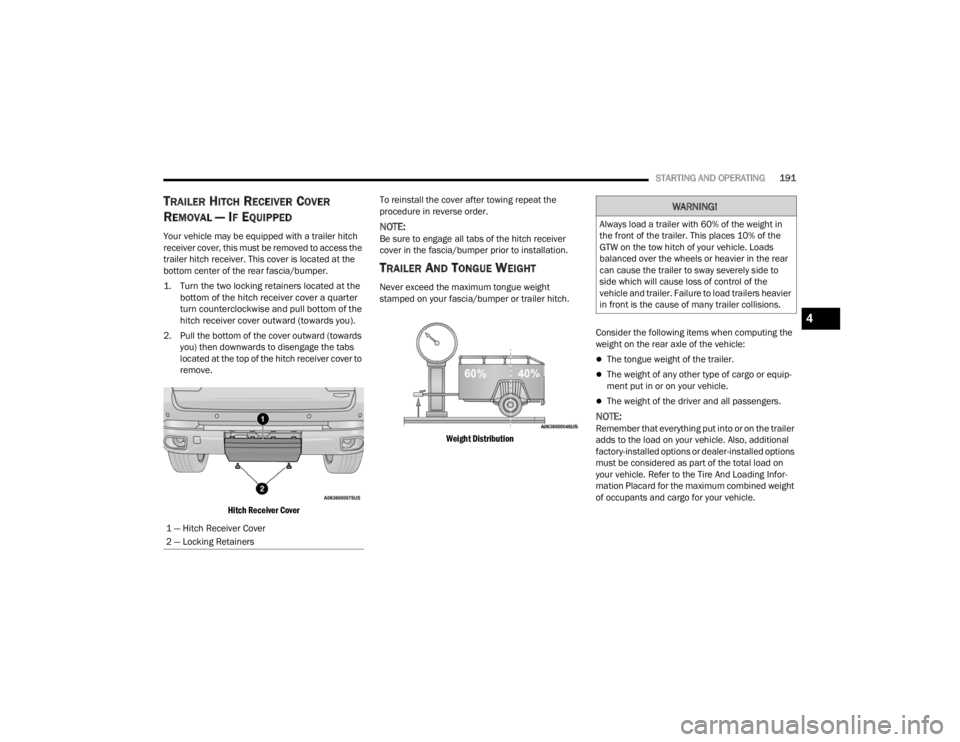
1. Turn the two locking retainers located at the
bottom of the hitch receiver cover a quarter
turn counterclockwise and pull bottom of the
hitch receiver cover outward (towards you).
2. Pull the bottom of the cover outward (towards you) then downwards to disengage the tabs
located at the top of the hitch receiver cover to
remove.
Hitch Receiver Cover
To reinstall the cover after towing repeat the
procedure in reverse order.NOTE:Be sure to engage all tabs of the hitch receiver
cover in the fascia/bumper prior to installation.
TRAILER AND TONGUE WEIGHT
Never exceed the maximum tongue weight
stamped on your fascia/bumper or trailer hitch.
Weight Distribution
Consider the following items when computing the
weight on the rear axle of the vehicle:
The tongue weight of the trailer.
The weight of any other type of cargo or equip
-
ment put in or on your vehicle.
The weight of the driver and all passengers.
NOTE:Remember that everything put into or on the trailer
adds to the load on your vehicle. Also, additional
factory-installed options or dealer-installed options
must be considered as part of the total load on
your vehicle. Refer to the Tire And Loading Infor -
mation Placard for the maximum combined weight
of occupants and cargo for your vehicle.
1 — Hitch Receiver Cover
2 — Locking Retainers
WARNING!
Always load a trailer with 60% of the weight in
the front of the trailer. This places 10% of the
GTW on the tow hitch of your vehicle. Loads
balanced over the wheels or heavier in the rear
can cause the trailer to sway severely side to
side which will cause loss of control of the
vehicle and trailer. Failure to load trailers heavier
in front is the cause of many trailer collisions.
4
23_WL_OM_EN_USC_t.book Page 191
Page 194 of 424

192STARTING AND OPERATING
(Continued)
(Continued)
TOWING REQUIREMENTS
To promote proper break-in of the new vehicle
drivetrain components, the following guidelines
are recommended.
Perform the maintenance listed in the Scheduled
Servicing Ú
page 330. When towing a trailer,
never exceed the GAWR or GCWR ratings.
Towing Requirements — Tires
Do not attempt to tow a trailer while using a
compact spare tire.
Do not drive more than 50 mph (80 km/h) when
towing while using a full size spare tire.
Proper tire inflation pressures are essential to
the safe and satisfactory operation of your
vehicle.
Check the trailer tires for proper tire inflation
pressures before trailer usage.
Check for signs of tire wear or visible tire
damage before towing a trailer.
Replacing tires with a higher load carrying
capacity will not increase the vehicle's GVWR
and GAWR limits.
For further information Ú page 374.
CAUTION!
Do not tow a trailer at all during the first
500 miles (805 km) the new vehicle is driven.
The engine, axle or other parts could be
damaged.
Then, during the first 500 miles (805 km) that
a trailer is towed, do not drive over 50 mph
(80 km/h) and do not make starts at full
throttle. This helps the engine and other parts
of the vehicle wear in at the heavier loads.
WARNING!
Make certain that the load is secured in the
trailer and will not shift during travel. When
trailering cargo that is not fully secured,
dynamic load shifts can occur that may be
difficult for the driver to control. You could lose
control of your vehicle and have a collision.
When hauling cargo or towing a trailer, do not
overload your vehicle or trailer. Overloading can
cause a loss of control, poor performance or
damage to brakes, axle, engine, transmission,
steering, suspension, chassis structure or tires.
Safety chains must always be used between
your vehicle and trailer. Always connect the
chains to the hook retainers of the vehicle
hitch. Cross the chains under the trailer
tongue and allow enough slack for turning
corners.
Vehicles with trailers should not be parked on
a grade. When parking, apply the parking
brake on the tow vehicle. Put the tow vehicle
transmission in PARK (P). For four-wheel drive
vehicles, make sure the transfer case is not in
NEUTRAL (N). Always, block or "chock" the
trailer wheels.
GCWR must not be exceeded.
Total weight must be distributed between the
tow vehicle and the trailer such that the
following four ratings are not exceeded :
GVWR
GTW
WARNING!
GAWR
Tongue weight rating for the trailer hitch
utilized
WARNING!
23_WL_OM_EN_USC_t.book Page 192
Page 200 of 424
198STARTING AND OPERATING
If the vehicle is equipped with Quadra-Lift
air suspension, the engine should be
started and left running for a minimum of
60 seconds (with all the doors closed) at
least once every 24 hours. This process
allows the air suspension to adjust the
vehicle’s ride height to compensate for
temperature effects.
Engaging/disengaging of the Electric Park
Brake requires the ignition to be in the ON/
RUN position.
If shift conditions/interlocks are not met, a
“4WD Shift Canceled” or a “4WD Shift
Aborted/ Retry Shift” message will be
displayed on the instrument cluster. To reat -
tempt shift, put the transmission in
NEUTRAL (N) and push and hold the 4WD
LOW button.
If shift conditions/interlocks are not met, a
“To Complete 4WD Shift Put Transmission
In Neutral” or a “To Complete 4WD Shift
Speed Must Be Below 3 MPH” or a “To
Complete 4WD Shift Allow Engine To Return
To Idle” message will flash from the instru -
ment cluster display Ú page 98.
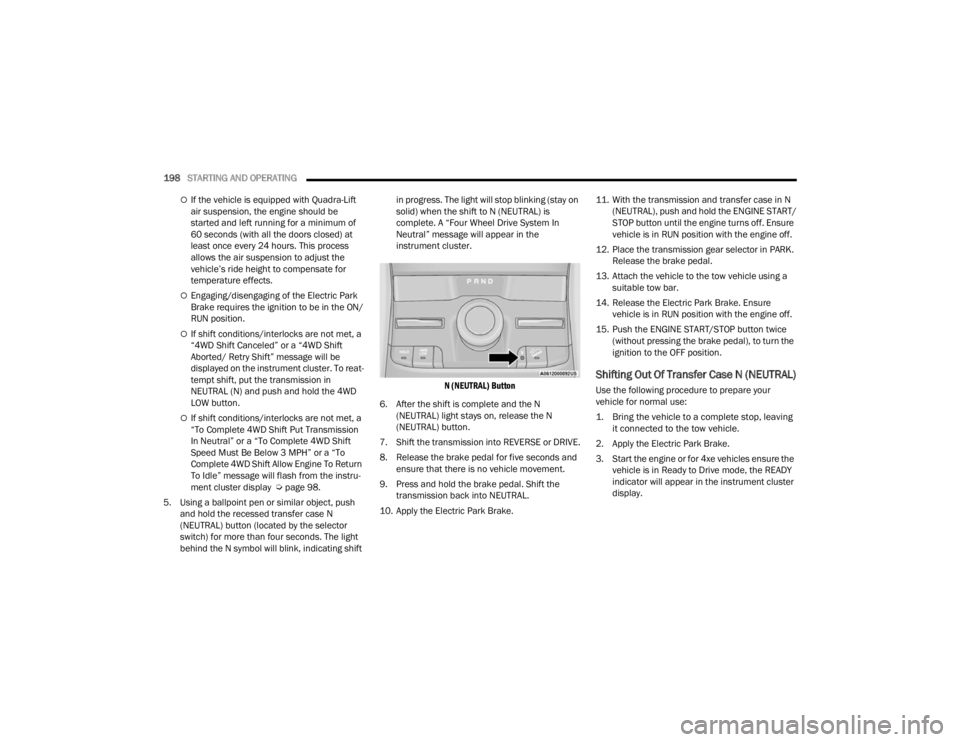
5. Using a ballpoint pen or similar object, push and hold the recessed transfer case N
(NEUTRAL) button (located by the selector
switch) for more than four seconds. The light
behind the N symbol will blink, indicating shift in progress. The light will stop blinking (stay on
solid) when the shift to N (NEUTRAL) is
complete. A “Four Wheel Drive System In
Neutral” message will appear in the
instrument cluster.
N (NEUTRAL) Button
6. After the shift is complete and the N (NEUTRAL) light stays on, release the N
(NEUTRAL) button.
7. Shift the transmission into REVERSE or DRIVE.
8. Release the brake pedal for five seconds and ensure that there is no vehicle movement.
9. Press and hold the brake pedal. Shift the transmission back into NEUTRAL.
10. Apply the Electric Park Brake. 11. With the transmission and transfer case in N
(NEUTRAL), push and hold the ENGINE START/
STOP button until the engine turns off. Ensure
vehicle is in RUN position with the engine off.
12. Place the transmission gear selector in PARK. Release the brake pedal.
13. Attach the vehicle to the tow vehicle using a suitable tow bar.
14. Release the Electric Park Brake. Ensure vehicle is in RUN position with the engine off.
15. Push the ENGINE START/STOP button twice (without pressing the brake pedal), to turn the
ignition to the OFF position.
Shifting Out Of Transfer Case N (NEUTRAL)
Use the following procedure to prepare your
vehicle for normal use:
1. Bring the vehicle to a complete stop, leaving it connected to the tow vehicle.
2. Apply the Electric Park Brake.
3. Start the engine or for 4xe vehicles ensure the vehicle is in Ready to Drive mode, the READY
indicator will appear in the instrument cluster
display.
23_WL_OM_EN_USC_t.book Page 198
Page 202 of 424

200STARTING AND OPERATING
OFF-ROAD DRIVING TIPS
Quadra-Lift — If Equipped
When off-roading, it is recommended that the
lowest useable vehicle height that will clear the
current obstacle or terrain be selected. The vehicle
height should then be raised as required by the
changes in terrain.
The Selec-Terrain switch will automatically change
the vehicle to the optimized height based on the
Selec-Terrain switch position. The vehicle height
can be changed from the default height for each
Selec-Terrain mode by normal use of the air
suspension switches Úpage 131.
When To Use 4WD LOW Range —
If Equipped
When off-road driving, shift to 4WD LOW for
additional traction. This range should be limited to
extreme situations such as deep snow, mud, or
sand where additional low speed pulling power is
needed. Vehicle speeds in excess of 25 mph
(40 km/h) should be avoided when in 4WD LOW
range.
Driving Through Water
Although your vehicle is capable of driving through
water, there are a number of precautions that
must be considered before entering the water.
NOTE:Your vehicle is capable of water fording in up to
24 inches (61 cm) with air suspension or
21 inches (53 cm) without air suspension, of water
while crossing small rivers or streams. To maintain
optimal performance of your vehicle's heating and
ventilation system it is recommended to switch the
system into recirculation mode during water
fording. Be sure to avoid lowering the vehicle in
water, ensure that the easy exit entry setting is
turned off in Uconnect settings. Driving through water more than a few inches/
centimeters deep will require extra caution to
ensure safety and prevent damage to your vehicle.
If you must drive through water, try to determine
the depth and the bottom condition (and location
of any obstacles) prior to entering. Proceed with
caution and maintain a steady controlled speed
less than 5 mph (8 km/h) in deep water to
minimize wave effects.
Flowing Water
If the water is swift flowing and rising (as in storm
run-off), avoid crossing until the water level
recedes and/or the flow rate is reduced. If you
must cross flowing water avoid depths in excess of
9 inches (23 cm). The flowing water can erode the
streambed, causing your vehicle to sink into
deeper water. Determine exit point(s) that are
downstream of your entry point to allow for drifting.
WARNING!
Do not drive in 4WD LOW range on dry
pavement; driveline damage may result. 4WD
LOW range locks front and rear drivelines
together and does not allow for differential
action between the front to rear driveshafts.
Driving in 4WD LOW on pavement will cause
driveline binding; use only on wet or slippery
surfaces.
CAUTION!
When driving through water, do not exceed
5 mph (8 km/h). Always check water depth
before entering as a precaution, and check all
fluids afterward. Driving through water may
cause damage that may not be covered by the
New Vehicle Limited Warranty.
23_WL_OM_EN_USC_t.book Page 200
Page 203 of 424

STARTING AND OPERATING201
Standing Water
Avoid driving in standing water deeper than
24 inches (61 cm) with air suspension or
21 inches (53 cm) without air suspension, and
reduce speed appropriately to minimize wave
effects. Maximum speed is 5 mph (8 km/h).
Maintenance
After driving through deep water, inspect your
vehicle fluids and lubricants (engine oil,
transmission oil, axle, transfer case) to ensure the
fluids have not been contaminated. Contaminated
fluid (milky, foamy in appearance) should be
flushed/changed as soon as possible to prevent
component damage.
Driving In Snow, Mud And Sand
In heavy snow, when pulling a load, or for
additional control at slower speeds, shift the
transmission to a low gear and shift the transfer
case to 4WD LOW if necessary Ú page 131. Only
shift into a lower gear to maintain forward motion.
Over-revving the engine can spin the wheels and
traction will be lost.
Avoid abrupt downshifts on icy or slippery roads,
because engine braking may cause skidding and
loss of control.
Hill Climbing
NOTE:Before attempting to climb a hill, determine the
conditions at the crest and/or on the other side.
Before climbing a steep hill, shift the transmission
to a lower gear and shift the transfer case to 4WD
LOW. Use FIRST gear and 4WD LOW for very steep
hills.
If you stall or begin to lose forward motion while
climbing a steep hill, allow your vehicle to come to
a stop and immediately apply the brakes. Restart
the engine, and shift into REVERSE (R). Back slowly
down the hill, allowing the compression braking of
the engine to help regulate your speed. If the
brakes are required to control vehicle speed, apply
them lightly and avoid locking or skidding the tires. Remember, never drive diagonally across a hill.
Always drive straight up or down.
If the wheels start to slip as you approach the crest
of a hill, ease off the accelerator and maintain
forward motion by turning the front wheels slowly.
This may provide a fresh “bite” into the surface and
will usually provide traction to complete the climb.
Traction Downhill
When descending mountains or hills, use Hill
Descent Control or Selec-Speed Control to avoid
repeated heavy braking.
If not equipped with Hill Descent Control or
Selec-Speed Control use the following procedure:
Shift the transmission into a low gear, and the
transfer case into 4WD LOW range. Let the vehicle
go slowly down the hill with all four wheels turning
against engine compression drag. This will permit
you to control the vehicle speed and direction.
When descending mountains or hills, repeated
braking can cause brake fade with loss of braking
control. Avoid repeated heavy braking by
downshifting the transmission whenever possible.
WARNING!
If the engine stalls, you lose forward motion, or
cannot make it to the top of a steep hill or grade,
never attempt to turn around. To do so may
result in tipping and rolling the vehicle. Always
back carefully straight down a hill in REVERSE
gear. Never back down a hill in NEUTRAL using
only the brake.
4
23_WL_OM_EN_USC_t.book Page 201
Page 215 of 424

MULTIMEDIA213
Clock & Date
Rear Seat Alert
When this setting is turned on and the rear doors are opened while the engine is
running, or if the engine is turned on within 10 minutes of the door opening, a
message will appear to check the rear seat when the vehicle is powered OFF.
Setting Name
Description
When the Clock & Date button is pressed on the touchscreen, the system displays the different options related to the vehicle’s internal clock.
NOTE:Depending on the vehicle’s options, feature settings may vary.
Setting NameDescription
Sync Time With GPS This setting will sync the time to the GPS receiver in the system. The system
will control the time via the GPS location.
Time Format This setting will allow you to set the time format (AM/PM). Sync Time With GPS
must be off for this setting to be available. The “12 hrs” setting will set the
time to a 12-hour format. The “24 hrs” setting will set the time to a 24-hour
format.
Set Time This setting will allow you to set the hours and minutes. Sync Time With GPS
must be off for this setting to be available. The “+” setting will increase the
hours or minutes. The “-” setting will decrease the hours or minutes.
Set Date This setting will allow you to set the day, month and year. Using “+” or “-”, you
can scroll through the available days, months, and years.
Show Time and Date During Screen Off This setting will allow you to show the time and date while the screen is off.
Available options are “On” and “Off”.
5
23_WL_OM_EN_USC_t.book Page 213
Page 218 of 424

216MULTIMEDIA
Mirrors & Wipers
ParkView Backup Camera Delay This setting will add a timed delay to the ParkView Backup Camera when
shifting out of REVERSE.
ParkView Backup Camera Active Guidelines This setting will turn the ParkView Backup Camera Active Guidelines on or off.
Forward Facing Camera Guidelines This setting will turn the Forward Facing Camera Guidelines on or off.
Setting NameDescription
When the Mirrors & Wipers button is pressed on the touchscreen, the system displays the options related to the vehicle’s mirrors and wipers.
NOTE:Depending on the vehicle’s options, feature settings may vary.
Setting NameDescription
Tilt Side Mirrors In Reverse This setting will tilt the outside side-view mirrors when the ignition is in the
ON/RUN position and the transmission gear selector is in the REVERSE
position. The mirrors will move back to their previous position when the
transmission is shifted out of REVERSE. The available settings are “On” and
“Off”.
Auto Folding Side Mirrors This setting will automatically fold and unfold the side-view mirrors when the
vehicle is turned off, the doors are locked, or the key fob button is pushed.
The available options are “On” and “Off”.
Rain Sensing Auto Wipers This setting will turn the Rain Sensing Auto Wipers on or off.
Headlights With Wipers This setting will turn the headlights on when the wipers are activated.
23_WL_OM_EN_USC_t.book Page 216
Page 219 of 424

MULTIMEDIA217
Lights
When the Lights button is pressed on the touchscreen, the system displays the options related to the vehicle’s exterior and interior lights.
NOTE:
When the “Daytime Running Lights” feature is selected, the daytime running lights can be turned on or off. This feature is only allowed by law in the country
of the vehicle purchase.
Depending on the vehicle’s options, feature settings may vary.
Setting Name Description
Ambient Color Personalization This setting will redirect to a new menu that will allow you to change the
ambient lighting color in the cabin.
Headlight Off Delay This setting will allow you to set the amount of time it takes for the headlights
to shut off after the vehicle is turned off. The available settings are “0 sec”,
“30 sec”, “60 sec”, and “90 sec”.
Headlight Illumination On Approach This setting will allow you to set the amount of time it takes for the headlights
to shut off after the vehicle is unlocked. “Greeting Lights” must be selected
and “Headlight Illumination on Approach” must be selected above 0 seconds
for the feature to be enabled. The available settings are “0 sec”, “30 sec”, “60
sec”, and “90 sec”.
Headlights with Wipers This setting will turn the headlights on when the wipers are activated.
Proximity Wake-Up This setting will allow you to turn on or off some exterior and interior lighting
illumination when approaching the vehicle.
NOTE:“Headlight Illumination On Approach” must be set to a value other than zero
for “Proximity Wake-Up” to be active.
5
23_WL_OM_EN_USC_t.book Page 217
Page 220 of 424

218MULTIMEDIA
Brakes
Greeting Lights When the “Greeting Lights” feature is selected, it enables “Headlight
Illumination On Approach”. When “Headlight Illumination On Approach” is
selected, it allows the adjustment of the amount of time the headlights
remain on after the doors are unlocked with the key fob. “Greeting Lights”
must be selected and “Headlight Illumination On Approach” must be selected
above zero seconds for the feature to be enabled. The available settings are
“On” and “Off”.
Auto Dim High Beams This setting will allow you to turn the Auto Dim High Beams on or off.
Daytime Running Lights This setting will allow you to turn the Daytime Running Lights on or off.
Cornering Lights When this setting is selected, if the steering wheel rotation angle is large or
the turn signal indicators are on, a light (incorporated in the fog light) will turn
on, on the relevant side to improve visibility at night.
Flash Lights With Lock This setting will allow you to turn the flashing of the lights when the Lock
button is pushed on the key fob on or off.
Setting Name
Description
When the Brakes button is pressed on the touchscreen, the system will display settings related to the vehicle’s brake system.
NOTE:Depending on the vehicle’s options, feature settings may vary.
Setting NameDescription
Auto Park Brake This setting will turn the Auto Park Brake on or off.
Brake Service This setting will allow you to set the brakes for service. When the setting is
selected, a pop-up will display with “Yes” and “No” options.
23_WL_OM_EN_USC_t.book Page 218