lock JEEP GRAND CHEROKEE 2023 Manual PDF
[x] Cancel search | Manufacturer: JEEP, Model Year: 2023, Model line: GRAND CHEROKEE, Model: JEEP GRAND CHEROKEE 2023Pages: 424, PDF Size: 15.48 MB
Page 221 of 424

MULTIMEDIA219
Doors & Locks
When the Doors & Locks button is pressed on the touchscreen, the system displays the options related to locking and unlocking the vehicle’s doors.
NOTE:
The Auto Door Locks feature default condition is enabled. When enabled, the door locks will lock automatically when the vehicle’s speed exceeds 15 mph
(24 km/h). The Auto Door Locks feature can be enabled or disabled by an authorized dealer per written request of the customer. Please see an authorized
dealer for service.
Depending on the vehicle’s options, feature settings may vary.
Setting Name Description
Auto Door Locks This setting will allow you to change if the doors lock automatically when the
vehicle reaches 15 mph (24 km/h).
Auto Unlock On Exit This setting will unlock the doors when any of the doors are opened from the
inside.
Flash Lights With Lock This setting will allow you to turn the flashing of the lights when the Lock
button is pushed on the key fob on or off.
Sound Horn With Lock This setting will sound the horn when the Lock button is pushed on the key
fob. The “Off” setting will not sound the horn when the Lock button is pushed.
The “1st Press” setting will sound the horn when the Lock button is pushed
once. The “2nd Press” setting will sound the horn when the Lock button is
pushed twice.
Sound Horn With Remote Start This setting will sound the horn when the remote start is activated from the
key fob.
Remote Door Unlock, Door Lock/1st Press Of Key Fob Unlocks This setting will change how many pushes of the Unlock button on the key fob
are needed to unlock all the doors. The “Driver Door” setting will only unlock
the driver door on the first push on the Unlock button. The “All Doors” setting
will unlock all doors with only one push of the Unlock button.5
23_WL_OM_EN_USC_t.book Page 219
Page 222 of 424

220MULTIMEDIA
Seats & Comfort
Passive Entry This setting will allow you to turn the Passive Entry feature
(Keyless Enter ‘n Go™) on or off.
Personal Settings Linked To Key Fob This setting will recall preset radio stations and driver seat position that have
been linked to the key fob.
Power Liftgate Alert This setting will chime an audible alert when the power liftgate is raising or
lowering. Selectable options are “On” and “Off”.
Hands-Free Power Liftgate This setting will use hands-free technology to automatically open or close the
power liftgate. Selectable options are “On” and “Off”.
Auto Relock This setting will lock the doors after 30 seconds of the doors remaining
unlocked. The available options are “On” and “Off”.
Setting Name
Description
When Seats & Comfort button is pressed on the touchscreen, the system displays the options related to the vehicle’s comfort systems when remote start has
been activated or the vehicle has been started.
NOTE:Depending on the vehicle’s options, feature settings may vary.
Setting NameDescription
Easy Exit Seats This setting will automatically move the driver seat rearward when the engine
is shut off. The available settings are “On” and “Off”.
23_WL_OM_EN_USC_t.book Page 220
Page 223 of 424

MULTIMEDIA221
Key Off Options
Auto-On Driver Heated/Ventilated Seat & Heated Steering Wheel With Vehicle
Start This setting will activate the vehicle’s comfort systems and heated seats or
heated steering wheel when the vehicle is remote started or ignition is
started. The “Off” setting will not activate the comfort systems. The “Remote
Start” setting (if equipped) will only activate the comfort systems when using
Remote Start. The “All Start” setting will activate the comfort systems
whenever the vehicle is started.
3rd Row Seat Recline Lockout This setting will activate the 3rd Row Seat Recline Lockout. Selectable options
are “Off”, “Lock On Ignition”, and “Always Locked”.
Setting Name
Description
When the Key Off Options button is pressed on the touchscreen, the system displays the options related to vehicle shutoff. These settings will only activate
when the ignition is set to OFF.
NOTE:Depending on the vehicle’s options, feature settings may vary.
Setting NameDescription
Sound Horn With Lower
This setting will sound the horn when the Lower button is pressed on the key fob.
Flash Lights With Lower
This setting will flash the lights when the Lower button is pressed on the key fob.
Easy Exit Seat This setting adjusts the seats to make exiting the vehicle easier.
Headlight Off Delay This setting will allow you to set the amount of time the headlights remain on
after the vehicle has been turned off. The available settings are “0 sec”, “30
sec”, “60 sec”, and “90 sec”.
Auto Entry/Exit Suspension This setting will turn the Auto Entry/Exit Suspension system on or off.
5
23_WL_OM_EN_USC_t.book Page 221
Page 227 of 424

MULTIMEDIA225
SiriusXM® Setup
Accessibility — If Equipped
When the SiriusXM® Setup button is pressed on the touchscreen, the system displays the options related to SiriusXM® satellite radio. These settings can be
used to skip specific radio channels and restart favorite songs from the beginning.
NOTE:
A subscription to SiriusXM® satellite radio is required for these settings to be functional.
Depending on the vehicle’s options, feature settings may vary.
Setting Name Description
SiriusXM® Account, Profile, And Settings This setting will redirect you to the SiriusXM® Settings menu within the
SiriusXM® menu.
Block Explicit This setting will skip over content labeled as explicit. The available settings
are “On” and “Off”.
After pressing the Accessibility button on the touchscreen, the following setting will be available:
NOTE:Depending on the vehicle’s options, feature settings may vary.
Setting Name
Description
Video Button Readback This setting will turn the Video Button Readback feature on or off.
5
23_WL_OM_EN_USC_t.book Page 225
Page 230 of 424
228MULTIMEDIA
STEERING WHEEL AUDIO CONTROLS
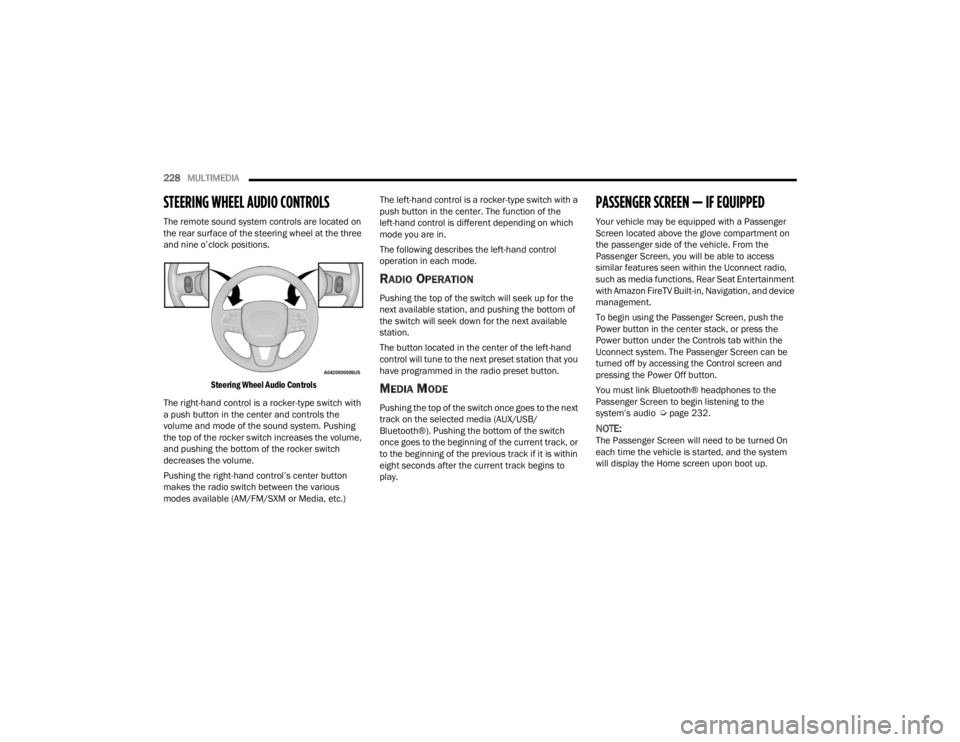
The remote sound system controls are located on
the rear surface of the steering wheel at the three
and nine o’clock positions.
Steering Wheel Audio Controls
The right-hand control is a rocker-type switch with
a push button in the center and controls the
volume and mode of the sound system. Pushing
the top of the rocker switch increases the volume,
and pushing the bottom of the rocker switch
decreases the volume.
Pushing the right-hand control’s center button
makes the radio switch between the various
modes available (AM/FM/SXM or Media, etc.) The left-hand control is a rocker-type switch with a
push button in the center. The function of the
left-hand control is different depending on which
mode you are in.
The following describes the left-hand control
operation in each mode.
RADIO OPERATION
Pushing the top of the switch will seek up for the
next available station, and pushing the bottom of
the switch will seek down for the next available
station.
The button located in the center of the left-hand
control will tune to the next preset station that you
have programmed in the radio preset button.
MEDIA MODE
Pushing the top of the switch once goes to the next
track on the selected media (AUX/USB/
Bluetooth®). Pushing the bottom of the switch
once goes to the beginning of the current track, or
to the beginning of the previous track if it is within
eight seconds after the current track begins to
play.
PASSENGER SCREEN — IF EQUIPPED
Your vehicle may be equipped with a Passenger
Screen located above the glove compartment on
the passenger side of the vehicle. From the
Passenger Screen, you will be able to access
similar features seen within the Uconnect radio,
such as media functions, Rear Seat Entertainment
with Amazon FireTV Built-in, Navigation, and device
management.
To begin using the Passenger Screen, push the
Power button in the center stack, or press the
Power button under the Controls tab within the
Uconnect system. The Passenger Screen can be
turned off by accessing the Control screen and
pressing the Power Off button.
You must link Bluetooth® headphones to the
Passenger Screen to begin listening to the
system’s audio Ú
page 232.
NOTE:The Passenger Screen will need to be turned On
each time the vehicle is started, and the system
will display the Home screen upon boot up.
23_WL_OM_EN_USC_t.book Page 228
Page 234 of 424
232MULTIMEDIA
REAR SEAT ENTERTAINMENT WITH
A
MAZON FIRE T V BUILT-IN — IF
E
QUIPPED
Rear Seat Entertainment with Fire TV built-in will let
you control and listen in to the content being
played on the rear entertainment screens. You can
view the contents of the rear screens, lock the rear
screens, change the source of the rear screens, or
turn the rear screens on or off Ú page 234.
HDMI PROJECTING
HDMI lets you connect a device to the provided
HDMI port, using an HDMI cable, and project the
device directly to the Passenger Screen. To begin,
plug a device into the HDMI port. Then, press the
HDMI button on the touchscreen.
HDMI will continue to show the menu bar and
Headphone Paring button.
NOTE:
The HDMI Card will not automatically launch
when a new device is connected. The HDMI
Card will show a device connected, and the Card
will need to be pressed.
If the user disconnects a device from the HDMI
port while the HDMI Card is in full screen, the
system will close HDMI and reload the Home
screen.
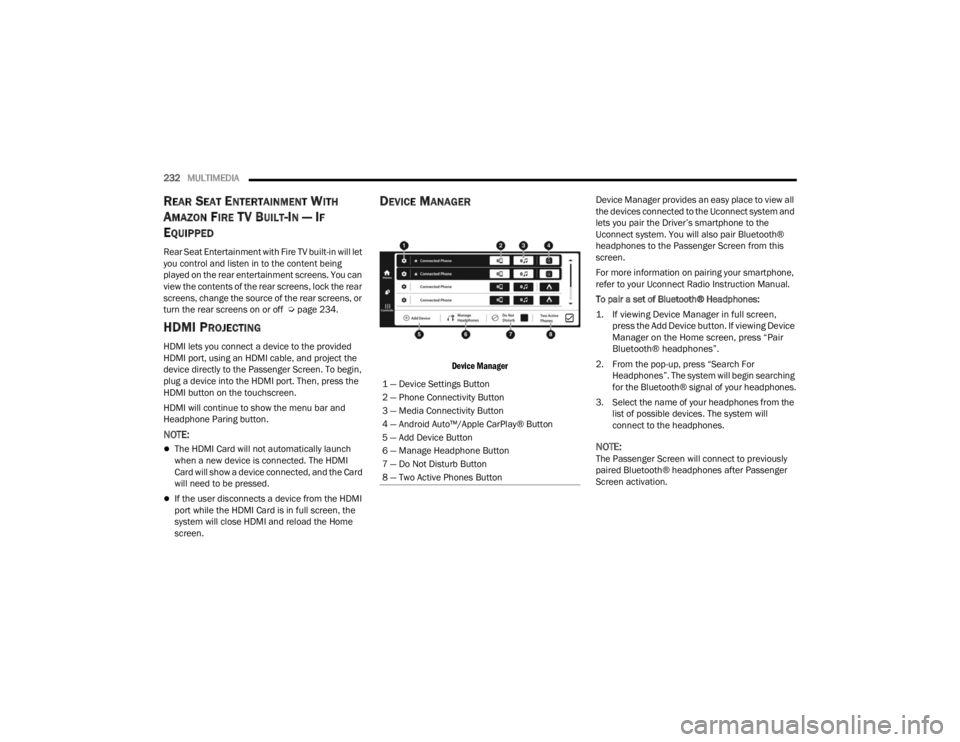
DEVICE MANAGER
Device Manager
Device Manager provides an easy place to view all
the devices connected to the Uconnect system and
lets you pair the Driver’s smartphone to the
Uconnect system. You will also pair Bluetooth®
headphones to the Passenger Screen from this
screen.
For more information on pairing your smartphone,
refer to your Uconnect Radio Instruction Manual.
To pair a set of Bluetooth® Headphones:
1. If viewing Device Manager in full screen,
press the Add Device button. If viewing Device
Manager on the Home screen, press “Pair
Bluetooth® headphones”.
2. From the pop-up, press “Search For Headphones”. The system will begin searching
for the Bluetooth® signal of your headphones.
3. Select the name of your headphones from the list of possible devices. The system will
connect to the headphones.
NOTE:The Passenger Screen will connect to previously
paired Bluetooth® headphones after Passenger
Screen activation.
1 — Device Settings Button
2 — Phone Connectivity Button
3 — Media Connectivity Button
4 — Android Auto™/Apple CarPlay® Button
5 — Add Device Button
6 — Manage Headphone Button
7 — Do Not Disturb Button
8 — Two Active Phones Button
23_WL_OM_EN_USC_t.book Page 232
Page 248 of 424
246MULTIMEDIA
VEHICLE DYNAMICS
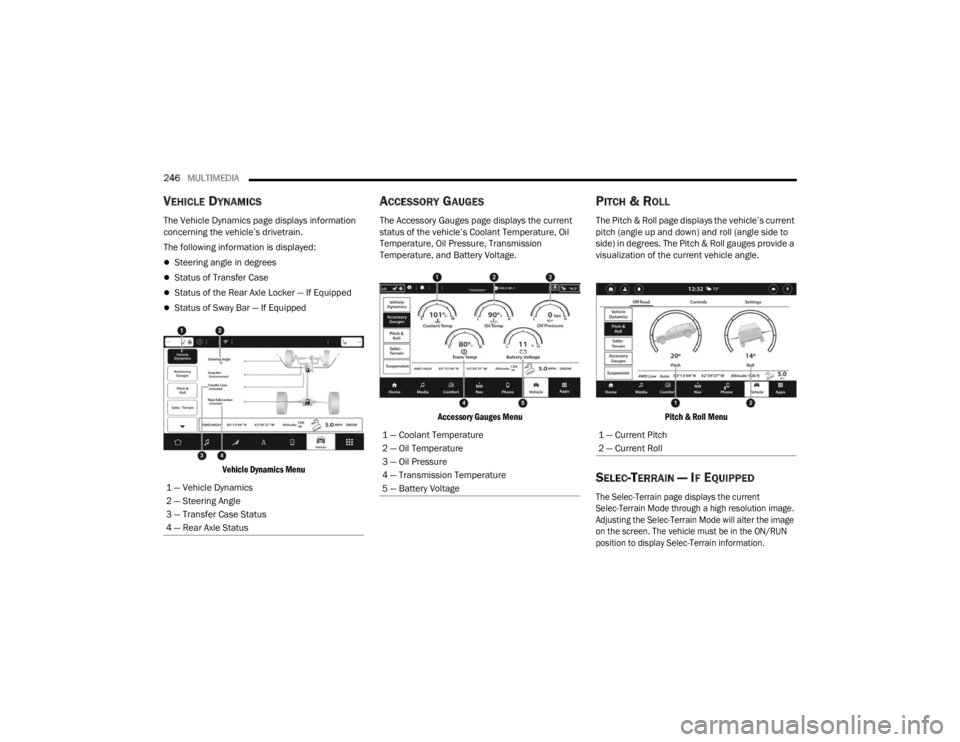
The Vehicle Dynamics page displays information
concerning the vehicle’s drivetrain.
The following information is displayed:
Steering angle in degrees
Status of Transfer Case
Status of the Rear Axle Locker — If Equipped
Status of Sway Bar — If Equipped
Vehicle Dynamics Menu
ACCESSORY GAUGES
The Accessory Gauges page displays the current
status of the vehicle’s Coolant Temperature, Oil
Temperature, Oil Pressure, Transmission
Temperature, and Battery Voltage.
Accessory Gauges Menu
PITCH & ROLL
The Pitch & Roll page displays the vehicle’s current
pitch (angle up and down) and roll (angle side to
side) in degrees. The Pitch & Roll gauges provide a
visualization of the current vehicle angle.
Pitch & Roll Menu
SELEC-TERRAIN — IF EQUIPPED
The Selec-Terrain page displays the current
Selec-Terrain Mode through a high resolution image.
Adjusting the Selec-Terrain Mode will alter the image
on the screen. The vehicle must be in the ON/RUN
position to display Selec-Terrain information.
1 — Vehicle Dynamics
2 — Steering Angle
3 — Transfer Case Status
4 — Rear Axle Status
1 — Coolant Temperature
2 — Oil Temperature
3 — Oil Pressure
4 — Transmission Temperature
5 — Battery Voltage1 — Current Pitch
2 — Current Roll
23_WL_OM_EN_USC_t.book Page 246
Page 250 of 424
248 (Continued)
SAFETY
SAFETY FEATURES
ANTI-LOCK BRAKE SYSTEM (ABS)
The ABS provides increased vehicle stability and
brake performance under most braking conditions.
The system automatically prevents wheel lock and
enhances vehicle control during braking.
The ABS performs a self-check cycle to ensure that
the ABS is working properly each time the vehicle
is started and driven. During this self-check, you
may hear a slight clicking sound as well as some
related motor noises.
The ABS is activated during braking when the
system detects one or more wheels are beginning
to lock. Road conditions such as ice, snow, gravel,
bumps, railroad tracks, loose debris, or panic stops
may increase the likelihood of ABS activation(s).
You also may experience the following normal
characteristics when the ABS activates:
ABS motor noise or clicking sounds (you may
continue to hear for a short time after the stop)
Brake pedal pulsations
A slight drop of the brake pedal at the end of the
stopThe ABS is designed to function with the Original
Equipment Manufacturer (OEM) tires. Modification
may result in degraded ABS performance.
Anti-Lock Brake System (ABS) Warning
Light
The yellow ABS Warning Light will turn on when the
ignition is placed in the ON/RUN mode and may
stay on for as long as four seconds.
If the ABS Warning Light remains on or comes on
while driving, it indicates that the anti-lock portion
of the brake system is not functioning and that
service is required. However, the conventional
brake system will continue to operate normally if
the ABS Warning Light is on.
WARNING!
The ABS contains sophisticated electronic
equipment that may be susceptible to interfer
-
ence caused by improperly installed or high
output radio transmitting equipment. This
interference can cause possible loss of
anti-lock braking capability. Installation of
such equipment should be performed by qual -
ified professionals.
Pumping of the Anti-Lock Brakes will diminish
their effectiveness and may lead to a collision.
Pumping makes the stopping distance longer.
Just press firmly on your brake pedal when you
need to slow down or stop.
The ABS cannot prevent the natural laws of
physics from acting on the vehicle, nor can it
increase braking or steering efficiency beyond
that afforded by the condition of the vehicle
brakes and tires or the traction afforded.
The ABS cannot prevent collisions, including
those resulting from excessive speed in turns,
following another vehicle too closely, or hydro -
planing.
The capabilities of an ABS equipped vehicle
must never be exploited in a reckless or
dangerous manner that could jeopardize the
user’s safety or the safety of others.
WARNING!
23_WL_OM_EN_USC_t.book Page 248
Page 251 of 424
SAFETY249
If the ABS Warning Light is on, the brake system
should be serviced as soon as possible to restore
the benefits of Anti-Lock Brakes. If the ABS
Warning Light does not come on when the ignition
is placed in the ON/RUN mode, have the light
repaired as soon as possible.
DROWSY DRIVER DETECTION (DDD) —
I
F EQUIPPED
DDD detects when the driver is feeling fatigued
and warns the driver to pull over and take a break.
To Activate/Deactivate
DDD can be activated and deactivated through the
Uconnect system by selecting the following in order:
1. “Safety & Driving Assistance”
2. “Drowsy Driver Detection”
System Operation
Using feedback obtained from the driver’s steering
patterns, any buttons/switches that are pressed,
and from the front camera, the system implements
two operating logics:
The first operating logic takes the driving style
into account, observing the road and detecting
to what extent the driver can continue driving
with few lane crossing events.
The second operating logic measures the time
spent behind the wheel with the vehicle speed
above 40 mph (60 km/h) and below 100 mph
(160 km/h).
If the driving style indicates that the driver is
unable to follow the road trajectory and respect the
horizontal lane markings while within the operating
speed range of the system, a pop up will display on
the instrument cluster display to suggest that the
driver should stop for a break. An audible signal
will also sound.
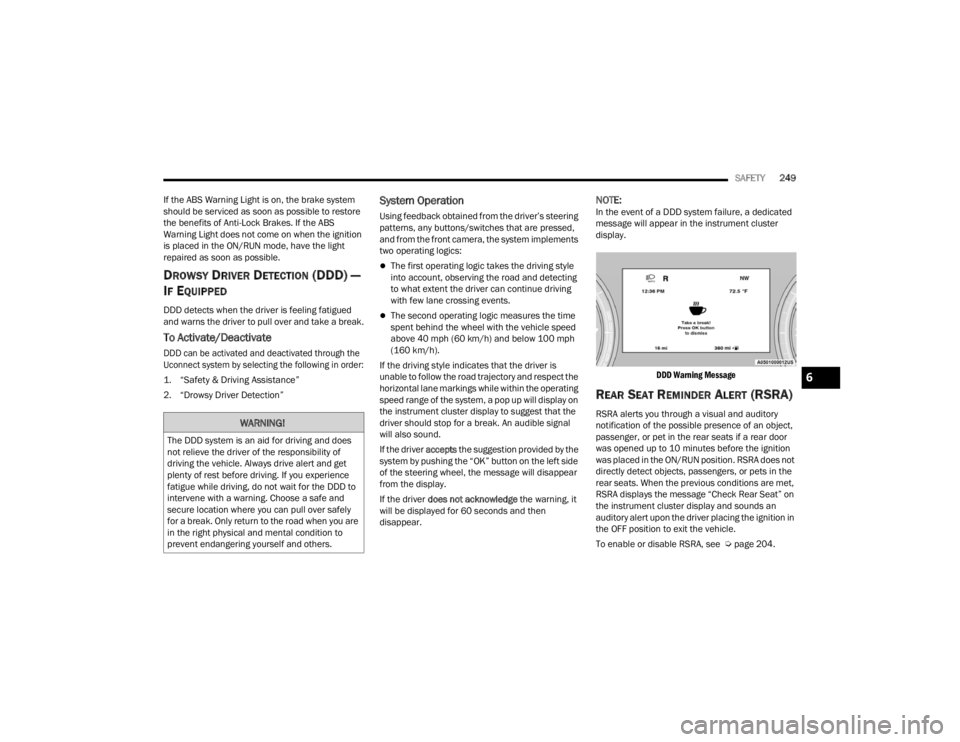
If the driver accepts the suggestion provided by the
system by pushing the “OK” button on the left side
of the steering wheel, the message will disappear
from the display.
If the driver does not acknowledge the warning, it
will be displayed for 60 seconds and then
disappear.
NOTE:In the event of a DDD system failure, a dedicated
message will appear in the instrument cluster
display.
DDD Warning Message
REAR SEAT REMINDER ALERT (RSRA)
RSRA alerts you through a visual and auditory
notification of the possible presence of an object,
passenger, or pet in the rear seats if a rear door
was opened up to 10 minutes before the ignition
was placed in the ON/RUN position. RSRA does not
directly detect objects, passengers, or pets in the
rear seats. When the previous conditions are met,
RSRA displays the message “Check Rear Seat” on
the instrument cluster display and sounds an
auditory alert upon the driver placing the ignition in
the OFF position to exit the vehicle.
To enable or disable RSRA, see Ú page 204.WARNING!
The DDD system is an aid for driving and does
not relieve the driver of the responsibility of
driving the vehicle. Always drive alert and get
plenty of rest before driving. If you experience
fatigue while driving, do not wait for the DDD to
intervene with a warning. Choose a safe and
secure location where you can pull over safely
for a break. Only return to the road when you are
in the right physical and mental condition to
prevent endangering yourself and others.
6
23_WL_OM_EN_USC_t.book Page 249
Page 252 of 424

250SAFETY
ELECTRONIC BRAKE CONTROL (EBC)
S
YSTEM
If applicable, refer to the “Hybrid Supplement” for
additional information.
Your vehicle is equipped with an advanced EBC
system. This system includes the Anti-Lock Brake
System (ABS), Brake Assist System (BAS),
Electronic Brake Force Distribution (EBD), Electronic Roll Mitigation (ERM), Electronic
Stability Control (ESC), Hill Start Assist (HSA), and
Traction Control System (TCS). These systems work
together to enhance both vehicle stability and
control in various driving conditions.
Your vehicle may also be equipped with Dynamic
Steering Torque (DST), Rain Brake Support (RBS),
Ready Alert Braking (RAB), and Trailer Sway
Control (TSC).
Brake Assist System (BAS)
The BAS is designed to optimize the vehicle’s
braking capability during emergency braking
maneuvers. The system detects an emergency
braking situation by sensing the rate and amount
of brake application and then applies optimum
pressure to the brakes. This can help reduce
braking distances. The BAS complements the
Anti-Lock Brake System (ABS). Applying the brakes
very quickly results in the best BAS assistance. To
receive the benefit of the system, you must apply
continuous braking pressure during the stopping
sequence (do not “pump” the brakes). Do not
reduce brake pedal pressure unless braking is no
longer desired. Once the brake pedal is released,
the BAS is deactivated.
Brake System Warning Light
The red Brake System Warning Light will turn on
when the ignition is placed in the ON/RUN mode
and may stay on for as long as four seconds.
If the Brake System Warning Light remains on or
comes on while driving, it indicates that the brake
system is not functioning properly and that
immediate service is required. If the Brake System
Warning Light does not come on when the ignition
is placed in the ON/RUN mode, have the light
repaired as soon as possible.
WARNING!
Before exiting a vehicle, always come to a
complete stop, then shift the automatic trans
-
mission into PARK and apply the parking
brake.
Always make sure the keyless ignition node is
in the OFF position, key fob is removed from
the vehicle and vehicle is locked.
Never leave children alone in a vehicle, or with
access to an unlocked vehicle. Leaving chil -
dren in a vehicle unattended is dangerous for
a number of reasons. A child or others could
be seriously or fatally injured. Children should
be warned not to touch the parking brake,
brake pedal or the gear selector.
Do not leave children or animals inside parked
vehicles in hot weather. Interior heat buildup
may cause serious injury or death.
WARNING!
The Brake Assist System (BAS) cannot prevent
the natural laws of physics from acting on the
vehicle, nor can it increase the traction afforded
by prevailing road conditions. BAS cannot
prevent collisions, including those resulting from
excessive speed in turns, driving on very slippery
surfaces, or hydroplaning. The capabilities of a
BAS-equipped vehicle must never be exploited in
a reckless or dangerous manner, which could
jeopardize the user's safety or the safety of
others.
23_WL_OM_EN_USC_t.book Page 250