Tab 9 JEEP LIBERTY 2002 KJ / 1.G Workshop Manual
[x] Cancel search | Manufacturer: JEEP, Model Year: 2002, Model line: LIBERTY, Model: JEEP LIBERTY 2002 KJ / 1.GPages: 1803, PDF Size: 62.3 MB
Page 614 of 1803

POWER MIRRORS
TABLE OF CONTENTS
page page
POWER MIRRORS
DESCRIPTION.........................11
OPERATION...........................11
DIAGNOSIS AND TESTING - POWER
MIRRORS...........................11
POWER MIRROR SWITCH
DIAGNOSIS AND TESTING - POWER MIRROR
SWITCH............................12REMOVAL.............................13
INSTALLATION.........................13
SIDEVIEW MIRROR
REMOVAL.............................13
POWER MIRRORS
DESCRIPTION
The available power operated sideview mirrors
allow the driver to adjust both outside mirrors elec-
trically from the drivers seat by operating a switch
on the driver side front door trim panel (Fig. 1).
OPERATION
The power mirrors receive ignition current through
a fuse in the junction block, and will only operate
when the ignition switch is in the Run position.
DIAGNOSIS AND TESTING - POWER MIRRORS
WIRING VOLTAGE TEST
The following wiring test determines whether or
not voltage is continuous through the body harness
to switch.
(1) Remove the power mirror switch (Refer to 8 -
ELECTRICAL/POWER MIRRORS/POWER MIRROR
SWITCH - REMOVAL).
(2) Disconnect wire connector from back of power
mirror switch.
(3) Switch ignition to the RUN position.
(4) Connect the clip end of a 12 volt test light to
Pin 5 in the harness connector at the mirror switch.
Touch the test light probe to Pin 3.
If the test light illuminates, the wiring circuit
between the battery and switch is OK.
If the lamp does not illuminate, first check fuse 25
in the Junction Block (JB). If fuse 25 is OK, then
check for a broken wire.
Refer to the appropriate wiring information. The
wiring information includes wiring diagrams, proper
wire and connector repair procedures, details of wire
harness routing and retention, connector pin-out
information and location views for the various wire
harness connectors, splices and grounds.
POWER MIRROR MOTOR TEST
If the power mirror switch is receiving proper cur-
rent and ground and mirrors do not operate, proceed
with power mirror motor test. Refer to the appropri-
ate wiring information. The wiring information
includes wiring diagrams, proper wire and connector
repair procedures, details of wire harness routing
and retention, connector pin-out information and
location views for the various wire harness connec-
tors, splices and grounds.
Fig. 1 POWER MIRROR SWITCH
1 - DOOR TRIM PANEL
2 - DOOR LOCK SWITCH
3 - POWER MIRROR SWITCH
KJPOWER MIRRORS 8N - 11
Page 615 of 1803
(1) Remove front door trim panel to gain access to
power mirror wire connector (Refer to 23 - BODY/
DOOR - FRONT/TRIM PANEL - REMOVAL).
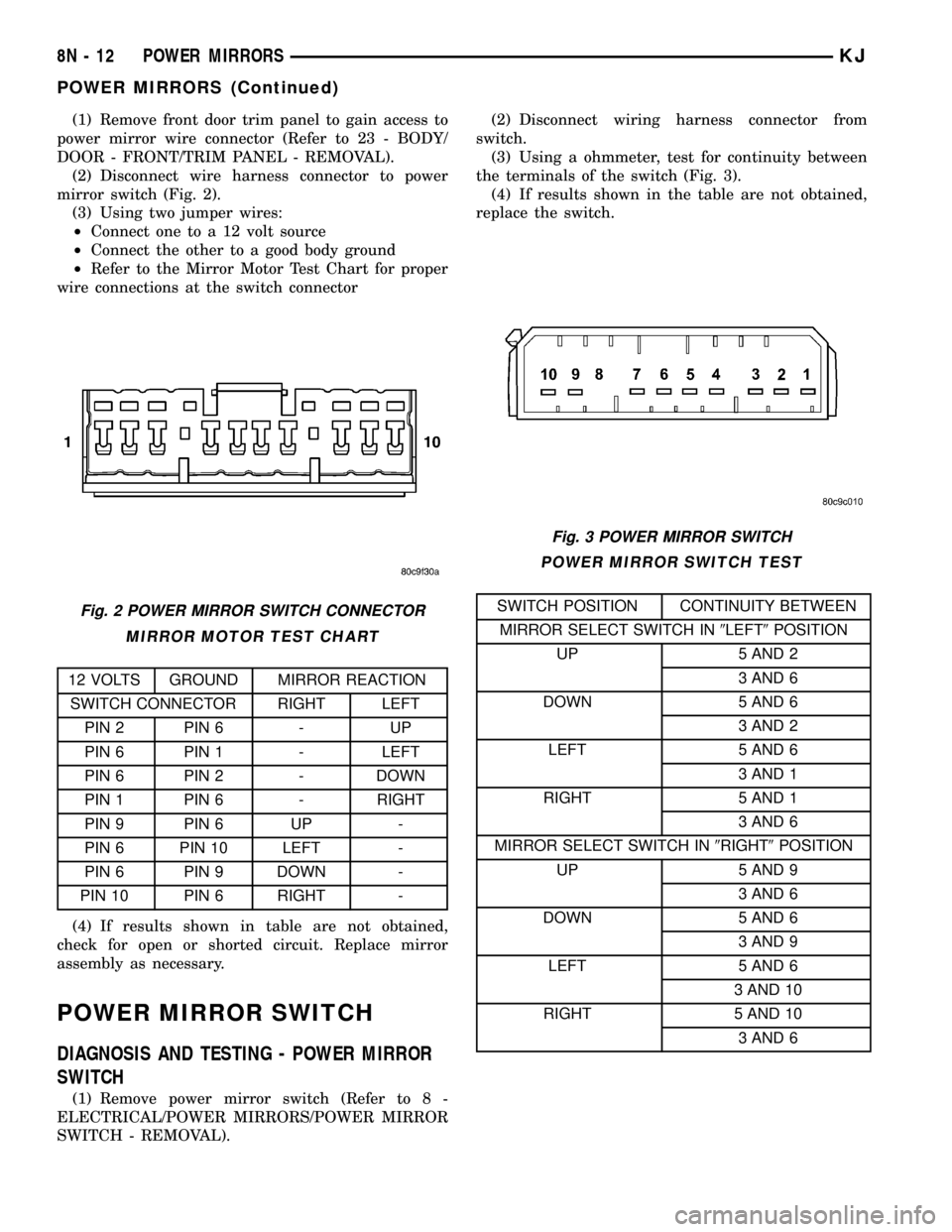
(2) Disconnect wire harness connector to power
mirror switch (Fig. 2).
(3) Using two jumper wires:
²Connect one to a 12 volt source
²Connect the other to a good body ground
²Refer to the Mirror Motor Test Chart for proper
wire connections at the switch connector
MIRROR MOTOR TEST CHART
12 VOLTS GROUND MIRROR REACTION
SWITCH CONNECTOR RIGHT LEFT
PIN 2 PIN 6 - UP
PIN 6 PIN 1 - LEFT
PIN 6 PIN 2 - DOWN
PIN 1 PIN 6 - RIGHT
PIN 9 PIN 6 UP -
PIN 6 PIN 10 LEFT -
PIN 6 PIN 9 DOWN -
PIN 10 PIN 6 RIGHT -
(4) If results shown in table are not obtained,
check for open or shorted circuit. Replace mirror
assembly as necessary.
POWER MIRROR SWITCH
DIAGNOSIS AND TESTING - POWER MIRROR
SWITCH
(1) Remove power mirror switch (Refer to 8 -
ELECTRICAL/POWER MIRRORS/POWER MIRROR
SWITCH - REMOVAL).(2) Disconnect wiring harness connector from
switch.
(3) Using a ohmmeter, test for continuity between
the terminals of the switch (Fig. 3).
(4) If results shown in the table are not obtained,
replace the switch.
POWER MIRROR SWITCH TEST
SWITCH POSITION CONTINUITY BETWEEN
MIRROR SELECT SWITCH IN9LEFT9POSITION
UP 5 AND 2
3 AND 6
DOWN 5 AND 6
3 AND 2
LEFT 5 AND 6
3 AND 1
RIGHT 5 AND 1
3 AND 6
MIRROR SELECT SWITCH IN9RIGHT9POSITION
UP 5 AND 9
3 AND 6
DOWN 5 AND 6
3 AND 9
LEFT 5 AND 6
3 AND 10
RIGHT 5 AND 10
3 AND 6Fig. 2 POWER MIRROR SWITCH CONNECTOR
Fig. 3 POWER MIRROR SWITCH
8N - 12 POWER MIRRORSKJ
POWER MIRRORS (Continued)
Page 617 of 1803

POWER SEATS
TABLE OF CONTENTS
page page
POWER SEATS
DESCRIPTION.........................14
OPERATION...........................15
DIAGNOSIS AND TESTING - POWER SEATS . . 15
SEAT TRACK
DESCRIPTION.........................15
OPERATION...........................15
DIAGNOSIS AND TESTING - SEAT TRACK....16
REMOVAL.............................16
INSTALLATION.........................16
LEFT POWER SEAT SWITCH
DESCRIPTION.........................16OPERATION...........................17
DIAGNOSIS AND TESTING - LEFT POWER
SEAT SWITCH........................17
REMOVAL.............................18
INSTALLATION.........................18
RIGHT POWER SEAT SWITCH
DESCRIPTION.........................19
OPERATION...........................19
DIAGNOSIS AND TESTING - RIGHT POWER
SEAT SWITCH........................19
REMOVAL.............................20
INSTALLATION.........................20
POWER SEATS
DESCRIPTION
Individually controlled, electrically powered front
seats are available as factory-installed equipment on
this model. Vehicles with this option can be visually
identified by the two separate power seat switches,
mounted on each of the front seat cushion side
shields (Fig. 1). The power seat system option allows
the front seating positions to be electrically adjustedfor optimum vehicle control and comfort. The power
seat cushion can be adjusted forward, rearward, front
up, front down, rear up, or rear down. The power
seat system for this vehicle includes the following
major components, which are described in further
detail later in this section:
²Power Seat Switches- Two power seat
switches are used per vehicle, one for the driver and
one for the front seat passenger. Refer to the left and
right power seat switch information later in this sec-
tion.
²Power Seat Tracks- Two power seat tracks
are used per vehicle, one for the driver and one for
the front seat passenger seats. Refer to the power
seat track information later in this section.
²Circuit Breaker- An automatic resetting cir-
cuit breaker (# 1) is located in the Junction Block
and is used to protect the power seat system from
current overload.
Hard wired circuitry connects the power seat sys-
tem components to each other through the electrical
system of the vehicle. These hard wired circuits are
integral to several wire harnesses, which are routed
throughout the vehicle and retained by many differ-
ent methods. These circuits may be connected to each
other, to the vehicle electrical system and to the
power seat system components through the use of a
combination of soldered splices, splice block connec-
tors and many different types of wire harness termi-
nal connectors and insulators. Refer to theWiring
section of this manual for more information. The wir-
ing information includes wiring diagrams, proper
wire and connector repair procedures, further details
on wire harness routing and retention, as well as
pin-out and location views for the various wire har-
ness connectors, splices and grounds.
Fig. 1 KJ Heated/Power Seat
8N - 14 POWER SEATSKJ
Page 619 of 1803
DIAGNOSIS AND TESTING - SEAT TRACK
(1) Remove the power seat switch from the seat
(Refer to 8 - ELECTRICAL/POWER SEATS/DRIVER
SEAT SWITCH - REMOVAL).
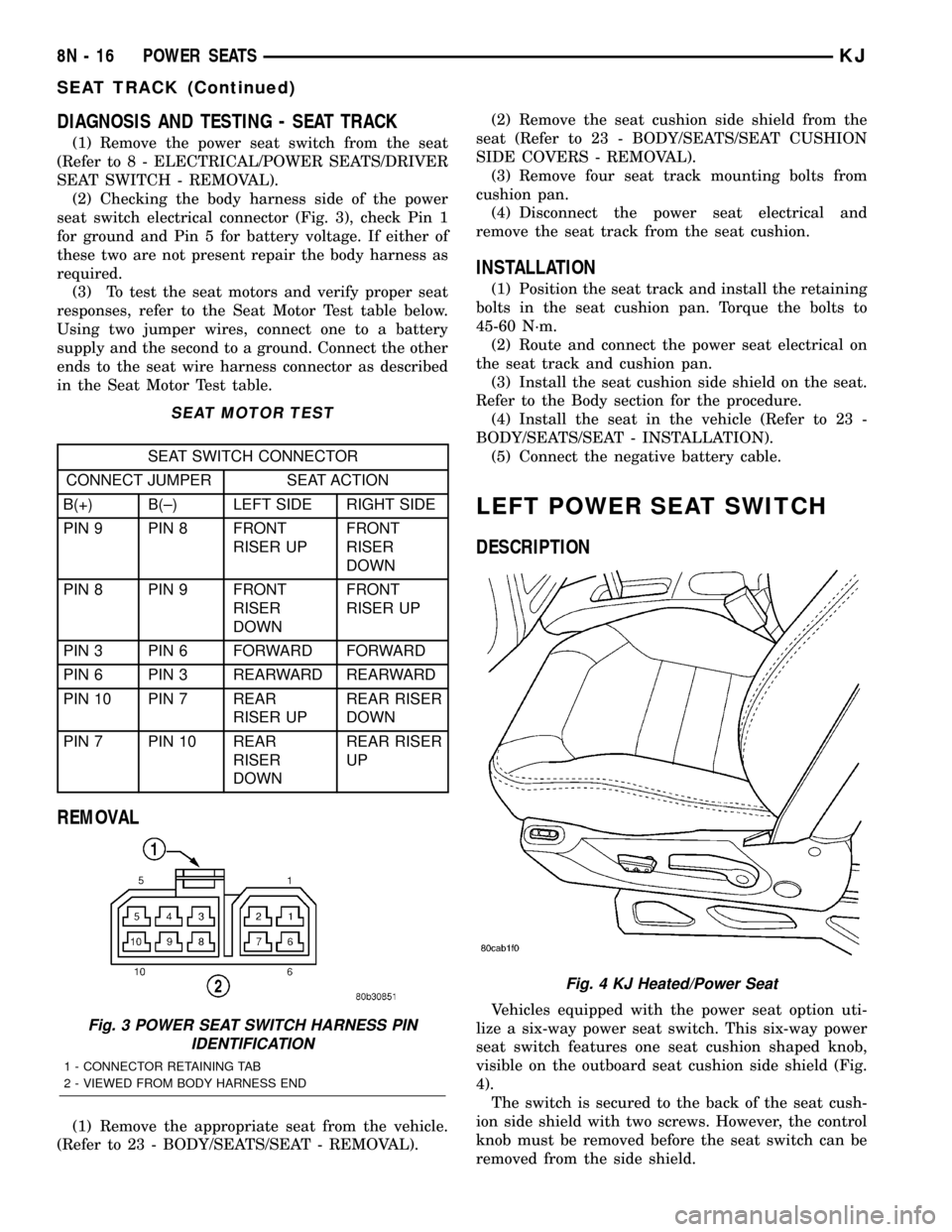
(2) Checking the body harness side of the power
seat switch electrical connector (Fig. 3), check Pin 1
for ground and Pin 5 for battery voltage. If either of
these two are not present repair the body harness as
required.
(3) To test the seat motors and verify proper seat
responses, refer to the Seat Motor Test table below.
Using two jumper wires, connect one to a battery
supply and the second to a ground. Connect the other
ends to the seat wire harness connector as described
in the Seat Motor Test table.
SEAT MOTOR TEST
SEAT SWITCH CONNECTOR
CONNECT JUMPER SEAT ACTION
B(+) B(±) LEFT SIDE RIGHT SIDE
PIN 9 PIN 8 FRONT
RISER UPFRONT
RISER
DOWN
PIN 8 PIN 9 FRONT
RISER
DOWNFRONT
RISER UP
PIN 3 PIN 6 FORWARD FORWARD
PIN 6 PIN 3 REARWARD REARWARD
PIN 10 PIN 7 REAR
RISER UPREAR RISER
DOWN
PIN 7 PIN 10 REAR
RISER
DOWNREAR RISER
UP
REMOVAL
(1) Remove the appropriate seat from the vehicle.
(Refer to 23 - BODY/SEATS/SEAT - REMOVAL).(2) Remove the seat cushion side shield from the
seat (Refer to 23 - BODY/SEATS/SEAT CUSHION
SIDE COVERS - REMOVAL).
(3) Remove four seat track mounting bolts from
cushion pan.
(4) Disconnect the power seat electrical and
remove the seat track from the seat cushion.
INSTALLATION
(1) Position the seat track and install the retaining
bolts in the seat cushion pan. Torque the bolts to
45-60 N´m.
(2) Route and connect the power seat electrical on
the seat track and cushion pan.
(3) Install the seat cushion side shield on the seat.
Refer to the Body section for the procedure.
(4) Install the seat in the vehicle (Refer to 23 -
BODY/SEATS/SEAT - INSTALLATION).
(5) Connect the negative battery cable.
LEFT POWER SEAT SWITCH
DESCRIPTION
Vehicles equipped with the power seat option uti-
lize a six-way power seat switch. This six-way power
seat switch features one seat cushion shaped knob,
visible on the outboard seat cushion side shield (Fig.
4).
The switch is secured to the back of the seat cush-
ion side shield with two screws. However, the control
knob must be removed before the seat switch can be
removed from the side shield.
Fig. 3 POWER SEAT SWITCH HARNESS PIN
IDENTIFICATION
1 - CONNECTOR RETAINING TAB
2 - VIEWED FROM BODY HARNESS END
Fig. 4 KJ Heated/Power Seat
8N - 16 POWER SEATSKJ
SEAT TRACK (Continued)
Page 621 of 1803
SWITCH
POSITIONCONTINUITY BETWEEN PINS
DRIVER SEAT PASSENGER
SEAT
OFF PIN1to3 PIN1to3
PIN1to6 PIN1to6
PIN1to7 PIN1to7
PIN1to8 PIN1to8
PIN1to9 PIN1to9
PIN1to10 PIN1to10
FRONT RISER
UPPIN1to8 PIN1to8
PIN5to9 PIN5to9
FRONT RISER
DOWNPIN1to9 PIN1to9
PIN5to8 PIN5to8
CENTER
SWITCH
FORWARDPIN1to6 PIN1to6
PIN5to3 PIN5to3
CENTER
SWITCH
REARWARDPIN1to3 PIN1to3
PIN5to6 PIN5to6
REAR RISER
UPPIN1to7 PIN1to7
PIN5to10 PIN5to10
REAR RISER
DOWNPIN1to10 PIN1to10
PIN5to7 PIN5to7
REMOVAL
(1) Disconnect and isolate the negative battery
cable.
(2) Using a push pin remover or another suitable
wide flat-bladed tool, gently pry the power seat
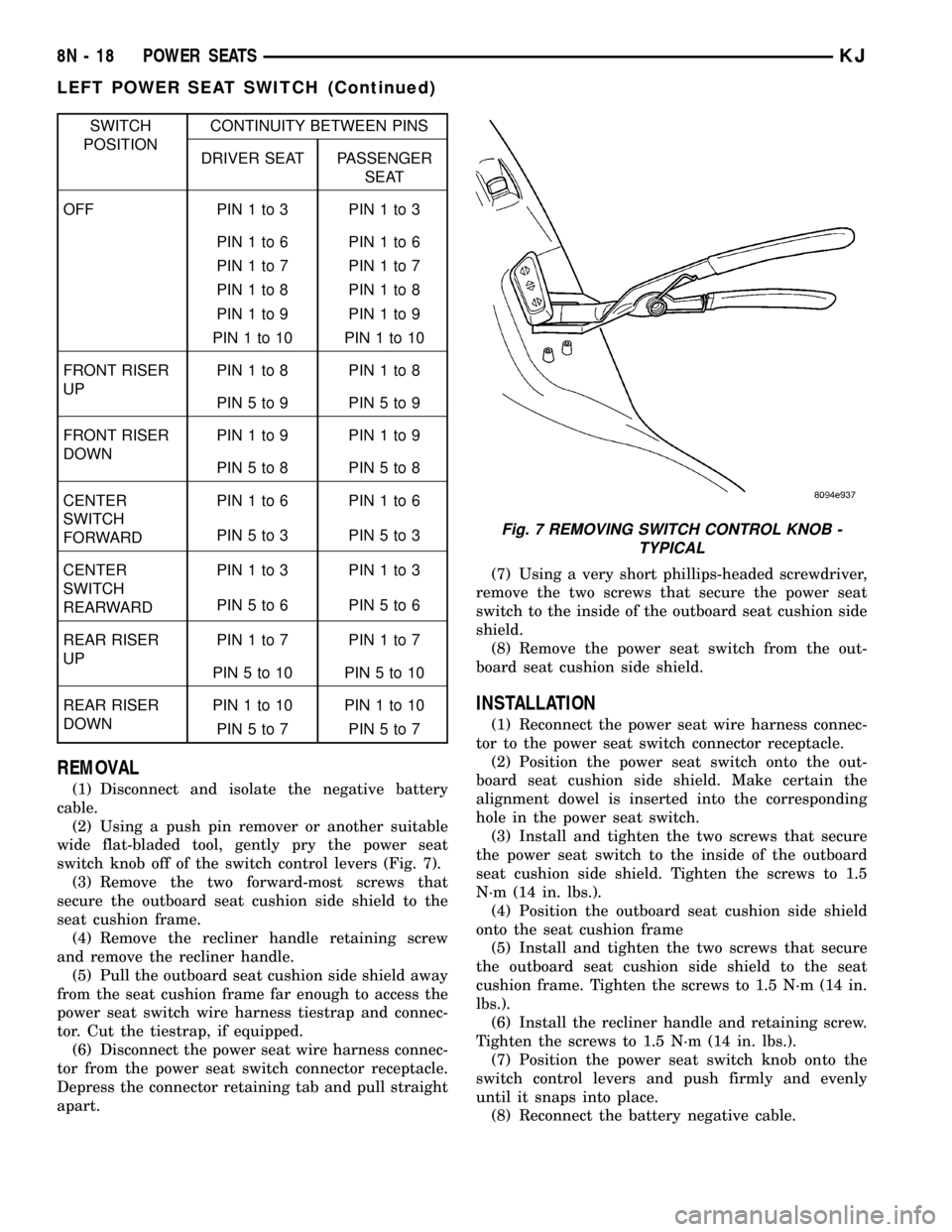
switch knob off of the switch control levers (Fig. 7).
(3) Remove the two forward-most screws that
secure the outboard seat cushion side shield to the
seat cushion frame.
(4) Remove the recliner handle retaining screw
and remove the recliner handle.
(5) Pull the outboard seat cushion side shield away
from the seat cushion frame far enough to access the
power seat switch wire harness tiestrap and connec-
tor. Cut the tiestrap, if equipped.
(6) Disconnect the power seat wire harness connec-
tor from the power seat switch connector receptacle.
Depress the connector retaining tab and pull straight
apart.(7) Using a very short phillips-headed screwdriver,
remove the two screws that secure the power seat
switch to the inside of the outboard seat cushion side
shield.
(8) Remove the power seat switch from the out-
board seat cushion side shield.
INSTALLATION
(1) Reconnect the power seat wire harness connec-
tor to the power seat switch connector receptacle.
(2) Position the power seat switch onto the out-
board seat cushion side shield. Make certain the
alignment dowel is inserted into the corresponding
hole in the power seat switch.
(3) Install and tighten the two screws that secure
the power seat switch to the inside of the outboard
seat cushion side shield. Tighten the screws to 1.5
N´m (14 in. lbs.).
(4) Position the outboard seat cushion side shield
onto the seat cushion frame
(5) Install and tighten the two screws that secure
the outboard seat cushion side shield to the seat
cushion frame. Tighten the screws to 1.5 N´m (14 in.
lbs.).
(6) Install the recliner handle and retaining screw.
Tighten the screws to 1.5 N´m (14 in. lbs.).
(7) Position the power seat switch knob onto the
switch control levers and push firmly and evenly
until it snaps into place.
(8) Reconnect the battery negative cable.
Fig. 7 REMOVING SWITCH CONTROL KNOB -
TYPICAL
8N - 18 POWER SEATSKJ
LEFT POWER SEAT SWITCH (Continued)
Page 623 of 1803
SWITCH
POSITIONCONTINUITY BETWEEN PINS
DRIVER SEAT PASSENGER
SEAT
OFF PIN1to3 PIN1to3
PIN1to6 PIN1to6
PIN1to7 PIN1to7
PIN1to8 PIN1to8
PIN1to9 PIN1to9
PIN1to10 PIN1to10
FRONT RISER
UPPIN1to8 PIN1to8
PIN5to9 PIN5to9
FRONT RISER
DOWNPIN1to9 PIN1to9
PIN5to8 PIN5to8
CENTER
SWITCH
FORWARDPIN1to6 PIN1to6
PIN5to3 PIN5to3
CENTER
SWITCH
REARWARDPIN1to3 PIN1to3
PIN5to6 PIN5to6
REAR RISER
UPPIN1to7 PIN1to7
PIN5to10 PIN5to10
REAR RISER
DOWNPIN1to10 PIN1to10
PIN5to7 PIN5to7
REMOVAL
(1) Disconnect and isolate the negative battery
cable.
(2) Using a push pin remover or another suitable
wide flat-bladed tool, gently pry the power seat
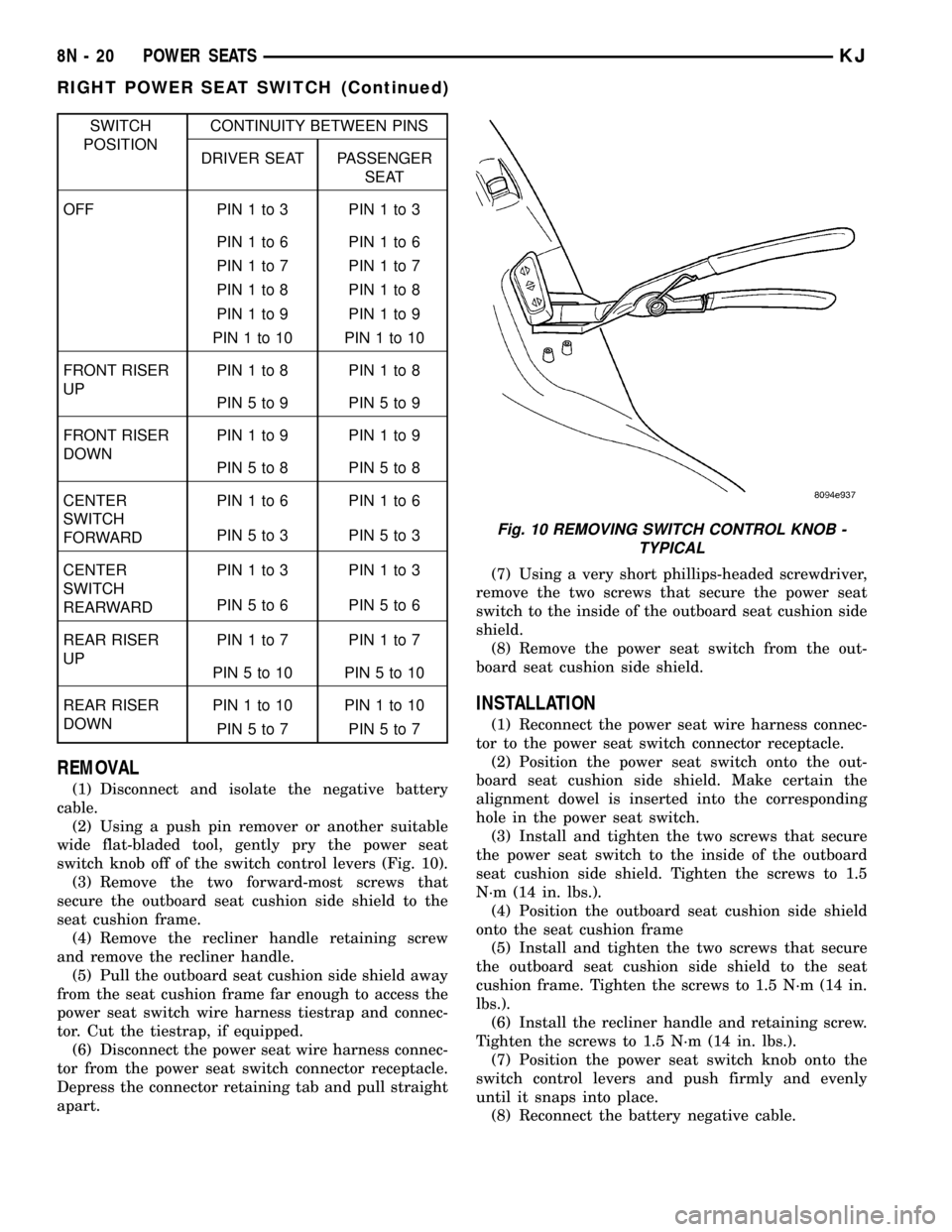
switch knob off of the switch control levers (Fig. 10).
(3) Remove the two forward-most screws that
secure the outboard seat cushion side shield to the
seat cushion frame.
(4) Remove the recliner handle retaining screw
and remove the recliner handle.
(5) Pull the outboard seat cushion side shield away
from the seat cushion frame far enough to access the
power seat switch wire harness tiestrap and connec-
tor. Cut the tiestrap, if equipped.
(6) Disconnect the power seat wire harness connec-
tor from the power seat switch connector receptacle.
Depress the connector retaining tab and pull straight
apart.(7) Using a very short phillips-headed screwdriver,
remove the two screws that secure the power seat
switch to the inside of the outboard seat cushion side
shield.
(8) Remove the power seat switch from the out-
board seat cushion side shield.
INSTALLATION
(1) Reconnect the power seat wire harness connec-
tor to the power seat switch connector receptacle.
(2) Position the power seat switch onto the out-
board seat cushion side shield. Make certain the
alignment dowel is inserted into the corresponding
hole in the power seat switch.
(3) Install and tighten the two screws that secure
the power seat switch to the inside of the outboard
seat cushion side shield. Tighten the screws to 1.5
N´m (14 in. lbs.).
(4) Position the outboard seat cushion side shield
onto the seat cushion frame
(5) Install and tighten the two screws that secure
the outboard seat cushion side shield to the seat
cushion frame. Tighten the screws to 1.5 N´m (14 in.
lbs.).
(6) Install the recliner handle and retaining screw.
Tighten the screws to 1.5 N´m (14 in. lbs.).
(7) Position the power seat switch knob onto the
switch control levers and push firmly and evenly
until it snaps into place.
(8) Reconnect the battery negative cable.
Fig. 10 REMOVING SWITCH CONTROL KNOB -
TYPICAL
8N - 20 POWER SEATSKJ
RIGHT POWER SEAT SWITCH (Continued)
Page 624 of 1803

POWER WINDOWS
TABLE OF CONTENTS
page page
POWER WINDOWS
DESCRIPTION.........................21
OPERATION...........................21
DIAGNOSIS AND TESTING - POWER
WINDOWS...........................21
WINDOW MOTOR
REMOVAL.............................22WINDOW SWITCH
DIAGNOSIS AND TESTING - WINDOW
SWITCH............................22
REMOVAL.............................23
INSTALLATION.........................23
POWER WINDOWS
DESCRIPTION
The power window system allows each of the door
windows to be raised and lowered electrically by
actuating a switch on the center console. A master
switch on the front of the center console allows the
driver to raise or lower each of the passenger door
windows and to lock out the individual switches on
the rear of the center console from operation. The
power window system receives battery feed through
fuse 13 in the Power Distribution Center (PDC), only
when the ignition switch is in the RUN or ACCES-
SORY position.
OPERATION
WINDOW SWITCH
The power window switches control the battery
and ground feeds to the power window motors. Both
of the rear door power window switches receive their
battery and ground feeds through the circuitry of the
front window switch. When the power window lock-
out switch is in the Lock position, the battery feed
for the rear door window switches is interrupted.
WINDOW MOTOR
Front door window lift motors use permanent type
magnets. The B+ and ground applied at the motor
terminal pins will cause the motor to rotate in one
direction. Reversing current through the motor ter-
minals will cause the motor to rotate in the opposite
direction.
Refer to the appropriate wiring information. The
wiring information includes wiring diagrams, proper
wire and connector repair procedures, details of wire
harness routing and retention, connector pin-out
information and location views for the various wire
harness connectors, splices and grounds.
DIAGNOSIS AND TESTING - POWER
WINDOWS
WIRING VOLTAGE TEST
The following wiring test determines whether or
not voltage is continuous through the body harness
to the front switch.
(1) Remove the power window switch and bezel
(Refer to 8 - ELECTRICAL/POWER WINDOWS/
POWER WINDOW SWITCH - REMOVAL).
(2) Disconnect wire connector from back of power
window switch.
(3) Switch ignition to the ON position.
(4) Connect the clip end of a 12 volt test light to
Pin 14 of the window switch harness connector.
Touch the test light probe to Pin 10.
²If the test light illuminates, the wiring circuit
between the battery and switch is OK.
²If the lamp does not illuminate, first check fuse
13 in the Power Distribution Center (PDC). If fuse 13
is OK, then check for a broken wire.
Refer to the appropriate wiring information. The
wiring information includes wiring diagrams, proper
wire and connector repair procedures, details of wire
harness routing and retention, connector pin-out
information and location views for the various wire
harness connectors, splices and grounds.
POWER WINDOW MOTOR TEST
If the power window motor is receiving proper cur-
rent and ground and does not operate, proceed with
motor test. Refer to the appropriate wiring informa-
tion. The wiring information includes wiring dia-
grams, proper wire and connector repair procedures,
details of wire harness routing and retention, connec-
tor pin-out information and location views for the
various wire harness connectors, splices and grounds.
(1) Remove front door trim panel as necessary to
gain access to power window motor wire connector
KJPOWER WINDOWS 8N - 21
Page 628 of 1803
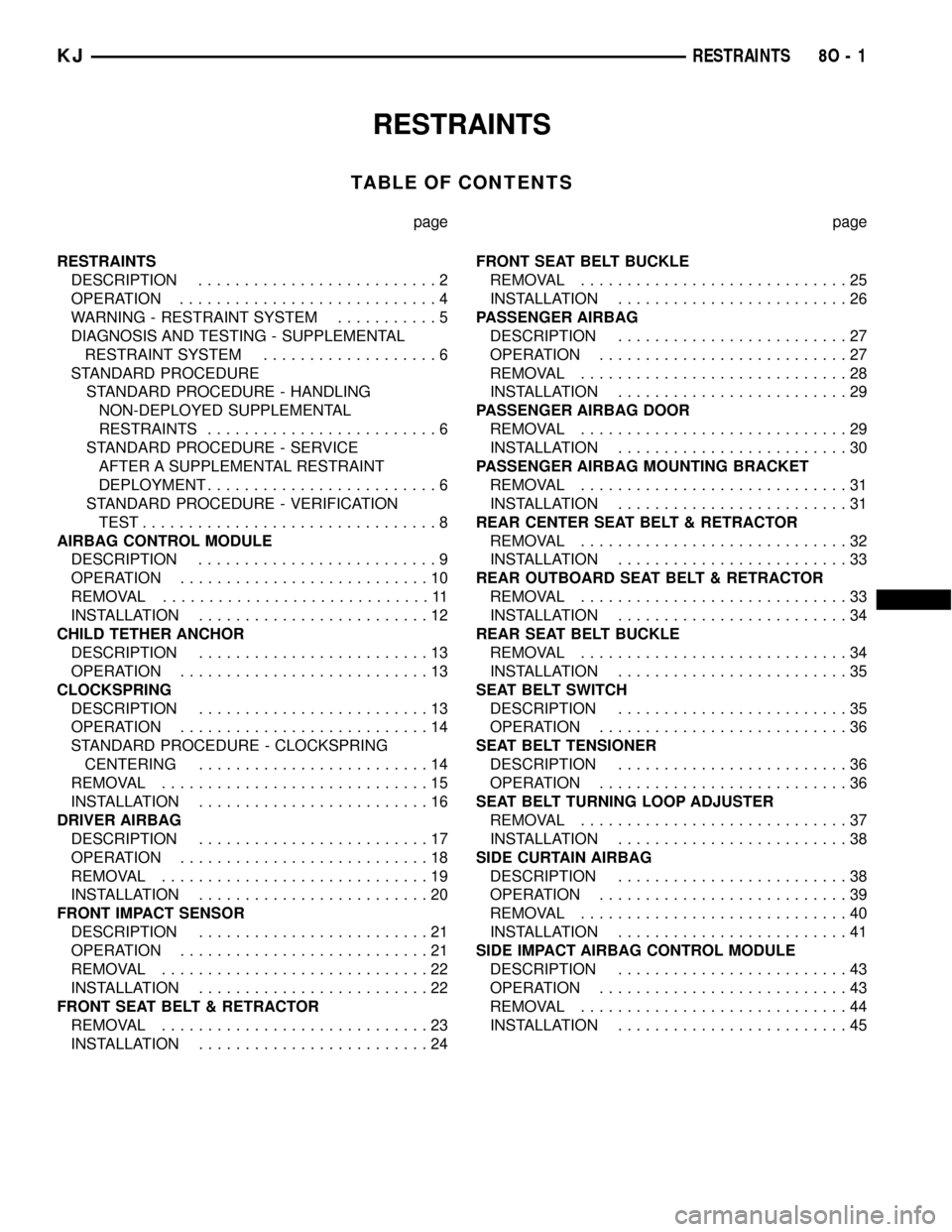
RESTRAINTS
TABLE OF CONTENTS
page page
RESTRAINTS
DESCRIPTION..........................2
OPERATION............................4
WARNING - RESTRAINT SYSTEM...........5
DIAGNOSIS AND TESTING - SUPPLEMENTAL
RESTRAINT SYSTEM...................6
STANDARD PROCEDURE
STANDARD PROCEDURE - HANDLING
NON-DEPLOYED SUPPLEMENTAL
RESTRAINTS.........................6
STANDARD PROCEDURE - SERVICE
AFTER A SUPPLEMENTAL RESTRAINT
DEPLOYMENT.........................6
STANDARD PROCEDURE - VERIFICATION
TEST................................8
AIRBAG CONTROL MODULE
DESCRIPTION..........................9
OPERATION...........................10
REMOVAL.............................11
INSTALLATION.........................12
CHILD TETHER ANCHOR
DESCRIPTION.........................13
OPERATION...........................13
CLOCKSPRING
DESCRIPTION.........................13
OPERATION...........................14
STANDARD PROCEDURE - CLOCKSPRING
CENTERING.........................14
REMOVAL.............................15
INSTALLATION.........................16
DRIVER AIRBAG
DESCRIPTION.........................17
OPERATION...........................18
REMOVAL.............................19
INSTALLATION.........................20
FRONT IMPACT SENSOR
DESCRIPTION.........................21
OPERATION...........................21
REMOVAL.............................22
INSTALLATION.........................22
FRONT SEAT BELT & RETRACTOR
REMOVAL.............................23
INSTALLATION.........................24FRONT SEAT BELT BUCKLE
REMOVAL.............................25
INSTALLATION.........................26
PASSENGER AIRBAG
DESCRIPTION.........................27
OPERATION...........................27
REMOVAL.............................28
INSTALLATION.........................29
PASSENGER AIRBAG DOOR
REMOVAL.............................29
INSTALLATION.........................30
PASSENGER AIRBAG MOUNTING BRACKET
REMOVAL.............................31
INSTALLATION.........................31
REAR CENTER SEAT BELT & RETRACTOR
REMOVAL.............................32
INSTALLATION.........................33
REAR OUTBOARD SEAT BELT & RETRACTOR
REMOVAL.............................33
INSTALLATION.........................34
REAR SEAT BELT BUCKLE
REMOVAL.............................34
INSTALLATION.........................35
SEAT BELT SWITCH
DESCRIPTION.........................35
OPERATION...........................36
SEAT BELT TENSIONER
DESCRIPTION.........................36
OPERATION...........................36
SEAT BELT TURNING LOOP ADJUSTER
REMOVAL.............................37
INSTALLATION.........................38
SIDE CURTAIN AIRBAG
DESCRIPTION.........................38
OPERATION...........................39
REMOVAL.............................40
INSTALLATION.........................41
SIDE IMPACT AIRBAG CONTROL MODULE
DESCRIPTION.........................43
OPERATION...........................43
REMOVAL.............................44
INSTALLATION.........................45
KJRESTRAINTS 8O - 1
Page 630 of 1803

An occupant restraint system is standard factory-
installed safety equipment on this model. Available
occupant restraints for this model include both active
and passive types. Active restraints are those which
require the vehicle occupants to take some action to
employ, such as fastening a seat belt; while passive
restraints require no action by the vehicle occupants
to be employed (Fig. 1).
ACTIVE RESTRAINTS The active restraints for
this model include:
²Front Seat Belts- Both front seating positions
are equipped with three-point seat belt systems
employing a lower B-pillar mounted inertia latch-
type retractor, height-adjustable upper B-pillar
mounted turning loops, a traveling lower seat belt
anchor secured to the outboard side of the seat
frame, and a traveling end-release seat belt buckle
secured to the inboard side of the seat frame. Both
front seat belt buckles include an integral Hall-effect
seat belt switch that detects whether its respective
seat belt has been fastened.
²Rear Seat Belts- All three rear seating posi-
tions are equipped with three-point seat belt sys-
tems. The outboard seating position belts employ a
lower C-pillar mounted inertia latch-type retractor, a
fixed position upper C-pillar mounted turning loop,
and a fixed lower seat belt anchor secured to the
floor panel. The rear seat center seating position belt
has an inertia latch-type retractor that is integral to
the rear seat back panel, and a cable from the seat
back latch locks the center belt retractor spool unless
the seat back is fully latched. The rear seat center
seating position belt lower anchor is secured to the
floor panel. All three rear seat belts have fixed end-
release seat belt buckles secured to the floor panel, a
single buckle unit on the right side and a double
buckle unit on the left side.
²Child Seat Tether Anchors- All vehicles are
equipped with three, fixed-position, child seat tether
anchors. Two anchors are integral to the back of the
right rear seat back panel, and one is integral to the
left rear seat back panel.
PASSIVE RESTRAINTS The passive restraints
available for this model include the following:
²Dual Front Airbags- Multistage driver and
front passenger airbags are available for this model.
This airbag system is a passive, inflatable, Supple-
mental Restraint System (SRS) and vehicles with
this equipment can be readily identified by the ªSRS
- AIRBAGº logo molded into the driver airbag trim
cover in the center of the steering wheel and also
into the passenger airbag door on the instrument
panel above the glove box (Fig. 2). Vehicles with the
airbag system can also be identified by the airbag
indicator, which will illuminate in the instrument
cluster for about seven seconds as a bulb test eachtime the ignition switch is turned to the On position.
A pyrotechnic-type seat belt tensioner is integral to
the driver side front seat belt retractor mounted on
the lower B-pillar of all models equipped with dual
front airbags.
²Side Curtain Airbags- Optional side curtain
airbags are available for this model when it is also
equipped with dual front airbags. This airbag system
is a passive, inflatable, Supplemental Restraint Sys-
tem (SRS) and vehicles with this equipment can be
readily identified by a molded identification trim but-
ton with the ªSRS - AIRBAGº logo located on the
headliner above each B-pillar (Fig. 2).
The supplemental restraint system includes the
following major components, which are described in
further detail elsewhere in this service information:
²Airbag Control Module- The Airbag Control
Module (ACM) is also sometimes referred to as the
Occupant Restraint Controller (ORC). The ACM is
located on a mount on the floor panel transmission
tunnel, below the center of the instrument panel.
²Airbag Indicator- The airbag indicator is inte-
gral to the ElectroMechanical Instrument Cluster
(EMIC), which is located on the instrument panel in
front of the driver.
²Clockspring- The clockspring is located near
the top of the steering column, directly beneath the
steering wheel.
²Driver Airbag- The driver airbag is located in
the center of the steering wheel, beneath the driver
airbag trim cover.
²Driver Knee Blocker- The driver knee blocker
is a structural unit secured to the back side of and
integral to the instrument panel steering column
opening cover.
²Front Impact Sensor- Two front impact sen-
sors are used on vehicles equipped with dual front
airbags, one left side and one right side. One sensor
Fig. 2 SRS Logo
KJRESTRAINTS 8O - 3
RESTRAINTS (Continued)
Page 634 of 1803
airbag unit, the headliner, as well as the upper A, B,
and C-pillar trim must be replaced. These compo-
nents are not intended for reuse and will be damaged
or weakened as a result of a supplemental restraint
deployment, which may or may not be obvious during
a visual inspection.
On vehicles with an optional sunroof, the sunroof
drain tubes and hoses must be closely inspected fol-
lowing a side curtain airbag deployment. It is also
critical that the mounting surfaces and/or mounting
brackets for the Airbag Control Module (ACM), Side
Impact Airbag Control Module (SIACM), and front
impact sensors be closely inspected and restored to
their original conditions following any vehicle impact
damage. Because the ACM, SIACM, and each front
impact sensor are used by the supplemental restraint
system to monitor or confirm the direction and sever-
ity of a vehicle impact, improper orientation or inse-
cure fastening of these components may cause
airbags not to deploy when required, or to deploy
when not required. All other vehicle components
should be closely inspected following any other sup-
plemental restraint deployment, but are to be
replaced only as required by the extent of the visible
damage incurred.
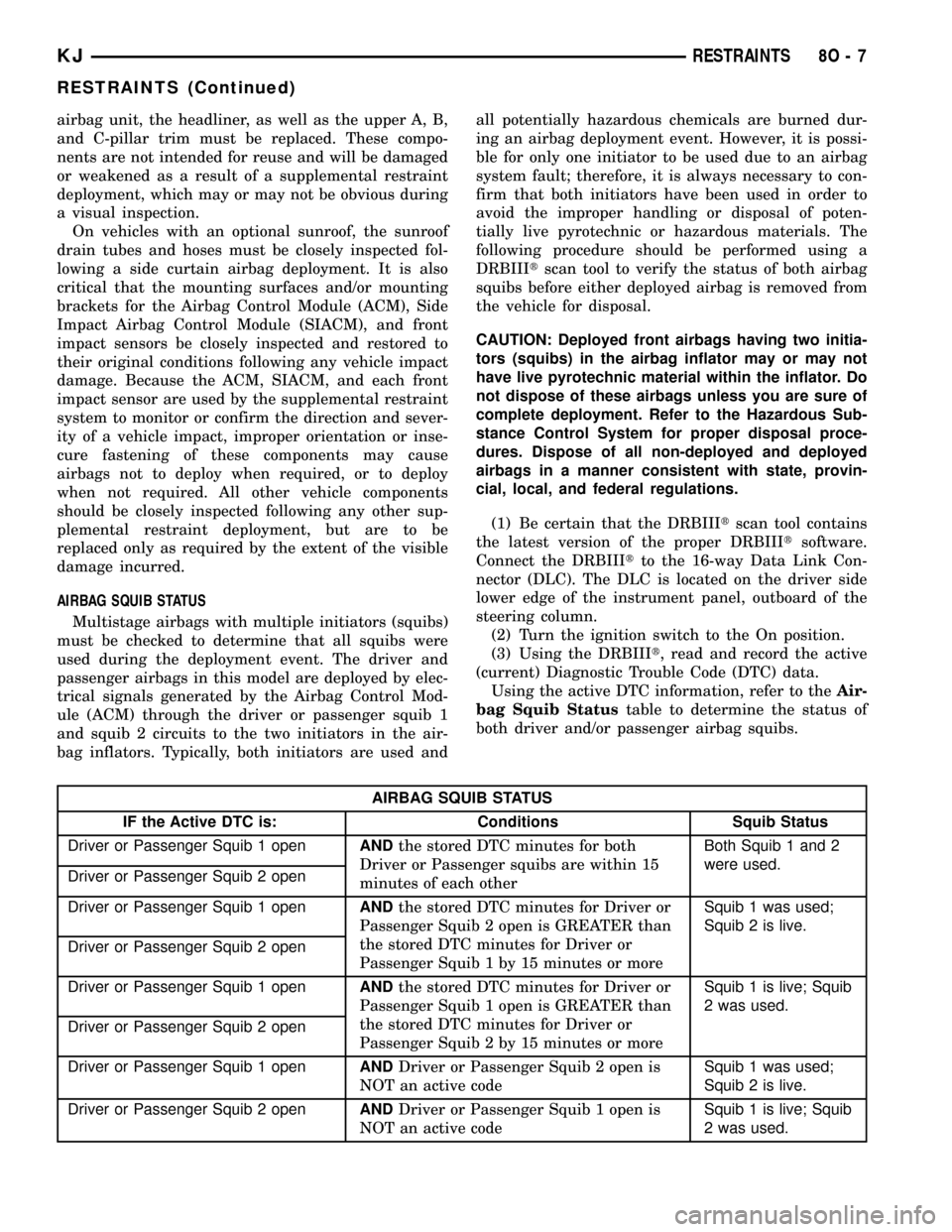
AIRBAG SQUIB STATUS
Multistage airbags with multiple initiators (squibs)
must be checked to determine that all squibs were
used during the deployment event. The driver and
passenger airbags in this model are deployed by elec-
trical signals generated by the Airbag Control Mod-
ule (ACM) through the driver or passenger squib 1
and squib 2 circuits to the two initiators in the air-
bag inflators. Typically, both initiators are used andall potentially hazardous chemicals are burned dur-
ing an airbag deployment event. However, it is possi-
ble for only one initiator to be used due to an airbag
system fault; therefore, it is always necessary to con-
firm that both initiators have been used in order to
avoid the improper handling or disposal of poten-
tially live pyrotechnic or hazardous materials. The
following procedure should be performed using a
DRBIIItscan tool to verify the status of both airbag
squibs before either deployed airbag is removed from
the vehicle for disposal.
CAUTION: Deployed front airbags having two initia-
tors (squibs) in the airbag inflator may or may not
have live pyrotechnic material within the inflator. Do
not dispose of these airbags unless you are sure of
complete deployment. Refer to the Hazardous Sub-
stance Control System for proper disposal proce-
dures. Dispose of all non-deployed and deployed
airbags in a manner consistent with state, provin-
cial, local, and federal regulations.
(1) Be certain that the DRBIIItscan tool contains
the latest version of the proper DRBIIItsoftware.
Connect the DRBIIItto the 16-way Data Link Con-
nector (DLC). The DLC is located on the driver side
lower edge of the instrument panel, outboard of the
steering column.
(2) Turn the ignition switch to the On position.
(3) Using the DRBIIIt, read and record the active
(current) Diagnostic Trouble Code (DTC) data.
Using the active DTC information, refer to theAir-
bag Squib Statustable to determine the status of
both driver and/or passenger airbag squibs.
AIRBAG SQUIB STATUS
IF the Active DTC is: Conditions Squib Status
Driver or Passenger Squib 1 openANDthe stored DTC minutes for both
Driver or Passenger squibs are within 15
minutes of each otherBoth Squib 1 and 2
were used.
Driver or Passenger Squib 2 open
Driver or Passenger Squib 1 openANDthe stored DTC minutes for Driver or
Passenger Squib 2 open is GREATER than
the stored DTC minutes for Driver or
Passenger Squib 1 by 15 minutes or moreSquib 1 was used;
Squib 2 is live.
Driver or Passenger Squib 2 open
Driver or Passenger Squib 1 openANDthe stored DTC minutes for Driver or
Passenger Squib 1 open is GREATER than
the stored DTC minutes for Driver or
Passenger Squib 2 by 15 minutes or moreSquib 1 is live; Squib
2 was used.
Driver or Passenger Squib 2 open
Driver or Passenger Squib 1 openANDDriver or Passenger Squib 2 open is
NOT an active codeSquib 1 was used;
Squib 2 is live.
Driver or Passenger Squib 2 openANDDriver or Passenger Squib 1 open is
NOT an active codeSquib 1 is live; Squib
2 was used.
KJRESTRAINTS 8O - 7
RESTRAINTS (Continued)