battery replacement JEEP LIBERTY 2002 KJ / 1.G User Guide
[x] Cancel search | Manufacturer: JEEP, Model Year: 2002, Model line: LIBERTY, Model: JEEP LIBERTY 2002 KJ / 1.GPages: 1803, PDF Size: 62.3 MB
Page 329 of 1803

(4) Clean the battery thermal guard with a sodium
bicarbonate (baking soda) and warm water cleaning
solution using a stiff bristle parts cleaning brush to
remove any acid film.
(5) Clean any corrosion from the battery terminal
posts with a wire brush or a post and terminal
cleaner, and a sodium bicarbonate (baking soda) and
warm water cleaning solution (Fig. 3).
INSPECTION
The following information details the recommended
inspection procedures for the battery and related
components. In addition to the maintenance sched-
ules found in this service manual and the owner's
manual, it is recommended that these procedures be
performed any time the battery or related compo-
nents must be removed for vehicle service.
(1) Inspect the battery cable terminal clamps for
damage. Replace any battery cable that has a dam-
aged or deformed terminal clamp.
(2) Inspect the battery tray and battery holddown
hardware for damage. Replace any damaged parts.
(3) Slide the thermal guard off of the battery case.
Inspect the battery case for cracks or other damagethat could result in electrolyte leaks. Also, check the
battery terminal posts for looseness. Batteries with
damaged cases or loose terminal posts must be
replaced.
(4) Inspect the battery thermal guard for tears,
cracks, deformation or other damage. Replace any
battery thermal guard that has been damaged.
(5) Inspect the battery built-in test indicator sight
glass for an indication of the battery condition. If the
battery is discharged, charge as required. Refer to
Standard Procedures for the proper battery built-in
indicator test procedures. Also refer to Standard Pro-
cedures for the proper battery charging procedures.
SPECIFICATIONS
The battery Group Size number, the Cold Cranking
Amperage (CCA) rating, and the Reserve Capacity
(RC) rating or Ampere-Hours (AH) rating can be
found on the original equipment battery label. Be
certain that a replacement battery has the correct
Group Size number, as well as CCA, and RC or AH
ratings that equal or exceed the original equipment
specification for the vehicle being serviced. Battery
sizes and ratings are discussed in more detail below.
²Group Size- The outside dimensions and ter-
minal placement of the battery conform to standards
established by the Battery Council International
(BCI). Each battery is assigned a BCI Group Size
number to help identify a correctly-sized replace-
ment.
²Cold Cranking Amperage- The Cold Crank-
ing Amperage (CCA) rating specifies how much cur-
rent (in amperes) the battery can deliver for thirty
seconds at -18É C (0É F). Terminal voltage must not
fall below 7.2 volts during or after the thirty second
discharge period. The CCA required is generally
higher as engine displacement increases, depending
also upon the starter current draw requirements.
²Reserve Capacity- The Reserve Capacity (RC)
rating specifies the time (in minutes) it takes for bat-
tery terminal voltage to fall below 10.5 volts, at a
discharge rate of 25 amperes. RC is determined with
the battery fully-charged at 26.7É C (80É F). This rat-
ing estimates how long the battery might last after a
charging system failure, under minimum electrical
load.
²Ampere-Hours- The Ampere-Hours (AH) rat-
ing specifies the current (in amperes) that a battery
can deliver steadily for twenty hours, with the volt-
age in the battery not falling below 10.5 volts. This
rating is also sometimes identified as the twenty-
hour discharge rating.
Fig. 3 Clean Battery Terminal Post - Typical
1 - TERMINAL BRUSH
2 - BATTERY CABLE
3 - BATTERY
8F - 6 BATTERY SYSTEMKJ
BATTERY SYSTEM (Continued)
Page 339 of 1803
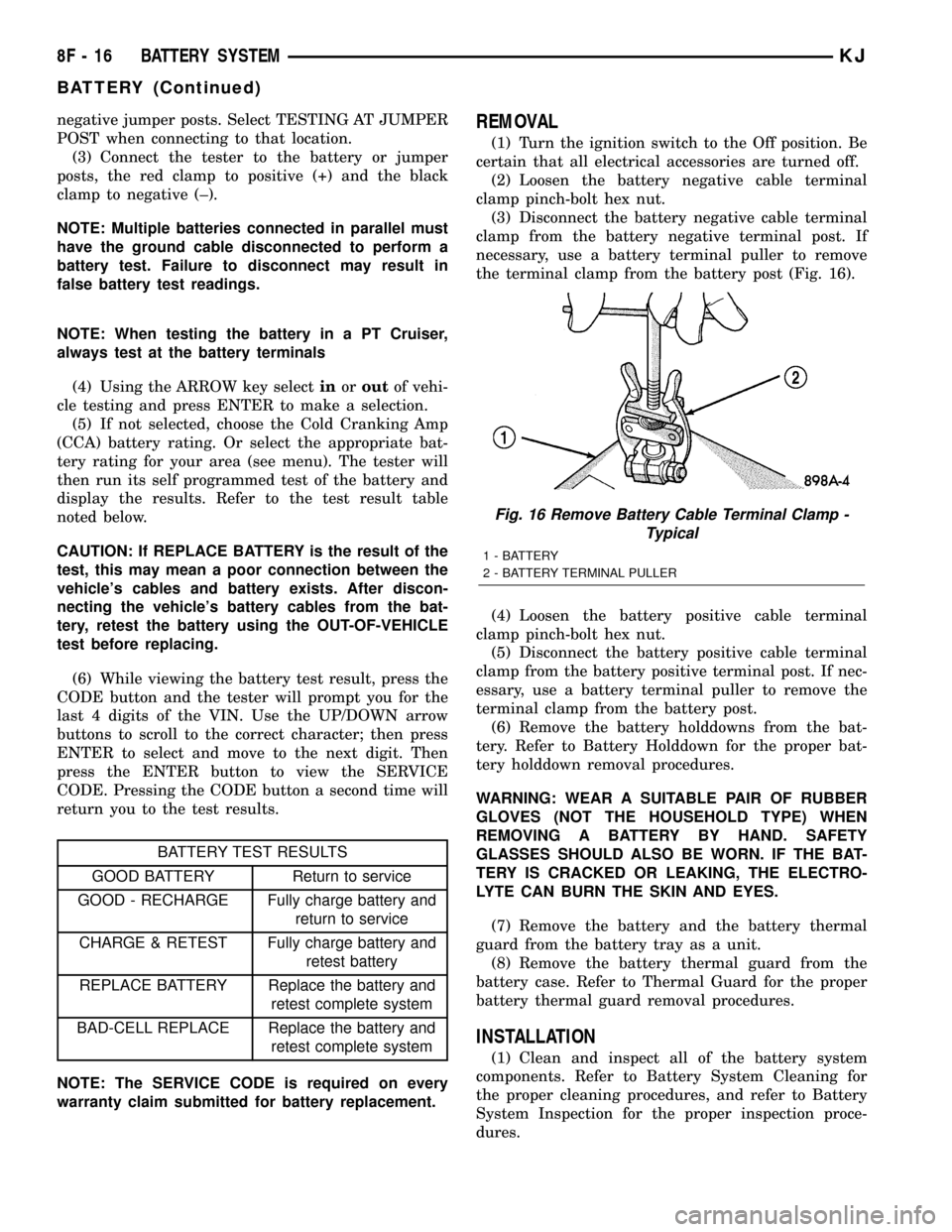
negative jumper posts. Select TESTING AT JUMPER
POST when connecting to that location.
(3) Connect the tester to the battery or jumper
posts, the red clamp to positive (+) and the black
clamp to negative (±).
NOTE: Multiple batteries connected in parallel must
have the ground cable disconnected to perform a
battery test. Failure to disconnect may result in
false battery test readings.
NOTE: When testing the battery in a PT Cruiser,
always test at the battery terminals
(4) Using the ARROW key selectinoroutof vehi-
cle testing and press ENTER to make a selection.
(5) If not selected, choose the Cold Cranking Amp
(CCA) battery rating. Or select the appropriate bat-
tery rating for your area (see menu). The tester will
then run its self programmed test of the battery and
display the results. Refer to the test result table
noted below.
CAUTION: If REPLACE BATTERY is the result of the
test, this may mean a poor connection between the
vehicle's cables and battery exists. After discon-
necting the vehicle's battery cables from the bat-
tery, retest the battery using the OUT-OF-VEHICLE
test before replacing.
(6) While viewing the battery test result, press the
CODE button and the tester will prompt you for the
last 4 digits of the VIN. Use the UP/DOWN arrow
buttons to scroll to the correct character; then press
ENTER to select and move to the next digit. Then
press the ENTER button to view the SERVICE
CODE. Pressing the CODE button a second time will
return you to the test results.
BATTERY TEST RESULTS
GOOD BATTERY Return to service
GOOD - RECHARGE Fully charge battery and
return to service
CHARGE & RETEST Fully charge battery and
retest battery
REPLACE BATTERY Replace the battery and
retest complete system
BAD-CELL REPLACE Replace the battery and
retest complete system
NOTE: The SERVICE CODE is required on every
warranty claim submitted for battery replacement.
REMOVAL
(1) Turn the ignition switch to the Off position. Be
certain that all electrical accessories are turned off.
(2) Loosen the battery negative cable terminal
clamp pinch-bolt hex nut.
(3) Disconnect the battery negative cable terminal
clamp from the battery negative terminal post. If
necessary, use a battery terminal puller to remove
the terminal clamp from the battery post (Fig. 16).
(4) Loosen the battery positive cable terminal
clamp pinch-bolt hex nut.
(5) Disconnect the battery positive cable terminal
clamp from the battery positive terminal post. If nec-
essary, use a battery terminal puller to remove the
terminal clamp from the battery post.
(6) Remove the battery holddowns from the bat-
tery. Refer to Battery Holddown for the proper bat-
tery holddown removal procedures.
WARNING: WEAR A SUITABLE PAIR OF RUBBER
GLOVES (NOT THE HOUSEHOLD TYPE) WHEN
REMOVING A BATTERY BY HAND. SAFETY
GLASSES SHOULD ALSO BE WORN. IF THE BAT-
TERY IS CRACKED OR LEAKING, THE ELECTRO-
LYTE CAN BURN THE SKIN AND EYES.
(7) Remove the battery and the battery thermal
guard from the battery tray as a unit.
(8) Remove the battery thermal guard from the
battery case. Refer to Thermal Guard for the proper
battery thermal guard removal procedures.
INSTALLATION
(1) Clean and inspect all of the battery system
components. Refer to Battery System Cleaning for
the proper cleaning procedures, and refer to Battery
System Inspection for the proper inspection proce-
dures.
Fig. 16 Remove Battery Cable Terminal Clamp -
Typical
1 - BATTERY
2 - BATTERY TERMINAL PULLER
8F - 16 BATTERY SYSTEMKJ
BATTERY (Continued)
Page 341 of 1803

(3) Install and tighten the battery hold down
bracket retaining bolt. Tighten the bolt to 4 N´m (20
in. lbs.).
(4) Reconnect the battery negative cable terminal
clamp to the battery negative terminal post. Tighten
the terminal clamp pinch-bolt hex nut to 8.4 N´m (75
in. lbs.).
BATTERY CABLES
DESCRIPTION
The battery cables (Fig. 18) are large gauge,
stranded copper wires sheathed within a heavy plas-
tic or synthetic rubber insulating jacket. The wire
used in the battery cables combines excellent flexibil-
ity and reliability with high electrical current carry-
ing capacity. The battery cables feature a clamping
type female battery terminal made of soft lead that is
die cast onto one end of the battery cable wire. A
square headed pinch-bolt and hex nut are installed
at the open end of the female battery terminal clamp.
Large eyelet type terminals are crimped onto the
opposite end of the battery cable wire and then sol-
der-dipped. The battery positive cable wires have a
red insulating jacket to provide visual identificationand feature a larger female battery terminal clamp
to allow connection to the larger battery positive ter-
minal post. The battery negative cable wires have a
black insulating jacket and a smaller female battery
terminal clamp.
The battery cables cannot be repaired and, if dam-
aged or faulty they must be replaced. Both the bat-
tery positive and negative cables are available for
service replacement only as a unit with the battery
wire harness, which may include portions of the wir-
ing circuits for the generator and other components
on some models. Refer to the appropriate wiring
information in this service manual for the location of
the proper battery cable wire harness diagrams. The
wiring information also includes proper wire and con-
nector repair procedures, further details on wire har-
ness routing and retention, as well as pin-out and
location views for the various wire harness connec-
tors, splices and grounds.
OPERATION
The battery cables connect the battery terminal
posts to the vehicle electrical system. These cables
also provide a path back to the battery for electrical
current generated by the charging system for restor-
ing the voltage potential of the battery. The female
battery terminal clamps on the ends of the battery
cable wires provide a strong and reliable connection
of the battery cable to the battery terminal posts.
The terminal pinch bolts allow the female terminal
clamps to be tightened around the male terminal
posts on the top of the battery. The eyelet terminals
secured to the opposite ends of the battery cable
wires from the female battery terminal clamps pro-
vide secure and reliable connection of the battery
cables to the vehicle electrical system.
The battery positive cable terminal clamp is die
cast onto the ends of two wires. One wire has an eye-
let terminal that connects the battery positive cable
to the B(+) terminal studs of the Power Distribution
Center (PDC), and the other wire has an eyelet ter-
minal that connects the battery positive cable to the
B(+) terminal stud of the engine starter motor sole-
noid. The battery negative cable terminal clamp is
also die cast onto the ends of two wires. One wire
has an eyelet terminal that connects the battery neg-
ative cable to the vehicle powertrain through a stud
on the left side of the engine cylinder block. The
other wire has an eyelet terminal that connects the
battery negative cable to the vehicle body through a
ground stud on the left wheel house, near the bat-
tery.
Fig. 18 Battery Cables - Typical
1 - Battery
2 - Radiator Crossmember
3 - Terminal Clamps
4 - Fender Inner Shield
5 - Negative Cable
6 - Positive Cable
8F - 18 BATTERY SYSTEMKJ
BATTERY HOLDDOWN (Continued)
Page 348 of 1803

GENERATOR
DESCRIPTION
The generator is belt-driven by the engine using a
serpentine type drive belt. It is serviced only as a
complete assembly. If the generator fails for any rea-
son, the entire assembly must be replaced.
OPERATION
As the energized rotor begins to rotate within the
generator, the spinning magnetic field induces a cur-
rent into the windings of the stator coil. Once the
generator begins producing sufficient current, it also
provides the current needed to energize the rotor.
The stator winding connections deliver the induced
AC current to 3 positive and 3 negative diodes for
rectification. From the diodes, rectified DC current is
delivered to the vehicle electrical system through the
generator battery terminal.
Although the generators appear the same exter-
nally, different generators with different output rat-
ings are used on this vehicle. Be certain that the
replacement generator has the same output rating
and part number as the original unit. Refer to Spec-
ifications and see Generator Ratings for amperage
ratings and part numbers.
Noise emitting from the generator may be caused
by: worn, loose or defective bearings; a loose or defec-
tive drive pulley; incorrect, worn, damaged or misad-
justed fan drive belt; loose mounting bolts; a
misaligned drive pulley or a defective stator or diode.
REMOVAL
Gasoline Powered Engines
CAUTION: DISCONNECT NEGATIVE CABLE FROM
BATTERY BEFORE REMOVING BATTERY OUTPUT
WIRE FROM GENERATOR. FAILURE TO DO SO
CAN RESULT IN INJURY.
(1) Disconnect and isolate negative battery cable
at battery.
CAUTION: Never force a belt over a pulley rim
using a screwdriver. The synthetic fiber of the belt
can be damaged.CAUTION: When installing a serpentine accessory
drive belt, the belt MUST be routed correctly. The
water pump will be rotating in the wrong direction if
the belt is installed incorrectly, causing the engine
to overheat. Refer to belt routing label in engine
compartment, or refer to Belt Schematics in Cooling
System.
(2) Remove generator drive belt. Refer to 7, Cool-
ing System for procedures.
(3) Unsnap plastic protective cover (Fig. 2) from
B+ mounting stud.
(4) Remove B+ terminal mounting nut (Fig. 2) at
top of generator.
(5) Disconnect field wire electrical connector at
rear of generator (Fig. 2) by pushing on connector
tab.
(6) 2.4L Engine: Remove 2 generator mounting
bolts (Fig. 3).
(7) 3.7L Engine: Remove 1 vertical generator
mounting bolt and 2 horizontal mounting bolts (Fig.
4).
(8) Remove generator from vehicle.
Fig. 2 GENERATOR ELECTRICAL CONNECTORS -
TYPICAL
1 - PROTECTIVE CAP
2-B+NUT
3 - B+ TERMINAL
4 - FIELD ELECTRICAL CONNECTOR
KJCHARGING SYSTEM 8F - 25
Page 354 of 1803

VOLTAGE REGULATOR
DESCRIPTION
The Electronic Voltage Regulator (EVR) is not a
separate component. It is actually a voltage regulat-
ing circuit located within the Powertrain Control
Module (PCM). The EVR is not serviced separately. If
replacement is necessary, the PCM must be replaced.
OPERATION
The amount of DC current produced by the gener-
ator is controlled by EVR circuitry contained within
the Powertrain Control Module (PCM). This circuitry
is connected in series with the generators second
rotor field terminal and its ground.
Voltage is regulated by cycling the ground path to
control the strength of the rotor magnetic field. TheEVR circuitry monitors system line voltage (B+) and
battery temperature (refer to Battery Temperature
Sensor for more information). It then determines a
target charging voltage. If sensed battery voltage is
0.5 volts or lower than the target voltage, the PCM
grounds the field winding until sensed battery volt-
age is 0.5 volts above target voltage. A circuit in the
PCM cycles the ground side of the generator field up
to 100 times per second (100Hz), but has the capabil-
ity to ground the field control wire 100% of the time
(full field) to achieve the target voltage. If the charg-
ing rate cannot be monitored (limp-in), a duty cycle
of 25% is used by the PCM in order to have some
generator output. Also refer to Charging Operation
for additional information.
KJCHARGING SYSTEM 8F - 31
Page 372 of 1803

(2) Follow the instructions in the repair kit for
preparing the damaged area.
(3) Remove the package separator clamp and mix
the two conductive epoxy components thoroughly
within the packaging. Fold the package in half and
cut the center corner to dispense the epoxy.
(4) For grid line repairs, mask the area to be
repaired with masking tape or a template.
(5) Apply the epoxy through the slit in the mask-
ing tape or template. Overlap both ends of the break
by at least 19 millimeters (0.75 inch).
(6) For a terminal or pigtail wire replacement,
mask the adjacent areas so the epoxy can be
extended onto the adjacent grid line as well as the
bus bar. Apply a thin layer of epoxy to the area
where the terminal or pigtail wire was fastened and
onto the adjacent grid line.
(7) Apply a thin layer of conductive epoxy to the
terminal or bare wire end of the pigtail and place it
in the proper location on the bus bar. To prevent the
terminal or pigtail wire from moving while the epoxy
is curing, it must be wedged or clamped.
(8)
Carefully remove the masking tape or template.
CAUTION: Do not allow the glass surface to exceed
204É C (400É F) or the glass may fracture.
(9) Allow the epoxy to cure 24 hours at room tem-
perature, or use a heat gun that will not over heat
the glass. Hold the heat gun approximately 25.4 cen-
timeters (10 inches) from the repair.
(10) After the conductive epoxy is properly cured,
remove the wedge or clamp from the terminal or pig-
tail wire. Do not attach the wire harness connectors
until the curing process is complete.
(11) Check the operation of the rear window defog-
ger glass heating grid.
REAR WINDOW DEFOGGER
GRID
DESCRIPTION
The heated rear window glass has two electrically
conductive vertical bus bars and a series of 11 hori-
zontal grid lines made of a silver-ceramic material,
which is baked on and bonded to the inside surface of
the glass. The grid lines and bus bars comprise a
parallel electrical circuit.
OPERATION
When the rear window defogger switch is placed in
the On position, electrical current is directed to the
rear window grid lines through the bus bars. The
grid lines heat the rear window to clear the surface
of fog or snow. Protection for the heated grid circuit
is provided by a fuse in the Power Distribution Cen-
ter (PDC).
The grid lines and bus bars are highly resistant to
abrasion. However, it is possible for an open circuit
to occur in an individual grid line, resulting in no
current flow through the line.
The grid lines can be damaged or scraped off with
sharp instruments. Care should be taken when clean-
ing the glass or removing foreign materials, decals,
or stickers from the glass. Normal glass cleaning sol-
vents or hot water used with rags or toweling is rec-
ommended.
A repair kit is available to repair the grid lines and
bus bars, or to reinstall the heated glass pigtail
wires.
DIAGNOSIS AND TESTING - REAR WINDOW
DEFOGGER GRID
For circuit descriptions and diagrams, (Refer to
Appropriate Wiring Information). To detect breaks in
the grid lines, the following procedure is required:
(1) Turn the ignition switch to the run position.
Set the defogger switch in the On position. The indi-
cator lamp should light. If OK, go to Step 2. If not
OK, (Refer to 8 - ELECTRICAL/HEATED GLASS/
REAR WINDOW DEFOGGER RELAY - DIAGNOSIS
AND TESTING)
(2) Using a 12-volt DC voltmeter, contact the ver-
tical bus bar on the right side of the vehicle with the
negative lead. With the positive lead, contact the ver-
tical bus bar on the left side of the vehicle. The volt-
meter should read battery voltage. If OK, go to Step
3. If not OK, repair the open circuit to the defogger
relay as required.
(3) With the negative lead of the voltmeter, contact
a good body ground point. The voltage reading should
not change. If OK, go to Step 4. If not OK, repair the
circuit to ground as required.
Fig. 2 GRID LINE REPAIR
1 - BREAK
2 - GRID LINE
3 - MASKING TAPE
KJWINDOW DEFOGGER 8G - 5
WINDOW DEFOGGER (Continued)
Page 413 of 1803

CLUSTER BULB
This procedure applies to each of the incandescent
cluster illumination lamp and bulb holder units.
(1) Disconnect and isolate the battery negative
cable.
(2) Remove the instrument cluster from the instru-
ment panel. (Refer to 8 - ELECTRICAL/INSTRU-
MENT CLUSTER - REMOVAL).
(3) Turn the bulb holder counterclockwise about
sixty degrees on the cluster electronic circuit board
(Fig. 4).
(4) Pull the bulb and bulb holder unit straight
back to remove it from the bulb mounting hole in the
cluster electronic circuit board.
CLUSTER LENS, HOOD, AND MASK
(1) Disconnect and isolate the battery negative
cable.
(2) Remove the instrument cluster from the instru-
ment panel. (Refer to 8 - ELECTRICAL/INSTRU-
MENT CLUSTER - REMOVAL).
(3) From the back of the instrument cluster,
remove the six screws that secure the rear cover and
the lens, hood, and mask unit to the cluster housing
(Fig. 5).
(4) Remove the lens, hood, and mask unit from the
face of the instrument cluster.
ASSEMBLY
WARNING: ON VEHICLES EQUIPPED WITH AIR-
BAGS, DISABLE THE SUPPLEMENTAL RESTRAINT
SYSTEM BEFORE ATTEMPTING ANY STEERING
WHEEL, STEERING COLUMN, DRIVER AIRBAG,
PASSENGER AIRBAG, SEAT BELT TENSIONER,
FRONT IMPACT SENSORS, SIDE CURTAIN AIRBAG,
OR INSTRUMENT PANEL COMPONENT DIAGNOSIS
OR SERVICE. DISCONNECT AND ISOLATE THE
BATTERY NEGATIVE (GROUND) CABLE, THEN
WAIT TWO MINUTES FOR THE SYSTEM CAPACI-
TOR TO DISCHARGE BEFORE PERFORMING FUR-
THER DIAGNOSIS OR SERVICE. THIS IS THE ONLY
SURE WAY TO DISABLE THE SUPPLEMENTAL
RESTRAINT SYSTEM. FAILURE TO TAKE THE
PROPER PRECAUTIONS COULD RESULT IN ACCI-
DENTAL AIRBAG DEPLOYMENT AND POSSIBLE
PERSONAL INJURY.
CLUSTER BULB
This procedure applies to each of the incandescent
cluster illumination lamp and bulb holder units.
CAUTION: Always use the correct bulb size and
type for replacement. An incorrect bulb size or type
may overheat and cause damage to the instrument
cluster, the electronic circuit board and/or the
gauges.
(1) Insert the bulb and bulb holder unit straight
into the correct bulb mounting hole in the cluster
electronic circuit board (Fig. 4).
Fig. 4 Cluster Bulb Remove/Install
1 - INSTRUMENT CLUSTER
2 - BULB & HOLDER (9)
Fig. 5 Instrument Cluster Components
1 - REAR COVER
2 - CLUSTER HOUSING
3 - LENS, HOOD & MASK
4 - SCREW (6)
8J - 10 INSTRUMENT CLUSTERKJ
INSTRUMENT CLUSTER (Continued)
Page 460 of 1803

INSTALLATION
CAUTION: Always use the correct bulb size and
type for replacement. An incorrect bulb size or type
may overheat and cause damage to the lamp, the
socket and/or the lamp wiring.
(1) Align the base of the bulb with the receptacle
in the Center High Mounted Stop Lamp (CHMSL)
unit socket.
(2) Push the bulb straight into the CHMSL unit
socket until it is firmly seated.
(3) Align the socket and bulb with the socket open-
ing on the back of CHMSL unit housing.
(4) Push the socket and bulb straight into the
CHMSL unit housing until it is firmly seated (Fig. 6).
(5) Rotate the socket on the back of the CHMSL
unit housing clockwise about 30 degrees.
(6) Reinstall the CHMSL unit onto the roof panel.
(Refer to 8 - ELECTRICAL/LAMPS/LIGHTING -
EXTERIOR/CENTER HIGH MOUNTED STOP
LAMP UNIT - INSTALLATION).
(7) Reconnect the battery negative cable.
CENTER HIGH MOUNTED
STOP LAMP UNIT
REMOVAL
(1) Disconnect and isolate the battery negative
cable.
(2) Remove the two screws that secure the Center
High Mounted Stop Lamp (CHMSL) unit to the rear
of the roof panel (Fig. 7).
(3) Pull the CHMSL unit away from the roof panel
far enough to access and disconnect the wire harness
connector for the CHMSL unit from the lamp socket
pigtail wire.
(4) Remove the CHMSL unit from the roof panel.
INSTALLATION
(1) Position the Center High Mounted Stop Lamp
(CHMSL) unit to the roof panel.
(2) Reconnect the wire harness connector for the
CHMSL unit to the lamp socket pigtail wire (Fig. 7).
(3) Position the CHMSL unit into the roof panel
opening.
(4) Install and tighten the two screws that secure
the CHMSL unit to the rear of the roof panel.
Tighten the screws to 2 N´m (21 in. lbs.).
(5) Reconnect the battery negative cable.
COMBINATION FLASHER
DESCRIPTION
The combination flasher for this model is integral
to the hazard switch located in the center of the
instrument panel, just above the radio. The combina-
tion flasher is a smart relay that functions as both
the turn signal system and the hazard warning sys-
tem flasher. The combination flasher contains active
electronic Integrated Circuitry (IC) elements. This
flasher is designed to handle the current flow
requirements of the factory-installed lighting. If sup-
plemental lighting is added to the turn signal lamp
circuits, such as when towing a trailer with lights,
the combination flasher will automatically try to
compensate to keep the flash rate the same.
The combination flasher cannot be repaired or
adjusted and, if faulty or damaged, the hazard switch
unit must be replaced.
OPERATION
The combination flasher has the following inputs and
outputs: fused B(+), fused ignition switch output, right
turn signal sense, left turn signal sense, and one output
each for the right and left turn signal circuits. The com-
bination flasher also receives an internal input through
the closed contacts of the hazard switch and, on vehicles
equipped with the optional Vehicle Theft Security Sys-
tem (VTSS), the flasher receives an input from the Body
Control Module (BCM) in order to flash the turn signal
lamps as an optical alert feature of that system. Con-
Fig. 7 Center High Mounted Stop Lamp Remove/
Install
1 - ROOF PANEL
2 - BODY WIRE HARNESS CONNECTOR
3 - BULB SOCKET
4 - CHMSL
5 - SCREW (2)
6 - PLASTIC NUT (2)
KJLAMPS/LIGHTING - EXTERIOR 8L - 19
CENTER HIGH MOUNTED STOP LAMP BULB (Continued)
Page 463 of 1803

(6) Pull the socket and bulb straight out of the
front fog lamp unit housing and through the access
hole into the front wheel opening area.
(7) Pull the bulb straight out of the front fog lamp
unit socket.
INSTALLATION
CAUTION: Always use the correct bulb size and
type for replacement. An incorrect bulb size or type
may overheat and cause damage to the lamp, the
socket and/or the lamp wiring.
CAUTION: Do not contaminate the bulb glass by
touching it with your fingers or by allowing it to
contact other oily surfaces. Shortened bulb life will
result.
(1) Align the base of the bulb with the receptacle
in the front fog lamp unit socket.
(2) Push the bulb straight into the front fog lamp
unit socket until it is firmly seated.
(3) Position the socket and bulb through the access
hole in the front wheelhouse splash shield and align
it with the socket opening on the back of the front
fog lamp unit housing (Fig. 10).
(4) Push the socket and bulb straight into the
front fog lamp unit housing until it is firmly seated.
(5) Rotate the socket on the back of the front fog
lamp unit housing clockwise about 30 degrees.
(6) Lower and snap shut the access cover over the
hole at the front of the front wheelhouse splash
shield.
(7) Reconnect the battery negative cable.
FRONT FOG LAMP RELAY
DESCRIPTION
The front fog lamp relay is located in the Junction
Block (JB) on the driver side outboard end of the
instrument panel in the passenger compartment of
the vehicle. The front fog lamp relay is a conven-
tional International Standards Organization (ISO)
micro relay (Fig. 11). Relays conforming to the ISO
specifications have common physical dimensions, cur-
rent capacities, terminal patterns, and terminal func-
tions. The relay is contained within a small,
rectangular, molded plastic housing and is connected
to all of the required inputs and outputs by five inte-
gral male spade-type terminals that extend from the
bottom of the relay base.
The front fog lamp relay cannot be adjusted or
repaired and, if faulty or damaged, the unit must be
replaced.
OPERATION
The front fog lamp relay is an electromechanical
switch that uses a low current input from the Body
Control Module (BCM) to control a high current out-
put to the front fog lamps. The movable common feed
contact point is held against the fixed normally
closed contact point by spring pressure. When the
relay coil is energized, an electromagnetic field is
produced by the coil windings. This electromagnetic
field draws the movable relay contact point away
from the fixed normally closed contact point, and
holds it against the fixed normally open contact
Fig. 10 Front Fog Lamp Bulb Remove/Install
1 - FRONT WHEELHOUSE SPLASH SHIELD
2 - ACCESS HOLE
3 - SOCKET
4 - BULB
Fig. 11 ISO Micro Relay
30 - COMMON FEED
85 - COIL GROUND
86 - COIL BATTERY
87 - NORMALLY OPEN
87A - NORMALLY CLOSED
8L - 22 LAMPS/LIGHTING - EXTERIORKJ
FRONT FOG LAMP BULB (Continued)
Page 468 of 1803

LIGHTING - EXTERIOR/FRONT LAMP UNIT -
REMOVAL).
(3) Firmly grasp the socket on the back of the
front lamp unit housing for the bulb that is being
removed (Fig. 18).
(4) Rotate the socket on the back of the front lamp
unit housing counterclockwise about 30 degrees.
(5) Pull the socket and bulb straight out of the
back of the front lamp unit housing.
(6) Pull the bulb straight out of the front lamp
unit socket.
INSTALLATION
CAUTION: Always use the correct bulb size and
type for replacement. An incorrect bulb size or type
may overheat and cause damage to the lamp, the
socket and/or the lamp wiring.
(1) Align the base of the bulb with the receptacle
in the front lamp unit socket.
(2) Push the bulb straight into the front lamp unit
socket until it is firmly seated.
(3) Align the socket and bulb with the socket open-
ing on the back of the front lamp unit housing (Fig.
18).
(4) Push the socket and bulb straight into the
front lamp unit housing until it is firmly seated.
(5) Rotate the socket on the back of the front lamp
unit housing clockwise about 30 degrees.
(6) Reinstall the front lamp unit into the front
bumper fascia. (Refer to 8 - ELECTRICAL/LAMPS/
LIGHTING - EXTERIOR/FRONT LAMP UNIT -
INSTALLATION).
(7) Reconnect the battery negative cable.
FRONT LAMP UNIT
REMOVAL
(1) Disconnect and isolate the battery negative
cable.
(2) Remove the screw that secures the outboard
end of the front lamp unit to the front bumper fascia
(Fig. 19).
(3) Pull the outboard end of the front lamp unit
away from the front bumper fascia far enough to dis-
Fig. 17 Front Fog Lamp Adjusting Screw
1 - FRONT BUMPER FASCIA
2 - ADJUSTING SCREW
3 - FRONT FOG LAMP UNIT
Fig. 18 Front Lamp Bulb Remove/Install
1 - FRONT LAMP UNIT
2 - SIDE MARKER SOCKET
3 - FRONT FASCIA
4 - HEADLAMP & DASH WIRE HARNESS
5 - MOUNTING TAB
6 - PARK/TURN SIGNAL SOCKET
Fig. 19 Front Lamp Unit Remove/Install
1 - FRONT LAMP UNIT
2 - FRONT BUMPER FASCIA
3 - SCREW (1)
KJLAMPS/LIGHTING - EXTERIOR 8L - 27
FRONT LAMP BULB (Continued)