instrument panel JEEP PATRIOT 2021 Owner handbook (in English)
[x] Cancel search | Manufacturer: JEEP, Model Year: 2021, Model line: PATRIOT, Model: JEEP PATRIOT 2021Pages: 332, PDF Size: 1.99 MB
Page 5 of 332

Table of Contents
1
INTRODUCTION......................................................................3
2
THINGS TO KNOW BEFORE STARTING YOUR VEHICLE..............................................9
3
UNDERSTANDING THE FEATURES OF YOUR VEHICLE.............................................61
4
UNDERSTANDING YOUR INSTRUMENT PANEL.................................................117
5
STARTING AND OPERATING............................................................161
6
WHAT TO DO IN EMERGENCIES..........................................................225
7
MAINTAINING YOUR VEHICLE...........................................................251
8
MAINTENANCE SCHEDULES............................................................283
9
IF YOU NEED CONSUMER ASSISTANCE.....................................................293
10
INDEX..........................................................................317
1
Page 12 of 332
WARNINGS AND CAUTIONS
This Owner’s Manual containsWARNINGS
against operating procedures that could result
in a collision, bodily injury and/or death. It also
containsCAUTIONSagainst procedures that
could result in damage to your vehicle. If you do
not read this entire Owner’s Manual, you may
miss important information. Observe all Warn-
ings and Cautions.
VEHICLE IDENTIFICATION
NUMBER
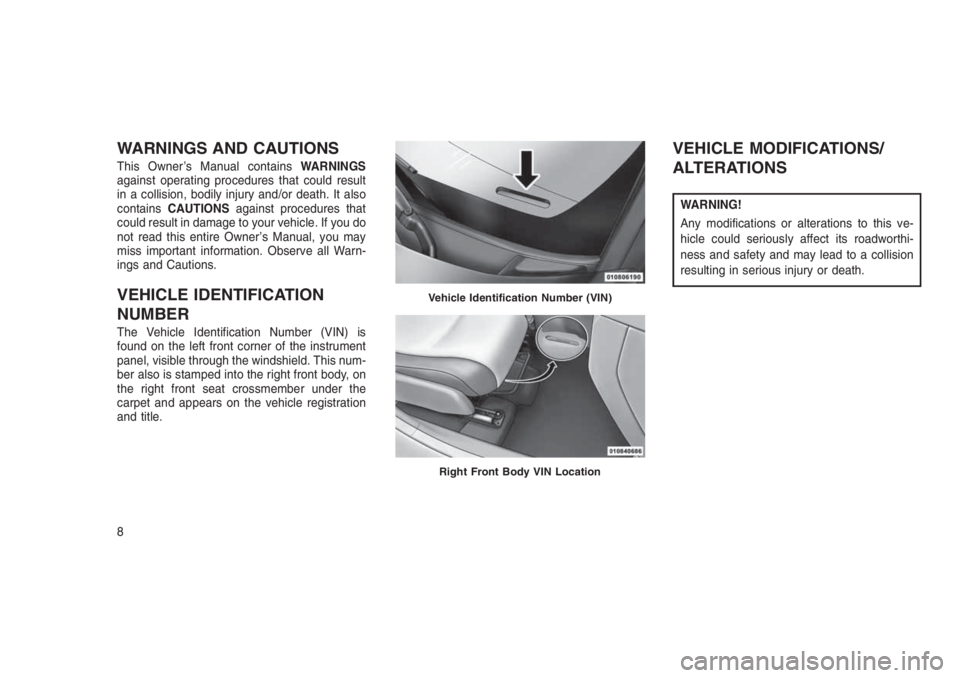
The Vehicle Identification Number (VIN) is
found on the left front corner of the instrument
panel, visible through the windshield. This num-
ber also is stamped into the right front body, on
the right front seat crossmember under the
carpet and appears on the vehicle registration
and title.
VEHICLE MODIFICATIONS/
ALTERATIONS
WARNING!
Any modifications or alterations to this ve-
hicle could seriously affect its roadworthi-
ness and safety and may lead to a collision
resulting in serious injury or death.
Vehicle Identification Number (VIN)
Right Front Body VIN Location
8
Page 21 of 332
NOTE:
The line of transmission must not be
blocked with metal objects.
To Unlock The Doors And LiftgatePush and release the UNLOCKbutton on
the RKE Key Fob once to unlock the driver’s
door or twice within five seconds to unlock all
doors and liftgate. The turn signal lights will
flash to acknowledge the unlock signal. The
illuminated entry system will also turn on.
RKE Key Fob Unlock, Driver
Door/All First Press
This feature lets you program the system to
unlock either the driver’s door or all doors on the
first push of the UNLOCK
button on the RKE
Key Fob. To change the current setting, proceed
as follows:
•For vehicles equipped with the Electronic
Vehicle Information Center (EVIC), refer to
“Electronic Vehicle Information Center
(EVIC)/Personal Settings (Customer-
Programmable Features)” in “Understanding
Your Instrument Panel” for further informa-
tion.
•For vehicles not equipped with the EVIC,
perform the following steps:
1. Push and hold the LOCK
button on a
programmed RKE Key Fob for at least 4
seconds but no longer than 10 seconds.
Then, push and hold the UNLOCK
button
while still holding the LOCKbutton.
2. Release both buttons at the same time.3. Test the feature while outside of the vehicle
by pushing the LOCK/UNLOCK buttons on
the RKE Key Fob with the ignition in the
LOCK position and the RKE Key removed.
4. Repeat these steps if you want to return this
feature to its previous setting.
NOTE:
Pushing the LOCK button on the RKE Key
Fob while you are inside the vehicle will
activate the Vehicle Security Alarm. Opening
a door with the Vehicle Security Alarm acti-
vated will cause the alarm to sound. Push
the UNLOCK button to deactivate the Ve-
hicle Security Alarm.
Illuminated Approach — If EquippedThis feature activates the headlights for up to 90
seconds when the doors are unlocked with the
RKE Key Fob. The time for this feature is
programmable on vehicles equipped with the
EVIC. Refer to “Electronic Vehicle Information
Center (EVIC)/Personal Settings (Customer-
Programmable Features)” in “Understanding
Your Instrument Panel” for further information.
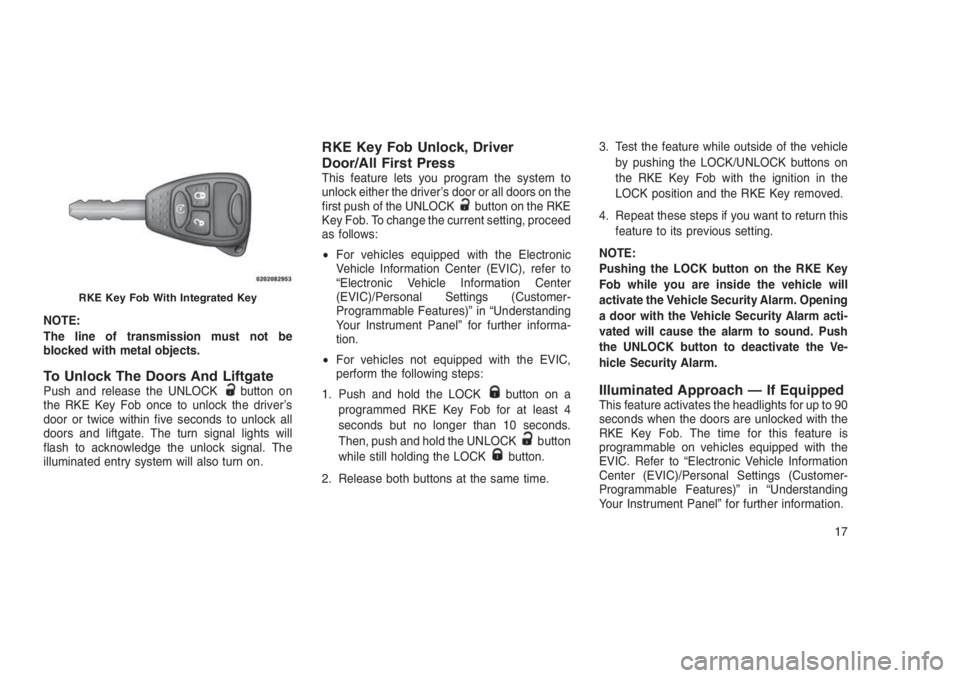
RKE Key Fob With Integrated Key
17
Page 22 of 332
To Lock The Doors And LiftgatePush and release the LOCK button on the RKE
Key Fob to lock all doors and liftgate. The turn
signal lights will flash to acknowledge the sig-
nal.
Flash Lights With Remote Key
Lock/Unlock
This feature will cause the turn signal lights to
flash when the doors are lockedor unlockedwith the RKE Key Fob. This feature can be
turned on or turned off. To change the current
setting, proceed as follows:
•For vehicles equipped with the EVIC, refer to
“Electronic Vehicle Information Center
(EVIC)/Personal Settings (Customer-
Programmable Features)” in “Understanding
Your Instrument Panel” for further informa-
tion.
•For vehicles not equipped with the EVIC,
perform the following steps:
1. Push and hold the UNLOCK
button on a
programmed RKE Key Fob for at least 4
seconds but no longer than 10 seconds.Then, push and hold the LOCK
button
while still holding the UNLOCKbutton.
2. Release both
buttons at the same
time.
3. Test the feature while outside of the vehicle
by pushing the LOCK
/UNLOCK
buttons on the RKE Key Fob with the ignition
in the LOCK position and the RKE Key
removed.
4. Repeat these steps if you want to return this
feature to its previous setting.
NOTE:
Pushing the LOCK
button on the RKE
Key Fob while you are in the vehicle will
activate the Vehicle Security Alarm. Opening
a door with the Vehicle Security Alarm acti-
vated will cause the alarm to sound. Push
the UNLOCK
button to deactivate the
Vehicle Security Alarm.
RKE Key Fob Battery ReplacementThe recommended replacement battery is
CR2032.NOTE:
Perchlorate Material — special handling
may apply.
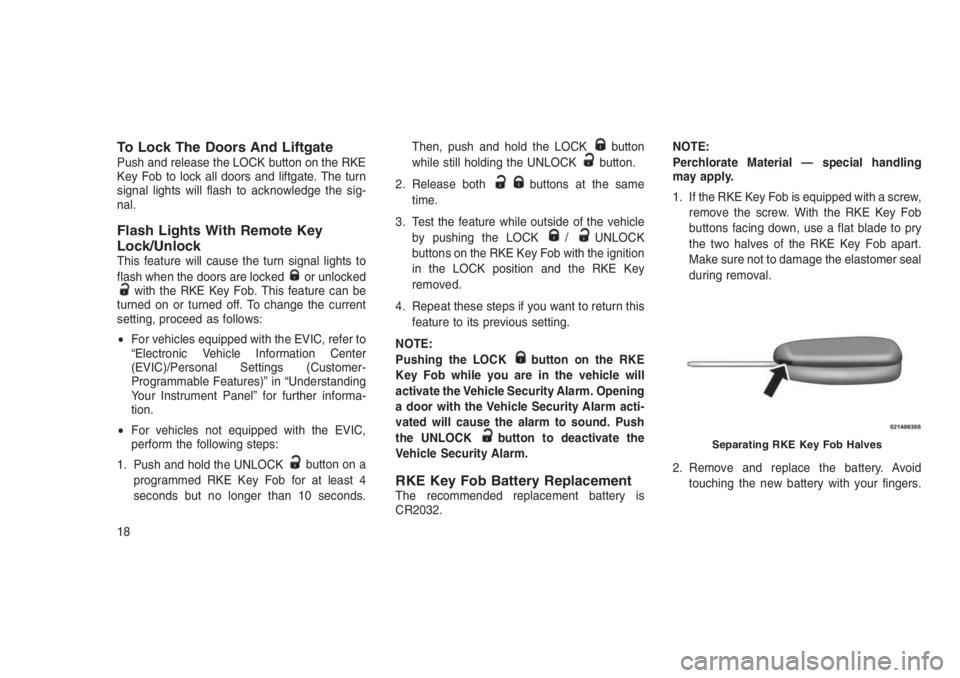
1. If the RKE Key Fob is equipped with a screw,
remove the screw. With the RKE Key Fob
buttons facing down, use a flat blade to pry
the two halves of the RKE Key Fob apart.
Make sure not to damage the elastomer seal
during removal.
2. Remove and replace the battery. Avoid
touching the new battery with your fingers.
Separating RKE Key Fob Halves
18
Page 26 of 332
Auto Lock Doors — If Equipped
When enabled, the door locks will lock auto-
matically when the vehicle’s speed exceeds 15
MPH (24 km/h).
The doors will lock automatically on vehicles
with power door locks if all of the following
conditions are met:
•The Auto Door Lock feature is enabled.
•The transmission is in gear.•All doors are closed.
•The throttle is pushed.
•The vehicle speed is above 15 MPH
(24 km/h).
•
The doors were not previously locked using the
power door lock switch or RKE Key Fob.
Auto Lock Doors Programming
The Automatic Door Locks feature can be en-
abled or disabled as follows:
•For vehicles equipped with the Electronic
Vehicle Information Center (EVIC), refer to
“Electronic Vehicle Information Center
(EVIC) — If Equipped/Personal Settings
(Customer Programmable Features)” in “Un-
derstanding Your Instrument Panel” for fur-
ther information.
•For vehicles not equipped with the EVIC,
perform the following procedure:
1. Close all doors and place the RKE Key in the
ignition.
2. Within 15 seconds, place the ignition be-
tween LOCK and ON/RUN and then back toLOCK four times, ending up in the LOCK
position (do not start the engine).
3. Within 30 seconds, push the power door
LOCK switch to lock the doors.
4. A single chime will indicate the completion of
the programming.
5. Repeat these steps if you want to return this
feature to its previous setting.
NOTE:
•If you do not hear the chime, it means that
the system did not enter the programming
mode and you will need to repeat the
procedure.
•Use the Automatic Door Lock feature in
accordance with local laws.
Automatic Unlock Doors On Exit
The doors will unlock automatically if:
•The Automatic Unlock Doors On Exit feature
is enabled.
•The transmission was in gear, and the ve-
hicle speed returned to 0 MPH (0 km/h).
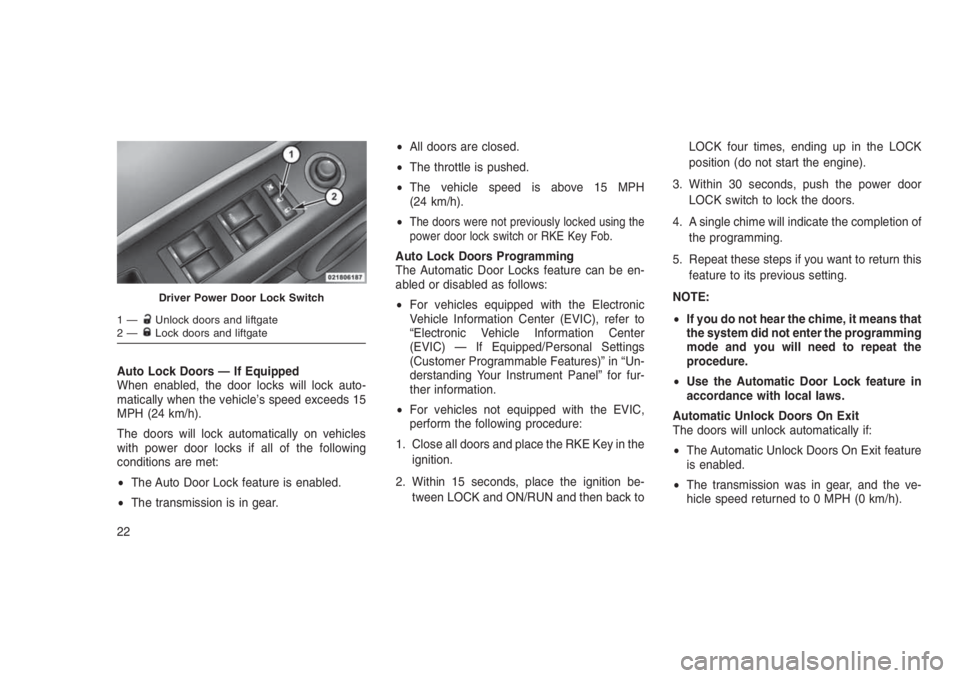
Driver Power Door Lock Switch
1—Unlock doors and liftgate
2—Lock doors and liftgate
22
Page 27 of 332
•The transmission is in NEUTRAL or PARK.
•The driver’s door is opened.
•The doors were not previously unlocked.
Automatic Unlock Doors On Exit
Programming
The Automatic Unlock Doors On Exit feature
can be enabled or disabled as follows:
•For vehicles equipped with the EVIC, refer to
“Electronic Vehicle Information Center
(EVIC) — If Equipped/Personal Settings
(Customer-Programmable Features)” in “Un-
derstanding Your Instrument Panel” for fur-
ther information.
•For vehicles not equipped with the EVIC,
perform the following procedure:
1. Close all doors and place the RKE Key in the
ignition.
2. Within 15 seconds, place the ignition be-
tween LOCK and ON/RUN and then back to
LOCK five times, ending up in the ON/RUN
position (do not start the engine).3. Within 30 seconds, push the power door
UNLOCK switch to unlock the doors.
4. A single chime will indicate the completion of
the programming.
5. Repeat these steps if you want to return this
feature to its previous setting.
NOTE:
•If you do not hear the chime, it means that
the system did not enter the programming
mode and you will need to repeat the
procedure.
•Use the Automatic Unlock Doors On Exit
feature in accordance with local laws.
Child-Protection Door Lock System
— Rear Doors
To provide a safer environment for small chil-
dren riding in the rear seats, the rear doors are
equipped with Child-Protection Door Lock sys-
tem.To Engage Or Disengage The Child-
Protection Door Lock System
1. Open the rear door.
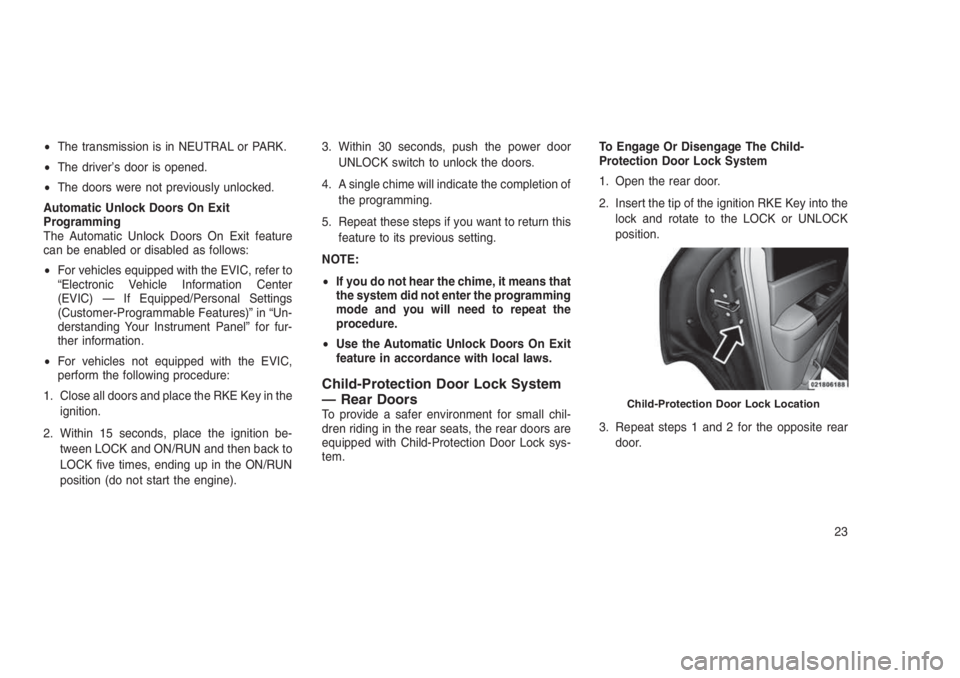
2. Insert the tip of the ignition RKE Key into the
lock and rotate to the LOCK or UNLOCK
position.
3. Repeat steps 1 and 2 for the opposite rear
door.Child-Protection Door Lock Location
23
Page 28 of 332
WARNING!
Avoid trapping anyone in a vehicle in a
collision. Remember that the rear doors can
only be opened from the outside when the
Child-Protection locks are engaged.
NOTE:
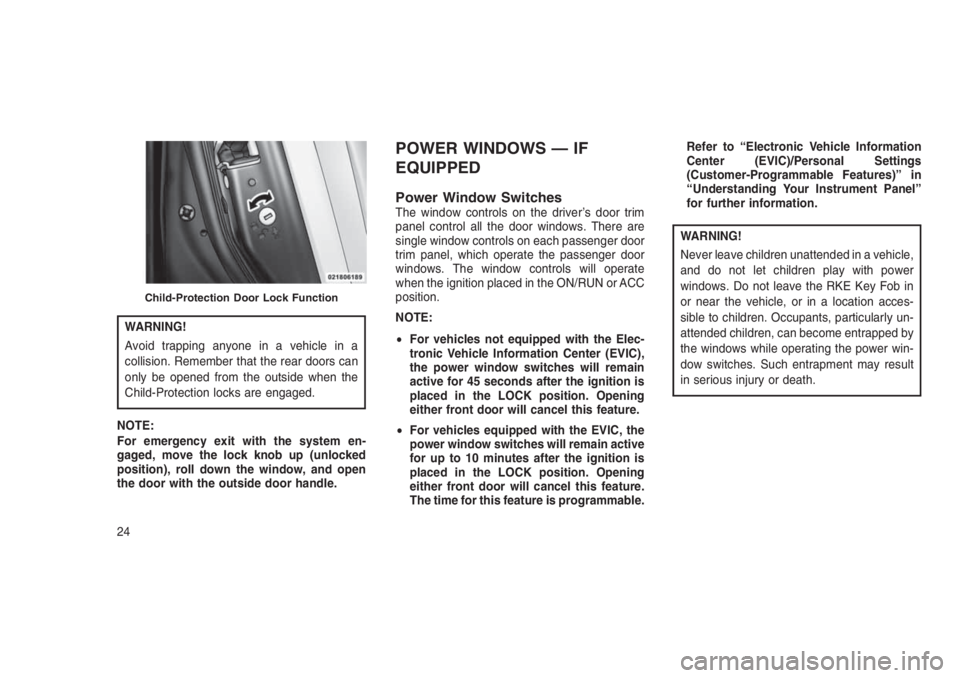
For emergency exit with the system en-
gaged, move the lock knob up (unlocked
position), roll down the window, and open
the door with the outside door handle.
POWER WINDOWS — IF
EQUIPPED
Power Window SwitchesThe window controls on the driver’s door trim
panel control all the door windows. There are
single window controls on each passenger door
trim panel, which operate the passenger door
windows. The window controls will operate
when the ignition placed in the ON/RUN or ACC
position.
NOTE:
•For vehicles not equipped with the Elec-
tronic Vehicle Information Center (EVIC),
the power window switches will remain
active for 45 seconds after the ignition is
placed in the LOCK position. Opening
either front door will cancel this feature.
•For vehicles equipped with the EVIC, the
power window switches will remain active
for up to 10 minutes after the ignition is
placed in the LOCK position. Opening
either front door will cancel this feature.
The time for this feature is programmable.Refer to “Electronic Vehicle Information
Center (EVIC)/Personal Settings
(Customer-Programmable Features)” in
“Understanding Your Instrument Panel”
for further information.
WARNING!
Never leave children unattended in a vehicle,
and do not let children play with power
windows. Do not leave the RKE Key Fob in
or near the vehicle, or in a location acces-
sible to children. Occupants, particularly un-
attended children, can become entrapped by
the windows while operating the power win-
dow switches. Such entrapment may result
in serious injury or death.
Child-Protection Door Lock Function
24
Page 42 of 332
Supplemental Restraint System
(SRS)
Air Bag System Components
Your vehicle may be equipped with the following
air bag system components:
•Occupant Restraint Controller (ORC)
•Air Bag Warning Light
•Steering Wheel and Column
•Instrument Panel
•Knee Impact Bolsters
•Advanced Front Air Bags
•Supplemental Side Air Bags
•Front and Side Impact Sensors
•Seat Belt Pretensioners
•Seat Belt Buckle Switch
Advanced Front Air Bags
This vehicle has Advanced Front Air Bags for
both the driver and front passenger as a supple-
ment to the seat belt restraint systems. The
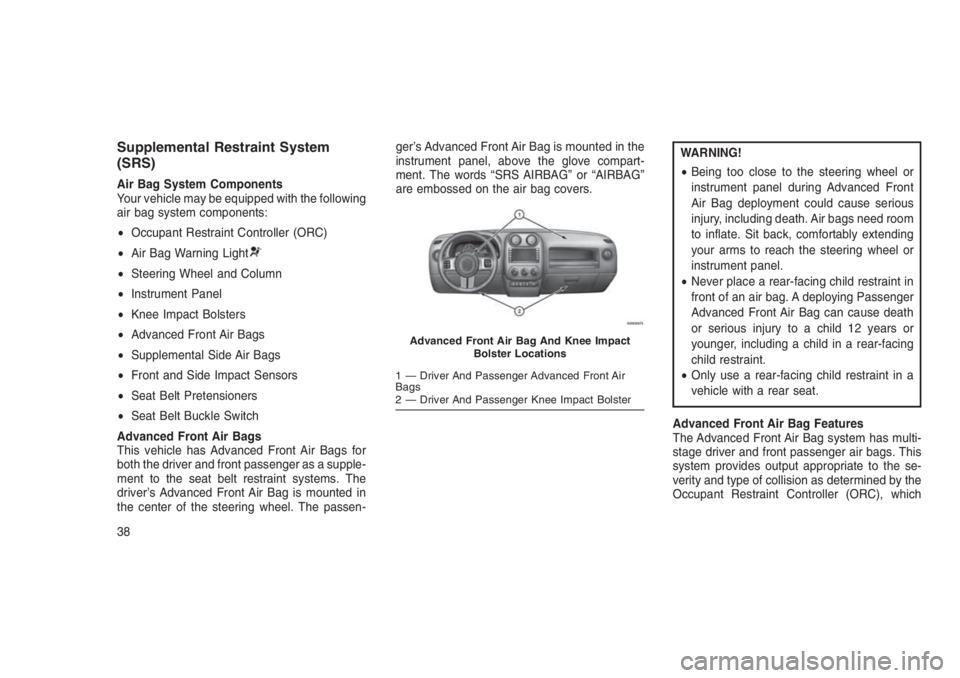
driver’s Advanced Front Air Bag is mounted in
the center of the steering wheel. The passen-ger’s Advanced Front Air Bag is mounted in the
instrument panel, above the glove compart-
ment. The words “SRS AIRBAG” or “AIRBAG”
are embossed on the air bag covers.
WARNING!
•Being too close to the steering wheel or
instrument panel during Advanced Front
Air Bag deployment could cause serious
injury, including death. Air bags need room
to inflate. Sit back, comfortably extending
your arms to reach the steering wheel or
instrument panel.
•Never place a rear-facing child restraint in
front of an air bag. A deploying Passenger
Advanced Front Air Bag can cause death
or serious injury to a child 12 years or
younger, including a child in a rear-facing
child restraint.
•Only use a rear-facing child restraint in a
vehicle with a rear seat.
Advanced Front Air Bag Features
The Advanced Front Air Bag system has multi-
stage driver and front passenger air bags. This
system provides output appropriate to the se-
verity and type of collision as determined by the
Occupant Restraint Controller (ORC), which
Advanced Front Air Bag And Knee Impact
Bolster Locations
1 — Driver And Passenger Advanced Front Air
Bags
2 — Driver And Passenger Knee Impact Bolster
38
Page 43 of 332
may receive information from the front impact
sensors or other system components.
The first stage inflator is triggered immediately
during an impact that requires air bag deploy-
ment. A low energy output is used in less severe
collisions. A higher energy output is used for
more severe collisions.
This vehicle may be equipped with a driver
and/or front passenger seat belt buckle switch
that detects whether the driver or front passen-
ger seat belt is buckled. The seat belt buckle
switch may adjust the inflation rate of the Ad-
vanced Front Air Bags.
WARNING!
•No objects should be placed over or near
the air bag on the instrument panel or
steering wheel because any such objects
could cause harm if the vehicle is in a
collision severe enough to cause the air
bag to inflate.
(Continued)
WARNING!(Continued)
•Do not put anything on or around the air
bag covers or attempt to open them manu-
ally. You may damage the air bags and you
could be injured because the air bags may
no longer be functional. The protective
covers for the air bag cushions are de-
signed to open only when the air bags are
inflating.
•Relying on the air bags alone could lead to
more severe injuries in a collision. The air
bags work with your seat belt to restrain
you properly. In some collisions, air bags
won’t deploy at all. Always wear your seat
belts even though you have air bags.
Advanced Front Air Bag Operation
Advanced Front Air Bags are designed to pro-
vide additional protection by supplementing the
seat belts. Advanced Front Air Bags are not
expected to reduce the risk of injury in rear,
side, or rollover collisions. The Advanced Front
Air Bags will not deploy in all frontal collisions,
including some that may produce substantialvehicle damage — for example, some pole
collisions, truck underrides, and angle offset
collisions.
On the other hand, depending on the type and
location of impact, Advanced Front Air Bags
may deploy in crashes with little vehicle front-
end damage but that produce a severe initial
deceleration.
Because air bag sensors measure vehicle de-
celeration over time, vehicle speed and damage
by themselves are not good indicators of
whether or not an air bag should have de-
ployed.
Seat belts are necessary for your protection in
all collisions, and also are needed to help keep
you in position, away from an inflating air bag.
When the ORC detects a collision requiring the
Advanced Front Air Bags, it signals the inflator
units. A large quantity of non-toxic gas is gen-
erated to inflate the Advanced Front Air Bags.
The steering wheel hub trim cover and the
upper right side of the instrument panel sepa-
rate and fold out of the way as the air bags
inflate to their full size. The Advanced Front Air
39
Page 48 of 332
•Flash hazard lights as long as the battery has
power or until the hazard light button is
pressed. The hazard lights can be deacti-
vated by pressing the hazard light button.
•Turn on the interior lights, which remain on as
long as the battery has power.
•Unlock the power door locks.
Enhanced Accident Response System
Reset Procedure
In order to reset the Enhanced Accident Re-
sponse System functions after an event, the
ignition must be changed from the START or
ON/RUN position to the OFF position. Carefully
check the vehicle for fuel leaks in the engine
compartment and on the ground near the en-
gine compartment and fuel tank before resetting
the system and starting the engine.
Air Bag Warning Light
The air bags must be ready to
inflate for your protection in a colli-
sion. The Occupant Restraint Con-
troller (ORC) monitors the internal
circuits and interconnecting wiring
associated with air bag system electrical com-
ponents.The ORC monitors the readiness of the elec-
tronic parts of the air bag system whenever the
ignition is placed in the START or ON/RUN
position. If the ignition is in the OFF position or
in the ACC position, the air bag system is not on
and the air bags will not inflate.
The ORC contains a backup power supply
system that may deploy the air bags even if the
battery loses power or it becomes disconnected
prior to deployment.
The ORC turns on the Air Bag Warning Light in
the instrument panel for approximately four to
eight seconds for a self-check when the ignition
is first placed in the ON/RUN position. After the
self-check, the Air Bag Warning Light will turn
off. If the ORC detects a malfunction in any part
of the system, it turns on the Air Bag Warning
Light, either momentarily or continuously. A
single chime will sound to alert you if the light
comes on again after initial startup.
The ORC also includes diagnostics that will
illuminate the instrument panel Air Bag Warning
Light if a malfunction is detected that could
affect the air bag system. The diagnostics also
record the nature of the malfunction. While theair bag system is designed to be maintenance
free, if any of the following occurs, have an
authorized dealer service the air bag system
immediately.
•The Air Bag Warning Light does not come on
during the four to eight seconds when the
ignition is first placed in the ON/RUN posi-
tion.
•The Air Bag Warning Light remains on after
the four to eight-second interval.
•The Air Bag Warning Light comes on inter-
mittently or remains on while driving.
NOTE:
If the speedometer, tachometer, or any en-
gine related gauges are not working, the
Occupant Restraint Controller (ORC) may
also be disabled. In this condition the air
bags may not be ready to inflate for your
protection. Have an authorized dealer ser-
vice the air bag system immediately.
44