warning JEEP RENEGADE 2014 1.G Owners Manual
[x] Cancel search | Manufacturer: JEEP, Model Year: 2014, Model line: RENEGADE, Model: JEEP RENEGADE 2014 1.GPages: 212, PDF Size: 17.48 MB
Page 171 of 212
WHEELS
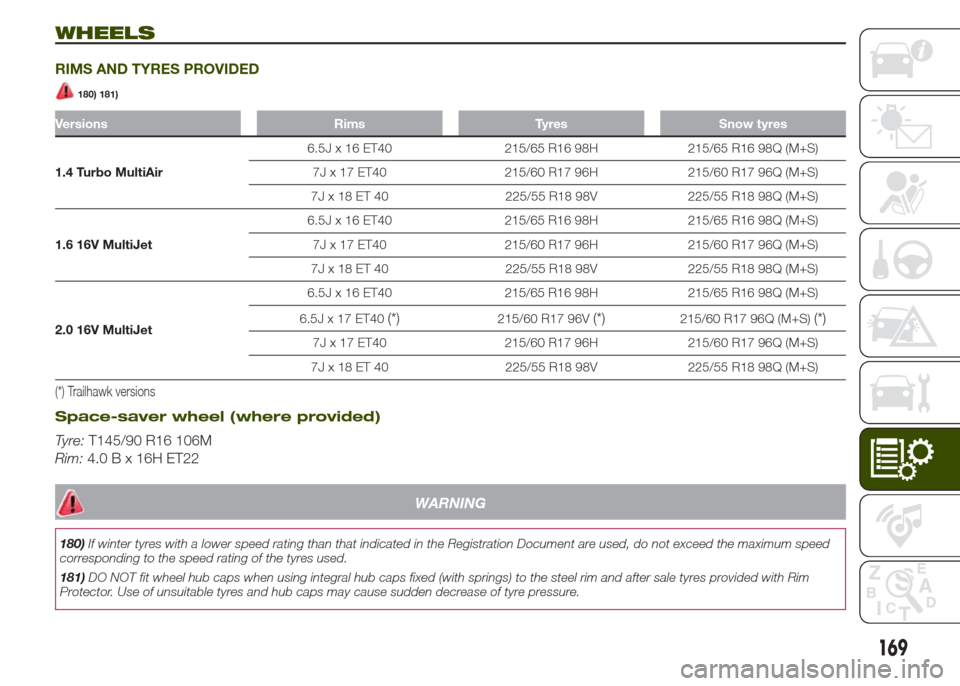
RIMS AND TYRES PROVIDED
180) 181)
Versions Rims Tyres Snow tyres
1.4 Turbo MultiAir6.5J x 16 ET40 215/65 R16 98H 215/65 R16 98Q (M+S)
7J x 17 ET40 215/60 R17 96H 215/60 R17 96Q (M+S)
7J x 18 ET 40 225/55 R18 98V 225/55 R18 98Q (M+S)
1.6 16V MultiJet6.5J x 16 ET40 215/65 R16 98H 215/65 R16 98Q (M+S)
7J x 17 ET40 215/60 R17 96H 215/60 R17 96Q (M+S)
7J x 18 ET 40 225/55 R18 98V 225/55 R18 98Q (M+S)
2.0 16V MultiJet6.5J x 16 ET40 215/65 R16 98H 215/65 R16 98Q (M+S)
6.5J x 17 ET40
(*)215/60 R17 96V(*)215/60 R17 96Q (M+S)(*)
7J x 17 ET40 215/60 R17 96H 215/60 R17 96Q (M+S)
7J x 18 ET 40 225/55 R18 98V 225/55 R18 98Q (M+S)
(*) Trailhawk versions
Space-saver wheel (where provided)
Tyre:T145/90 R16 106M
Rim:4.0 B x 16H ET22
WARNING
180)If winter tyres with a lower speed rating than that indicated in the Registration Document are used, do not exceed the maximum speed
corresponding to the speed rating of the tyres used.
181)DO NOT fit wheel hub caps when using integral hub caps fixed (with springs) to the steel rim and after sale tyres provided with Rim
Protector. Use of unsuitable tyres and hub caps may cause sudden decrease of tyre pressure.
169
Page 172 of 212
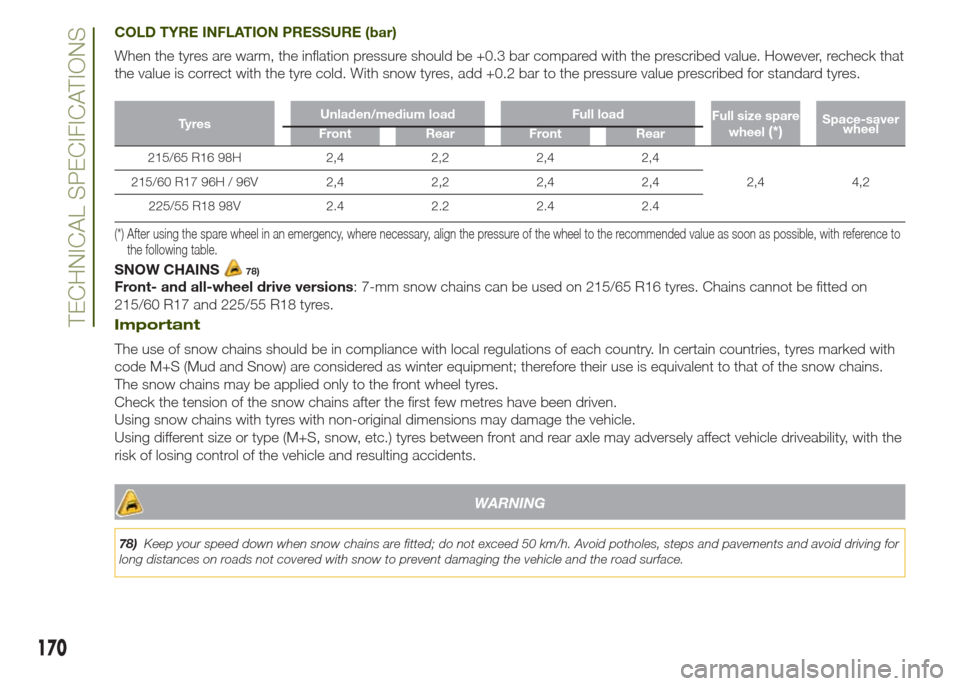
COLD TYRE INFLATION PRESSURE (bar)
When the tyres are warm, the inflation pressure should be +0.3 bar compared with the prescribed value. However, recheck that
the value is correct with the tyre cold. With snow tyres, add +0.2 bar to the pressure value prescribed for standard tyres.
Ty r e sUnladen/medium load Full load
Full size spare
wheel(*)Space-saver
wheel
Front Rear Front Rear
215/65 R16 98H 2,4 2,2 2,4 2,4
2,4 4,2 215/60 R17 96H / 96V 2,4 2,2 2,4 2,4
225/55 R18 98V 2.4 2.2 2.4 2.4
(*) After using the spare wheel in an emergency, where necessary, align the pressure of the wheel to the recommended value as soon as possible, with reference to
the following table.
SNOW CHAINS78)
Front- and all-wheel drive versions: 7-mm snow chains can be used on 215/65 R16 tyres. Chains cannot be fitted on
215/60 R17 and 225/55 R18 tyres.
Important
The use of snow chains should be in compliance with local regulations of each country. In certain countries, tyres marked with
code M+S (Mud and Snow) are considered as winter equipment; therefore their use is equivalent to that of the snow chains.
The snow chains may be applied only to the front wheel tyres.
Check the tension of the snow chains after the first few metres have been driven.
Using snow chains with tyres with non-original dimensions may damage the vehicle.
Using different size or type (M+S, snow, etc.) tyres between front and rear axle may adversely affect vehicle driveability, with the
risk of losing control of the vehicle and resulting accidents.
WARNING
78)Keep your speed down when snow chains are fitted; do not exceed 50 km/h. Avoid potholes, steps and pavements and avoid driving for
long distances on roads not covered with snow to prevent damaging the vehicle and the road surface.
170
TECHNICAL SPECIFICATIONS
Page 179 of 212
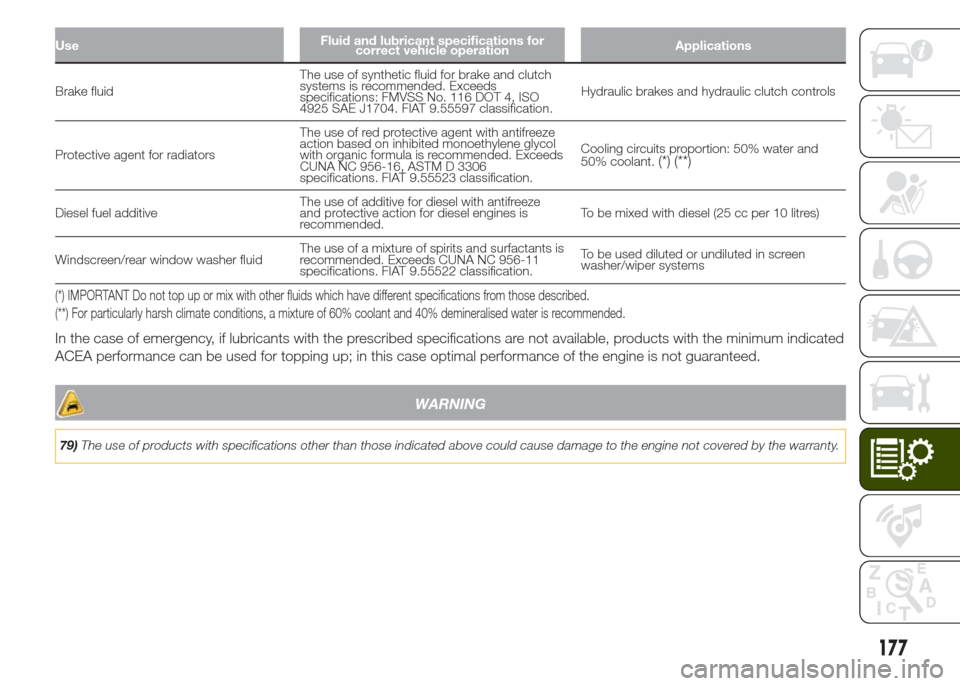
UseFluid and lubricant specifications for
correct vehicle operationApplications
Brake fluidThe use of synthetic fluid for brake and clutch
systems is recommended. Exceeds
specifications: FMVSS No. 116 DOT 4, ISO
4925 SAE J1704. FIAT 9.55597 classification.Hydraulic brakes and hydraulic clutch controls
Protective agent for radiatorsThe use of red protective agent with antifreeze
action based on inhibited monoethylene glycol
with organic formula is recommended. Exceeds
CUNA NC 956-16, ASTM D 3306
specifications. FIAT 9.55523 classification.Cooling circuits proportion: 50% water and
50% coolant.
(*) (**)
Diesel fuel additiveThe use of additive for diesel with antifreeze
and protective action for diesel engines is
recommended.To be mixed with diesel (25 cc per 10 litres)
Windscreen/rear window washer fluidThe use of a mixture of spirits and surfactants is
recommended. Exceeds CUNA NC 956-11
specifications. FIAT 9.55522 classification.To be used diluted or undiluted in screen
washer/wiper systems
(*) IMPORTANT Do not top up or mix with other fluids which have different specifications from those described.
(**) For particularly harsh climate conditions, a mixture of 60% coolant and 40% demineralised water is recommended.
In the case of emergency, if lubricants with the prescribed specifications are not available, products with the minimum indicated
ACEA performance can be used for topping up; in this case optimal performance of the engine is not guaranteed.
WARNING
79)The use of products with specifications other than those indicated above could cause damage to the engine not covered by the warranty.
177
Page 184 of 212
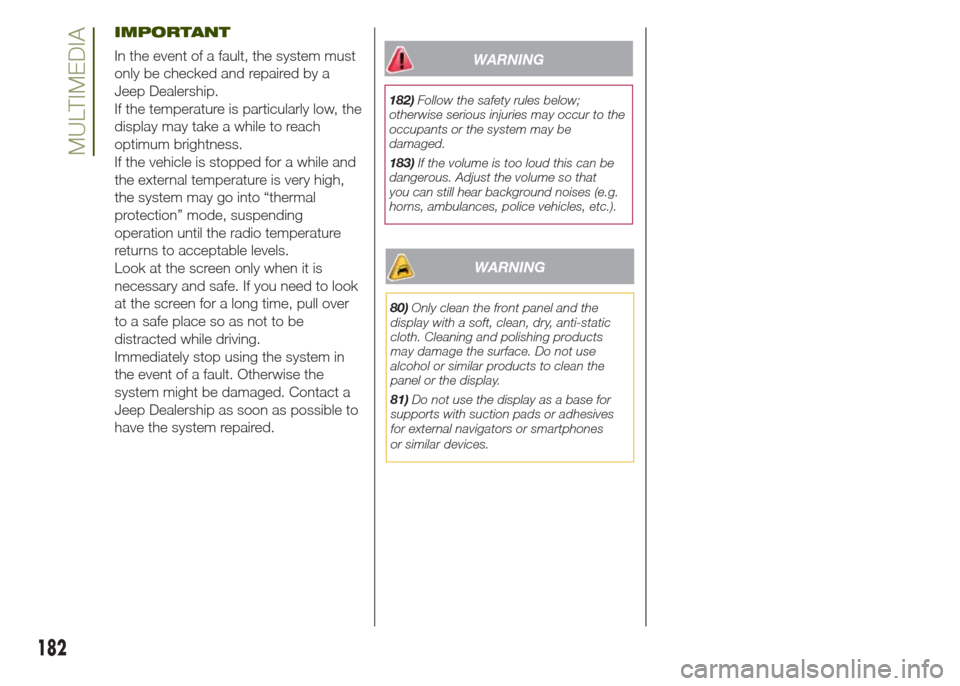
IMPORTANT
In the event of a fault, the system must
only be checked and repaired by a
Jeep Dealership.
If the temperature is particularly low, the
display may take a while to reach
optimum brightness.
If the vehicle is stopped for a while and
the external temperature is very high,
the system may go into “thermal
protection” mode, suspending
operation until the radio temperature
returns to acceptable levels.
Look at the screen only when it is
necessary and safe. If you need to look
at the screen for a long time, pull over
to a safe place so as not to be
distracted while driving.
Immediately stop using the system in
the event of a fault. Otherwise the
system might be damaged. Contact a
Jeep Dealership as soon as possible to
have the system repaired.WARNING
182)Follow the safety rules below;
otherwise serious injuries may occur to the
occupants or the system may be
damaged.
183)If the volume is too loud this can be
dangerous. Adjust the volume so that
you can still hear background noises (e.g.
horns, ambulances, police vehicles, etc.).
WARNING
80)Only clean the front panel and the
display with a soft, clean, dry, anti-static
cloth. Cleaning and polishing products
may damage the surface. Do not use
alcohol or similar products to clean the
panel or the display.
81)Do not use the display as a base for
supports with suction pads or adhesives
for external navigators or smartphones
or similar devices.
182
MULTIMEDIA
Page 191 of 212
NOTE The operations described above
can only be accessed if supported by
the mobile phone in use.
SMS message reader
The system can read the messages
received by the mobile phone. To use
this function the mobile phone must
support the SMS exchange function
throughBluetooth®.
If this function is not supported by the
phone, the corresponding
button is
deactivated (greyed out).
When a text message is received, the
display will show a screen where the
options "Listen", "Call" or "Ignore" can
be selected.
Press the
button to access the list
of SMS messages received by the
mobile phone (the list displays a
maximum of 60 messages received).
SETTINGS
Press the +MORE button on the front
panel to display the main "Settings"
menu.
NOTE The menu items displayed vary
according to the versions.
The menu includes the following items:
❒Display;
❒Units;
❒Voice commands;
❒Clock & Date;❒Safety/Assistance (where provided);
❒Lights (where provided);
❒Doors & Locks;
❒Engine Off Options;
❒Audio;
❒Phone/Bluetooth;
❒SiriusXM Setup (where provided);
❒Radio Setup;
❒Restore settings
Safety/Assistance(where provided)
This function can be used to carry out
the following adjustments:
ParkView Camera(where provided)
This function can be used to carry out
the following adjustments:
❒"Active Guidelines" (where provided):
permits the activation of dynamic grids
that indicate the trajectory of the vehicle
on the display.
❒"ParkView cam.delay" (where
provided): permits a delay in the
disappearance of images from the
camera when reverse is disengaged.
Forward Collision Warning(where provided)
This function can be used to select the
Forward Collision Warning system
intervention method.The options available are:
❒"Off": the system is deactivated;
❒"Only warning": the system
intervenes only by providing the driver
with an acoustic warning (where
provided);
❒"Only active braking": the system
intervenes by activating automatic
braking (where provided);
❒"Warning + active braking": the
system intervenes by providing the
driver with an acoustic warning and
activating automatic braking.
Forward Collision Sensitivity(where provided)
This function can be used to select the
"readiness" of the system to intervene,
on the basis of distance from the
obstacle.
The options available are "Near",
"Med", "Far".
ParkSense(where provided)
This function can be used to select the
type of warning provided by the
ParkSense system.
The options available are:
❒"Sound Only": the system warns the
driver that an obstacle is present
through acoustic warnings only, via the
speakers in the vehicle.
189
Page 192 of 212
❒"Sound & Display": the system warns
the driver that an obstacle is present
through acoustic (via the speakers
in the vehicle) and visual (on the
instrument panel) warnings.
Front ParkSense Vol.(where provided)
This function can be used to select the
volume of the acoustic warnings
provided by the front Parksense
system.
Rear ParkSense Vol.(where provided)
This function can be used to select the
volume of the acoustic warnings
provided by the rear Parksense system.
ParkSense Vol.(where provided)
This function can be used to select the
volume of the acoustic warnings
provided by the Parksense system.
LaneSense Warning(where provided)
This function can be used to select the
"readiness" of the LaneSense system to
intervene.
LaneSense Strength(where provided)
This function can be used to select the
force to apply to the steering wheel
to put the vehicle back in the lane
through the electric steering system, in
the event of LaneSense system
intervention.
SideSense(where provided)
This function can be used to select the
Side Distance Warning system warning
type.
The options available are:
❒"Off": the system is deactivated;
❒"Sound Only": the system warns the
driver that an obstacle is present
through acoustic warnings only, via the
speakers in the vehicle.
❒"Sound & Display": the system warns
the driver that an obstacle is present
through acoustic (via the speakers
in the vehicle) and visual (on the
instrument panel) warnings.
SideSense Intensity(where provided)
This function can be used to select the
Side Distance Warning system acoustic
warning volume.
Blind Spot Alert(where provided)
This function can be used to select the
type of warning ("Sound Only" or
"Sound & Display") to indicate the
presence of objects in the blind spot of
the door mirror.
Rain sensor(where provided)
This function can be used to activate/
deactivate the automatic operation
of the wipers in the event of rain.
Brakes(where provided)
This function can be used to select the
following submenus:
❒"Brake Service" (where provided):
permits the activation of the procedure
to carry out braking system servicing;
❒"Auto Park Brake" (where provided):
permits the activation/deactivation of
automatic parking brake engagement.
NAVIGATION(Uconnect 5" Radio Nav versions only)
Programming a route
IMPORTANT In the interest of safety
and to reduce distractions while you are
driving, you should always plan a route
before you start driving.
190
MULTIMEDIA
Page 200 of 212
SMS message reader
The system can read the messages
received by the mobile phone. To use
this function the mobile phone must
support the SMS exchange function
throughBluetooth®.
If this function is not supported by the
phone, the corresponding
button is
deactivated (greyed out).
When a text message is received, the
display will show a screen where the
options "Listen", "Call" or "Ignore" can
be selected.
Press the
button to access the list
of SMS messages received by the
mobile phone (the list displays a
maximum of 60 messages received).
SETTINGS
Press the +MORE button on the front
panel to display the main "Settings"
menu.
NOTE The menu items displayed vary
according to the versions.
The menu includes the following items:
❒Display;
❒Units;
❒Voice commands;
❒Clock & Date;
❒Safety & Driving Assistance;
❒Lights;
❒Doors & Locks;❒Vehicle shutdown options;
❒Audio;
❒Phone/Bluetooth;
❒Sirius XM configuration (where
available);
❒Radio Setup;
❒System Information;
❒Restore defaults;
❒Clear Personal Data.
Safety & Driving Assistance
This function can be used to carry
out the following adjustments:
ParkView camera(where provided)
Allows you to activate the display of the
shooting of the ParkView camera when
the reverse gear is engaged.
Delayed ParkView deactivation(where provided)
Allows you to delay the switching off of
the shooting of the ParkView camera
when the reverse gear is disengaged.
Guidelines for load platform camera(where provided)
Allows you to activate the display of the
dynamic guidelines that indicate the
route of the vehicle.
Forward Collision Warning(where provided)
Allows you to select the intervention
mode for the Forward Collision Warning
system. The options available are:
❒"Off": the system is deactivated;
❒"Only warning": the system
intervenes only by providing the driver
with a warning (option available for
versions/markets, where provided);
❒"Only active braking": the system
intervenes by activating automatic
braking (option available for
versions/markets, where provided);
❒"Alarm + active braking": the system
intervenes by providing the driver with
a warning and activating automatic
braking;
Forward Collision Sensitivity(where provided)
Allows you to select the intervention
readiness for the system according to
the distance of the obstacle. The
options available are "Near", "Med",
"Far".
ParkSense(where provided)
Allows you to select the type of warning
provided by the ParkSense system.
The options available are:
198
MULTIMEDIA
Page 201 of 212
❒"Audio Only": the system warns the
driver that an obstacle is present
through acoustic warnings only, via the
speakers in the vehicle;
❒"Audio and visual": the system
warns the driver that an obstacle is
present through acoustic (via the
speakers in the vehicle) and visual (on
the instrument panel) warnings.
Front ParkSense Vol.(where provided)
Allows you to select the volume of the
acoustic warnings for the front
ParkSense system.
Rear ParkSense Vol.(where provided)
Allows you to select the volume of the
acoustic warnings for the rear
ParkSense system.
LaneSense Warning(where provided)
Allows you to select the intervention
readiness for the LaneSense system.
LaneSense Strength(where provided)
Allows you to select the force to apply
to the steering wheel to put the vehicle
back in the lane through the electric
steering system, in the event of
LaneSense system intervention.
SideSense(where provided)
Allows you to select the type of warning
provided by the Side Distance Warning
system.
The options available are:
❒"Off": the system is off;
❒"Audio Only": the system warns the
driver that an obstacle is present
through acoustic warnings only, via the
speakers in the vehicle;
❒"Audio and visual": the system
warns the driver that an obstacle is
present through acoustic (via the
speakers in the vehicle) and visual (on
the instrument panel) warnings.
SideSense Volume(where provided)
Allows you to select the volume of the
acoustic warnings for the front Side
Distance Warning system.
Rain sensor(where provided)
Allows you to activate/deactivate the
automatic switching on of the wipers in
the case of rain.
Brakes
This option can be used to select the
following submenus:
❒"Brake Service"(for versions/
markets, where provided): permits the
activation of the procedure to carry
out braking system servicing;
❒"Auto Park Brake"(for versions/
markets, where provided): permits the
activation/deactivation of automatic
parking brake engagement.
NAVIGATION MODE
IMPORTANT Navigation maps are
pre-loaded on the system, therefore no
external support is needed.
To activate the main navigation menu,
press the NAV button on the front
panel, then press one of the following
buttons:
❒"Where to?": it searches or
navigates to the destination;
❒"View map": it displays the map;
❒"Info": it displays all info about
navigation;
❒"Emergency": it searches for
Hospitals or Police Stations located
near the destination. It is also possible
to view your current position on the
display and save, in "Favourites", the
location of the Hospitals or Police
Stations.
199
Page 203 of 212
IMPORTANT INFORMATION AND RECOMMENDATIONS
WARNING
MySky SUN ROOF
❒While refitting the panels, pay special attention to prevent any trapping of fingers, scarves, ties and loose clothing; they might be trapped
under the panels themselves.
ROOF RACK/SKI RACK
❒Before driving, make sure that the transversal bars have been fitted properly.
SUGGESTIONS FOR DRIVING
❒If the engine stalls, the vehicle skids or it is not possible to drive in a straight line on the top of a hill or a road with a gradient, do not try to
do a U-turn for any reason. This operation would result in the vehicle rolling over. Back up on the stretch of road with a gradient, shifting to
reverse and proceeding with the utmost care. Do not travel downhill with gearbox in neutral and using only the brake.
❒The presence of abrasive material on the brakes may cause excessive wear or adversely affect its correct operation. If the vehicle is driven
in particularly dusty environments, have the brakes checked and cleaned as necessary.
INTERIORS
❒Never use flammable products, such as petrol ether or rectified petrol to clean the inside of the vehicle. The electrostatic charges which are
generated by rubbing during the cleaning operation may cause a fire.
❒Do not keep aerosol cans in the vehicle: danger of explosion. Aerosol cans must not be exposed to a temperature exceeding 50°C. When
the vehicle is exposed to sunlight, the internal temperature can greatly exceed this value.
❒There must be no obstacles on the floor underneath the pedals; make sure that mats are always flat and do not interfere with the pedals.
SUPPLY
❒Modifications or repairs to the supply system that are not carried out correctly or do not take the system technical specifications into
account can cause malfunctions leading to the risk of fire.
Page 204 of 212
WARNING
ROOF RACK/SKI RACK
❒The use of transversal bars on longitudinal ones prevents the use of the sunroof, because the latter, while opening, interferes with the bars.
❒Therefore do not move the sunroof if transversal bars have been fitted.
❒Fully comply with the regulations in force concerning maximum clearance.
INTERIORS
❒Never use alcohol, petrols and derivatives to clean the dashboard and instrument panel lens.