lock JEEP RENEGADE 2014 1.G Workshop Manual
[x] Cancel search | Manufacturer: JEEP, Model Year: 2014, Model line: RENEGADE, Model: JEEP RENEGADE 2014 1.GPages: 212, PDF Size: 17.48 MB
Page 152 of 212
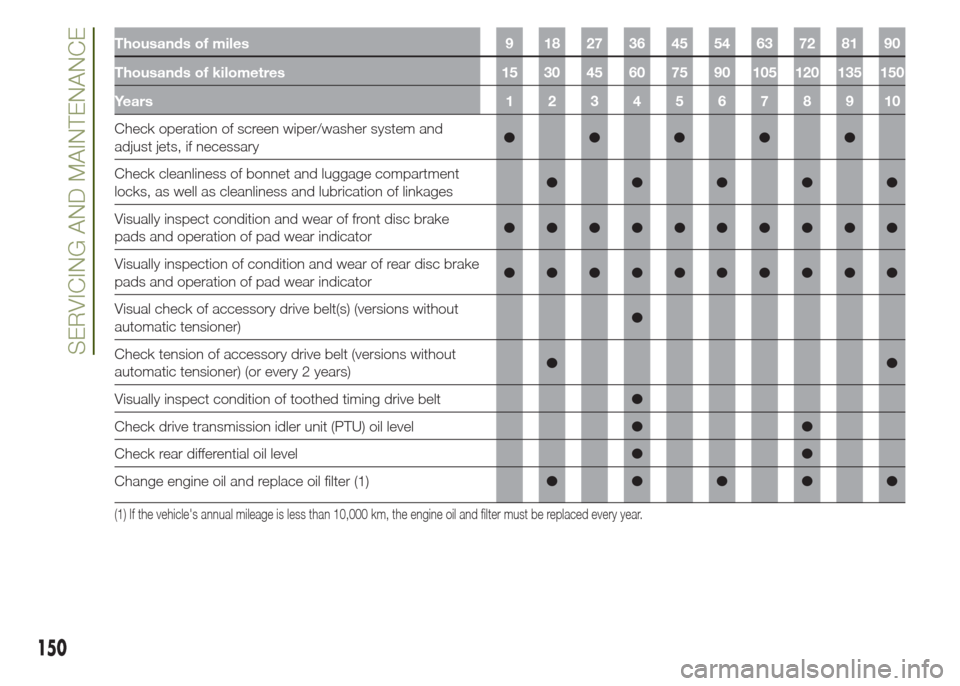
Thousands of miles 9 18 27 36 45 54 63 72 81 90
Thousands of kilometres 15 30 45 60 75 90 105 120 135 150
Years12345678910
Check operation of screen wiper/washer system and
adjust jets, if necessary●●●●●
Check cleanliness of bonnet and luggage compartment
locks, as well as cleanliness and lubrication of linkages●●●●●
Visually inspect condition and wear of front disc brake
pads and operation of pad wear indicator●●●●●●●●●●
Visually inspection of condition and wear of rear disc brake
pads and operation of pad wear indicator●●●●●●●●●●
Visual check of accessory drive belt(s) (versions without
automatic tensioner)●
Check tension of accessory drive belt (versions without
automatic tensioner) (or every 2 years)●●
Visually inspect condition of toothed timing drive belt●
Check drive transmission idler unit (PTU) oil level●●
Check rear differential oil level●●
Change engine oil and replace oil filter (1)●●●●●
(1) If the vehicle's annual mileage is less than 10,000 km, the engine oil and filter must be replaced every year.
150
SERVICING AND MAINTENANCE
Page 155 of 212
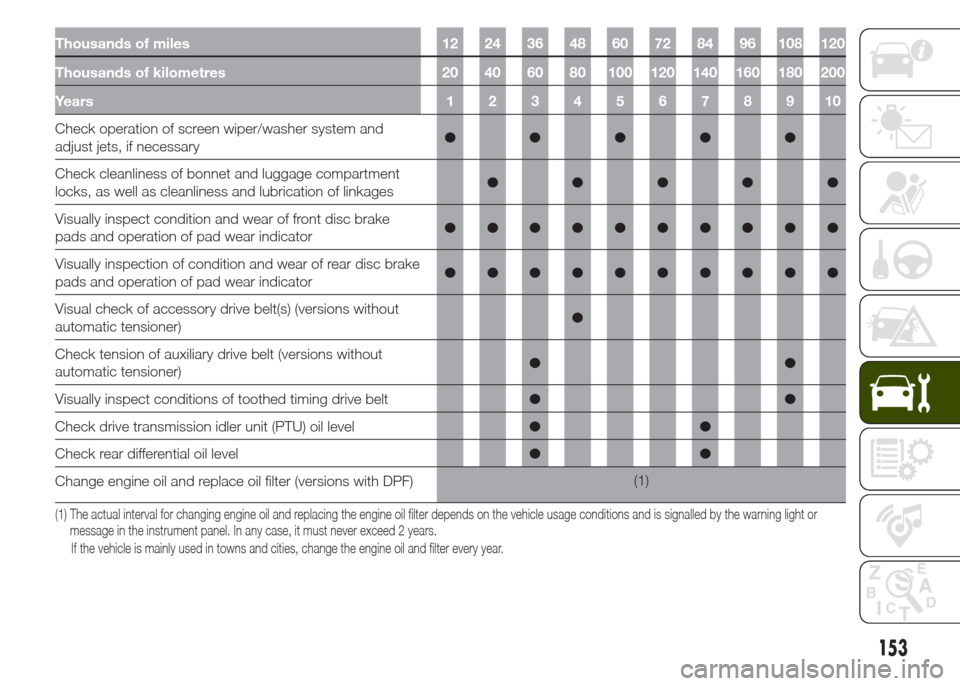
Thousands of miles 12 24 36 48 60 72 84 96 108 120
Thousands of kilometres 20 40 60 80 100 120 140 160 180 200
Years12345678910
Check operation of screen wiper/washer system and
adjust jets, if necessary●●●●●
Check cleanliness of bonnet and luggage compartment
locks, as well as cleanliness and lubrication of linkages●●●●●
Visually inspect condition and wear of front disc brake
pads and operation of pad wear indicator●●●●●●●●●●
Visually inspection of condition and wear of rear disc brake
pads and operation of pad wear indicator●●●●●●●●●●
Visual check of accessory drive belt(s) (versions without
automatic tensioner)●
Check tension of auxiliary drive belt (versions without
automatic tensioner)●●
Visually inspect conditions of toothed timing drive belt●●
Check drive transmission idler unit (PTU) oil level●●
Check rear differential oil level●●
Change engine oil and replace oil filter (versions with DPF)(1)
(1) The actual interval for changing engine oil and replacing the engine oil filter depends on the vehicle usage conditions and is signalled by the warning light or
message in the instrument panel. In any case, it must never exceed 2 years.
If the vehicle is mainly used in towns and cities, change the engine oil and filter every year.
153
Page 163 of 212
SERVICING
PROCEDURES
176) 177) 178)
64) 65) 66) 67) 68) 69) 70) 71)
WINDSCREEN/REAR
WINDOW WIPER
Replacing the windscreen
wiper blades
Proceed as follows:
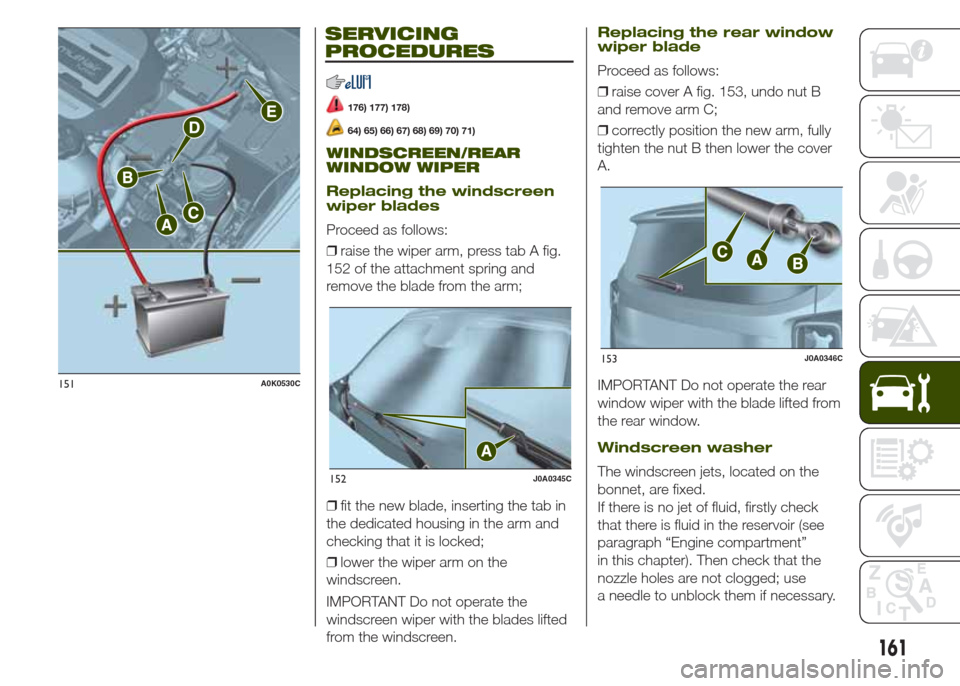
❒raise the wiper arm, press tab A fig.
152 of the attachment spring and
remove the blade from the arm;
❒fit the new blade, inserting the tab in
the dedicated housing in the arm and
checking that it is locked;
❒lower the wiper arm on the
windscreen.
IMPORTANT Do not operate the
windscreen wiper with the blades lifted
from the windscreen.
Replacing the rear window
wiper blade
Proceed as follows:
❒raise cover A fig. 153, undo nut B
and remove arm C;
❒correctly position the new arm, fully
tighten the nut B then lower the cover
A.
IMPORTANT Do not operate the rear
window wiper with the blade lifted from
the rear window.
Windscreen washer
The windscreen jets, located on the
bonnet, are fixed.
If there is no jet of fluid, firstly check
that there is fluid in the reservoir (see
paragraph “Engine compartment”
in this chapter). Then check that the
nozzle holes are not clogged; use
a needle to unblock them if necessary.
151A0K0530C
152J0A0345C
153J0A0346C
161
Page 164 of 212
IMPORTANT In versions with a sun
roof, make sure that the sun roof is
closed before operating the window
washer jets.
Rear window washer
The rear window washer jets are fixed.
The nozzle holder is located above
the rear window.
WARNING
176)The air intake system (air cleaner,
rubber hoses, etc.) can be a protection in
the case of blowbacks from the engine.
DO NOT REMOVE this system unless you
need to carry out repair or servicing
operations. Before starting the engine
make sure the system is not dismantled:
failure to comply with this precaution
may cause serious injuries.
177)Exhaust emissions are very
dangerous and may be fatal. They contain
carbon monoxide, a colourless and
odourless gas which, if inhaled, may cause
fainting and poisoning.
178)The exhaust system can reach high
temperatures and cause a fire if the vehicle
is parked on flammable material. Dry grass
or leaves can also catch fire if they come
into contact with the exhaust system.
Do not park or use the vehicle in a place in
which the exhaust system might come
into contact with flammable material.
WARNING
64)Incorrect maintenance of the vehicle or
failure to carry out operations or repairs
(when necessary) may lead to more
expensive repairs, damage to other
components or a negative impact on the
vehicle performance. Have any operating
faults immediately checked by a Jeep
Dealership.
65)The vehicle is equipped with fluids
optimised for protecting its performance
and duration, and to extend servicing
intervals. Do not use chemicals for washing
these components since they may
damage the engine, the gearbox or the
climate control system. This damage is not
covered by the vehicle’s warranty. If, due
to malfunction of a component, washing is
needed, only use the fluid specific for
that procedure.
66)An excessive or insufficient amount of
oil in the block is extremely harmful for
the engine. Make sure it is always at an
adequate level.
67)Always require the use of only
compressor coolants and lubricants
approved and suitable for the specific air
conditioning system fitted on the vehicle.
Some non-approved coolants are
flammable and may explode, with the risk
of injuries. The use of non-approved
coolants or lubricants may adversely affect
system efficiency, leading to expensive
repairs.68)The air conditioning system contains
high-pressure coolant: to prevent damage
to people or the system, any topping-up
with fuel or repairs that involves
disconnection of the pipes must be carried
out by a Jeep Dealership.
69)Vehicles equipped with a catalytic
converter must be exclusively supplied with
unleaded petrol. Leaded petrol would
permanently damage the catalytic
converter and eliminate its ability to reduce
polluting emissions, seriously
compromising the engine performance,
which would be irreparably damaged. If the
engine does not work correctly, especially
if it starts irregularly or if there is a reduction
of its performance, immediately go to a
Jeep Dealership. Prolonged and faulty
operation of the engine may cause
overheating of the converter and, as a
consequence, possible damage to the
converter and the vehicle.
70)Using a gearbox fluid different from that
approved may compromise gearshifting
quality and/or cause vibration of the
gearbox itself.
71)It is recommended to have the vehicle
serviced by a Jeep Dealership. When
carrying out normal periodic operations
and small servicing interventions personally
on the vehicle, it is recommended to use
suitable equipment, original spare parts
and the necessary fluids. Do not carry out
any interventions if you don't have the
necessary experience.
162
SERVICING AND MAINTENANCE
Page 183 of 212
TIPS, CONTROLS
AND GENERAL
INFORMATION
ROAD SAFETY
Learn how to use the various system
functions before setting off.
Read the instructions for the system
carefully before setting off.
182) 183)
RECEPTION CONDITIONS
Reception conditions change
constantly while driving. Reception may
be interfered with by the presence of
mountains, buildings or bridges,
especially when you are far away from
the broadcaster.
IMPORTANT The volume may be
increased when receiving traffic alerts
and news.
CARE AND MAINTENANCE
Observe the following precautions
to ensure the system is fully
operational:
❒the display lens should not come into
contact with pointed or rigid objects
which could damage its surface; use a
soft, dry anti-static cloth to clean and
do not press.
❒never use alcohol, petrols and
derivatives to clean the display lens.❒prevent any liquid from entering the
system: this could damage it beyond
repair.
80) 81)
ANTI-THEFT
PROTECTION
The system is equipped with an
anti-theft protection system based on
the exchange of information with the
electronic control unit (Body Computer)
on the vehicle.
This guarantees maximum safety and
prevents the secret code from being
entered after the power supply has
been disconnected.
If the check has a positive outcome, the
system will start to operate, whereas if
the comparison codes are not the
same or if the electronic control unit
(Body Computer) is replaced, the
system will ask the user to enter the
secret code according to the procedure
described in the paragraph below.
Entering the secret code(excluding versions equipped with
Uconnect 6.5" Radionav)
When the system is switched on, if the
code is requested, the display will
show "Please enter Anti-Theft Code"
followed by the video page showing
a keypad to enter the secret code.The secret code is made up of four
digits, from 0 to 9: to insert the first digit
of the code, turn the BROWSE/ENTER
right knob and press to confirm.
After entering the fourth digit, the
system begins operating.
If an incorrect code is entered, the
system displays "Incorrect Code" to
notify the user of the need to enter the
correct code.
After the 3 available attempts to enter
the code, the system displays
"Incorrect Code. Radio locked. Wait for
30 minutes". Once the text has
disappeared you can start the code
entering procedure again.
Vehicle radio passport(excluding versions equipped with
Uconnect 6.5" Radionav)
This document certifies ownership of
the system. The vehicle radio passport
shows the system model, serial number
and secret code.
In the case of loss of the vehicle radio
passport, contact the Jeep Dealership,
taking an ID document and the vehicle
ownership documents.
IMPORTANT Keep the vehicle radio
passport in a safe place so that you
can give the information to the relevant
authorities if the system is stolen.
181
Page 186 of 212
Front panel control summary table
Button Functions Mode
1 – PHONEPhone data display Brief button press
2 – MEDIASource selection: USB/iPod or AUX or
®Brief button press
3 – RADIOAccess to the Radio mode, with the possibility
of selecting among AM, FM or DAB (where
provided)Brief button press
4 – ON/OFFDisplay on/off Brief button press
5 – COMPASS
(Uconnect 5" Radio versions)Compass information display Brief button press
5–NAV
(Uconnect 5" Radio Nav versions)Access to the Navigation menu Brief button press
6 – MOREAccess to additional functions: display of time,
External temperature, Settings, Compass
(where provided)Brief button press
7 – BROWSE ENTERScrolling the list or tuning to a radio station or
select previous/next trackKnob clockwise/anticlockwise turning
Confirmation of the option displayed Brief button press
8–
Exit the selection/return to previous screen Brief button press
9–
Volume activation/deactivation (Mute/Pause)
Microphone activation/deactivation (in Phone
mode)Brief button press
10 – VOLUME
Switching on Brief button press
Switching off Brief button press
Volume adjustment Left/right rotation of knob
The system uses the "touch screen" function; to interact with the different functions, press the "graphic buttons" displayed. To
confirm the selection, press the button "OK". To go back to the previous screen, press the
(Delete) button or, depending on
the activated screen,
/Done.
184
MULTIMEDIABluetooth
Page 191 of 212
NOTE The operations described above
can only be accessed if supported by
the mobile phone in use.
SMS message reader
The system can read the messages
received by the mobile phone. To use
this function the mobile phone must
support the SMS exchange function
throughBluetooth®.
If this function is not supported by the
phone, the corresponding
button is
deactivated (greyed out).
When a text message is received, the
display will show a screen where the
options "Listen", "Call" or "Ignore" can
be selected.
Press the
button to access the list
of SMS messages received by the
mobile phone (the list displays a
maximum of 60 messages received).
SETTINGS
Press the +MORE button on the front
panel to display the main "Settings"
menu.
NOTE The menu items displayed vary
according to the versions.
The menu includes the following items:
❒Display;
❒Units;
❒Voice commands;
❒Clock & Date;❒Safety/Assistance (where provided);
❒Lights (where provided);
❒Doors & Locks;
❒Engine Off Options;
❒Audio;
❒Phone/Bluetooth;
❒SiriusXM Setup (where provided);
❒Radio Setup;
❒Restore settings
Safety/Assistance(where provided)
This function can be used to carry out
the following adjustments:
ParkView Camera(where provided)
This function can be used to carry out
the following adjustments:
❒"Active Guidelines" (where provided):
permits the activation of dynamic grids
that indicate the trajectory of the vehicle
on the display.
❒"ParkView cam.delay" (where
provided): permits a delay in the
disappearance of images from the
camera when reverse is disengaged.
Forward Collision Warning(where provided)
This function can be used to select the
Forward Collision Warning system
intervention method.The options available are:
❒"Off": the system is deactivated;
❒"Only warning": the system
intervenes only by providing the driver
with an acoustic warning (where
provided);
❒"Only active braking": the system
intervenes by activating automatic
braking (where provided);
❒"Warning + active braking": the
system intervenes by providing the
driver with an acoustic warning and
activating automatic braking.
Forward Collision Sensitivity(where provided)
This function can be used to select the
"readiness" of the system to intervene,
on the basis of distance from the
obstacle.
The options available are "Near",
"Med", "Far".
ParkSense(where provided)
This function can be used to select the
type of warning provided by the
ParkSense system.
The options available are:
❒"Sound Only": the system warns the
driver that an obstacle is present
through acoustic warnings only, via the
speakers in the vehicle.
189
Page 193 of 212
❒tap the screen to open the Main
menu;
❒select "Navigate to" or "Drive to";
❒select "Address": you can change the
country or state setting by tapping the
flag before you select a city;
❒enter the town or city name, or the
postcode. Towns with similar names
are shown in the list while you type;
Tip: tap the arrow to the right of the list
to expand the list of suggested towns.
When the correct city or town appears
in the list, tap the name to select the
destination.
❒enter the street name. Streets with
similar names are shown in the list while
you type. When the correct street
name appears in the list, tap the name
to select the destination;
❒enter the house number, then tap
"Done";
❒the location is shown on the map.
Tap "Select" to continue or tap "Back"
to enter another address;
❒when the new route is shown, tap
"Done". For more information about the
route, tap "Details". To change your
route, for example, to travel via a
particular location or to select a new
destination, tap "Change route". You
are guided to your destination, using
spoken instructions and on-screen
directions.
MAP UPDATE(Uconnect 5" Radio Nav versions only)
The map can be updated in two
different ways:
❒most recent maps guarantee:ifa
new map is available for your system
within 90 day of initial use, it can be
downloaded once free of charge.
❒map update: it is possible to
purchase a new version of the map
installed on your system.
Preparing a USB device
To update the map, a USB device that
meets the following requirements must
be used:
❒ideally, the USB device should be
empty;
❒the USB device must have at least
8 GB of memory free;
❒the USB must use a FAT-32 file
system;
❒the USB device must not be blocked
and must allow files to be saved.
NOTE The use of a memory stick is
recommended, while the use of mass
storage devices, such as mobile
phones or multimedia players, is not
recommended.
To prepare a USB device, proceed as
follows:❒ensure that the map you wish to
update is active in the navigation
system. If the navigation system has
several maps and you wish to update a
map which is not currently active,
activate the map. To do this, select
"Change map" in the "Settings" menu
of the navigation application;
❒select "Navigation updates" in the
"Settings" menu. You are asked
whether you wish to prepare a USB
device for downloading updates;
❒select "Yes";
❒insert the USB device.
The system starts to prepare the USB
device.
When the USB device is ready, the
display shows a dedicated message.
Remove the USB device and connect it
to the computer. The new map can
now be downloaded to the USB
device.
TomTom HOME installation
To install TomTom HOME and create
a MyTomTom account, proceed as
follows:
❒download and install the TomTom
HOME application on the computer. On
the computer, access
www.tomtom.com/getstarted. Select
"Download TomTom HOME", then
follow the instructions provided.
191
To plan a route, do the following:
Page 200 of 212
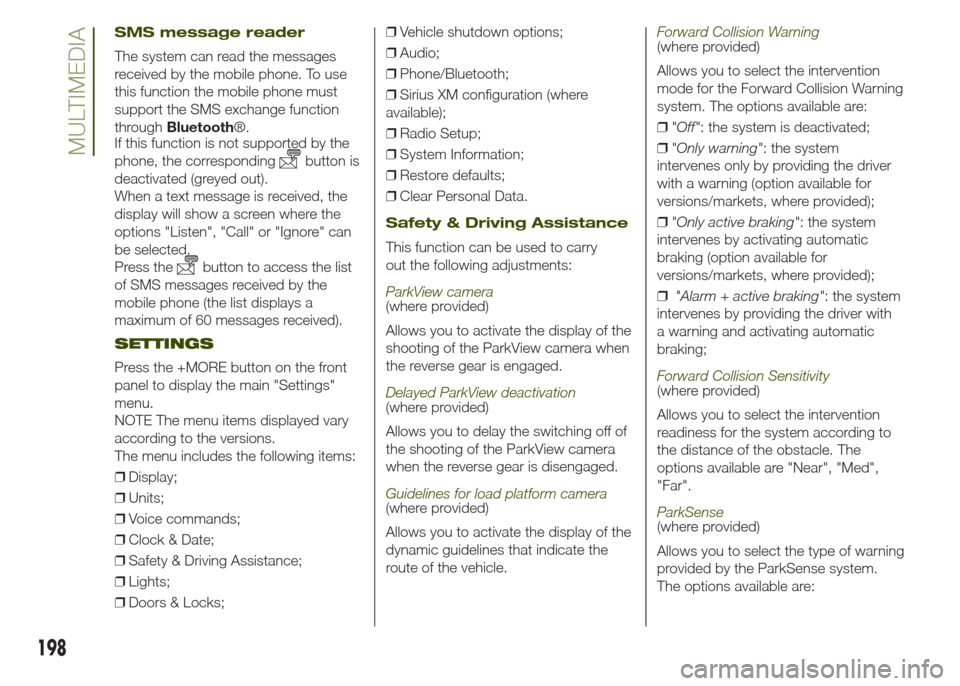
SMS message reader
The system can read the messages
received by the mobile phone. To use
this function the mobile phone must
support the SMS exchange function
throughBluetooth®.
If this function is not supported by the
phone, the corresponding
button is
deactivated (greyed out).
When a text message is received, the
display will show a screen where the
options "Listen", "Call" or "Ignore" can
be selected.
Press the
button to access the list
of SMS messages received by the
mobile phone (the list displays a
maximum of 60 messages received).
SETTINGS
Press the +MORE button on the front
panel to display the main "Settings"
menu.
NOTE The menu items displayed vary
according to the versions.
The menu includes the following items:
❒Display;
❒Units;
❒Voice commands;
❒Clock & Date;
❒Safety & Driving Assistance;
❒Lights;
❒Doors & Locks;❒Vehicle shutdown options;
❒Audio;
❒Phone/Bluetooth;
❒Sirius XM configuration (where
available);
❒Radio Setup;
❒System Information;
❒Restore defaults;
❒Clear Personal Data.
Safety & Driving Assistance
This function can be used to carry
out the following adjustments:
ParkView camera(where provided)
Allows you to activate the display of the
shooting of the ParkView camera when
the reverse gear is engaged.
Delayed ParkView deactivation(where provided)
Allows you to delay the switching off of
the shooting of the ParkView camera
when the reverse gear is disengaged.
Guidelines for load platform camera(where provided)
Allows you to activate the display of the
dynamic guidelines that indicate the
route of the vehicle.
Forward Collision Warning(where provided)
Allows you to select the intervention
mode for the Forward Collision Warning
system. The options available are:
❒"Off": the system is deactivated;
❒"Only warning": the system
intervenes only by providing the driver
with a warning (option available for
versions/markets, where provided);
❒"Only active braking": the system
intervenes by activating automatic
braking (option available for
versions/markets, where provided);
❒"Alarm + active braking": the system
intervenes by providing the driver with
a warning and activating automatic
braking;
Forward Collision Sensitivity(where provided)
Allows you to select the intervention
readiness for the system according to
the distance of the obstacle. The
options available are "Near", "Med",
"Far".
ParkSense(where provided)
Allows you to select the type of warning
provided by the ParkSense system.
The options available are:
198
MULTIMEDIA
Page 209 of 212
INDEX
4
WD LOW mode
(engagement/release)................... 110
ABS (system) ................................ 64
Active safety systems ..................... 64
Airbag ............................................ 91
Alarm ............................................. 11
All-wheel drive ................................ 109
Automatic transmission gear
lever unlocking ............................. 143
Automatic transmission .................. 103
Auxiliary driving systems................. 69
Battery recharging ........................ 160
Bodywork (cleaning and
maintenance) ............................... 164
Bonnet ........................................... 33
Broken-down vehicle towing .......... 146
BSM system .................................. 69
Changing a wheel ......................... 135
Child protection systems ................ 81
Climate control ............................... 24
CO2 emissions............................... 179
Control panel and on-board
instruments .................................. 38
Daytime running lights (DRL) ......... 19
Dimensions .................................... 171
Dipped beam headlights ................ 19
Direction indicators ........................ 20
Disabling active safety systems ...... 66Display ........................................... 40
Doors ............................................. 11
DST (system).................................. 65
DTC (system) ................................. 64
Electric Parking Brake (EPB) ......... 100
Electric steering wheel heating ....... 17
Electric sun roof ............................. 29
Electric windows ............................ 28
Electronic Cruise Control ................ 108
Engine compartment...................... 155
Engine............................................ 167
ERM (system) ................................. 65
ESC (system) ................................. 64
Exterior lights ................................. 19
Fluids and lubricants ..................... 176
Fog lights ....................................... 19
Forward Collision Warning Plus
system ......................................... 71
Front airbags .................................. 91
Front courtesy lights ....................... 21
Fuel consumption .......................... 178
Fuel cut-off system......................... 143
Fuse boxes .................................... 130
Fuses (replacement) ....................... 130
Hazard warning lights ................... 124
HDC (system) ................................. 65
Headlight alignment adjustment ..... 20
Head restraints............................... 16
HSA (system) ................................. 64
Identification data .......................... 166
Ignition device ................................ 8
Important information and
recommendations ........................ 201
Interior lights .................................. 21
Jump starting ................................ 141
Keys
– electronic key ............................ 7
– key with remote control ............. 7
Lane Change ................................ 20
LaneSense system ......................... 114
Lifting the vehicle ........................... 163
Light switch.................................... 19
Luggage compartment................... 34
Main beam headlights .................. 20
Main beam headlights
– Automatic main beam
headlights ................................. 20
Manual gearbox ............................. 103
MySky sun roof .............................. 31
Occupant protection systems ....... 76
Parking lights ................................ 20
ParkSense (system)........................ 112
PBA (system) ................................. 64
Performance (top speed) ................ 178
Prescriptions for handling the
vehicle at the end of its life ........... 179
Pretensioners ................................. 79