light JEEP WAGONEER 2023 Owner's Guide
[x] Cancel search | Manufacturer: JEEP, Model Year: 2023, Model line: WAGONEER, Model: JEEP WAGONEER 2023Pages: 396, PDF Size: 15.17 MB
Page 63 of 396
GETTING TO KNOW YOUR VEHICLE61
Front Map/Reading Lights
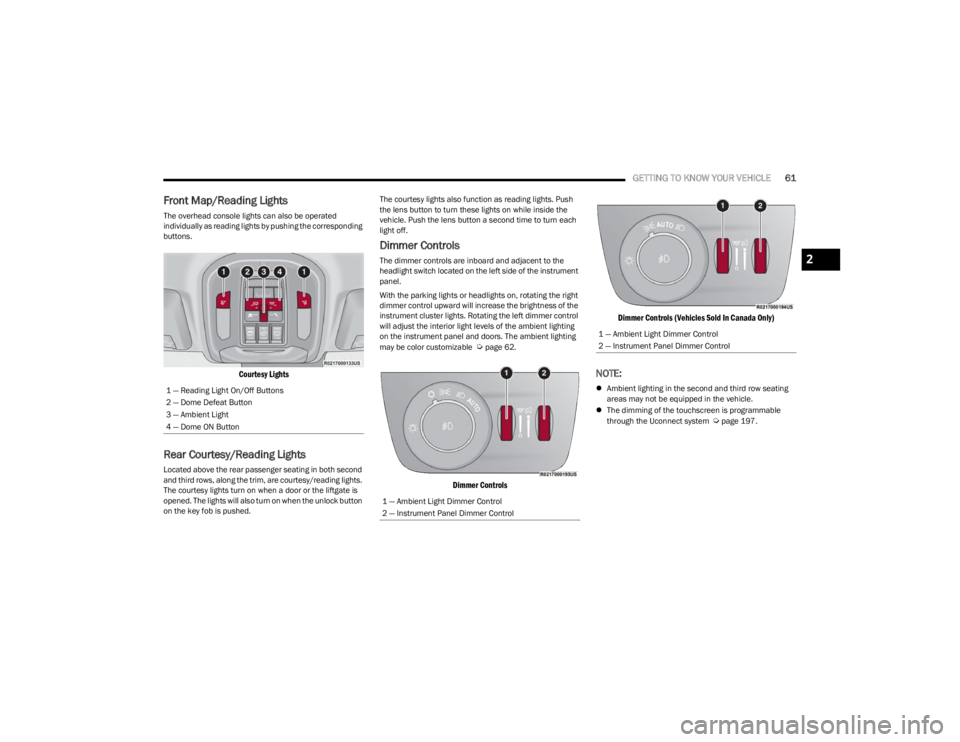
The overhead console lights can also be operated
individually as reading lights by pushing the corresponding
buttons.
Courtesy Lights
Rear Courtesy/Reading Lights
Located above the rear passenger seating in both second
and third rows, along the trim, are courtesy/reading lights.
The courtesy lights turn on when a door or the liftgate is
opened. The lights will also turn on when the unlock button
on the key fob is pushed. The courtesy lights also function as reading lights. Push
the lens button to turn these lights on while inside the
vehicle. Push the lens button a second time to turn each
light off.
Dimmer Controls
The dimmer controls are inboard and adjacent to the
headlight switch located on the left side of the instrument
panel.
With the parking lights or headlights on, rotating the right
dimmer control upward will increase the brightness of the
instrument cluster lights. Rotating the left dimmer control
will adjust the interior light levels of the ambient lighting
on the instrument panel and doors. The ambient lighting
may be color customizable
Úpage 62.
Dimmer Controls
Dimmer Controls (Vehicles Sold In Canada Only)
NOTE:
Ambient lighting in the second and third row seating
areas may not be equipped in the vehicle.
The dimming of the touchscreen is programmable
through the Uconnect system
Úpage 197.
1 — Reading Light On/Off Buttons
2 — Dome Defeat Button
3 — Ambient Light
4 — Dome ON Button
1 — Ambient Light Dimmer Control
2 — Instrument Panel Dimmer Control
1 — Ambient Light Dimmer Control
2 — Instrument Panel Dimmer Control
2
23_WS_OM_EN_USC_t.book Page 61
Page 64 of 396
62GETTING TO KNOW YOUR VEHICLE
Multicolor Ambient Lighting — If Equipped
The color of certain ambient lighting inside of the vehicle
can be selected within the Apps menu on the radio screen,
or within Uconnect Settings
Úpage 197. Brightness is
adjusted using the ambient light dimmer control on the
headlight switch.
Five colors can be selected for the following two zones
inside of the vehicle:
Zone 1:
Instrument panel decorative ambient lights
Door panel decorative ambient lights
Zone 2:
Front seat footwell areas below the instrument
panel
Lighting below the second row seats
Map pocket lighting on all four door panels
These areas can be set to different colors, or if the SYNC
button is selected within the settings menu, all colored
lights will be set to the same color automatically.
NOTE:All other ambient lighting inside of the vehicle will remain
white, and the ambient light dimmer control switch will
adjust all ambient lighting at the same time.
ILLUMINATED ENTRY — IF EQUIPPED
The Illuminated Entry feature allows you to activate the
low beam, parking lights, and side marker lights for 25
seconds when the vehicle is unlocked (through the key fob
or the Passive Entry door handles [if equipped]). This feature can be activated or deactivated through the
Uconnect Settings
Úpage 197.
NOTE:
When a door is open with the feature active, the activa -
tion of the lights is extended for five seconds.
The feature is disabled when the vehicle is locked or
when the ignition is placed in the ON/RUN position.
WINDSHIELD WIPERS AND WASHERS
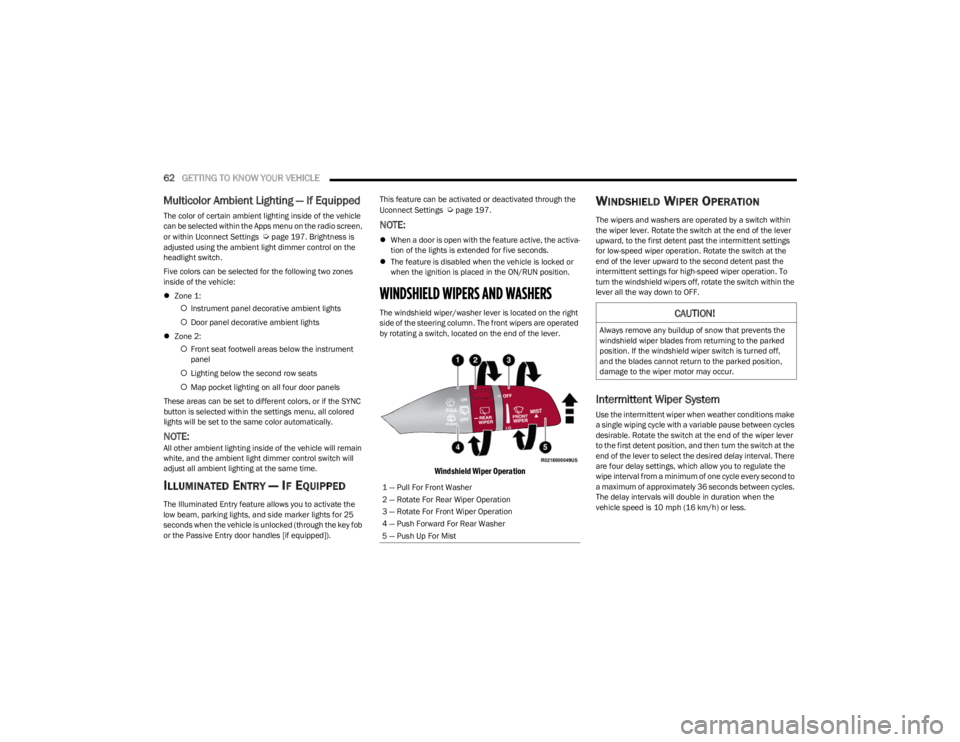
The windshield wiper/washer lever is located on the right
side of the steering column. The front wipers are operated
by rotating a switch, located on the end of the lever.
Windshield Wiper Operation
WINDSHIELD WIPER OPERATION
The wipers and washers are operated by a switch within
the wiper lever. Rotate the switch at the end of the lever
upward, to the first detent past the intermittent settings
for low-speed wiper operation. Rotate the switch at the
end of the lever upward to the second detent past the
intermittent settings for high-speed wiper operation. To
turn the windshield wipers off, rotate the switch within the
lever all the way down to OFF.
Intermittent Wiper System
Use the intermittent wiper when weather conditions make
a single wiping cycle with a variable pause between cycles
desirable. Rotate the switch at the end of the wiper lever
to the first detent position, and then turn the switch at the
end of the lever to select the desired delay interval. There
are four delay settings, which allow you to regulate the
wipe interval from a minimum of one cycle every second to
a maximum of approximately 36 seconds between cycles.
The delay intervals will double in duration when the
vehicle speed is 10 mph (16 km/h) or less.
1 — Pull For Front Washer
2 — Rotate For Rear Wiper Operation
3 — Rotate For Front Wiper Operation
4 — Push Forward For Rear Washer
5 — Push Up For Mist
CAUTION!
Always remove any buildup of snow that prevents the
windshield wiper blades from returning to the parked
position. If the windshield wiper switch is turned off,
and the blades cannot return to the parked position,
damage to the wiper motor may occur.
23_WS_OM_EN_USC_t.book Page 62
Page 82 of 396
80GETTING TO KNOW YOUR VEHICLE
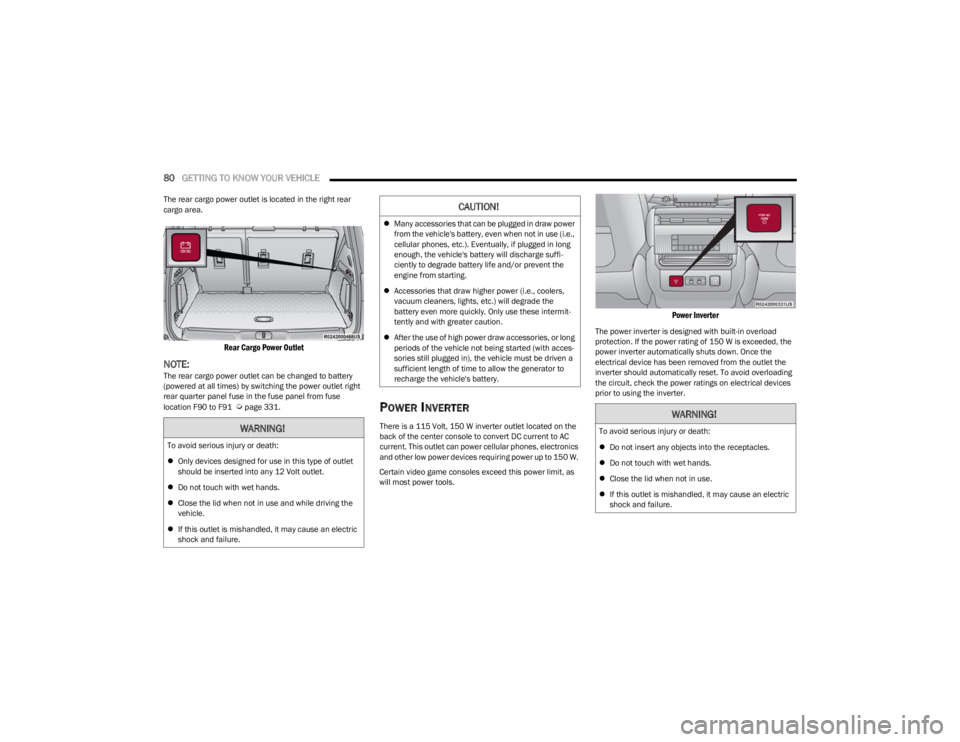
The rear cargo power outlet is located in the right rear
cargo area.
Rear Cargo Power Outlet
NOTE:The rear cargo power outlet can be changed to battery
(powered at all times) by switching the power outlet right
rear quarter panel fuse in the fuse panel from fuse
location F90 to F91
Úpage 331.POWER INVERTER
There is a 115 Volt, 150 W inverter outlet located on the
back of the center console to convert DC current to AC
current. This outlet can power cellular phones, electronics
and other low power devices requiring power up to 150 W.
Certain video game consoles exceed this power limit, as
will most power tools.
Power Inverter
The power inverter is designed with built-in overload
protection. If the power rating of 150 W is exceeded, the
power inverter automatically shuts down. Once the
electrical device has been removed from the outlet the
inverter should automatically reset. To avoid overloading
the circuit, check the power ratings on electrical devices
prior to using the inverter.
WARNING!
To avoid serious injury or death:
Only devices designed for use in this type of outlet
should be inserted into any 12 Volt outlet.
Do not touch with wet hands.
Close the lid when not in use and while driving the
vehicle.
If this outlet is mishandled, it may cause an electric
shock and failure.
CAUTION!
Many accessories that can be plugged in draw power
from the vehicle's battery, even when not in use (i.e.,
cellular phones, etc.). Eventually, if plugged in long
enough, the vehicle's battery will discharge suffi -
ciently to degrade battery life and/or prevent the
engine from starting.
Accessories that draw higher power (i.e., coolers,
vacuum cleaners, lights, etc.) will degrade the
battery even more quickly. Only use these intermit -
tently and with greater caution.
After the use of high power draw accessories, or long
periods of the vehicle not being started (with acces -
sories still plugged in), the vehicle must be driven a
sufficient length of time to allow the generator to
recharge the vehicle's battery.
WARNING!
To avoid serious injury or death:
Do not insert any objects into the receptacles.
Do not touch with wet hands.
Close the lid when not in use.
If this outlet is mishandled, it may cause an electric
shock and failure.
23_WS_OM_EN_USC_t.book Page 80
Page 83 of 396
GETTING TO KNOW YOUR VEHICLE81
WIRELESS CHARGING PAD —
I
F EQUIPPED
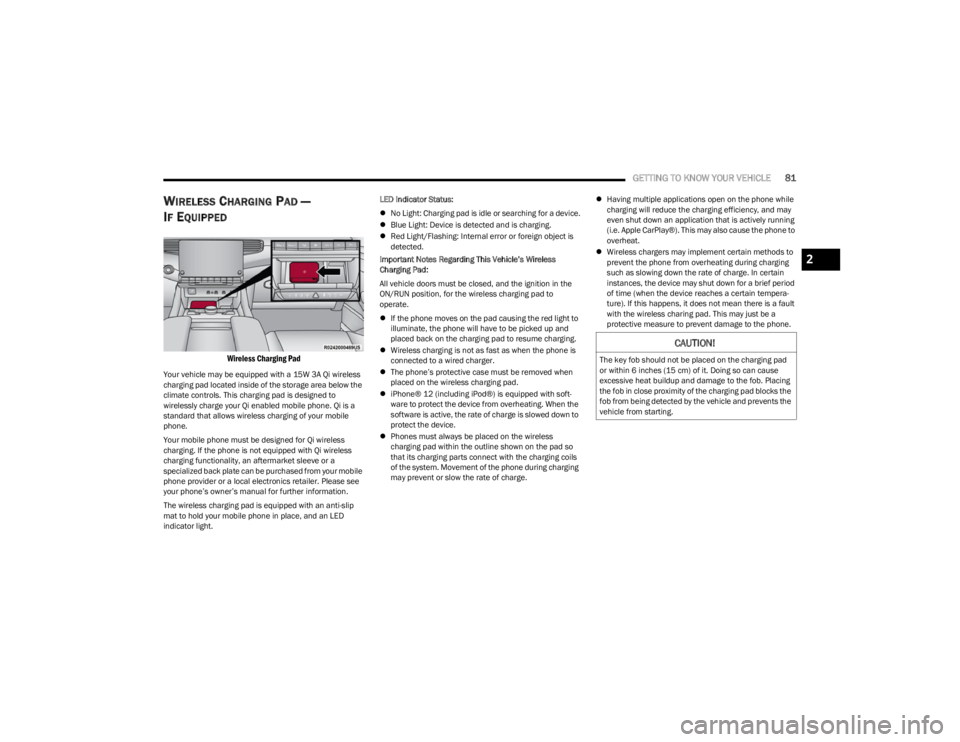
Wireless Charging Pad
Your vehicle may be equipped with a 15W 3A Qi wireless
charging pad located inside of the storage area below the
climate controls. This charging pad is designed to
wirelessly charge your Qi enabled mobile phone. Qi is a
standard that allows wireless charging of your mobile
phone.
Your mobile phone must be designed for Qi wireless
charging. If the phone is not equipped with Qi wireless
charging functionality, an aftermarket sleeve or a
specialized back plate can be purchased from your mobile
phone provider or a local electronics retailer. Please see
your phone’s owner’s manual for further information.
The wireless charging pad is equipped with an anti-slip
mat to hold your mobile phone in place, and an LED
indicator light. LED Indicator Status:
No Light: Charging pad is idle or searching for a device.
Blue Light: Device is detected and is charging.
Red Light/Flashing: Internal error or foreign object is
detected.
Important Notes Regarding This Vehicle’s Wireless
Charging Pad:
All vehicle doors must be closed, and the ignition in the
ON/RUN position, for the wireless charging pad to
operate.
If the phone moves on the pad causing the red light to
illuminate, the phone will have to be picked up and
placed back on the charging pad to resume charging.
Wireless charging is not as fast as when the phone is
connected to a wired charger.
The phone’s protective case must be removed when
placed on the wireless charging pad.
iPhone® 12 (including iPod®) is equipped with soft -
ware to protect the device from overheating. When the
software is active, the rate of charge is slowed down to
protect the device.
Phones must always be placed on the wireless
charging pad within the outline shown on the pad so
that its charging parts connect with the charging coils
of the system. Movement of the phone during charging
may prevent or slow the rate of charge.
Having multiple applications open on the phone while
charging will reduce the charging efficiency, and may
even shut down an application that is actively running
(i.e. Apple CarPlay®). This may also cause the phone to
overheat.
Wireless chargers may implement certain methods to
prevent the phone from overheating during charging
such as slowing down the rate of charge. In certain
instances, the device may shut down for a brief period
of time (when the device reaches a certain tempera -
ture). If this happens, it does not mean there is a fault
with the wireless charing pad. This may just be a
protective measure to prevent damage to the phone.
CAUTION!
The key fob should not be placed on the charging pad
or within 6 inches (15 cm) of it. Doing so can cause
excessive heat buildup and damage to the fob. Placing
the fob in close proximity of the charging pad blocks the
fob from being detected by the vehicle and prevents the
vehicle from starting.
2
23_WS_OM_EN_USC_t.book Page 81
Page 84 of 396
82GETTING TO KNOW YOUR VEHICLE
WINDOWS
POWER WINDOW CONTROLS
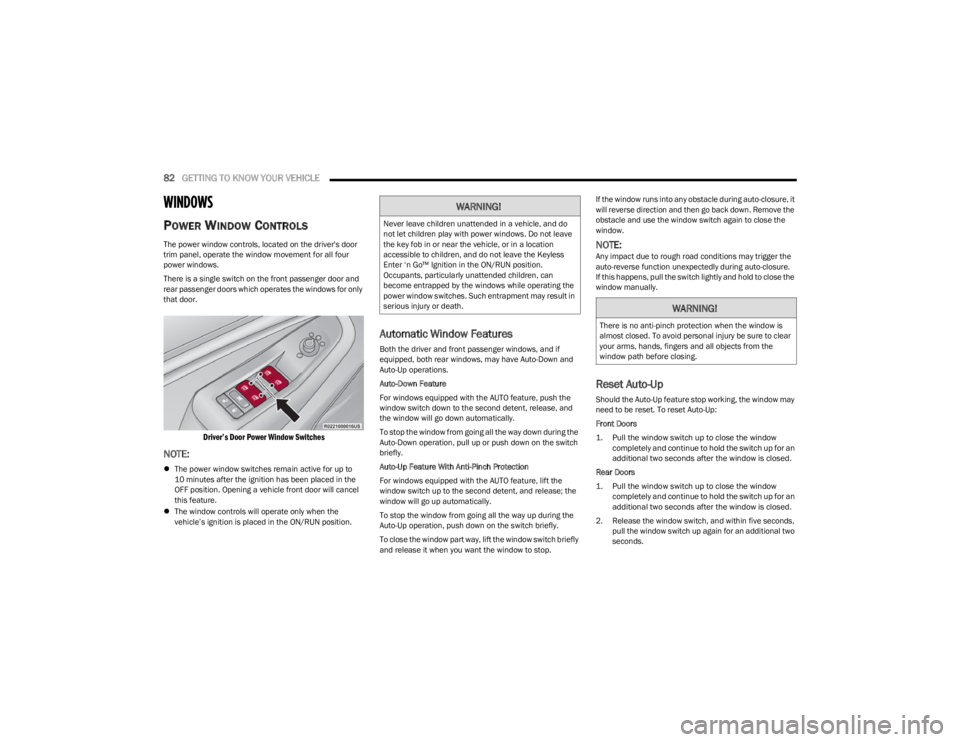
The power window controls, located on the driver's door
trim panel, operate the window movement for all four
power windows.
There is a single switch on the front passenger door and
rear passenger doors which operates the windows for only
that door.
Driver’s Door Power Window Switches
NOTE:
The power window switches remain active for up to
10 minutes after the ignition has been placed in the
OFF position. Opening a vehicle front door will cancel
this feature.
The window controls will operate only when the
vehicle’s ignition is placed in the ON/RUN position.
Automatic Window Features
Both the driver and front passenger windows, and if
equipped, both rear windows, may have Auto-Down and
Auto-Up operations.
Auto-Down Feature
For windows equipped with the AUTO feature, push the
window switch down to the second detent, release, and
the window will go down automatically.
To stop the window from going all the way down during the
Auto-Down operation, pull up or push down on the switch
briefly.
Auto-Up Feature With Anti-Pinch Protection
For windows equipped with the AUTO feature, lift the
window switch up to the second detent, and release; the
window will go up automatically.
To stop the window from going all the way up during the
Auto-Up operation, push down on the switch briefly.
To close the window part way, lift the window switch briefly
and release it when you want the window to stop. If the window runs into any obstacle during auto-closure, it
will reverse direction and then go back down. Remove the
obstacle and use the window switch again to close the
window.
NOTE:Any impact due to rough road conditions may trigger the
auto-reverse function unexpectedly during auto-closure.
If this happens, pull the switch lightly and hold to close the
window manually.
Reset Auto-Up
Should the Auto-Up feature stop working, the window may
need to be reset. To reset Auto-Up:
Front Doors
1. Pull the window switch up to close the window
completely and continue to hold the switch up for an
additional two seconds after the window is closed.
Rear Doors
1. Pull the window switch up to close the window completely and continue to hold the switch up for an
additional two seconds after the window is closed.
2. Release the window switch, and within five seconds, pull the window switch up again for an additional two
seconds.
WARNING!
Never leave children unattended in a vehicle, and do
not let children play with power windows. Do not leave
the key fob in or near the vehicle, or in a location
accessible to children, and do not leave the Keyless
Enter ‘n Go™ Ignition in the ON/RUN position.
Occupants, particularly unattended children, can
become entrapped by the windows while operating the
power window switches. Such entrapment may result in
serious injury or death.
WARNING!
There is no anti-pinch protection when the window is
almost closed. To avoid personal injury be sure to clear
your arms, hands, fingers and all objects from the
window path before closing.
23_WS_OM_EN_USC_t.book Page 82
Page 85 of 396
GETTING TO KNOW YOUR VEHICLE83
Window Lockout Switch
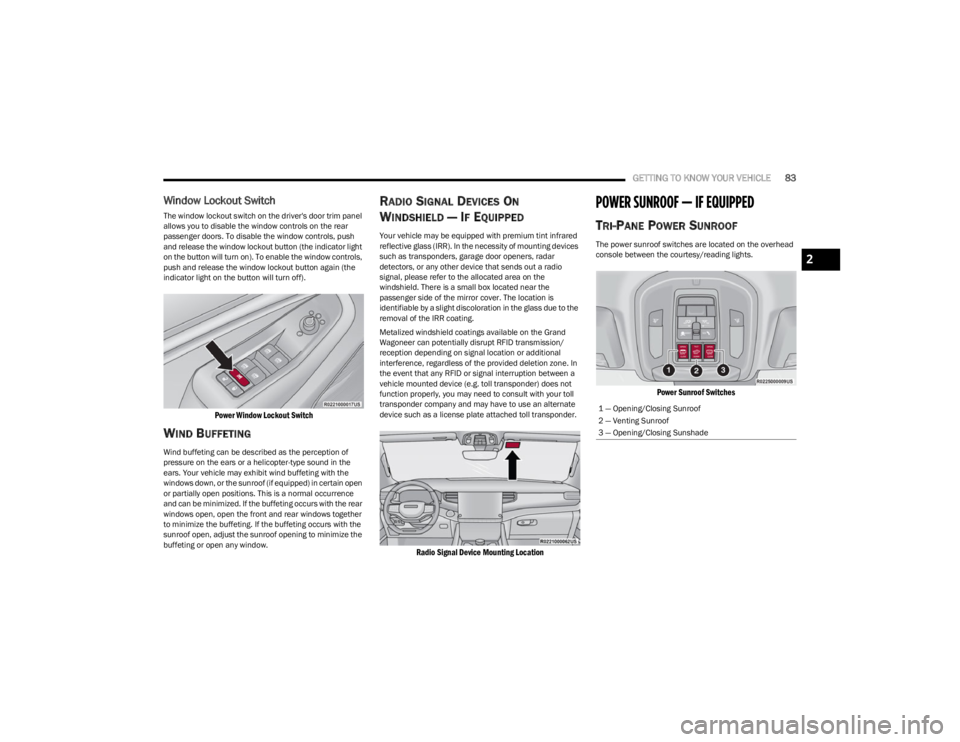
The window lockout switch on the driver's door trim panel
allows you to disable the window controls on the rear
passenger doors. To disable the window controls, push
and release the window lockout button (the indicator light
on the button will turn on). To enable the window controls,
push and release the window lockout button again (the
indicator light on the button will turn off).
Power Window Lockout Switch
WIND BUFFETING
Wind buffeting can be described as the perception of
pressure on the ears or a helicopter-type sound in the
ears. Your vehicle may exhibit wind buffeting with the
windows down, or the sunroof (if equipped) in certain open
or partially open positions. This is a normal occurrence
and can be minimized. If the buffeting occurs with the rear
windows open, open the front and rear windows together
to minimize the buffeting. If the buffeting occurs with the
sunroof open, adjust the sunroof opening to minimize the
buffeting or open any window.
RADIO SIGNAL DEVICES ON
W
INDSHIELD — IF EQUIPPED
Your vehicle may be equipped with premium tint infrared
reflective glass (IRR). In the necessity of mounting devices
such as transponders, garage door openers, radar
detectors, or any other device that sends out a radio
signal, please refer to the allocated area on the
windshield. There is a small box located near the
passenger side of the mirror cover. The location is
identifiable by a slight discoloration in the glass due to the
removal of the IRR coating.
Metalized windshield coatings available on the Grand
Wagoneer can potentially disrupt RFID transmission/
reception depending on signal location or additional
interference, regardless of the provided deletion zone. In
the event that any RFID or signal interruption between a
vehicle mounted device (e.g. toll transponder) does not
function properly, you may need to consult with your toll
transponder company and may have to use an alternate
device such as a license plate attached toll transponder.
Radio Signal Device Mounting Location
POWER SUNROOF — IF EQUIPPED
TRI-PANE POWER SUNROOF
The power sunroof switches are located on the overhead
console between the courtesy/reading lights.
Power Sunroof Switches
1 — Opening/Closing Sunroof
2 — Venting Sunroof
3 — Opening/Closing Sunshade
2
23_WS_OM_EN_USC_t.book Page 83
Page 90 of 396
88GETTING TO KNOW YOUR VEHICLE
NOTE:The activation zone is the same for vehicles equipped with
or without a trailer tow package.
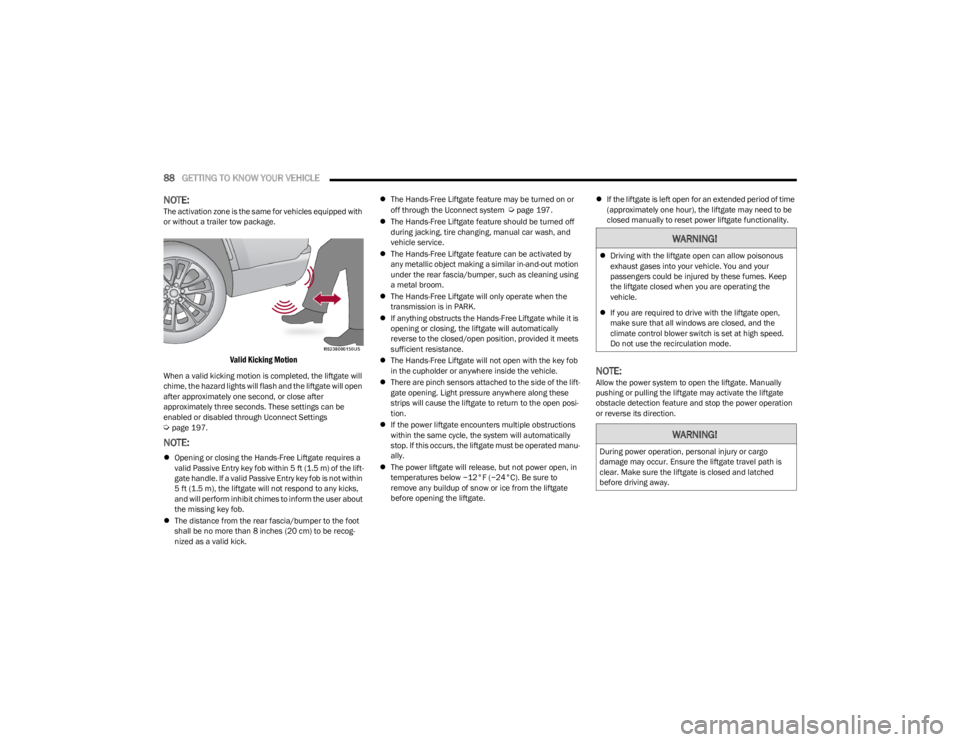
Valid Kicking Motion
When a valid kicking motion is completed, the liftgate will
chime, the hazard lights will flash and the liftgate will open
after approximately one second, or close after
approximately three seconds. These settings can be
enabled or disabled through Uconnect Settings
Úpage 197.
NOTE:
Opening or closing the Hands-Free Liftgate requires a
valid Passive Entry key fob within 5 ft (1.5 m) of the lift -
gate handle. If a valid Passive Entry key fob is not within
5 ft (1.5 m), the liftgate will not respond to any kicks,
and will perform inhibit chimes to inform the user about
the missing key fob.
The distance from the rear fascia/bumper to the foot
shall be no more than 8 inches (20 cm) to be recog -
nized as a valid kick.
The Hands-Free Liftgate feature may be turned on or
off through the Uconnect system
Úpage 197.
The Hands-Free Liftgate feature should be turned off
during jacking, tire changing, manual car wash, and
vehicle service.
The Hands-Free Liftgate feature can be activated by
any metallic object making a similar in-and-out motion
under the rear fascia/bumper, such as cleaning using
a metal broom.
The Hands-Free Liftgate will only operate when the
transmission is in PARK.
If anything obstructs the Hands-Free Liftgate while it is
opening or closing, the liftgate will automatically
reverse to the closed/open position, provided it meets
sufficient resistance.
The Hands-Free Liftgate will not open with the key fob
in the cupholder or anywhere inside the vehicle.
There are pinch sensors attached to the side of the lift -
gate opening. Light pressure anywhere along these
strips will cause the liftgate to return to the open posi -
tion.
If the power liftgate encounters multiple obstructions
within the same cycle, the system will automatically
stop. If this occurs, the liftgate must be operated manu -
ally.
The power liftgate will release, but not power open, in
temperatures below −12°F (−24°C). Be sure to
remove any buildup of snow or ice from the liftgate
before opening the liftgate.
If the liftgate is left open for an extended period of time
(approximately one hour), the liftgate may need to be
closed manually to reset power liftgate functionality.
NOTE:Allow the power system to open the liftgate. Manually
pushing or pulling the liftgate may activate the liftgate
obstacle detection feature and stop the power operation
or reverse its direction.
WARNING!
Driving with the liftgate open can allow poisonous
exhaust gases into your vehicle. You and your
passengers could be injured by these fumes. Keep
the liftgate closed when you are operating the
vehicle.
If you are required to drive with the liftgate open,
make sure that all windows are closed, and the
climate control blower switch is set at high speed.
Do not use the recirculation mode.
WARNING!
During power operation, personal injury or cargo
damage may occur. Ensure the liftgate travel path is
clear. Make sure the liftgate is closed and latched
before driving away.
23_WS_OM_EN_USC_t.book Page 88
Page 103 of 396
GETTING TO KNOW YOUR INSTRUMENT PANEL101
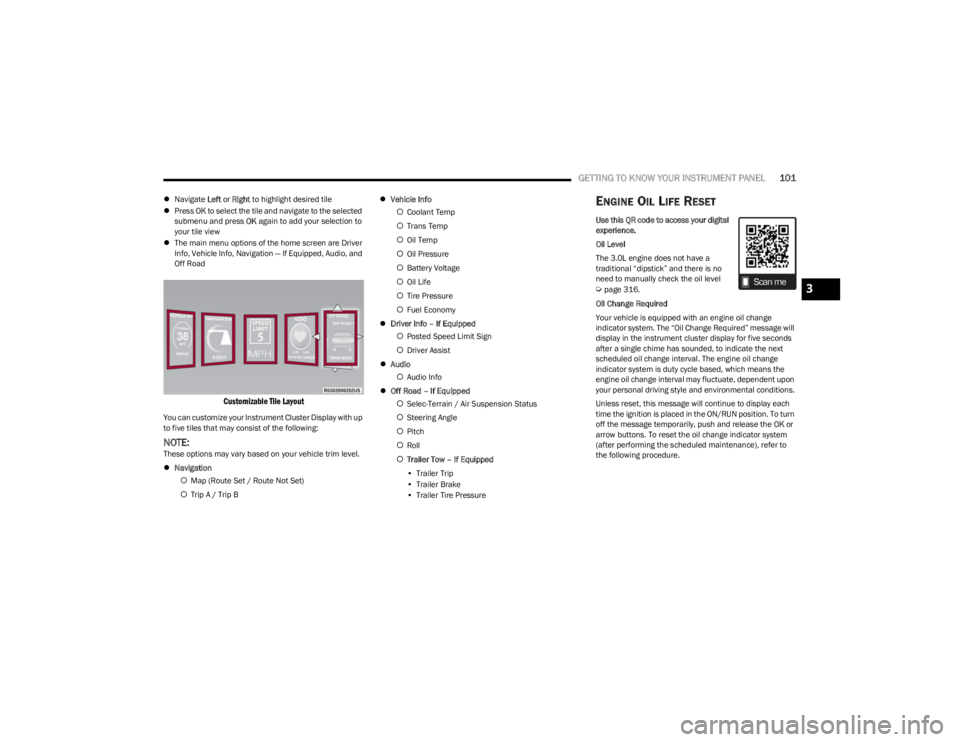
Navigate Left or Right to highlight desired tile
Press OK to select the tile and navigate to the selected
submenu and press OK again to add your selection to
your tile view
The main menu options of the home screen are Driver
Info, Vehicle Info, Navigation — If Equipped, Audio, and
Off Road
Customizable Tile Layout
You can customize your Instrument Cluster Display with up
to five tiles that may consist of the following:
NOTE:These options may vary based on your vehicle trim level.
Navigation
Map (Route Set / Route Not Set)
Trip A / Trip B
Vehicle Info
Coolant Temp
Trans Temp
Oil Temp
Oil Pressure
Battery Voltage
Oil Life
Tire Pressure
Fuel Economy
Driver Info – If Equipped
Posted Speed Limit Sign
Driver Assist
Audio
Audio Info
Off Road – If Equipped
Selec-Terrain / Air Suspension Status
Steering Angle
Pitch
Roll
Trailer Tow – If Equipped
• Trailer Trip
• Trailer Brake
• Trailer Tire Pressure
ENGINE OIL LIFE RESET
Use this QR code to access your digital
experience.
Oil Level
The 3.0L engine does not have a
traditional “dipstick” and there is no
need to manually check the oil level
Úpage 316.
Oil Change Required
Your vehicle is equipped with an engine oil change
indicator system. The “Oil Change Required” message will
display in the instrument cluster display for five seconds
after a single chime has sounded, to indicate the next
scheduled oil change interval. The engine oil change
indicator system is duty cycle based, which means the
engine oil change interval may fluctuate, dependent upon
your personal driving style and environmental conditions.
Unless reset, this message will continue to display each
time the ignition is placed in the ON/RUN position. To turn
off the message temporarily, push and release the OK or
arrow buttons. To reset the oil change indicator system
(after performing the scheduled maintenance), refer to
the following procedure.3
23_WS_OM_EN_USC_t.book Page 101
Page 104 of 396
102GETTING TO KNOW YOUR INSTRUMENT PANEL
Vehicles Equipped With Keyless Enter ‘n Go™ Ignition
Use the steering wheel instrument cluster display controls
for the following procedure(s):
1. Without pressing the brake pedal, push the ENGINE
START/STOP button and place the ignition in the
ON/RUN position (do not start the engine).
2. Push and release the down arrow button to scroll
downward through the main menu to “Vehicle Info”.
3. Push and release the right arrow button to access
the “Oil Life” screen.
4. Push and hold the OK button to reset oil life. If
conditions are met, the gauge and numeric display
will update to show 100%. If conditions are not met a
pop-up message of “To reset oil life engine must be
off with ignition in run” will be displayed (for five
seconds), and the user will remain at the Oil Life
screen.
5. Push and release the up or down arrow button
to exit the submenu screen.
NOTE:If the indicator message illuminates when you start the
vehicle, the oil change indicator system did not reset. If
necessary, repeat this procedure.
Secondary Method Of Resetting Engine Oil Life
1. Without pressing the brake pedal, push the ENGINE START/STOP button and place the ignition to the
ON/RUN position (do not start the engine).
2. Fully press the accelerator pedal, slowly, three times within 10 seconds. 3. Without pushing the brake pedal, push the ENGINE
START/STOP button once to return the ignition to the
OFF position.
NOTE:If the indicator message illuminates when you start the
vehicle, the oil change indicator system did not reset. If
necessary, repeat this procedure.
DISPLAY AND MESSAGES
The instrument cluster display is located in the center
portion of the cluster and consist of multiple sections:
Main Screen — The inner ring of the display will illumi -
nate in black under normal conditions, yellow for non
critical warnings and red for critical warnings
Submenu Dots — Whenever there are submenus avail -
able, the position within the submenus is shown here
Reconfigurable Telltales/Information
Gear Selector Status (PRND)
Driver Interactive Display (Compass, Temp, Range to
Empty, Trip A, Trip B, Average Fuel Economy, Current
Fuel Economy and Time)
Air Suspension Status — If Equipped
Four-Wheel Drive (4WD) Status — If Equipped
The instrument cluster display will normally display the
main menu or the screens of a selected feature of the
main menu. The main display area also displays pop-up
messages and warning or information messages. These
pop-up messages fall into several categories:
Five Second Stored Messages
When the appropriate conditions occur, this type of
message takes control of the main display area for five
seconds and then returns to the previous screen. Most
of the messages of this type are then stored (as long as
the condition that activated it remains active) and can
be reviewed from the “Messages” main menu item.
Examples of this message type are “Right Front Turn
Signal Lamp Out” and “Low Tire Pressure”.
Unstored Messages
This message type is displayed indefinitely or until the
condition that activated the message is cleared. Exam -
ples of this message type are “Turn Signal On” (if a turn
signal is left on) and “Lights On” (if driver leaves the
vehicle with the lights on).
Unstored Messages Until RUN
These messages deal primarily with the Remote Start
feature. This message type is displayed until the igni -
tion is in the RUN state. Examples of this message type
are “Remote Start Canceled - Door Ajar” and “Press
Brake Pedal and Push Button to Start”.
Five Second Unstored Messages
When the appropriate conditions occur, this type of
message takes control of the main display area for five
seconds and then returns to the previous screen. An
example of this message type is “Automatic High
Beams On”.
23_WS_OM_EN_USC_t.book Page 102
Page 105 of 396

GETTING TO KNOW YOUR INSTRUMENT PANEL103
Messages include the following, but not limited to:
NOTE:Certain messages may require dealer service.
Front Seat Belts Unbuckled Oil Change DueACC Override
Driver Seat Belt Unbuckled Fuel LowCruise Set To XXX mph or km/h
Passenger Seat Belt Unbuckled Service Anti-lock Brake SystemService Shifter
Traction Control Off Service Electronic Throttle ControlTire Pressure Screen With Low Tire(s)
Washer Fluid Low Service Power SteeringService Tire Pressure System
Oil Pressure Low Cruise OffPark Brake Engaged
Oil Level Low – If Equipped Cruise ReadyBrake Fluid Low
Engine Temperature Hot Lights OnRight Front Turn Signal Light Out
Right Rear Turn Signal Light Out Left Front Turn Signal Light OutLeft Rear Turn Signal Light Out
Ignition or Accessory On Vehicle Not In ParkRemote Start Active Push Start Button
Remote Start Canceled Fuel Low Remote Start Canceled Hood OpenRemote Start Canceled Liftgate Open
Remote Start Canceled Door Open Remote Start Canceled Time ExpiredRemote Start Disabled Start To Reset
Service Air Bag System Service Air Bag Warning LightDoor Open
Doors Open Hood OpenVehicle Speed Too High To Shift to D
Liftgate Open Shift Not AllowedVehicle Speed is Too High to Shift to R
Vehicle Speed is Too High to Shift to P Service Transmission
3
23_WS_OM_EN_USC_t.book Page 103