light JEEP WAGONEER 2023 Manual PDF
[x] Cancel search | Manufacturer: JEEP, Model Year: 2023, Model line: WAGONEER, Model: JEEP WAGONEER 2023Pages: 396, PDF Size: 15.17 MB
Page 154 of 396
152STARTING AND OPERATING
INDICATIONS ON THE DISPLAY
The Active Driving Assist system status can always be
viewed in the instrument cluster display, and status
changes are shown by changes in color of the system’s
indicator lights.
As the system detects driver inattentiveness as previously
described
Úpage 148, the system status indicator lights
will change from green, to yellow, to red. The following
indicators will change in color as warnings to the driver
escalate:
Active Driving Assist Indicator (steering wheel icon in
the instrument cluster display or Head Up Display
[if equipped])
Glow effect of the instrument cluster display
For Hands-Free ADA only, light strips in the driver and
front passenger’s door panels (red and green only)
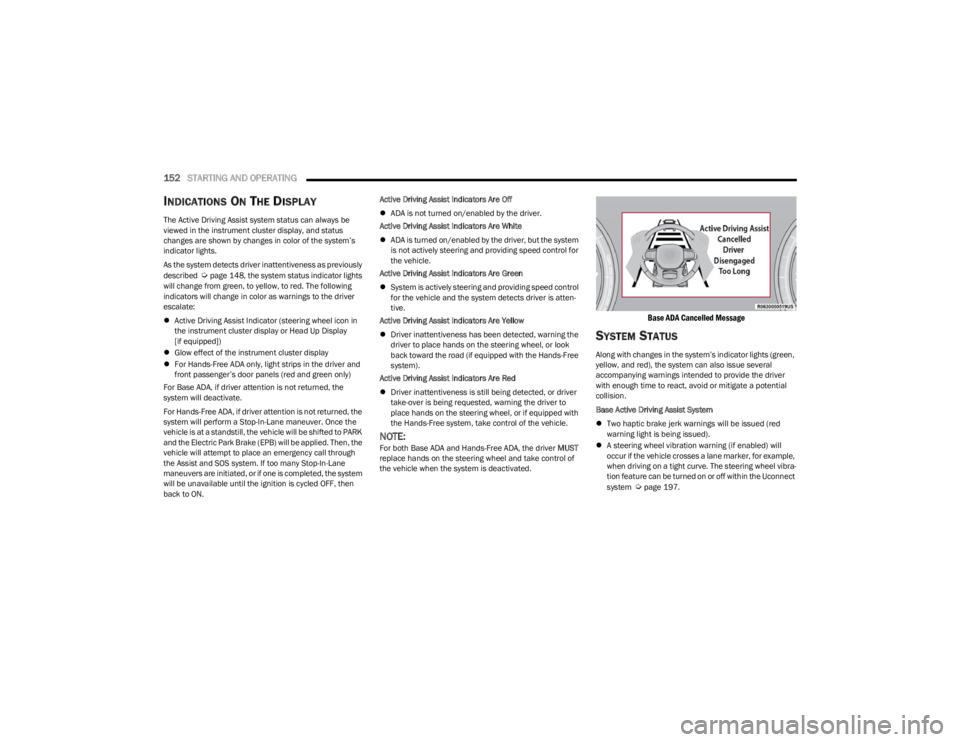
For Base ADA, if driver attention is not returned, the
system will deactivate.
For Hands-Free ADA, if driver attention is not returned, the
system will perform a Stop-In-Lane maneuver. Once the
vehicle is at a standstill, the vehicle will be shifted to PARK
and the Electric Park Brake (EPB) will be applied. Then, the
vehicle will attempt to place an emergency call through
the Assist and SOS system. If too many Stop-In-Lane
maneuvers are initiated, or if one is completed, the system
will be unavailable until the ignition is cycled OFF, then
back to ON. Active Driving Assist Indicators Are Off
ADA is not turned on/enabled by the driver.
Active Driving Assist Indicators Are White
ADA is turned on/enabled by the driver, but the system
is not actively steering and providing speed control for
the vehicle.
Active Driving Assist Indicators Are Green
System is actively steering and providing speed control
for the vehicle and the system detects driver is atten -
tive.
Active Driving Assist Indicators Are Yellow
Driver inattentiveness has been detected, warning the
driver to place hands on the steering wheel, or look
back toward the road (if equipped with the Hands-Free
system).
Active Driving Assist Indicators Are Red
Driver inattentiveness is still being detected, or driver
take-over is being requested, warning the driver to
place hands on the steering wheel, or if equipped with
the Hands-Free system, take control of the vehicle.
NOTE:For both Base ADA and Hands-Free ADA, the driver MUST
replace hands on the steering wheel and take control of
the vehicle when the system is deactivated.
Base ADA Cancelled Message
SYSTEM STATUS
Along with changes in the system’s indicator lights (green,
yellow, and red), the system can also issue several
accompanying warnings intended to provide the driver
with enough time to react, avoid or mitigate a potential
collision.
Base Active Driving Assist System
Two haptic brake jerk warnings will be issued (red
warning light is being issued).
A steering wheel vibration warning (if enabled) will
occur if the vehicle crosses a lane marker, for example,
when driving on a tight curve. The steering wheel vibra -
tion feature can be turned on or off within the Uconnect
system
Úpage 197.
23_WS_OM_EN_USC_t.book Page 152
Page 155 of 396

STARTING AND OPERATING153
(Continued)
Hands-Free Active Driving Assist System
Two haptic brake jerk warnings will be issued (red
warning light is being issued).
A seat vibration warning will occur (red warning light is
being issued).
The driver can take control of the vehicle at any time to
override the warnings by pressing the gas or brake pedal,
moving the steering wheel, and being attentive to the
road.
SYSTEM OPERATION/LIMITATIONS
The Base Active Driving Assist and Hands-Free Active
Driving Assist systems DO NOT:
Warn or prevent collisions with other vehicles
Steer your vehicle around stopped vehicles, slower
vehicles, construction zones or equipment, pedes -
trians, or animals
Respond to traffic lights or stop signs
Merge onto highways or exit off ramps
Change lanes (exception: Hands-Free, only when initi -
ated by the driver)
React to cross traffic
NOTE:Adaptive Cruise Control (ACC) is a core component of ADA.
For ACC system limitations Úpage 139.
The Active Driving Assist system may have limited or
reduced functionality when one of the following conditions
occur:
The vehicle’s radar sensors and/or forward facing
camera is damaged, covered, misaligned, or
obstructed (e.g. by mud, ice, snow, etc.)
If the suspension alignment is not correct, if the vehicle
is modified (e.g. lifting or lowering the suspension,
installing different sized wheels or tires) or if there has
been damage due to road hazards
Driving near highway toll booths
NOTE:If damage to the windshield occurs, have the windshield
replaced by an authorized dealer as soon as possible.
WARNING!
Active Driving Assist is an SAE Level 2 Driver Assist
feature, requiring driver attention at all times. To
prevent serious injury or death:
Always remember that the Active Driving Assist
system is a convenience system that cannot accu -
rately detect all situations. Complete attention is
always required while driving, even when using the
Active Driving Assist system.
Always remain alert and be ready to take control of
the vehicle in the event that the Active Driving Assist
system deactivates, or otherwise lacks full function -
ality as described further before and after this
statement.
Always keep your hands on the steering wheel when
the Base Active Driving Assist system is activated.
Always keep your eyes on the road when the
Hands-Free Active Driving Assist system is activated.
Maintain a safe distance from other vehicles and pay
attention to traffic conditions.
Do not use a hand held device when either Base or
Hands-Free Active Driving Assist system is engaged.
Always pay attention to the road when the
Hands-Free Active Driving Assist system is engaged.
The Active Driving Assist system will not steer to
avoid safety hazards, construction zones, objects, or
road impediments. You need to take control to steer
and brake the vehicle in such situations, and when
merging into traffic, exiting the highway, making a
turn for crossing traffic, or stopping for traffic control
devices.
Do not place any objects on the steering wheel (e.g.
steering wheel covers) which could interfere with the
hand detection sensors.
WARNING!
4
23_WS_OM_EN_USC_t.book Page 153
Page 174 of 396
172STARTING AND OPERATING
The display will show the entire view inside the vehicle on
the left side of the screen, and will show a zoomed-in view
of the selected seat on the right side of the screen.
FamCam Display Example (7 Passenger Vehicle Shown)
To change the seat shown in the zoomed-in view, press a
different seat location on the left side of the display. The
zoomed-in view will then show the new seat location. By
default, the second row driver’s side seat will be displayed
in the zoomed-in view.
The display will appear in color in well lit conditions and
will appear black and white in low light conditions.
If the driver shifts into REVERSE or presses the
touchscreen X button, the view will close. Otherwise, the
FamCam view will remain on the display.
NOTE:When FamCam is turned off, the selected seat in the
zoomed-in view on the right side of the display will be
retained. The next time the feature is activated, the same
seat will be shown in the zoomed-in view.
NIGHT VISION CAMERA SYSTEM —
IF EQUIPPED
Your vehicle may be equipped with a Night Vision Camera
system which uses an infrared camera to view the area
ahead of the vehicle, beyond the headlights, to detect
people and large animals when it is dark outside.
The system detects pedestrians or large animals by
measuring the temperature difference between the object
and the surrounding area.
The thermal objects detected by the camera can be
displayed in the instrument cluster display. Scroll to the
Night Vision page in the instrument cluster display menu
Úpage 104 to display the Night Vision screen.
Warm objects (e.g. animals) will appear lighter on the
display while cold objects (e.g. traffic signs) will appear
darker.
NOTE:
Night Vision only shows objects of interest that are
warmer or colder than the surroundings.
Adjust the instrument cluster dimmer control bright -
ness to make the image appear brighter or dimmer.
To exit out of the Night Vision screen, select a different
menu in the instrument cluster display.
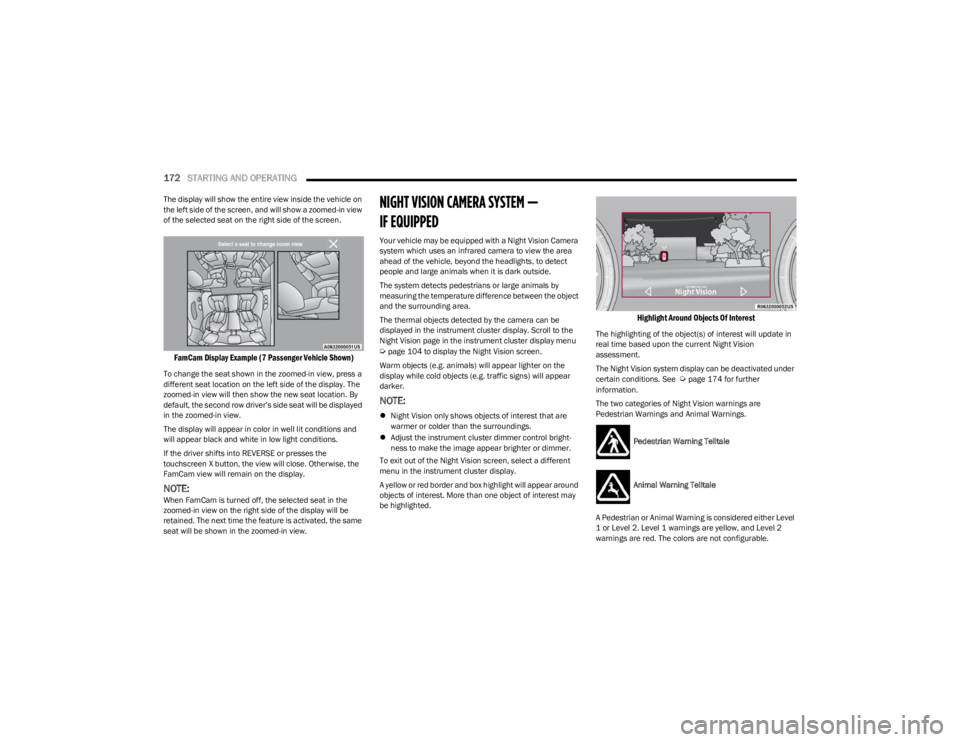
A yellow or red border and box highlight will appear around
objects of interest. More than one object of interest may
be highlighted.
Highlight Around Objects Of Interest
The highlighting of the object(s) of interest will update in
real time based upon the current Night Vision
assessment.
The Night Vision system display can be deactivated under
certain conditions. See
Úpage 174 for further
information.
The two categories of Night Vision warnings are
Pedestrian Warnings and Animal Warnings.
Pedestrian Warning Telltale
Animal Warning Telltale
A Pedestrian or Animal Warning is considered either Level
1 or Level 2. Level 1 warnings are yellow, and Level 2
warnings are red. The colors are not configurable.
23_WS_OM_EN_USC_t.book Page 172
Page 175 of 396

STARTING AND OPERATING173
(Continued)
Level 1 Warnings:
Yellow telltale in the instrument cluster display
Yellow highlights around the detected
pedestrian/animal
Occurs when the vehicle is moving at speeds greater
than 8 mph (13 km/h) and the target is in or
approaching the vehicle path
Level 2 Warnings:
Red telltale in the instrument cluster display
Red highlights around the detected pedestrian/animal
Occurs when the vehicle is moving at speeds greater
than 8 mph (13 km/h) and a collision with the detected
pedestrian/animal is possible
The pedestrian/animal is directly in the vehicle path,
close to the headlight area
A video pop-up will display when there is a target
detected and the instrument cluster display is not
showing the Night Vision page
A chime will sound for a Level 2 Warning detection
event
Only one telltale can be displayed at a time based upon
priority.
The priority order of the warnings from highest to lowest is:
1. Pedestrian Warning Level 2
2. Animal Warning Level 2
3. Pedestrian Warning Level 1
4. Animal Warning Level 1
Level 2 Warnings may display in the Head Up Display
(if equipped).
NOTE:If the vehicle is stopped, or slowing down, all Level 2
warnings become Level 1 warnings.
You can enable or disable the warnings within the
Uconnect system
Úpage 197.
If the warnings are off, the telltales, chimes, and warning
messages will all be off. Pedestrians and animals can still
be detected by the system, but there will be no warnings. The Night Vision alert status telltale will be gray
when the warnings are suppressed. The telltale
will also turn gray to indicate that the alerts are
suppressed due to environmental factors (e.g.
daylight hours, external temperature is greater than 86°F
(30°C)) or if the gear selector is in REVERSE. When the
Night Vision alerts are active, the telltale will be green
Úpage 108.
Camera Washers
When the front window washer is activated, the Night
Vision camera will also be washed
Úpage 63.DETECTION RANGE
The system can detect people 4 ft (1.25 m) tall or greater
in the upright position. The system can also detect
animals that are four-legged and 3 ft (1 m) tall or greater
in the upright position.
The detection distance for the system is between 26 ft
(8 m) and 328 ft (100 m) from the front of the vehicle.WARNING!
Do not jerk the steering wheel in response to a
warning.
Never attempt to swerve around animals if doing so
would endanger you or others.
Do not stare at the image while driving. You could
crash and you or others could be injured.
The Night Vision system only provides alerts to
objects of interest and cannot serve as a substitute
for the driver’s personal judgment. The warnings are
meant to direct your attention to the detected
objects, but the Night Vision system does not auto -
matically brake the vehicle and may not provide a
warning with enough time to help avoid a crash.
Warnings are only provided if a pedestrian or large
animal is detected by the system.
It is always the driver’s responsibility to be attentive
of road, traffic, and weather conditions, vehicle
speed, distance to the vehicle ahead, and most
importantly, brake operation, to ensure safe opera -
tion of the vehicle under all road conditions. Your
complete attention is always required while driving to
maintain safe control of your vehicle.
WARNING!
4
23_WS_OM_EN_USC_t.book Page 173
Page 176 of 396

174STARTING AND OPERATING
(Continued)
The system may not be able to detect pedestrians or
animals in the following situations:
Pedestrian/animal is outside of the detection range
Pedestrian/animal is fully or partially covered
Pedestrian/animal does not reach the minimum detec -
tion height
NOTE:Other objects on the road that meet the height/shape/
temperature (e.g. sun exposure) of pedestrians/animals
may be detected and classified as targets.
SERVICE THE NIGHT VISION SYSTEM
When service conditions are present, the following fault
messages may appear in the instrument cluster display
when the vehicle is placed in the ON position.
If "Night Vision Unavailable Sensor Blocked" appears in
the instrument cluster display, make sure the camera is
clear of snow, ice, mud, dirt or other debris. The camera is
located in the upper fascia/bumper, inside the driver side
grille slot. Clean the camera using a soft wet cloth or by
pressing the Clean Camera button in the Uconnect
system. If the message continues to appear after cycling
the ignition, see an authorized dealer.
If “Night Vision Temporarily Unavailable” or “Night Vision
Unavailable Service Required" appears in the instrument
cluster display after cycling the ignition, see an authorized
dealer.
The camera must be properly aligned to work correctly.
If the camera needs adjustment, see an authorized
dealer. Do not attempt to adjust the camera yourself.
NOTE:Alignment and performance of the Night Vision may be
affected by aftermarket modifications. Mopar® parts
should be used to get the optimal performance of this
system.
NIGHT VISION SYSTEM LIMITATIONS
The Night Vision display is deactivated under the following
conditions:
Vehicle is shifted into REVERSE
The ignition is not in the ON/RUN position
The headlights are off and the vehicle speed is greater
than 8 mph (13 km/h)
The Night Vision display warnings are suppressed under
the following conditions:
Daylight hours
Temperatures above 86°F (30°C)
The system may not be fully functional in the following
situations:
On steep hills
On tight curves of the road
If the camera/sensor is damaged or blocked by dirt,
snow, ice, or other debris
In poor visibility conditions such as heavy fog, rain,
snow, or other weather conditions
If the vehicle has been modified with aftermarket parts
and/or accessories
NOTE:If any of these conditions are present, the system does not
need service.
WARNING!
Night Vision can only detect pedestrians and animals
located within the range of the infrared camera.
Night Vision may not detect pedestrians or animals
and highlight them if:
They are not in an upright position, for example
if they are sitting or lying down, or if the pedes -
trian is riding a bicycle
The figure in the display appears incomplete, for
example because the pedestrian or animal is
partially behind a vehicle
The pedestrian/animal is not directly ahead in
the coverage area
The pedestrian/animal is part of a group
The pedestrian is wearing certain types of
clothing
The pedestrian/animal is moving too quickly
through the field of view
The sensor is blocked by dirt, rain, snow, or ice
WARNING!
23_WS_OM_EN_USC_t.book Page 174
Page 179 of 396
STARTING AND OPERATING177
If the vehicle is in PARK, Zoom View is available until the
gear selector is placed in DRIVE or REVERSE and speeds
are at or above 8 mph (13 km/h).
NOTE:
If the vehicle is in DRIVE, NEUTRAL, or REVERSE, and
speed is greater than or equal to 8 mph (13 km/h),
Zoom View is unavailable and the icon will appear gray.
While in Zoom View, the guidelines will not be visible.
REFUELING THE VEHICLE
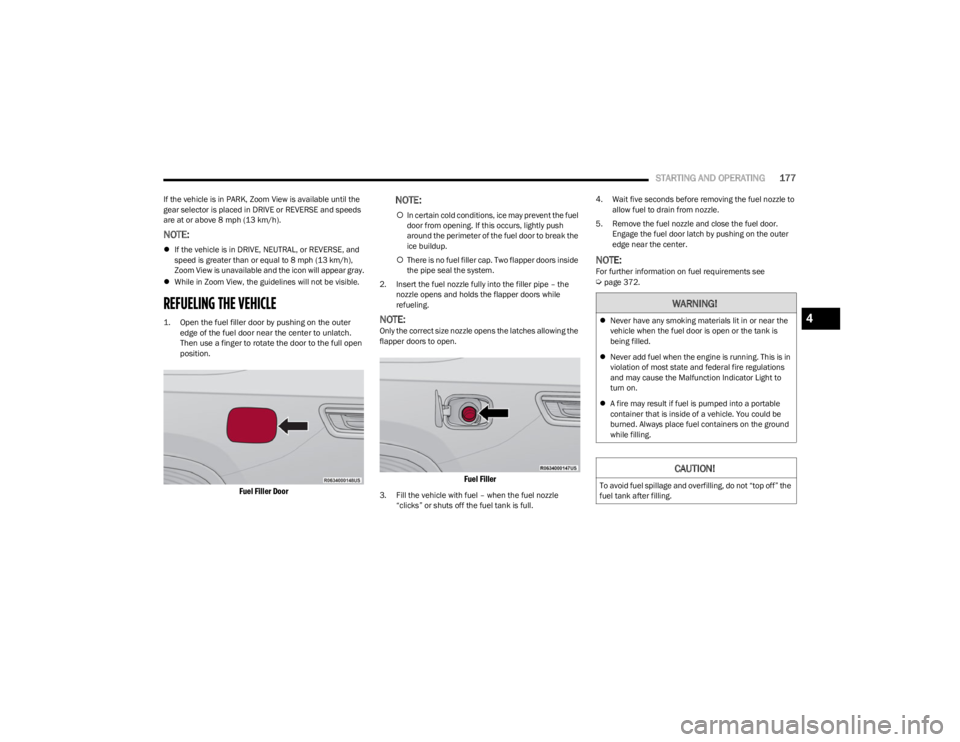
1. Open the fuel filler door by pushing on the outer
edge of the fuel door near the center to unlatch.
Then use a finger to rotate the door to the full open
position.
Fuel Filler Door
NOTE:
In certain cold conditions, ice may prevent the fuel
door from opening. If this occurs, lightly push
around the perimeter of the fuel door to break the
ice buildup.
There is no fuel filler cap. Two flapper doors inside
the pipe seal the system.
2. Insert the fuel nozzle fully into the filler pipe – the nozzle opens and holds the flapper doors while
refueling.
NOTE:Only the correct size nozzle opens the latches allowing the
flapper doors to open.
Fuel Filler
3. Fill the vehicle with fuel – when the fuel nozzle “clicks” or shuts off the fuel tank is full. 4. Wait five seconds before removing the fuel nozzle to
allow fuel to drain from nozzle.
5. Remove the fuel nozzle and close the fuel door. Engage the fuel door latch by pushing on the outer
edge near the center.
NOTE:For further information on fuel requirements see Úpage 372.
WARNING!
Never have any smoking materials lit in or near the
vehicle when the fuel door is open or the tank is
being filled.
Never add fuel when the engine is running. This is in
violation of most state and federal fire regulations
and may cause the Malfunction Indicator Light to
turn on.
A fire may result if fuel is pumped into a portable
container that is inside of a vehicle. You could be
burned. Always place fuel containers on the ground
while filling.
CAUTION!
To avoid fuel spillage and overfilling, do not “top off” the
fuel tank after filling.
4
23_WS_OM_EN_USC_t.book Page 177
Page 183 of 396
STARTING AND OPERATING181
RECOMMENDED DISTRIBUTION HITCH
ADJUSTMENT — NON-AIR SUSPENSION
EQUIPPED VEHICLES
1. Verify that the vehicle is at the normal ride height.
2. Position the vehicle on a level surface in preparation
to connect to the trailer (do not connect the trailer).
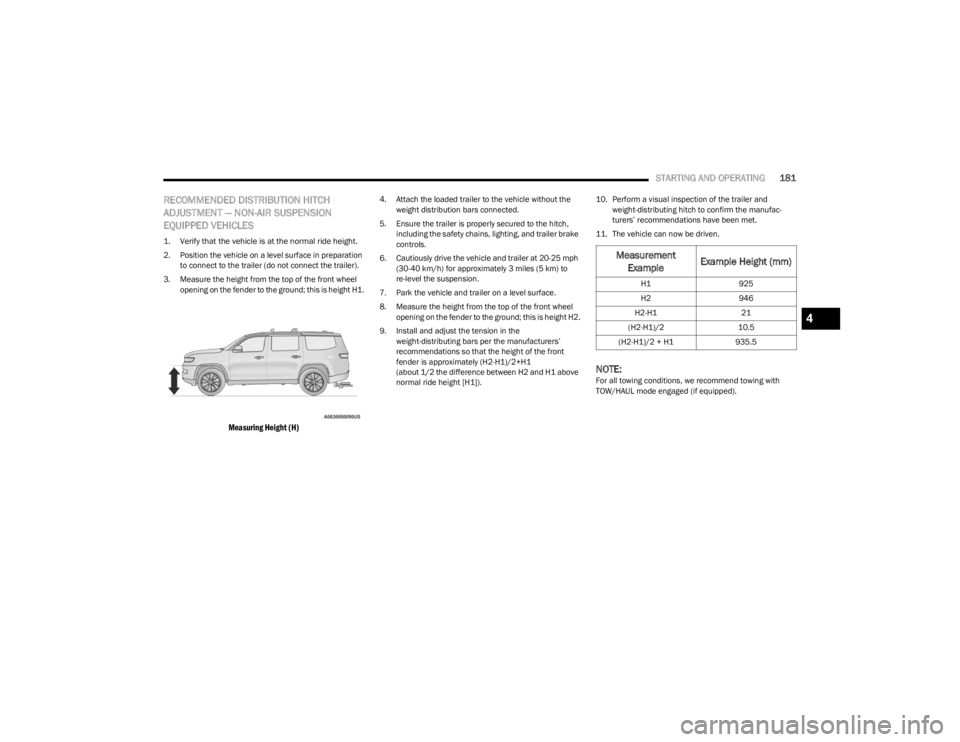
3. Measure the height from the top of the front wheel opening on the fender to the ground; this is height H1.
Measuring Height (H)
4. Attach the loaded trailer to the vehicle without the weight distribution bars connected.
5. Ensure the trailer is properly secured to the hitch, including the safety chains, lighting, and trailer brake
controls.
6. Cautiously drive the vehicle and trailer at 20-25 mph (30-40 km/h) for approximately 3 miles (5 km) to
re-level the suspension.
7. Park the vehicle and trailer on a level surface.
8. Measure the height from the top of the front wheel opening on the fender to the ground; this is height H2.
9. Install and adjust the tension in the weight-distributing bars per the manufacturers’
recommendations so that the height of the front
fender is approximately (H2-H1)/2+H1
(about 1/2 the difference between H2 and H1 above
normal ride height [H1]). 10. Perform a visual inspection of the trailer and
weight-distributing hitch to confirm the manufac -
turers’ recommendations have been met.
11. The vehicle can now be driven.
NOTE:For all towing conditions, we recommend towing with
TOW/HAUL mode engaged (if equipped).
Measurement Example Example Height (mm)
H1
925
H2 946
H2-H1 21
(H2-H1)/2 10.5
(H2-H1)/2 + H1 935.5
4
23_WS_OM_EN_USC_t.book Page 181
Page 184 of 396

182STARTING AND OPERATING
TRAILER HITCH CLASSIFICATION
The following chart provides the industry standard for the maximum trailer weight a given trailer hitch class can tow and should be used to assist you in selecting the correct trailer hitch
for your intended towing condition.
TRAILER TOWING WEIGHTS (MAXIMUM TRAILER WEIGHT RATINGS)
Trailer Hitch Classification Definitions
Class Max. Trailer Hitch Industry Standards
Class I - Light Duty 2,000 lb (907 kg)
Class II - Medium Duty 3,500 lb (1,587 kg)
Class III - Heavy Duty 6,000 lb (2,722 kg)
Class IV - Extra Heavy Duty 10,000 lb (4,535 kg)
Refer to the “Trailer Towing Weights (Maximum Trailer Weight Ratings)” chart for the Maximum Gross Trailer Weight (GTW) towable for your given drivetrain.
All trailer hitches should be professionally installed on your vehicle.
Model Engine Wheel Base (in) Axle Ratio GCWR Frontal Area Max GTW Max TW
Wagoneer 4x2 3.0L SO 1303.5512,300 lb
(5,579 kg) 40 sq ft (3.72 sq m) 5,990 lb
(2,717 kg) 599 lb (272 kg)
Wagoneer 4x4 3.0L SO 1303.5512,300 lb
(5,579 kg) 40 sq ft (3.72 sq m) 5,750 lb
(2,608 kg) 575 lb (261 kg)
Wagoneer 4x2 3.0L SO 1303.9216,500 lb
(7,484 kg) 60 sq ft (5.57 sq m) 10,000 lb
(4,536 kg) 1,000 lb (454 kg)
Wagoneer 4x4 (Max Tow) 3.0L SO
1303.9216,500 lb
(7,484 kg) 55 sq ft (5.11 sq m) 10,000 lb
(4,536 kg) 1,000 lb (454 kg)
23_WS_OM_EN_USC_t.book Page 182
Page 189 of 396
STARTING AND OPERATING187
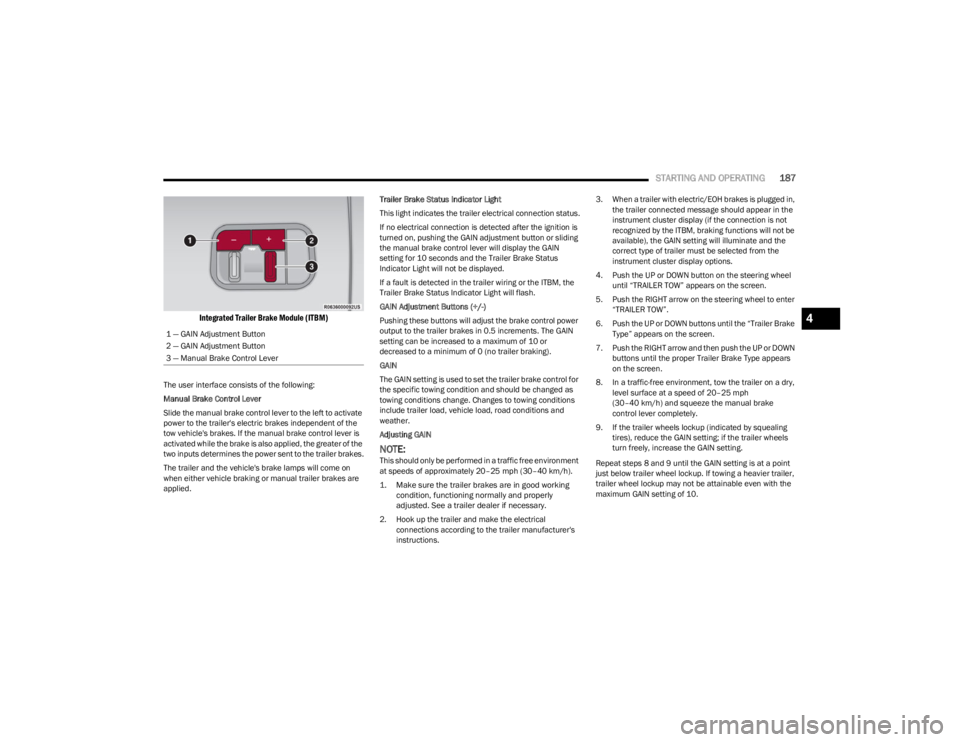
Integrated Trailer Brake Module (ITBM)
The user interface consists of the following:
Manual Brake Control Lever
Slide the manual brake control lever to the left to activate
power to the trailer's electric brakes independent of the
tow vehicle's brakes. If the manual brake control lever is
activated while the brake is also applied, the greater of the
two inputs determines the power sent to the trailer brakes.
The trailer and the vehicle's brake lamps will come on
when either vehicle braking or manual trailer brakes are
applied. Trailer Brake Status Indicator Light
This light indicates the trailer electrical connection status.
If no electrical connection is detected after the ignition is
turned on, pushing the GAIN adjustment button or sliding
the manual brake control lever will display the GAIN
setting for 10 seconds and the Trailer Brake Status
Indicator Light will not be displayed.
If a fault is detected in the trailer wiring or the ITBM, the
Trailer Brake Status Indicator Light will flash.
GAIN Adjustment Buttons (+/-)
Pushing these buttons will adjust the brake control power
output to the trailer brakes in 0.5 increments. The GAIN
setting can be increased to a maximum of 10 or
decreased to a minimum of 0 (no trailer braking).
GAIN
The GAIN setting is used to set the trailer brake control for
the specific towing condition and should be changed as
towing conditions change. Changes to towing conditions
include trailer load, vehicle load, road conditions and
weather.
Adjusting GAIN
NOTE:This should only be performed in a traffic free environment
at speeds of approximately 20–25 mph (30–40 km/h).
1. Make sure the trailer brakes are in good working condition, functioning normally and properly
adjusted. See a trailer dealer if necessary.
2. Hook up the trailer and make the electrical connections according to the trailer manufacturer's
instructions. 3. When a trailer with electric/EOH brakes is plugged in,
the trailer connected message should appear in the
instrument cluster display (if the connection is not
recognized by the ITBM, braking functions will not be
available), the GAIN setting will illuminate and the
correct type of trailer must be selected from the
instrument cluster display options.
4. Push the UP or DOWN button on the steering wheel until “TRAILER TOW” appears on the screen.
5. Push the RIGHT arrow on the steering wheel to enter “TRAILER TOW”.
6. Push the UP or DOWN buttons until the “Trailer Brake Type” appears on the screen.
7. Push the RIGHT arrow and then push the UP or DOWN buttons until the proper Trailer Brake Type appears
on the screen.
8. In a traffic-free environment, tow the trailer on a dry, level surface at a speed of 20–25 mph
(30–40 km/h) and squeeze the manual brake
control lever completely.
9. If the trailer wheels lockup (indicated by squealing tires), reduce the GAIN setting; if the trailer wheels
turn freely, increase the GAIN setting.
Repeat steps 8 and 9 until the GAIN setting is at a point
just below trailer wheel lockup. If towing a heavier trailer,
trailer wheel lockup may not be attainable even with the
maximum GAIN setting of 10.
1 — GAIN Adjustment Button
2 — GAIN Adjustment Button
3 — Manual Brake Control Lever
4
23_WS_OM_EN_USC_t.book Page 187
Page 190 of 396
188STARTING AND OPERATING
Display Messages
The trailer brake control interacts with the instrument
cluster display. Display messages, along with a single
chime, will be displayed when a malfunction is determined
in the trailer connection, trailer brake control, or on the
trailer
Úpage 99.
NOTE:
An aftermarket controller may be available for use with
trailers with air or EOH trailer brake systems. To deter -
mine the type of brakes on your trailer and the avail -
ability of controllers, check with your trailer
manufacturer or dealer.
Removal of the ITBM will cause errors and it may cause
damage to the electrical system and electronic
modules of the vehicle. See an authorized dealer if an
aftermarket module is to be installed.
Towing Requirements — Trailer Lights
And Wiring
Whenever pulling a trailer, regardless of the trailer size,
stop lights and turn signals on the trailer are required for
motoring safety.
The Trailer Tow Package may include a four- and seven-pin
wiring harness. Use a factory approved trailer harness and
connector.
NOTE:Do not cut or splice wiring into the vehicle’s wiring
harness.
The electrical connections are all complete to the vehicle
but you must mate the harness to a trailer connector.
Refer to the following illustrations.
NOTE:
Disconnect the trailer wiring connector from the vehicle
(or any other device plugged into the vehicle's electrical
connectors) before launching a boat into water.
Be sure to reconnect once clear from water area.
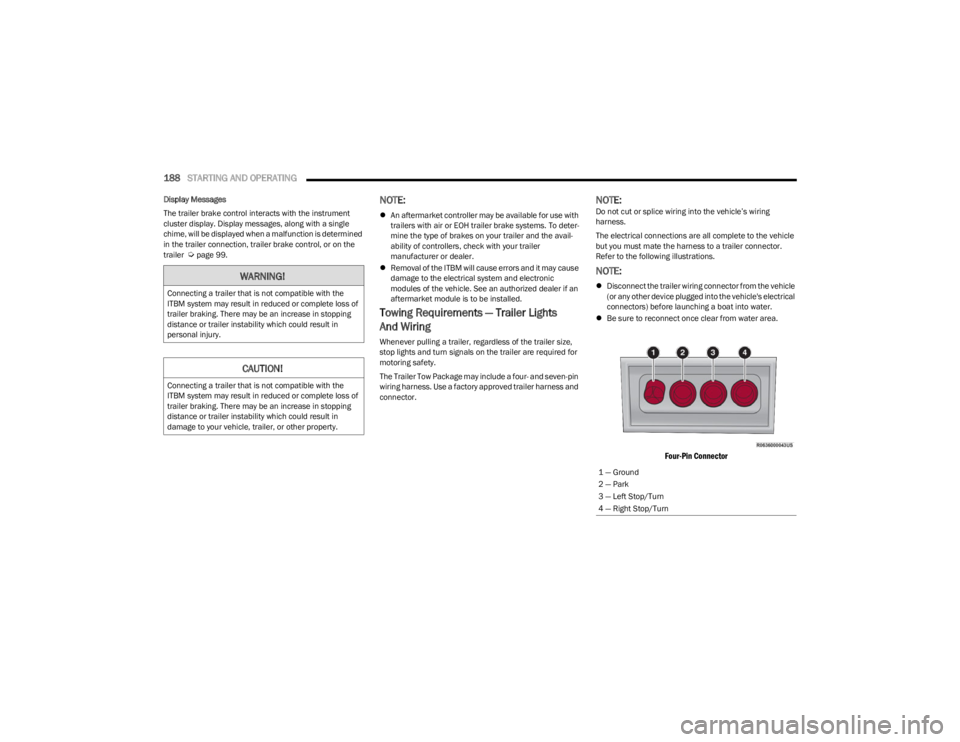
Four-Pin Connector
WARNING!
Connecting a trailer that is not compatible with the
ITBM system may result in reduced or complete loss of
trailer braking. There may be an increase in stopping
distance or trailer instability which could result in
personal injury.
CAUTION!
Connecting a trailer that is not compatible with the
ITBM system may result in reduced or complete loss of
trailer braking. There may be an increase in stopping
distance or trailer instability which could result in
damage to your vehicle, trailer, or other property.
1 — Ground
2 — Park
3 — Left Stop/Turn
4 — Right Stop/Turn
23_WS_OM_EN_USC_t.book Page 188