wheel JEEP WAGONEER 2023 Manual PDF
[x] Cancel search | Manufacturer: JEEP, Model Year: 2023, Model line: WAGONEER, Model: JEEP WAGONEER 2023Pages: 396, PDF Size: 15.17 MB
Page 223 of 396
MULTIMEDIA221
STEERING WHEEL AUDIO CONTROLS
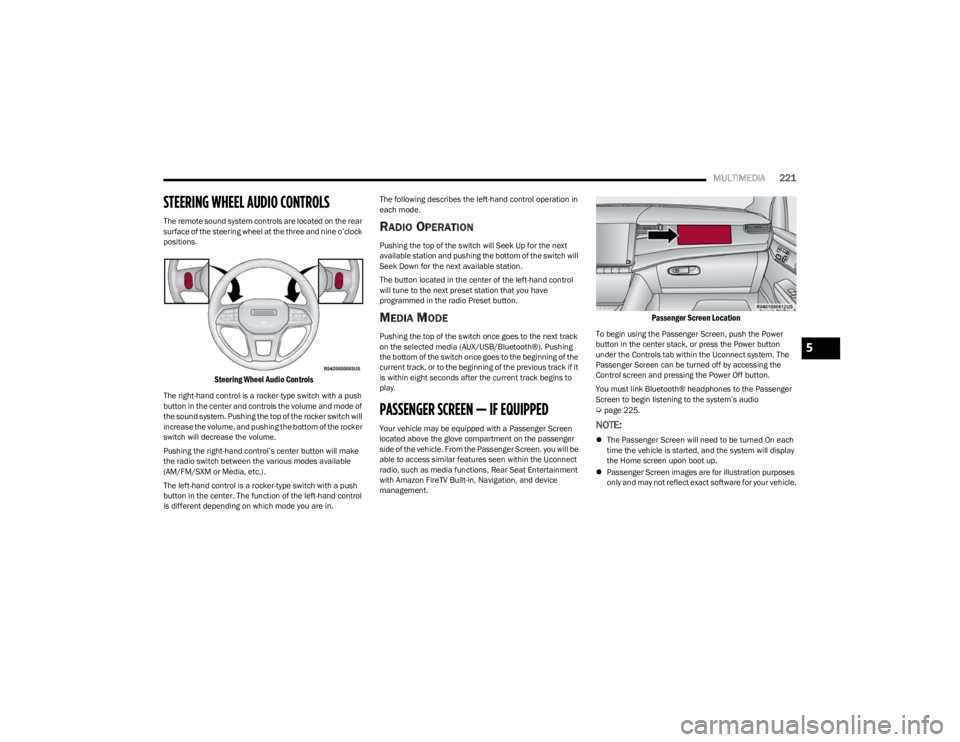
The remote sound system controls are located on the rear
surface of the steering wheel at the three and nine o’clock
positions.
Steering Wheel Audio Controls
The right-hand control is a rocker-type switch with a push
button in the center and controls the volume and mode of
the sound system. Pushing the top of the rocker switch will
increase the volume, and pushing the bottom of the rocker
switch will decrease the volume.
Pushing the right-hand control’s center button will make
the radio switch between the various modes available
(AM/FM/SXM or Media, etc.).
The left-hand control is a rocker-type switch with a push
button in the center. The function of the left-hand control
is different depending on which mode you are in. The following describes the left-hand control operation in
each mode.
RADIO OPERATION
Pushing the top of the switch will Seek Up for the next
available station and pushing the bottom of the switch will
Seek Down for the next available station.
The button located in the center of the left-hand control
will tune to the next preset station that you have
programmed in the radio Preset button.
MEDIA MODE
Pushing the top of the switch once goes to the next track
on the selected media (AUX/USB/Bluetooth®). Pushing
the bottom of the switch once goes to the beginning of the
current track, or to the beginning of the previous track if it
is within eight seconds after the current track begins to
play.
PASSENGER SCREEN — IF EQUIPPED
Your vehicle may be equipped with a Passenger Screen
located above the glove compartment on the passenger
side of the vehicle. From the Passenger Screen, you will be
able to access similar features seen within the Uconnect
radio, such as media functions, Rear Seat Entertainment
with Amazon FireTV Built-in, Navigation, and device
management.
Passenger Screen Location
To begin using the Passenger Screen, push the Power
button in the center stack, or press the Power button
under the Controls tab within the Uconnect system. The
Passenger Screen can be turned off by accessing the
Control screen and pressing the Power Off button.
You must link Bluetooth® headphones to the Passenger
Screen to begin listening to the system’s audio
Úpage 225.
NOTE:
The Passenger Screen will need to be turned On each
time the vehicle is started, and the system will display
the Home screen upon boot up.
Passenger Screen images are for illustration purposes
only and may not reflect exact software for your vehicle.
5
23_WS_OM_EN_USC_t.book Page 221
Page 240 of 396
238MULTIMEDIA
SUSPENSION — IF EQUIPPED
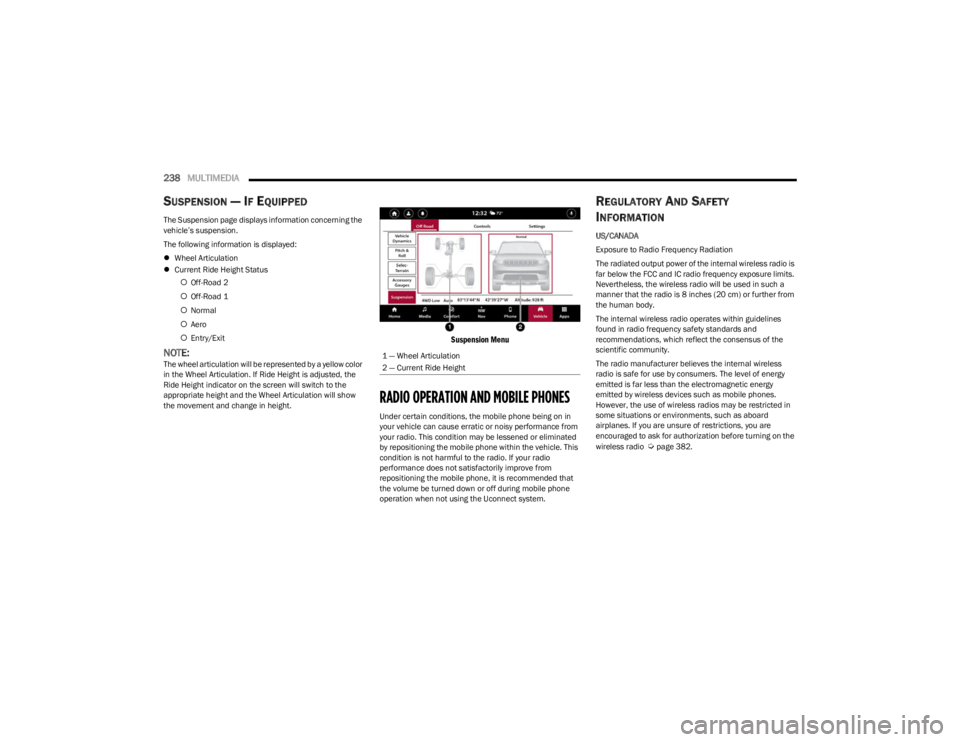
The Suspension page displays information concerning the
vehicle’s suspension.
The following information is displayed:
Wheel Articulation
Current Ride Height Status
Off-Road 2
Off-Road 1
Normal
Aero
Entry/Exit
NOTE:The wheel articulation will be represented by a yellow color
in the Wheel Articulation. If Ride Height is adjusted, the
Ride Height indicator on the screen will switch to the
appropriate height and the Wheel Articulation will show
the movement and change in height.
Suspension Menu
RADIO OPERATION AND MOBILE PHONES
Under certain conditions, the mobile phone being on in
your vehicle can cause erratic or noisy performance from
your radio. This condition may be lessened or eliminated
by repositioning the mobile phone within the vehicle. This
condition is not harmful to the radio. If your radio
performance does not satisfactorily improve from
repositioning the mobile phone, it is recommended that
the volume be turned down or off during mobile phone
operation when not using the Uconnect system.
REGULATORY AND SAFETY
I
NFORMATION
US/CANADA
Exposure to Radio Frequency Radiation
The radiated output power of the internal wireless radio is
far below the FCC and IC radio frequency exposure limits.
Nevertheless, the wireless radio will be used in such a
manner that the radio is 8 inches (20 cm) or further from
the human body.
The internal wireless radio operates within guidelines
found in radio frequency safety standards and
recommendations, which reflect the consensus of the
scientific community.
The radio manufacturer believes the internal wireless
radio is safe for use by consumers. The level of energy
emitted is far less than the electromagnetic energy
emitted by wireless devices such as mobile phones.
However, the use of wireless radios may be restricted in
some situations or environments, such as aboard
airplanes. If you are unsure of restrictions, you are
encouraged to ask for authorization before turning on the
wireless radio
Úpage 382.
1 — Wheel Articulation
2 — Current Ride Height
23_WS_OM_EN_USC_t.book Page 238
Page 241 of 396
239
(Continued)
SAFETY
SAFETY FEATURES
ANTI-LOCK BRAKE SYSTEM (ABS)
The ABS provides increased vehicle stability and brake
performance under most braking conditions. The system
automatically prevents wheel lock and enhances vehicle
control during braking.
The ABS performs a self-check cycle to ensure that the
ABS is working properly each time the vehicle is started
and driven. During this self-check, you may hear a slight
clicking sound as well as some related motor noises.
The ABS is activated during braking when the system
detects one or more wheels are beginning to lock. Road
conditions such as ice, snow, gravel, bumps, railroad
tracks, loose debris, or panic stops may increase the
likelihood of ABS activation(s).
You also may experience the following normal
characteristics when the ABS activates:
ABS motor noise or clicking sounds (you may continue
to hear for a short time after the stop).
Brake pedal pulsations.
A slight drop of the brake pedal at the end of the stop. The ABS is designed to function with the Original
Equipment Manufacturer (OEM) tires. Modification may
result in degraded ABS performance.
Anti-Lock Brake System (ABS) Warning
Light
The yellow ABS Warning Light will turn on when the ignition
is placed in the ON/RUN mode and may stay on for as long
as four seconds.
If the ABS Warning Light remains on or comes on while
driving, it indicates that the anti-lock portion of the brake
system is not functioning and that service is required.
However, the conventional brake system will continue to
operate normally if the ABS Warning Light is on.
If the ABS Warning Light is on, the brake system should be
serviced as soon as possible to restore the benefits of
Anti-Lock Brakes. If the ABS Warning Light does not come
on when the ignition is placed in the ON/RUN mode, have
the light repaired as soon as possible.
WARNING!
The ABS contains sophisticated electronic equip -
ment that may be susceptible to interference caused
by improperly installed or high output radio transmit -
ting equipment. This interference can cause possible
loss of anti-lock braking capability. Installation of
such equipment should be performed by qualified
professionals.
Pumping of the Anti-Lock Brakes will diminish their
effectiveness and may lead to a collision. Pumping
makes the stopping distance longer. Just press firmly
on your brake pedal when you need to slow down or
stop.
The ABS cannot prevent the natural laws of physics
from acting on the vehicle, nor can it increase
braking or steering efficiency beyond that afforded
by the condition of the vehicle brakes and tires or the
traction afforded.
The ABS cannot prevent collisions, including those
resulting from excessive speed in turns, following
another vehicle too closely, or hydroplaning.
The capabilities of an ABS equipped vehicle must
never be exploited in a reckless or dangerous
manner that could jeopardize the user’s safety or the
safety of others.
WARNING!
6
23_WS_OM_EN_USC_t.book Page 239
Page 242 of 396
240SAFETY
REAR SEAT REMINDER ALERT (RSRA)
RSRA alerts you of the possible presence of an object,
passenger, or pet in the rear seats through a visual and
auditory notification. The system will activate
automatically if a rear door was opened within 10 minutes
of the ignition being placed in the ON/RUN position. RSRA
does not directly detect objects, passengers, or pets in the
rear seats. When the previous conditions are met, RSRA
displays the message “Check Rear Seat” on the
instrument cluster display and sounds an auditory alert
upon the driver placing the ignition in the OFF position to
exit the vehicle.
To enable or disable RSRA, see
Úpage 197.
DROWSY DRIVER DETECTION (DDD) —
I
F EQUIPPED
DDD detects when the driver is feeling fatigued and warns
the driver to pull over and take a break.
To Activate/Deactivate
DDD can be activated and deactivated through the
Uconnect system by selecting the following in order:
1. “Safety & Driving Assistance”
2. “Drowsy Driver Detection”
System Intervention
Using feedback obtained from the driver’s steering
patterns, any buttons/switches that are pressed, and from
the front camera, the system implements two operating
logics:
The first operating logic takes the driving style into
account, observing the road and detecting to what
extent the driver can continue driving with few lane
crossing events.
The second operating logic measures the time spent
behind the wheel with the vehicle speed above 40 mph
(60 km/h) and below 100 mph (160 km/h).
If the driving style indicates that the driver is unable to
follow the road trajectory and respect the horizontal lane
markings while within the operating speed range of the
system, a pop up will display on the instrument cluster
display to suggest that the driver should stop for a break.
An audible signal will also sound.
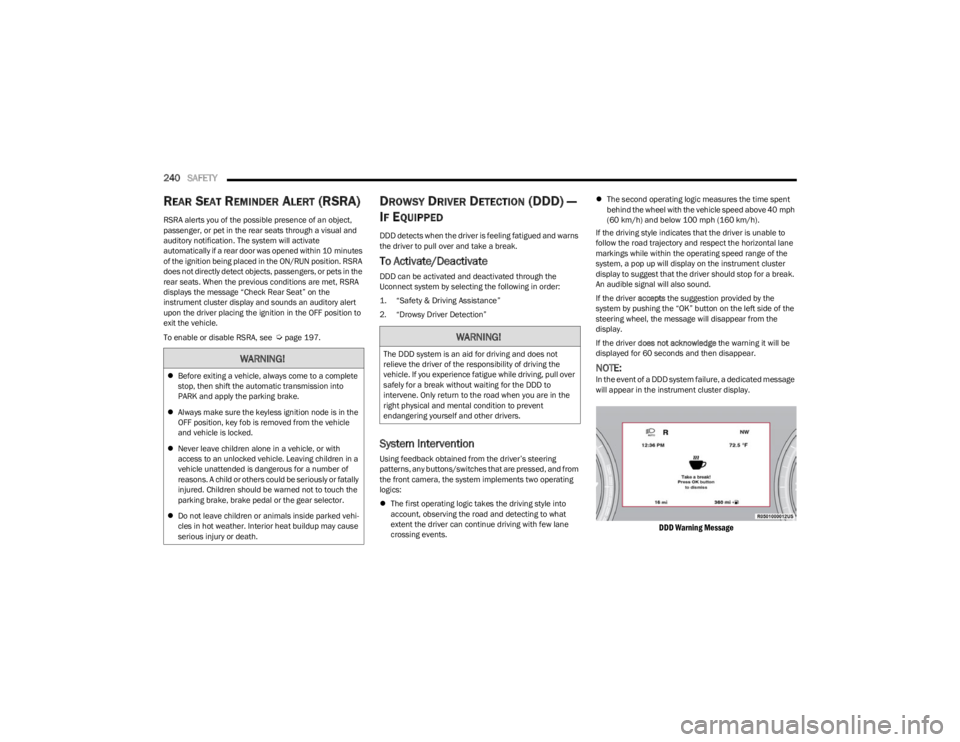
If the driver accepts the suggestion provided by the
system by pushing the “OK” button on the left side of the
steering wheel, the message will disappear from the
display.
If the driver does not acknowledge the warning it will be
displayed for 60 seconds and then disappear.
NOTE:In the event of a DDD system failure, a dedicated message
will appear in the instrument cluster display.
DDD Warning Message
WARNING!
Before exiting a vehicle, always come to a complete
stop, then shift the automatic transmission into
PARK and apply the parking brake.
Always make sure the keyless ignition node is in the
OFF position, key fob is removed from the vehicle
and vehicle is locked.
Never leave children alone in a vehicle, or with
access to an unlocked vehicle. Leaving children in a
vehicle unattended is dangerous for a number of
reasons. A child or others could be seriously or fatally
injured. Children should be warned not to touch the
parking brake, brake pedal or the gear selector.
Do not leave children or animals inside parked vehi -
cles in hot weather. Interior heat buildup may cause
serious injury or death.
WARNING!
The DDD system is an aid for driving and does not
relieve the driver of the responsibility of driving the
vehicle. If you experience fatigue while driving, pull over
safely for a break without waiting for the DDD to
intervene. Only return to the road when you are in the
right physical and mental condition to prevent
endangering yourself and other drivers.
23_WS_OM_EN_USC_t.book Page 240
Page 243 of 396

SAFETY241
ELECTRONIC BRAKE CONTROL (EBC)
S
YSTEM
Your vehicle is equipped with an advanced EBC system.
This system includes the Anti-Lock Brake System (ABS),
Brake Assist System (BAS), Electronic Brake Force
Distribution (EBD), Electronic Stability Control (ESC),
Electronic Roll Mitigation (ERM), Hill Start Assist (HSA),
Intersection Collision Assist (ICA), and Traction Control
System (TCS). These systems work together to enhance
both vehicle stability and control in various driving
conditions.
Your vehicle may also be equipped with Dynamic Steering
Torque (DST), Rain Brake Support (RBS), Ready Alert
Braking (RAB), and Trailer Sway Control (TSC).
Brake Assist System (BAS)
The BAS is designed to optimize the vehicle’s braking
capability during emergency braking maneuvers. The
system detects an emergency braking situation by sensing
the rate and amount of brake application and then applies
optimum pressure to the brakes. This can help reduce
braking distances. The BAS complements the Anti-Lock
Brake System (ABS). Applying the brakes very quickly
results in the best BAS assistance. To receive the benefit
of the system, you must apply continuous braking
pressure during the stopping sequence (do not “pump”
the brakes). Do not reduce brake pedal pressure unless
braking is no longer desired. Once the brake pedal is
released, the BAS is deactivated.
Brake System Warning Light
The red Brake System Warning Light will turn on when the
ignition is placed in the ON/RUN mode and may stay on for
as long as four seconds.
If the Brake System Warning Light remains on or comes on
while driving, it indicates that the brake system is not
functioning properly and that immediate service is
required. If the Brake System Warning Light does not
come on when the ignition is placed in the ON/RUN mode,
have the light repaired as soon as possible.
Electronic Brake Force Distribution (EBD)
EBD manages the distribution of the braking torque
between the front and rear axles by limiting braking
pressure to the rear axle. This is done to prevent
overslip of the rear wheels to avoid vehicle instability, and
to prevent the rear axle from entering ABS before the
front axle.
Electronic Roll Mitigation (ERM)
ERM anticipates the potential for wheel lift by monitoring
the driver’s steering wheel input and the speed of the
vehicle. When ERM determines that the rate of change of
the steering wheel angle and vehicle’s speed are
sufficient to potentially cause wheel lift, it then applies the
appropriate brake and may also reduce engine power to
lessen the chance that wheel lift will occur. ERM can only
reduce the chance of wheel lift occurring during severe or
evasive driving maneuvers; it cannot prevent wheel lift
due to other factors, such as road conditions, leaving the
roadway, or striking objects or other vehicles.
NOTE:
ERM is disabled any time the ESC is in “Full Off” mode (if
equipped). See
Úpage 242 for a complete explanation of
the available ESC modes.
WARNING!
The Brake Assist System (BAS) cannot prevent the
natural laws of physics from acting on the vehicle, nor
can it increase the traction afforded by prevailing road
conditions. BAS cannot prevent collisions, including
those resulting from excessive speed in turns, driving
on very slippery surfaces, or hydroplaning. The
capabilities of a BAS-equipped vehicle must never be
exploited in a reckless or dangerous manner, which
could jeopardize the user's safety or the safety of
others.
WARNING!
Many factors, such as vehicle loading, road conditions
and driving conditions, influence the chance that wheel
lift or rollover may occur. ERM cannot prevent all wheel
lift or rollovers, especially those that involve leaving the
roadway or striking objects or other vehicles. The
capabilities of an ERM-equipped vehicle must never be
exploited in a reckless or dangerous manner which
could jeopardize the user's safety or the safety of
others.
6
23_WS_OM_EN_USC_t.book Page 241
Page 244 of 396

242SAFETY
Electronic Stability Control (ESC)
ESC enhances directional control and stability of the
vehicle under various driving conditions. ESC corrects for
oversteering or understeering of the vehicle by applying
the brake of the appropriate wheel(s) to assist in
counteracting these conditions. Engine power may also be
reduced to help the vehicle maintain the desired path.
Oversteer — when the vehicle is turning more than
appropriate for the steering wheel position.
Understeer — when the vehicle is turning less than
appropriate for the steering wheel position.
ESC uses sensors in the vehicle to determine the vehicle
path intended by the driver and compares it to the actual
path of the vehicle. When the actual path does not match
the intended path, ESC applies the brake of the
appropriate wheel to assist in counteracting the oversteer
or understeer condition.
The ESC Activation/Malfunction Indicator Light located in
the instrument cluster will start to flash as soon as the ESC
system becomes active. The ESC Activation/Malfunction
Indicator Light also flashes when the Traction Control
System (TCS) is active. If the ESC Activation/Malfunction
Indicator Light begins to flash during acceleration, ease up
on the accelerator and apply as little throttle as possible.
Be sure to adapt your speed and driving to the prevailing
road conditions.
ESC Operating Modes
Depending upon model and mode of operation, the ESC
system may have multiple operating modes.
ESC On
This is the normal operating mode for the ESC. Whenever
the vehicle is started, the ESC system will be in this mode.
This mode should be used for most driving conditions.
Alternate ESC modes should only be used for specific
reasons as noted in the following paragraphs.
Partial Off
This mode may be useful if the vehicle becomes stuck.
This mode may modify TCS and ESC thresholds for
activation, which allows for more wheel spin than normally
allowed.
To enter the “Partial Off” mode, momentarily push the ESC
OFF button and the ESC OFF Indicator Light will illuminate.
To turn the ESC on again, momentarily push the ESC OFF
button and the ESC OFF Indicator Light will turn off.
NOTE:For vehicles with multiple partial ESC modes, the push and
release of the button will toggle the ESC modes. Multiple
attempts may be required to return to "ESC On" mode.
WARNING!
Electronic Stability Control (ESC) cannot prevent the
natural laws of physics from acting on the vehicle,
nor can it increase the traction afforded by prevailing
road conditions. ESC cannot prevent accidents,
including those resulting from excessive speed in
turns, driving on very slippery surfaces, or hydro -
planing. ESC also cannot prevent accidents resulting
from loss of vehicle control due to inappropriate
driver input for the conditions. Only a safe, attentive,
and skillful driver can prevent accidents. The capabil -
ities of an ESC equipped vehicle must never be
exploited in a reckless or dangerous manner which
could jeopardize the user’s safety or the safety of
others.
Vehicle modifications, or failure to properly maintain
your vehicle, may change the handling characteris -
tics of your vehicle, and may negatively affect the
performance of the ESC system. Changes to the
steering system, suspension, braking system, tire
type and size or wheel size may adversely affect ESC
performance. Improperly inflated and unevenly worn
tires may also degrade ESC performance. Any vehicle
modification or poor vehicle maintenance that
reduces the effectiveness of the ESC system can
increase the risk of loss of vehicle control, vehicle
rollover, personal injury and death.
23_WS_OM_EN_USC_t.book Page 242
Page 248 of 396

246SAFETY
The set speed for SSC is selectable by the driver, and can
be adjusted by using the gear shift +/-. Additionally, the
SSC set speed may be reduced when climbing a grade and
the level of set speed reduction depends on the
magnitude of grade. The following summarizes the SSC
set speeds:
SSC Target Set Speeds
1st = .6 mph (1 km/h)
2nd = 1.2 mph (2 km/h)
3rd = 1.8 mph (3 km/h)
4th = 2.5 mph (4 km/h)
5th = 3.1 mph (5 km/h)
6th = 3.7 mph (6 km/h)
7th = 4.3 mph (7 km/h)
8th = 5 mph (8 km/h)
9th = 5.6 mph (9 km/h) – If Equipped
REVERSE = .6 mph (1 km/h)
NEUTRAL = 1.2 mph (2 km/h)
PARK = SSC remains enabled but not active
NOTE:
During SSC the +/- shifter input is used for SSC target
speed selection but will not affect the gear chosen by
the transmission. While actively controlling SSC the
transmission will shift appropriately for the
driver-selected set speed and corresponding driving
conditions.
SSC performance is influenced by the Select-Terrain
mode. This difference may be notable to the driver and
may be perceived as a varying level of aggressiveness. Driver Override:
The driver may override SSC activation with throttle or
brake application at any time.
Deactivating SSC
SSC will be deactivated but remain available if any of the
following conditions occur:
Driver overrides SSC set speed with throttle or brake
application
Vehicle speed exceeds 20 mph (32 km/h) but remains
below 40 mph (64 km/h)
Vehicle is shifted to PARK
Disabling SSC
SSC will deactivate and be disabled if any of the following
conditions occur:
The driver pushes the SSC switch.
The driveline is shifted out of 4WD Low.
The parking brake is applied.
The driver door opens.
The vehicle is driven greater than 20 mph (32 km/h)
for greater than 70 seconds.
The vehicle is driven greater than 40 mph (64 km/h)
(SSC exits immediately).
Feedback To The Driver:
The instrument cluster has an SSC icon and the SSC
switch has an LED which offers feedback to the driver
about the state SSC is in.
The cluster icon and switch light will illuminate and
remain on solid when SSC is enabled or activated. This
is the normal operating condition for SSC.
The cluster icon and switch light will flash for several
seconds then extinguish when the driver pushes the
SSC switch but enable conditions are not met.
The cluster icon and switch light will flash for several
seconds then extinguish when SSC disables due to
excess speed.
The cluster icon and switch light will flash then extin -
guish when SSC deactivates due to overheated brakes.
Traction Control System (TCS)
The TCS monitors the amount of wheel spin of each of the
driven wheels. If wheel spin is detected, the TCS may apply
brake pressure to the spinning wheel(s) and/or reduce
engine power to provide enhanced acceleration and
stability. A feature of the TCS, Brake Limited Differential
(BLD) functions similarly to a limited slip differential and
controls the wheel spin across a driven axle. If one wheel
on a driven axle is spinning faster than the other, the
system will apply the brake of the spinning wheel. This will
allow more engine power to be applied to the wheel that is
not spinning. BLD may remain enabled even if the TCS and
Electronic Stability Control (ESC) are in reduced modes.
WARNING!
SSC is only intended to assist the driver in controlling
vehicle speed when driving in off-road conditions. The
driver must remain attentive to the driving conditions
and is responsible for maintaining a safe vehicle speed.
23_WS_OM_EN_USC_t.book Page 246
Page 249 of 396
SAFETY247
Trailer Sway Control (TSC)
TSC uses sensors in the vehicle to recognize an
excessively swaying trailer and will take the appropriate
actions to attempt to stop the sway. TSC will become
active automatically once an excessively swaying trailer is
recognized.
NOTE:TSC cannot stop all trailers from swaying. Always use
caution when towing a trailer and follow the trailer tongue
weight recommendations
Úpage 178.
When TSC is functioning, the ESC Activation/Malfunction
Indicator Light will flash, the engine power may be reduced
and you may feel the brakes being applied to individual
wheels to attempt to stop the trailer from swaying. TSC is
disabled when the ESC system is in the “Partial Off” mode.
AUXILIARY DRIVING SYSTEMS
BLIND SPOT MONITORING (BSM)
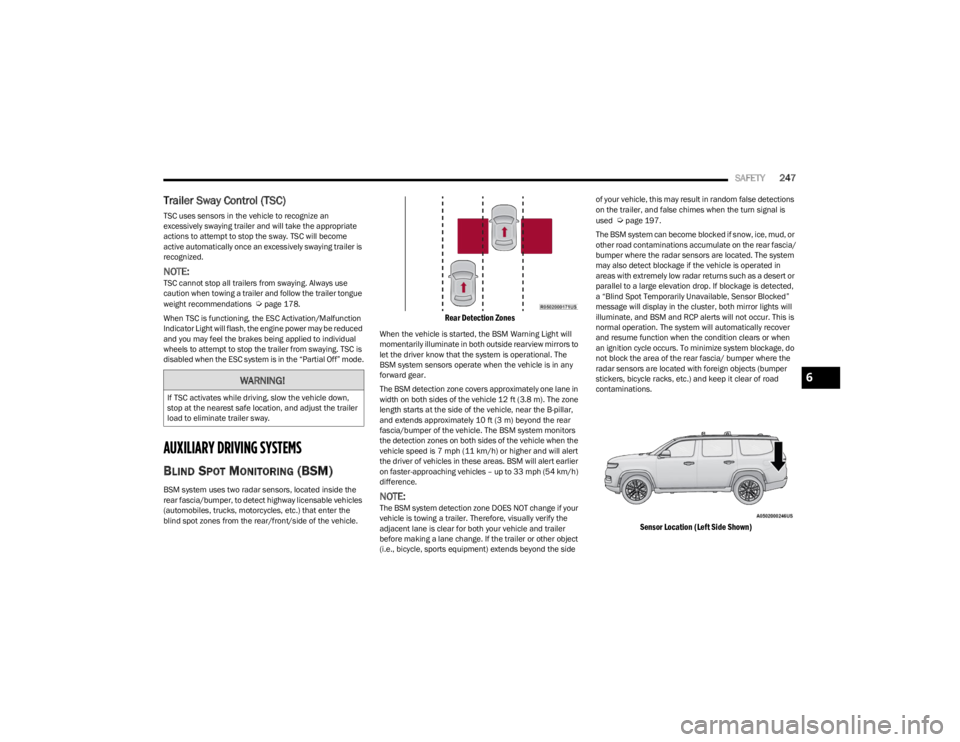
BSM system uses two radar sensors, located inside the
rear fascia/bumper, to detect highway licensable vehicles
(automobiles, trucks, motorcycles, etc.) that enter the
blind spot zones from the rear/front/side of the vehicle.
Rear Detection Zones
When the vehicle is started, the BSM Warning Light will
momentarily illuminate in both outside rearview mirrors to
let the driver know that the system is operational. The
BSM system sensors operate when the vehicle is in any
forward gear.
The BSM detection zone covers approximately one lane in
width on both sides of the vehicle 12 ft (3.8 m). The zone
length starts at the side of the vehicle, near the B-pillar,
and extends approximately 10 ft (3 m) beyond the rear
fascia/bumper of the vehicle. The BSM system monitors
the detection zones on both sides of the vehicle when the
vehicle speed is 7 mph (11 km/h) or higher and will alert
the driver of vehicles in these areas. BSM will alert earlier
on faster-approaching vehicles – up to 33 mph (54 km/h)
difference.
NOTE:The BSM system detection zone DOES NOT change if your
vehicle is towing a trailer. Therefore, visually verify the
adjacent lane is clear for both your vehicle and trailer
before making a lane change. If the trailer or other object
(i.e., bicycle, sports equipment) extends beyond the side of your vehicle, this may result in random false detections
on the trailer, and false chimes when the turn signal is
used
Úpage 197.
The BSM system can become blocked if snow, ice, mud, or
other road contaminations accumulate on the rear fascia/
bumper where the radar sensors are located. The system
may also detect blockage if the vehicle is operated in
areas with extremely low radar returns such as a desert or
parallel to a large elevation drop. If blockage is detected,
a “Blind Spot Temporarily Unavailable, Sensor Blocked”
message will display in the cluster, both mirror lights will
illuminate, and BSM and RCP alerts will not occur. This is
normal operation. The system will automatically recover
and resume function when the condition clears or when
an ignition cycle occurs. To minimize system blockage, do
not block the area of the rear fascia/ bumper where the
radar sensors are located with foreign objects (bumper
stickers, bicycle racks, etc.) and keep it clear of road
contaminations.
Sensor Location (Left Side Shown)
WARNING!
If TSC activates while driving, slow the vehicle down,
stop at the nearest safe location, and adjust the trailer
load to eliminate trailer sway.
6
23_WS_OM_EN_USC_t.book Page 247
Page 255 of 396

SAFETY253
(Continued)
For information on how to properly inflate the vehicle’s
tires, see
Úpage 349.
The TPMS will warn the driver of a low tire pressure if the
tire pressure falls below the low pressure warning
threshold for any reason, including low temperature
effects, or natural pressure loss through the tire.
The TPMS will continue to warn the driver of low tire
pressure as long as the condition exists, and will not turn
off until the tire pressure is at or above recommended cold
tire pressure. Once the low tire pressure warning has been
illuminated, the tire pressure must be increased to the
recommended cold tire pressure in order for the TPMS
Warning Light to be turned off.
NOTE:When filling warm tires, the tire pressure may need to be
increased up to an additional 4 psi (28 kPa) above the
recommended cold placard pressure in order to turn the
TPMS Warning Light off.
The system will automatically update and the TPMS
Warning Light will extinguish once the updated tire
pressures have been received. The vehicle may need to be
driven for up to 20 minutes above 15 mph (24 km/h) to
receive this information. For example, your vehicle has a recommended cold
(parked for more than three hours) tire pressure of 33 psi
(227 kPa). If the ambient temperature is 68°F (20°C) and
the measured tire pressure is 28 psi (193 kPa), a
temperature drop to 20°F (-7°C) will decrease the tire
pressure to approximately 24 psi (165 kPa). This tire
pressure is sufficiently low enough to turn on the TPMS
Warning Light. Driving the vehicle may cause the tire
pressure to rise to approximately 28 psi (193 kPa), but the
TPMS Warning Light will still be on. In this situation, the
TPMS Warning Light will turn off only after the tires have
been inflated to the vehicle’s recommended cold tire
pressure value.NOTE:
The TPMS is not intended to replace normal tire care
and maintenance, or to provide warning of a tire failure
or condition.
The TPMS should not be used as a tire pressure gauge
while adjusting your tire pressure.
Driving on a significantly underinflated tire causes the
tire to overheat and can lead to tire failure. Underinfla -
tion also reduces fuel efficiency and tire tread life, and
may affect the vehicle’s handling and stopping ability.
The TPMS is not a substitute for proper tire mainte -
nance, and it is the driver’s responsibility to maintain
correct tire pressure using an accurate tire gauge, even
if underinflation has not reached the level to trigger illu -
mination of the TPMS Warning Light.
Seasonal temperature changes will affect tire pres -
sure, and the TPMS will monitor the actual tire pres -
sure in the tire.
CAUTION!
The TPMS has been optimized for the original equip -
ment tires and wheels. TPMS pressures and warn -
ings have been established for the tire size equipped
on your vehicle. Undesirable system operation or
sensor damage may result when using replacement
equipment that is not of the same size, type, and/or
style. The TPMS sensor is not designed for use on
aftermarket wheels and may contribute to a poor
overall system performance or sensor damage.
Customers are encouraged to use Original Equip -
ment Manufacturer (OEM) wheels to ensure proper
TPMS feature operation.
Using aftermarket tire sealants may cause the Tire
Pressure Monitoring System (TPMS) sensor to
become inoperable. After using an aftermarket tire
sealant it is recommended that you take your vehicle
to an authorized dealership to have your sensor func -
tion checked.
After inspecting or adjusting the tire pressure, always
reinstall the valve stem cap. This will prevent mois -
ture and dirt from entering the valve stem, which
could damage the Tire Pressure Monitoring System
sensor.
CAUTION!
6
23_WS_OM_EN_USC_t.book Page 253
Page 256 of 396
254SAFETY
The Tire Pressure Monitoring System (TPMS) uses wireless
technology with wheel rim-mounted electronic sensors to
monitor tire pressure levels. Sensors, mounted to each
wheel as part of the valve stem, transmit tire pressure
readings to the receiver module.
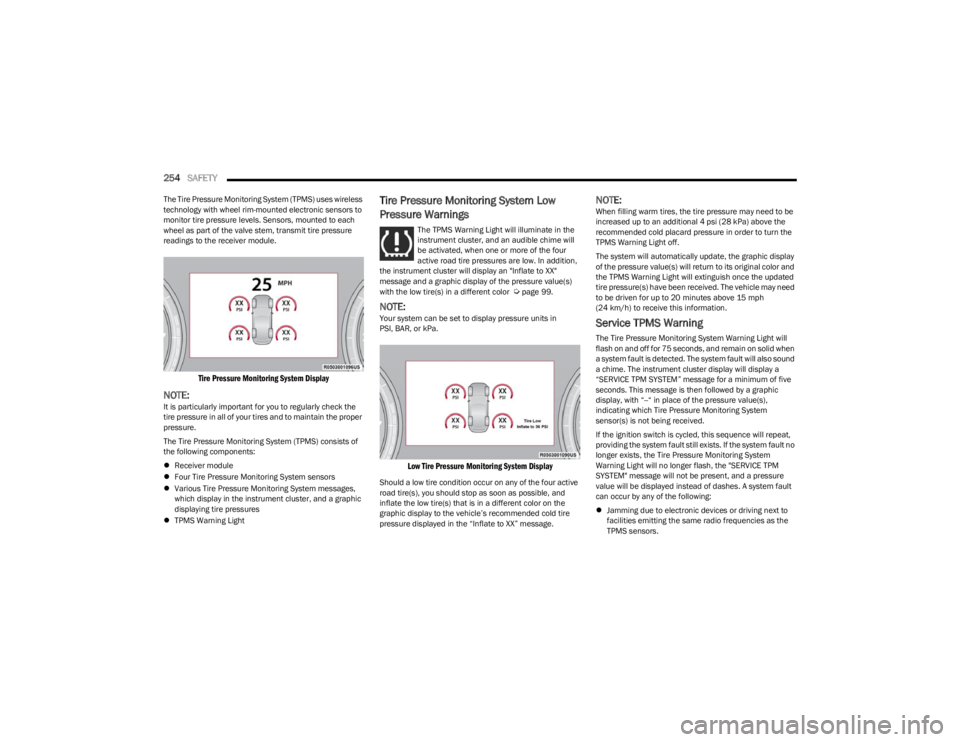
Tire Pressure Monitoring System Display
NOTE:It is particularly important for you to regularly check the
tire pressure in all of your tires and to maintain the proper
pressure.
The Tire Pressure Monitoring System (TPMS) consists of
the following components:
Receiver module
Four Tire Pressure Monitoring System sensors
Various Tire Pressure Monitoring System messages,
which display in the instrument cluster, and a graphic
displaying tire pressures
TPMS Warning Light
Tire Pressure Monitoring System Low
Pressure Warnings
The TPMS Warning Light will illuminate in the
instrument cluster, and an audible chime will
be activated, when one or more of the four
active road tire pressures are low. In addition,
the instrument cluster will display an "Inflate to XX"
message and a graphic display of the pressure value(s)
with the low tire(s) in a different color
Úpage 99.
NOTE:Your system can be set to display pressure units in
PSI, BAR, or kPa.
Low Tire Pressure Monitoring System Display
Should a low tire condition occur on any of the four active
road tire(s), you should stop as soon as possible, and
inflate the low tire(s) that is in a different color on the
graphic display to the vehicle’s recommended cold tire
pressure displayed in the “Inflate to XX” message.
NOTE:When filling warm tires, the tire pressure may need to be
increased up to an additional 4 psi (28 kPa) above the
recommended cold placard pressure in order to turn the
TPMS Warning Light off.
The system will automatically update, the graphic display
of the pressure value(s) will return to its original color and
the TPMS Warning Light will extinguish once the updated
tire pressure(s) have been received. The vehicle may need
to be driven for up to 20 minutes above 15 mph (24 km/h) to receive this information.
Service TPMS Warning
The Tire Pressure Monitoring System Warning Light will
flash on and off for 75 seconds, and remain on solid when
a system fault is detected. The system fault will also sound
a chime. The instrument cluster display will display a
“SERVICE TPM SYSTEM” message for a minimum of five
seconds. This message is then followed by a graphic
display, with “--“ in place of the pressure value(s),
indicating which Tire Pressure Monitoring System
sensor(s) is not being received.
If the ignition switch is cycled, this sequence will repeat,
providing the system fault still exists. If the system fault no
longer exists, the Tire Pressure Monitoring System
Warning Light will no longer flash, the "SERVICE TPM
SYSTEM" message will not be present, and a pressure
value will be displayed instead of dashes. A system fault
can occur by any of the following:
Jamming due to electronic devices or driving next to
facilities emitting the same radio frequencies as the
TPMS sensors.
23_WS_OM_EN_USC_t.book Page 254