maintenance JEEP WRANGLER 2023 User Guide
[x] Cancel search | Manufacturer: JEEP, Model Year: 2023, Model line: WRANGLER, Model: JEEP WRANGLER 2023Pages: 396, PDF Size: 25.15 MB
Page 159 of 396
STARTING AND OPERATING157
flash in the instrument cluster display and a chime will
sound while ACC continues to apply its maximum braking
capacity.
NOTE:The “BRAKE!” screen in the instrument cluster display is a
warning for the driver to take action and does not neces -
sarily mean that the Forward Collision Warning system is
applying the brakes autonomously.
Overtake Aid
When driving with ACC engaged and following a vehicle,
the system will provide an additional acceleration up to
the ACC set speed to assist in passing the vehicle. This
additional acceleration is triggered when the driver utilizes
the left turn signal and will only be active when passing on
the left hand side.
ACC Operation At A Stop (Automatic
Transmission Only)
In the event that the ACC system brings your vehicle to a
standstill while following a target vehicle, your vehicle will
resume motion without the need for any driver action if the
target vehicle starts moving within two seconds of your
vehicle coming to a standstill.
If the target vehicle does not start moving within two
seconds of your vehicle coming to a standstill, the ACC
with Stop system will cancel and the brakes will release. A
cancel message will display on the instrument cluster
display and produce a warning chime. Driver intervention
will be required at this moment.
While ACC with Stop is holding your vehicle at a standstill,
if the driver seatbelt is unbuckled or the driver door is
opened, the ACC with Stop system will cancel and the brakes will release. A cancel message will display on the
instrument cluster display and produce a warning chime.
Driver intervention will be required at this moment.
Display Warnings And Maintenance
“WIPE FRONT RADAR SENSOR IN FRONT OF
VEHICLE” WARNING
The “ACC/FCW Unavailable Wipe Front Radar Sensor”
warning will display and a chime will sound when
conditions temporarily limit system performance.
This most often occurs at times of poor visibility, such as
in snow or heavy rain. The ACC system may also become
temporarily blinded due to obstructions, such as mud, dirt
or ice. In these cases, the instrument cluster display will
display “ACC/FCW Unavailable Wipe Front Radar Sensor”
and the system will deactivate.
The “ACC/FCW Unavailable Wipe Front Radar Sensor”
message can sometimes be displayed while driving in
highly reflective areas (i.e. tunnels with reflective tiles, or
ice and snow). The ACC system will recover after the
vehicle has left these areas. Under rare conditions, when
the radar is not tracking any vehicles or objects in its path
this warning may temporarily occur.
NOTE:If the “ACC/FCW Unavailable Wipe Front Radar Sensor”
warning is active, Fixed Speed Cruise Control is still
available.
If weather conditions are not a factor, the driver should
examine the sensor. It may require cleaning or removal of
an obstruction. The sensor is located in the center of the
vehicle behind the lower grille.
To keep the ACC system operating properly, it is important
to note the following maintenance items:
Always keep the sensor clean. Carefully wipe the
sensor lens with a soft cloth. Be cautious not to
damage the sensor lens.
Do not remove any screws from the sensor. Doing so
could cause an ACC system malfunction or failure and
require a sensor realignment.
If the sensor or front end of the vehicle is damaged due
to a collision, see an authorized dealer for service.
Do not attach or install any accessories near the
sensor, including transparent material or aftermarket
grilles. Doing so could cause an ACC system failure or
malfunction.
When the condition that deactivated the system is no
longer present, the system will return to the “Adaptive
Cruise Control Off” state and will resume function by
simply reactivating it.
NOTE:If the “ACC/FCW Unavailable Wipe Front Radar Sensor”
message occurs frequently (e.g. more than once on every
trip) without any snow, rain, mud, or other obstruction,
have the radar sensor realigned at an authorized dealer.
WARNING!
When the ACC system is resumed, the driver must
ensure that there are no pedestrians, vehicles or
objects in the path of the vehicle. Failure to follow these
warnings can result in a collision and death or serious
personal injury.
4
23_JL_OM_EN_USC_t.book Page 157
Page 169 of 396
STARTING AND OPERATING167
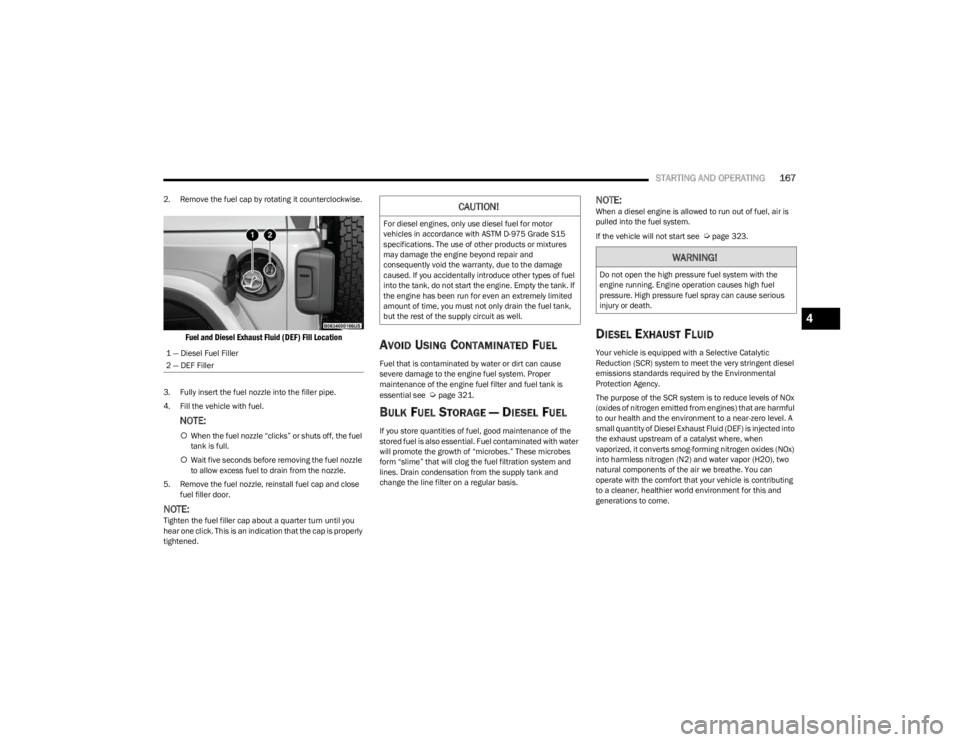
2. Remove the fuel cap by rotating it counterclockwise.
Fuel and Diesel Exhaust Fluid (DEF) Fill Location
3. Fully insert the fuel nozzle into the filler pipe.
4. Fill the vehicle with fuel.
NOTE:
When the fuel nozzle “clicks” or shuts off, the fuel
tank is full.
Wait five seconds before removing the fuel nozzle
to allow excess fuel to drain from the nozzle.
5. Remove the fuel nozzle, reinstall fuel cap and close fuel filler door.
NOTE:Tighten the fuel filler cap about a quarter turn until you
hear one click. This is an indication that the cap is properly
tightened.
AVOID USING CONTAMINATED FUEL
Fuel that is contaminated by water or dirt can cause
severe damage to the engine fuel system. Proper
maintenance of the engine fuel filter and fuel tank is
essential see
Úpage 321.
BULK FUEL STORAGE — DIESEL FUEL
If you store quantities of fuel, good maintenance of the
stored fuel is also essential. Fuel contaminated with water
will promote the growth of “microbes.” These microbes
form “slime” that will clog the fuel filtration system and
lines. Drain condensation from the supply tank and
change the line filter on a regular basis.
NOTE:When a diesel engine is allowed to run out of fuel, air is
pulled into the fuel system.
If the vehicle will not start see
Úpage 323.
DIESEL EXHAUST FLUID
Your vehicle is equipped with a Selective Catalytic
Reduction (SCR) system to meet the very stringent diesel
emissions standards required by the Environmental
Protection Agency.
The purpose of the SCR system is to reduce levels of NOx
(oxides of nitrogen emitted from engines) that are harmful
to our health and the environment to a near-zero level. A
small quantity of Diesel Exhaust Fluid (DEF) is injected into
the exhaust upstream of a catalyst where, when
vaporized, it converts smog-forming nitrogen oxides (NOx)
into harmless nitrogen (N2) and water vapor (H2O), two
natural components of the air we breathe. You can
operate with the comfort that your vehicle is contributing
to a cleaner, healthier world environment for this and
generations to come.
1 — Diesel Fuel Filler
2 — DEF Filler
CAUTION!
For diesel engines, only use diesel fuel for motor
vehicles in accordance with ASTM D-975 Grade S15
specifications. The use of other products or mixtures
may damage the engine beyond repair and
consequently void the warranty, due to the damage
caused. If you accidentally introduce other types of fuel
into the tank, do not start the engine. Empty the tank. If
the engine has been run for even an extremely limited
amount of time, you must not only drain the fuel tank,
but the rest of the supply circuit as well.
WARNING!
Do not open the high pressure fuel system with the
engine running. Engine operation causes high fuel
pressure. High pressure fuel spray can cause serious
injury or death.
4
23_JL_OM_EN_USC_t.book Page 167
Page 202 of 396
200MULTIMEDIA
DRAG & DROP MENU BAR
The Uconnect features and services in the main menu bar
are easily customized for your preference. Simply follow
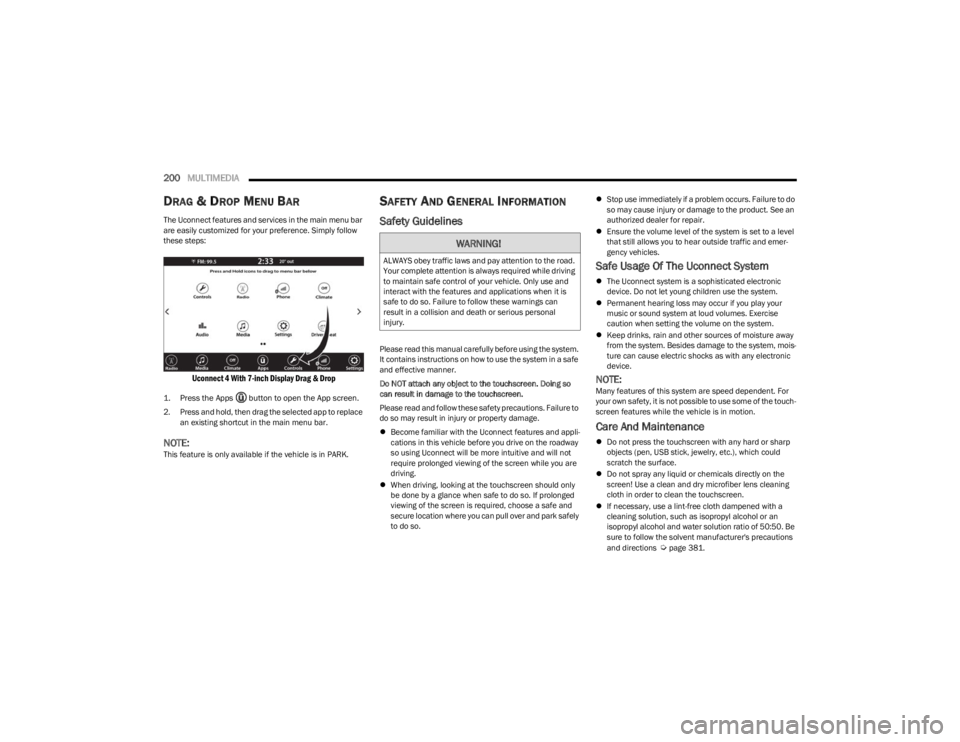
these steps:
Uconnect 4 With 7-inch Display Drag & Drop
1. Press the Apps button to open the App screen.
2. Press and hold, then drag the selected app to replace
an existing shortcut in the main menu bar.
NOTE:This feature is only available if the vehicle is in PARK.
SAFETY AND GENERAL INFORMATION
Safety Guidelines
Please read this manual carefully before using the system.
It contains instructions on how to use the system in a safe
and effective manner.
Do NOT attach any object to the touchscreen. Doing so
can result in damage to the touchscreen.
Please read and follow these safety precautions. Failure to
do so may result in injury or property damage.
Become familiar with the Uconnect features and appli -
cations in this vehicle before you drive on the roadway
so using Uconnect will be more intuitive and will not
require prolonged viewing of the screen while you are
driving.
When driving, looking at the touchscreen should only
be done by a glance when safe to do so. If prolonged
viewing of the screen is required, choose a safe and
secure location where you can pull over and park safely
to do so.
Stop use immediately if a problem occurs. Failure to do
so may cause injury or damage to the product. See an
authorized dealer for repair.
Ensure the volume level of the system is set to a level
that still allows you to hear outside traffic and emer -
gency vehicles.
Safe Usage Of The Uconnect System
The Uconnect system is a sophisticated electronic
device. Do not let young children use the system.
Permanent hearing loss may occur if you play your
music or sound system at loud volumes. Exercise
caution when setting the volume on the system.
Keep drinks, rain and other sources of moisture away
from the system. Besides damage to the system, mois -
ture can cause electric shocks as with any electronic
device.
NOTE:Many features of this system are speed dependent. For
your own safety, it is not possible to use some of the touch -
screen features while the vehicle is in motion.
Care And Maintenance
Do not press the touchscreen with any hard or sharp
objects (pen, USB stick, jewelry, etc.), which could
scratch the surface.
Do not spray any liquid or chemicals directly on the
screen! Use a clean and dry microfiber lens cleaning
cloth in order to clean the touchscreen.
If necessary, use a lint-free cloth dampened with a
cleaning solution, such as isopropyl alcohol or an
isopropyl alcohol and water solution ratio of 50:50. Be
sure to follow the solvent manufacturer's precautions
and directions
Úpage 381.
WARNING!
ALWAYS obey traffic laws and pay attention to the road.
Your complete attention is always required while driving
to maintain safe control of your vehicle. Only use and
interact with the features and applications when it is
safe to do so. Failure to follow these warnings can
result in a collision and death or serious personal
injury.
23_JL_OM_EN_USC_t.book Page 200
Page 232 of 396

230MULTIMEDIA
Automatic SOS — If Equipped
Automatic SOS is a hands-free safety service that can
immediately connect you with help in the event that your
vehicle’s airbags deploy. After an accident, a live agent will
contact you through the Uconnect system and alert
emergency services.
NOTE:An active SiriusXM Guardian™ subscription is required for
this feature to function.
After a crash where the airbags deploy:
1. Automatic SOS will initiate a call with an agent.
2. An agent will receive the call and confirm the location
of the emergency.
3. If needed, the agent will request the assistance of emergency services.
4. First responders will arrive on scene. The agent will remain on the call until emergency services arrive.
NOTE:
Agents are available 24/7 to assist you in the case of
an emergency.
On your behalf, agents are able to notify family
members about the collision.
Agents can brief first responders of the situation before
they arrive on scene.
In the event vehicle occupants are unable to speak,
emergency services will be dispatched based on the
last known GPS coordinates.
SiriusXM Guardian™ connected services are depen -
dent upon an operative telematics device, a cellular
connection, navigation map data, and GPS satellite
reception, which can limit the ability to reach the
response center or reach emergency support.
Terms of service of the Uconnect and the SiriusXM
Guardian™ subscriber agreement apply. See terms of
services for complete service limitation.
Remote Commands
On the Remote Commands screen, you have access to
several vehicle features that can be controlled remotely
from your mobile device. These features include locking/
unlocking, remote starting, and activating the horn and
lights of the vehicle. Remote Commands lets you send a request to your
vehicle in one of three ways:
Anywhere using your mobile device and Vehicle
Branded App
From your computer on the Owner’s Site (not available
on all functions)
Contacting SiriusXM Guardian™ Customer Care (not
available on all functions)
Using A Remote Command Through Your Mobile Device
And The Vehicle Branded App
1. Press the desired Remote Command icon on your mobile device.
2. A pop-up screen will appear asking for your SiriusXM Guardian™ Security PIN (this is the same four-digit
code established when you activated your SiriusXM
Guardian™ connected services). Enter the SiriusXM
Guardian™ Security PIN on the keypad.
3. It may take 30 seconds or more for the command to go through to your vehicle.
4. A message will let you know if the command was received by your vehicle.
If anyone in the vehicle could be in danger (e.g., fire
or smoke is visible, dangerous road conditions or
location), do not wait for voice contact from a
SiriusXM Guardian™ Customer Care agent. All occu -
pants should exit the vehicle immediately and move
to a safe location.
Failure to perform scheduled maintenance and
regular inspection of your vehicle may result in
vehicle damage, accident or injury.
WARNING!
Lock Press this button to lock
your vehicle.
Vehicle Start Press this button to start
your vehicle.
Horn & Lights Press this button to sound
the horn and activate your
lights.
Unlock
Press this button to unlock
your vehicle.
Cancel Vehicle Start Press this button to cancel
remote start.
23_JL_OM_EN_USC_t.book Page 230
Page 236 of 396

234MULTIMEDIA
Create A 4G Wi-Fi Hotspot For Use In Your Vehicle
How It Works
The 4G Wi-Fi Hotspot feature provides the
vehicle passengers with an internet access
hotspot in the vehicle, using the radio as an
access point. The hotspot will allow
Wi-Fi-enabled in-vehicle devices (such as a laptop or any
other portable-enabled media device) to wirelessly
connect to the internet. Uconnect offers a complimentary
3-month trial period that includes 1GB of total data. The
trial can be activated any time within the first year of new
vehicle ownership.
Use one of these three ways to purchase a subscription to
the 4G Wi-Fi Hotspot:
1. From your vehicle’s touchscreen, select the 4G Wi-Fi Hotspot App, and press the How To Purchase button
and follow the instructions.
2. Log onto your Owner’s Site and click the link to the AT&T portal to get set up.
3. For existing Connected Car customers: Push the
ASSIST button to be routed to an AT&T Customer Care
agent who will assist you.
Once the 4G Wi-Fi Hotspot is purchased, you can change
its name and the password by selecting the Wi-Fi Hotspot
App and pressing the Setup Wi-Fi Hotspot button. You can
also view the connected devices from the app screen by
pressing the View Connected Devices button.
NOTE:A SiriusXM Guardian™ subscription is not required in order
to purchase and use 4G Wi-Fi Hotspot. For more infor -
mation on setting up a Wi-Fi connection, visit https://
myvehicle.att.com.
Stolen Vehicle Assistance — If Equipped
Description
If your vehicle is stolen, the SiriusXM Guardian™ Customer
Care agent may be able to locate the stolen vehicle and
work with law enforcement to help recover it.
How It Works
1. If your vehicle is stolen, contact local law enforcement as soon as possible. They will work
with you to file a stolen vehicle report.
2. Next, inform SiriusXM Guardian™ Customer Care that your vehicle has been stolen.
The SiriusXM Guardian™ Customer Care Agent will
ask for the stolen vehicle report number (as issued by
your local law enforcement). If you have downloaded
the Vehicle Branded App, you can push the Settings
menu button on your device, select “Help”, and then
select “SiriusXM Guardian™ Customer Care” to make
the call. 3. SiriusXM Guardian™ Customer Care will authenticate
that you are the owner of the vehicle and contact the
law enforcement with whom you filed the stolen
vehicle report.
4. SiriusXM Guardian™ Customer Care will work with your local law enforcement to locate the vehicle. You
will be contacted by law enforcement if your vehicle is
recovered. While the investigation is ongoing, you
should also contact your insurance company to
inform it of the situation.
Requirements
Vehicle must be properly equipped with the Uconnect
system.
Vehicle must have an operable LTE (voice/data) or 4G
(data) network connection compatible with your device.
Vehicle must be registered with SiriusXM Guardian™
and have an active subscription that includes the appli -
cable feature.
NOTE:Not all features of SiriusXM Guardian™ are available
everywhere at all times, particularly in remote or enclosed
areas.
Monthly Vehicle Health Report —
If Equipped
Description
Monthly Vehicle Health Report is a Uconnect service
through which a summary of the performance of your
vehicle’s key systems will be sent to you every month so
you can stay on top of your vehicle’s maintenance needs.
This is provided as a convenience to you and does not
substitute for regular maintenance to your vehicle.
WARNING!
Always drive safely with your hands on the steering
wheel and obey all applicable laws. You have full
responsibility and assume all risks related to the use of
the features and applications in this vehicle. Only use
the features and applications in this vehicle when it is
safe to do so. Failure to comply may result in an
accident involving in serious injury or death.
23_JL_OM_EN_USC_t.book Page 234
Page 237 of 396

MULTIMEDIA235
In order to provide the Monthly Vehicle Health Report, the
Uconnect system in your vehicle may collect and transmit
vehicle data to SiriusXM Guardian™ and to FCA, such as
your vehicle’s health and performance, your vehicle’s
location, your utilization of the features in your vehicle,
and other data.
This data collection and transmission begins when you
enroll in SiriusXM Guardian™ and will continue even if you
cancel your SiriusXM Guardian™ subscription unless you
call SiriusXM Guardian™ Customer Care and tell them to
deactivate your Connected Services.
Please see the Uconnect Privacy Policy for more
information, located at www.driveuconnect.com/
connectedservices/privacy.html (US Residents) or
www.driveuconnect.ca (Canadian Residents).
For more information on SiriusXM Guardian™ private
policy, see https://siriusxmcvs.com/privacy-policy.
NOTE:Your vehicle must be enrolled in an active subscription
with Connected Services. If you have concerns about the
operation, function or performance of your vehicle, please
take it to an authorized dealer. This report does not
replace regularly scheduled maintenance. Check the
instrument cluster warning lights and cautions in your
vehicle for the most accurate vehicle health information.
Vehicle Health Alert —If Equipped
Description
Your vehicle will send you an email alert if it senses a
problem with one of your vehicle’s key systems. For further
information, go to your Owner’s website.
NOTE:Vehicle Health Alert emails require you to register and
activate services. During this process you will be asked to
provide an email address to which the reports will be sent.
In-Vehicle Notifications — If Equipped
Description
Your vehicle will send you notifications to remind you when
services are needed, or to alert you of other important
information, such as recall notices. When you receive a
notification through your touchscreen, press OK to dismiss
the message, or press Call Care to speak with a SiriusXM
Guardian™ Customer Care agent.
NOTE:Pressing “OK” or the X button on the pop-up screen will
dismiss or close the pop-up, and the In-Vehicle Messages
mailbox will display. In the Mailbox, you can reopen
messages or delete messages.
Amazon Alexa Skill — If Equipped
Enjoy the convenience of using your voice to command
your vehicle with Amazon Alexa!
With Amazon Alexa, you can connect to your vehicle and
remotely access key services and features.
If your vehicle is equipped with Uconnect Navigation, you
can send a destination directly to your vehicle using Alexa.
If you need assistance, you can always ask Alexa for help,
or complete a list of commands by saying: “Alexa, ask
“Alexa, ask
“Alexa, ask
with your Voice Code.”
“Alexa, ask
Drive, Auburn Hills, Michigan to my
“Alexa, ask
An active subscription to SiriusXM Guardian™ is required.
To use Amazon Alexa, first, register for SiriusXM
Guardian™
Úpage 226.
Next, link the Uconnect system on your vehicle to Amazon
Alexa:
1. Download the Amazon Alexa app on your mobile device (Apple® or Android™).
2. Once in the app, tap MENU and go to SKILLS.
3. Search for
4. Tap SAVE SETTINGS when prompted.
5. Link the vehicle brand name to the
6. Log in using your Owner Account credentials. This will be the same user name and password you used when
registering for SiriusXM Guardian™ connected
services. There will be additional settings to confirm
on the following screen.
7. AUTHORIZE the account to return to the
You can now begin using the
Alexa!
5
23_JL_OM_EN_USC_t.book Page 235
Page 248 of 396

246SAFETY
(Continued)
NOTE:ERM is disabled any time the ESC is in “Full Off” mode (if
equipped) Úpage 246.
Electronic Stability Control (ESC)
ESC enhances directional control and stability of the
vehicle under various driving conditions. ESC corrects for
oversteering or understeering of the vehicle by applying
the brake of the appropriate wheel(s) to counteract these
conditions. Engine power may also be reduced to help the
vehicle maintain the desired path.
Oversteer — when the vehicle is turning more than
appropriate for the steering wheel position.
Understeer — when the vehicle is turning less than
appropriate for the steering wheel position.
ESC uses sensors in the vehicle to determine the vehicle
path intended by the driver and compares it to the actual
path of the vehicle. When the actual path does not match
the intended path, ESC applies the brake of the
appropriate wheel to assist in counteracting the oversteer
or understeer condition. The ESC Activation/Malfunction Indicator Light located in
the instrument cluster will start to flash as soon as the ESC
system becomes active. The ESC Activation/Malfunction
Indicator Light also flashes when the TCS is active. If the
ESC Activation/Malfunction Indicator Light begins to flash
during acceleration, ease up on the accelerator and apply
as little throttle as possible. Be sure to adapt your speed
and driving to the prevailing road conditions.
ESC Operating Modes
Depending upon model and mode of operation, the ESC
system may have multiple operating modes.
ESC On
“ESC On” is the normal operating mode for the ESC.
Whenever the vehicle is started, the ESC system will be in
this mode. This mode should be used for most driving
conditions. Alternate ESC modes should only be used for
specific reasons as noted in the following paragraphs.
Partial Off
This mode may be useful if the vehicle becomes stuck.
This mode may modify TCS and ESC thresholds for
activation, which allows for more wheel spin than normally
allowed.
WARNING!
Many factors, such as vehicle loading, road conditions
and driving conditions, influence the chance that wheel
lift or rollover may occur. ERM cannot prevent all wheel
lift or rollovers, especially those that involve leaving the
roadway or striking objects or other vehicles. The capa-
bilities of an ERM-equipped vehicle must never be
exploited in a reckless or dangerous manner which
could jeopardize the user's safety or the safety of oth
-
ers.
WARNING!
Electronic Stability Control (ESC) cannot prevent the
natural laws of physics from acting on the vehicle,
nor can it increase the traction afforded by prevailing
road conditions. ESC cannot prevent accidents,
including those resulting from excessive speed in
turns, driving on very slippery surfaces, or hydro -
planing. ESC also cannot prevent accidents resulting
from loss of vehicle control due to inappropriate
driver input for the conditions. Only a safe, attentive,
and skillful driver can prevent accidents. The capabil -
ities of an ESC equipped vehicle must never be
exploited in a reckless or dangerous manner which
could jeopardize the user’s safety or the safety of
others.
Vehicle modifications, or failure to properly maintain
your vehicle, may change the handling characteris -
tics of your vehicle, and may negatively affect the
performance of the ESC system. Changes to the
steering system, suspension, braking system, tire
type and size or wheel size may adversely affect ESC
performance. Improperly inflated and unevenly worn
tires may also degrade ESC performance. Any vehicle
modification or poor vehicle maintenance that
reduces the effectiveness of the ESC system can
increase the risk of loss of vehicle control, vehicle
rollover, personal injury and death.
WARNING!
23_JL_OM_EN_USC_t.book Page 246
Page 260 of 396
258SAFETY
NOTE:
The TPMS is not intended to replace normal tire care
and maintenance, or to provide warning of a tire failure
or condition.
The TPMS should not be used as a tire pressure gauge
while adjusting your tire pressure, unless your vehicle
is equipped with a Tire Fill Alert or Selectable Tire Fill
Alert feature.
Driving on a significantly underinflated tire causes the
tire to overheat and can lead to tire failure. Underinfla -
tion also reduces fuel efficiency and tire tread life, and
may affect the vehicle’s handling and stopping ability.
The TPMS is not a substitute for proper tire mainte -
nance, and it is the driver’s responsibility to maintain
correct tire pressure using an accurate tire pressure
gauge, even if underinflation has not reached the level
to trigger illumination of the TPMS Warning Light.
Seasonal temperature changes will affect tire pres -
sure, and the TPMS will monitor the actual tire pres -
sure in the tire.
System Operation
The Tire Pressure Monitoring System (TPMS) uses wireless
technology with wheel rim mounted electronic sensors to
monitor tire pressure levels. Sensors, mounted to each
wheel as part of the valve stem, transmit tire pressure
readings to the receiver module.
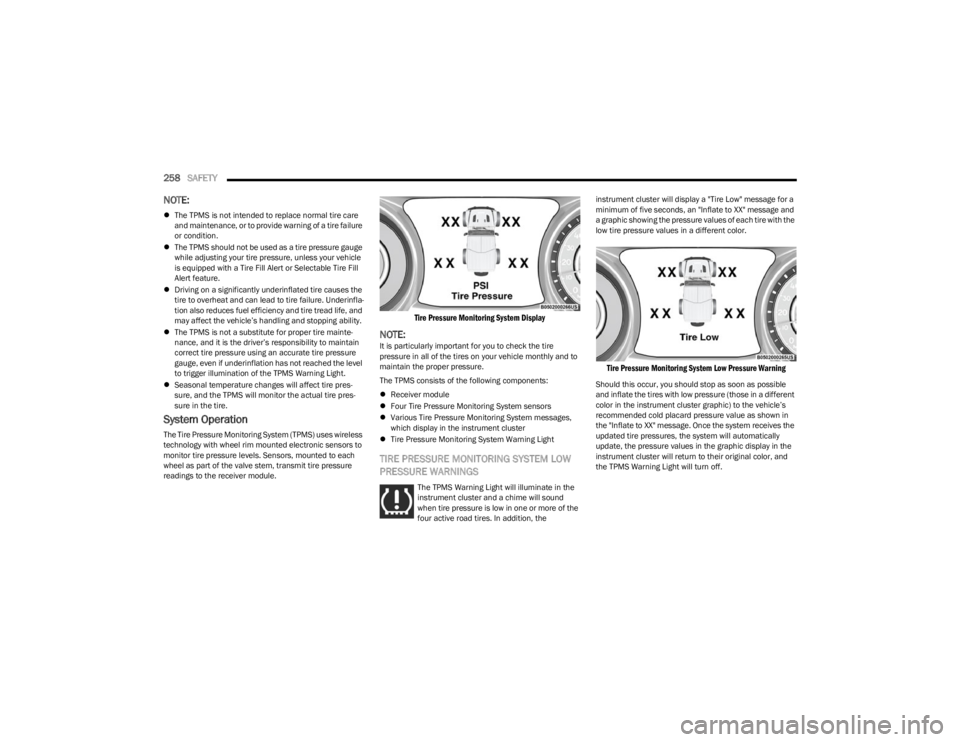
Tire Pressure Monitoring System Display
NOTE:It is particularly important for you to check the tire
pressure in all of the tires on your vehicle monthly and to
maintain the proper pressure.
The TPMS consists of the following components:
Receiver module
Four Tire Pressure Monitoring System sensors
Various Tire Pressure Monitoring System messages,
which display in the instrument cluster
Tire Pressure Monitoring System Warning Light
TIRE PRESSURE MONITORING SYSTEM LOW
PRESSURE WARNINGS
The TPMS Warning Light will illuminate in the
instrument cluster and a chime will sound
when tire pressure is low in one or more of the
four active road tires. In addition, the instrument cluster will display a "Tire Low" message for a
minimum of five seconds, an "Inflate to XX" message and
a graphic showing the pressure values of each tire with the
low tire pressure values in a different color.
Tire Pressure Monitoring System Low Pressure Warning
Should this occur, you should stop as soon as possible
and inflate the tires with low pressure (those in a different
color in the instrument cluster graphic) to the vehicle’s
recommended cold placard pressure value as shown in
the "Inflate to XX" message. Once the system receives the
updated tire pressures, the system will automatically
update, the pressure values in the graphic display in the
instrument cluster will return to their original color, and
the TPMS Warning Light will turn off.
23_JL_OM_EN_USC_t.book Page 258
Page 269 of 396
SAFETY267
SUPPLEMENTAL RESTRAINT SYSTEMS
(SRS)
Some of the safety features described in this section may
be standard equipment on some models, or may be
optional equipment on others. If you are not sure, ask an
authorized dealer.
The air bag system must be ready to protect you in a
collision. The Occupant Restraint Controller (ORC)
monitors the internal circuits and interconnecting wiring
associated with the electrical Air Bag System
Components. Your vehicle may be equipped with the
following Air Bag System Components:
Air Bag System Components
Occupant Restraint Controller (ORC)
Air Bag Warning Light
Steering Wheel and Column
Instrument Panel
Knee Impact Bolsters
Driver and Front Passenger Air Bags
Seat Belt Buckle Switch
Supplemental Side Air Bags
Front and Side Impact Sensors
Seat Belt Pretensioners
Seat Track Position Sensors
Occupant Classification System
Air Bag Warning Light
The Occupant Restraint Controller (ORC)
monitors the readiness of the electronic parts
of the air bag system whenever the ignition
switch is in the START or ON/RUN position. If
the ignition switch is in the OFF position or in the ACC
position, the air bag system is not on and the air bags will
not inflate.
The ORC contains a backup power supply system that may
deploy the air bag system even if the battery loses power
or it becomes disconnected prior to deployment.
The ORC turns on the Air Bag Warning Light in the
instrument panel for approximately four to eight seconds
for a self-check when the ignition switch is first in the ON/
RUN position. After the self-check, the Air Bag Warning
Light will turn off. If the ORC detects a malfunction in any
part of the system, it turns on the Air Bag Warning Light,
either momentarily or continuously. A single chime will
sound to alert you if the light comes on again after initial
startup.
The ORC also includes diagnostics that will illuminate the
instrument panel Air Bag Warning Light if a malfunction is
detected that could affect the air bag system. The
diagnostics also record the nature of the malfunction. While the air bag system is designed to be maintenance
free, if any of the following occurs, have an authorized
dealer service the air bag system immediately.
The Air Bag Warning Light does not come on during the
four to eight seconds when the ignition switch is first in
the ON/RUN position.
The Air Bag Warning Light remains on after the four to
eight-second interval.
The Air Bag Warning Light comes on intermittently or
remains on while driving.
NOTE:If the speedometer, tachometer, or any engine related
gauges are not working, the Occupant Restraint Controller
(ORC) may also be disabled. In this condition the air bags
may not be ready to inflate for your protection. Have an
authorized dealer service the air bag system immediately.
Redundant Air Bag Warning Light
If a fault with the Air Bag Warning Light is
detected, which could affect the Supplemental
Restraint System (SRS), the Redundant Air Bag
Warning Light will illuminate on the instrument
panel. The Redundant Air Bag Warning Light will stay on
Failure to replace the seat belt assembly could
increase the risk of injury in collisions.
Do not use the Automatic Locking Mode to restrain
occupants who are wearing the seat belt or children
who are using booster seats. The locked mode is only
used to install rear-facing or forward-facing child
restraints that have a harness for restraining the
child.
WARNING!
WARNING!
Ignoring the Air Bag Warning Light in your instrument
panel could mean you won’t have the air bag system to
protect you in a collision. If the light does not come on
as a bulb check when the ignition is first turned on,
stays on after you start the vehicle, or if it comes on as
you drive, have an authorized dealer service the air bag
system immediately.
6
23_JL_OM_EN_USC_t.book Page 267
Page 308 of 396
306
SERVICING AND MAINTENANCE
SCHEDULED SERVICING — GASOLINE
ENGINE
Your vehicle is equipped with an automatic oil change
indicator system. The oil change indicator system will
remind you that it is time to take your vehicle in for
scheduled maintenance.
Based on engine operation conditions, the oil change
indicator message will illuminate. This means that service
is required for your vehicle. Operating conditions such as
frequent short-trips, trailer tow, extremely hot or cold
ambient temperatures will influence when the “Change
Oil” or “Oil Change Required” message is displayed. Have
your vehicle serviced as soon as possible, within the next
500 miles (805 km).On vehicles equipped with instrument cluster display, “Oil
Change Required” will be displayed and a single chime will
sound, indicating that an oil change is necessary.
On non-instrument cluster display equipped vehicles,
“Change Oil” will flash in the instrument cluster odometer
and a single chime will sound, indicating that an oil
change is necessary.
An authorized dealer will reset the oil change indicator
message after completing the scheduled oil change. If a
scheduled oil change is performed by someone other than
an authorized dealer, the message can be reset by
referring to the steps described under Instrument Cluster
Display for further information
Úpage 108.
NOTE:Under no circumstances should oil change intervals
exceed 10,000 miles (16,000 km), 12 months or 350
hours of engine run time, whichever comes first. The 350
hours of engine run or idle time is generally only a concern
for fleet customers.
Once A Month Or Before A Long Trip:
Check the engine oil level.
Check the windshield washer fluid level.
Check the tire inflation pressures and look for unusual
wear or damage, rotate at the first sign of irregular
wear.
Check the fluid levels of the coolant reservoir, brake
master cylinder, and power steering, and fill as needed.
Check the function of all interior and exterior lights.
23_JL_OM_EN_USC_t.book Page 306