towing JEEP WRANGLER 2023 Owner's Manual
[x] Cancel search | Manufacturer: JEEP, Model Year: 2023, Model line: WRANGLER, Model: JEEP WRANGLER 2023Pages: 396, PDF Size: 25.15 MB
Page 175 of 396
STARTING AND OPERATING173
(Continued)
TRAILER AND TONGUE WEIGHT
Never exceed the maximum tongue weight stamped on
your bumper or trailer hitch.
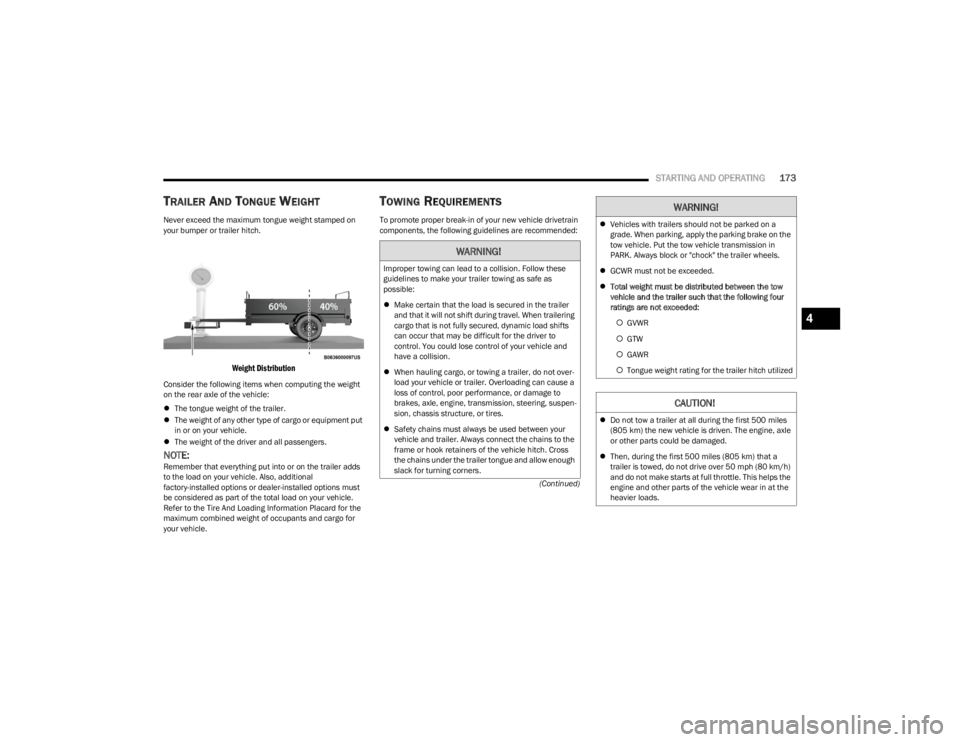
Weight Distribution
Consider the following items when computing the weight
on the rear axle of the vehicle:
The tongue weight of the trailer.
The weight of any other type of cargo or equipment put
in or on your vehicle.
The weight of the driver and all passengers.
NOTE:Remember that everything put into or on the trailer adds
to the load on your vehicle. Also, additional
factory-installed options or dealer-installed options must
be considered as part of the total load on your vehicle.
Refer to the Tire And Loading Information Placard for the
maximum combined weight of occupants and cargo for
your vehicle.
TOWING REQUIREMENTS
To promote proper break-in of your new vehicle drivetrain
components, the following guidelines are recommended:
WARNING!
Improper towing can lead to a collision. Follow these
guidelines to make your trailer towing as safe as
possible:
Make certain that the load is secured in the trailer
and that it will not shift during travel. When trailering
cargo that is not fully secured, dynamic load shifts
can occur that may be difficult for the driver to
control. You could lose control of your vehicle and
have a collision.
When hauling cargo, or towing a trailer, do not over -
load your vehicle or trailer. Overloading can cause a
loss of control, poor performance, or damage to
brakes, axle, engine, transmission, steering, suspen -
sion, chassis structure, or tires.
Safety chains must always be used between your
vehicle and trailer. Always connect the chains to the
frame or hook retainers of the vehicle hitch. Cross
the chains under the trailer tongue and allow enough
slack for turning corners.
Vehicles with trailers should not be parked on a
grade. When parking, apply the parking brake on the
tow vehicle. Put the tow vehicle transmission in
PARK. Always block or "chock" the trailer wheels.
GCWR must not be exceeded.
Total weight must be distributed between the tow
vehicle and the trailer such that the following four
ratings are not exceeded:
GVWR
GTW
GAWR
Tongue weight rating for the trailer hitch utilized
CAUTION!
Do not tow a trailer at all during the first 500 miles
(805 km) the new vehicle is driven. The engine, axle
or other parts could be damaged.
Then, during the first 500 miles (805 km) that a
trailer is towed, do not drive over 50 mph (80 km/h)
and do not make starts at full throttle. This helps the
engine and other parts of the vehicle wear in at the
heavier loads.
WARNING!
4
23_JL_OM_EN_USC_t.book Page 173
Page 176 of 396
174STARTING AND OPERATING
(Continued)
Towing Requirements — Tires
Proper tire inflation pressures are essential to the safe
and satisfactory operation of your vehicle.
Check the trailer tires for proper tire inflation pressures
before trailer usage.
Check for signs of tire wear or visible tire damage
before towing a trailer.
Replacing tires with a higher load carrying capacity will
not increase the vehicle's GVWR and GAWR limits.
For further information
Úpage 345.
Towing Requirements — Trailer Brakes
Do not interconnect the hydraulic brake system or
vacuum system of your vehicle with that of the trailer.
This could cause inadequate braking and possible
personal injury.
An electronically actuated trailer brake controller is
required when towing a trailer with electronically actu -
ated brakes. When towing a trailer equipped with a
hydraulic surge actuated brake system, an electronic
brake controller is not required.
Trailer brakes are recommended for trailers over 1,000
lb (453 kg) and required for trailers in excess of 2,000
lb (907 kg).
Towing Requirements — Trailer Lights And
Wiring
Whenever you pull a trailer, regardless of the trailer size,
stop lights and turn signals on the trailer are required for
motoring safety.
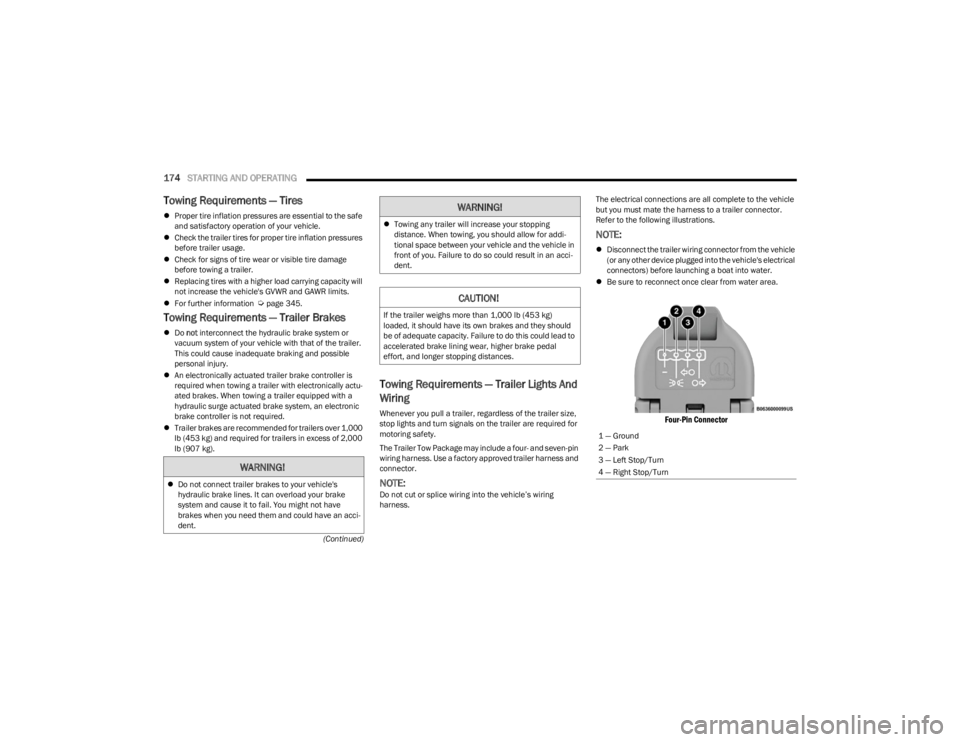
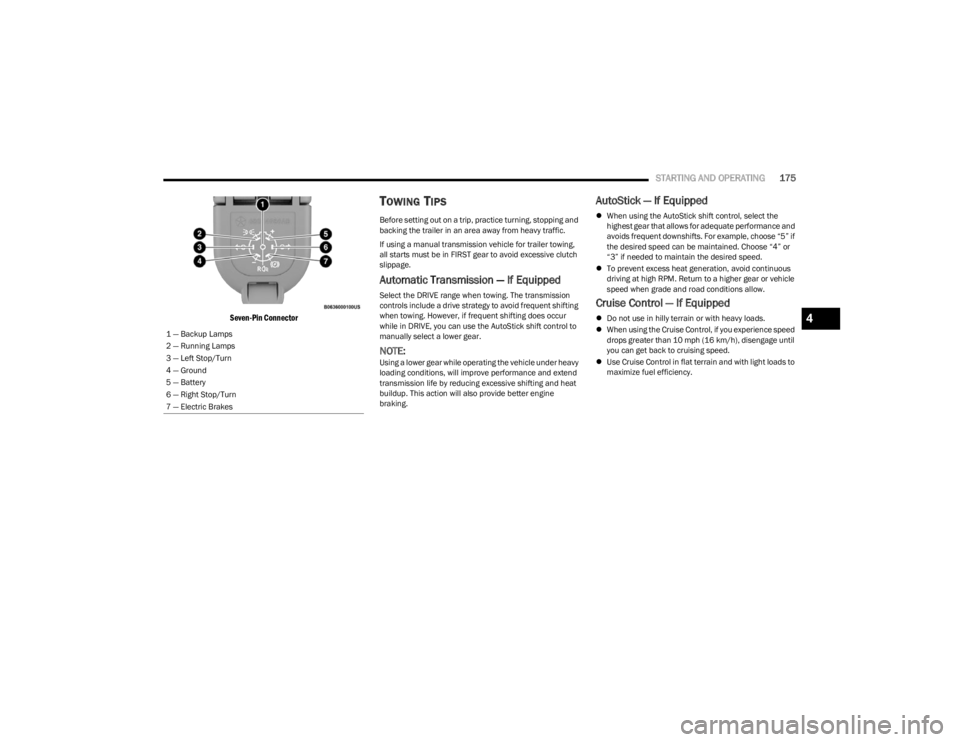
The Trailer Tow Package may include a four- and seven-pin
wiring harness. Use a factory approved trailer harness and
connector.
NOTE:Do not cut or splice wiring into the vehicle’s wiring
harness. The electrical connections are all complete to the vehicle
but you must mate the harness to a trailer connector.
Refer to the following illustrations.
NOTE:
Disconnect the trailer wiring connector from the vehicle
(or any other device plugged into the vehicle's electrical
connectors) before launching a boat into water.
Be sure to reconnect once clear from water area.
Four-Pin Connector
WARNING!
Do not connect trailer brakes to your vehicle's
hydraulic brake lines. It can overload your brake
system and cause it to fail. You might not have
brakes when you need them and could have an acci -
dent.
Towing any trailer will increase your stopping
distance. When towing, you should allow for addi -
tional space between your vehicle and the vehicle in
front of you. Failure to do so could result in an acci -
dent.
CAUTION!
If the trailer weighs more than 1,000 lb (453 kg)
loaded, it should have its own brakes and they should
be of adequate capacity. Failure to do this could lead to
accelerated brake lining wear, higher brake pedal
effort, and longer stopping distances.
WARNING!
1 — Ground
2 — Park
3 — Left Stop/Turn
4 — Right Stop/Turn
23_JL_OM_EN_USC_t.book Page 174
Page 177 of 396
STARTING AND OPERATING175
Seven-Pin Connector
TOWING TIPS
Before setting out on a trip, practice turning, stopping and
backing the trailer in an area away from heavy traffic.
If using a manual transmission vehicle for trailer towing,
all starts must be in FIRST gear to avoid excessive clutch
slippage.
Automatic Transmission — If Equipped
Select the DRIVE range when towing. The transmission
controls include a drive strategy to avoid frequent shifting
when towing. However, if frequent shifting does occur
while in DRIVE, you can use the AutoStick shift control to
manually select a lower gear.
NOTE:Using a lower gear while operating the vehicle under heavy
loading conditions, will improve performance and extend
transmission life by reducing excessive shifting and heat
buildup. This action will also provide better engine
braking.
AutoStick — If Equipped
When using the AutoStick shift control, select the
highest gear that allows for adequate performance and
avoids frequent downshifts. For example, choose “5” if
the desired speed can be maintained. Choose “4” or
“3” if needed to maintain the desired speed.
To prevent excess heat generation, avoid continuous
driving at high RPM. Return to a higher gear or vehicle
speed when grade and road conditions allow.
Cruise Control — If Equipped
Do not use in hilly terrain or with heavy loads.
When using the Cruise Control, if you experience speed
drops greater than 10 mph (16 km/h), disengage until
you can get back to cruising speed.
Use Cruise Control in flat terrain and with light loads to
maximize fuel efficiency.
1 — Backup Lamps
2 — Running Lamps
3 — Left Stop/Turn
4 — Ground
5 — Battery
6 — Right Stop/Turn
7 — Electric Brakes4
23_JL_OM_EN_USC_t.book Page 175
Page 178 of 396

176STARTING AND OPERATING
(Continued)
(Continued)
RECREATIONAL TOWING (BEHIND MOTORHOME)
TOWING THIS VEHICLE BEHIND ANOTHER VEHICLE
RECREATIONAL TOWING —
F
OUR-WHEEL DRIVE MODELS
NOTE:The transfer case must be shifted into (N) Neutral, auto -
matic transmission must be in PARK, and manual trans -
mission must be in gear (NOT in NEUTRAL) for recreational
towing.
Towing Condition Wheels OFF the Ground Four-Wheel Drive Models
Flat Tow NONESee Instructions
Automatic transmission in PARK.
Manual transmission in gear (NOT in NEUTRAL [N]).
Transfer case in (N) Neutral.
Tow in forward direction.
Dolly Tow Front
NOT ALLOWED
Rear NOT ALLOWED
On Trailer ALLOK
NOTE:When towing your vehicle, always follow applicable state and provincial laws. Contact state and provincial Highway Safety offices for additional details.
CAUTION!
DO NOT dolly tow any 4WD vehicle. Towing with only
one set of wheels on the ground (front or rear) will
cause severe transmission and/or transfer case
damage. Tow with all four wheels either ON the
ground, or OFF the ground (using a vehicle trailer).
Tow only in the forward direction. Towing this vehicle
backwards can cause severe damage to the transfer
case.
Automatic transmissions must be placed in PARK for
recreational towing.Manual transmissions must be placed in gear (not in
NEUTRAL) for recreational towing.
Before recreational towing, perform the procedure
outlined under “Shifting Into (N) Neutral” to be
certain that the transfer case is fully in (N) Neutral.
Otherwise, internal damage will result.
Towing this vehicle in violation of the above require -
ments can cause severe transmission and/or transfer
case damage. Damage from improper towing is not
covered under the New Vehicle Limited Warranty.
CAUTION!
23_JL_OM_EN_USC_t.book Page 176
Page 179 of 396
STARTING AND OPERATING177
Shifting Into (N) Neutral
Use the following procedure to prepare your vehicle for
recreational towing:
1. Bring the vehicle to a complete stop on level ground.
2. Press and hold the brake pedal. 3. Shift the automatic transmission into NEUTRAL or
press the clutch pedal on a manual transmission.
4. Turn the engine off.
5. Shift the transfer case lever into (N) Neutral.
6. Start the engine.
7. Shift the transmission into REVERSE.
8. Release the brake pedal (and clutch pedal on manual transmissions) for five seconds and ensure that there
is no vehicle movement.
9. Repeat steps seven and eight with automatic transmission in DRIVE or manual transmission in
FIRST gear.
10. Turn the engine off.
11. Firmly apply the parking brake.
12. Shift the transmission into PARK or place manual transmission in gear (NOT in NEUTRAL).
13. Attach the vehicle to the tow vehicle using a suitable tow bar.
14. Release the parking brake.
Shifting Out of (N) Neutral
Use the following procedure to prepare your vehicle for
normal usage.
1. Bring the vehicle to a complete stop, leaving it connected to the tow vehicle.
2. Firmly apply the parking brake.
3. Start the engine.
4. Press and hold the brake pedal.
5. Shift the transmission into NEUTRAL.
6. Turn the engine off.
7. Shift the transfer case lever to the desired position.
NOTE:When shifting the transfer case out of (N) Neutral, the
engine should remain off to avoid gear clash.
8. Shift the automatic transmission into PARK, or place manual transmission in NEUTRAL.
9. Release the brake pedal.
10. Disconnect vehicle from the tow vehicle.
11. Start the engine.
12. Press and hold the brake pedal.
13. Release the parking brake.
14. Shift the transmission into gear, release the brake pedal (and clutch pedal on manual transmissions),
and check that the vehicle operates normally.
Do not use a fascia/bumper-mounted clamp-on tow
bar on your vehicle. The bumper face bar will be
damaged.
WARNING!
You or others could be injured or killed if you leave the
vehicle unattended with the transfer case in the (N)
Neutral position without first fully engaging the parking
brake. The transfer case (N) Neutral position
disengages both the front and rear driveshafts from the
powertrain, and will allow the vehicle to roll, even if the
automatic transmission is in PARK (or manual
transmission is in gear). The parking brake should
always be applied when the driver is not in the vehicle.
CAUTION!
It is necessary to follow these steps to be certain that
the transfer case is fully in (N) Neutral before
recreational towing to prevent damage to internal parts.
CAUTION!
CAUTION!
Damage to the transmission may occur if the
transmission is shifted into PARK with the transfer case
in (N) Neutral and the engine running. With the transfer
case in (N) Neutral ensure that the engine is OFF before
shifting the transmission into PARK.
4
23_JL_OM_EN_USC_t.book Page 177
Page 239 of 396

MULTIMEDIA237
MANAGE MY SIRIUSXM GUARDIAN™
A
CCOUNT
To manage your SiriusXM Guardian™ account, press the
ASSIST button in your vehicle, or call SiriusXM Guardian™
Customer Care.
NOTE:It is recommended, when selling your vehicle, or turning in
your lease, to call SiriusXM Guardian™ Care to remove
your personal data.
CONNECTED SERVICES FAQS
For additional information about SiriusXM Guardian™,
active subscribers can push the ASSIST button (if
equipped) and then select SiriusXM Guardian™ Call on
your in-vehicle touchscreen to contact SiriusXM
Guardian™. Your call will be directed to a SiriusXM
Guardian™ agent or held in a queue until an agent is
available. If you do not have an active subscription, push
the ASSIST button and press the Activate button on the
touchscreen to activate services.
CONNECTED SERVICES SOS FAQS —
I
F EQUIPPED
1.
What happens if I accidentally push the SOS Call
button on the mirror or overhead console?
You have
10 seconds after pushing the SOS Call button to
cancel the call. To cancel the call, either push the
SOS Call button again, or press the Cancel button on
the in-vehicle touchscreen.
2.
What type of information is sent when I use the SOS
Call button from my vehicle? Certain vehicle
information, such as make and model, is transmitted
along with the last known GPS location.
3. When could I use the SOS Call button? You can use
the SOS Call button to make a call if you or someone
else needs emergency assistance.
CONNECTED SERVICES REMOTE DOOR
L
OCK/UNLOCK FAQS
1.
How long does it take to unlock or lock the door?
Depending on various conditions, it can take up to
three minutes or more for the request to get to your
vehicle.
2. Which is faster, my key fob or the Vehicle Branded
App? Your key fob will lock/unlock the door more
quickly, however its range is limited and your Vehicle
Branded App comes in handy for these and other
situations.
3. Will my vehicle be safe if I lose my device? People
sometimes lose their mobile devices, which is why
security measures have been engineered into the
Vehicle Branded App. Asking for your username,
password and SiriusXM Guardian™ Security PIN are
required for the activation of Remote services
through your mobile device. It is your responsibility to
protect your passwords and PINs. 4.
Why can’t all mobile devices use the Vehicle Branded
App? The Vehicle Branded App is compatible with
most devices with the Apple® and Android™
operating systems. The capabilities of these devices
allow us to remotely command your vehicle. Other
operating systems may be supported in the future.
5. Why is the Vehicle Branded App running slow? The
Vehicle Branded App relies on a mobile network
connection from your device to send commands to
your vehicle which must have an operable LTE (voice/
data), 4G (data), or 5G (data) network connection. If
either your device or your vehicle is in an area with
below average coverage, it may take longer to log in
and send commands.
CONNECTED SERVICES ROADSIDE
A
SSISTANCE FAQS
1.
What is the phone number for roadside assistance
call? The phone number is:
US: 1-800-521-2779
Canada: 1-800-363-4869
2. If I am subscribed to SiriusXM Guardian™, does it
cover towing or other expenses incurred by using
roadside assistance? No, however your new vehicle
may include Roadside Assistance Call services.
5
23_JL_OM_EN_USC_t.book Page 237
Page 251 of 396
SAFETY249
Feedback To The Driver
The instrument cluster has an HDC icon and the HDC
switch has an indicator light, which offers feedback to the
driver about the state HDC is in.
The cluster icon and switch indicator light will illumi -
nate and remain on solid when HDC is enabled or acti -
vated. This is the normal operating condition for HDC.
The cluster icon and switch indicator light will flash for
several seconds then extinguish when the driver pushes
the HDC switch but enable conditions are not met.
The cluster icon and switch indicator light will flash for
several seconds then extinguish when HDC disables
due to excess speed.
The cluster icon and switch indicator light will flash
when HDC deactivates due to overheated brakes. The
flashing will stop and HDC will activate again once the
brakes have cooled sufficiently.
Hill Start Assist (HSA)
The HSA system is designed to mitigate roll back from a
complete stop while on an incline. If the driver releases
the brake while stopped on an incline, HSA will continue to
hold the brake pressure for a short period. If the driver
does not apply the throttle before this time expires, the
system will release brake pressure and the vehicle will roll
down the hill as normal. The following conditions must be met in order for HSA to
activate:
The feature must be enabled.
The vehicle must be stopped.
The parking brake must be off.
The driver door must be closed. (If the doors are
attached, then the door must be closed. If the doors
are detached then the driver's seat belt must be
buckled.)
The vehicle must be on a sufficient grade.
The gear selection must match vehicle uphill direction
(i.e., vehicle facing uphill is in forward gear; vehicle
backing uphill is in REVERSE gear).
HSA will work in REVERSE gear and all forward gears.
The system will not activate if the transmission is in
PARK or NEUTRAL. For vehicles equipped with a
manual transmission, if the clutch is pressed, HSA will
remain active.
Disabling And Enabling HSA
This feature can be turned on or turned off. To change the
current setting, refer to
Ú
page 184 for further information.
Towing With HSA
HSA will also provide assistance to mitigate roll back while
towing a trailer.
Rain Brake Support (RBS)
RBS may improve braking performance in wet conditions.
It will periodically apply a small amount of brake pressure
to remove any water buildup on the front brake rotors. It
functions when the windshield wipers are in LO or HI
speed. When RBS is active, there is no notification to the
driver and no driver interaction is required.
WARNING!
HDC is only intended to assist the driver in controlling
vehicle speed when descending hills. The driver must
remain attentive to the driving conditions and is
responsible for maintaining a safe vehicle speed.WARNING!
There may be situations where the Hill Start Assist
(HSA) will not activate and slight rolling may occur, such
as on minor hills or with a loaded vehicle, or while pull -
ing a trailer. HSA is not a substitute for active driving
involvement. It is always the driver’s responsibility to be
attentive to distance to other vehicles, people, and
objects, and most importantly brake operation to
ensure safe operation of the vehicle under all road con -
ditions. Your complete attention is always required
while driving to maintain safe control of your vehicle.
Failure to follow these warnings can result in a collision
or serious personal injury.
WARNING!
If you use a trailer brake controller with your trailer,
the trailer brakes may be activated and deactivated
with the brake switch. If so, there may not be enough
brake pressure to hold both the vehicle and the
trailer on a hill when the brake pedal is released. In
order to avoid rolling down an incline while resuming
acceleration, manually activate the trailer brake or
apply more vehicle brake pressure prior to releasing
the brake pedal.
HSA is not a parking brake. Always apply the parking
brake fully when exiting your vehicle. Also, be certain
to place the transmission in PARK (P).
Failure to follow these warnings can result in a colli -
sion or serious personal injury.
6
23_JL_OM_EN_USC_t.book Page 249
Page 253 of 396
SAFETY251
Deactivating SSC
SSC will be deactivated but remain available if any of the
following conditions occur:
The driver overrides SSC set speed with throttle or
brake application.
The vehicle speed exceeds 20 mph (32 km/h) but
remains below 40 mph (64 km/h).
The vehicle is shifted into PARK.
Disabling SSC
SSC will deactivate and be disabled if any of the following
conditions occur:
The driver pushes the SSC switch.
The driveline is shifted out of the 4WD Low.
The parking brake is applied.
The vehicle is driven greater than 20 mph (32 km/h)
for greater than 70 seconds.
The vehicle is driven greater than 40 mph (64 km/h).
SSC will exist immediately.
The driver door opens. (Driver door opens if doors are
attached or driver seat belt is unbuckled if doors are
detached).
Feedback To The Driver
The instrument cluster has an SSC icon and the SSC
switch has a lamp that offers feedback to the driver about
the state SSC is in.
The cluster icon and switch lamp will illuminate and
remain on solid when SSC is enabled or activated.
These are the normal operating conditions for SSC.
The cluster icon and switch lamp will flash for several
seconds then extinguish when the driver pushes the
SSC switch but enabled conditions are not met.
The cluster icon and switch lamp will flash for several
seconds then extinguish when SSC disables due to
excess speed.
The cluster icon and switch lamp will flash then extin -
guish when SSC deactivates due to overheated brakes.
Traction Control System (TCS)
TCS monitors the amount of wheel spin of each of the
driven wheels. If wheel spin is detected, the TCS may apply
brake pressure to the spinning wheel(s) and/or reduce
engine power to provide enhanced acceleration and
stability. A feature of the TCS, Brake Limited Differential
(BLD) functions similarly to a limited slip differential and
controls the wheel spin across a driven axle. If one wheel
on a driven axle is spinning faster than the other, the
system will apply the brake of the spinning wheel. This will
allow more engine torque to be applied to the wheel that
is not spinning. BLD may remain enabled even if TCS and
Electronic Stability Control (ESC) are in reduced modes.
Trailer Sway Control (TSC)
TSC uses sensors in the vehicle to recognize an
excessively swaying trailer and will take the appropriate
actions to attempt to stop the sway.
NOTE:TSC cannot stop all trailers from swaying. Always use
caution when towing a trailer and follow the trailer tongue
weight recommendations
Úpage 170.
When TSC is functioning, the ESC Activation/Malfunction
Indicator Light will flash, the engine power may be reduced
and you may feel the brakes being applied to individual
wheels to attempt to stop the trailer from swaying. TSC is
disabled when the ESC system is in the “Partial Off” or
“Full Off” modes.
WARNING!
SSC is only intended to assist the driver in controlling
vehicle speed when driving in off-road conditions. The
driver must remain attentive to the driving conditions
and is responsible for maintaining a safe vehicle speed.
WARNING!
If TSC activates while driving, slow the vehicle down,
stop at the nearest safe location, and adjust the trailer
load to eliminate trailer sway.6
23_JL_OM_EN_USC_t.book Page 251
Page 254 of 396
252SAFETY
AUXILIARY DRIVING SYSTEMS
BLIND SPOT MONITORING (BSM) —
I
F EQUIPPED
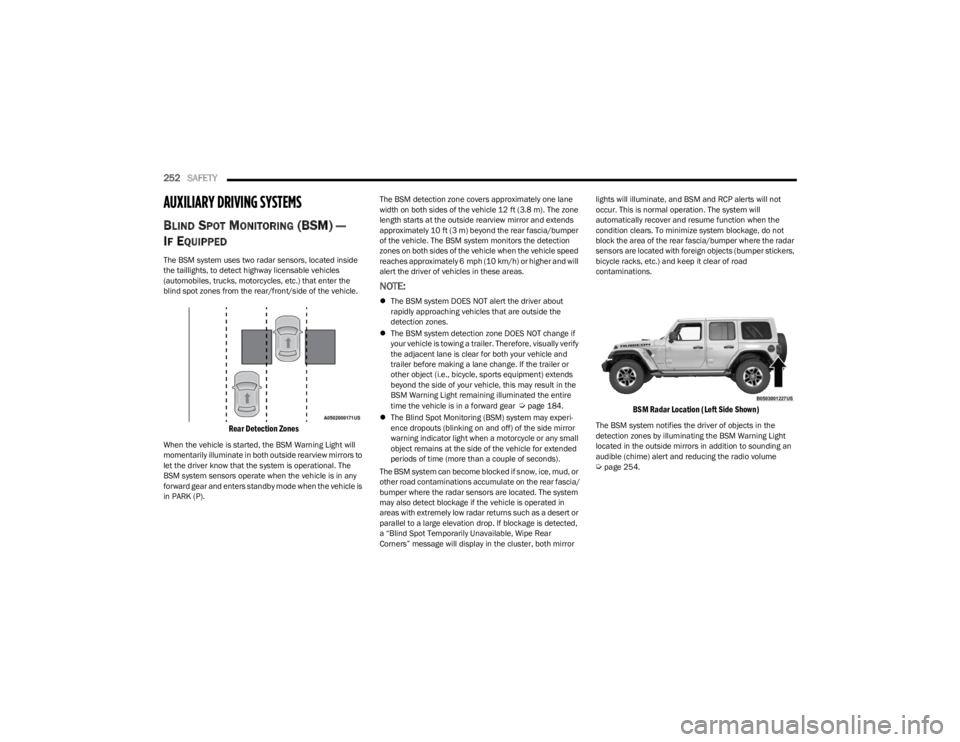
The BSM system uses two radar sensors, located inside
the taillights, to detect highway licensable vehicles
(automobiles, trucks, motorcycles, etc.) that enter the
blind spot zones from the rear/front/side of the vehicle.
Rear Detection Zones
When the vehicle is started, the BSM Warning Light will
momentarily illuminate in both outside rearview mirrors to
let the driver know that the system is operational. The
BSM system sensors operate when the vehicle is in any
forward gear and enters standby mode when the vehicle is
in PARK (P). The BSM detection zone covers approximately one lane
width on both sides of the vehicle 12 ft (3.8 m). The zone
length starts at the outside rearview mirror and extends
approximately 10 ft (3 m) beyond the rear fascia/bumper
of the vehicle. The BSM system monitors the detection
zones on both sides of the vehicle when the vehicle speed
reaches approximately 6 mph (10 km/h) or higher and will
alert the driver of vehicles in these areas.
NOTE:
The BSM system DOES NOT alert the driver about
rapidly approaching vehicles that are outside the
detection zones.
The BSM system detection zone DOES NOT change if
your vehicle is towing a trailer. Therefore, visually verify
the adjacent lane is clear for both your vehicle and
trailer before making a lane change. If the trailer or
other object (i.e., bicycle, sports equipment) extends
beyond the side of your vehicle, this may result in the
BSM Warning Light remaining illuminated the entire
time the vehicle is in a forward gear
Úpage 184.
The Blind Spot Monitoring (BSM) system may experi -
ence dropouts (blinking on and off) of the side mirror
warning indicator light when a motorcycle or any small
object remains at the side of the vehicle for extended
periods of time (more than a couple of seconds).
The BSM system can become blocked if snow, ice, mud, or
other road contaminations accumulate on the rear fascia/
bumper where the radar sensors are located. The system
may also detect blockage if the vehicle is operated in
areas with extremely low radar returns such as a desert or
parallel to a large elevation drop. If blockage is detected,
a “Blind Spot Temporarily Unavailable, Wipe Rear
Corners” message will display in the cluster, both mirror lights will illuminate, and BSM and RCP alerts will not
occur. This is normal operation. The system will
automatically recover and resume function when the
condition clears. To minimize system blockage, do not
block the area of the rear fascia/bumper where the radar
sensors are located with foreign objects (bumper stickers,
bicycle racks, etc.) and keep it clear of road
contaminations.
BSM Radar Location (Left Side Shown)
The BSM system notifies the driver of objects in the
detection zones by illuminating the BSM Warning Light
located in the outside mirrors in addition to sounding an
audible (chime) alert and reducing the radio volume
Úpage 254.
23_JL_OM_EN_USC_t.book Page 252
Page 305 of 396

IN CASE OF EMERGENCY303
TOWING A DISABLED VEHICLE
This section describes procedures for towing a disabled vehicle using a commercial towing service.
If the transmission and drivetrain are operable, disabled 4x4 vehicles may also be towed as described
Úpage 176.
Proper towing or lifting equipment is required to prevent
damage to your vehicle. Use only tow bars and other
equipment designed for this purpose, following equipment
manufacturer’s instructions. Use of safety chains is
mandatory. Attach a tow bar or other towing device to
main structural members of the vehicle, not to fascia/
bumpers or associated brackets. State and local laws
regarding vehicles under tow must be observed.
If you must use the accessories (wipers, defrosters, etc.)
while being towed, the ignition must be in the ON/RUN
position, not the ACC position.
If the vehicle's battery is discharged, instructions on
shifting the automatic transmission out of PARK (P) in
order to move the vehicle
Úpage 301.
FOUR–WHEEL DRIVE MODELS
FCA US LLC recommends towing with all wheels OFF the
ground. Acceptable methods are to tow the vehicle on a
flatbed or with one end of the vehicle raised and the
opposite end on a towing dolly.
If flatbed equipment is not available and the transfer case
is operable, the vehicle may be towed (in the forward
direction, with ALL wheels on the ground), IF the transfer
case is in NEUTRAL (N) and the transmission is in PARK (P)
(for automatic transmissions) or in gear NOT in NEUTRAL ,
for manual transmissions)
Úpage 176.
Towing Condition
Wheels OFF The Ground 4WD MODELS
Flat Tow NONE
Automatic Transmission in PARK (P)
Manual Transmission in gear ( NOT in NEUTRAL)
Transfer Case in NEUTRAL (N)
Tow in Forward direction
Wheel Lift Or Dolly Tow Front
NOT ALLOWED
Rear NOT ALLOWED
Flatbed ALLBEST METHOD
NOTE:When towing your vehicle, always follow applicable state and provincial laws. Contact state and provincial Highway Safety offices for additional details.
CAUTION!
Do not use sling type equipment when towing.
Vehicle damage may occur.
When securing the vehicle to a flatbed truck, do not
attach to front or rear suspension components.
Damage to your vehicle may result from improper
towing.
If the vehicle being towed requires steering, the igni -
tion switch must be in the ACC or ON/RUN mode, not
in the OFF mode.
7
23_JL_OM_EN_USC_t.book Page 303