battery KIA BORREGO 2017 Owner's Manual
[x] Cancel search | Manufacturer: KIA, Model Year: 2017, Model line: BORREGO, Model: KIA BORREGO 2017Pages: 548, PDF Size: 36.78 MB
Page 220 of 548
4131
Features of your vehicle
System operation
Ventilation
1. Set the mode to the position.
2. Set the air intake control to theoutside (fresh) air position.
3. Set the temperature control to the desired position.
4. Set the fan speed control to the desired speed.
Heating
1. Set the mode to the position.
2. Set the air intake control to theoutside (fresh) air position.
3. Set the temperature control to the desired position.
4. Set the fan speed control to the desired speed.
5. If dehumidified heating is desired, turn the air conditioning system (if equipped) on.
Operation Tips
To keep dust or unpleasant fumesfrom entering the vehicle through
the ventilation system, temporarily
set the air intake control to the
recirculated air position. Be sure to
return the control to the fresh air
position when the irritation has
passed to keep fresh air in the
vehicle. This will help keep the driv-
er alert and comfortable.
Air for the heating/cooling system is drawn in through the grilles just
ahead of the windshield. Care
should be taken that these are not
blocked by leaves, snow, ice or
other obstructions.
To prevent interior fog on the wind- shield, set the air intake control to
the fresh air position and fan speed
to the desired position, turn on theair conditioning system, and adjust
the temperature control to desired
temperature.
If the windshield fogs up, set the mode to the or position.CAUTION
Operating the blower when the
ignition switch is in the ON posi-tion could cause the battery to discharge. Operate the blowerwhen the engine is running.
Page 226 of 548
4137
Features of your vehicle
Automatic climate control system
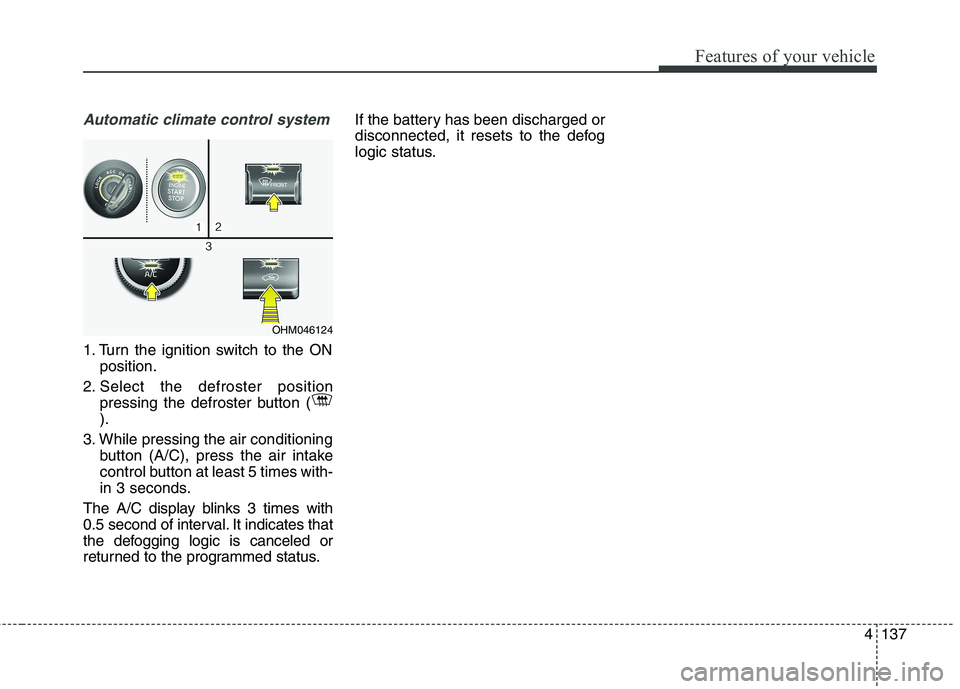
1. Turn the ignition switch to the ONposition.
2. Select the defroster position pressing the defroster button ( ).
3. While pressing the air conditioning button (A/C), press the air intake
control button at least 5 times with-
in 3 seconds.
The A/C display blinks 3 times with
0.5 second of interval. It indicates that
the defogging logic is canceled or
returned to the programmed status. If the battery has been discharged or
disconnected, it resets to the defog
logic status.
OHM046124
Page 233 of 548
Features of your vehicle
144
4
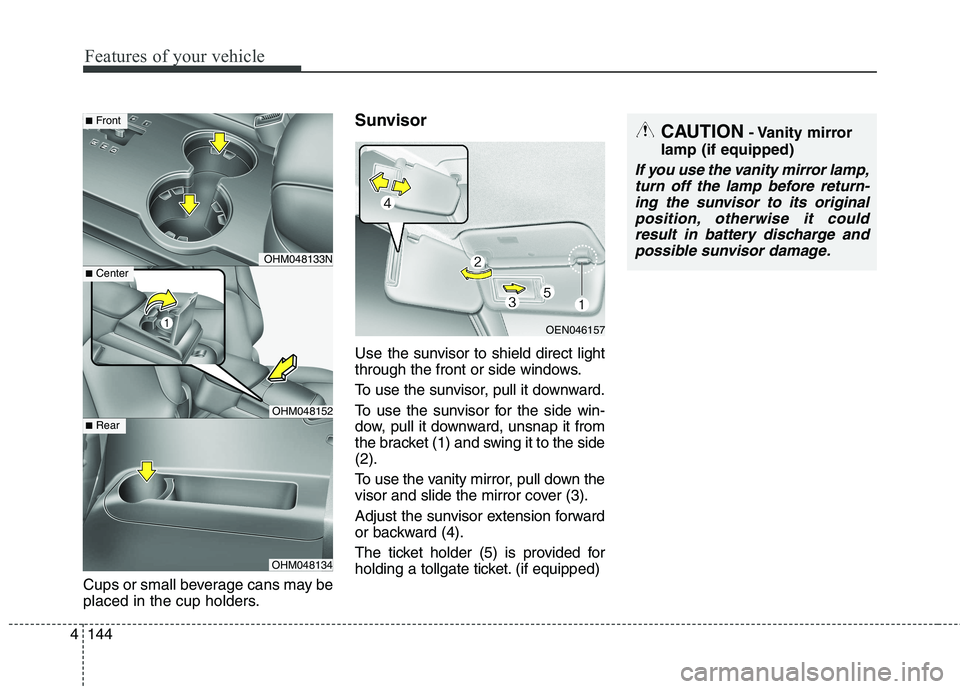
Cups or small beverage cans may be
placed in the cup holders. Sunvisor
Use the sun
visor to shield direct light
through the front or side windows.
To use the sunvisor, pull it downward.
To use the sunvisor for the side win-
dow, pull it downward, unsnap it from
the bracket (1) and swing it to the side(2).
To use the vanity mirror, pull down the
visor and slide the mirror cover (3).
Adjust the sunvisor extension forward
or backward (4).
The ticket holder (5) is provided for
holding a tollgate ticket. (if equip ped)
OHM048133N
OHM048152
OHM048134
■Center
■Front
■Rear
OEN046157
CAUTION - Vanity mirror
lamp (if equipped)
If you use the vanity mirror lamp, turn off the lamp before return-ing the sunvisor to its originalposition, otherwise it could result in battery discharge andpossible sunvisor damage.
Page 236 of 548
4147
Features of your vehicle
Power outletCAUTION
Use the power outlet onlywhen the engine is runningand remove the accessory plug after use. Using theaccessory plug for prolongedperiods of time with the engine off could cause thebattery to discharge.
Only use 12V electric acces- sories which are less than 10Ain electric capacity.
Adjust the air-conditioner or heater to the lowest operatinglevel when using the poweroutlet.
Close the cover when not in use.
Some electronic devices can cause electronic interferencewhen plugged into a vehicle’spower outlet. These devicesmay cause excessive audiostatic and malfunctions in other electronic systems ordevices used in your vehicle.
(Continued)
OHM048212OHM046135N
■Center (if equipped) Type A■ Front
OHM048164N
■Rear
OHM048160
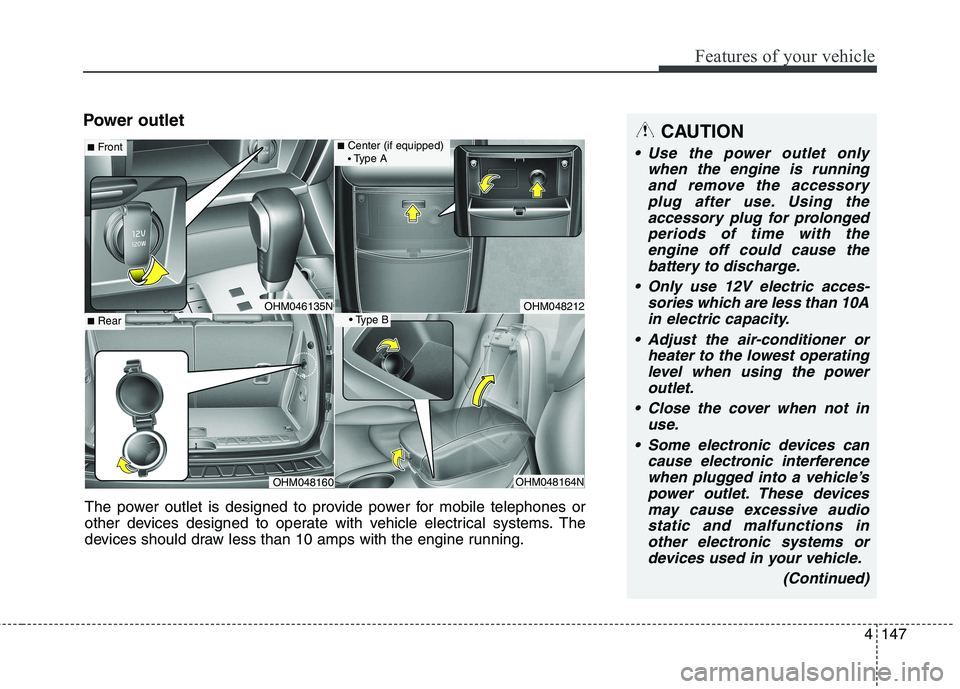
The power outlet is designed to provide power for mobile telephones or
other devices designed to operate with vehicle electrical systems. The
devices should draw less than 10 amps with the engine running.
Page 257 of 548
Audio system
15
5
(Continued)
When the EQ features of an exter-
nal device, such as the iPod ®
, and
the audio system are both active,
EQ effects could overlap and
cause sound deterioration and dis-
tortion. Whenever possible, turn
off the EQ feature within the
external device when it is connect-
ed to the audio system.
Noise may occur when an iPod ®
or
AUX device is connected. When
such devices are not being used,
disconnect the device for storage.
When the iPod ®
or AUX device
power is connected to the power
jack, playing the external device
may result in noise. In such cases,
disconnect the power connection
before use.
Skipping or improper operation may occur depending on the char-
acteristics of your iPod ®
/iPhone ®
device. (Continued)(Continued)
If your iPhone is connected to both
the Bluetooth ®
Wireless Technology
and USB, the sound may not be
properly played. In your iPhone,
select the Dock connector or
Bluetooth ®
Wireless Technology to
change the sound output (source).
iPod ®
mode cannot be operated
when the iPod ®
cannot be recog-
nized due to the playing of ver-
sions that do not support commu-
nication protocols, cases of iPod ®
abnormalities and defects.
For fifth generation iPod ®
Nano
devices, the iPod ®
may not be recog-
nized when the battery level is low.
Please charge the iPod ®
for use.
The search/play orders shown with- in the iPod ®
device may differ from
the orders shown within the audio
system.
If the iPod ®
malfunctions due to
an iPod ®
device defect, reset the
iPod ®
and try again. (To learn
more, refer to your iPod ®
manual)
(Continued) (Continued)
Some iPod
®
s may not sync with
the System depending on the ver-
sion. If the Media is removed
before the Media is recognized,
then the system may not properly
restore the previously operated
mode. (iPad charging is not sup-
ported.)
Use an iPod ®
cable shorter than 1
meter in length such as the one
originally supplied with a new
iPod ®
, longer cables may lead to
the audio system not recognizing
the iPod ®
.
Page 260 of 548
Audio system
518
(Continued)
While a phone is connectedthrough Bluetooth®
Wireless
Technology your phone may dis-
charge quicker than usual for
additional Bluetooth®
Wireless
Technology-related operations.
If Priority is set upon vehicle igni- tion (IGN/ACC ON), the
Bluetooth ®
Wireless Technology
phone will be automatically con-
nected. Even if you are outside, the
Bluetooth ®
Wireless Technology
phone will be automatically con-
nected once you are in the vicinity
of the vehicle. If you do not want
to automatically connect your
Bluetooth ®
Wireless Technology
phone, try the following.
1) Turn off the Bluetooth®
Wireless
Technology feature in your
mobile phone.
2) Turn off the Bluetooth®
Wireless
Technology feature in your car
audio system. (Continued)(Continued)
- To turn off the Bluetooth®
Wireless Technology feature in
your car audio system, go to
[SETUP]> [Phone] and [turn
off] the Bluetooth®
Wireless
Technology feature.
Bluetooth ®
Wireless Technology
connection may become intermit-
tently disconnected in some
mobile phones. Follow these steps
to try again.
1) Turn the Bluetooth®
Wireless
Technology function within the
mobile phone off/on and try
again.
2) Turn the mobile phone power Off/On and try again.
3) Completely remove the mobile phone battery, reboot, and then
try again.
4) Reboot the audio system and try again.
5) Delete all paired devices, pair and try again.
It is possible to pair up to five Bluetooth ®
Wireless Technology
devices to the car system. (Continued)(Continued)
Phone contact names should be
saved in English or they may not
be displayed correctly.
The Handsfree call volume and quality may differ depending on
the mobile phone.
Only one Bluetooth®
Wireless
Technology device can be connect-
ed at a time.
In some mobile phones, starting the ignition while talking through
Bluetooth ®
Wireless Technology
enabled handsfree call will result
in the call becoming disconnected.
(Switch the call back to your
mobile phone when starting the
ignition.)
If the mobile phone is not paired or connected, it is not possible to
enter Phone mode. Once a phone
is paired or connected, the guid-
ance screen will be displayed.
Page 331 of 548

67
Driving your vehicle
ON
The warning lights can be checked
before the engine is started. This is
the normal running position after the
engine is started.
Do not leave the ignition switch ON ifthe engine is not running to preventbattery discharge.
START
Turn the ignition key to the START
position to start the engine. The
engine will crank until you release
the key; then it returns to the ON
position. The brake warning lamp
can be checked in this position. Starting the engine
WARNING
- Ignition key
Never turn the ignition switch to LOCK or ACC while the vehi-
cle is moving. This would result
in loss of directional control
and braking function, whichcould cause an accident.
(Continued)
(Continued)
The anti-theft steering columnlock (if equipped) is not a sub-
stitute for the parking brake.
Before leaving the driver’s seat,
always make sure the shift
lever is engaged in P (Park), set
the parking brake fully and shut
the engine off. Unexpected and
sudden vehicle movement mayoccur if these precautions arenot taken.
Never reach for the ignition switch, or any other controls
through the steering wheel
while the vehicle is in motion.
The presence of your hand orarm in this area could cause a
loss of vehicle control, an
accident and serious bodily
injury or death.
Do not place any movable objects around the driver’s
seat as they may move while
driving, interfere with the driv-er and lead to an accident.
WARNING
Always wear appropriate shoes when operating your
vehicle. Unsuitable shoes
(high heels, ski boots,etc.)
may interfere with your abilityto use the brake and accelera-tor pedal.
Do not start the vehicle with the accelerator pedal
depressed. The vehicle can
move and lead to an accident.
Wait until the engine rpm is nor- mal. The vehicle may suddenly
move if the brake padel isreleased when the rpm is high.
Page 335 of 548

611
Driving your vehicle
✽✽
NOTICE
If the steering wheel doesn't unlock
properly, the engine start/stop but-
ton will not work. Press the engine
start/stop button while turning the
steering wheel right and left to
release the tension. ACC(Accessory)
Press the engine start/stop button while it is in the OFF position without
depressing the brake pedal.
The steering wheel unlocks and
electrical accessories are opera-tional.
If the engine start/stop button is in
the ACC position for more than 1
hour, the button is turned off auto-
matically to prevent battery dis-
charge.
ON
Press the engine start/stop button
while it is in the ACC position without
depressing the brake pedal.
The warning lights can be checked
before the engine is started. Do not
leave the engine start/stop button in
the ON position for a long time. The
battery may discharge, because the
engine is not running.
CAUTION
You are able to turn off the engine (START/RUN) or vehiclepower (ON), only when the vehi- cle is not in motion. In an emer-gency situation while the vehi-cle is in motion, you are able to turn the engine off and to theACC position by pressing theengine start/stop button for more than 2 seconds or 3 timessuccessively within 3 seconds.If the vehicle is still moving, youcan restart the engine without depressing the brake pedal bypressing the engine start/stopbutton with the shift lever in the N (Neutral) position.
Orange indicatorGreen indicator
Page 336 of 548
Driving your vehicle
12
6
START/RUN
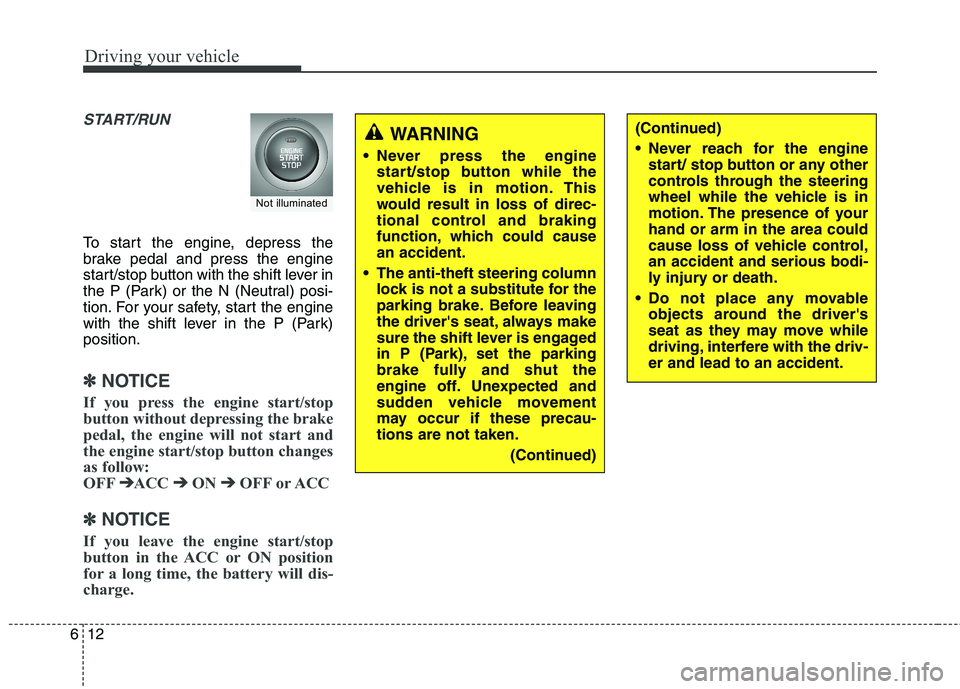
To start the engine, depress the
brake pedal and press the engine
start/stop button with the shift lever in
the P (Park) or the N (Neutral) posi-
tion. For your safety, start the engine
with the shift lever in the P (Park)position.
✽✽
NOTICE
If you press the engine start/stop
button without depressing the brake
pedal, the engine will not start and
the engine start/stop button changes
as follow:
OFF ➔
➔
ACC ➔➔
ON ➔➔
OFF or ACC
✽
✽
NOTICE
If you leave the engine start/stop
button in the ACC or ON position
for a long time, the battery will dis-
charge.
WARNING
Never press the engine start/stop button while the
vehicle is in motion. This
would result in loss of direc-
tional control and braking
function, which could causean accident.
The anti-theft steering column lock is not a substitute for the
parking brake. Before leaving
the driver's seat, always make
sure the shift lever is engaged
in P (Park), set the parking
brake fully and shut the
engine off. Unexpected and
sudden vehicle movement
may occur if these precau-tions are not taken.
(Continued)
Not illuminated
(Continued)
Never reach for the enginestart/ stop button or any other
controls through the steering
wheel while the vehicle is in
motion. The presence of yourhand or arm in the area could
cause loss of vehicle control,an accident and serious bodi-
ly injury or death.
Do not place any movable objects around the driver's
seat as they may move while
driving, interfere with the driv-er and lead to an accident.
Page 339 of 548
615
Driving your vehicle
✽✽
NOTICE
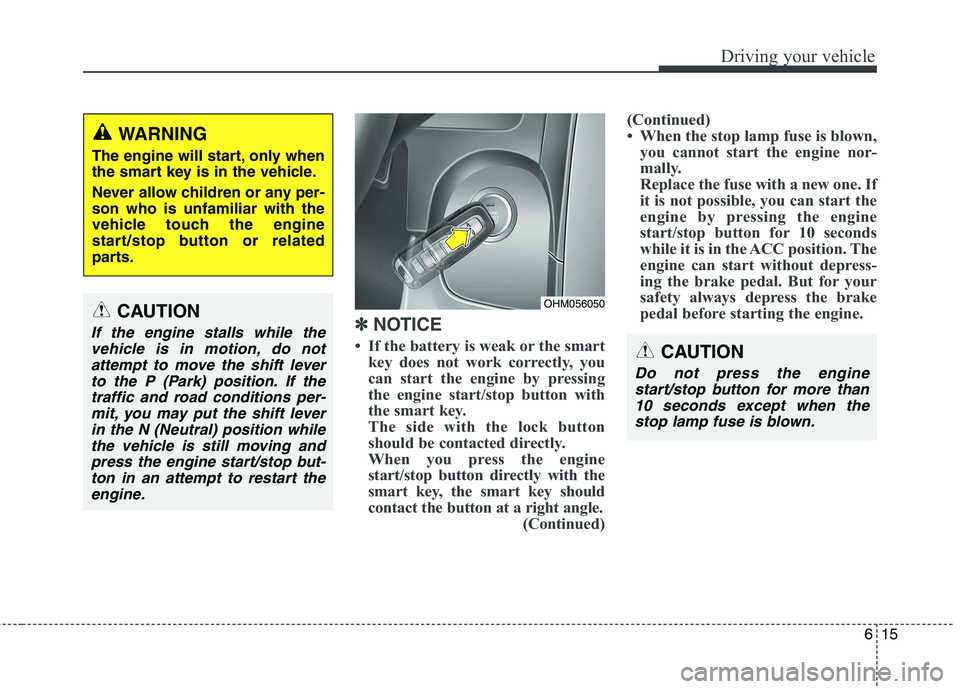
If the battery is weak or the smart key does not work correctly, you
can start the engine by pressing
the engine start/stop button with
the smart key.
The side with the lock button
should be contacted directly.
When you press the engine
start/stop button directly with the
smart key, the smart key should
contact the button at a right angle. (Continued) (Continued)
When the stop lamp fuse is blown,
you cannot start the engine nor-
mally.
Replace the fuse with a new one. If
it is not possible, you can start the
engine by pressing the engine
start/stop button for 10 seconds
while it is in the ACC position. The
engine can start without depress-
ing the brake pedal. But for your
safety always depress the brake
pedal before starting the engine.
WARNING
The engine will start, only when
the smart key is in the vehicle.
Never allow children or any per- son who is unfamiliar with the
vehicle touch the engine
start/stop button or related
parts.
CAUTION
If the engine stalls while the vehicle is in motion, do notattempt to move the shift lever
to the P (Park) position. If thetraffic and road conditions per-mit, you may put the shift lever in the N (Neutral) position whilethe vehicle is still moving andpress the engine start/stop but- ton in an attempt to restart theengine.
OHM056050
CAUTION
Do not press the engine start/stop button for more than10 seconds except when thestop lamp fuse is blown.