display KIA BORREGO 2017 Repair Manual
[x] Cancel search | Manufacturer: KIA, Model Year: 2017, Model line: BORREGO, Model: KIA BORREGO 2017Pages: 548, PDF Size: 36.78 MB
Page 300 of 548
Audio system
558
Voice Command List
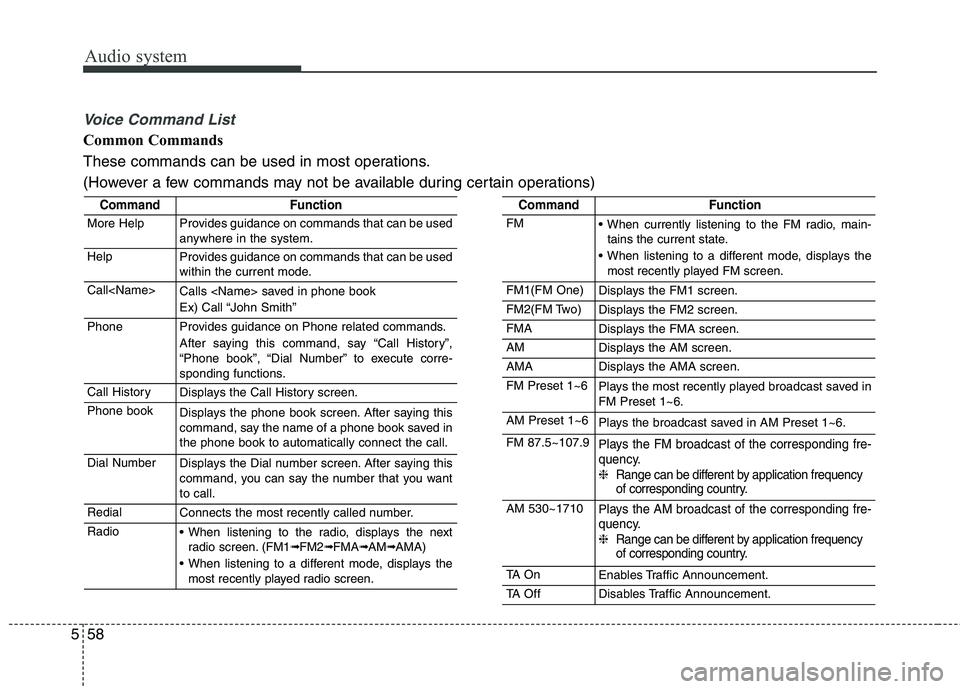
Common Commands
These commands can be used in most operations.
(However a few commands may not be available during certain operations)
CommandFunction
More HelpProvides guidance on commands that can be used
anywhere in the system.
HelpProvides guidance on commands that can be used
within the current mode.
Call
Ex) Call “John Smith”
PhoneProvides guidance on Phone related commands.
After saying this command, say “Call History”,
“Phone book”, “Dial Number” to execute corre-
sponding functions.
Call HistoryDisplays the Call History screen.
Phone bookDisplays the phone book screen. After saying this
command, say the name of a phone book saved inthe phone book to automatically connect the call.
Dial NumberDisplays the Dial number screen. After saying this
command, you can say the number that you wantto call.
RedialConnects the most recently called number.
Radio When listening to the radio, displays the nextradio screen. (FM1➟FM2➟FMA➟AM➟AMA)
When listening to a different mode, displays the most recently played radio screen.
CommandFunction
FM When currently listening to the FM radio, main-tains the current state.
When listening to a different mode, displays the most recently played FM screen.
FM1(FM One)Displays the FM1 screen.
FM2(FM Two)Displays the FM2 screen.
FMADisplays the FMA screen.
AMDisplays the AM screen.
AMADisplays the AMA screen.
FM Preset 1~6Plays the most recently played broadcast saved in FM Preset 1~6.
AM Preset 1~6Plays the broadcast saved in AM Preset 1~6.
FM 87.5~107.9Plays the FM broadcast of the corresponding fre-
quency. ❈ Range can be different by application frequency
of corresponding country.
AM 530~1710Plays the AM broadcast of the corresponding fre-
quency. ❈ Range can be different by application frequency
of corresponding country.
TA O nEnables Traffic Announcement.
TA OffDisables Traffic Announcement.
Page 302 of 548
Audio system
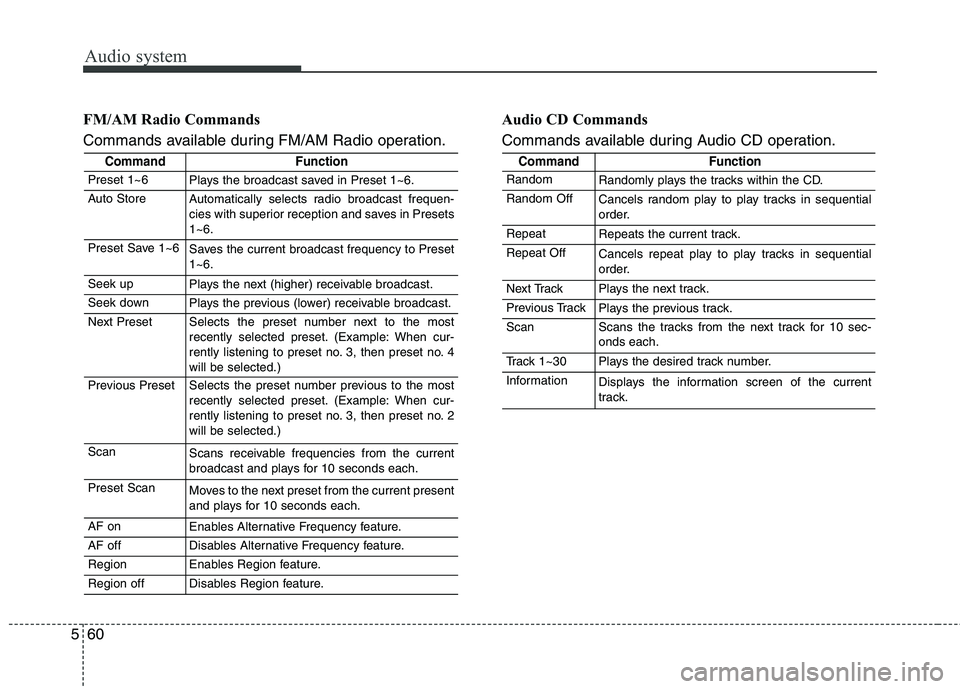
560FM/AM Radio Commands
Commands available during FM/AM Radio operation.
Audio CD Commands
Commands available during Audio CD operation.
CommandFunction
Preset 1~6Plays the broadcast saved in Preset 1~6.
Auto StoreAutomatically selects radio broadcast frequen-
cies with superior reception and saves in Presets1~6.
Preset Save 1~6Saves the current broadcast frequency to Preset 1~6.
Seek upPlays the next (higher) receivable broadcast.
Seek downPlays the previous (lower) receivable broadcast.
Next PresetSelects the preset number next to the most
recently selected preset. (Example: When cur-
rently listening to preset no. 3, then preset no. 4will be selected.)
Previous PresetSelects the preset number previous to the most
recently selected preset. (Example: When cur-
rently listening to preset no. 3, then preset no. 2will be selected.)
ScanScans receivable frequencies from the current
broadcast and plays for 10 seconds each.
Preset ScanMoves to the next preset from the current present
and plays for 10 seconds each.
AF onEnables Alternative Frequency feature.
AF offDisables Alternative Frequency feature.
RegionEnables Region feature.
Region offDisables Region feature.
CommandFunction
RandomRandomly plays the tracks within the CD.
Random OffCancels random play to play tracks in sequential
order.
RepeatRepeats the current track.
Repeat OffCancels repeat play to play tracks in sequential
order.
Next TrackPlays the next track.
Previous TrackPlays the previous track.
ScanScans the tracks from the next track for 10 sec- onds each.
Track 1~30Plays the desired track number.
InformationDisplays the information screen of the current
track.
Page 303 of 548
Audio system
61
5
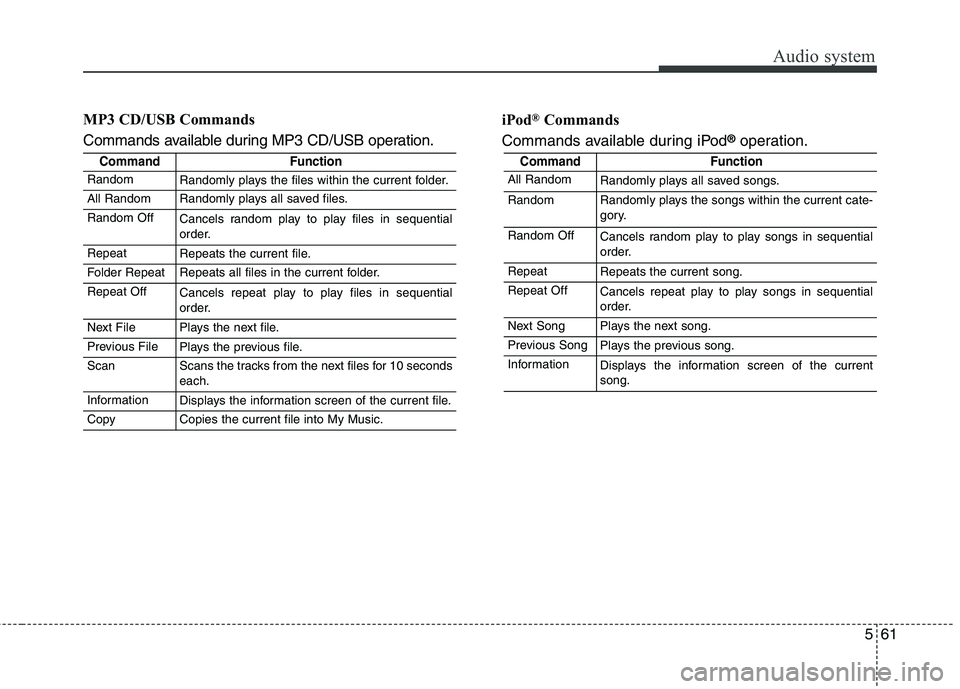
MP3 CD/USB Commands
Commands available during MP3 CD/USB operation. iPod
®
Commands
Commands available during iPod ®
operation.
CommandFunction
RandomRandomly plays the files within the current folder.
All RandomRandomly plays all saved files.
Random OffCancels random play to play files in sequential
order.
RepeatRepeats the current file.
Folder RepeatRepeats all files in the current folder.
Repeat OffCancels repeat play to play files in sequential
order.
Next FilePlays the next file.
Previous FilePlays the previous file.
ScanScans the tracks from the next files for 10 seconds each.
InformationDisplays the information screen of the current file.
CopyCopies the current file into My Music.
CommandFunction
All RandomRandomly plays all saved songs.
RandomRandomly plays the songs within the current cate-
gory.
Random OffCancels random play to play songs in sequential
order.
RepeatRepeats the current song.
Repeat OffCancels repeat play to play songs in sequential
order.
Next SongPlays the next song.
Previous SongPlays the previous song.
InformationDisplays the information screen of the current song.
Page 304 of 548
Audio system
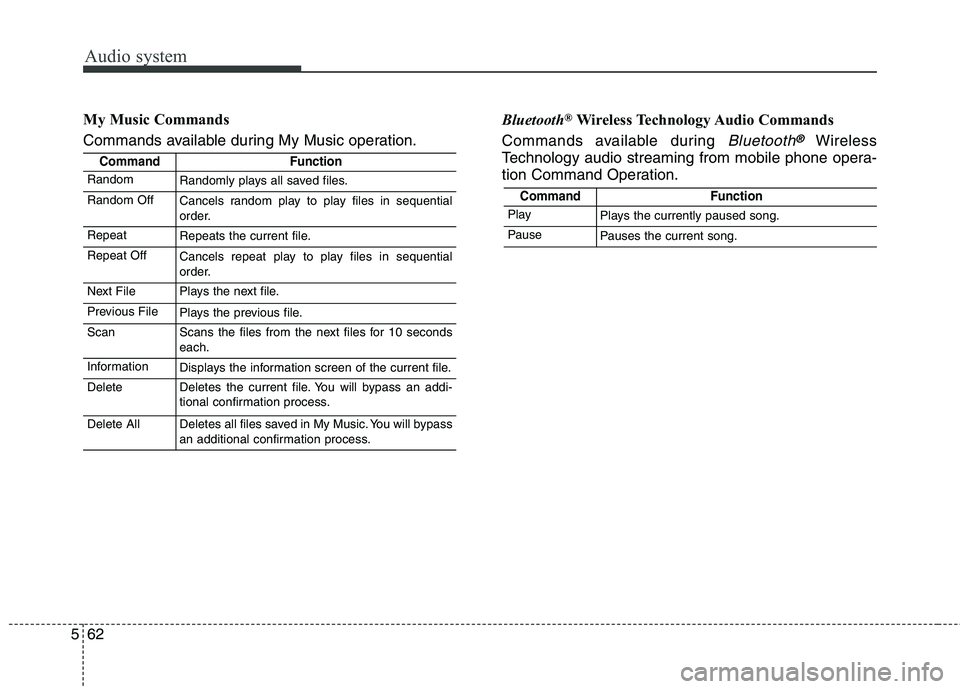
562My Music Commands
Commands available during My Music operation.
Bluetooth
®
Wireless Technology Audio Commands
Commands available during
Bluetooth®Wireless
Technology audio streaming from mobile phone opera-
tion Command Operation.
CommandFunction
RandomRandomly plays all saved files.
Random OffCancels random play to play files in sequential
order.
RepeatRepeats the current file.
Repeat OffCancels repeat play to play files in sequential
order.
Next FilePlays the next file.
Previous FilePlays the previous file.
ScanScans the files from the next files for 10 seconds each.
InformationDisplays the information screen of the current file.
DeleteDeletes the current file. You will bypass an addi-
tional confirmation process.
Delete AllDeletes all files saved in My Music. You will bypass
an additional confirmation process.
CommandFunction
PlayPlays the currently paused song.
PausePauses the current song.
Page 305 of 548
![KIA BORREGO 2017 Repair Manual Audio system
63
5
Setup Mode
(Type-1) Press the [SETUP]button to display
the Setup screen.
You can select and control options
related to [Display], [Sound], [Clock/
Day], [Phone] and [System].With](/img/2/57934/w960_57934-304.png "KIA BORREGO 2017 Repair Manual Audio system
63
5
Setup Mode
(Type-1) Press the [SETUP]button to display
the Setup screen.
You can select and control options
related to [Display], [Sound], [Clock/
Day], [Phone] and [System].With")
Audio system
63
5
Setup Mode
(Type-1) Press the [SETUP]button to display
the Setup screen.
You can select and control options
related to [Display], [Sound], [Clock/
Day], [Phone] and [System].With the Display Button
Press the [SETUP]button
Select
[Display]
You can select and control options
related to [Brightness], [Pop-up
Mode], [Scroll text] and [Song Info].
Adjusting the Brightness
Use the [Left/Right] buttons to adjust
the screen brightness or set the
Brightness on Automatic, Day or
Night mode.
Press the [Default] button to reset.
Automatic : Adjusts the brightnessautomatically.
Day : Always maintains the bright- ness on high.
Night : Always maintains the bright- ness on low.
Page 306 of 548
![KIA BORREGO 2017 Repair Manual Audio system
564Pop-up Mode
This feature is used to display the
Pop-up Mode screen when entering
radio and media modes.
When this feature is turned on, pressing the
[RADIO]or [MEDIA]
button will d](/img/2/57934/w960_57934-305.png "KIA BORREGO 2017 Repair Manual Audio system
564Pop-up Mode
This feature is used to display the
Pop-up Mode screen when entering
radio and media modes.
When this feature is turned on, pressing the
[RADIO]or [MEDIA]
button will d")
Audio system
564Pop-up Mode
This feature is used to display the
Pop-up Mode screen when entering
radio and media modes.
When this feature is turned on, pressing the
[RADIO]or [MEDIA]
button will display the Pop-up Modescreen.
✽✽ NOTICE
The media Pop-up Mode screen can
be displayed only when two or more
media modes have been connected.
Scroll Text
This feature is used to scroll text dis-
played on the screen when it is too
long to be displayed at once.
When turned on, the text is repeat-
edly scrolled. When turned off, the
text is scrolled just once. Song Info
This feature is used to change the
information displayed within USB
and MP3 CD modes.
Folder File : Displays file name and
folder name.
Album Artist Song : Displays album name/artist name/song.
Page 308 of 548
![KIA BORREGO 2017 Repair Manual Audio system
566Volume Dialogue (if equipped)
Use the [-], [+] buttons to adjust the
Volume Dialog.
Touch Screen Beep
This feature is used to turn the touch
screen beep on/off.
With the Clock/Day](/img/2/57934/w960_57934-307.png "KIA BORREGO 2017 Repair Manual Audio system
566Volume Dialogue (if equipped)
Use the [-], [+] buttons to adjust the
Volume Dialog.
Touch Screen Beep
This feature is used to turn the touch
screen beep on/off.
With the Clock/Day")
Audio system
566Volume Dialogue (if equipped)
Use the [-], [+] buttons to adjust the
Volume Dialog.
Touch Screen Beep
This feature is used to turn the touch
screen beep on/off.
With the Clock/Day Button
Press the
[SETUP]button
Select
[Clock/Day]
You can select and control options
related to [Clock Settings], [Day
Settings], [Time Format], [Clock
Display(Power off)] and [AutomaticRDS Time].
Clock Settings
Use the [Up/Down] buttons to set the
Hour, Minutes and AM/PM setting. Press and hold the [CLOCK]button
to display the Clock/Day screen.
Page 309 of 548
![KIA BORREGO 2017 Repair Manual Audio system
67
5
Day Settings
Use the [Up/Down] buttons to set the
Day, Month and Year setting. Time Format
This feature is used to change the
clock format between 12hr or 24hr.
Clock Display (P](/img/2/57934/w960_57934-308.png "KIA BORREGO 2017 Repair Manual Audio system
67
5
Day Settings
Use the [Up/Down] buttons to set the
Day, Month and Year setting. Time Format
This feature is used to change the
clock format between 12hr or 24hr.
Clock Display (P")
Audio system
67
5
Day Settings
Use the [Up/Down] buttons to set the
Day, Month and Year setting. Time Format
This feature is used to change the
clock format between 12hr or 24hr.
Clock Display (Power Off)
This feature is used to display a clock on the screen when the audio sys-
tem is turned off.Automatic RDS Time
This feature is used to set time auto-
matically by synchronizing with RDS.
Page 311 of 548
Audio system
69
5
✽✽
NOTICE - Before
Downloading Phone Books
Only phone books within connect- ed phones can be downloaded.
Also check to see that your mobile
phone supports the download fea-
ture.
To learn more about whether your mobile phone supports phone
book downloads, refer to your
mobile phone user’s manual.
The Phone book for only the con- nected phone can be downloaded.
Before downloading, check to see
whether your phone supports the
download feature.
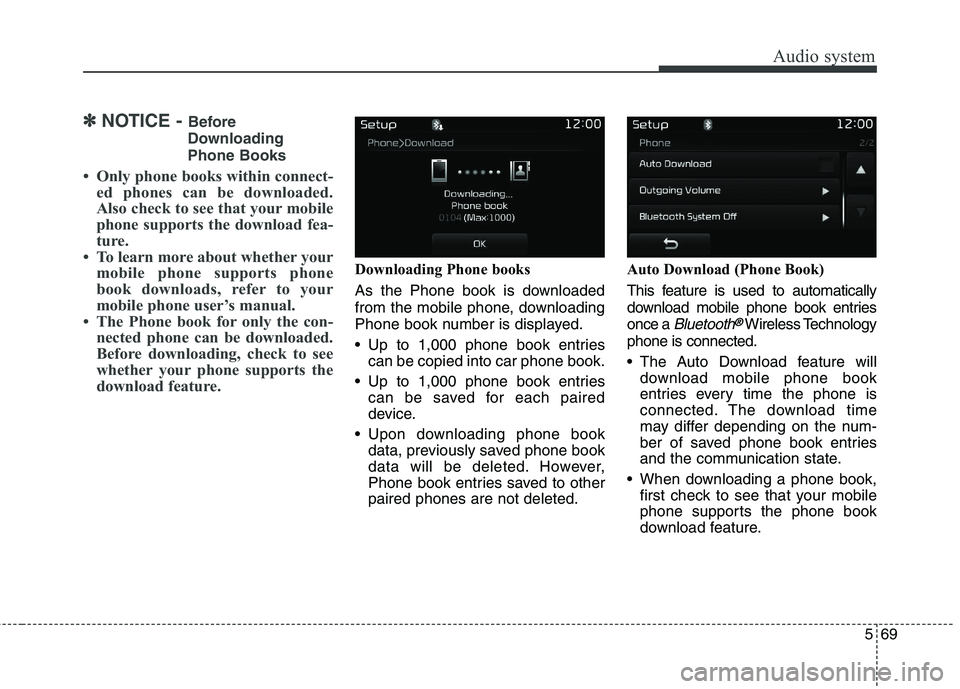
Downloading Phone books
As the Phone book is downloaded
from the mobile phone, downloading
Phone book number is displayed.
Up to 1,000 phone book entriescan be copied into car phone book.
Up to 1,000 phone book entries can be saved for each paired
device.
Upon downloading phone book data, previously saved phone book
data will be deleted. However,
Phone book entries saved to otherpaired phones are not deleted. Auto Download (Phone Book)
This feature is used to automatically
download mobile phone book entriesonce a
Bluetooth®Wireless Technology
phone is connected.
The Auto Download feature will download mobile phone book
entries every time the phone is
connected. The download time
may differ depending on the num-
ber of saved phone book entries
and the communication state.
When downloading a phone book, first check to see that your mobile
phone supports the phone book
download feature.
Page 313 of 548
![KIA BORREGO 2017 Repair Manual Audio system
71
5
With the System Button
Press the [SETUP]button
Select
[System]
You can select and control options
related to [Memory Information],
[Voice Recognition System] and[Language].
Mem](/img/2/57934/w960_57934-312.png "KIA BORREGO 2017 Repair Manual Audio system
71
5
With the System Button
Press the [SETUP]button
Select
[System]
You can select and control options
related to [Memory Information],
[Voice Recognition System] and[Language].
Mem")
Audio system
71
5
With the System Button
Press the [SETUP]button
Select
[System]
You can select and control options
related to [Memory Information],
[Voice Recognition System] and[Language].
Memory Information
This feature displays information
related to system memory.
Using : Displays capacity currently in use
Capacity : Displays total capacity ❈ May differ depending on the
selected audio. Voice Recognition System (if equipped)
This feature is used to select the
desired prompt feedback option from
Normal and Expert.
Normal : When using voice recog-
nition, provides detailed guidance prompts
Expert : When using voice recogni- tion, omits some guidance prompts Language
This feature is used to change the
system and voice recognition lan-
guage. If the language is changed, the sys-
tem will restart and apply the select-
ed language.
Language support by region