display KIA BORREGO 2017 Manual PDF
[x] Cancel search | Manufacturer: KIA, Model Year: 2017, Model line: BORREGO, Model: KIA BORREGO 2017Pages: 548, PDF Size: 36.78 MB
Page 314 of 548
![KIA BORREGO 2017 Manual PDF Audio system
572Setup Mode
(Type-2) Press the
[SETUP]button to display
the Setup screen.
You can select and control options
related to [Display], [Sound],
[Clock/Calendar], [Phone] and[System].
Wi](/img/2/57934/w960_57934-313.png "KIA BORREGO 2017 Manual PDF Audio system
572Setup Mode
(Type-2) Press the
[SETUP]button to display
the Setup screen.
You can select and control options
related to [Display], [Sound],
[Clock/Calendar], [Phone] and[System].
Wi")
Audio system
572Setup Mode
(Type-2) Press the
[SETUP]button to display
the Setup screen.
You can select and control options
related to [Display], [Sound],
[Clock/Calendar], [Phone] and[System].
With the Display Button
Press the [SETUP]button
Select
[Display]
You can select and control options
related to [Brightness], [Mode Pop
up], [Text Scroll] and [Media Display].
Adjusting the Brightness
Use the [Left/Right] buttons to adjust
the screen brightness or set the
Brightness on Automatic, Day or
Night mode.
Press the [Default] button to reset.
Automatic : Adjusts the brightnessautomatically.
Day : Always maintains the bright- ness on high.
Night : Always maintains the bright- ness on low.
Page 315 of 548
![KIA BORREGO 2017 Manual PDF Audio system
73
5
Mode Pop up
This feature is used to display the
Mode Pop up screen when entering
radio and media modes.
When this feature is turned on, pressing the [RADIO]or [MEDIA]
button wil](/img/2/57934/w960_57934-314.png "KIA BORREGO 2017 Manual PDF Audio system
73
5
Mode Pop up
This feature is used to display the
Mode Pop up screen when entering
radio and media modes.
When this feature is turned on, pressing the [RADIO]or [MEDIA]
button wil")
Audio system
73
5
Mode Pop up
This feature is used to display the
Mode Pop up screen when entering
radio and media modes.
When this feature is turned on, pressing the [RADIO]or [MEDIA]
button will display the Mode Pop upscreen.
✽✽ NOTICE
The media Mode Pop up screen can
be displayed only when two or more
media modes have been connected.
Text Scroll
This feature is used to scroll text dis-
played on the screen when it is too
long to be displayed at once.
When turned on, the text is repeat-
edly scrolled. When turned off, the
text is scrolled just once. Media Display
This feature is used to change the
information displayed within USB
and MP3 CD modes.
Folder File : Displays file name and
folder name.
Album Artist Song : Displays album name/artist name/song.
Page 317 of 548
![KIA BORREGO 2017 Manual PDF Audio system
75
5
With the Clock/Calendar Button
Press the [SETUP]button
Select
[Clock/Calendar]
You can select and control options
related to [Clock Settings], [Calendar
Settings] and [Clock Dis](/img/2/57934/w960_57934-316.png "KIA BORREGO 2017 Manual PDF Audio system
75
5
With the Clock/Calendar Button
Press the [SETUP]button
Select
[Clock/Calendar]
You can select and control options
related to [Clock Settings], [Calendar
Settings] and [Clock Dis")
Audio system
75
5
With the Clock/Calendar Button
Press the [SETUP]button
Select
[Clock/Calendar]
You can select and control options
related to [Clock Settings], [Calendar
Settings] and [Clock Display(Poweroff)].
Clock Settings
Use the [Up/Down] buttons to set the
Hour, Minutes and AM/PM setting. Press and hold the [CLOCK]button
to display the Clock/Calendar screen. Calendar Settings
Use the [Up/Down] buttons to set the
Year, Month and Day setting.
Page 318 of 548
![KIA BORREGO 2017 Manual PDF Audio system
576Clock Display (Power off)
This feature is used to display a clock on the screen when the audio sys-
tem is turned off.
With the Phone Button
Press the
[SETUP]button
Select
[Phone]](/img/2/57934/w960_57934-317.png "KIA BORREGO 2017 Manual PDF Audio system
576Clock Display (Power off)
This feature is used to display a clock on the screen when the audio sys-
tem is turned off.
With the Phone Button
Press the
[SETUP]button
Select
[Phone]")
Audio system
576Clock Display (Power off)
This feature is used to display a clock on the screen when the audio sys-
tem is turned off.
With the Phone Button
Press the
[SETUP]button
Select
[Phone]
You can select and control options
related to [Pair Phone], [Paired
Phone List], [Contacts Download],
[Auto Download], [Outgoing Volume]and [Bluetooth System Off].
Pairing a New Device
Bluetooth®Wireless Technology
devices can be paired with the audiosystem.
For more information, refer to the
“Pairing through Phone Setup” sec-tion within
Bluetooth®Wireless
Technology.
Page 319 of 548
Audio system
77
5
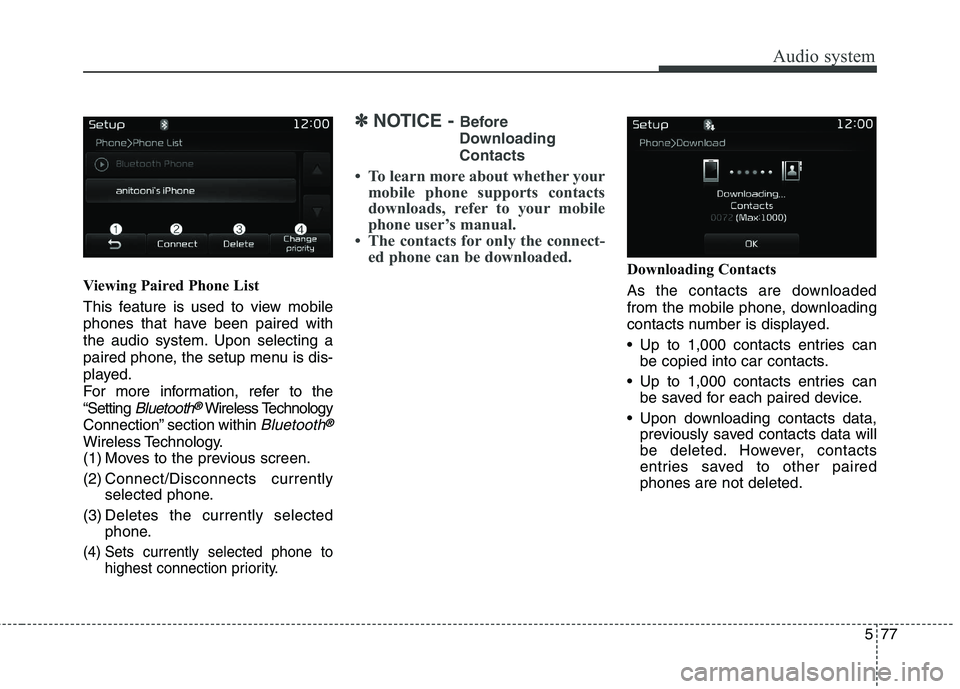
Viewing Paired Phone List
This feature is used to view mobile
phones that have been paired with
the audio system. Upon selecting a
paired phone, the setup menu is dis-
played.
For more information, refer to the“Setting
Bluetooth®Wireless Technology
Connection” section within
Bluetooth®
Wireless Technology.
(1) Moves to the previous screen.
(2) Connect/Disconnects currently selected phone.
(3) Deletes the currently selected phone.
(4) Sets currently selected phone to highest connection priority.
✽✽NOTICE - Before
Downloading Contacts
To learn more about whether your mobile phone supports contacts
downloads, refer to your mobile
phone user’s manual.
The contacts for only the connect- ed phone can be downloaded.
Downloading Contacts
As the contacts are downloaded
from the mobile phone, downloading
contacts number is displayed.
Up to 1,000 contacts entries canbe copied into car contacts.
Up to 1,000 contacts entries can be saved for each paired device.
Upon downloading contacts data, previously saved contacts data will
be deleted. However, contacts
entries saved to other pairedphones are not deleted.
Page 321 of 548
![KIA BORREGO 2017 Manual PDF Audio system
79
5
With the System Button
Press the [SETUP] button
Select
[System]
You can select and control options
related to [Memory Information] and[Language].
Memory Information
This featu](/img/2/57934/w960_57934-320.png "KIA BORREGO 2017 Manual PDF Audio system
79
5
With the System Button
Press the [SETUP] button
Select
[System]
You can select and control options
related to [Memory Information] and[Language].
Memory Information
This featu")
Audio system
79
5
With the System Button
Press the [SETUP] button
Select
[System]
You can select and control options
related to [Memory Information] and[Language].
Memory Information
This feature displays information
related to system memory.
Using : Displays capacity currently in use
Capacity : Displays total capacity Language
This feature is used to change the
system language. If the language is changed, the sys-
tem will restart and apply the select-
ed language. Language Setting is depend on the
Audio System.
Page 338 of 548

Driving your vehicle
14
6
3. Press the engine start/stop button
while depressing the brake pedal.
4. Continue depressing the brake pedal until the illuminated glow
indicator goes off. (approximately5 seconds)
5. The engine starts running when the glow indicator goes off.
✽✽
NOTICE
If the engine start/stop button is
pressed once more while the engine
is pre-heating, the engine may start.
Starting and stopping the engine for
turbocharger intercooler
1. Do not race or accelerate the engine immediately after starting.
If the engine is cold, idle for sever-
al seconds before sufficient lubri-cation is ensured in the tur-bocharger unit.
2. After high speed or extended driv- ing, requiring a heavy engine load,
idle the engine about 1 minute
before turning it off.
This idle time will allow the tur- bocharger to cool prior to shutting
the engine off. Even if the smart key is in the vehi-
cle, if it is far away from you, the
engine may not start.
When the engine start/stop button is in the ACC position or above, if
any door is opened, the system
checks for the smart key. If the
smart key is not in the vehicle, a
message “Key is not in the vehicle”
will appear on the LCD display. Andif all doors are closed, the chime
will sound for 5 seconds. The indi-
cator or warning will turn off while
the vehicle is moving. Always have
the smart key with you.
W-60
Glow indicator light
CAUTION
Do not turn the engine off imme-
diately after it has been subject-ed to a heavy load. Doing so may cause severe damage tothe engine or turbocharger unit.
Page 341 of 548

617
Driving your vehicle
For smooth operation, depress thebrake pedal when shifting from N(Neutral) to a forward or reverse gear.
Transaxle ranges
The indicator lights in the instrument
cluster displays the shift lever posi-
tion when the ignition switch is in theON position.
P (Park)
Always come to a complete stop
before shifting into P (Park). This
position locks the transaxle and pre-
vents the front wheels from rotating. R (Reverse)
Use this position to drive the vehicle
backward.
WARNING
- Automatic
transaxle
Always check the surrounding areas near your vehicle for
people, especially children,
before shifting a vehicle into
D (Drive) or R (Reverse).
Before leaving the driver’s seat, always make sure the
shift lever is in the P (Park)
position; then set the parking
brake fully and shut the
engine off. Unexpected and
sudden vehicle movementcan occur if these precautions
are not followed in the orderidentified.
Do not use the engine brake (shifting from a high gear to
lower gear) rapidly on slip-
pery roads.
The vehicle may slip causing an accident.
CAUTION
To avoid damage to your
transaxle, do not acceleratethe engine in R (Reverse) orany forward gear position withthe brakes on.
When stopped on an upgrade, do not hold the vehicle sta-tionary with engine power.Use the service brake or theparking brake.
Do not shift from N (Neutral) or P (Park) into D (Drive), or R(Reverse) when the engine isabove idle speed.
WARNING
Shifting into P (Park) while the vehicle is in motion will cause
the drive wheels to lock which
will cause you to lose control
of the vehicle.
Do not use the P (Park) posi- tion in place of the parking
brake. Always make sure the
shift lever is latched in the P
(Park) position and set the
parking brake fully.
Never leave a child unattend- ed in a vehicle.
CAUTION
The transaxle may be damaged
if you shift into P (Park) whilethe vehicle is in motion.
Page 373 of 548
649
Driving your vehicle
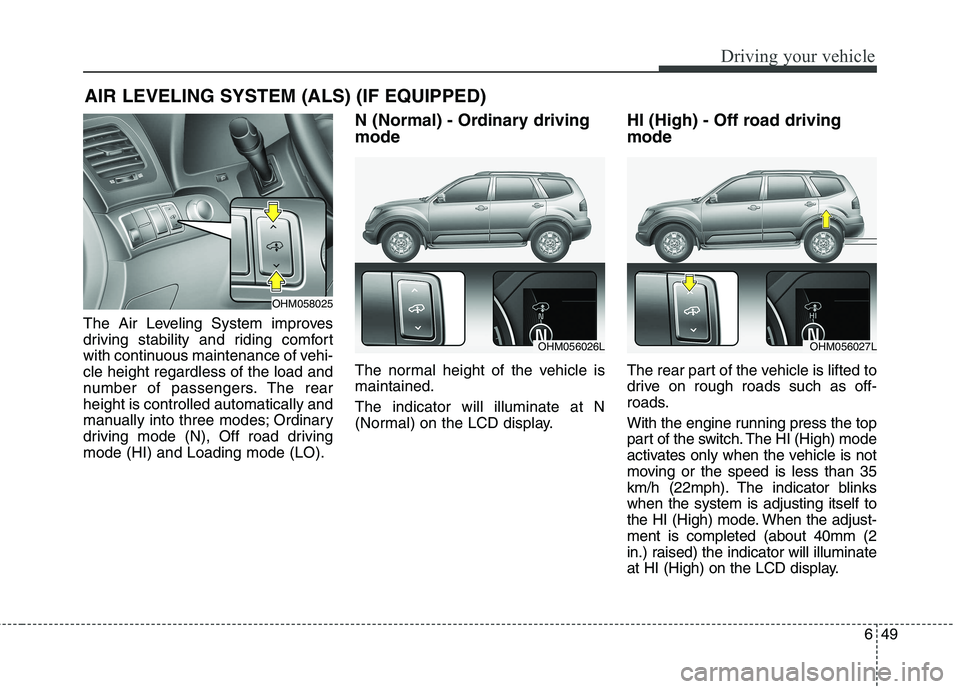
The Air Leveling System improves
driving stability and riding comfort
with continuous maintenance of vehi-cle height regardless of the load and
number of passengers. The rearheight is controlled automatically and
manually into three modes; Ordinary
driving mode (N), Off road drivingmode (HI) and Loading mode (LO).N (Normal) - Ordinary driving mode
The normal height of the vehicle is maintained. The indicator will illuminate at N
(Normal) on the LCD display.
HI (High) - Off road driving mode
The rear part of the vehicle is lifted to
drive on rough roads such as off-
roads.
With the engine running press the top
part of the switch. The HI (High) mode
activates only when the vehicle is not
moving or the speed is less than 35
km/h (22mph). The indicator blinkswhen the system is adjusting itself to
the HI (High) mode. When the adjust-ment is completed (about 40mm (2
in.) raised) the indicator will illuminate
at HI (High) on the LCD display.
AIR LEVELING SYSTEM (ALS) (IF EQUIPPED)
OHM058025
OHM056026LOHM056027L
Page 374 of 548
Driving your vehicle
50
6
To go to the N (Normal) mode, press
the bottom part of the switch. Also, if
the vehicle speed is over 60 km/h
(38mph) or drives over 10 secondsat the speed of about 45 km/h
(28mph), the vehicle will lower itself
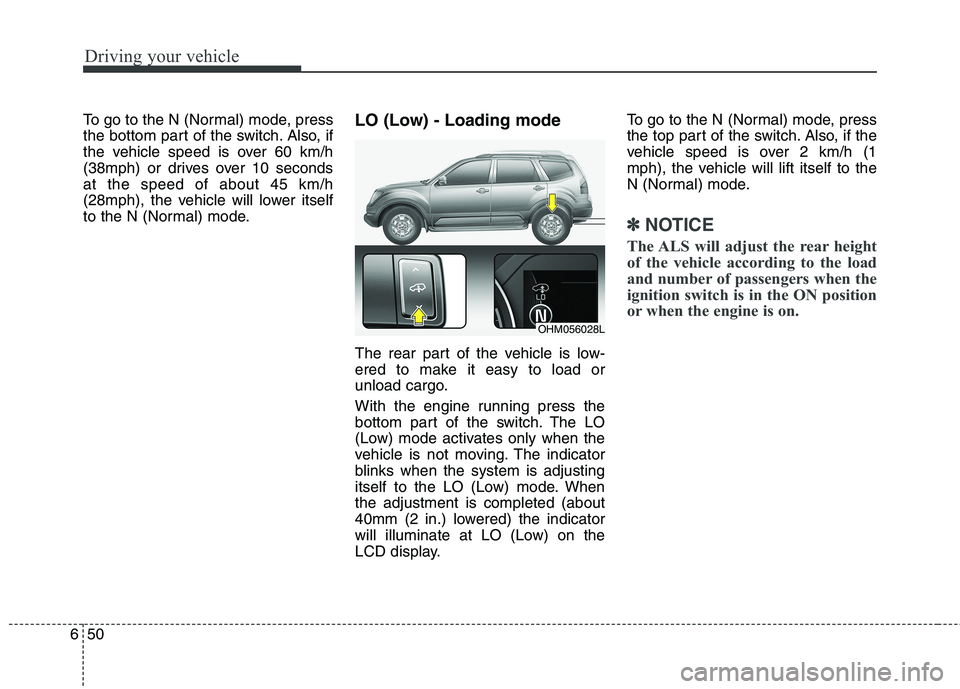
to the N (Normal) mode. LO (Low) - Loading mode
The rear part of the vehicle is low-
ered to make it easy to load or
unload cargo.
With the engine running press the
bottom part of the switch. The LO
(Low) mode activates only when the
vehicle is not moving. The indicator
blinks when the system is adjusting
itself to the LO (Low) mode. Whenthe adjustment is completed (about
40mm (2 in.) lowered) the indicator
will illuminate at LO (Low) on the
LCD display.To go to the N (Normal) mode, press
the top part of the switch. Also, if the
vehicle speed is over 2 km/h (1
mph), the vehicle will lift itself to the
N (Normal) mode.
✽✽
NOTICE
The ALS will adjust the rear height
of the vehicle according to the load
and number of passengers when the
ignition switch is in the ON position
or when the engine is on.
OHM056028L