instrument cluster KIA CADENZA 2017 User Guide
[x] Cancel search | Manufacturer: KIA, Model Year: 2017, Model line: CADENZA, Model: KIA CADENZA 2017Pages: 500, PDF Size: 10.37 MB
Page 287 of 500
Driving your vehicle
50
5
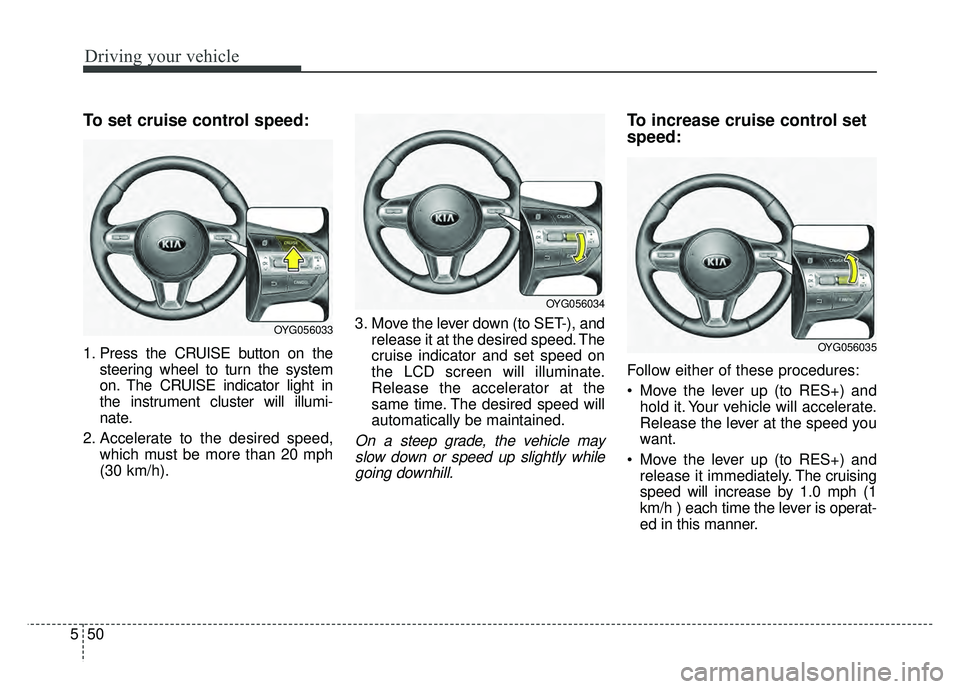
To set cruise control speed:
1. Press the CRUISE button on the
steering wheel to turn the system
on. The CRUISE indicator light in
the instrument cluster will illumi-
nate.
2. Accelerate to the desired speed, which must be more than 20 mph
(30 km/h). 3. Move the lever down (to SET-), and
release it at the desired speed. The
cruise indicator and set speed on
the LCD screen will illuminate.
Release the accelerator at the
same time. The desired speed will
automatically be maintained.
On a steep grade, the vehicle mayslow down or speed up slightly whilegoing downhill.
To increase cruise control set
speed:
Follow either of these procedures:
Move the lever up (to RES+) and hold it. Your vehicle will accelerate.
Release the lever at the speed you
want.
Move the lever up (to RES+) and release it immediately. The cruising
speed will increase by 1.0 mph (1
km/h ) each time the lever is operat-
ed in this manner.
OYG056033
OYG056034
OYG056035
Page 289 of 500
Driving your vehicle
52
5
Each of these actions will cancel
cruise control operation (The setspeed on the LCD will disappear andthe CRUISE indicator will illuminatecontinuously.), but it will not turn thesystem off. If you wish to resumecruise control operation, move thelever up (to RES+). You will return toyour previously preset speed.To resume cruising speed at
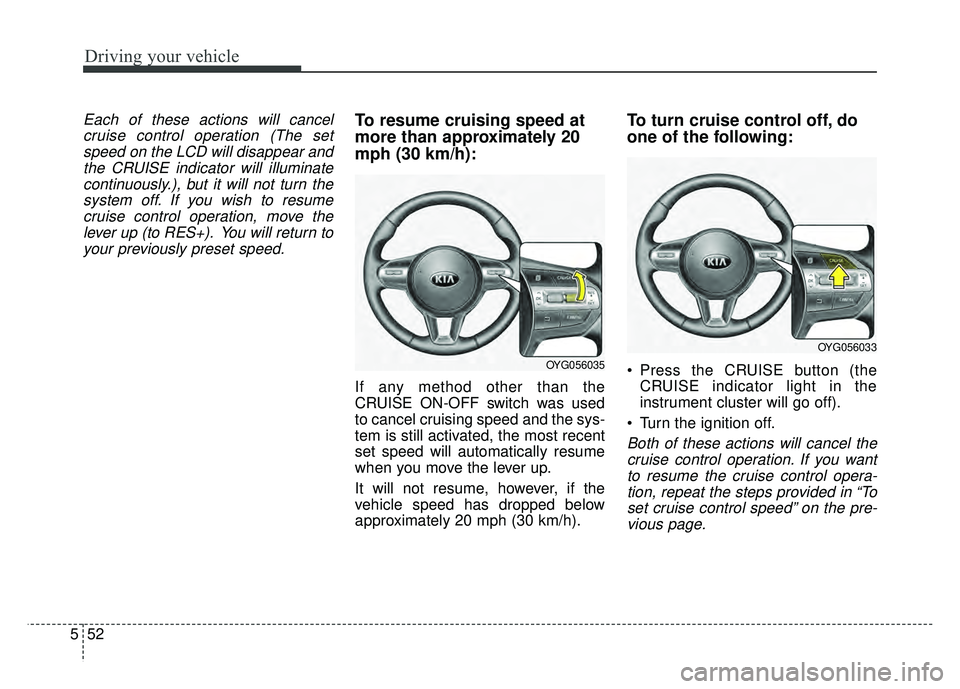
more than approximately 20
mph (30 km/h):
If any method other than the
CRUISE ON-OFF switch was used
to cancel cruising speed and the sys-
tem is still activated, the most recent
set speed will automatically resume
when you move the lever up.
It will not resume, however, if the
vehicle speed has dropped below
approximately 20 mph (30 km/h).
To turn cruise control off, do
one of the following:
Press the CRUISE button (the CRUISE indicator light in the
instrument cluster will go off).
Turn the ignition off.
Both of these actions will cancel the cruise control operation. If you wantto resume the cruise control opera-tion, repeat the steps provided in “Toset cruise control speed” on the pre-vious page.
OYG056035
OYG056033
Page 290 of 500
553
Driving your vehicle
ADVANCED SMART CRUISE CONTROL SYSTEM (ASCC) (IF EQUIPPED)
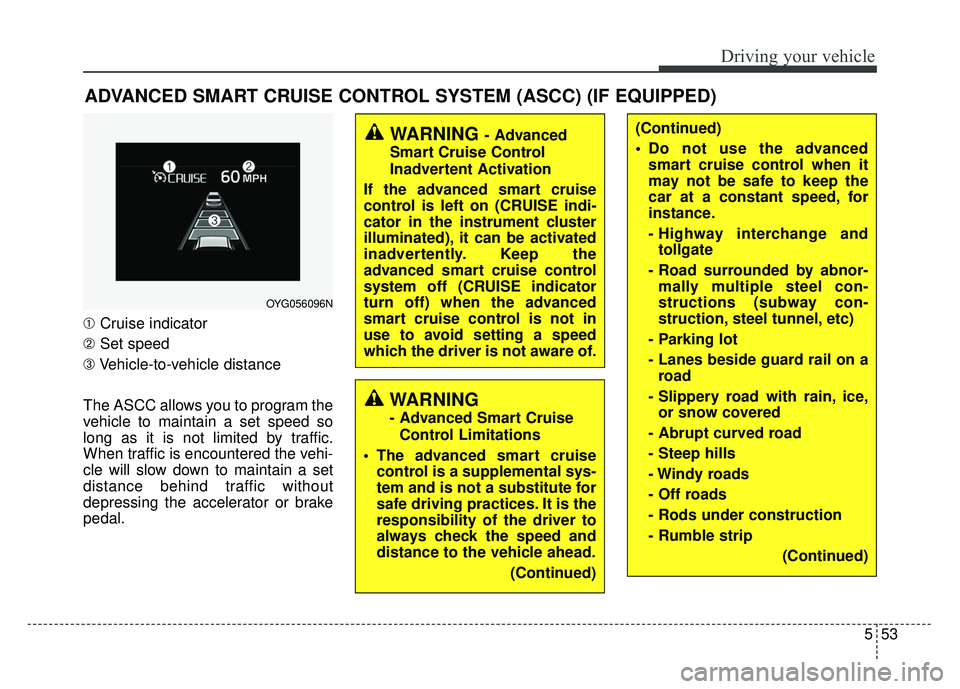
➀Cruise indicator
➁ Set speed
➂ Vehicle-to-vehicle distance
The ASCC allows you to program the
vehicle to maintain a set speed so
long as it is not limited by traffic.
When traffic is encountered the vehi-
cle will slow down to maintain a set
distance behind traffic without
depressing the accelerator or brake
pedal.
WARNING - Advanced
Smart Cruise Control
Inadvertent Activation
If the advanced smart cruise
control is left on (CRUISE indi-
cator in the instrument cluster
illuminated), it can be activated
inadvertently. Keep the
advanced smart cruise control
system off (CRUISE indicator
turn off) when the advanced
smart cruise control is not in
use to avoid setting a speed
which the driver is not aware of.
WARNING
- Advanced Smart Cruise Control Limitations
The advanced smart cruise control is a supplemental sys-
tem and is not a substitute for
safe driving practices. It is the
responsibility of the driver to
always check the speed and
distance to the vehicle ahead.
(Continued)
OYG056096N
(Continued)
Do not use the advancedsmart cruise control when it
may not be safe to keep the
car at a constant speed, for
instance.
- Highway interchange andtollgate
- Road surrounded by abnor- mally multiple steel con-
structions (subway con-
struction, steel tunnel, etc)
- Parking lot
- Lanes beside guard rail on a road
- Slippery road with rain, ice, or snow covered
- Abrupt curved road
- Steep hills
- Windy roads
- Off roads
- Rods under construction
- Rumble strip (Continued)
Page 291 of 500
Driving your vehicle
54
5
Speed setting (ASCC)
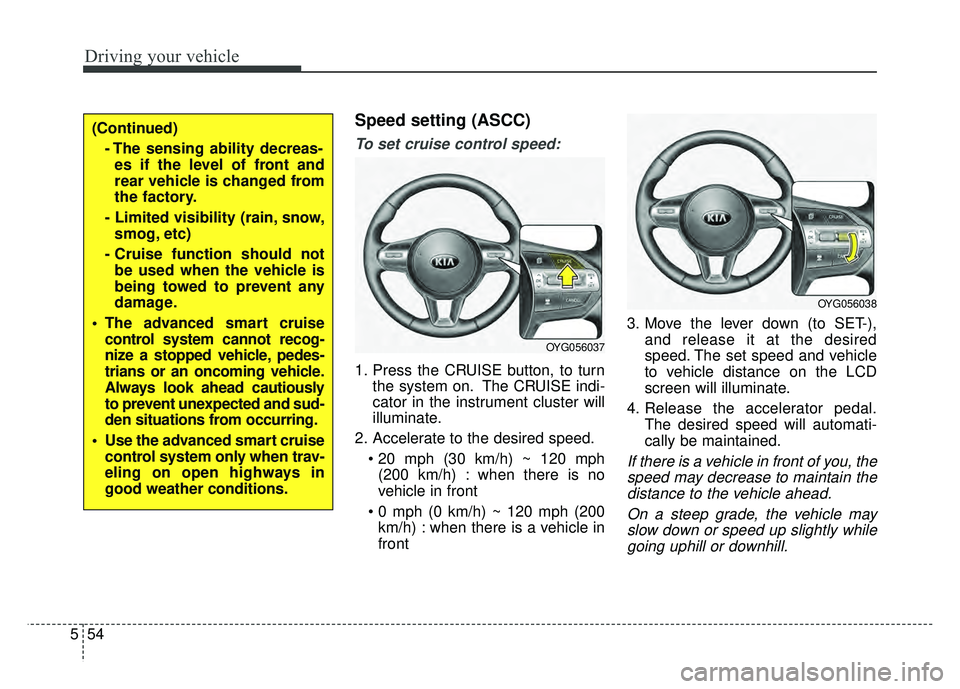
To set cruise control speed:
1. Press the CRUISE button, to turn
the system on. The CRUISE indi-
cator in the instrument cluster will
illuminate.
2. Accelerate to the desired speed. (200 km/h) : when there is no
vehicle in front
km/h) : when there is a vehicle in
front 3. Move the lever down (to SET-),
and release it at the desired
speed. The set speed and vehicle
to vehicle distance on the LCD
screen will illuminate.
4. Release the accelerator pedal. The desired speed will automati-
cally be maintained.
If there is a vehicle in front of you, thespeed may decrease to maintain thedistance to the vehicle ahead.
On a steep grade, the vehicle mayslow down or speed up slightly whilegoing uphill or downhill.
OYG056037
OYG056038
(Continued)
- The sensing ability decreas-es if the level of front and
rear vehicle is changed from
the factory.
- Limited visibility (rain, snow, smog, etc)
- Cruise function should not be used when the vehicle is
being towed to prevent any
damage.
The advanced smart cruise control system cannot recog-
nize a stopped vehicle, pedes-
trians or an oncoming vehicle.
Always look ahead cautiously
to prevent unexpected and sud-
den situations from occurring.
Use the advanced smart cruise control system only when trav-
eling on open highways in
good weather conditions.
Page 295 of 500
Driving your vehicle
58
5
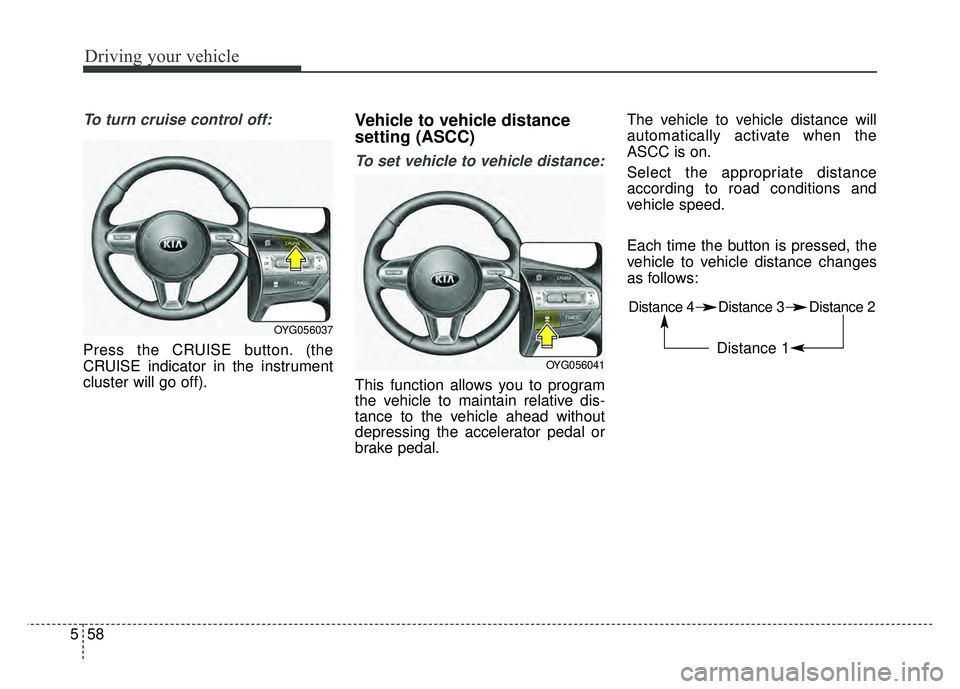
To turn cruise control off:
Press the CRUISE button. (the
CRUISE indicator in the instrument
cluster will go off).
Vehicle to vehicle distance
setting (ASCC)
To set vehicle to vehicle distance:
This function allows you to program
the vehicle to maintain relative dis-
tance to the vehicle ahead without
depressing the accelerator pedal or
brake pedal. The vehicle to vehicle distance will
automatically activate when the
ASCC is on.
Select the appropriate distance
according to road conditions and
vehicle speed.
Each time the button is pressed, the
vehicle to vehicle distance changes
as follows:
OYG056037
OYG056041
Distance 4 Distance 3 Distance 2
Distance 1
Page 317 of 500
Driving your vehicle
80
5
“Check BSD System”
If the system does not work properly,
a warning message will appear and
the light on the switch will turn off. The
system will turn off automatically.
Have your vehicle inspected by an
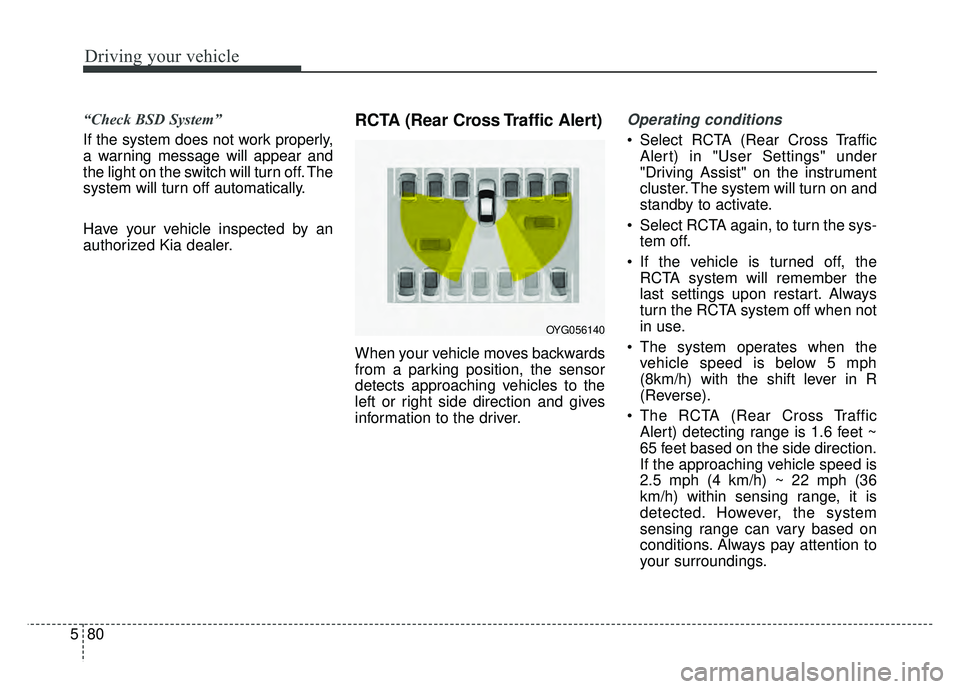
authorized Kia dealer.RCTA (Rear Cross Traffic Alert)
When your vehicle moves backwards
from a parking position, the sensor
detects approaching vehicles to the
left or right side direction and gives
information to the driver.
Operating conditions
Select RCTA (Rear Cross Traffic
Alert) in "User Settings" under
"Driving Assist" on the instrument
cluster. The system will turn on and
standby to activate.
Select RCTA again, to turn the sys- tem off.
If the vehicle is turned off, the RCTA system will remember the
last settings upon restart. Always
turn the RCTA system off when not
in use.
The system operates when the vehicle speed is below 5 mph
(8km/h) with the shift lever in R
(Reverse).
The RCTA (Rear Cross Traffic Alert) detecting range is 1.6 feet ~
65 feet based on the side direction.
If the approaching vehicle speed is
2.5 mph (4 km/h) ~ 22 mph (36
km/h) within sensing range, it is
detected. However, the system
sensing range can vary based on
conditions. Always pay attention to
your surroundings.
OYG056140
Page 322 of 500
585
Driving your vehicle
It gently applies braking power on the
tire, which is located in the opposite
side of the possibly-colliding point.
The instrument cluster will inform the
driver of the system activation.
The Smart Blind Spot Detection
System is automatically deactivated,
when the vehicle drives a certain dis-
tance away, when the vehicle direc-
tion is changed against the possible-
colliding point, when the steering
wheel is abruptly moved, or when the
brake pedal is depressed.
When the turn signals operate, the
Smart Blind Spot Detection System
operates only once. However, when
the turn signals are turned off, the sys-
tem re-enters the activation conditions.
The driver should drive the vehicle in
the middle of the vehicle lanes to
keep the system in the ready status.
When the vehicle drives too close to
one side of the vehicle lanes, the
system may not properly operate.
In addition, the system may not prop-
erly control your vehicle in accordance
with driving situations. Thus, always
pay close attention to road situations.Warning message
When there is a malfunction with the
Smart Blind Spot Detection System,
warning message ("Smart BSD brak-
ing system malfunction") appears on
LCD display and deactivates the
Smart Blind Spot Detection System.
In this case, we recommend you to
have your vehicle inspected by an
authorized Kia dealer.
Limitations of the system
The driver must be cautious in the
below situations, because the sys-
tem may not detect other vehicles or
objects in certain circumstances.
The vehicle drives on a curvedroad or through a tollgate.
The sensor is polluted with rain, snow, mud, etc.
The rear bumper where the sensor is located is covered with a foreign
object such as a bumper sticker, a
bumper guard, a bike rack, etc.
The rear bumper is damaged, or the sensor is out of the original
default position.
The vehicle height gets lower or higher due to heavy loading in a
trunk, abnormal tire pressure, etc.
The vehicle drives in inclement weather such as heavy rain or snow.
There is a fixed object near the vehicle, such as a guardrail.
A big vehicle is near such as a bus or truck.
Page 432 of 500

761
Maintenance
Fuse switch
Always set the fuse switch to the ON
position before using the vehicle.
If you move the switch to the OFF
position, some items such as audio
and digital clock must be reset and
transmitter (or smart key) may not
work properly. When the switch is
Off, the caution indicator will be dis-
played on the instrument cluster.
Always place the fuse switch in the
ON position while driving the vehicle.
If the switch is located in the “OFF”
position, a caution indicator will be
displayed in the cluster.
Engine compartment fuse
replacement
1. Turn the ignition switch and allother switches off.
2. Remove the fuse panel cover by pressing the tab and pulling the
cover up. When the blade type
fuse is disconnected, remove it by
using the clip designed for chang-
ing fuses located in the engine
compartment fuse box. Upon
removal, securely insert reserve
fuse of the same rating. 3. Check the removed fuse; replace it
if it is blown. To remove or insert
the fuse, use the fuse puller in the
engine compartment fuse panel.
4. Push in a new fuse of the same rating, and make sure it fits tightly
in the clips. If it fits loosely, consult
an authorized Kia dealer.
CAUTION
After checking the fuse panel inthe engine compartment,securely install the fuse panelcover through the audible click-ing sound.
If not, electrical failures mayoccur from water contact.
OYG076030
OYG076031
Page 436 of 500
765
Maintenance
Fuse NameFuse ratingCircuit Protected
MODULE 710ADriver Door Module, Passenger Door Module
SPARE10ASpare
MODULE 310AStop Lamp Switch, BCM (Body Control Module), Sports Mode Switch
MODULE 510AConsole Switch, Blind Spot Detection Radar Left Handle side/Right Handle\
side, BCM (Body Control
Module), Smart Cruise Control Unit, Crash Pad Switch, Fuel Filler & Trunk Open Switch, Lane Departure
Warning Unit, Steering Tilt & Telescopic Module
IG125APCB (Printed Circuit Board) Block
MDPS7.5AMDPS (Motor Driven Power Steering) Unit
MODULE 610A
Air Conditioner Switch, Air Conditioner Control Module, Electro Chromic Mirror, Head Lamp Left Handle
side/Right Handle side, Auto Head Lamp Leveling Device Module, Front Seat Warmer Control Module, Front
Air Ventilation Seat Control Module, Rear Seat Warmer Control Module, Audio/Video & Navigation Head
Unit, Driver Integrated memory system Module, Auto Transmission Shift Lever Indicator, Multipurpose
Check Connector
CLUSTER10AInstrument Cluster, Head-Up Display
AIR BAG15ASRS (Supplemental Restraint System) Control Module
MULTIMEDIA 120AIGPM (Integrated Gateway Power control Module), Audio/Video & Navigation Head Unit
A/BAG IND7.5AAir Conditioner Switch, Instrument Cluster
MODULE 410ASmart Key Control Module, Immobilizer Module
SPARE 210ASpare
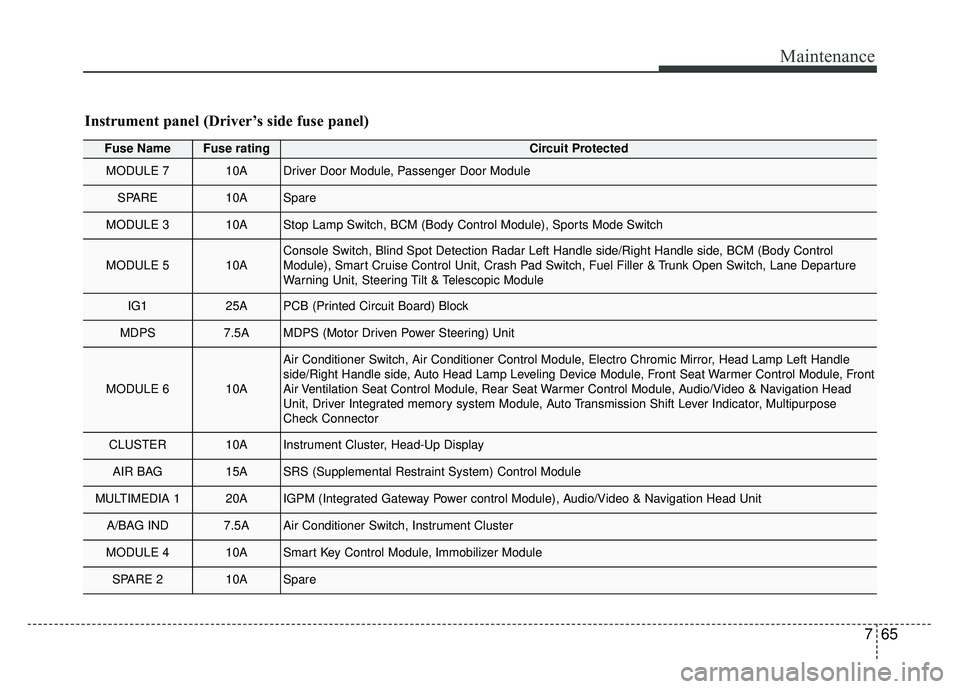
Instrument panel (Driver’s side fuse panel)
Page 437 of 500
Maintenance
66
7
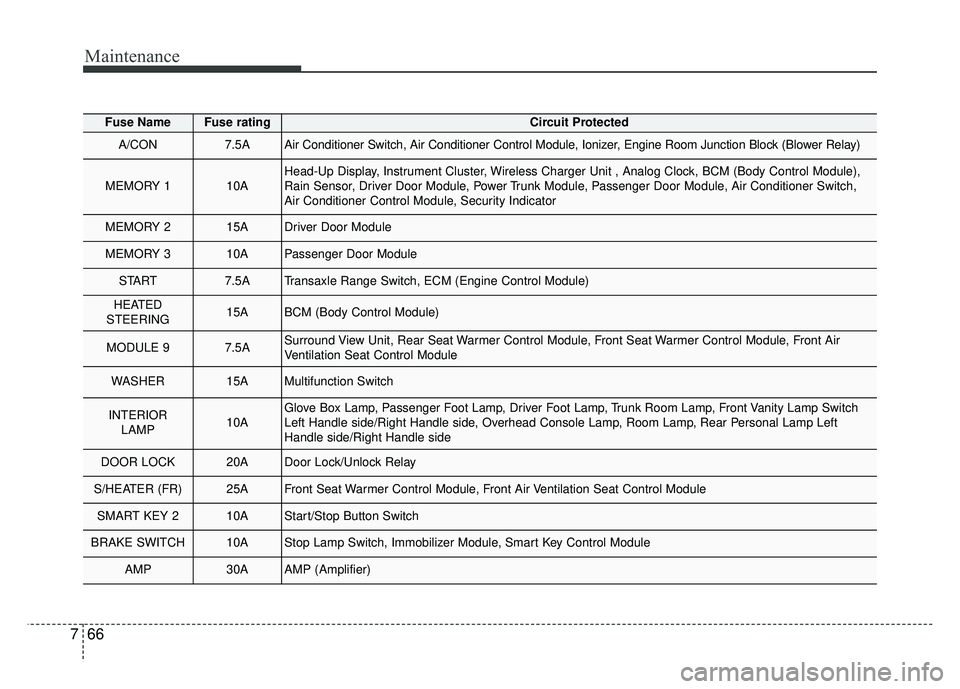
Fuse NameFuse ratingCircuit Protected
A/CON7.5AAir Conditioner Switch, Air Conditioner Control Module, Ionizer, Engine Room Junction Block (Blower Relay)
MEMORY 110AHead-Up Display, Instrument Cluster, Wireless Charger Unit , Analog Clock, BCM (Body Control Module),
Rain Sensor, Driver Door Module, Power Trunk Module, Passenger Door Module, Air Conditioner Switch,
Air Conditioner Control Module, Security Indicator
MEMORY 215ADriver Door Module
MEMORY 310APassenger Door Module
START7.5ATransaxle Range Switch, ECM (Engine Control Module)
HEATED
STEERING15ABCM (Body Control Module)
MODULE 97.5ASurround View Unit, Rear Seat Warmer Control Module, Front Seat Warmer Control Module, Front Air
Ventilation Seat Control Module
WASHER15AMultifunction Switch
INTERIOR LAMP10AGlove Box Lamp, Passenger Foot Lamp, Driver Foot Lamp, Trunk Room Lamp, Front Vanity Lamp Switch
Left Handle side/Right Handle side, Overhead Console Lamp, Room Lamp, Rear Personal Lamp Left
Handle side/Right Handle side
DOOR LOCK20ADoor Lock/Unlock Relay
S/HEATER (FR)25AFront Seat Warmer Control Module, Front Air Ventilation Seat Control Module
SMART KEY 210AStart/Stop Button Switch
BRAKE SWITCH10AStop Lamp Switch, Immobilizer Module, Smart Key Control Module
AMP30AAMP (Amplifier)