tow KIA CADENZA 2019 Owner's Manual
[x] Cancel search | Manufacturer: KIA, Model Year: 2019, Model line: CADENZA, Model: KIA CADENZA 2019Pages: 518, PDF Size: 11.08 MB
Page 239 of 518
4157
Features of your vehicle
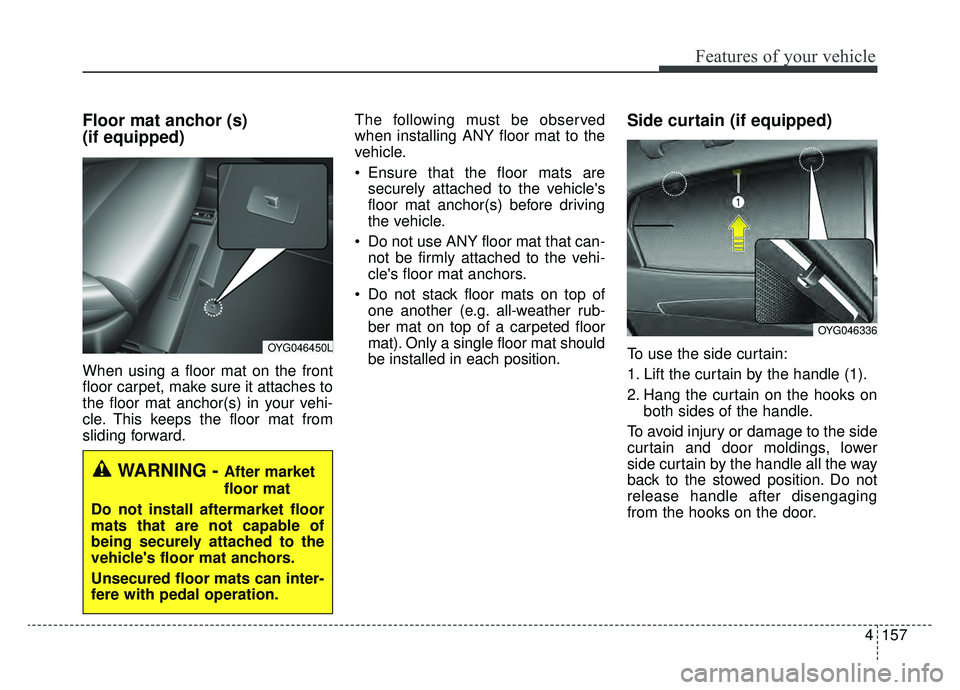
Floor mat anchor (s)
(if equipped)
When using a floor mat on the front
floor carpet, make sure it attaches to
the floor mat anchor(s) in your vehi-
cle. This keeps the floor mat from
sliding forward.The following must be observed
when installing ANY floor mat to the
vehicle.
Ensure that the floor mats are
securely attached to the vehicle's
floor mat anchor(s) before driving
the vehicle.
Do not use ANY floor mat that can- not be firmly attached to the vehi-
cle's floor mat anchors.
Do not stack floor mats on top of one another (e.g. all-weather rub-
ber mat on top of a carpeted floor
mat). Only a single floor mat should
be installed in each position.
Side curtain (if equipped)
To use the side curtain:
1. Lift the curtain by the handle (1).
2. Hang the curtain on the hooks on both sides of the handle.
To avoid injury or damage to the side
curtain and door moldings, lower
side curtain by the handle all the way
back to the stowed position. Do not
release handle after disengaging
from the hooks on the door.OYG046450L
WARNING - After market
floor mat
Do not install aftermarket floor
mats that are not capable of
being securely attached to the
vehicle's floor mat anchors.
Unsecured floor mats can inter-
fere with pedal operation.
OYG046336
Page 248 of 518

Drive mode integrated control system . . . . . . . . . 5-76
. . . . . . . . . . . . . . . . . . . . . . . . . . . . . . . . . . 5-76\
. . . . . . . . . . . . . . . . . . . . . . . . . . . 5-77
. . . . . . . . . . 5-77
. . . . . . . . . . . . . . . . . . . 5-80
Blind-spot Collision Warning (BCW). . . . . . . . . . 5-84
. . . . . . . . . . . . 5-85
. . . 5-87
. . . . . . . . . . . . . . . . . . . . . . . . . . . . 5-91
Blind-Spot Collision-Avoidance Assist (BCA) . . . 5-93
Lane Keeping Assist (LKA) system . . . . . . . . . . . 5-97
. . . . . . . . . . . . . . . . . . . . . . . . 5-99
. . . . . . . . . . . . . . . . . . . . . . . . . . . 5-103
. . . . . . . . . . . . . . . . . . . . . 5-104
. . . . . . . . . . . . . . . . . . 5-105
Driver Attention Warning (DAW) . . . . . . . . . . . 5-107
. . . . . . . . . . . . . . . . . . 5-107
. . . . . . . . . . . . . . . . . . . . . . . . . 5-109
. . . . . . . . . . . . . . . . . . . . . . . . . . . . . 5-109
. . . . . . . . . . . . . . . . . . . . . . . . . . 5-110
Economical operation . . . . . . . . . . . . . . . . . . . . . 5-112
Special driving conditions . . . . . . . . . . . . . . . . . . 5-114
. . . . . . . . . . . . . . . . . 5-114
. . . . . . . . . . . . . . . . . . . . . . . . . . 5-114
. . . . . . . . . . . . . . . . . . . . . . . . . . . 5-115 . . . . . . . . . . . . . . . . . . . . . . . . . . . . . 5-115
. . . . . . . . . . . . . . . . . . . . . . . . . . . 5-116
. . . . . . . . . . . . . . . . . . . . . . 5-117
. . . . . . . . . . . . . . . . . . . . . . . . . . . . . 5-117
. . . . . . . . . . . . . . . . . . . . . . . . . . . . 5-117
Winter driving . . . . . . . . . . . . . . . . . . . . . . . . . . . 5-118
. . . . . . . . . . . . . . . . . . . . . . 5-118
. . . . . . . . . 5-120
. . . . . . . . . . . . . . . . . . . . . 5-120
. . . . . . 5-120
. . . . . . . . . . . . . . . . . . . 5-121
system . . . . . . . . . . . . . . . . . . . . . . . . . . . . . . . . . . . . \
5-121
. . . . . . . . . . . . 5-121
. . . 5-121
. . . . . . . . . . . . . . . . . . 5-121
Trailer towing . . . . . . . . . . . . . . . . . . . . . . . . . . . . 5-121
Vehicle load limit . . . . . . . . . . . . . . . . . . . . . . . . . 5-122
. . . . . . . . . . . . . 5-122
. . . . . . . . . . . . . . . . . . . . . . . . . . . 5-125
Vehicle weight . . . . . . . . . . . . . . . . . . . . . . . . . . . . 5-126
5
Page 271 of 518
525
Driving your vehicle
The EPB warning light may illumi-nate if the EPB switch operates
abnormally. Shut the engine off
and turn it on again after a few min-
utes. The warning light will go off
and the EPB switch will operate
normally. However, if the EPB
warning light is still on, have the
system checked by an authorized
Kia dealer.
If the parking brake warning light does not illuminate or blinks even
though the EPB switch was pulled
up, the EPB is not applied.
If the parking brake warning light blinks when the EPB warning light
is on, press the EPB button, then
pull it up. Once more press it back
to its original position and pull it
back up. If the EPB warning does
not go off, have the system
checked by an authorized Kia deal-
er.Emergency braking
If there is a problem with the brake
pedal while driving, emergency brak-
ing is possible by pulling up and
holding the EPB switch. Braking is
possible only while you are holding
the EPB switch.
✽ ✽ NOTICE
During emergency braking by the
EPB, the parking brake warning
light will illuminate to indicate that
the system is operating.
If you notice a continuous noise or
burning smell when the EPB is used
for emergency braking, have your
vehicle checked by an authorized Kia
dealer.
When the EPB (electronic parking
brake) is not released
If the EPB does not release normal-
ly, take your vehicle to an authorized
Kia dealer by loading the vehicle on
a flatbed tow truck and have the sys-
tem checked.WARNING
Do not operate the electronic
parking brake while the vehicle is
moving except in an emergency
situation. Applying the electronic
parking brake while the vehicle is
moving at normal speeds can
cause a sudden loss of control of
the vehicle. If you must use the
electronic parking brake to stop
the vehicle, use great caution in
applying the brake.
Page 296 of 518
Driving your vehicle
50
5
✽ ✽
NOTICE
In some instances, the FCA system
may be canceled when subjected to
electromagnetic interference.
WARNING - Testing the
FCA
The FCA does not operate in
certain situations. Thus, never
test-operate the FCA against a
person or an object. It may
cause a severe injury or even
death.
WARNING - FCA and
Towing
Cancel the FCA in the User
Settings on the LCD display,
before towing another vehicle.
While towing, the brake applica-
tion may adversely affect your
vehicle safety.WARNING
Do not use the FCA system when towing a vehicle. Cancel
the FCA in the User Settings
on the LCD display before
towing. Brake application by
the FCA system while towing
may adversely affect your
safety.
Use extreme caution when the vehicle in front of you has
cargo that extends rearward
from the cab, or when the
vehicle in front of you has
higher ground clearance.
The FCA system is designed to detect and monitor the
vehicle ahead or detect a
pedestrian in the roadway
through radar signals and
camera recognition. It is not
designed to detect bicycles,
motorcycles, or smaller
wheeled objects such as lug-
gage bags, shopping carts, or
strollers.
Page 304 of 518

Driving your vehicle
58
5
(Continued)
- Road surrounded by multi-ple steel constructions (sub-
way construction, steel tun-
nel, etc)
- Parking lot
- Lanes beside guard rail on a road
- Slippery road with rain, ice, or snow
- Abrupt curved road
- Steep hills
- Windy roads
- Off roads
- Roads under construction
- Rumble strip
- When driving near crash barriers
- When driving on a sharp curve
- I cannot understand this. This needs to be rewritten by
an engineer that under-
stands what message this is
trying to convey.
(Continued)(Continued)- When driving in heavy trafficor when traffic conditions
make it difficult to drive at a
constant speed
Limited visibility (rain, snow, smog, etc.)
The smart cruise control sys- tem cannot recognize a
stopped vehicle, pedestrians
or an oncoming vehicle.
Always look ahead cautiously
to prevent unexpected and
sudden situations from occur-
ring.
Pay particular attention to the driving conditions whenever
using the smart cruise control
system.
Be careful when driving downhill using the SCC.
Cruise function should not be used when the vehicle is
being towed to prevent any
damage.
(Continued)(Continued)
Always set the vehicle speedunder the speed limit.
Always pay continuous atten- tion to road and driving condi-
tions even when the smart
cruise control system is being
operated.
Page 320 of 518
Driving your vehicle
74
5
- After an engine start, please stop
for several seconds. If system ini-
tialization is not completed, the
smart cruise control system will not
operate.
- After an engine start, if the sensor cover is obscured with foreign sub-
stances, there is a possibility that
the smart cruise control system
may not work.
- The following conditions may cause a malfunction: over-loading
the liftgate, suspension modifica-
tion, tire replacement with unau-
thorized tires or tires with different
tread wear and pressure levels.
- Keep a safe distance according to road conditions and vehicle speed.
If the vehicle to vehicle distance is
too close during a high-speed driv-
ing, a serious collision may result.
- The smart cruise control system cannot recognize a stopped vehi-
cle, pedestrians or an oncoming
vehicle. Always look ahead cau-
tiously to prevent unexpected and
sudden situations from occurring.
WARNING - Inclines &
Towing
Do not use smart cruise control
system on steep inclines or
when towing another vehicle or
trailer since such extreme load-
ing can interfere with your vehi-
cle's ability to maintain the
selected speed.WARNING
- Safe Use of smart cruise control system
The smart cruise control system
can provide you with an addition-
al level of safety and fatigue
reduction. However you must
maintain careful observation of
the roadway in front and around
you and maintain control of your
vehicle and spacing around
other vehicles as you normally
would. For example, this will
require you to apply the brakes
as needed when coming upon a
slower moving vehicle, or when a
vehicle from another lane drives
quickly in front of you.
WARNING - Emergency Stops
The smart cruise control sys-
tem cannot guarantee the stop
for every emergency situation.
If an emergency stop is neces-
sary, you must apply the brakes.
Page 327 of 518

581
Driving your vehicle
Driving Style Gauge
Once the SMART MODE is selected
by pressing the DRIVE MODE but-
ton, and the DRIVE MODE indicator
screen is selected by pressing the
trip computer button on the steering
wheel, the driving style gauge bar
will show up at the bottom of screen
and visualize current style of driving. Left poles of the driving style gauge
indicate economic driving in green
color. The more economically you
drive, the more the left poles will
light up in green.
Likewise, the right pole of the driving
style gauge indicates sporty driving
in red color. As the vehicle acceler-
ates, the gauge will move to the right
pole. If the driving style gauge fills up
toward left side (or Economic side)
and is maintained there for a certain
time, the vehicle will be automatical-
ly switch to SMART ECO MODE.
Likewise, when driving style gauge
fills up toward right side and is main-
tained there for a certain time, the
vehicle will be automatically switch
to SMART SPORT MODE.
If you wish to maintain the SMART ECO MODE for better fuel econo-
my, try to maintain economic driv-
ing style and keep the driving style
gauge green.
OYG056149N
Page 334 of 518

Driving your vehicle
88
5
Warning type If the vehicle detected by sensors
approaches your vehicle, the warn-
ing chime will sound and the warn-
ing light will blink on the outside
rearview mirror.
If the detected vehicle is out of detection range, moving away in the
opposite direction or moving slow,
or if the vehicle is right behind your
vehicle, if the direction of the other
vehicle is not heading towards your
vehicle, the warning is cancelled.
The system may not operate prop- erly due to other factors or circum-
stances. Always pay attention to
your surroundings.
❈ If your vehicle's left or right side
bumper is blinded by a barrier or
vehicles, the system sensing abili-
ty may be limited.
OYG058222
OYG056144L
OYG058223
WARNING
The Blind-Spot Collision
Warning System and Rear
Cross-Traffic Collision
Warning is not a substitute for
proper and safe driving proce-
dures. Always drive safely
and use caution when chang-
ing lanes or backing up. The
Blind-Spot Collision Warning
System and Rear Cross-
Traffic Collision Warning may
not detect every object along-
side the vehicle.
When the BCW system is being activated, The warning
light on the outside rearview
mirror will illuminate whenev-
er a vehicle is detected by the
system. To avoid accidents,
do not focus only on the warn-
ing light and neglect to see
the surrounding of the vehi-
cle.
(Continued)
Page 360 of 518
Driving your vehicle
114
5
Hazardous driving conditions
When hazardous driving conditions
are encountered such as water,
snow, ice, mud, sand, or similar haz-
ards, follow these suggestions:
Drive cautiously and allow extra
distance for braking.
Avoid sudden braking or steering.
When braking with non-ABS brakes pump the brake pedal with
a light up-and-down motion until
the vehicle is stopped.
Do not pump the brake pedal on a
vehicle equipped with ABS. If stalled in snow, mud, or sand,
use the second gear. Accelerate
slowly to avoid spinning the drive
wheels.
Use sand, rock salt, or other non- slip material under the drive
wheels to provide traction when
stalled in ice, snow, or mud.
Rocking the vehicle
If it is necessary to rock the vehicle
to free it from snow, sand, or mud,
first turn the steering wheel right and
left to clear the area around your
front wheels. Then, shift back and
forth between R (Reverse) and any
forward gear in vehicles equipped
with an Automatic Transaxle. Do not
race the engine, and spin the wheels
as little as possible. If you are still
stuck after a few tries, have the vehi-
cle pulled out by a tow vehicle to
avoid engine overheating and possi-
ble damage to the transaxle.
SPECIAL DRIVING CONDITIONS
WARNING- Downshifting
Do not downshift with an auto-
matic transaxle while driving on
slippery surfaces. The sudden
change in tire speed could
cause the tires to skid and
result in an accident.
WARNING- Sudden
Vehicle Movement
Do not attempt to rock the vehi-
cle if people or objects are near-
by. The vehicle may suddenly
move forward or backwards as it
becomes unstuck.
Page 367 of 518
5121
Driving your vehicle
To keep locks from freezing
To keep the locks from freezing,
squirt an approved de-icer fluid or
glycerine into the key opening. If a
lock is covered with ice, squirt it with
an approved de-icing fluid to remove
the ice. If the lock is frozen internally,
you may be able to thaw it out by
using a heated key. Handle the heat-
ed key with care to avoid injury.
Use approved window washer
anti-freeze in system
To keep the water in the window
washer system from freezing, add an
approved window washer anti-freeze
solution in accordance with instruc-
tions on the container. Window wash-
er anti-freeze is available from an
authorized Kia dealer and most auto
parts outlets. Do not use engine
coolant or other types of anti-freeze
as these may damage the paint fin-
ish.
Don’t let your parking brake
freeze
Under some conditions your parking
brake can freeze in the engaged
position. This is most likely to happen
when there is an accumulation of
snow or ice around or near the rear
brakes or if the brakes are wet. If
there is a risk the parking brake may
freeze, apply it only temporarily while
you put the gear shift lever in P
(Park, Automatic Transaxle) and
block the rear wheels so the vehicle
cannot roll. Then release the parking
brake.
Don't let ice and snow accu-
mulate underneath
Under some conditions, snow and
ice can build up under the fenders
and interfere with the steering. When
driving in severe winter conditions
where this may happen, you should
periodically check underneath the
vehicle to be sure the movement of
the front wheels and the steering
components are not obstructed.
Carry emergency equipment
Depending on the severity of the
weather, you should carry appropri-
ate emergency equipment. Some of
the items you may want to carry
include tow straps or chains, flash-
light, emergency flares, sand, shov-
el, jumper cables, window scraper,
gloves, ground cloth, coveralls, blan-
ket, etc.
TRAILER TOWING
We do not recommend using this
vehicle for trailer towing.