ESP KIA CADENZA 2020 User Guide
[x] Cancel search | Manufacturer: KIA, Model Year: 2020, Model line: CADENZA, Model: KIA CADENZA 2020Pages: 560, PDF Size: 11.37 MB
Page 101 of 560
419
Features of your vehicle
Safe Exit Assist (SEA)
(if equipped)
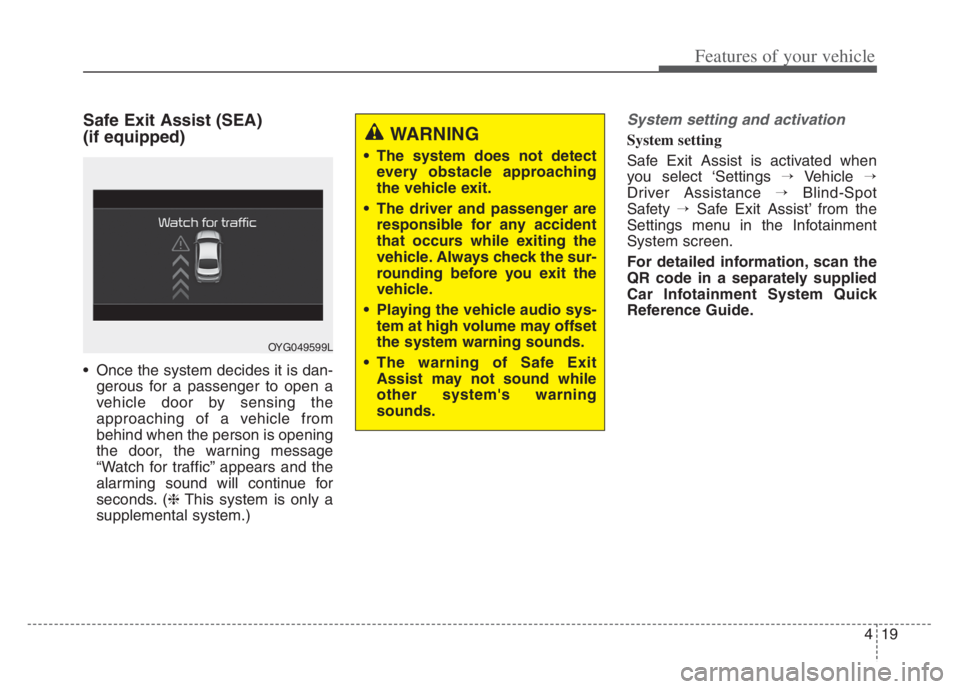
Once the system decides it is dan-
gerous for a passenger to open a
vehicle door by sensing the
approaching of a vehicle from
behind when the person is opening
the door, the warning message
“Watch for traffic” appears and the
alarming sound will continue for
seconds. (❈This system is only a
supplemental system.)
System setting and activation
System setting
Safe Exit Assist is activated when
you select ‘Settings →Vehicle →
Driver Assistance →Blind-Spot
Safety →Safe Exit Assist’ from the
Settings menu in the Infotainment
System screen.
For detailed information, scan the
QR code in a separately supplied
Car Infotainment System Quick
Reference Guide.WARNING
The system does not detect
every obstacle approaching
the vehicle exit.
The driver and passenger are
responsible for any accident
that occurs while exiting the
vehicle. Always check the sur-
rounding before you exit the
vehicle.
Playing the vehicle audio sys-
tem at high volume may offset
the system warning sounds.
The warning of Safe Exit
Assist may not sound while
other system's warning
sounds.
OYG049599L
Page 112 of 560
Features of your vehicle
30 4
Power windows
The ENGINE START/STOP button
must be in the ON position for power
windows to operate. Each door has a
power window switch that controls the
door’s window. The driver has a power
window lock switch which can block
the operation of rear passenger win-
dows.
The power windows can be operated
for approximately 30 seconds after
engine is turned off. However, if the
front doors are opened, the power
windows cannot be operated even
within the 30 second period.
If the window cannot be closed
because it is blocked by objects,
remove the objects and close the
window.
✽ ✽
NOTICE
While driving with the rear windows
down or with the sunroof in an open
(or partially open) position, your
vehicle may demonstrate a wind
buffeting or pulsation noise. This
noise is a normal occurrence and
can be reduced or eliminated by tak-
ing the following actions. If the noise
occurs with one or both of the rear
windows down, partially lower both
front windows approximately one
inch (2.5 cm). If you experience the
noise with the sunroof open, slightly
reduce the size of the sunroof open-
ing.
Window opening and closing
The driver’s door has a master power
window switch that controls all the
windows in the vehicle.
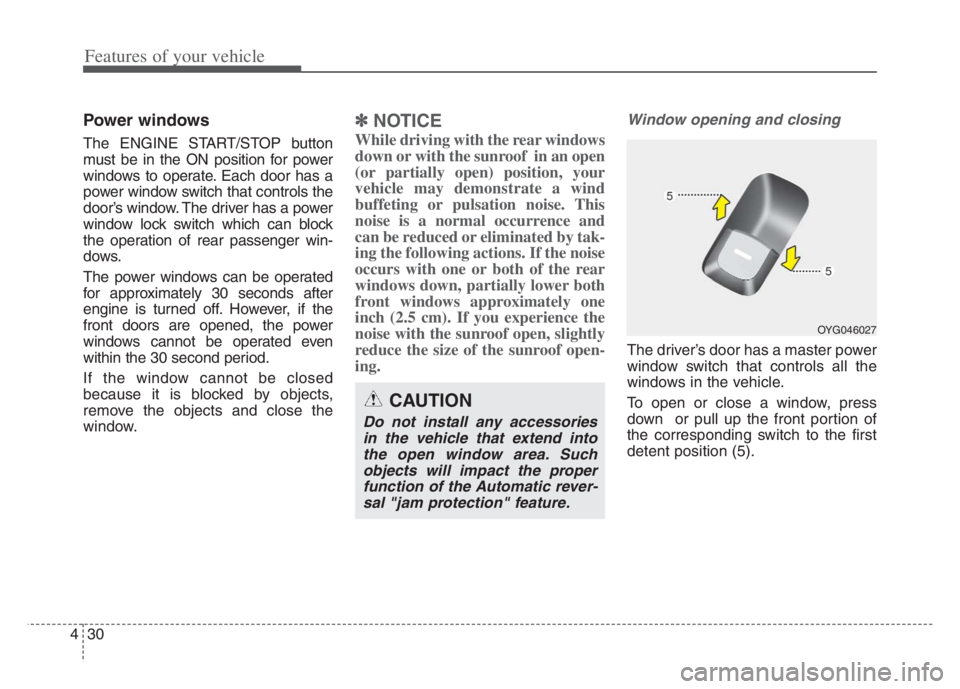
To open or close a window, press
down or pull up the front portion of
the corresponding switch to the first
detent position (5).
OYG046027
CAUTION
Do not install any accessories
in the vehicle that extend into
the open window area. Such
objects will impact the proper
function of the Automatic rever-
sal "jam protection" feature.
Page 121 of 560
439
Features of your vehicle
Make sure to refuel your vehicle
according to the “Fuel requirements”
suggested in chapter 1.
If the fuel filler cap requires replace-
ment, use only a genuine Kia cap or the
equivalent specified for your vehicle. An
incorrect fuel filler cap can result in a
serious malfunction of the fuel system
or emission control system.
CAUTION- Exterior paint
Do not spill fuel on the exterior
surfaces of the vehicle. Any
type of fuel spilled on painted
surfaces may damage the paint.
WARNING- Refueling &
Vehicle fires
When refueling, always shut the
engine off. Sparks produced by
electrical components related
to the engine can ignite fuel
vapors causing a fire. Once
refueling is complete, check to
make sure the filler cap and
filler door are securely closed,
before starting the engine.WARNING- Cell phone
fires
Do not use cellular phones
while refueling. Electric current
and/or electronic interference
from cellular phones can poten-
tially ignite fuel vapors causing
a fire.
WARNING- Smoking
DO NOT use matches or a lighter
and DO NOT SMOKE or leave a lit
cigarette in your vehicle while at
a gas station especially during
refueling. Automotive fuel is
highly flammable and can, when
ignited, result in fire.
Page 123 of 560
441
Features of your vehicle
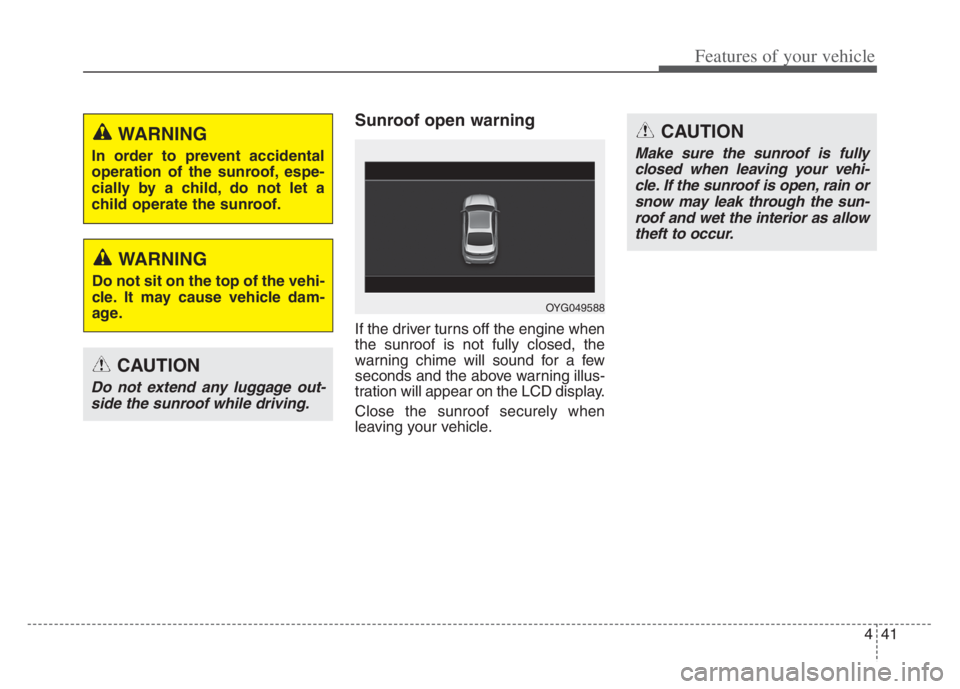
Sunroof open warning
If the driver turns off the engine when
the sunroof is not fully closed, the
warning chime will sound for a few
seconds and the above warning illus-
tration will appear on the LCD display.
Close the sunroof securely when
leaving your vehicle.
CAUTION
Do not extend any luggage out-
side the sunroof while driving.
OYG049588
CAUTION
Make sure the sunroof is fully
closed when leaving your vehi-
cle. If the sunroof is open, rain or
snow may leak through the sun-
roof and wet the interior as allow
theft to occur.
WARNING
In order to prevent accidental
operation of the sunroof, espe-
cially by a child, do not let a
child operate the sunroof.
WARNING
Do not sit on the top of the vehi-
cle. It may cause vehicle dam-
age.
Page 131 of 560

449
Features of your vehicle
Heated steering wheel
(if equipped)
With the ENGINE START/STOP but-
ton in the ON position, pressing the
heated steering wheel button warms
the steering wheel. The indicator on
the button will illuminate.
To turn the heated steering wheel off,
press the button once again. The
indicator on the button will turn off.
✽ ✽
NOTICE
The heated steering wheel will turn
off automatically approximately 30
minutes after the heated steering
wheel is turned on.
OYG040040N
WARNING
If the steering wheel becomes
too warm, turn the system off.
The heated steering wheel may
cause burns even at low tem-
peratures, especially if used for
long periods of time.
CAUTION
Do not install any type of grip
cover for the steering wheel, it
may impair the function of the
heated steering wheel system.
When cleaning the heated
steering wheel, do not use an
organic solvent such as paint
thinner, benzene, alcohol and
gasoline. Doing so may dam-
age the surface of the steering
wheel.
If the surface of steering
wheel is damaged by a sharp
object, damage to the heated
steering wheel components
could occur.
Page 141 of 560
459
Features of your vehicle
NVS®is a registered trademark and
Z-Nav™ is a trademark of the
Gentex Corporation, Zeeland,
Michigan.
HomeLink
®is a registered trademark
owned by Johnson Controls,
Incorporated, Milwaukee, Wisconsin.
FCC ID: NZLZTVHL3
IC: 4112A-ZTVHL3This device complies with Part 15
of the FCC Rules.
Operation is subject to the following
three conditions:
1. This device may not cause harmful
interference.
2. This device must accept any inter-
ference received, including inter-
ference that may cause undesired
operation.
3. The transceiver has been tested
and complies with FCC and
Industry Canada rules. Changes
or modifications not expressly
approved by the party responsible
for compliance could void the
user’s authority to operate the
device.Two Way Communication Progra-
ming
1. Complete the HomeLink
"Programming" first.
2. Before the first 10 times HomeLink
button is pressed after the pro-
gramming, the following steps
MUST occur to program two way
communication. (only for some
older garage doors)
Page 145 of 560
463
Features of your vehicle
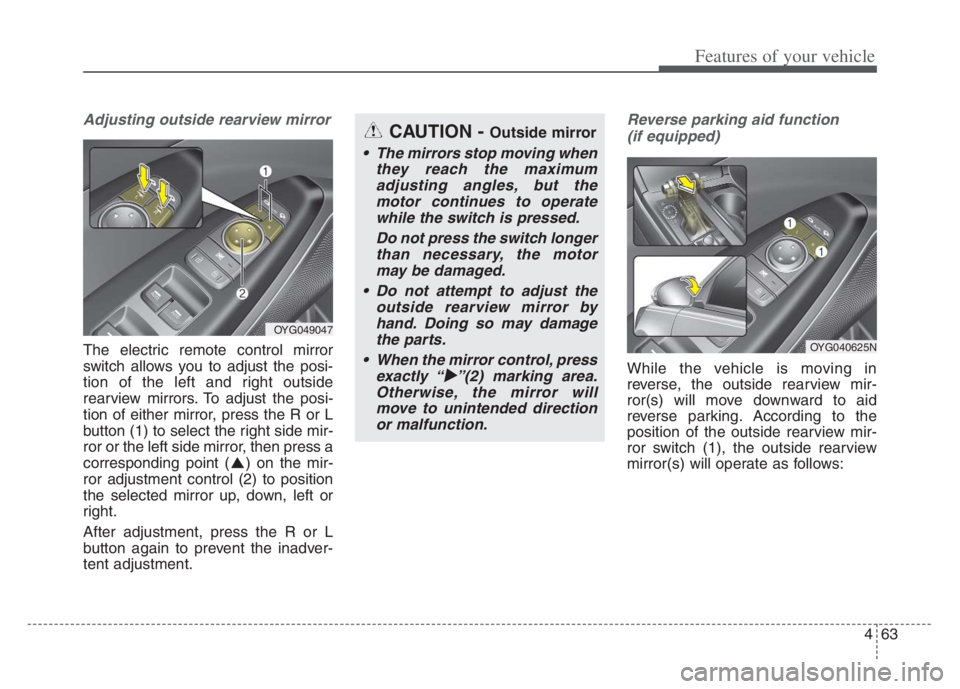
Adjusting outside rearview mirror
The electric remote control mirror
switch allows you to adjust the posi-
tion of the left and right outside
rearview mirrors. To adjust the posi-
tion of either mirror, press the R or L
button (1) to select the right side mir-
ror or the left side mirror, then press a
corresponding point ( ) on the mir-
ror adjustment control (2) to position
the selected mirror up, down, left or
right.
After adjustment, press the R or L
button again to prevent the inadver-
tent adjustment.
Reverse parking aid function
(if equipped)
While the vehicle is moving in
reverse, the outside rearview mir-
ror(s) will move downward to aid
reverse parking. According to the
position of the outside rearview mir-
ror switch (1), the outside rearview
mirror(s) will operate as follows:
OYG049047
CAUTION - Outside mirror
The mirrors stop moving when
they reach the maximum
adjusting angles, but the
motor continues to operate
while the switch is pressed.
Do not press the switch longer
than necessary, the motor
may be damaged.
Do not attempt to adjust the
outside rearview mirror by
hand. Doing so may damage
the parts.
When the mirror control, press
exactly “
”(2) marking area.
Otherwise, the mirror will
move to unintended direction
or malfunction.
OYG040625N
Page 179 of 560
![KIA CADENZA 2020 User Guide 497
Features of your vehicle
AUTO HOLD Indicator
Light
This indicator light illuminates:
[White] When you activate the auto
hold system by pressing the AUTO
HOLD button.
[Green] When you stop the ve](/img/2/40377/w960_40377-178.png "KIA CADENZA 2020 User Guide 497
Features of your vehicle
AUTO HOLD Indicator
Light
This indicator light illuminates:
[White] When you activate the auto
hold system by pressing the AUTO
HOLD button.
[Green] When you stop the ve")
497
Features of your vehicle
AUTO HOLD Indicator
Light
This indicator light illuminates:
[White] When you activate the auto
hold system by pressing the AUTO
HOLD button.
[Green] When you stop the vehicle
completely by depressing the
brake pedal with the auto hold sys-
tem activated.
[Yellow] When there is a malfunc-
tion with the auto hold system.
In this case, have your vehicle
inspected by an authorized Kia
dealer.
❈For more details, refer to “Auto
Hold” in chapter 5.
Lane Keeping Assist
Indicator Light
This indicator light illuminates :
[Green] When the system operat-
ing conditions are satisfied.
[White] The system operating con-
ditions are not satisfied.
[Yellow] When there is a malfunc-
tion with Lane Keeping Assist.
In this case, have the vehicle
inspected by an authorized Kia
dealer.
❈For more details, refer to “Lane
Keeping Assist (LKA)” in chapter 5.
WARNING - Distracted
driving
Driving while distracted can
result in a loss of vehicle con-
trol that may lead to an acci-
dent, severe personal injury,
and death. The driver’s primary
responsibility is in the safe and
legal operation of a vehicle, and
use of any handheld devices,
other equipment, or vehicle sys-
tems which take the driver’s
eyes, attention and focus away
from the safe operation of a
vehicle or which are not permis-
sible by law should never be
used during operation of the
vehicle.AUTO
HOLD
Page 181 of 560
499
Features of your vehicle
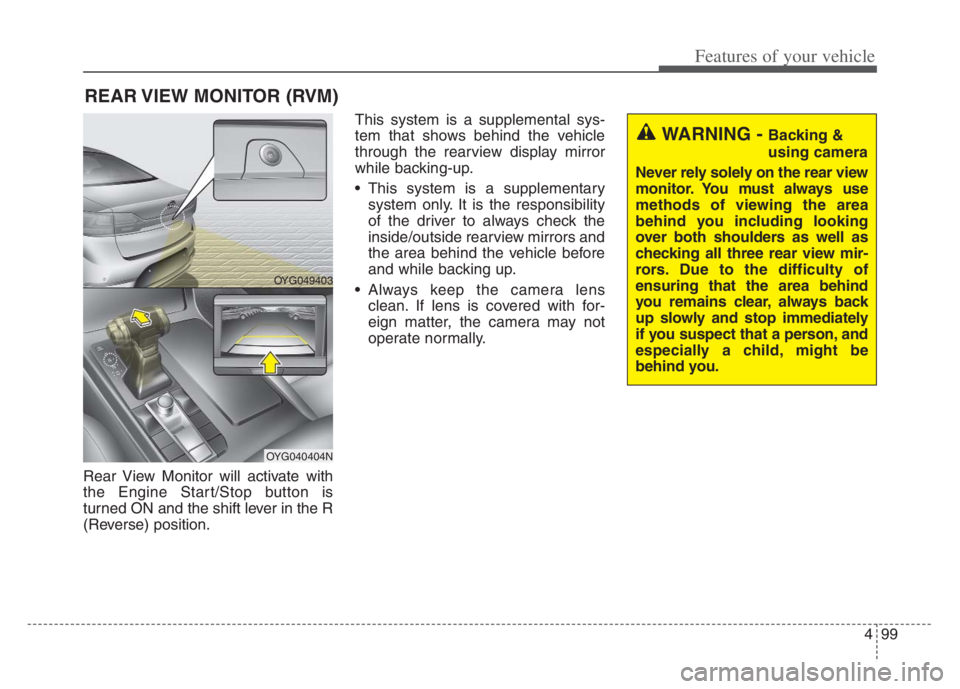
Rear View Monitor will activate with
the Engine Start/Stop button is
turned ON and the shift lever in the R
(Reverse) position.This system is a supplemental sys-
tem that shows behind the vehicle
through the rearview display mirror
while backing-up.
This system is a supplementary
system only. It is the responsibility
of the driver to always check the
inside/outside rearview mirrors and
the area behind the vehicle before
and while backing up.
Always keep the camera lens
clean. If lens is covered with for-
eign matter, the camera may not
operate normally.
REAR VIEW MONITOR (RVM)
WARNING - Backing &
using camera
Never rely solely on the rear view
monitor. You must always use
methods of viewing the area
behind you including looking
over both shoulders as well as
checking all three rear view mir-
rors. Due to the difficulty of
ensuring that the area behind
you remains clear, always back
up slowly and stop immediately
if you suspect that a person, and
especially a child, might be
behind you.
OYG049403
OYG040404N
Page 183 of 560

4101
Features of your vehicle
Surround View Monitor auto activa-
tion is activated or deactivated
when you select ‘Settings →
Vehicle →Driver Assistance →
Parking safety →Surround View
Monitor Auto On’ from the Settings
menu in the Infotainment System
screen.
For more details, please scan the
QR code in a separately supplied
Car Infotainment System Quick
Reference Guide.
When the trunk and driver/passen-
ger door are opened and the out-
side mirror is folded, the warning is
illuminated in SVM
If SVM is not operating normally, the
system should be checked by an
authorized Kia dealer.
WARNING
This system is a supplementary
system only. It is the responsi-
bility of the driver to always
check the area around the vehi-
cle before and while moving.