ESP KIA CADENZA 2020 Workshop Manual
[x] Cancel search | Manufacturer: KIA, Model Year: 2020, Model line: CADENZA, Model: KIA CADENZA 2020Pages: 560, PDF Size: 11.37 MB
Page 377 of 560
Driving your vehicle
124 5
✽
✽
NOTICE
• Even though the steering is assist-
ed by the system, the driver may
control the steering wheel.
• The steering wheel may feel heav-
ier when the steering wheel is
assisted by the system than when it
is not.
Check Lane Following Assist
If there is a problem with the system
a message will appear for a few sec-
onds. In this case, have the system
checked by an authorized Kia dealer.LFA will not be in the ENABLED
state and/or the steering wheel will not
be assisted when:
If the driver operate turn signal
lamp or Hazzard warning flasher to
change the lane,
- To change the driving lane, turn
on the turn signal lamp switch
and change the lanes.
- If change the driving lane to
another without operating turn
signal lamp switch, the repulsive
force may occur on the steering
wheel.
- After system operating or chang-
ing the lanes, you must move to
the center of the lane to switch the
system to LFA. If you continue to
drive close to the lane line instead
of in the middle of the lane, it does
not assist the steering.
WARNING
LFA is a supplemental system
only. It is the responsibility of
the driver to safely steer the
vehicle and to maintain it in its
lane.
Turn off LFA and drive without
using the system in the fol-
lowing situations:
- In bad weather
- In bad road conditions
- When the steering wheel
needs to be controlled by the
driver frequently.
- When towing a vehicle or
trailer
Page 381 of 560

Driving your vehicle
128 5
Highway Driving Assist helps keep
the vehicle between lanes, maintain
a distance with the vehicle ahead,
and automatically adjusts the vehicle
speed to the speed limit while driving
on the highway.✽ ✽
NOTICE
• HDA is available only on con-
trolled access road of certain high-
ways.
❈ ❈
Controlled access road indi-
cates roads with limited
entrances and exits that allow
uninterrupted high speed traf-
fic flow. Only passenger cars
and motorcycles are allowed on
controlled access roads.
• Additional highways may be
expanded by navigation updates.
HIGHWAY DRIVING ASSIST (HDA)
WARNING
HDA is not a substitute for
safe driving practices, but a
convenience function. It is the
responsibility of the driver to
always be aware of the sur-
roundings and drive safely.
HDA relies entirely on the
road information provided by
the navigation system. It is the
responsibility of the driver to
follow traffic laws and avoid
accidents.
Turn off Highway Driving
Assist when the vehicle is
being towed.
For your safety, please read
the owner's manual before
using the system.
Available highway
(Controlled access road)
USASelect Interstate Highway
and U.S. (Federal) and St
Page 388 of 560
5135
Driving your vehicle
This device complies with Part 15
of the FCC rules.
Operation is subject to the following
three conditions:
1. This device may not cause harm-
ful interference, and
2. This device must accept any inter-
ference received, including inter-
ference that may cause undesired
operation.
3. Changes or modifications not
expressly approved by the party
responsible for compliance could
void the user's authority to operate
the device.Radio frequency radiation expo-
sure information:
This equipment complies with FCC
radiation exposure limits set forth for
an uncontrolled environment.
This equipment should be installed
and operated with a minimum dis-
tance of 8 in (20 cm) between the
radio (antenna) and your body.
This transmitter must not be colocat-
ed or operating in conjunction with
any other antenna or transmitter.
Page 394 of 560
5141
Driving your vehicle
The brake control may not operate
properly according to the status of
the ESC (Electronic Stability
Control). The same warning mes-
sage is displayed on the instrument
cluster for this case also.
- When the ESC (Electronic Stability
Control) warning light is on.
- When the ESC (Electronic Stability
Control) is engaged in a different
function.
When the operation condition of
Rear Cross-Traffic Collision
Warning is satisfied, the warning
will occur every time a vehicle
approaches the side or rear of your
stopped (0 mph (0 km/h) vehicle
speed) vehicle.
The driver should always exercise
extreme caution while operating
the vehicle, whether or not the
warning light on the outside
rearview mirror illuminates or there
is a warning alarm.
Playing the vehicle audio system at
high volume may prevent you from
hearing the system's warning
sounds.CAUTION
The system's warning or
brake may not operate proper-
ly if the left/right of your vehi-
cle's rear bumper is obscured
by a vehicle or obstacle.
The warning of Rear Cross-
Traffic Collision Warning may
not sound while other sys-
tem's warning sounds.
If any other warning sound
such as seat belt warning
chime is already generated,
Rear Cross-Traffic Collision
Warning may not sound.
WARNING
Drive safely even though the
vehicle is equipped with a
Rear Cross-Traffic Collision
Warning and Rear Cross-
Traffic Collision-Avoidance
Assist. Do not solely rely on
the system but check your
surrounding when backing
the vehicle up.
The driver is responsible for
accurate brake control.
Always exercise extreme cau-
tion while driving. Rear Cross-
Traffic Collision Warning and
Rear Cross-Traffic Collision-
Avoidance Assist may not
operate properly or unneces-
sarily operate in accordance
with your driving situations.
(Continued)
Page 395 of 560
Driving your vehicle
142 5
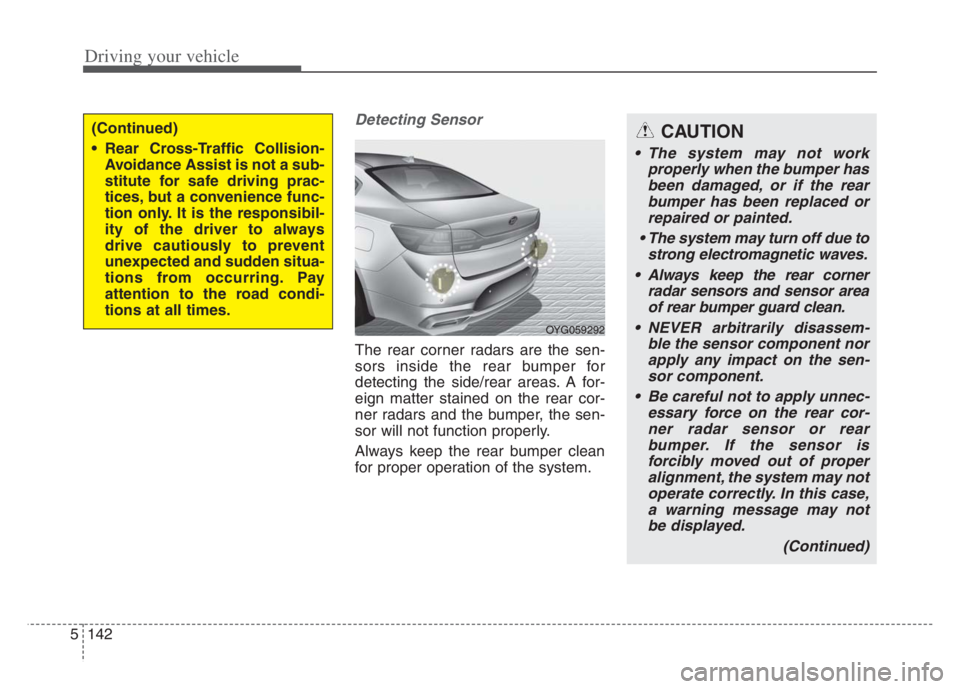
Detecting Sensor
The rear corner radars are the sen-
sors inside the rear bumper for
detecting the side/rear areas. A for-
eign matter stained on the rear cor-
ner radars and the bumper, the sen-
sor will not function properly.
Always keep the rear bumper clean
for proper operation of the system.
(Continued)
Rear Cross-Traffic Collision-
Avoidance Assist is not a sub-
stitute for safe driving prac-
tices, but a convenience func-
tion only. It is the responsibil-
ity of the driver to always
drive cautiously to prevent
unexpected and sudden situa-
tions from occurring. Pay
attention to the road condi-
tions at all times.
OYG059292
CAUTION
The system may not work
properly when the bumper has
been damaged, or if the rear
bumper has been replaced or
repaired or painted.
The system may turn off due to
strong electromagnetic waves.
Always keep the rear corner
radar sensors and sensor area
of rear bumper guard clean.
NEVER arbitrarily disassem-
ble the sensor component nor
apply any impact on the sen-
sor component.
Be careful not to apply unnec-
essary force on the rear cor-
ner radar sensor or rear
bumper. If the sensor is
forcibly moved out of proper
alignment, the system may not
operate correctly. In this case,
a warning message may not
be displayed.
(Continued)
Page 402 of 560
5149
Driving your vehicle
Your vehicle's fuel economy depends
mainly on your style of driving, where
you drive and when you drive.
Each of these factors affects how
many miles (kilometers) you can get
from a gallon (liter) of fuel. To operate
your vehicle as economically as pos-
sible, use the following driving sug-
gestions to help save money in both
fuel and repairs:
Drive smoothly. Accelerate at a
moderate rate. Don't make "jack-
rabbit" starts or full-throttle shifts
and maintain a steady cruising
speed. Don't race between stop-
lights. Try to adjust your speed to
the traffic so you don't have to
change speeds unnecessarily.
Avoid heavy traffic whenever pos-
sible. Always maintain a safe dis-
tance from other vehicles so you
can avoid unnecessary braking.
This also reduces brake wear.
Drive at a moderate speed. The
faster you drive, the more fuel your
vehicle uses. Driving at a moderate
speed, especially on the highway,
is one of the most effective ways to
reduce fuel consumption. Don't "ride" the brake pedal. This
can increase fuel consumption and
also increase wear on these com-
ponents. In addition, driving with
your foot resting on the brake pedal
may cause the brakes to overheat,
which reduces their effectiveness
and may lead to more serious con-
sequences.
Take care of your tires. Keep them
inflated to the recommended pres-
sure. Incorrect inflation, either too
much or too little, results in unnec-
essary tire wear. Check the tire
pressures at least once a month.
Be sure that the wheels are
aligned correctly. Improper align-
ment can result from hitting curbs
or driving too fast over irregular
surfaces. Poor alignment causes
faster tire wear and may also result
in other problems as well as
greater fuel consumption. Keep your vehicle in good condi-
tion. For better fuel economy and
reduced maintenance costs, main-
tain your vehicle in accordance
with the maintenance schedule in
chapter 7. If you drive your vehicle
in severe conditions, more frequent
maintenance is required (see
chapter 7 for details).
Keep your vehicle clean. For maxi-
mum service, your vehicle should
be kept clean and free of corrosive
materials. It is especially important
that mud, dirt, ice, etc. not be
allowed to accumulate on the
underside of the vehicle. This extra
weight can result in increased fuel
consumption and also contribute to
corrosion.
Travel lightly. Don't carry unneces-
sary weight in your vehicle. Weight
reduces fuel economy.
Don't let the engine idle longer
than necessary. If you are waiting
(and not in traffic), turn off your
engine and restart only when
you're ready to go.
ECONOMICAL OPERATION
Page 405 of 560
Driving your vehicle
152 5
The ESC system should be turned
OFF prior to rocking the vehicle.
Smooth cornering
Avoid braking or gear changing in
corners, especially when roads are
wet. Ideally, corners should always
be taken under gentle acceleration. If
you follow these suggestions, tire
wear will be held to a minimum.
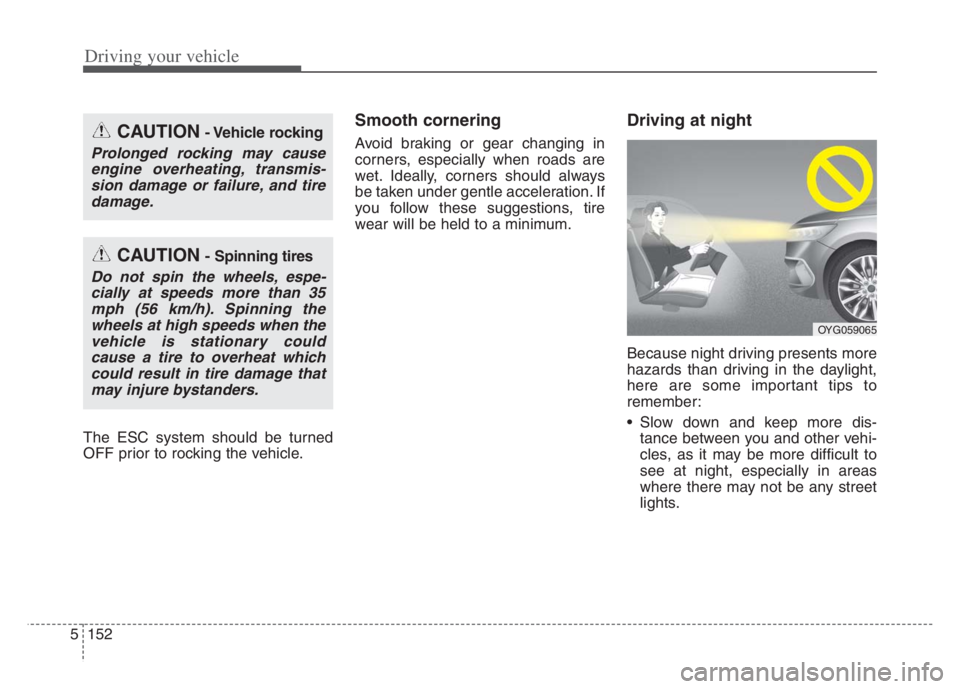
Driving at night
Because night driving presents more
hazards than driving in the daylight,
here are some important tips to
remember:
Slow down and keep more dis-
tance between you and other vehi-
cles, as it may be more difficult to
see at night, especially in areas
where there may not be any street
lights.
CAUTION- Vehicle rocking
Prolonged rocking may cause
engine overheating, transmis-
sion damage or failure, and tire
damage.
CAUTION- Spinning tires
Do not spin the wheels, espe-
cially at speeds more than 35
mph (56 km/h). Spinning the
wheels at high speeds when the
vehicle is stationary could
cause a tire to overheat which
could result in tire damage that
may injure bystanders.
OYG059065
Page 406 of 560
5153
Driving your vehicle
Adjust your mirrors to reduce the
glare from other driver's head-
lights.
Keep your headlights clean and
properly aimed. (On vehicles not
equipped with the automatic head-
light aiming feature.) Dirty or
improperly aimed headlights will
make it much more difficult to see
at night.
Avoid staring directly at the head-
lights of oncoming vehicles. You
could be temporarily blinded, and it
will take several seconds for your
eyes to readjust to the darkness.Driving in the rain
Rain and wet roads can make driving
dangerous, especially if you’re not
prepared for the slick pavement.
Here are a few things to consider
when driving in the rain:
A heavy rainfall will make it harder
to see and will increase the dis-
tance needed to stop your vehicle,
so slow down.
Keep your windshield wiping
equipment in good shape. Replace
your windshield wiper blades when
they show signs of streaking or
missing areas on the windshield.
If your tires are not in good condi-
tion, making a quick stop on wet
pavement can cause a skid and
possibly lead to an accident. Be
sure your tires are in good shape.
Turn on your headlights to make it
easier for others to see you. Driving too fast through large pud-
dles can affect your brakes. If you
must go through puddles, try to
drive through them slowly.
If you believe you may have gotten
your brakes wet, apply them lightly
while driving until normal braking
operation returns.
Page 426 of 560

What to do in an emergency
10
6
Each tire, including the spare (if pro-
vided), should be checked monthly
when cold and inflated to the inflation
pressure recommended by the vehi-
cle manufacturer on the vehicle plac-
ard or tire inflation pressure label. (If
your vehicle has tires of a different
size than the size indicated on the
vehicle placard or tire inflation pres-
sure label, you should determine the
proper tire inflation pressure for
those tires.)
As an added safety feature, your
vehicle has been equipped with a tire
pressure monitoring system (TPMS)
that illuminates a low tire pressure
telltale when one or more of your
tires is significantly under-inflated.
Accordingly, when the low tire pres-
sure telltale illuminates, you should
stop and check your tires as soon as
possible, and inflate them to the
proper pressure. Driving on a signifi-
cantly under-inflated tire causes the
tire to overheat and can lead to tire
failure. Under-inflation also reduces
fuel efficiency and tire tread life, and
may affect the vehicle’s handling and
stopping ability. Please note that the TPMS is not a
substitute for proper tire maintenance,
and it is the driver’s responsibility to
maintain correct tire pressure, even if
under-inflation has not reached the
level to trigger illumination of the
TPMS low tire pressure telltale.
Your vehicle has also been equipped
with a TPMS malfunction indicator to
indicate when the system is not
operating properly. The TPMS mal-
function indicator is combined with
the low tire pressure telltale. When
the system detects a malfunction,
the telltale will flash for approximate-
ly one minute and then remain con-
tinuously illuminated. This sequence
will continue upon subsequent vehi-
cle start-ups as long as the malfunc-
tion exists. When the malfunction
indicator is illuminated, the system
may not be able to detect or signal
low tire pressure as intended. TPMS
malfunctions may occur for a variety
of reasons, including the installation
of replacement or alternate tires or
wheels on the vehicle that prevent
the TPMS from functioning properly.
Always check the TPMS malfunction
telltale after replacing one or more
tires or wheels on your vehicle to
ensure that the replacement or alter-
nate tires and wheels allow the
TPMS to continue to function proper-
ly.
Page 439 of 560
623
What to do in an emergency
When using a compact spare tire,
observe the following precautions:
Under no circumstances should
you exceed 50 mph (80 km/h); a
higher speed could damage the
tire.
Ensure that you drive slowly
enough for the road conditions to
avoid all hazards. Any road hazard,
such as a pothole or debris, could
seriously damage the compact
spare.
Any continuous road use of this tire
could result in tire failure, loss of
vehicle control, and possible per-
sonal injury.
Do not exceed the vehicle’s maxi-
mum load rating or the load-carry-
ing capacity shown on the sidewall
of the compact spare tire.
Avoid driving over obstacles. The
compact spare tire diameter is
smaller than the diameter of a con-
ventional tire and reduces the
ground clearance approximately 1
inch (25 mm), which could result in
damage to the vehicle. Do not take this vehicle through an
automatic vehicle wash while the
compact spare tire is installed.
Do not use tire chains on the com-
pact spare tire. Because of the
smaller size, a tire chain will not fit
properly. This could damage the
vehicle and result in loss of the
chain.
Do not use the compact spare tire
on any other vehicle because this
tire has been designed especially
for your vehicle.
The compact spare tire’s tread life
is shorter than a regular tire.
Inspect your compact spare tire
regularly and replace worn com-
pact spare tires with the same size
and design, mounted on the same
wheel.
The compact spare tire should not
be used on any other wheels, nor
should standard tires, snow tires,
wheel covers or trim rings be used
with the compact spare wheel. If
such use is attempted, damage to
these items or other vehicle com-
ponents may occur. Do not use more than one compact
spare tire at a time.
Do not tow a trailer while the com-
pact spare tire is installed.