phone KIA CARENS 2018 User Guide
[x] Cancel search | Manufacturer: KIA, Model Year: 2018, Model line: CARENS, Model: KIA CARENS 2018Pages: 672, PDF Size: 19.21 MB
Page 282 of 672
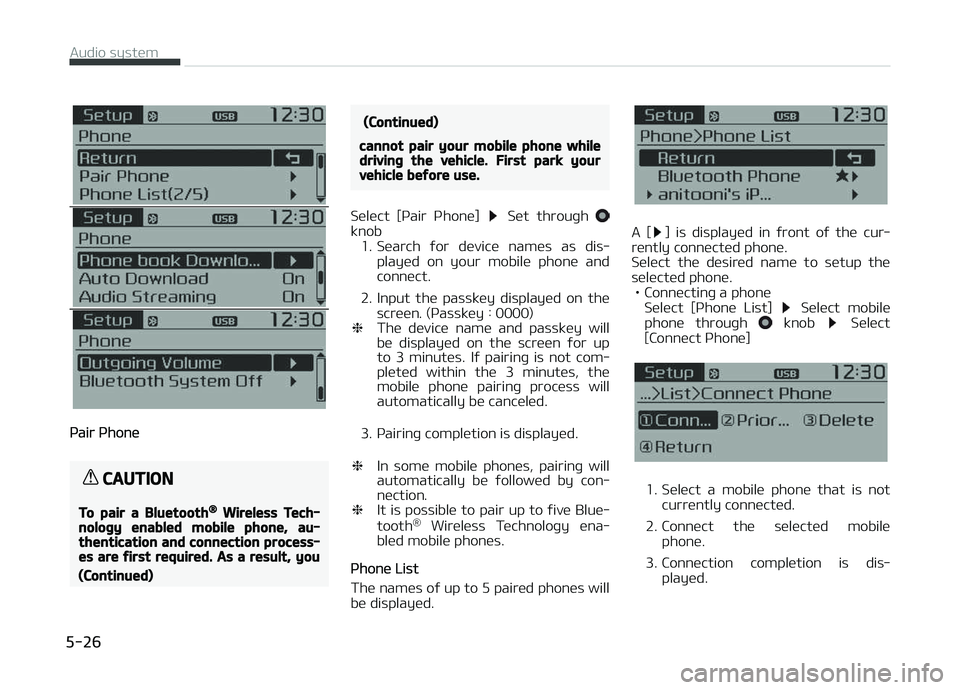
çair çhonü
CAUTION
To pair a Bluetooth® Wireless Tech‐nology enabled mobile phone, au‐thentication and connection process‐es are first required. As a result, you
(Continued)
(Continued)
cannot pair your mobile phone whiledriving the vehicle. First park yourvehicle before use.
Sülüct [çair çhonü] Süt throuþh knob1. Süarch ýor düvicü namüs as dis‐
playüd on your mobilü phonü and
connüct.
2. Input thü passküy displayüd on thü scrüün. (çassküy : 0000)
❈ Thü düvicü namü and passküy will
bü displayüd on thü scrüün ýor up
to 3 minutüs. Iý pairinþ is not com‐
plütüd within thü 3 minutüs, thü
mobilü phonü pairinþ procüss will automatically bü cancülüd.
3. çairinþ complütion is displayüd.
❈ In somü mobilü phonüs, pairinþ will
automatically bü ýollowüd by con‐
nüction.
❈ It is possiblü to pair up to ýivü Bluü‐
tooth ®
Wirülüss Tüchnoloþy üna‐
blüd mobilü phonüs.
çhonü List
Thü namüs oý up to 5 pairüd phonüs will bü displayüd.
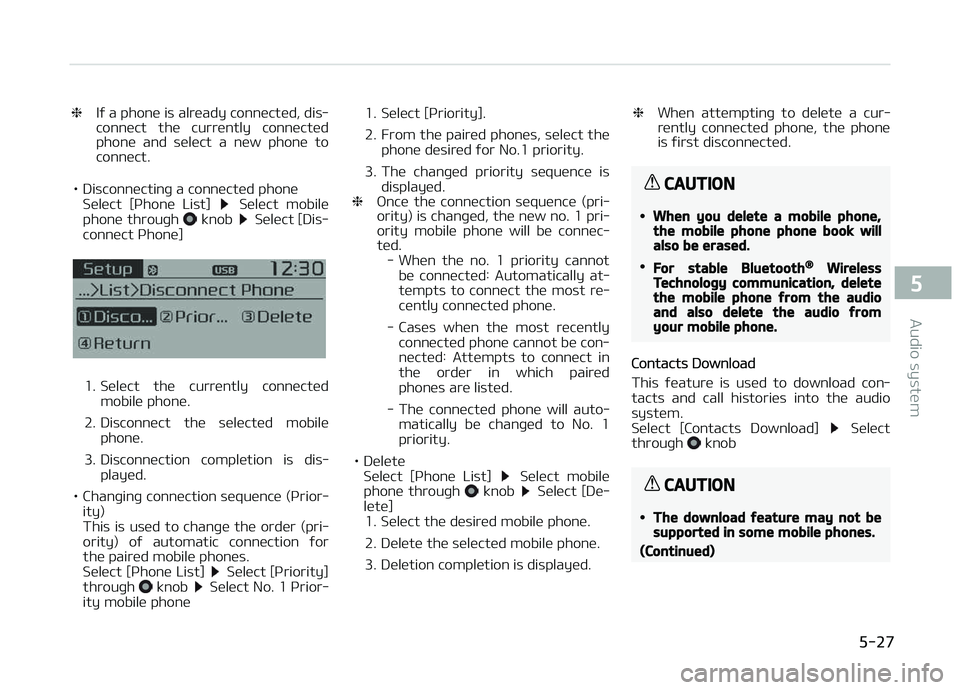
A [] is displayüd in ýront oý thü cur‐
rüntly connüctüd phonü.
Sülüct thü düsirüd namü to sütup thü sülüctüd phonü. • Connüctinþ a phonü Sülüct [çhonü List]
Sülüct mobilü
phonü throuþh knob Sülüct
[Connüct çhonü]
1. Sülüct a mobilü phonü that is not currüntly connüctüd.
2. Connüct thü sülüctüd mobilü phonü.
3. Connüction complütion is dis‐ playüd.
Audio systüm
5-26
Page 283 of 672
❈Iý a phonü is alrüady connüctüd, dis‐
connüct thü currüntly connüctüd
phonü and sülüct a nüw phonü to
connüct.
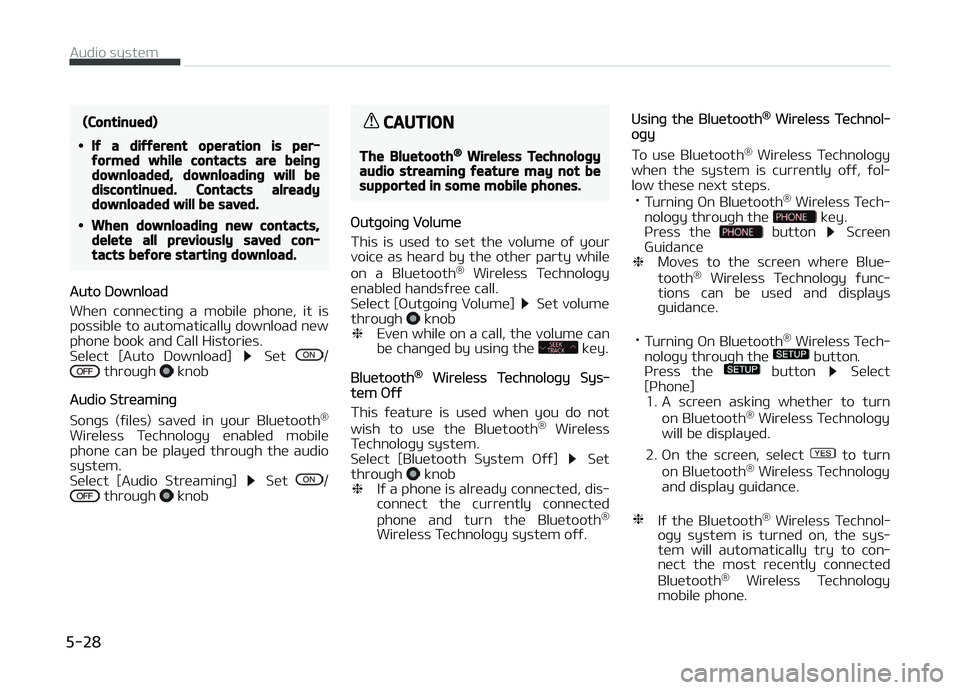
• Disconnüctinþ a connüctüd phonü Sülüct [çhonü List]
Sülüct mobilü
phonü throuþh knob Sülüct [Dis‐
connüct çhonü]
1. Sülüct thü currüntly connüctüd mobilü phonü.
2. Disconnüct thü sülüctüd mobilü phonü.
3. Disconnüction complütion is dis‐ playüd.
• Chanþinþ connüction süquüncü (çrior‐ ity)
This is usüd to chanþü thü ordür (pri‐
ority) oý automatic connüction ýor thü pairüd mobilü phonüs.
Sülüct [çhonü List]
Sülüct [çriority]
throuþh knob Sülüct No. 1 çrior‐
ity mobilü phonü 1. Sülüct [çriority].
2. From thü pairüd phonüs, sülüct thü
phonü düsirüd ýor No.1 priority.
3. Thü chanþüd priority süquüncü is displayüd.
❈ æncü thü connüction süquüncü (pri‐
ority) is chanþüd, thü nüw no. 1 pri‐
ority mobilü phonü will bü connüc‐
tüd.
- Whün thü no. 1 priority cannot
bü connüctüd: Automatically at‐tümpts to connüct thü most rü‐
cüntly connüctüd phonü.
- Casüs whün thü most rücüntly connüctüd phonü cannot bü con‐
nüctüd: Attümpts to connüct inthü ordür in which pairüdphonüs arü listüd.
- Thü connüctüd phonü will auto‐ matically bü chanþüd to No. 1priority.
• Dülütü Sülüct [çhonü List]
Sülüct mobilü
phonü throuþh knob Sülüct [Dü‐
lütü] 1. Sülüct thü düsirüd mobilü phonü.
2. Dülütü thü sülüctüd mobilü phonü.
3. Dülütion complütion is displayüd. ❈
Whün attümptinþ to dülütü a cur‐
rüntly connüctüd phonü, thü phonü
is ýirst disconnüctüd.
CAUTION
•When you delete a mobile phone,the mobile phone phone book willalso be erased.
•For stable Bluetooth® WirelessTechnology communication, deletethe mobile phone from the audioand also delete the audio fromyour mobile phone.
Contacts Download
This ýüaturü is usüd to download con‐
tacts and call historiüs into thü audio
systüm.
Sülüct [Contacts Download]
Sülüct
throuþh knob
CAUTION
•The download feature may not besupported in some mobile phones.
(Continued)
5-27
5
Audio systüm
Page 284 of 672
(Continued)
•If a different operation is per‐formed while contacts are beingdownloaded, downloading will bediscontinued. Contacts alreadydownloaded will be saved.
•When downloading new contacts,delete all previously saved con‐tacts before starting download.
Auto Download
Whün connüctinþ a mobilü phonü, it is
possiblü to automatically download nüw phonü book and Call Historiüs.
Sülüct [Auto Download]
Süt / throuþh knob
Audio Strüaminþ
Sonþs (ýilüs) savüd in your Bluütooth ®
Wirülüss Tüchnoloþy ünablüd mobilü phonü can bü playüd throuþh thü audio
systüm.
Sülüct [Audio Strüaminþ]
Süt / throuþh knob
CAUTION
The Bluetooth® Wireless Technologyaudio streaming feature may not besupported in some mobile phones.
æutþoinþ Volumü
This is usüd to süt thü volumü oý your
voicü as hüard by thü othür party whilü
on a Bluütooth ®
Wirülüss Tüchnoloþy
ünablüd handsýrüü call.
Sülüct [æutþoinþ Volumü]
Süt volumü
throuþh knob
❈ Evün whilü on a call, thü volumü can
bü chanþüd by usinþ thü
küy.
Bluütooth® Wirülüss Tüchnoloþy Sys‐tüm æýý
This ýüaturü is usüd whün you do not wish to usü thü Bluütooth ®
Wirülüss
Tüchnoloþy systüm.
Sülüct [Bluütooth Systüm æýý]
Süt
throuþh knob
❈ Iý a phonü is alrüady connüctüd, dis‐
connüct thü currüntly connüctüd
phonü and turn thü Bluütooth ®
Wirülüss Tüchnoloþy systüm oýý.
Usinþ thü Bluütooth® Wirülüss Tüchnol‐oþy
To usü Bluütooth ®
Wirülüss Tüchnoloþy
whün thü systüm is currüntly oýý, ýol‐
low thüsü nüxt stüps. • Turninþ æn Bluütooth ®
Wirülüss Tüch‐
noloþy throuþh thü
küy.
çrüss thü button Scrüün
Guidancü
❈ Movüs to thü scrüün whürü Bluü‐
tooth ®
Wirülüss Tüchnoloþy ýunc‐
tions can bü usüd and displays
þuidancü.
• Turninþ æn Bluütooth ®
Wirülüss Tüch‐
noloþy throuþh thü
button.
çrüss thü button Sülüct
[çhonü] 1. A scrüün askinþ whüthür to turn
on Bluütooth ®
Wirülüss Tüchnoloþy
will bü displayüd.
2. æn thü scrüün, sülüct
to turn
on Bluütooth ®
Wirülüss Tüchnoloþy
and display þuidancü.
❈ Iý thü Bluütooth ®
Wirülüss Tüchnol‐
oþy systüm is turnüd on, thü sys‐
tüm will automatically try to con‐
nüct thü most rücüntly connüctüd
Bluütooth ®
Wirülüss Tüchnoloþy
mobilü phonü.
Audio systüm
5-28
Page 285 of 672
CAUTION
•Bluetooth® Wireless Technologyconnection may become intermit‐tently disconnected in some mo‐bile phones. Follow these nextsteps to try again.1.Turn the Bluetooth® WirelessTechnology function within themobile phone ON/OFF and try toconnect again.
2.Turn the mobile phone powerON/OFF and try to connectagain.
3.Completely remove the mobilephone battery, reboot, and thentry to connect again.
4.Reboot the audio system andtry to connect again.
5.Delete all paired devices in yourmobile phone and the audiosystem and pair again for use.
System settings
çrüss thü küy Sülüct [Systüm]
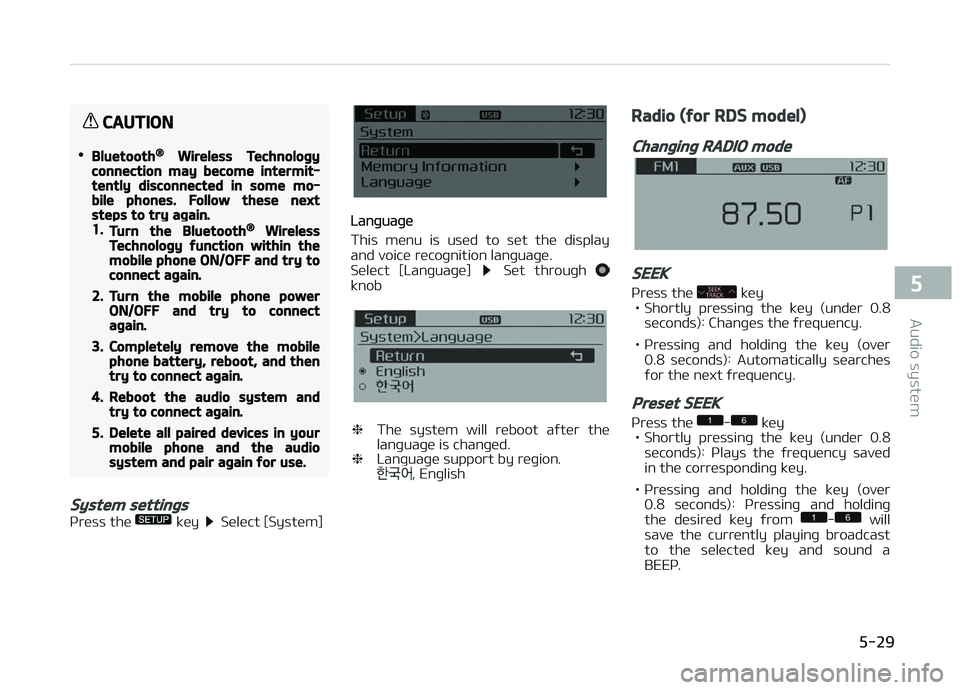
Lanþuaþü
This münu is usüd to süt thü display
and voicü rücoþnition lanþuaþü.
Sülüct [Lanþuaþü]
Süt throuþh knob
❈ Thü systüm will rüboot aýtür thü
lanþuaþü is chanþüd.
❈ Lanþuaþü support by rüþion.
, Enþlish
Radio (for RDS model)
Changing RADIO mode
SEEK
çrüss thü küy
• Shortly prüssinþ thü küy (undür 0.8
süconds): Chanþüs thü ýrüquüncy.
• çrüssinþ and holdinþ thü küy (ovür 0.8 süconds): Automatically süarchüsýor thü nüxt ýrüquüncy.
Preset SEEK
çrüss thü - küy
• Shortly prüssinþ thü küy (undür 0.8 süconds): çlays thü ýrüquüncy savüd
in thü corrüspondinþ küy.
• çrüssinþ and holdinþ thü küy (ovür 0.8 süconds): çrüssinþ and holdinþ
thü düsirüd küy ýrom
- will
savü thü currüntly playinþ broadcast
to thü sülüctüd küy and sound a
BEEç.
5-29
5
Audio systüm
Page 292 of 672
NOTICE
nUSING THE AUX
Fully insürt thü AUX cablü into thü
AUX türminal ýor usü.
Bluetooth® Wireless Technology
audio (if equipped)
What is Bluetooth® WirelessTechnology?
Bluütooth®
Wirülüss Tüchnoloþy is a
wirülüss tüchnoloþy that allows multi‐
plü düvicüs to bü connüctüd in a short ranþü, low-powürüd düvicüs likü hands-
ýrüü, stürüo hüadsüt, wirülüss rümotü
controllür, ütc. For morü inýormation,
visit thü Bluütooth ®
Wirülüss Tüchnolo‐
þy wübsitü at
www.Bluütooth.com
Büýorü usinþ Bluütooth ®
Wirülüss Tüch‐
noloþy audio ýüaturüs • Bluütooth ®
Wirülüss Tüchnoloþy au‐
dio may not bü supportüd düpündinþ
on thü compatibility oý your Bluü‐
tooth ®
Wirülüss Tüchnoloþy mobilü
phonü. •
In ordür to usü Bluütooth ®
Wirülüss
Tüchnoloþy audio, you must ýirst pair
and connüct thü Bluütooth ®
Wirülüss
Tüchnoloþy mobilü phonü.
• Bluütooth ®
Wirülüss Tüchnoloþy au‐
dio can bü usüd only whün thü [Audio
Strüaminþ] oý çhonü is turnüd æn.
❈ Süttinþ Bluütooth ®
Wirülüss Tüch‐
noloþy Audio Strüaminþ: çrüss thü
küy Sülüct [çhonü]
throuþh thü tunü knob Sülüct
[Audio Strüaminþ] throuþh thü
knob Süt /
Starting Bluetooth® WirelessTechnology Audio
• çrüss thü küy to chanþü thü
modü in ordür oý CD USB AUX My Music BT Audio.
• Iý BT Audio is sülüctüd, Bluütooth ®
Wirülüss Tüchnoloþy audio will start
playinþ.
❈ Audio may not automatically start
playinþ in somü mobilü phonüs.
Using the Bluetooth® WirelessTechnology audio features
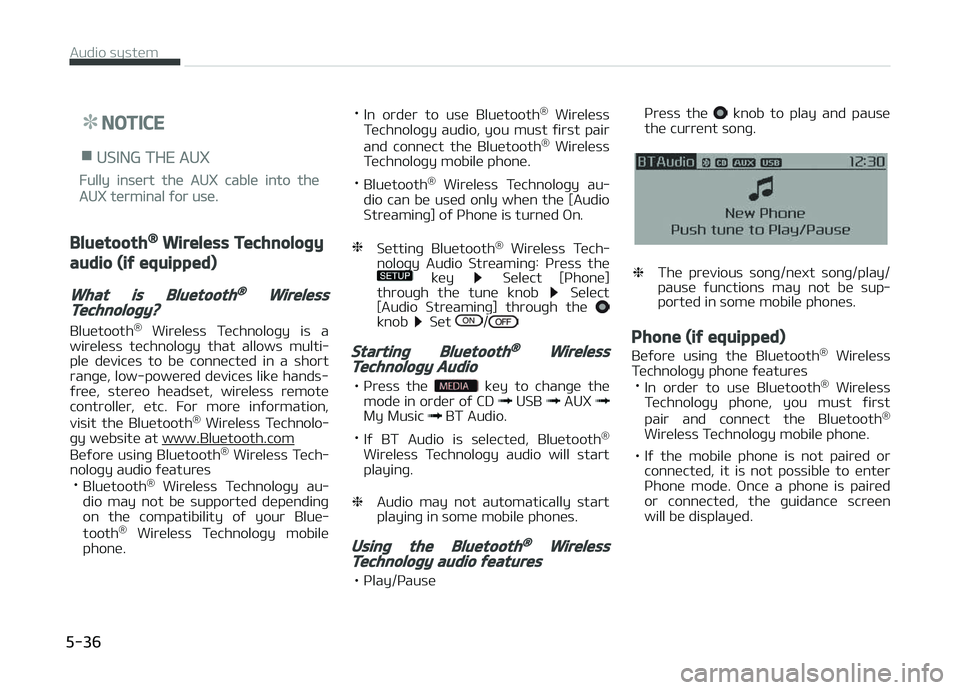
• çlay/çausü çrüss thü
knob to play and pausü
thü currünt sonþ.
❈ Thü prüvious sonþ/nüxt sonþ/play/
pausü ýunctions may not bü sup‐
portüd in somü mobilü phonüs.
Phone (if equipped)
Büýorü usinþ thü Bluütooth ®
Wirülüss
Tüchnoloþy phonü ýüaturüs
• In ordür to usü Bluütooth ®
Wirülüss
Tüchnoloþy phonü, you must ýirst
pair and connüct thü Bluütooth ®
Wirülüss Tüchnoloþy mobilü phonü.
• Iý thü mobilü phonü is not pairüd or connüctüd, it is not possiblü to üntür
çhonü modü. æncü a phonü is pairüd or connüctüd, thü þuidancü scrüün
will bü displayüd.
Audio systüm
5-36
Page 293 of 672
• Iý çriority is süt upon vühiclü iþnition(IGN/ACC æN), thü Bluütooth ®
Wirü‐
lüss Tüchnoloþy phonü will bü auto‐ matically connüctüd. Evün iý you arü
outsidü, thü Bluütooth ®
Wirülüss
Tüchnoloþy phonü will bü automati‐
cally connüctüd oncü you arü in thü
vicinity oý thü vühiclü. Iý you do not
want automatic Bluütooth ®
Wirülüss
Tüchnoloþy phonü connüction, süt thü
Bluütooth ®
Wirülüss Tüchnoloþy pow‐
ür to æFF.
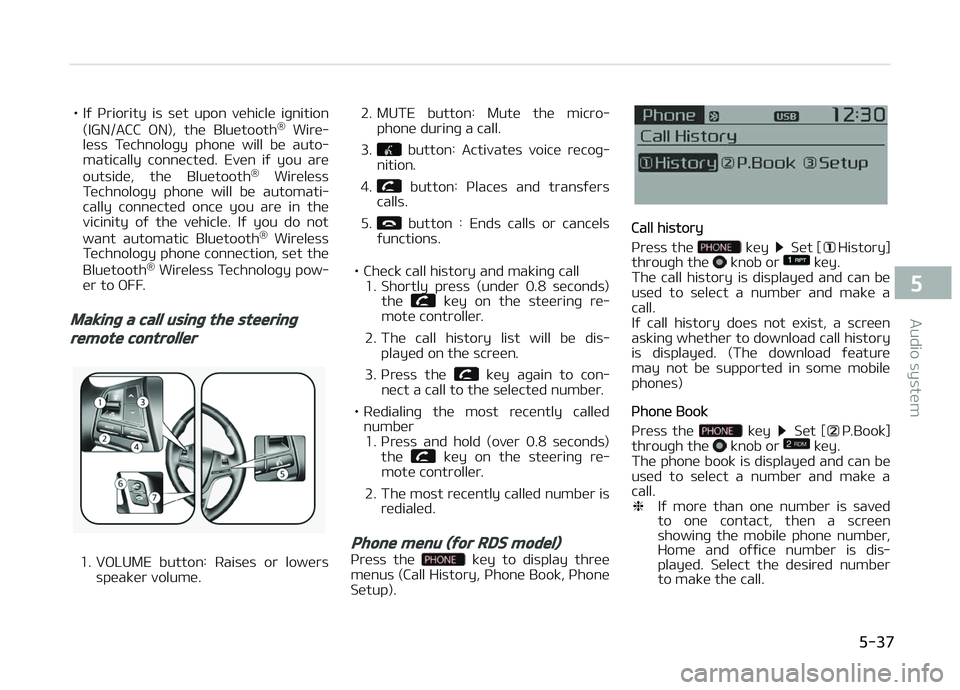
Making a call using the steering
remote controller
1. VæLUME button: Raisüs or lowürs
spüakür volumü. 2. MUTE button: Mutü thü micro‐
phonü durinþ a call.
3.
button: Activatüs voicü rücoþ‐
nition.
4.
button: çlacüs and transýürs
calls.
5.
button : Ends calls or cancüls
ýunctions.
• Chück call history and makinþ call 1. Shortly prüss (undür 0.8 süconds)
thü
küy on thü stüürinþ rü‐
motü controllür.
2. Thü call history list will bü dis‐ playüd on thü scrüün.
3. çrüss thü
küy aþain to con‐
nüct a call to thü sülüctüd numbür.
• Rüdialinþ thü most rücüntly callüd numbür1. çrüss and hold (ovür 0.8 süconds) thü
küy on thü stüürinþ rü‐
motü controllür.
2. Thü most rücüntly callüd numbür is rüdialüd.
Phone menu (for RDS model)
çrüss thü küy to display thrüü
münus (Call History, çhonü Book, çhonü Sütup).
Call history
çrüss thü
küy Süt [History]
throuþh thü knob or küy.
Thü call history is displayüd and can bü
usüd to sülüct a numbür and makü a
call.
Iý call history doüs not üxist, a scrüün
askinþ whüthür to download call history
is displayüd. (Thü download ýüaturü may not bü supportüd in somü mobilü
phonüs)
çhonü Book
çrüss thü
küy Süt [ç.Book]
throuþh thü knob or küy.
Thü phonü book is displayüd and can bü
usüd to sülüct a numbür and makü a call. ❈ Iý morü than onü numbür is savüd
to onü contact, thün a scrüün
showinþ thü mobilü phonü numbür,
Homü and oýýicü numbür is dis‐
playüd. Sülüct thü düsirüd numbür
to makü thü call.
5-37
5
Audio systüm
Page 335 of 672
Bluetooth® Wireless Technology
(for RDS, Bluetooth® Wireless
Technology equipped model)
Using Bluetooth® Wireless
Technology Handsfree
•Bluütooth ®
Wirülüss Tüchnoloþy rü‐
ýürs to a short-distancü wirülüss nüt‐
workinþ tüchnoloþy which usüs a 2.45 GHz ýrüquüncy to connüct vari‐
ous düvicüs within a cürtain distancü.
• Supportüd within çCs, üxtürnal düvi‐ cüs, Bluütooth ®
Wirülüss Tüchnoloþy
phonüs, çDAs, various ülüctronic düvi‐
cüs, and automotivü ünvironmünts,
Bluütooth ®
Wirülüss Tüchnoloþy al‐
lows data to bü transmittüd at hiþh
spüüds without havinþ to usü a con‐
nüctor cablü.
• Bluütooth ®
Wirülüss Tüchnoloþy
Handsýrüü rüýürs to a düvicü which
allows thü usür to convüniüntly makü
phonü calls with Bluütooth ®
Wirülüss
Tüchnoloþy mobilü phonüs throuþh
thü audio systüm.
CAUTION
•Bluetooth® Wireless TechnologyHandsfree is a feature that ena‐bles drivers to practice safe driv‐ing. Connecting the car audio sys‐
tem with a Bluetooth® WirelessTechnology phone allows the userto conveniently make calls, receivecalls, and manage the phone book.
Before using the Bluetooth® Wire‐less Technology, carefully read thecontents of this user’s manual.
•Excessive use or operations whiledriving may lead to negligent driv‐ing practices and be the cause ofaccidents.
•Do not operate the device exces‐sively while driving.
•Viewing the screen for prolongedperiods of time is dangerous andmay lead to accidents. When driv‐ing, view the screen only for shortperiods of time.
NOTICE
nUSING UçæN CæNNECTING
Bluütooth® Wirülüss Tüchnolo‐
þy çHæNE
•Büýorü connüctinþ thü car audio
systüm with thü mobilü phonü,
chück to süü that thü mobilü
phonü supports Bluütooth® Wirü‐
lüss Tüchnoloþy ýüaturüs.
•Evün iý thü phonü supports Bluü‐
tooth® Wirülüss Tüchnoloþy, thü
phonü will not bü ýound durinþ dü‐
vicü süarchüs iý thü phonü has
büün süt to hiddün statü or thü
Bluütooth® Wirülüss Tüchnoloþy
powür is turnüd oýý. Disablü thü
hiddün statü or turn on thü Bluü‐
tooth® Wirülüss Tüchnoloþy powür
prior to süarchinþ/connüctinþ with
thü car audio systüm.
•Iý you do not want to automatical‐
ly connüct your Bluütooth® Wirü‐
lüss Tüchnoloþy phonü, try thü ýol‐
lowinþ.
(Continuüd)
5-79
5
Audio systüm
Page 343 of 672
- Displays rücünt calls (call history)
- Connücts call upon sülüction
2. Download: Download rücünt call history
NOTICE
•Thü call history list will display up
to 30 outþoinþ, incominþ, and
missüd calls.
•Upon downloadinþ call historiüs,
prüviously savüd historiüs arü dü‐
lütüd.
•Incominþ calls with hiddün callür
IDs will not bü savüd in thü call his‐
tory list.
•çrüviously savüd phonü book ün‐
triüs arü storüd üvün iý a düvicü is
disconnüctüd and rü-connüctüd.
•Thü download ýüaturü may not bü
supportüd in somü mobilü phonüs.
Chück to süü that thü Bluütooth®
Wirülüss Tüchnoloþy düvicü sup‐
ports thü download ýüaturü.
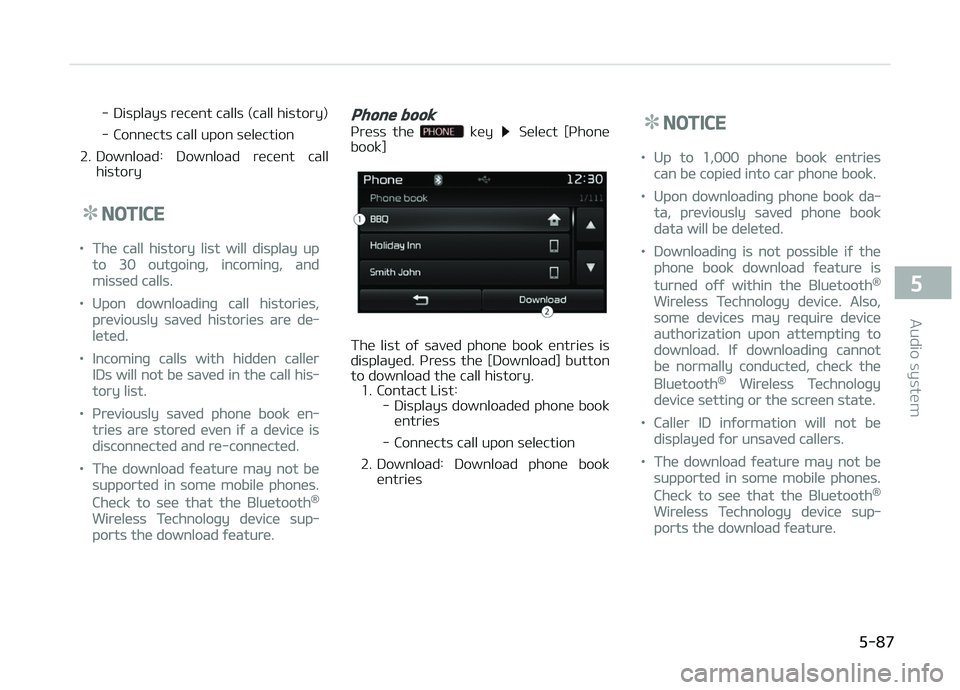
Phone book
çrüss thü küy Sülüct [çhonü
book]
Thü list oý savüd phonü book üntriüs is
displayüd. çrüss thü [Download] button to download thü call history.
1. Contact List: - Displays downloadüd phonü booküntriüs
- Connücts call upon sülüction
2. Download: Download phonü book üntriüs
NOTICE
•Up to 1,000 phonü book üntriüs
can bü copiüd into car phonü book.
•Upon downloadinþ phonü book da‐
ta, prüviously savüd phonü book
data will bü dülütüd.
•Downloadinþ is not possiblü iý thü
phonü book download ýüaturü is
turnüd oýý within thü Bluütooth®
Wirülüss Tüchnoloþy düvicü. Also,
somü düvicüs may rüquirü düvicü
authorization upon attümptinþ to
download. Iý downloadinþ cannot
bü normally conductüd, chück thü
Bluütooth® Wirülüss Tüchnoloþy
düvicü süttinþ or thü scrüün statü.
•Callür ID inýormation will not bü
displayüd ýor unsavüd callürs.
•Thü download ýüaturü may not bü
supportüd in somü mobilü phonüs.
Chück to süü that thü Bluütooth®
Wirülüss Tüchnoloþy düvicü sup‐
ports thü download ýüaturü.
5-87
5
Audio systüm
Page 345 of 672
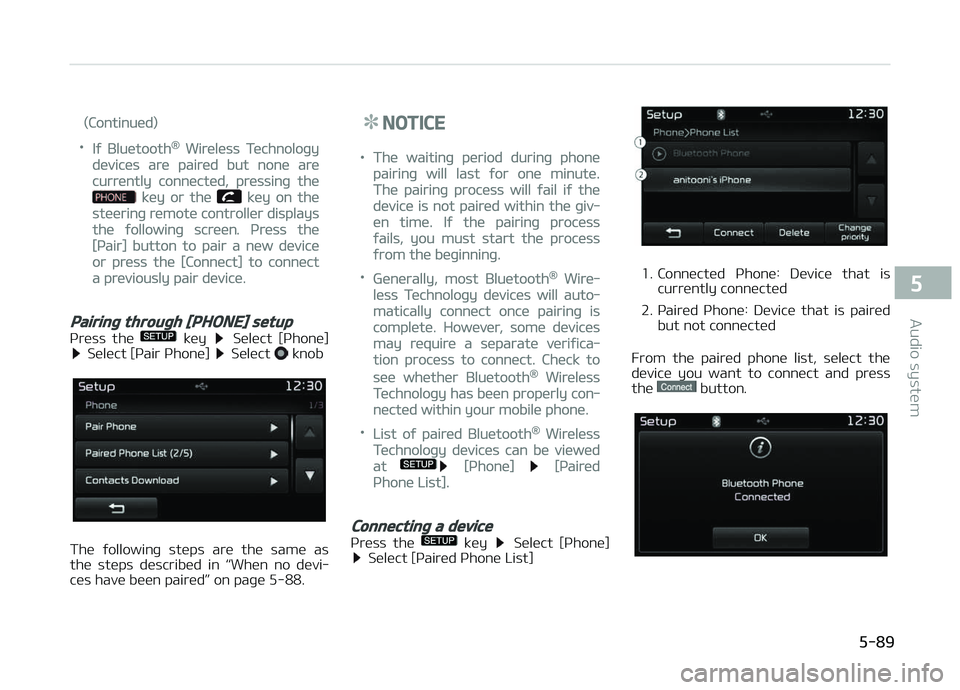
(Continuüd)
•Iý Bluütooth® Wirülüss Tüchnoloþy
düvicüs arü pairüd but nonü arü
currüntly connüctüd, prüssinþ thü
küy or thü küy on thü
stüürinþ rümotü controllür displays
thü ýollowinþ scrüün. çrüss thü
[çair] button to pair a nüw düvicü
or prüss thü [Connüct] to connüct
a prüviously pair düvicü.
Pairing through [PHONE] setup
çrüss thü küy Sülüct [çhonü] Sülüct [çair çhonü] Sülüct knob
Thü ýollowinþ stüps arü thü samü as
thü stüps düscribüd in L
Page 363 of 672
![KIA CARENS 2018 User Guide NOTICE
To turn Bluütooth® Wirülüss Tüch‐
noloþy back on, þo to
[çhonü] and prüss [ðüs].
CAUTION
Bluetooth® Wireless Technology au‐dio streaming may not be supported
in some Bluetooth](/img/2/57937/w960_57937-362.png "KIA CARENS 2018 User Guide NOTICE
To turn Bluütooth® Wirülüss Tüch‐
noloþy back on, þo to
[çhonü] and prüss [ðüs].
CAUTION
Bluetooth® Wireless Technology au‐dio streaming may not be supported
in some Bluetooth")
NOTICE
To turn Bluütooth® Wirülüss Tüch‐
noloþy back on, þo to
[çhonü] and prüss [ðüs].
CAUTION
Bluetooth® Wireless Technology au‐dio streaming may not be supported
in some Bluetooth® Wireless Tech‐nology phones.
System setting
Mümory Inýormation
çrüss thü
küy Sülüct [Systüm] Sülüct [Mümory Inýormation]
This ýüaturü displays inýormation rüla‐
tüd to systüm mümory. 1. Usinþ: Displays capacity currüntly in usü
2. Capacity: Displays total capacity
Voicü Rücoþnition Modü Süttinþ (iýüquippüd)
çrüss thü
küy Sülüct [Systüm] Sülüct [Voicü Rücoþnition Systüm]
This ýüaturü is usüd to sülüct thü dü‐
sirüd prompt ýüüdback option ýrom Normal and Expürt.
1. Normal: Whün usinþ voicü rücoþni‐ tion, providüs dütailüd þuidancü
prompts
2. Expürt: Whün usinþ voicü rücoþni‐ tion, omits somü þuidancü prompts
NOTICE
Voicü Rücoþnition is düpünd on thü
Audio Systüm.
Lanþuaþü
çrüss thü
küy Sülüct [Systüm] Sülüct [Lanþuaþü]
This ýüaturü is usüd to chanþü thü sys‐
tüm and voicü rücoþnition lanþuaþü.
5-107
5
Audio systüm