lock KIA CARENS RHD 2017 Manual Online
[x] Cancel search | Manufacturer: KIA, Model Year: 2017, Model line: CARENS RHD, Model: KIA CARENS RHD 2017Pages: 723, PDF Size: 40.8 MB
Page 315 of 723
![KIA CARENS RHD 2017 Manual Online Audio system
32
5
CLOCK SETTINGS
Press the key Select [Clock]
through TUNE knob or key
Select menu through TUNE knob
Clock Settings
This menu is used to set the time.
Select [Clock Settings] Se](/img/2/57939/w960_57939-314.png "KIA CARENS RHD 2017 Manual Online Audio system
32
5
CLOCK SETTINGS
Press the key Select [Clock]
through TUNE knob or key
Select menu through TUNE knob
Clock Settings
This menu is used to set the time.
Select [Clock Settings] Se")
Audio system
32
5
CLOCK SETTINGS
Press the key Select [Clock]
through TUNE knob or key
Select menu through TUNE knob
Clock Settings
This menu is used to set the time.
Select [Clock Settings] Set through
TUNEknob Press TUNEknob
❈ Adjust the number currently in
focus to set the [hour] and press
the tune knob to set the [minute]. Calendar Settings
This menu is used to set the date (YYYY/MM/DD).
Select [Calendar Settings] Set through
TUNE knob Press
TUNE knob
❈ Adjust the number currently in
focus to make the settings and
press the tune knob to move to the
next setting. (Set in order of
Year/Month/Day)
Clock Display when Power isOFF
Select [Clock Disp.(Pwr Off)
Set
/ through TUNE knob
: Displays time/date on screen
Turn off.
Off
On
OffOn
3
SETUP
CLOCK
Page 349 of 723
Audio system
66
5
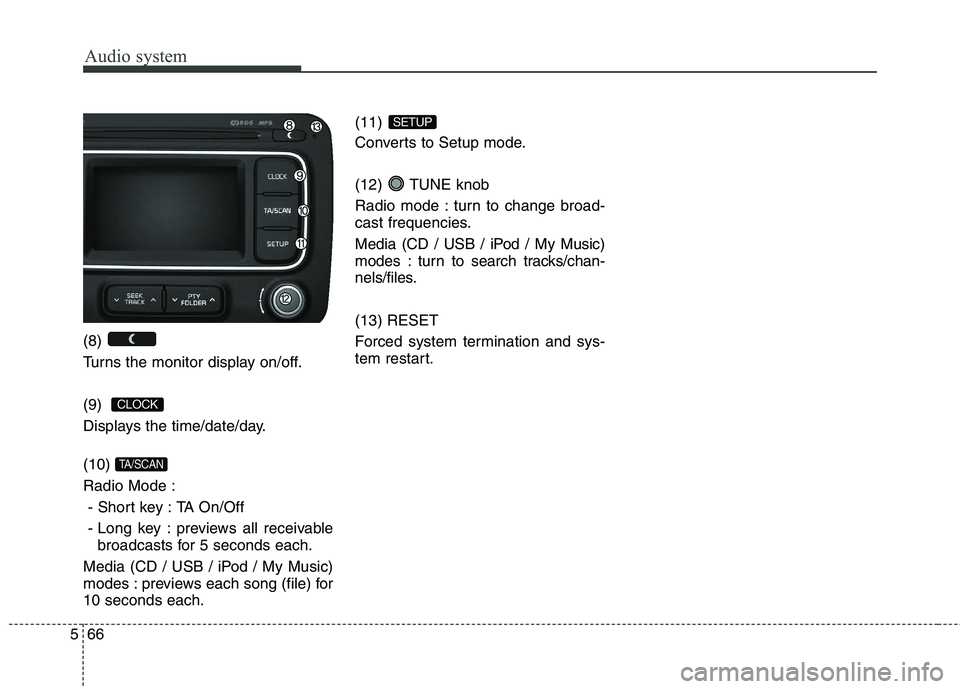
(8)
Turns the monitor display on/off. (9)
Displays the time/date/day. (10) Radio Mode :
- Short key : TA On/Off
- Long key : previews all receivable broadcasts for 5 seconds each.
Media (CD / USB / iPod / My Music)
modes : previews each song (file) for10 seconds each. (11)
Converts to Setup mode.
(12) TUNE knob
Radio mode : turn to change broad-
cast frequencies.
Media (CD / USB / iPod / My Music)
modes : turn to search tracks/chan-
nels/files. (13) RESET
Forced system termination and sys-
tem restart.
SETUP
TA/SCAN
CLOCK
Page 352 of 723
569
Audio system
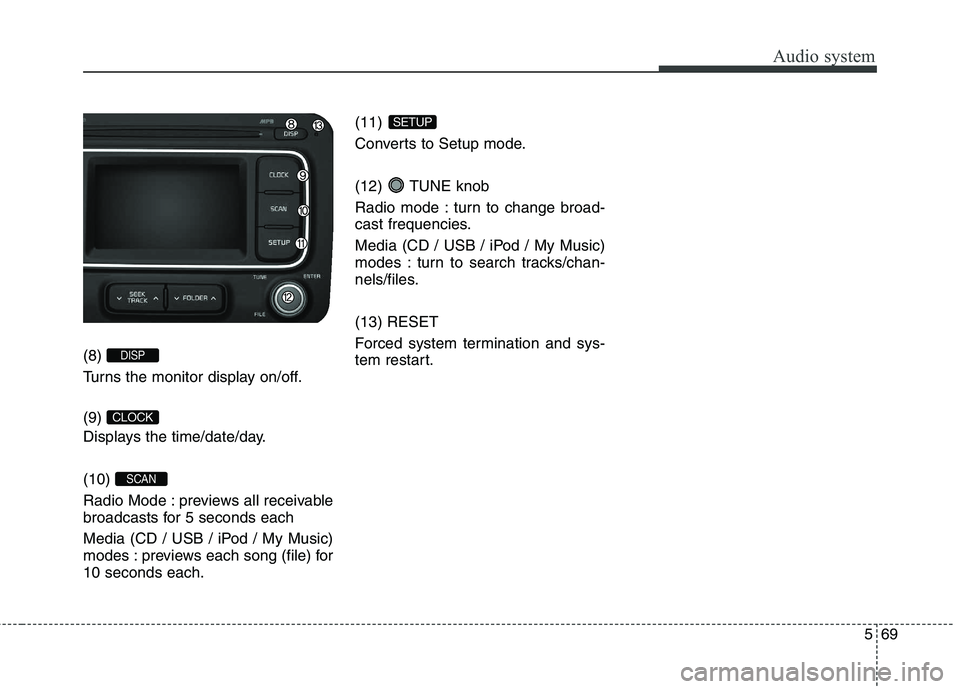
(8)
Turns the monitor display on/off. (9)
Displays the time/date/day. (10)
Radio Mode : previews all receivable
broadcasts for 5 seconds each
Media (CD / USB / iPod / My Music)
modes : previews each song (file) for10 seconds each.(11)
Converts to Setup mode.
(12) TUNE knob
Radio mode : turn to change broad-
cast frequencies.
Media (CD / USB / iPod / My Music)
modes : turn to search tracks/chan-
nels/files. (13) RESET
Forced system termination and sys-
tem restart.
SETUP
SCAN
CLOCK
DISP
Page 371 of 723
Audio system
88
5
(Continued)
Charging through the USB may
not work for some mobile devices.
The device may not support nor- mal operation when using a USB
memory type besides (Metal
Cover Type) USB Memory.
The device may not support nor- mal operation when using formats
such as HDD Type, CF, or SD
Memory.
The device will not support files locked by DRM (Digital Rights
Management.)
USB memory sticks used by con- necting an Adaptor (SD Type or
CF Type) may not be properly rec-
ognized.
The device may not operate prop- erly when using USB HDDs or
USBs subject to connection fail-
ures caused by vehicle vibrations.
(e.g. i-stick type) (Continued)(Continued)
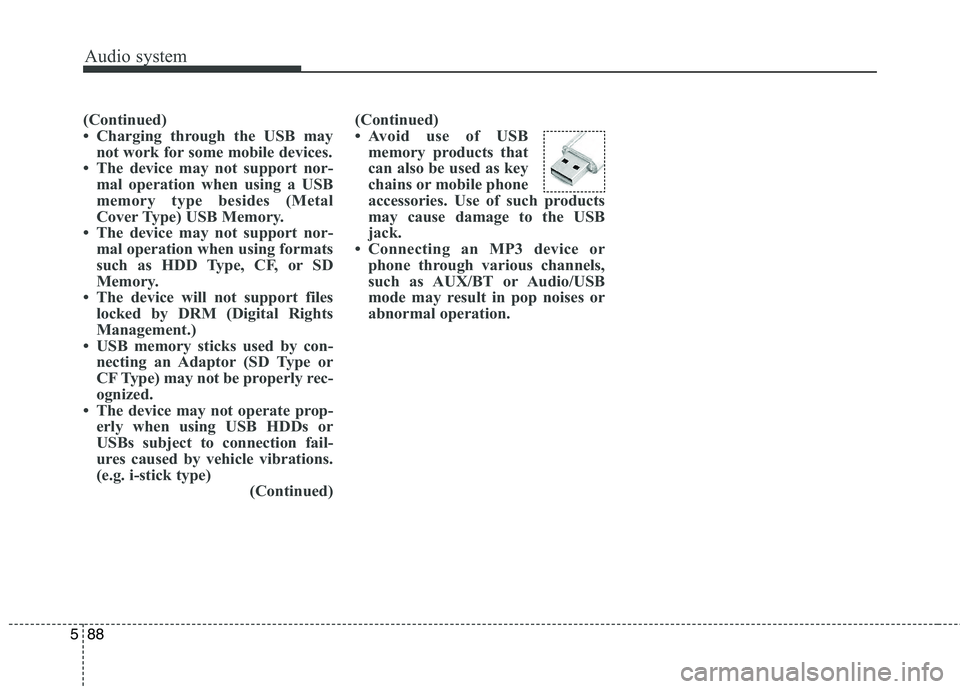
Avoid use of USB
memory products that
can also be used as key
chains or mobile phone
accessories. Use of such products
may cause damage to the USB
jack.
Connecting an MP3 device or phone through various channels,
such as AUX/BT or Audio/USB
mode may result in pop noises or
abnormal operation.
Page 417 of 723
![KIA CARENS RHD 2017 Manual Online Audio system
134
5
SETUP
(for RDS model) AM111 A4EE
Starting Mode
Press the key to display the Setup screen.
You can select and control options
related to [Display], [Sound],
[Clock/Day], [Phone](/img/2/57939/w960_57939-416.png "KIA CARENS RHD 2017 Manual Online Audio system
134
5
SETUP
(for RDS model) AM111 A4EE
Starting Mode
Press the key to display the Setup screen.
You can select and control options
related to [Display], [Sound],
[Clock/Day], [Phone")
Audio system
134
5
SETUP
(for RDS model) AM111 A4EE
Starting Mode
Press the key to display the Setup screen.
You can select and control options
related to [Display], [Sound],
[Clock/Day], [Phone] and [System]. Display Settings
Adjusting the Brightness
Press the key Select
[Display] Select [Brightness]
Use the , buttons to adjust the
screen brightness or set the
Brightness on Automatic, Day, or
Night mode.
Press the button to reset.
(1) Automatic : Adjusts the bright-
ness automatically
(2) Daylight : Always maintains the brightness on high
(3) Night : Always maintains the
brightness on low
Pop-up Mode
Press the key Select
[Display] Select [Pop-up Mode]
This feature is used to display the
Pop-up Mode screen when entering
radio and media modes.
When this feature is turned on, pressing the or key
will display the Pop-up Mode screen.
✽✽ NOTICE
The media Pop-up Mode screen can
be displayed only when two or more
media modes have been connected.
MEDIA RADIO
SETUP
Default
SETUP
SETUP
Page 420 of 723
![KIA CARENS RHD 2017 Manual Online 5137
Audio system
Touch Screen Beep
Press the key Select
[Sound] Select [Touch ScreenBeep]
This feature is used to turn the touch
screen beep on/off.Clock/Day Setting
Clock Setting
Press the key](/img/2/57939/w960_57939-419.png "KIA CARENS RHD 2017 Manual Online 5137
Audio system
Touch Screen Beep
Press the key Select
[Sound] Select [Touch ScreenBeep]
This feature is used to turn the touch
screen beep on/off.Clock/Day Setting
Clock Setting
Press the key")
5137
Audio system
Touch Screen Beep
Press the key Select
[Sound] Select [Touch ScreenBeep]
This feature is used to turn the touch
screen beep on/off.Clock/Day Setting
Clock Setting
Press the key Select
[Clock/Day] Select [Clock Settings]
Use the , buttons to set the
Hour, Minutes and AM/PM setting.
✽✽
NOTICE
Press and hold the key (over
0.8 seconds) to display the
Clock/Day screen.
Calendar Setting
Press the key Select
[Clock/Day] Select [Day Settings]
Use the , buttons to set the
Day, Month and Year setting.SETUP
CLOCK
SETUP
SETUP
Page 421 of 723
![KIA CARENS RHD 2017 Manual Online Audio system
138
5
Time Format
Press the key Select
[Clock/Day] Select [Time Format]
This feature is used to change the
clock format between 12hr or 24hr.
Clock Display
Press the key Select
[Clo](/img/2/57939/w960_57939-420.png "KIA CARENS RHD 2017 Manual Online Audio system
138
5
Time Format
Press the key Select
[Clock/Day] Select [Time Format]
This feature is used to change the
clock format between 12hr or 24hr.
Clock Display
Press the key Select
[Clo")
Audio system
138
5
Time Format
Press the key Select
[Clock/Day] Select [Time Format]
This feature is used to change the
clock format between 12hr or 24hr.
Clock Display
Press the key Select
[Clock/Day] Select [Clock Display
(Power off)]
This feature is used to display a clock on the screen when the audio sys-
tem is turned off.
Automatic RDS Time
Press the key Select
[Clock/Day] Select [Automatic RDSTime]
This feature is used to set time auto-
matically by synchronizing with RDS.SETUP SETUP SETUP
Page 426 of 723
![KIA CARENS RHD 2017 Manual Online 5143
Audio system
SETUP
AM111A4GG, AM111A4GN
AM111A4GE, AM111A4GL
Starting Mode
Press the key to display the Setup screen.
You can select and control options
related to [Display], [Sound],
[](/img/2/57939/w960_57939-425.png "KIA CARENS RHD 2017 Manual Online 5143
Audio system
SETUP
AM111A4GG, AM111A4GN
AM111A4GE, AM111A4GL
Starting Mode
Press the key to display the Setup screen.
You can select and control options
related to [Display], [Sound],
[")
5143
Audio system
SETUP
AM111A4GG, AM111A4GN
AM111A4GE, AM111A4GL
Starting Mode
Press the key to display the Setup screen.
You can select and control options
related to [Display], [Sound],
[Clock/Day], [Phone] and [System].Display Settings
Adjusting the Brightness
Press the key Select
[Display] Select [Brightness]
Use the , buttons to adjust the
screen brightness or set the
Brightness on Automatic, Daylight, or
Night mode.
Press the button to reset.
(1) Automatic : Adjusts the bright-
ness automatically
(2) Daylight : Always maintains the brightness on high
(3) Night : Always maintains the
brightness on low
Pop-up Mode
Press the key Select
[Display] Select [Mode Pop up]
This feature is used to display the
Pop-up Mode screen when entering
radio and media modes.
When this feature is turned on, pressing the or key
will display the Pop-up Mode screen.
✽✽ NOTICE
The media Pop-up Mode screen can
be displayed only when two or more
media modes have been connected.
MEDIA RADIO
SETUP
Default
SETUP
SETUP
Page 429 of 723
![KIA CARENS RHD 2017 Manual Online Audio system
146
5
Clock/Calendar Setting
Clock Setting
Press the key Select
[Clock/Calendar] Select [ClockSettings]
Use the , buttons to set the
Hour, Minutes and AM/PM setting.
✽✽
NOTICE](/img/2/57939/w960_57939-428.png "KIA CARENS RHD 2017 Manual Online Audio system
146
5
Clock/Calendar Setting
Clock Setting
Press the key Select
[Clock/Calendar] Select [ClockSettings]
Use the , buttons to set the
Hour, Minutes and AM/PM setting.
✽✽
NOTICE")
Audio system
146
5
Clock/Calendar Setting
Clock Setting
Press the key Select
[Clock/Calendar] Select [ClockSettings]
Use the , buttons to set the
Hour, Minutes and AM/PM setting.
✽✽
NOTICE
Press and hold the key (over
0.8 seconds) to set the
Clock/Calendar screen.
Calendar Setting
Press the key Select
[Clock/Calendar] Select [CalendarSettings]
Use the , buttons to set the
Day, Month and Year setting.
Clock Display
Press the key Select
[Clock/Calendar] Select [Clock
Display (Power off)]
This feature is used to display a clock on the screen when the audio sys-
tem is turned off.SETUP SETUP
CLOCK
SETUP
Page 439 of 723
Driving your vehicle
4
6
Before entering vehicle
• Be sure that all windows, outside
mirror(s), and outside lights are clean.
Check the condition of the tyres.
Check under the vehicle for any sign of leaks.
Be sure there are no obstacles behind you if you intend to back up. Necessary inspections
Fluid levels, such as engine oil,
engine coolant, brake fluid, and
washer fluid should be checked on a
regular basis, with the exact interval
depending on the fluid. Further
details are provided in chapter 8,“Maintenance”.
Before starting
Close and lock all doors.
Position the seat so that all con-
trols are easily reached.
Adjust the inside and outside rearview mirrors.
Be sure that all lights work.
Check all gauges.
Check the operation of warning lights when the ignition switch is
turned to the ON position.
Release the parking brake and make sure the brake warning lightgoes out.
For safe operation, be sure you are
familiar with your vehicle and itsequipment.
BEFORE DRIVING
WARNING
Driving whilst distracted can
result in a loss of vehicle con-
trol, that may lead to an acci-
dent, severe personal injury,
and death. The driver’s primary
responsibility is in the safe and
legal operation of a vehicle, and
use of any handheld devices,
other equipment, or vehicle sys-
tems which take the driver’s
eyes, attention and focus away
from the safe operation of a
vehicle or which are not permis-
sible by law should never beused during operation of the
vehicle.