lock KIA CARENS RHD 2017 Manual PDF
[x] Cancel search | Manufacturer: KIA, Model Year: 2017, Model line: CARENS RHD, Model: KIA CARENS RHD 2017Pages: 723, PDF Size: 40.8 MB
Page 233 of 723
4137
Features of your vehicle
Headlamp welcome
When the headlight(light switch in
the headlight or AUTO position) is onand all doors (and tailgate) are
locked and closed, the headlight,position light and tail light will come
on for 15 seconds if any of the below
is performed.
- When the door unlock button is pressed on the transmitter.
- When the door unlock button is pressed on the smart key.
At this time, if you press the door lock
button (on the transmitter or smart
key), the lights will turn off immedi-
ately. Interior light
When the interior light switch is in the DOOR position and all doors (and
tailgate) are locked and closed, the
room lamp will come on for 30 sec-
onds if any of the below is performed.
- When the door unlock button is pressed on the transmitter.
- When the door unlock button is pressed on the smart key.
- When the button of the outside door handle is pressed.
At this time, if you press the door lock
button, the lamps will turn off imme-
diately. Puddle lamp (if equipped)
When all doors are locked and closed, the puddle lamp will come on
for 15 seconds if any of the below is
performed.
- When the door unlock button is pressed on the transmitter.
- When the door unlock button is pressed on the smart key.
- When the button of the outside door handle is pressed.
- When the vehicle is approached with the smart key in possession.
At this time, if you press the door lock
button, the lamps will turn off imme-
diately.
WELCOME SYSTEM (IF EQUIPPED)
Page 242 of 723
Features of your vehicle
146
4
System operation
Ventilation
1. Set the mode to the position.
2. Set the air intake control to the
outside (fresh) air position.
3. Set the temperature control to the desired position.
4. Set the fan speed control to the desired speed.
Heating
1. Set the mode to the position.
2. Set the air intake control to theoutside (fresh) air position.
3. Set the temperature control to the desired position.
4. Set the fan speed control to the desired speed.
5. If dehumidified heating is desired, turn the air conditioning system on.
If the windscreen fogs up, set the mode to the position. Operation Tips
To keep dust or unpleasant fumes
from entering the vehicle through
the ventilation system, temporarily
set the air intake control to the
recirculated air position. Be sure to
return the control to the fresh air
position when the irritation has
passed to keep fresh air in the
vehicle. This will help keep the driv-
er alert and comfortable.
Air for the heating/cooling system is drawn in through the grilles just
ahead of the windscreen. Care
should be taken that these are not
blocked by leaves, snow, ice or
other obstructions.
To prevent interior fog on the wind- screen, set the air intake control to
the fresh air position and fan speed
to the desired position, turn on theair conditioning system, and adjust
the temperature control to desired
temperature.
Air conditioning (if equipped)
Kia Air Conditioning Systems are
filled with environmentally friendly
refrigerant*.
1. Start the engine. Push the air con- ditioning button.
2. Set the mode to the position.
3. Set the air intake control to the outside air or recirculated air posi- tion.
4. Adjust the fan speed control and temperature control to maintain
maximum comfort.
*: Your vehicle is filled with R-134a or R-1234yf according to the regula-
tion in your country at the time of
producing. You can find out which
air conditioning refrigerant is
applied to your vehicle at the label
inside of bonnet. Refer to chapter 9
for more detail location of air con-
ditioning refrigerant label.
Page 255 of 723
4159
Features of your vehicle
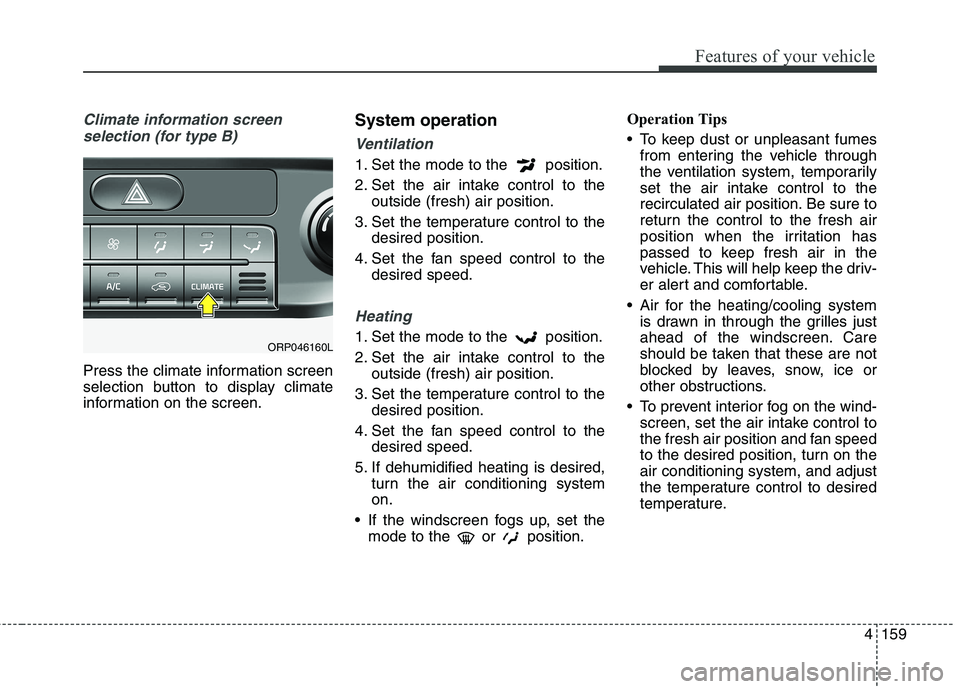
Climate information screen selection (for type B)
Press the climate information screen
selection button to display climate
information on the screen. System operation
Ventilation
1. Set the mode to the position.
2. Set the air intake control to the
outside (fresh) air position.
3. Set the temperature control to the desired position.
4. Set the fan speed control to the desired speed.
Heating
1. Set the mode to the position.
2. Set the air intake control to theoutside (fresh) air position.
3. Set the temperature control to the desired position.
4. Set the fan speed control to the desired speed.
5. If dehumidified heating is desired, turn the air conditioning system on.
If the windscreen fogs up, set the mode to the or position. Operation Tips
To keep dust or unpleasant fumes
from entering the vehicle through
the ventilation system, temporarily
set the air intake control to the
recirculated air position. Be sure to
return the control to the fresh air
position when the irritation has
passed to keep fresh air in the
vehicle. This will help keep the driv-
er alert and comfortable.
Air for the heating/cooling system is drawn in through the grilles just
ahead of the windscreen. Care
should be taken that these are not
blocked by leaves, snow, ice or
other obstructions.
To prevent interior fog on the wind- screen, set the air intake control to
the fresh air position and fan speed
to the desired position, turn on theair conditioning system, and adjust
the temperature control to desired
temperature.ORP046160L
Page 265 of 723
4169
Features of your vehicle
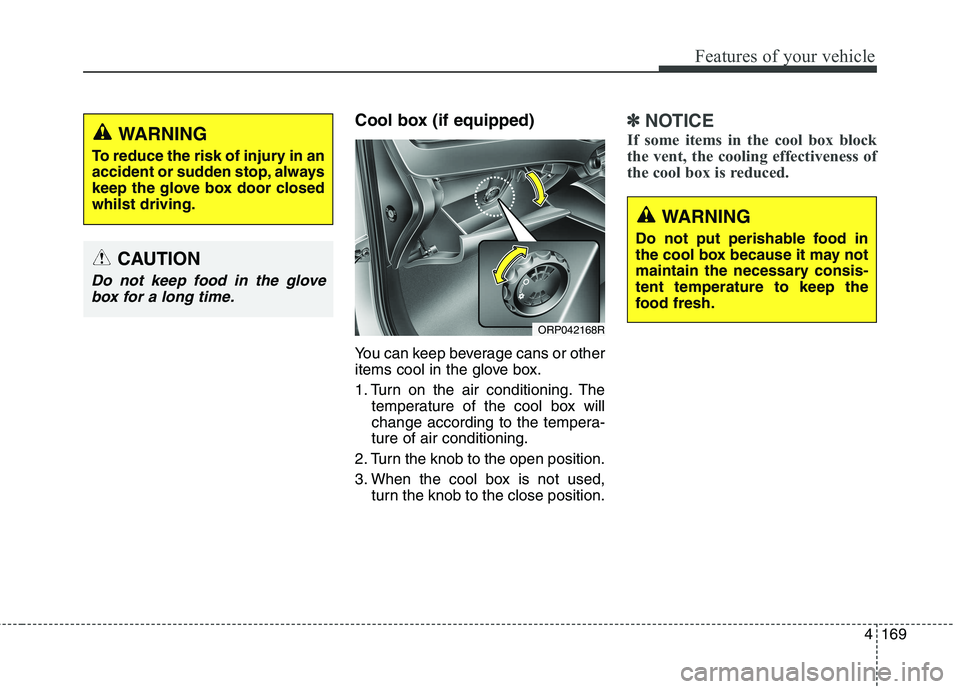
Cool box (if equipped)
You can keep beverage cans or other
items cool in the glove box.
1. Turn on the air conditioning. Thetemperature of the cool box will
change according to the tempera-ture of air conditioning.
2. Turn the knob to the open position.
3. When the cool box is not used, turn the knob to the close position.✽✽ NOTICE
If some items in the cool box block
the vent, the cooling effectiveness of
the cool box is reduced.
ORP042168R
WARNING
To reduce the risk of injury in an
accident or sudden stop, always
keep the glove box door closedwhilst driving.
CAUTION
Do not keep food in the glove box for a long time.
WARNING
Do not put perishable food in
the cool box because it may not
maintain the necessary consis-tent temperature to keep the
food fresh.
Page 266 of 723
Features of your vehicle
170
4
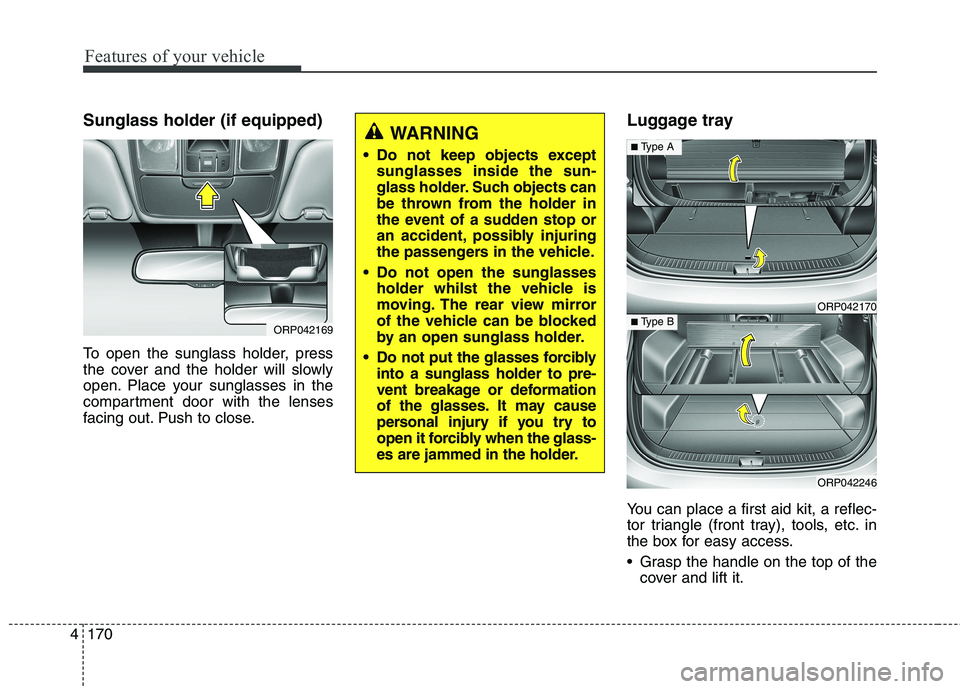
Sunglass holder (if equipped)
To open the sunglass holder, press
the cover and the holder will slowly
open. Place your sunglasses in the
compartment door with the lenses
facing out. Push to close. Luggage tray
You can place a first aid kit, a reflec-
tor triangle (front tray), tools, etc. in
the box for easy access.
Grasp the handle on the top of the
cover and lift it.
ORP042169
WARNING
Do not keep objects except sunglasses inside the sun-
glass holder. Such objects can
be thrown from the holder in
the event of a sudden stop or
an accident, possibly injuring
the passengers in the vehicle.
Do not open the sunglasses holder whilst the vehicle is
moving. The rear view mirror
of the vehicle can be blocked
by an open sunglass holder.
Do not put the glasses forcibly into a sunglass holder to pre-
vent breakage or deformation
of the glasses. It may cause
personal injury if you try to
open it forcibly when the glass-
es are jammed in the holder.
ORP042170
ORP042246
■Type A
■ Type B
Page 285 of 723
Audio system
2
5
✽✽
NOTICE
If you install an aftermarket HID
head lamp, your vehicle’s audio and
electronic device may malfunction.Antenna
Pole type antenna (if equipped)
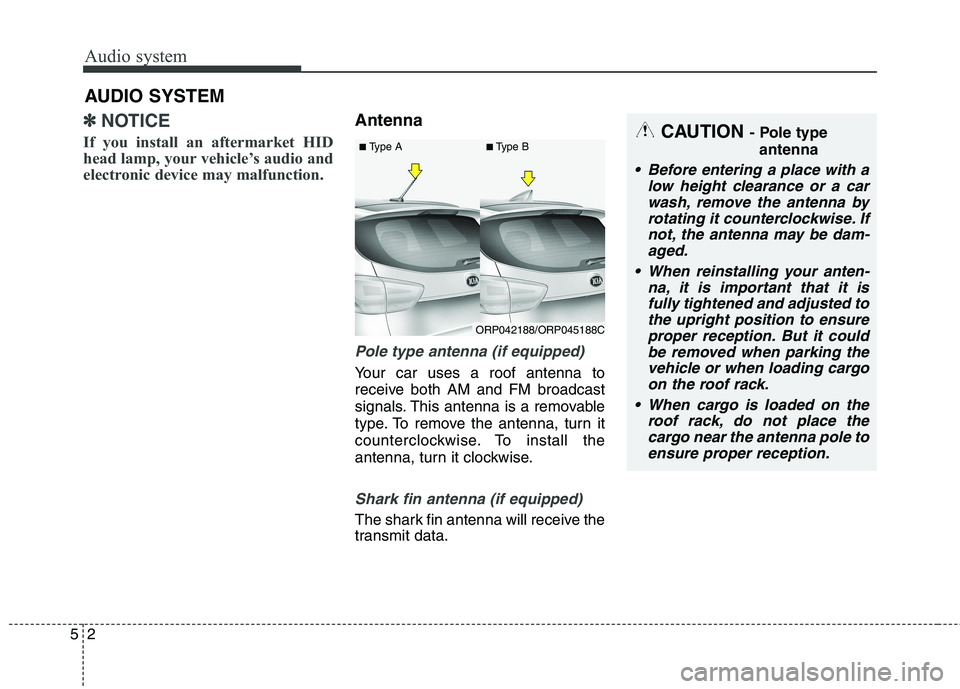
Your car uses a roof antenna to
receive both AM and FM broadcast
signals. This antenna is a removable
type. To remove the antenna, turn it
counterclockwise. To install the
antenna, turn it clockwise.
Shark fin antenna (if equipped)
The shark fin antenna will receive the
transmit data.
AUDIO SYSTEM
CAUTION
- Pole type
antenna
• Before entering a place with a low height clearance or a carwash, remove the antenna by rotating it counterclockwise. Ifnot, the antenna may be dam-aged.
When reinstalling your anten- na, it is important that it isfully tightened and adjusted tothe upright position to ensureproper reception. But it could be removed when parking thevehicle or when loading cargoon the roof rack.
When cargo is loaded on the roof rack, do not place thecargo near the antenna pole toensure proper reception.
ORP042188/ORP045188C
■
Type A ■Type B
Page 288 of 723
55
Audio system
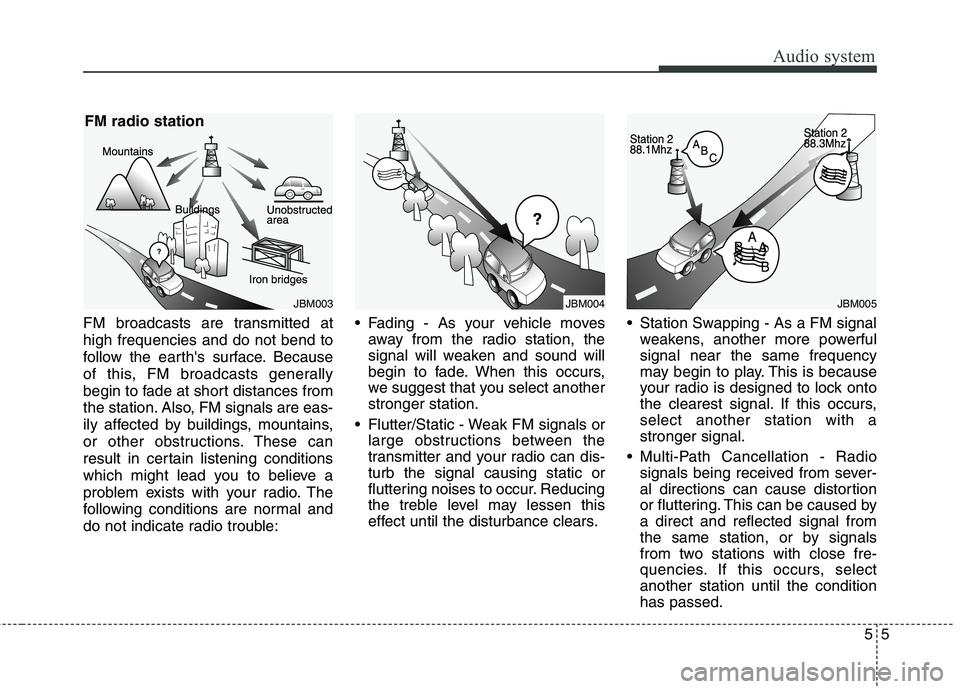
FM broadcasts are transmitted at high frequencies and do not bend to
follow the earth's surface. Because
of this, FM broadcasts generally
begin to fade at short distances from
the station. Also, FM signals are eas-
ily affected by buildings, mountains,
or other obstructions. These can
result in certain listening conditions
which might lead you to believe a
problem exists with your radio. The
following conditions are normal and
do not indicate radio trouble: Fading - As your vehicle moves
away from the radio station, the
signal will weaken and sound will
begin to fade. When this occurs,
we suggest that you select anotherstronger station.
Flutter/Static - Weak FM signals or large obstructions between the
transmitter and your radio can dis-turb the signal causing static or
fluttering noises to occur. Reducing
the treble level may lessen this
effect until the disturbance clears. Station Swapping - As a FM signal
weakens, another more powerfulsignal near the same frequency
may begin to play. This is because
your radio is designed to lock onto
the clearest signal. If this occurs,select another station with astronger signal.
Multi-Path Cancellation - Radio signals being received from sever-
al directions can cause distortion
or fluttering. This can be caused bya direct and reflected signal from
the same station, or by signals
from two stations with close fre-
quencies. If this occurs, selectanother station until the conditionhas passed.
¢¢¢
JBM004JBM005JBM003
FM radio station
Page 299 of 723
Audio system
16
5
Features of your vehicle
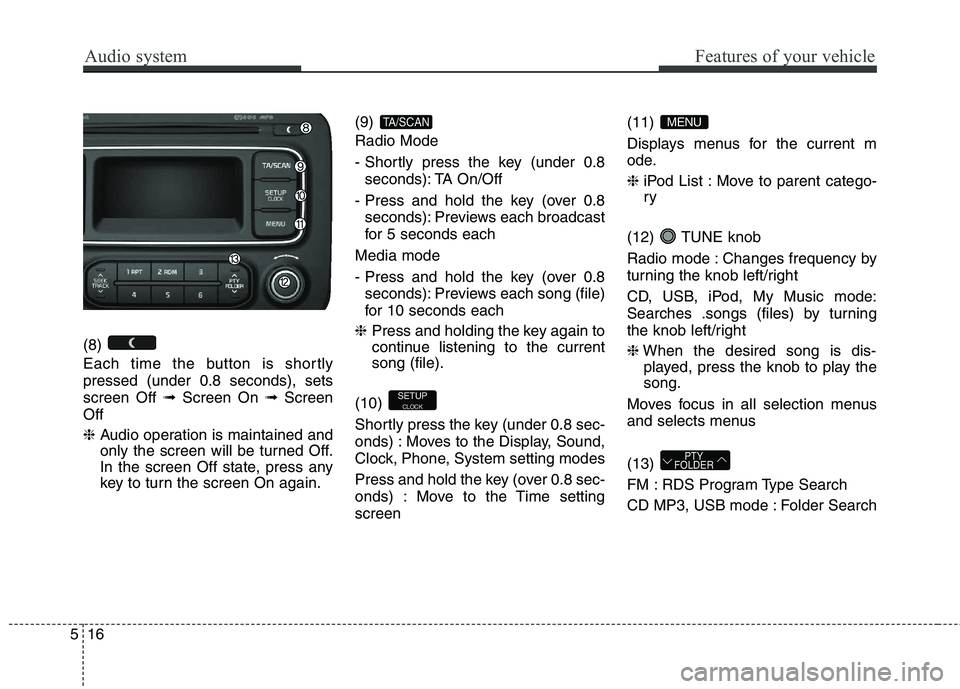
(8)
Each time the button is shortly pressed (under 0.8 seconds), setsscreen Off ➟Screen On ➟Screen
Off ❈ Audio operation is maintained and
only the screen will be turned Off.
In the screen Off state, press any
key to turn the screen On again. (9) Radio Mode
- Shortly press the key (under 0.8
seconds): TA On/Off
- Press and hold the key (over 0.8 seconds): Previews each broadcast
for 5 seconds each
Media mode
- Press and hold the key (over 0.8 seconds): Previews each song (file)
for 10 seconds each
❈ Press and holding the key again to
continue listening to the currentsong (file).
(10)
Shortly press the key (under 0.8 sec-
onds) : Moves to the Display, Sound,
Clock, Phone, System setting modes
Press and hold the key (over 0.8 sec-
onds) : Move to the Time settingscreen (11)
Displays menus for the current m
ode. ❈
iPod List : Move to parent catego- ry
(12) TUNE knob
Radio mode : Changes frequency by
turning the knob left/right
CD, USB, iPod, My Music mode:
Searches .songs (files) by turning
the knob left/right ❈ When the desired song is dis-
played, press the knob to play the song.
Moves focus in all selection menus
and selects menus (13)
FM : RDS Program Type Search
CD MP3, USB mode : Folder Search
PTY
FOLDER
MENU
SETUP
CLOCK
TA/SCAN
Page 302 of 723
519
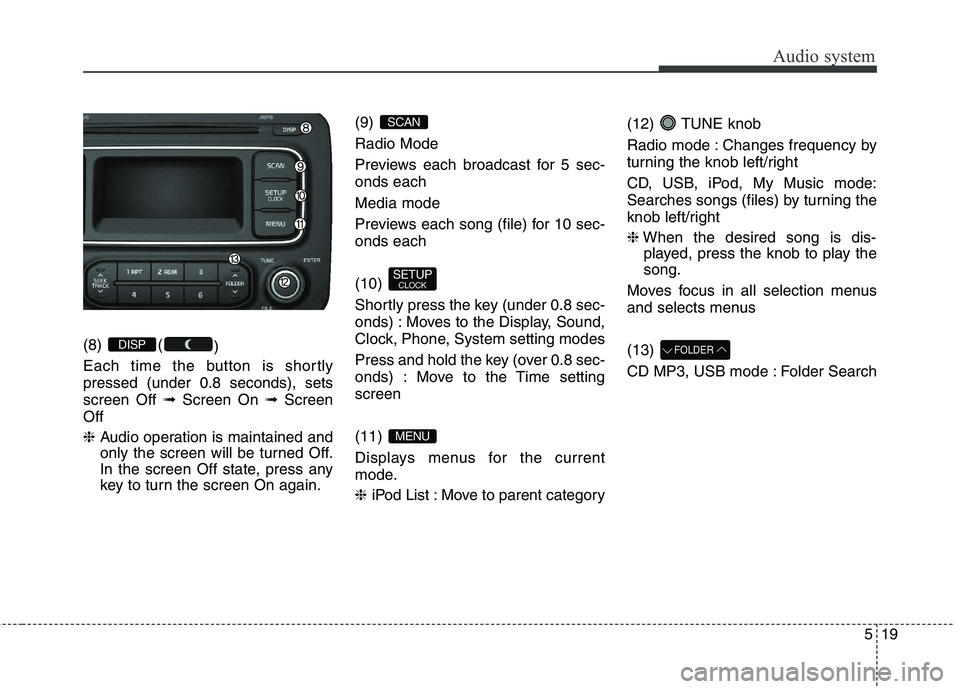
Audio system
(8) ()
Each time the button is shortly pressed (under 0.8 seconds), setsscreen Off ➟Screen On ➟Screen
Off ❈ Audio operation is maintained and
only the screen will be turned Off.
In the screen Off state, press any
key to turn the screen On again. (9) Radio Mode
Previews each broadcast for 5 sec- onds each Media mode
Previews each song (file) for 10 sec- onds each (10)
Shortly press the key (under 0.8 sec-
onds) : Moves to the Display, Sound,
Clock, Phone, System setting modes
Press and hold the key (over 0.8 sec-
onds) : Move to the Time settingscreen (11)
Displays menus for the current
mode. ❈
iPod List : Move to parent category (12) TUNE knob
Radio mode : Changes frequency by
turning the knob left/right
CD, USB, iPod, My Music mode:
Searches songs (files) by turning the
knob left/right ❈
When the desired song is dis-
played, press the knob to play the song.
Moves focus in all selection menus
and selects menus (13)
CD MP3, USB mode : Folder SearchFOLDER
MENU
SETUP CLOCK
SCAN
DISP
Page 306 of 723
![KIA CARENS RHD 2017 Manual PDF 523
Audio system
CLOCK SETTINGS
Press the key Select [Clock]
through TUNE knob or key
Select menu through TUNE knob
Clock Settings
This menu is used to set the time.
Select [Clock Settings] Set](/img/2/57939/w960_57939-305.png "KIA CARENS RHD 2017 Manual PDF 523
Audio system
CLOCK SETTINGS
Press the key Select [Clock]
through TUNE knob or key
Select menu through TUNE knob
Clock Settings
This menu is used to set the time.
Select [Clock Settings] Set")
523
Audio system
CLOCK SETTINGS
Press the key Select [Clock]
through TUNE knob or key
Select menu through TUNE knob
Clock Settings
This menu is used to set the time.
Select [Clock Settings] Set throughTUNE knob Press TUNE knob
❈ Adjust the number currently in
focus to set the [hour] and press
the tune knob to set the [minute].
Day Settings
This menu is used to set the date (DD/MM/YYYY).
Select [Day Settings] Set through
TUNE knob Press TUNE knob
❈ Adjust the number currently in
focus to make the settings and
press the tune knob to move to the
next setting. (Set in order of
Year/Month/Day)
Time Format This function is used to set the 12/24
hour time format of the audio system.
Select [Time Format] Set 12Hr /
24Hr through TUNE knob
Clock Display when Power is OFF
Select [Clock Disp.(Pwr Off)
Set
/ through TUNE knob
: Displays time/date on screen
Turn off.
Automatic RDS Time This option is used to automatically set
the time by synchronizing with RDS.
Select [Automatic RDS Time]
Set
/ through TUNE knob
: Turn on Automatic Time
Turn off.
Off
On
OffOn
Off
On
OffOn
3
SETUP
CLOCK