boot KIA CEED 2015 Owner's Manual
[x] Cancel search | Manufacturer: KIA, Model Year: 2015, Model line: CEED, Model: KIA CEED 2015Pages: 1210, PDF Size: 35.92 MB
Page 487 of 1210
Maintenance
28
7
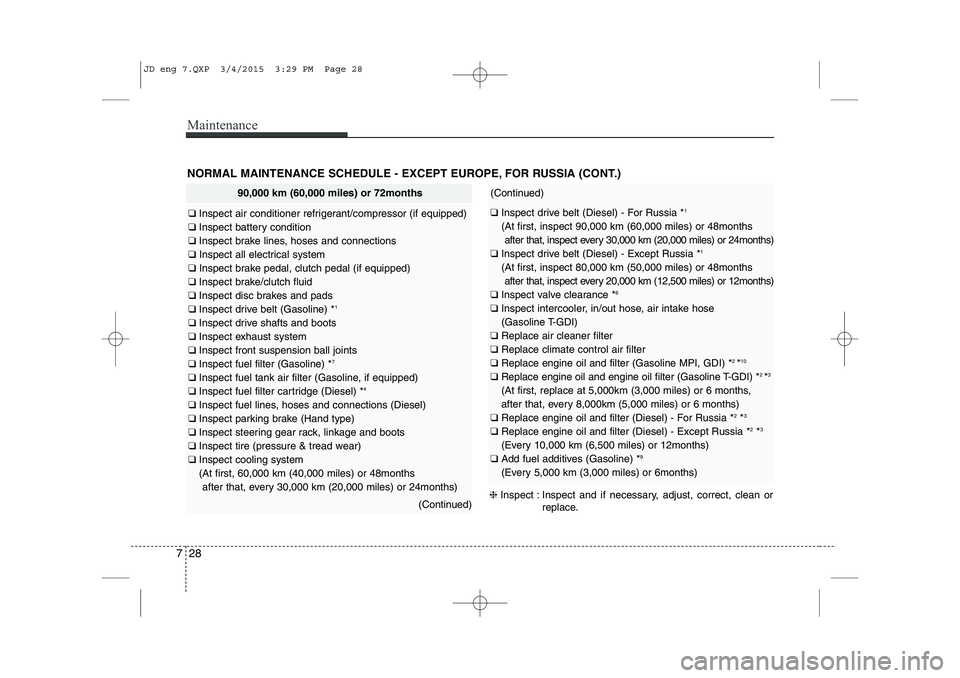
NORMAL MAINTENANCE SCHEDULE - EXCEPT EUROPE, FOR RUSSIA (CONT.)
90,000 km (60,000 miles) or 72months
❑ Inspect air conditioner refrigerant/compressor (if equipped)
❑ Inspect battery condition
❑ Inspect brake lines, hoses and connections
❑ Inspect all electrical system
❑ Inspect brake pedal, clutch pedal (if equipped)
❑ Inspect brake/clutch fluid
❑ Inspect disc brakes and pads
❑ Inspect drive belt (Gasoline) * 1
❑ Inspect drive shafts and boots
❑ Inspect exhaust system
❑ Inspect front suspension ball joints
❑ Inspect fuel filter (Gasoline) * 7
❑ Inspect fuel tank air filter (Gasoline, if equipped)
❑ Inspect fuel filter cartridge (Diesel) * 4
❑ Inspect fuel lines, hoses and connections (Diesel)
❑ Inspect parking brake (Hand type)
❑ Inspect steering gear rack, linkage and boots
❑ Inspect tire (pressure & tread wear)
❑ Inspect cooling system
(At first, 60,000 km (40,000 miles) or 48months
after that, every 30,000 km (20,000 miles) or 24months)
(Continued)
(Continued)
❑ Inspect drive belt (Diesel) - For Russia * 1
(At first, inspect 90,000 km (60,000 miles) or 48months after that, inspect every 30,000 km (20,000 miles) or 24months)
❑ Inspect drive belt (Diesel) - Except Russia * 1
(At first, inspect 80,000 km (50,000 miles) or 48months after that, inspect every 20,000 km (12,500 miles) or 12months)
❑ Inspect valve clearance * 6
❑ Inspect intercooler, in/out hose, air intake hose
(Gasoline T-GDI)
❑ Replace air cleaner filter
❑ Replace climate control air filter
❑ Replace engine oil and filter (Gasoline MPI, GDI) * 2
*10
❑ Replace engine oil and engine oil filter (Gasoline T-GDI) * 2
*3
(At first, replace at 5,000km (3,000 miles) or 6 months,
after that, every 8,000km (5,000 miles) or 6 months)
❑ Replace engine oil and filter (Diesel) - For Russia * 2
*3
❑ Replace engine oil and filter (Diesel) - Except Russia * 2
*3
(Every 10,000 km (6,500 miles) or 12months)
❑ Add fuel additives (Gasoline) * 9
(Every 5,000 km (3,000 miles) or 6months)
❈ Inspect : Inspect and if necessary, adjust, correct, clean or
replace.
JD eng 7.QXP 3/4/2015 3:29 PM Page 28
Page 488 of 1210
729
Maintenance
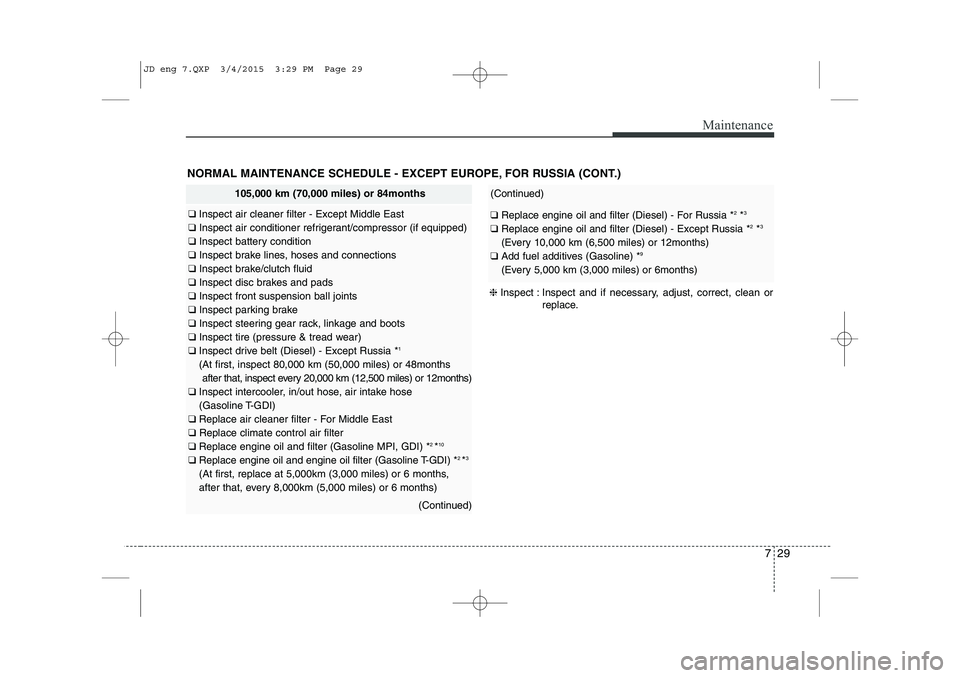
NORMAL MAINTENANCE SCHEDULE - EXCEPT EUROPE, FOR RUSSIA (CONT.)
105,000 km (70,000 miles) or 84months
❑ Inspect air cleaner filter - Except Middle East
❑ Inspect air conditioner refrigerant/compressor (if equipped)
❑ Inspect battery condition
❑ Inspect brake lines, hoses and connections
❑ Inspect brake/clutch fluid
❑ Inspect disc brakes and pads
❑ Inspect front suspension ball joints
❑ Inspect parking brake
❑ Inspect steering gear rack, linkage and boots
❑ Inspect tire (pressure & tread wear)
❑ Inspect drive belt (Diesel) - Except Russia * 1
(At first, inspect 80,000 km (50,000 miles) or 48months after that, inspect every 20,000 km (12,500 miles) or 12months)
❑ Inspect intercooler, in/out hose, air intake hose
(Gasoline T-GDI)
❑ Replace air cleaner filter - For Middle East
❑ Replace climate control air filter
❑ Replace engine oil and filter (Gasoline MPI, GDI) * 2
*10
❑ Replace engine oil and engine oil filter (Gasoline T-GDI) * 2
*3
(At first, replace at 5,000km (3,000 miles) or 6 months,
after that, every 8,000km (5,000 miles) or 6 months)
(Continued)
(Continued)
❑ Replace engine oil and filter (Diesel) - For Russia * 2
*3
❑ Replace engine oil and filter (Diesel) - Except Russia * 2
*3
(Every 10,000 km (6,500 miles) or 12months)
❑ Add fuel additives (Gasoline) * 9
(Every 5,000 km (3,000 miles) or 6months)
❈ Inspect : Inspect and if necessary, adjust, correct, clean or
replace.
JD eng 7.QXP 3/4/2015 3:29 PM Page 29
Page 489 of 1210

Maintenance
30
7
NORMAL MAINTENANCE SCHEDULE - EXCEPT EUROPE, FOR RUSSIA (CONT.)
120,000 km (80,000 miles) or 96months
❑ Inspect air cleaner filter - Except Middle East
❑ Inspect air conditioner refrigerant/compressor (if equipped)
❑ Inspect battery condition
❑ Inspect brake lines, hoses and connections
❑ Inspect all electrical system
❑ Inspect brake pedal, clutch pedal (if equipped)
❑ Inspect brake/clutch fluid
❑ Inspect disc brakes and pads
❑ Inspect drive belt (Gasoline) * 1
❑ Inspect drive shafts and boots
❑ Inspect exhaust system
❑ Inspect front suspension ball joints
❑ Inspect fuel filler cap (Diesel)
❑ Inspect fuel lines, hoses and connections (Gasoline, Diesel)
❑ Inspect parking brake (Hand type)
❑ Inspect steering gear rack, linkage and boots
❑ Inspect tire (pressure & tread wear)
❑ Inspect manual transaxle fluid (if equipped)
❑ Inspect vapor hose and fuel filler cap (Gasoline)
❑ Inspect fuel tank air filter (Gasoline, if equipped)
❑ Inspect cooling system
(At first, 60,000 km (40,000 miles) or 48months
after that, every 30,000 km (20,000 miles) or 24months)
(Continued)
(Continued)
❑ Inspect drive belt (Diesel) - For Russia * 1
(At first, inspect 90,000 km (60,000 miles) or 48months after that, inspect every 30,000 km (20,000 miles) or 24months)
❑ Inspect drive belt (Diesel) - Except Russia * 1
(At first, inspect 80,000 km (50,000 miles) or 48months after that, inspect every 20,000 km (12,500 miles) or 12months)
❑ Inspect intercooler, in/out hose, air intake hose
(Gasoline T-GDI)
❑ Replace air cleaner filter - For Middle East
❑ Replace climate control air filter
❑ Replace engine oil and filter (Gasoline MPI, GDI) * 2
*10
❑ Replace engine oil and engine oil filter (Gasoline T-GDI) * 2
*3
(At first, replace at 5,000km (3,000 miles) or 6 months,
after that, every 8,000km (5,000 miles) or 6 months)
❑ Replace engine oil and filter (Diesel) - For Russia * 2
*3
❑ Replace engine oil and filter (Diesel) - Except Russia * 2
*3
(Every 10,000 km (6,500 miles) or 12months)
❑ Replace fuel filter (Gasoline) * 7
❑ Replace fuel filter cartridge (Diesel) * 4
❑ Replace spark plugs (Gasoline - Nickel)
❑ Replace spark plugs (Gasoline GDI - Iridium) * 5
(Every 160,000 km (100,000 miles) or 120months)
(Continued)
JD eng 7.QXP 3/4/2015 3:29 PM Page 30
Page 492 of 1210
733
Maintenance
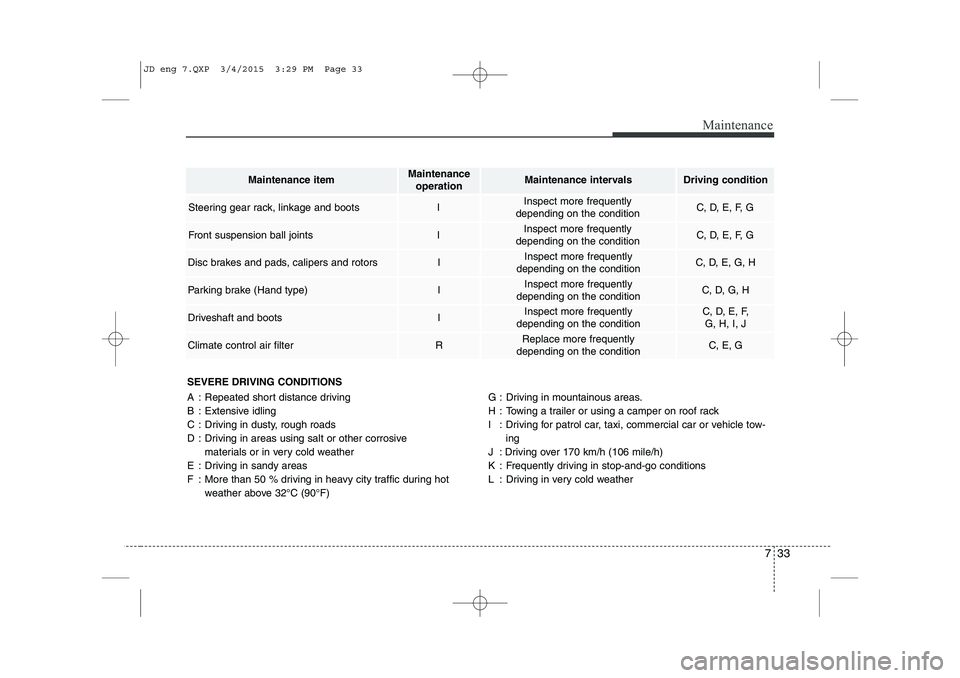
SEVERE DRIVING CONDITIONS
A : Repeated short distance driving
B : Extensive idling
C : Driving in dusty, rough roads
D : Driving in areas using salt or other corrosive materials or in very cold weather
E : Driving in sandy areas
F : More than 50 % driving in heavy city traffic during hot weather above 32°C (90°F) G : Driving in mountainous areas.
H : Towing a trailer or using a camper on roof rack
I : Driving for patrol car, taxi, commercial car or vehicle tow-
ing
J : Driving over 170 km/h (106 mile/h)
K : Frequently driving in stop-and-go conditions
L : Driving in very cold weather
Maintenance itemMaintenance operationMaintenance intervalsDriving condition
Steering gear rack, linkage and bootsIInspect more frequently
depending on the conditionC, D, E, F, G
Front suspension ball jointsIInspect more frequently
depending on the conditionC, D, E, F, G
Disc brakes and pads, calipers and rotorsIInspect more frequently
depending on the conditionC, D, E, G, H
Parking brake (Hand type)IInspect more frequently
depending on the conditionC, D, G, H
Driveshaft and bootsIInspect more frequently
depending on the conditionC, D, E, F, G, H, I, J
Climate control air filterRReplace more frequently
depending on the conditionC, E, G
JD eng 7.QXP 3/4/2015 3:29 PM Page 33
Page 495 of 1210
Maintenance
36
7
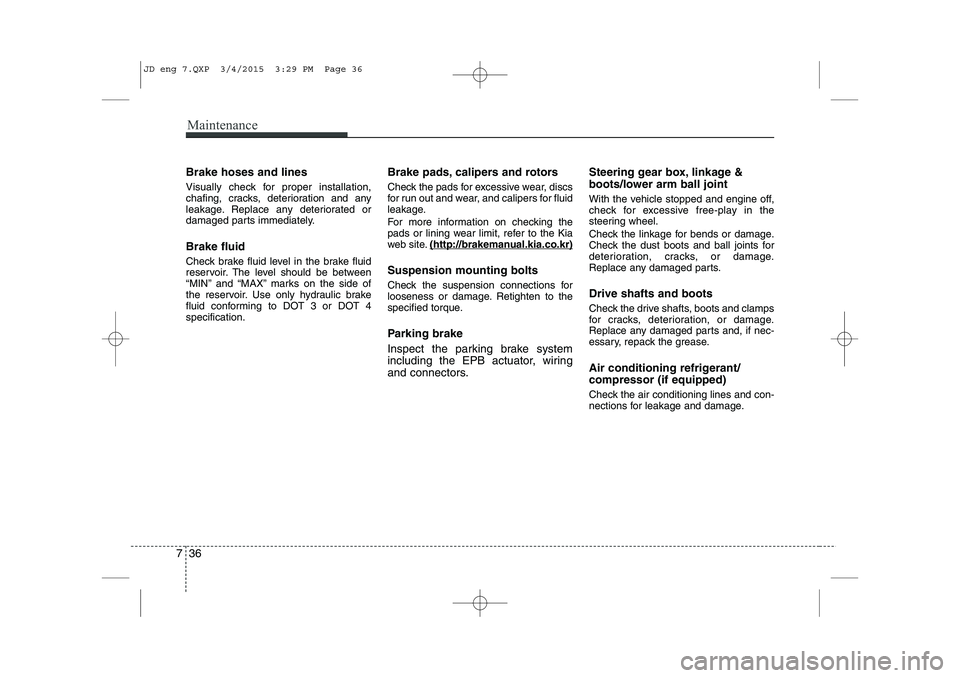
Brake hoses and lines
Visually check for proper installation,
chafing, cracks, deterioration and any
leakage. Replace any deteriorated or
damaged parts immediately. Brake fluid
Check brake fluid level in the brake fluid
reservoir. The level should be between
“MIN” and “MAX” marks on the side of
the reservoir. Use only hydraulic brake
fluid conforming to DOT 3 or DOT 4specification. Brake pads, calipers and rotors
Check the pads for excessive wear, discs
for run out and wear, and calipers for fluid
leakage.
For more information on checking the
pads or lining wear limit, refer to the Kia
web site.
(http://brakeman
ual.kia.co.kr)
Suspension mounting bolts
Check the suspension connections for
looseness or damage. Retighten to the
specified torque.
Parking brake
Inspect the parking brake system
including the EPB actuator, wiring
and connectors. Steering gear box, linkage &
boots/lower arm ball joint
With the vehicle stopped and engine off,
check for excessive free-play in the
steering wheel.
Check the linkage for bends or damage.
Check the dust boots and ball joints for
deterioration, cracks, or damage.
Replace any damaged parts. Drive shafts and boots
Check the drive shafts, boots and clamps
for cracks, deterioration, or damage.
Replace any damaged parts and, if nec-
essary, repack the grease.
Air conditioning refrigerant/ compressor (if equipped)
Check the air conditioning lines and con-
nections for leakage and damage.
JD eng 7.QXP 3/4/2015 3:29 PM Page 36
Page 569 of 1210
Maintenance
110
7
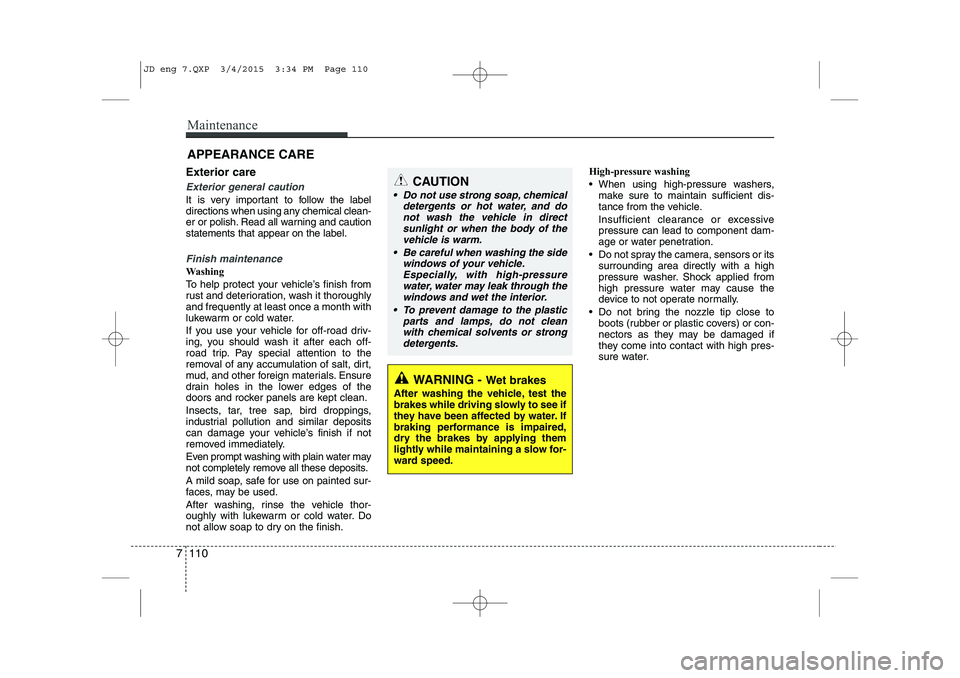
APPEARANCE CARE
Exterior care
Exterior general caution
It is very important to follow the label
directions when using any chemical clean-
er or polish. Read all warning and cautionstatements that appear on the label.
Finish maintenance
Washing
To help protect your vehicle’s finish from
rust and deterioration, wash it thoroughlyand frequently at least once a month with
lukewarm or cold water.
If you use your vehicle for off-road driv-
ing, you should wash it after each off-
road trip. Pay special attention to the
removal of any accumulation of salt, dirt,
mud, and other foreign materials. Ensure
drain holes in the lower edges of the
doors and rocker panels are kept clean.
Insects, tar, tree sap, bird droppings,
industrial pollution and similar deposits
can damage your vehicle’s finish if not
removed immediately.
Even prompt washing with plain water may
not completely remove all these deposits.
A mild soap, safe for use on painted sur-
faces, may be used.
After washing, rinse the vehicle thor-
oughly with lukewarm or cold water. Do
not allow soap to dry on the finish. High-pressure washing
When using high-pressure washers,
make sure to maintain sufficient dis-
tance from the vehicle.
Insufficient clearance or excessive pressure can lead to component dam-
age or water penetration.
Do not spray the camera, sensors or its surrounding area directly with a high
pressure washer. Shock applied from
high pressure water may cause the
device to not operate normally.
Do not bring the nozzle tip close to boots (rubber or plastic covers) or con-
nectors as they may be damaged if
they come into contact with high pres-
sure water.
WARNING - Wet brakes
After washing the vehicle, test the
brakes while driving slowly to see if
they have been affected by water. If
braking performance is impaired,
dry the brakes by applying them
lightly while maintaining a slow for-
ward speed.
CAUTION
Do not use strong soap, chemical detergents or hot water, and do
not wash the vehicle in directsunlight or when the body of thevehicle is warm.
Be careful when washing the side windows of your vehicle.Especially, with high-pressure water, water may leak through thewindows and wet the interior.
To prevent damage to the plastic parts and lamps, do not cleanwith chemical solvents or strong detergents.
JD eng 7.QXP 3/4/2015 3:34 PM Page 110
Page 874 of 1210
![KIA CEED 2015 Owners Manual Bluetooth®Wireless Technology
System Off
This feature is used when you do not wish to use the
Bluetooth®Wireless
Technologysystem.
Select [Bluetooth®Wireless Technology
System Off] Set through T](/img/2/57940/w960_57940-873.png "KIA CEED 2015 Owners Manual Bluetooth®Wireless Technology
System Off
This feature is used when you do not wish to use the
Bluetooth®Wireless
Technologysystem.
Select [Bluetooth®Wireless Technology
System Off] Set through T")
Bluetooth®Wireless Technology
System Off
This feature is used when you do not wish to use the
Bluetooth®Wireless
Technologysystem.
Select [Bluetooth®Wireless Technology
System Off] Set through TUNE knob
❈ If a phone is already connected, dis- connect the currently connected phone
and turn the
Bluetooth®Wireless
Technologysystem off.
Using the
Bluetooth®Wireless
Technology System
To use
Bluetooth®Wireless Technologywhen the system is currently off, follow
these next steps.
Turning On
Bluetooth®Wireless
Technologythrough the Key
Press the key Screen Guidance
❈ Moves to the screen where Bluetooth®
Wireless Technology functions can be
used and displays guidance. Turning On
Bluetooth®Wireless
Technologythrough the Key
Press the key Select [Phone]
through TUNE knob or key
➀ A screen asking whether to turn onBluetooth®Wireless Technologywill be
displayed.
➁ On the screen, select to turn on
Bluetooth®Wireless Technologyand
display guidance.
❈ If the
Bluetooth®Wireless Technologysystem is turned on, the system will
automatically try to connect the mostrecently connected
Bluetooth®
Wireless Technologymobile phone.
Bluetooth®Wireless Technology connection may become intermittently
disconnected in some mobile phones.
Follow these next steps to try again.
1) Turn the Bluetooth®Wireless Technologyfunction within the mobile phone
ON/OFF and try to connect again.
2) Turn the mobile phone power ON/OFF and
try to connect again.
3) Completely remove the mobile phone
battery, reboot, and then try to connectagain.
4) Reboot the audio system and try to con-
nect again
5) Delete all paired devices in your mobile phone and the audio system and pair
again for use.
YES
3
SETUP
SETUP
PHONE
PHONE
4 189
Features of your vehicle
JD RHD 4b(172~).QXP 2/17/2015 11:59 AM Page 189
Page 876 of 1210
![KIA CEED 2015 Owners Manual Language
This menu is used to set the display and
voice recognition language.
Select [Language] Set through TUNE knob
❈ The system will reboot after the lan- guage is changed.
❈ Language suppo](/img/2/57940/w960_57940-875.png "KIA CEED 2015 Owners Manual Language
This menu is used to set the display and
voice recognition language.
Select [Language] Set through TUNE knob
❈ The system will reboot after the lan- guage is changed.
❈ Language suppo")
Language
This menu is used to set the display and
voice recognition language.
Select [Language] Set through TUNE knob
❈ The system will reboot after the lan- guage is changed.
❈ Language support by region
-
4 191
Features of your vehicle
JD RHD 4b(172~).QXP 2/17/2015 11:59 AM Page 191
Page 895 of 1210
Features of your vehicle
210
4
System?
activated
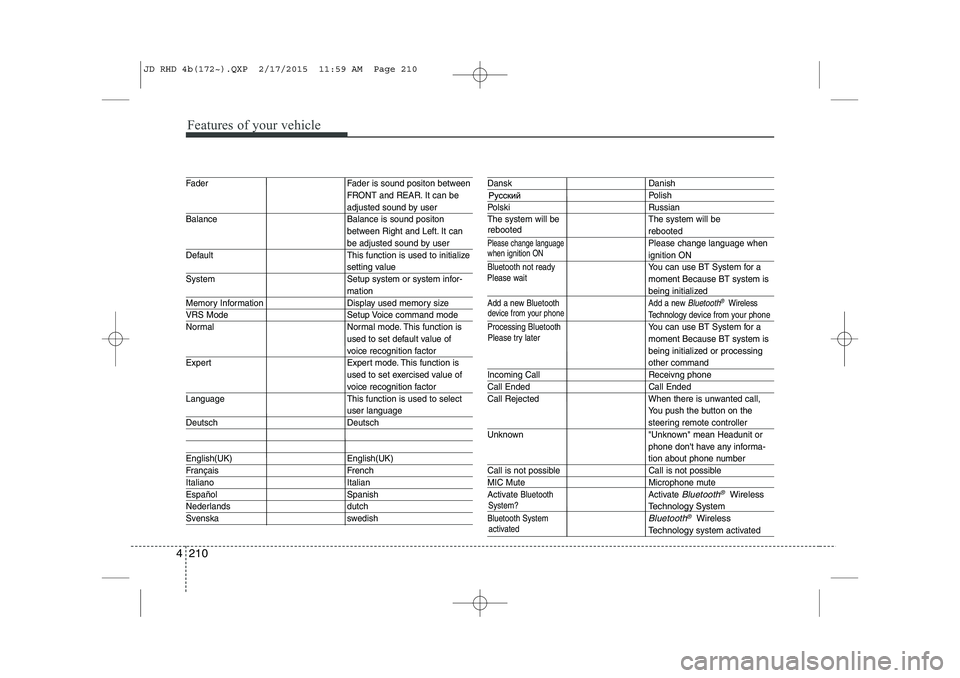
Fader Fader is sound positon between FRONT and REAR. It can be
adjusted sound by user
Balance Balance is sound positon between Right and Left. It can
be adjusted sound by user
Default This function is used to initialize
setting value
System Setup system or system infor-
mation
Memory Information Display used memory size
VRS Mode Setup Voice command mode
Normal Normal mode. This function is used to set default value of
voice recognition factor
Expert Expert mode. This function is used to set exercised value of
voice recognition factor
Language This function is used to select
user language
Deutsch Deutsch
English(UK) English(UK)
Français French
Italiano Italian
Español Spanish
Nederlands dutch
Svenska swedish
Dansk Danish
Polish
Polski Russian
The system will be The system will be
rebooted
Please change languagePlease change language when
ignition ON
Bluetooth not readyYou can use BT System for a moment Because BT system is
being initialized
Add a new Bluetooth Add a new Bluetooth®Wireless
Technology de vice from your phone
Processing Bluetooth
You can use BT System for a moment Because BT system is
being initialized or processing
other command
Incoming Call Receivng phone
Call Ended Call Ended
Call Rejected When there is unwanted call, You push the button on the
steering remote controller
Unknown "Unknown" mean Headunit or phone don't have any informa-
tion about phone number
Call is not possible Call is not possible
MIC Mute Microphone mute
Activate
BluetoothActivate Bluetooth®Wireless
TechnologySystem
Bluetooth SystemBluetooth®Wireless
Technologysystem activated
when ignition ON
device from your phone
Please try later
Please wait
rebooted
JD RHD 4b(172~).QXP 2/17/2015 11:59 AM Page 210
Page 926 of 1210
4 241
Features of your vehicle
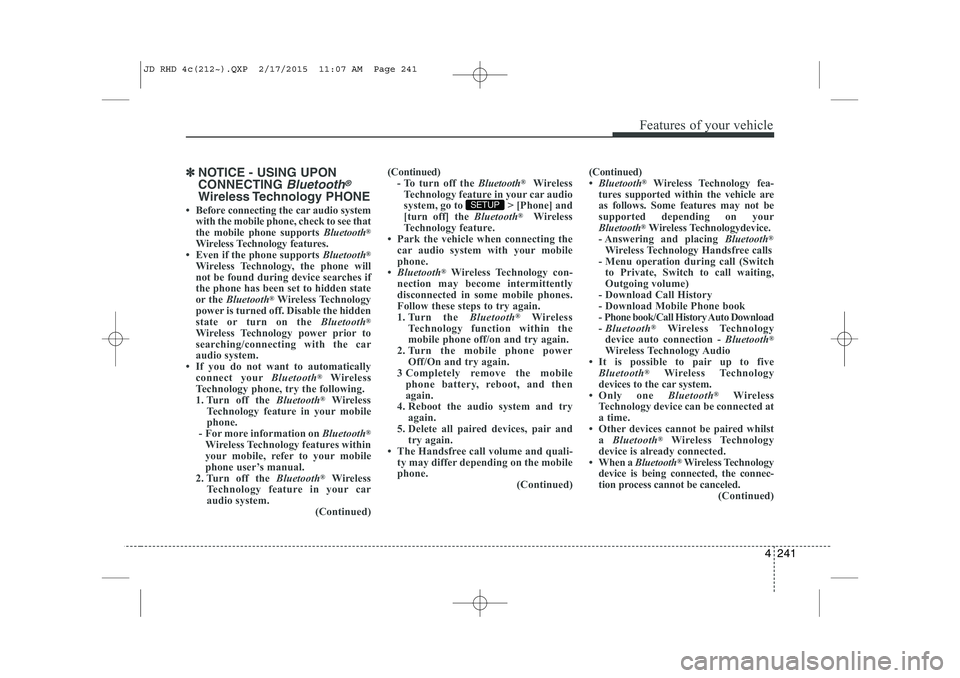
✽✽NOTICE - USING UPON CONNECTING
Bluetooth®
Wireless Technology PHONE
Before connecting the car audio system with the mobile phone, check to see that
the mobile phone supports Bluetooth®
Wireless Technology features.
Even if the phone supports Bluetooth®
Wireless Technology, the phone will
not be found during device searches if
the phone has been set to hidden state
or the Bluetooth ®
Wireless Technology
power is turned off. Disable the hidden
state or turn on the Bluetooth®
Wireless Technology power prior to
searching/connecting with the car
audio system.
If you do not want to automatically
connect your Bluetooth®
Wireless
Technology phone, try the following.
1. Turn off the Bluetooth®
Wireless
Technology feature in your mobile
phone.
- For more information on Bluetooth®
Wireless Technology features within
your mobile, refer to your mobile
phone user’s manual.
2. Turn off the Bluetooth®
Wireless
Technology feature in your car
audio system. (Continued)(Continued)
- To turn off the Bluetooth®
Wireless
Technology feature in your car audio
system, go to > [Phone] and
[turn off] the Bluetooth®
Wireless
Technology feature.
Park the vehicle when connecting the car audio system with your mobile
phone.
Bluetooth ®
Wireless Technology con-
nection may become intermittently
disconnected in some mobile phones.
Follow these steps to try again.
1. Turn the Bluetooth®
Wireless
Technology function within the
mobile phone off/on and try again.
2. Turn the mobile phone power Off/On and try again.
3 Completely remove the mobile phone battery, reboot, and then
again.
4. Reboot the audio system and try
again.
5. Delete all paired devices, pair and
try again.
The Handsfree call volume and quali-
ty may differ depending on the mobile
phone. (Continued)SETUP
(Continued)
Bluetooth ®
Wireless Technology fea-
tures supported within the vehicle are
as follows. Some features may not be
supported depending on your
Bluetooth ®
Wireless Technologydevice.
- Answering and placing Bluetooth®
Wireless Technology Handsfree calls
- Menu operation during call (Switch to Private, Switch to call waiting,
Outgoing volume)
- Download Call History
- Download Mobile Phone book
- Phone book/Call History Auto Download - Bluetooth ®
Wireless Technology
device auto connection - Bluetooth®
Wireless Technology Audio
It is possible to pair up to five Bluetooth ®
Wireless Technology
devices to the car system.
Only one Bluetooth®
Wireless
Technology device can be connected at
a time.
Other devices cannot be paired whilst a Bluetooth ®
Wireless Technology
device is already connected.
When a Bluetooth®
Wireless Technology
device is being connected, the connec-
tion process cannot be canceled. (Continued)
JD RHD 4c(212~).QXP 2/17/2015 11:07 AM Page 241