lights KIA CEED 2015 Owner's Manual
[x] Cancel search | Manufacturer: KIA, Model Year: 2015, Model line: CEED, Model: KIA CEED 2015Pages: 1210, PDF Size: 35.92 MB
Page 193 of 1210
Features of your vehicle
112
4
Static bending light (if equipped)
While driving the corner, for your sight
and safety, the static bending light turns
on automatically. The system will operate
automatically as follows:
• When vehicle speed is under 10km/h
and steering wheel angle approximate-
ly 80 degrees.
• When vehicle speed is over 10km/h and steering wheel angle approximate-
ly 35 degrees.
• When the vehicle is at a standstill.
• When moving rearwards with one of the above conditions satisfied the lights will light up the opposite direction. Lighting control
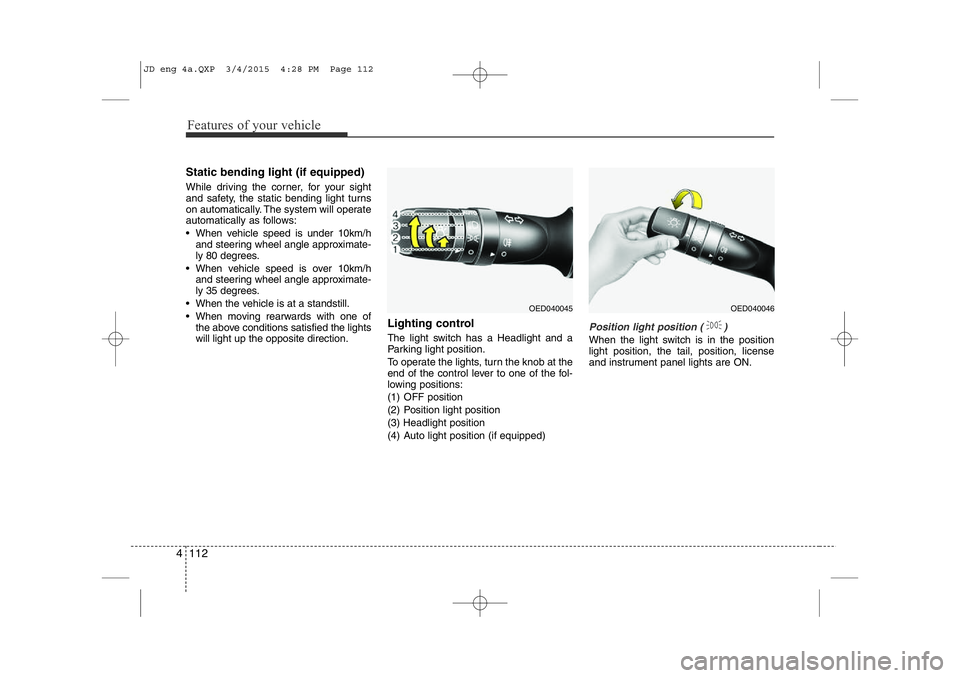
The light switch has a Headlight and a
Parking light position.
To operate the lights, turn the knob at the
end of the control lever to one of the fol-
lowing positions:
(1) OFF position
(2) Position light position (3) Headlight position
(4) Auto light position (if equipped)
Position light position ( )
When the light switch is in the position light position, the tail, position, license
and instrument panel lights are ON.
OED040045OED040046
JD eng 4a.QXP 3/4/2015 4:28 PM Page 112
Page 194 of 1210

4 113
Features of your vehicle
Headlight position ( )
When the light switch is in the headlight position the head, tail, position, license
and instrument panel lights are ON.
✽NOTICE
The ignition switch must be in the ON
position to turn on the headlights.
Auto light/AFLS position (if equipped)
When the light switch is in the AUTO light position, the taillights and headlights will
be turned ON or OFF automaticallydepending on the amount of light outside
the vehicle.
If your vehicle is equipped with the adap-
tive front lighting system (AFLS), it will
also operate when the headlamp is ON.
OYN049201
CAUTION
• Never place anything over the sensor (1) located on the instru-ment panel, this will ensure betterauto-light system control.
• Do not clean the sensor using a window cleaner, the cleaner mayleave a light film which could interfere with sensor operation.
• If your vehicle has window tint or other types of coating on the
front windshield, the Auto lightsystem may not work properly.
OED040800
JD eng 4a.QXP 3/4/2015 4:28 PM Page 113
Page 195 of 1210

Features of your vehicle
114
4
High - beam operation
1. Turn the light switch to the headlight
position.
2. Push the lever away from you. • The high-beam indicator will light when
the headlight high beams are switched on.
• To prevent the battery from being dis- charged, do not leave the lights on fora prolonged time while the engine is
not running.Flashing headlights
Pull the lever towards you. It will return to
the normal position when released. The
headlight switch does not need to be on
to use this flashing feature.
WARNING
Do not use high beam when there
are other vehicles. Using highbeam could obstruct the other dri- ver's vision.
OED040801OED040802
JD eng 4a.QXP 3/4/2015 4:28 PM Page 114
Page 197 of 1210
Features of your vehicle
116
4
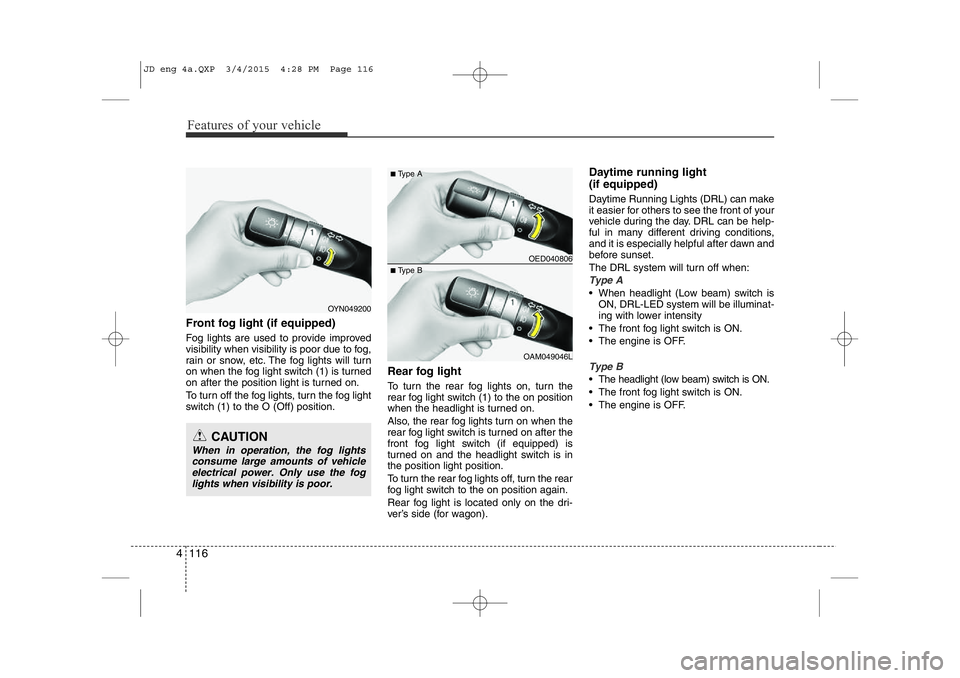
Front fog light (if equipped)
Fog lights are used to provide improved
visibility when visibility is poor due to fog,
rain or snow, etc. The fog lights will turn
on when the fog light switch (1) is turned
on after the position light is turned on.
To turn off the fog lights, turn the fog light
switch (1) to the O (Off) position. Rear fog light
To turn the rear fog lights on, turn the
rear fog light switch (1) to the on position
when the headlight is turned on.
Also, the rear fog lights turn on when the
rear fog light switch is turned on after the
front fog light switch (if equipped) is
turned on and the headlight switch is inthe position light position.
To turn the rear fog lights off, turn the rear
fog light switch to the on position again.
Rear fog light is located only on the dri-
ver’s side (for wagon).Daytime running light (if equipped)
Daytime Running Lights (DRL) can make
it easier for others to see the front of your
vehicle during the day. DRL can be help-
ful in many different driving conditions,
and it is especially helpful after dawn and
before sunset.
The DRL system will turn off when:
Type A
• When headlight (Low beam) switch is
ON, DRL-LED system will be illuminat-
ing with lower intensity
• The front fog light switch is ON.
• The engine is OFF.
Type B
• The headlight (low beam) switch is ON.
• The front fog light switch is ON.
• The engine is OFF.
OED040806
OAM049046L
■
Type A
■ Type B
OYN049200
CAUTION
When in operation, the fog lights
consume large amounts of vehicleelectrical power. Only use the fog
lights when visibility is poor.
JD eng 4a.QXP 3/4/2015 4:28 PM Page 116
Page 198 of 1210
4 117
Features of your vehicle
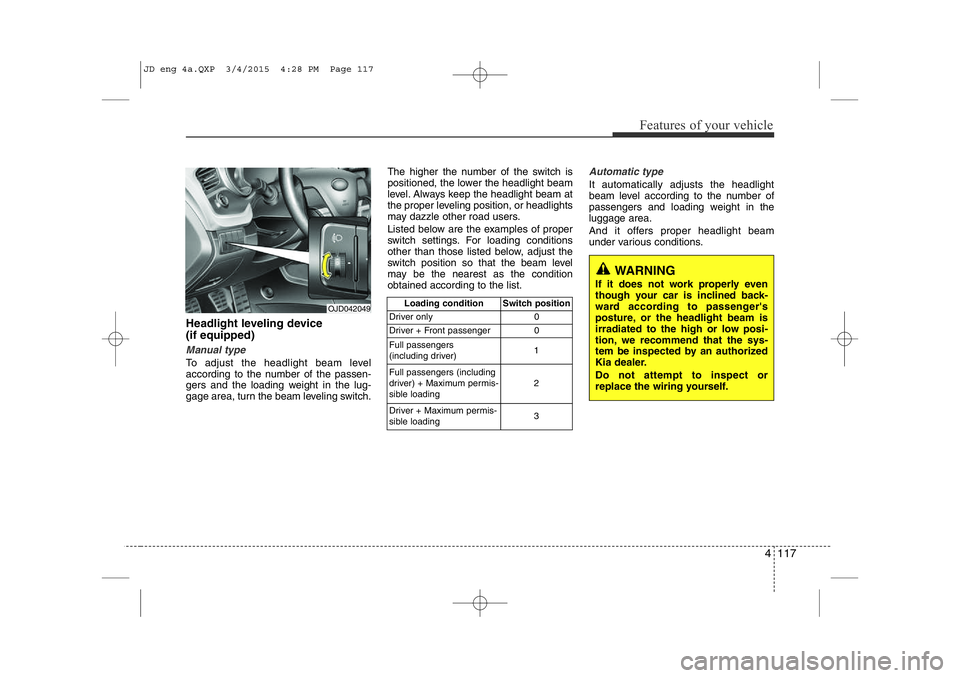
Headlight leveling device (if equipped)
Manual type
To adjust the headlight beam level
according to the number of the passen-
gers and the loading weight in the lug-
gage area, turn the beam leveling switch.The higher the number of the switch is
positioned, the lower the headlight beam
level. Always keep the headlight beam at
the proper leveling position, or headlights
may dazzle other road users.
Listed below are the examples of proper
switch settings. For loading conditions
other than those listed below, adjust the
switch position so that the beam level
may be the nearest as the conditionobtained according to the list.
Automatic type
It automatically adjusts the headlight
beam level according to the number of
passengers and loading weight in theluggage area.
And it offers proper headlight beam
under various conditions.
OJD042049
Loading condition Switch position
Driver only 0
Driver + Front passenger 0 Full passengers
(including driver) 1
Full passengers (including
driver) + Maximum permis-
sible loading 2
Driver + Maximum permis-
sible loading 3
WARNING
If it does not work properly even
though your car is inclined back-
ward according to passenger's
posture, or the headlight beam is
irradiated to the high or low posi-
tion, we recommend that the sys-
tem be inspected by an authorized
Kia dealer. Do not attempt to inspect or
replace the wiring yourself.
JD eng 4a.QXP 3/4/2015 4:28 PM Page 117
Page 203 of 1210
Features of your vehicle
122
4
Headlight washer (if equipped)
If your vehicle is equipped with the head-
light washer it will operate at the same
time when you operate the windshield
washer. It will operate when the headlight
switch is in the first or second position
and the ignition switch or engine
start/stop button is in the ON position.
The washer fluid will be sprayed on to the
headlights.
✽NOTICE
Check the headlight washers periodical-
ly to confirm that the washer fluid is
being sprayed properly onto the head-
light lenses.
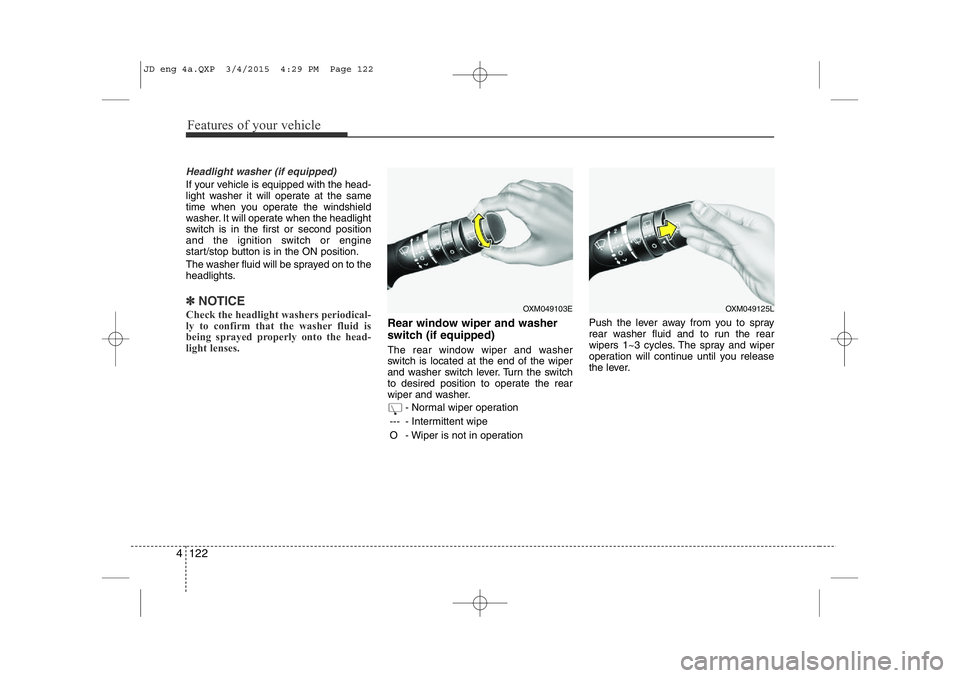
Rear window wiper and washer
switch (if equipped)
The rear window wiper and washer
switch is located at the end of the wiper
and washer switch lever. Turn the switch
to desired position to operate the rear
wiper and washer.
- Normal wiper operation
--- - Intermittent wipe
O - Wiper is not in operation Push the lever away from you to spray
rear washer fluid and to run the rear
wipers 1~3 cycles. The spray and wiper
operation will continue until you release
the lever.
OXM049103EOXM049125L
JD eng 4a.QXP 3/4/2015 4:29 PM Page 122
Page 204 of 1210
4 123
Features of your vehicle
Interior lamp AUTO cut
• When all entrances are closed, if youlock the vehicle by using the transmit-
ter or the smart key, all interior lamp
will be off after a few seconds.
• If you do not operate anything in the vehicle after turning off the engine, the
lights will turn off after 20 minutes. Map lamp
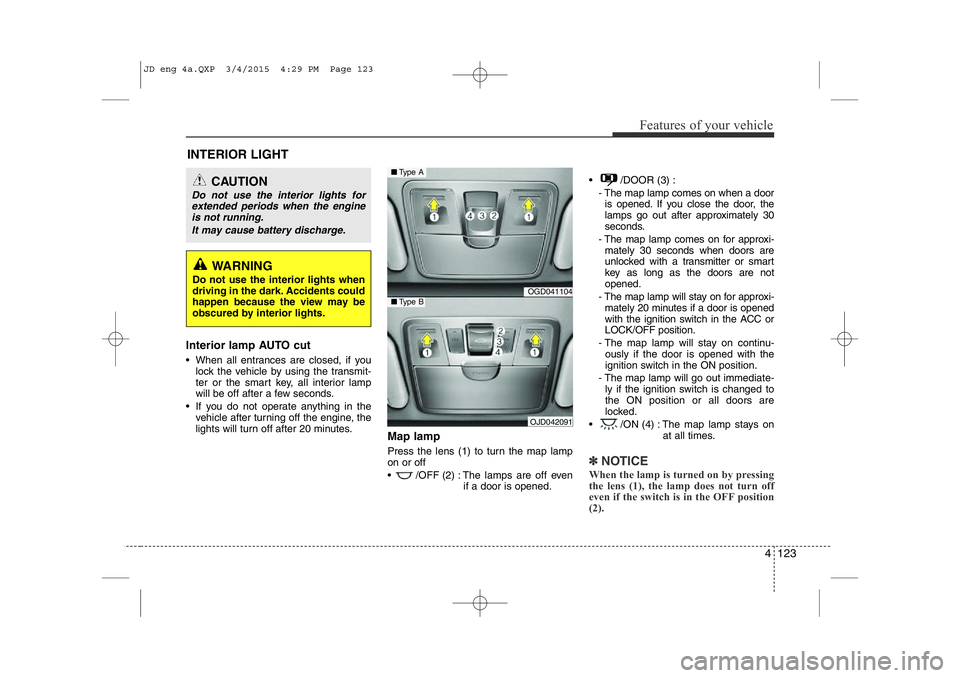
Press the lens (1) to turn the map lamp on or off
• /OFF (2) : The lamps are off even
if a door is opened. • /DOOR (3) :
- The map lamp comes on when a dooris opened. If you close the door, the
lamps go out after approximately 30
seconds.
- The map lamp comes on for approxi- mately 30 seconds when doors are
unlocked with a transmitter or smart
key as long as the doors are notopened.
- The map lamp will stay on for approxi- mately 20 minutes if a door is opened
with the ignition switch in the ACC orLOCK/OFF position.
- The map lamp will stay on continu- ously if the door is opened with the
ignition switch in the ON position.
- The map lamp will go out immediate- ly if the ignition switch is changed tothe ON position or all doors are
locked.
• /ON (4) : The map lamp stays on at all times.
✽NOTICE
When the lamp is turned on by pressing
the lens (1), the lamp does not turn off
even if the switch is in the OFF position (2).
INTERIOR LIGHT
CAUTION
Do not use the interior lights for extended periods when the engine is not running.
It may cause battery discharge.
WARNING
Do not use the interior lights when
driving in the dark. Accidents could
happen because the view may be
obscured by interior lights.
OGD041104
OJD042091
■ Type A
■Type B
JD eng 4a.QXP 3/4/2015 4:29 PM Page 123
Page 207 of 1210
Features of your vehicle
126
4
Headlamp welcome
When the headlight(light switch in the
headlight or AUTO position) is on and all
doors (and tailgate) are locked andclosed, the headlight, position light and
tail light will come on for 15 seconds if
any of the below is performed.
• Without smart key system
- When the door unlock button is pressed on the transmitter.
• With the smart key system - When the door unlock button is pressed on the smart key.
At this time, if you press the door lock but-
ton (on the transmitter or smart key), the
lights will turn off immediately. Interior light
When the interior light switch is in the DOOR position and all doors (and tail-
gate) are locked and closed, the room
lamp will come on for 30 seconds if any
of the below is performed.
• Without smart key system
- When the door unlock button is pressed on the transmitter.
• With the smart key system
- When the door unlock button is pressed on the smart key.
- When the button of the outside door handle is pressed.
At this time, if you press the door lock but-
ton, the lamps will turn off immediately. Puddle lamp (if equipped)
When all doors are locked and closed,
the puddle lamp will come on for 15 sec-
onds if any of the below is performed.
• Without smart key system
- When the door unlock button is pressed on the transmitter.
• With the smart key system
- When the door unlock button is pressed on the smart key.
- When the button of the outside door handle is pressed.
- When the vehicle is approached with the smart key in possession.
At this time, if you press the door lock but-
ton, the lamps will turn off immediately.
WELCOME SYSTEM (IF EQUIPPED)
JD eng 4a.QXP 3/4/2015 4:29 PM Page 126
Page 350 of 1210
Driving your vehicle
4
5
Before entering vehicle
• Be sure that all windows, outside mir-
ror(s), and outside lights are clean.
Check the condition of the tires.
Check under the vehicle for any sign of leaks.
Be sure there are no obstacles behind you if you intend to back up. Necessary inspections
Fluid levels, such as engine oil, engine
coolant, brake fluid, and washer fluid
should be checked on a regular basis,
with the exact interval depending on the
fluid. Further details are provided in
chapter 7, “Maintenance”.
Before starting
Close and lock all doors.
Position the seat so that all controls are
easily reached.
Adjust the inside and outside rearview mirrors.
Be sure that all lights work.
Check all gauges.
Check the operation of warning lights when the ignition switch is turned to the ON position.
Release the parking brake and make sure the brake warning light goes out.
For safe operation, be sure you are famil-
iar with your vehicle and its equipment.
BEFORE DRIVING
WARNING
All passengers must be properly
belted whenever the vehicle is mov-
ing. Refer to “Seat belts” in chapter
3 for more information on their
proper use.
WARNING
Always check the surrounding areas
near your vehicle for people, espe-
cially children, before putting a vehi-
cle into “D (Drive)” or “R (Reverse)”.
WARNING
Driving while distracted can result
in a loss of vehicle control, that
may lead to an accident, severe
personal injury, and death. The dri-
ver’s primary responsibility is in
the safe and legal operation of a
vehicle, and use of any handheld
devices, other equipment, or vehi-
cle systems which take the driver’s
eyes, attention and focus away
from the safe operation of a vehicle
or which are not permissible by law
should never be used during oper-
ation of the vehicle.
JD eng 5.QXP 3/4/2015 2:50 PM Page 4
Page 352 of 1210
Driving your vehicle
6
5
Ignition switch position
LOCK
The steering wheel locks to protect
against theft. The ignition key can be
removed only in the LOCK position.
When turning the ignition switch to the
LOCK position, push the key inward at
the ACC position and turn the key towardthe LOCK position.
ACC (Accessory)
The steering wheel is unlocked and elec-
trical accessories are operative.
✽✽
NOTICE
If difficulty is experienced turning the
ignition switch to the ACC position, turn
the key while turning the steering wheel
right and left to release the tension.
ON
The warning lights can be checked
before the engine is started. This is the
normal running position after the engine
is started.
Do not leave the ignition switch ON if the engine is not running to prevent battery
discharge.
START
Turn the ignition key to the START posi-
tion to start the engine. The engine will
crank until you release the key; then it
returns to the ON position. The brake
warning lamp can be checked in thisposition.
WARNING - Ignition key
Never turn the ignition switch to LOCK or ACC while the vehicle is
moving. This would result in loss of
directional control and braking
function, which could cause anaccident.
The anti-theft steering column lock (if equipped) is not a substitute for
the parking brake. Before leaving
the driver’s seat, always make sure
the shift lever is engaged in 1 st
gear
for the manual transaxle or P (Park)
for the automatic transaxle, set the
parking brake fully and shut the
engine off. Unexpected and sud-
den vehicle movement may occur ifthese precautions are not taken.
Never reach for the ignition switch, or any other controls through the
steering wheel while the vehicle is
in motion. The presence of yourhand or arm in this area could
cause a loss of vehicle control, an
accident and serious bodily injuryor death.
Do not place any movable objects around the driver’s seat as they
may move while driving, interferewith the driver and lead to an acci-dent.
JD eng 5.QXP 3/4/2015 2:50 PM Page 6