wheel KIA CEED 2016 User Guide
[x] Cancel search | Manufacturer: KIA, Model Year: 2016, Model line: CEED, Model: KIA CEED 2016Pages: 643, PDF Size: 38.19 MB
Page 73 of 643
Safety features of your vehicle
56
3
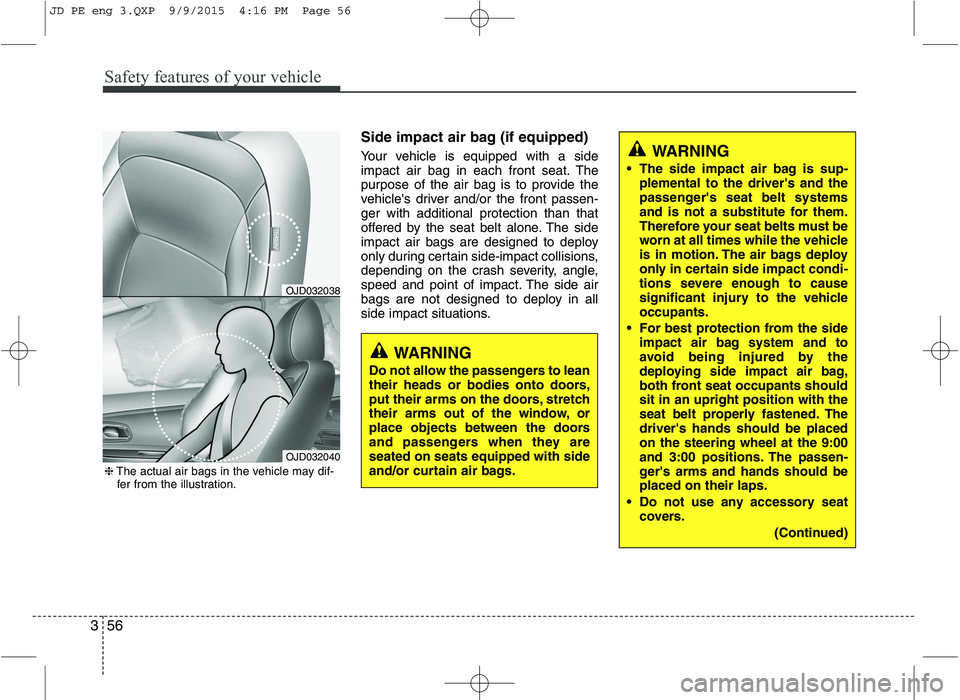
Side impact air bag (if equipped)
Your vehicle is equipped with a side
impact air bag in each front seat. The
purpose of the air bag is to provide the
vehicle's driver and/or the front passen-ger with additional protection than that
offered by the seat belt alone. The side
impact air bags are designed to deploy
only during certain side-impact collisions,
depending on the crash severity, angle,
speed and point of impact. The side air
bags are not designed to deploy in all
side impact situations.
WARNING
The side impact air bag is sup- plemental to the driver's and the
passenger's seat belt systems
and is not a substitute for them.
Therefore your seat belts must be
worn at all times while the vehicle
is in motion. The air bags deploy
only in certain side impact condi-
tions severe enough to cause
significant injury to the vehicleoccupants.
For best protection from the side impact air bag system and to
avoid being injured by the
deploying side impact air bag,
both front seat occupants shouldsit in an upright position with the
seat belt properly fastened. Thedriver's hands should be placedon the steering wheel at the 9:00
and 3:00 positions. The passen-
ger's arms and hands should beplaced on their laps.
Do not use any accessory seat covers.
(Continued)
WARNING
Do not allow the passengers to lean
their heads or bodies onto doors,
put their arms on the doors, stretch
their arms out of the window, or
place objects between the doors
and passengers when they areseated on seats equipped with side
and/or curtain air bags.
OJD032038
OJD032040
❈ The actual air bags in the vehicle may dif-
fer from the illustration.
JD PE eng 3.QXP 9/9/2015 4:16 PM Page 56
Page 81 of 643
Safety features of your vehicle
64
3
SRS Care
The SRS is virtually maintenance-free
and so there are no parts you can safely
service by yourself. If the SRS air bag
warning light does not illuminate, or con-
tinuously remains on, we recommend
that the system be inspected by an
authorized Kia dealer.
WARNING
Modification to SRS components or wiring, including the addition
of any kind of badges to the pad
covers or modifications to the
body structure, can adversely
affect SRS performance and lead
to possible injury.
For cleaning the air bag pad cov- ers, use only a soft, dry cloth or
one which has been moistened
with plain water. Solvents or
cleaners could adversely affect
the air bag covers and proper
deployment of the system.
No objects should be placed over or near the air bag modules on
the steering wheel, instrument
panel, and the front passenger's
panel above the glove box,
because any such object could
cause harm if the vehicle is in a
crash severe enough to cause
the air bags to inflate.
(Continued)(Continued)
If the air bags inflate, we recom-mend that the system be replaced
by an authorized Kia dealer.
Do not tamper with or disconnect SRS wiring, or other components
of the SRS system. Doing so
could result in injury, due to acci-
dental inflation of the air bags or
by rendering the SRS inopera-
tive.
If components of the air bag sys- tem must be discarded, or if the
vehicle must be scrapped, certain
safety precautions must be
observed. An authorized Kia
dealer knows these precautions
and can give you the necessary
information. Failure to follow
these precautions and proce-dures could increase the risk of
personal injury.
If your car was flooded and has soaked carpeting or water on floor-
ing, you shouldn't try to start the
engine; we recommend that you
contact an authorized Kia dealer.
JD PE eng 3.QXP 9/9/2015 4:17 PM Page 64
Page 84 of 643
Features of your vehicle
Keys . . . . . . . . . . . . . . . . . . . . . . . . . . . . . . . . . . . . . . 4-4 Record your key number . . . . . . . . . . . . . . . . . . . . . . . 4-4
Key operations . . . . . . . . . . . . . . . . . . . . . . . . . . . . . . . . 4-4
Immobilizer system . . . . . . . . . . . . . . . . . . . . . . . . . . . . 4-4
Remote keyless entry . . . . . . . . . . . . . . . . . . . . . . . . 4-6 Remote keyless entry system operations . . . . . . . . . . . 4-6
Transmitter precautions . . . . . . . . . . . . . . . . . . . . . . . . 4-8
Battery replacement . . . . . . . . . . . . . . . . . . . . . . . . . . . 4-9
Smart key . . . . . . . . . . . . . . . . . . . . . . . . . . . . . . . . 4-11 Smart key function . . . . . . . . . . . . . . . . . . . . . . . . . . . 4-11
Smart key precautions . . . . . . . . . . . . . . . . . . . . . . . . 4-13
Door lock/unlock in an emergency situation . . . . . . 4-13
Theft-alarm system . . . . . . . . . . . . . . . . . . . . . . . . 4-14 Armed stage . . . . . . . . . . . . . . . . . . . . . . . . . . . . . . . . . 4-14
Theft-alarm stage . . . . . . . . . . . . . . . . . . . . . . . . . . . . 4-15
Disarmed stage. . . . . . . . . . . . . . . . . . . . . . . . . . . . . . . 4-16
Door locks . . . . . . . . . . . . . . . . . . . . . . . . . . . . . . . . 4-17 From outside . . . . . . . . . . . . . . . . . . . . . . . . . . . . . . . . 4-17
From inside . . . . . . . . . . . . . . . . . . . . . . . . . . . . . . . . . 4-18
Deadlocks . . . . . . . . . . . . . . . . . . . . . . . . . . . . . . . . . . . 4-20
Door lock/unlock features. . . . . . . . . . . . . . . . . . . . . . 4-20
Child-protector rear door lock. . . . . . . . . . . . . . . . . . 4-21
Tailgate . . . . . . . . . . . . . . . . . . . . . . . . . . . . . . . . . . 4-22 Opening the tailgate . . . . . . . . . . . . . . . . . . . . . . . . . . 4-22
Closing the tailgate . . . . . . . . . . . . . . . . . . . . . . . . . . . 4-22
Emergency tailgate safety release . . . . . . . . . . . . . . . 4-23
Windows . . . . . . . . . . . . . . . . . . . . . . . . . . . . . . . . . 4-24 Power windows . . . . . . . . . . . . . . . . . . . . . . . . . . . . . . 4-25 Manual windows . . . . . . . . . . . . . . . . . . . . . . . . . . . . . 4-27
Hood. . . . . . . . . . . . . . . . . . . . . . . . . . . . . . . . . . . . . 4-28 Opening the hood . . . . . . . . . . . . . . . . . . . . . . . . . . . . 4-28
Closing the hood . . . . . . . . . . . . . . . . . . . . . . . . . . . . . 4-29
Fuel filler lid . . . . . . . . . . . . . . . . . . . . . . . . . . . . . . 4-30 Opening the fuel filler lid . . . . . . . . . . . . . . . . . . . . . . 4-30
Closing the fuel filler lid . . . . . . . . . . . . . . . . . . . . . . . 4-30
Panorama sunroof . . . . . . . . . . . . . . . . . . . . . . . . . 4-33 Sunroof open warning. . . . . . . . . . . . . . . . . . . . . . . . . 4-33
Sunshade . . . . . . . . . . . . . . . . . . . . . . . . . . . . . . . . . . . 4-34
Sliding the sunroof . . . . . . . . . . . . . . . . . . . . . . . . . . . 4-34
Tilting the sunroof . . . . . . . . . . . . . . . . . . . . . . . . . . . . 4-34
Closing the sunroof . . . . . . . . . . . . . . . . . . . . . . . . . . . 4-35
Resetting the sunroof . . . . . . . . . . . . . . . . . . . . . . . . . 4-36
Steering wheel . . . . . . . . . . . . . . . . . . . . . . . . . . . . . 4-37 Electronic power steering . . . . . . . . . . . . . . . . . . . . . . 4-37
Tilt and telescopic steering . . . . . . . . . . . . . . . . . . . . . 4-38
Heated steering wheel . . . . . . . . . . . . . . . . . . . . . . . . . 4-38
Horn . . . . . . . . . . . . . . . . . . . . . . . . . . . . . . . . . . . . . . . 4-39
Flex steering wheel . . . . . . . . . . . . . . . . . . . . . . . . . . . 4-40
Mirrors . . . . . . . . . . . . . . . . . . . . . . . . . . . . . . . . . . 4-42 Inside rearview mirror . . . . . . . . . . . . . . . . . . . . . . . . 4-42
Outside rearview mirror. . . . . . . . . . . . . . . . . . . . . . . 4-43
Instrument cluster (Normal vision) . . . . . . . . . . . 4-46 Instrument panel illumination . . . . . . . . . . . . . . . . . . 4-47
Gauges . . . . . . . . . . . . . . . . . . . . . . . . . . . . . . . . . . . . . 4-47
Manual transaxle shift indicator . . . . . . . . . . . . . . . . 4-49
Automatic transaxle shift position indicator . . . . . . 4-49
4
JD PE eng 4.QXP 1/28/2016 5:11 PM Page 1
Page 120 of 643

437
Features of your vehicle
STEERING WHEEL
Electronic power steering
Power steering uses the motor to assist
you in steering the vehicle. If the engine
is off or if the power steering system
becomes inoperative, the vehicle may
still be steered, but it will require
increased steering effort.
The electronic power steering is con-
trolled by the power steering control unit
which senses the steering wheel torque
and vehicle speed to command the
motor.
The steering effort becomes heavier as
the vehicle’s speed increases and
becomes lighter as the vehicle’s speed
decreases for better control of the steer-ing wheel.
Should you notice any change in the
effort required to steer during normal
vehicle operation, we recommend that
the system be checked by an authorized
Kia dealer.
✽✽ NOTICE
The following symptoms may occur dur-
ing normal vehicle operation:
The EPS warning light does not illu- minate.
The steering effort is high immediate- ly after turning the ignition switch on.
This happens as the system performs
the EPS system diagnostics. When the
diagnostics is completed, the steering
wheel will return to its normal condi-
tion.
A click noise may be heard from the
EPS relay after the ignition switch is
turned to the ON or LOCK/OFF posi-
tion.
Motor noise may be heard when the
vehicle is at a stop or at a low driving
speed.
The steering effort increases if the steering wheel is rotated continuously
when the vehicle is not in motion.
However, after a few minutes, it will
return to its normal conditions.
(Continued)(Continued)
If an error is detected in the electric
power steering system, EPS will stop
assisting driver in steering the vehicle to
prevent accidents and the warning light
on the cluster will illuminate or blink.
We recommend that the system be
checked by an authorized Kia dealer as
soon as possible.
When you operate the steering wheel in low temperature, abnormal noise could
occur. If temperature rises, the noise
will disappear. This is a normal condi-
tion.
When the vehicle is stationary, if you
turn the steering wheel all the way to
the left or right continuously, the
steering wheel becomes heavier from
the end. This is not a system malfunc-
tion but for your safety. As time pass-
es, the steering wheel returns to its
normal condition.
When the charging system warning
light comes on or the voltage is low
(When the alternator (or battery) does
not operate normally or it malfunc-
tions), the steering wheel may get
heavy and become difficult to control
operate abnormally.
JD PE eng 4.QXP 1/28/2016 5:14 PM Page 37
Page 121 of 643
Features of your vehicle
38
4
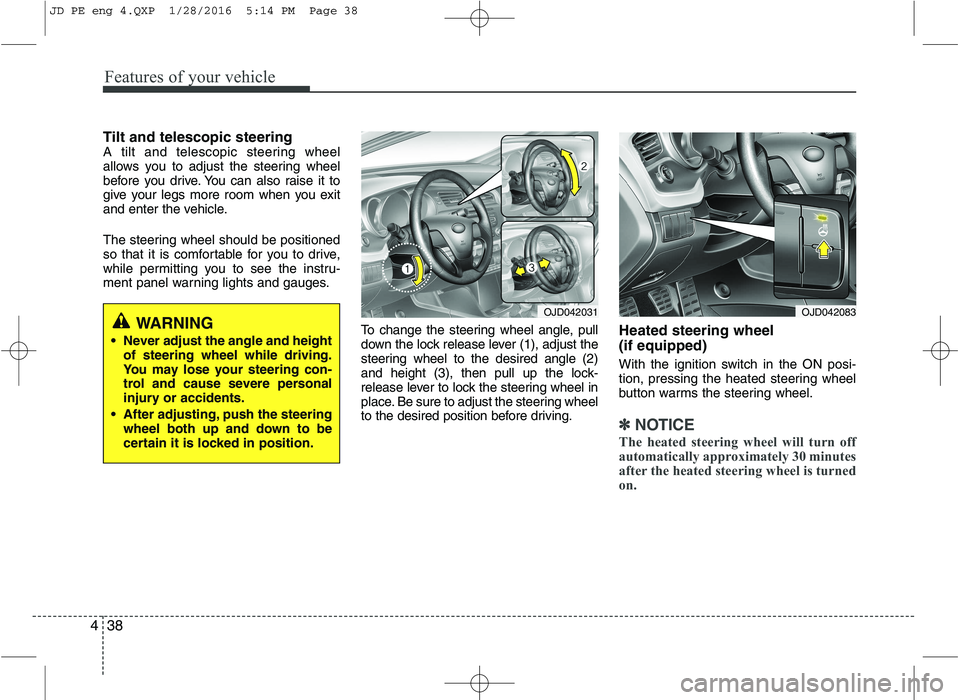
Tilt and telescopic steering
A tilt and telescopic steering wheel
allows you to adjust the steering wheel
before you drive. You can also raise it to
give your legs more room when you exit
and enter the vehicle.
The steering wheel should be positioned
so that it is comfortable for you to drive,
while permitting you to see the instru-
ment panel warning lights and gauges.
To change the steering wheel angle, pull
down the lock release lever (1), adjust the
steering wheel to the desired angle (2)
and height (3), then pull up the lock-
release lever to lock the steering wheel in
place. Be sure to adjust the steering wheel
to the desired position before driving.Heated steering wheel (if equipped)
With the ignition switch in the ON posi-
tion, pressing the heated steering wheel
button warms the steering wheel.
✽✽
NOTICE
The heated steering wheel will turn off
automatically approximately 30 minutes
after the heated steering wheel is turned
on.
WARNING
Never adjust the angle and height of steering wheel while driving.
You may lose your steering con-
trol and cause severe personal
injury or accidents.
After adjusting, push the steering wheel both up and down to be
certain it is locked in position.OJD042031OJD042083
JD PE eng 4.QXP 1/28/2016 5:14 PM Page 38
Page 122 of 643
439
Features of your vehicle
Horn
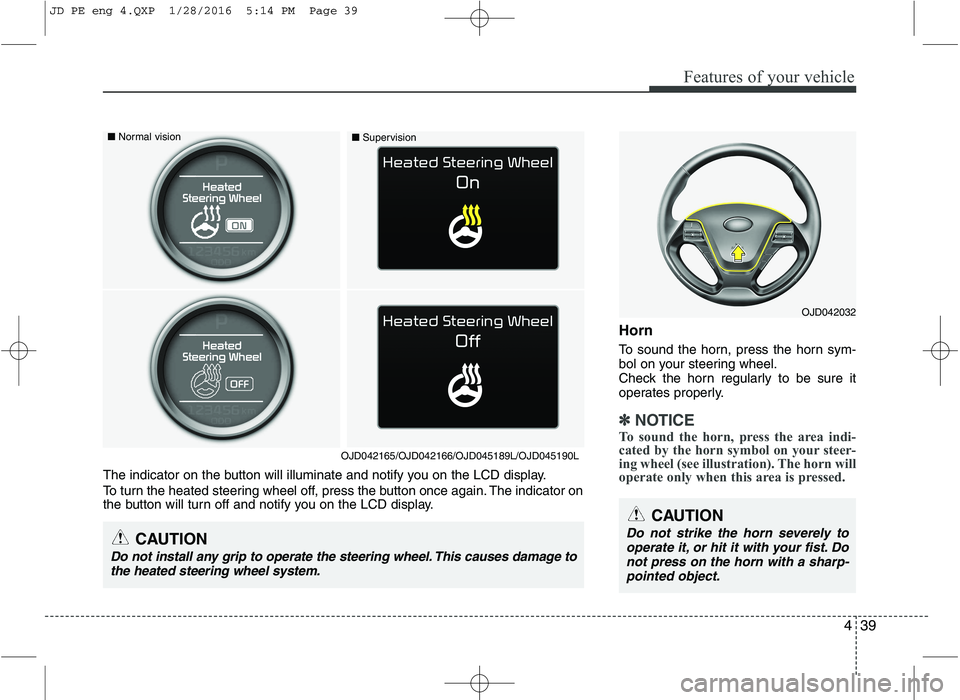
To sound the horn, press the horn sym-
bol on your steering wheel.
Check the horn regularly to be sure it
operates properly.
✽✽NOTICE
To sound the horn, press the area indi-
cated by the horn symbol on your steer-
ing wheel (see illustration). The horn will
operate only when this area is pressed.
OJD042032
CAUTION
Do not strike the horn severely to operate it, or hit it with your fist. Donot press on the horn with a sharp-
pointed object.
The indicator on the button will illuminate and notify you on the LCD display.
To turn the heated steering wheel off, press the button once again. The indicator on
the button will turn off and notify you on the LCD display.
CAUTION
Do not install any grip to operate the steering wheel. This causes damage tothe heated steering wheel system.
■ Normal vision
■Supervision
OJD042165/OJD042166/OJD045189L/OJD045190L
JD PE eng 4.QXP 1/28/2016 5:14 PM Page 39
Page 123 of 643
Features of your vehicle
40
4
Flex steering wheel (if equipped)
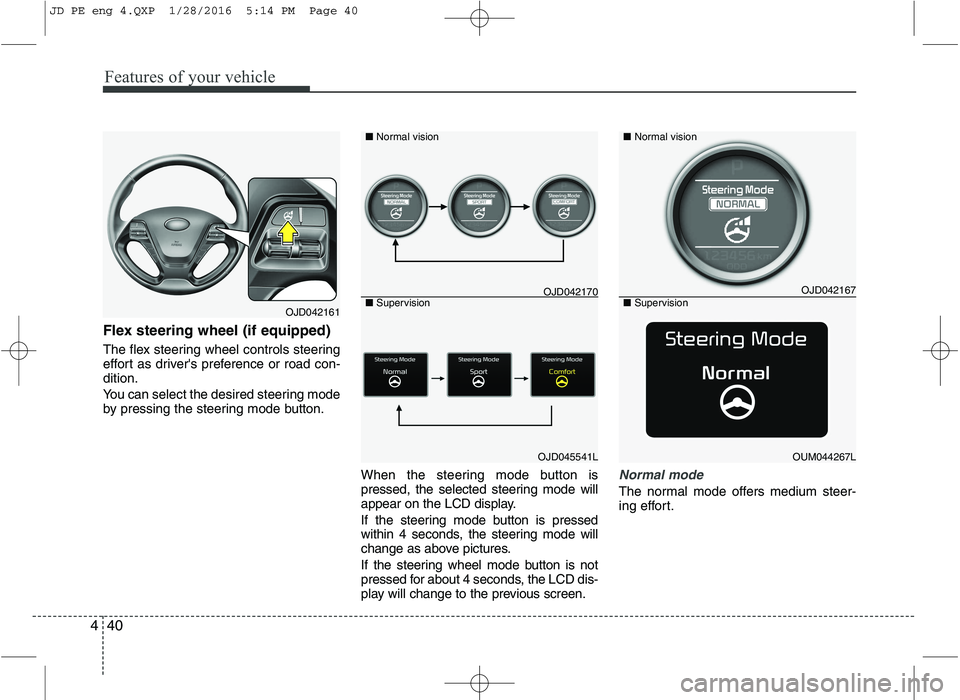
The flex steering wheel controls steering
effort as driver's preference or road con-dition.
You can select the desired steering mode
by pressing the steering mode button.
When the steering mode button is
pressed, the selected steering mode will
appear on the LCD display.
If the steering mode button is pressed
within 4 seconds, the steering mode will
change as above pictures.
If the steering wheel mode button is not
pressed for about 4 seconds, the LCD dis-
play will change to the previous screen.
Normal mode
The normal mode offers medium steer-
ing effort.
OJD042161
OJD045541L
■
Normal vision
■ Supervision
OJD042167
OUM044267L
■Normal vision
■ Supervision
OJD042170
JD PE eng 4.QXP 1/28/2016 5:14 PM Page 40
Page 124 of 643
441
Features of your vehicle
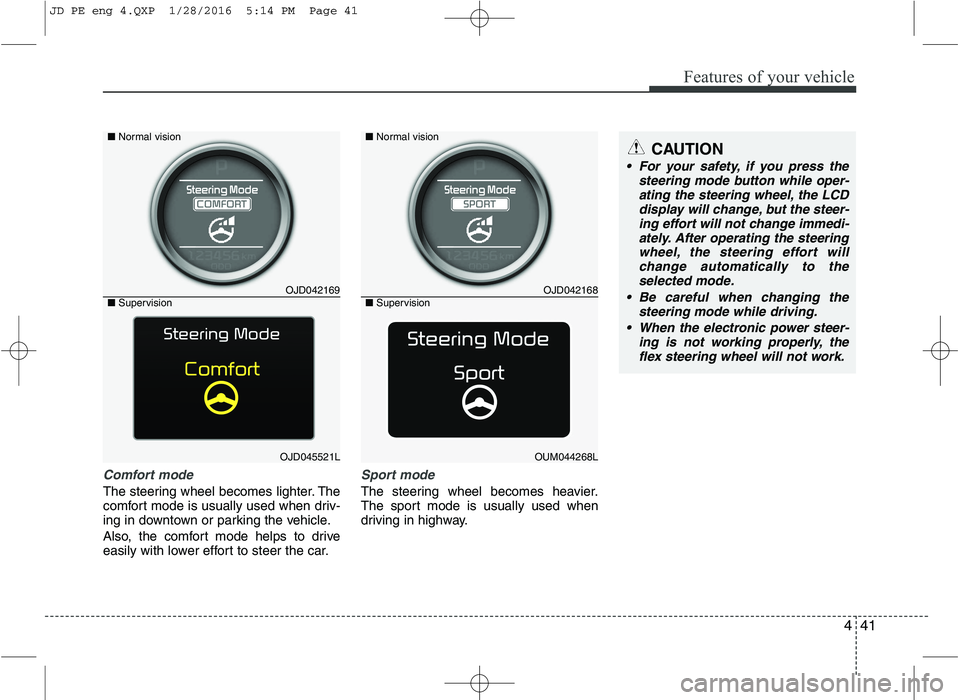
Comfort mode
The steering wheel becomes lighter. The
comfort mode is usually used when driv-
ing in downtown or parking the vehicle.
Also, the comfort mode helps to drive
easily with lower effort to steer the car.
Sport mode
The steering wheel becomes heavier.
The sport mode is usually used when
driving in highway.
CAUTION
For your safety, if you press thesteering mode button while oper-ating the steering wheel, the LCDdisplay will change, but the steer-
ing effort will not change immedi-ately. After operating the steering wheel, the steering effort willchange automatically to the
selected mode.
Be careful when changing the steering mode while driving.
When the electronic power steer- ing is not working properly, the
flex steering wheel will not work.
OJD042169
OJD045521L
■
Normal vision
■ Supervision
OJD042168
OUM044268L
■Normal vision
■ Supervision
JD PE eng 4.QXP 1/28/2016 5:14 PM Page 41
Page 134 of 643
451
Features of your vehicle
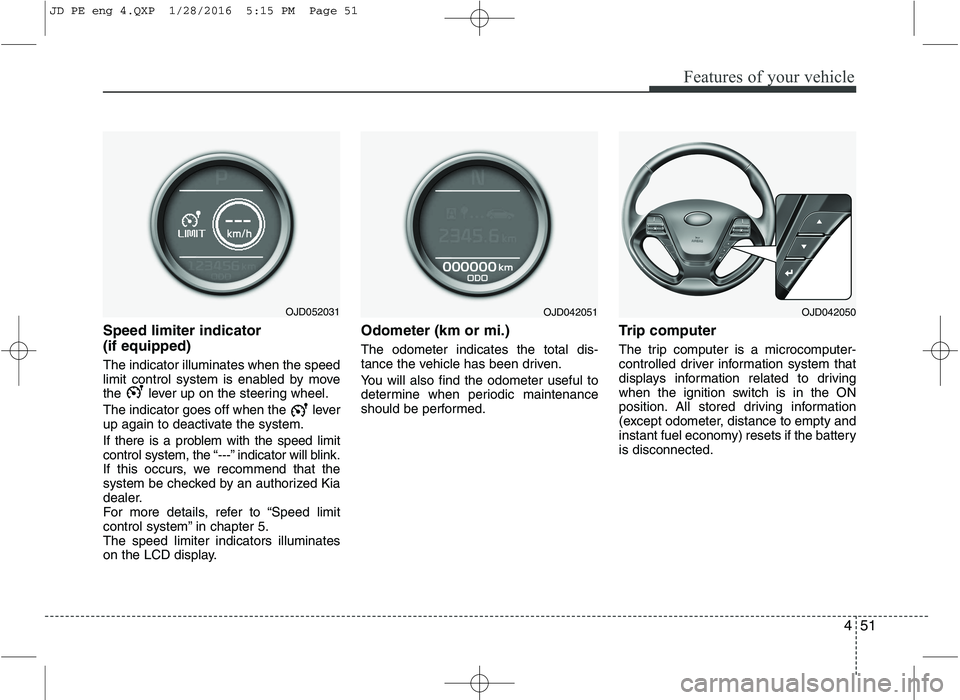
Speed limiter indicator (if equipped) The indicator illuminates when the speed
limit control system is enabled by move
the lever up on the steering wheel.
The indicator goes off when the lever
up again to deactivate the system.
If there is a problem with the speed limit
control system, the “---” indicator will blink.
If this occurs, we recommend that the
system be checked by an authorized Kia
dealer.
For more details, refer to “Speed limit
control system” in chapter 5.The speed limiter indicators illuminates
on the LCD display.Odometer (km or mi.) The odometer indicates the total dis-
tance the vehicle has been driven.
You will also find the odometer useful to
determine when periodic maintenance
should be performed.
Trip computer
The trip computer is a microcomputer-
controlled driver information system that
displays information related to driving
when the ignition switch is in the ON
position. All stored driving information
(except odometer, distance to empty and
instant fuel economy) resets if the batteryis disconnected.
OJD052031OJD042051OJD042050
JD PE eng 4.QXP 1/28/2016 5:15 PM Page 51
Page 140 of 643

457
Features of your vehicle
Door Menu
Auto Door Lock
Off - The auto door lock operation will becanceled.
Speed - All doors will be automatically locked when the vehicle speed
exceeds 15km/h (9.3mph).
Shift Lever - All doors will be automati- cally locked if the shift lever
is shifted from the P(Park)
position to the R(Reverse),
N(Neutral) or D(Drive) posi-
tion. (for automatic transaxle
shift lever)
Auto Door Unlock
Off - The auto door unlock operation will be canceled.
Key Out - All doors will be automatically unlocked when the ignition key
is removed from ignition switch
(or smart key is in the OFFposition).
Shift Lever - All doors will be automati- cally unlocked if the shift
lever is shifted to the
P(Park) position. (for auto-
matic transaxle shift lever) Lamp Menu
Headlamp delay (if equipped)
If the headlamp delay function is checked :
The Headlamp delay and Headlamp
Welcome function will be activated.
Welcome Light (if equipped)
If the welcome light function is checked :
The welcome light function of puddle
lamp will activate.
Auto Triple Turn
(One-touch triple turn signal)
If the auto triple turn function is checked :
The lane change signals will blink 3 times
when the turn signal lever is moved
slightly. Settings Menu
Seat Easy Access (for Driver Position
Memory System equipped vehicle)
(if equipped)
If the seat easy access function is
checked :
The driver's seat will automatically move
forward or rearward for the driver to enter
or exit the vehicle comfortably.
Steering position (if equipped)
If the steering position function is
checked:
The warning illuminates on the LCD dis-
play when the steering wheel is not
aligned with the ENGINE STRAT/STOP
button in the ON position.
Shift indicator (for manual transaxle)
If the shift indicator function is checked :
The shift indicator function will be activated.
For more details, refer to “Manual
transaxle shift indicator” in this chapter.
JD PE eng 4.QXP 1/28/2016 5:15 PM Page 57