speed KIA CERATO 2007 Owner's Manual
[x] Cancel search | Manufacturer: KIA, Model Year: 2007, Model line: CERATO, Model: KIA CERATO 2007Pages: 329, PDF Size: 34.09 MB
Page 165 of 329
Driving your vehicle
30
4
1 23456789
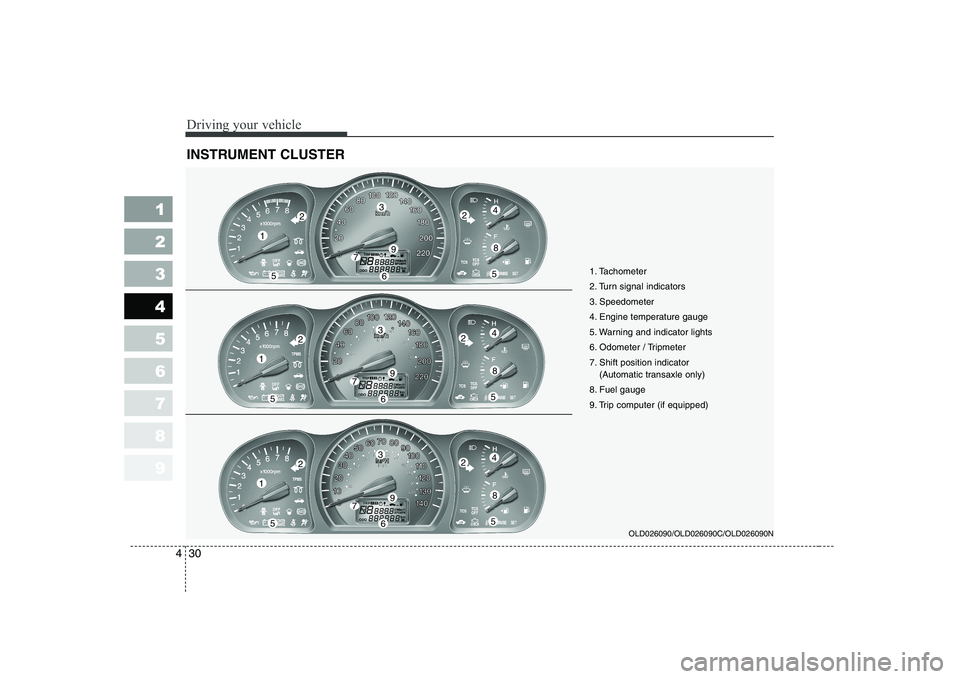
INSTRUMENT CLUSTER
OLD026090/OLD026090C/OLD026090N
1
55
224
8
3
79
6
1
55
224
8
3
79
6
1
55
224
8
3
79
6 1. Tachometer
2. Turn signal indicators
3. Speedometer
4. Engine temperature gauge
5. Warning and indicator lights
6. Odometer / Tripmeter
7. Shift position indicator
(Automatic transaxle only)
8. Fuel gauge
9. Trip computer (if equipped)
Page 166 of 329
431
1 23456789
Driving your vehicle
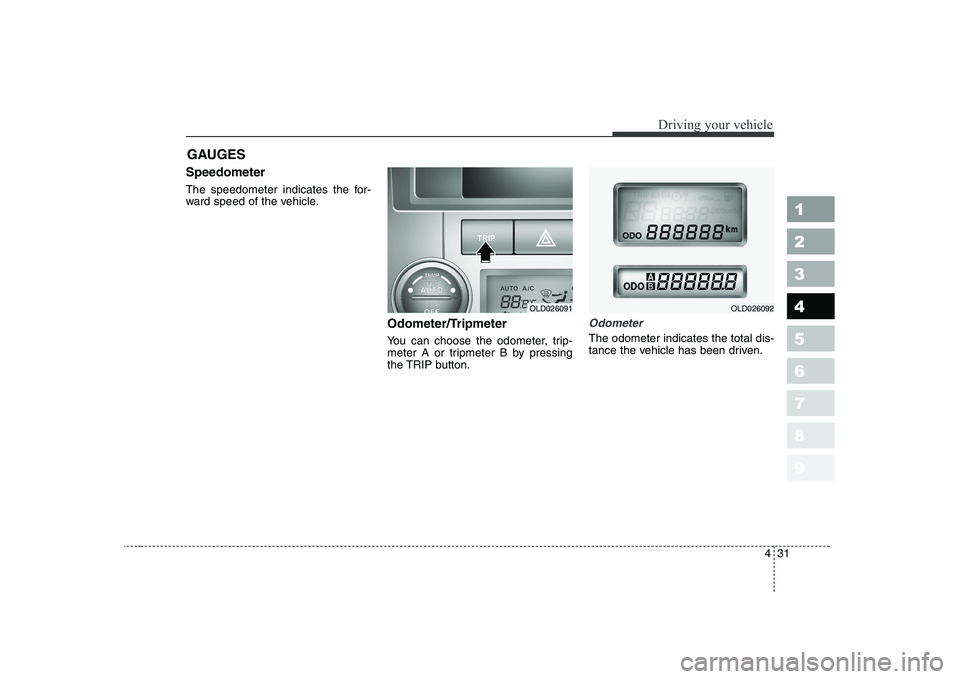
Speedometer
The speedometer indicates the for-
ward speed of the vehicle.Odometer/Tripmeter
You can choose the odometer, trip-
meter A or tripmeter B by pressing
the TRIP button.
Odometer
The odometer indicates the total dis-
tance the vehicle has been driven.
GAUGES
OLD026091OLD026092
Page 168 of 329
433
1 23456789
Driving your vehicle
Engine temperature gauge
This gauge shows the temperature of the engine coolant when the igni-
tion switch is ON.
Do not continue driving with an over-
heated engine. If your vehicle over-
heats, refer to “Overheating” in the
Index.
✽✽
NOTICE
If the gauge pointer moves beyond
the normal range area toward the“H” position, it indicates overheat-ing that may damage the engine.
Fuel gauge
The fuel gauge indicates the approx- imate amount of fuel remaining in thefuel tank.
Fuel tank capacity - 55 liters.
The fuel gauge is supplemented by a
low fuel warning light, which will illu-
minate when the fuel level has
dropped to about 8.5 liters. Trip computer (if equipped)
Trip computer is a microcomputer-
controlled driver information gauge
that displays information related to
driving, such as estimated distance
to empty, average speed and driving
time on the LCD.
Page 169 of 329
Driving your vehicle
34
4
1 23456789
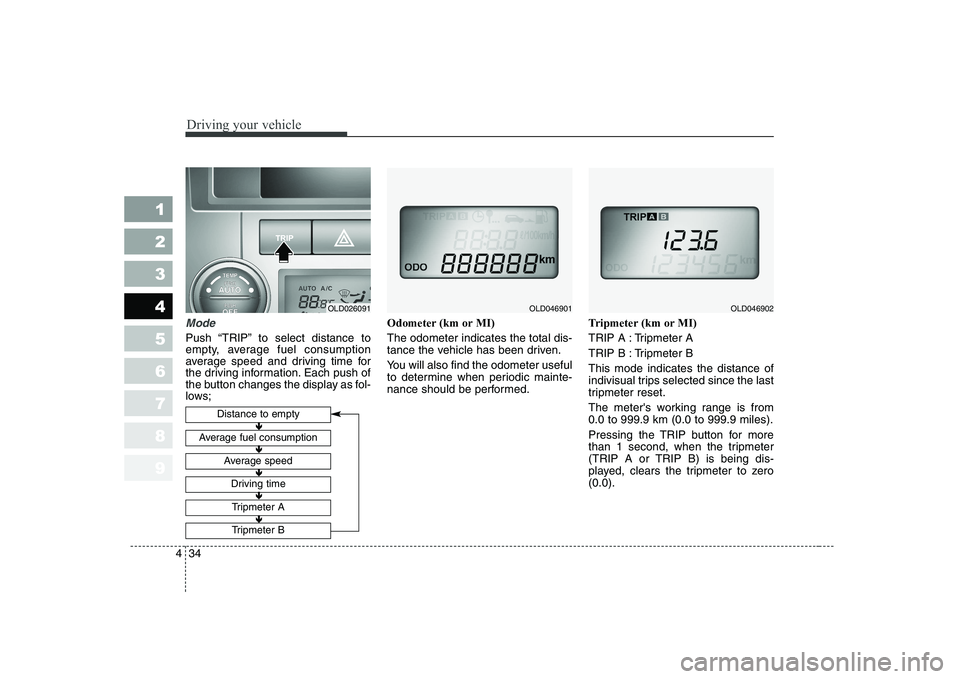
Mode
Push “TRIP” to select distance to
empty, average fuel consumption
average speed and driving time for
the driving information. Each push of
the button changes the display as fol-
lows; Odometer (km or MI) The odometer indicates the total dis-
tance the vehicle has been driven.
You will also find the odometer useful
to determine when periodic mainte-
nance should be performed.
Tripmeter (km or MI)
TRIP A : Tripmeter A
TRIP B : Tripmeter BThis mode indicates the distance of
indivisual trips selected since the last
tripmeter reset.
The meter's working range is from 0.0 to 999.9 km (0.0 to 999.9 miles).
Pressing the TRIP button for more
than 1 second, when the tripmeter
(TRIP A or TRIP B) is being dis-
played, clears the tripmeter to zero(0.0).
Distance to empty
Average fuel consumption
Average speed
Driving time
Tripmeter A
Tripmeter B
OLD046901OLD046902
Ð
Ð Ð
Ð Ð
Ð Ð
Ð Ð
Ð
OLD026091
Page 171 of 329

Driving your vehicle
36
4
1 23456789
Average speed
This mode indicates the average
speed from the starting of the vehicle
to the ignition key “OFF”. When the
ignition key is “OFF”, it will initialize to0 km/h (0 mph).
Driving time
This mode indicates the total time
from the starting of the vehicle to the
ignition key “OFF” after resetting.
When the “TRIP” switch is pushed, it
will initialize to 0:00. Reset
Push “TRIP” for more than 1 second
to initialize the displayed information
such as average speed and driving
time. Instrument panel illumination (if equipped)
When the vehicle’s parking lights or headlights are on, rotate the illumina-
tion control knob to adjust the instru-
ment panel illumination intensity.
OLD026204LOLD026097OLD026095
Page 172 of 329

437
1 23456789
Driving your vehicle
Warning lights / audible indi-
cators
Checking operation
All warning lights are checked by
turning the ignition switch ON (do not
start the engine). Any light that does
not illuminate should be checked by
an Authorized Kia Dealer.
After starting the engine, check to
make sure that all warning lights are
off. If any are still on, this indicates a
situation that needs attention. When
releasing the parking brake, the
brake system warning light should go
off. The fuel warning light will stay on
if the fuel level is low.Anti-lock brake sys- tem (ABS) warninglight (if equipped)
This light illuminates if the key is
turned to ON and goes off in approx-imately 3 seconds if the system is
operating normally.
If the light stays on, you may have a
problem with your ABS system.
Contact an authorized Kia dealer as
soon as possible.
Electronic brake force
distribution (EBD)system warning light (if equipped)
If two warning lights illumi- nate at the same time
while driving, your vehicle
has a problem with ABSand EBD system.In this case, your ABS system and
regular brake system may not work
normally. Have the vehicle checked
by an Authorized Kia Dealer as soon
as possible.
WARNINGS AND INDICATORS
ABS
ABS
WARNING
If the both ABS and Brake warn-
ing lights are ON and stay ON,
your vehicle’s brake system will
not work normally. So you may
experience an unexpected and
dangerous situation during sud-
den braking. In this case, avoidhigh speed driving and abrupt
braking. Have your vehicle
checked by Authorized Kia
Dealer as soon as possible.
Page 175 of 329

Driving your vehicle
40
4
1 23456789
Parking brake & brake fluid warning
Parking brake warning
This light is illuminated when the
parking brake is applied with the igni-
tion switch in the START or ON posi-
tion. The warning light should go off
when the parking brake is released.
Low brake fluid level warning
If the warning light remains on, it may
indicate that the brake fluid level in
the reservoir is low.
If the warning light remains on:
1. Drive carefully to the nearest safe
location and stop your vehicle.
2. With the engine stopped, check the brake fluid level immediately
and add fluid as required. Then
check all brake components for
fluid leaks.
3. Do not drive the vehicle if leaks are found, the warning light
remains on or the brakes do not
operate properly. Have it towed to
any Authorized Kia Dealer for a
brake system inspection and nec-
essary repairs.
To check bulb operation, check
whether the parking brake and brake
fluid warning light illuminates when
the ignition switch is in the ON posi-tion.
Low brake vacuum pressure warn- ing (for diesel, if equipped)
If the brake warning light remains on
after adding brake fluid and the brake
pedal becomes heavier or harder, it
may indicate that the brake vacuum
pump has any problem. Therefore
you should avoid high speed driving
or sudden stop, and you should
depress the brake pedal deeper and
harder than usual in braking. Make
sure to have the brake system
checked and repaired by an author-
ized Kia dealer.
WARNING
Driving the vehicle with a warn-
ing light on is dangerous. If thebrake warning light remains on,
have the brakes checked and
repaired immediately by an
authorized Kia Dealer.
Page 179 of 329

Driving your vehicle
44
4
1 23456789
Sedimentor level warning (diesel
engine only)
The light comes on if water in the
sedimentor is accumulated more
than normal. Drain water if the light is
turned on. Safety belt warning chime
Ty p e A
If the driver's seat belt is not fastened
when the ignition key is turned “ON”
or if it is disconnected after the key is
ON, the safety belt warning chime
will sound for approximately 6 sec-
onds.
Ty p e B
If the driver's lap/shoulder belt is not
fastened when the key is turned ON
and you drive over 9km/h, the safety
belt warning chime will sound for
approximately 100 seconds after the
warning light blinks for approximately
one minute.
If the driver's lap/shoulder belt is dis-
connected after the key is turn ON
and you drive over 9km/h, the safety
belt warning chime will sound for
approximately 100 seconds.
But, if the driver's lap/shoulder belt is connected and disconnected twice
within 9 seconds after the belt is fas-
tened, the safety belt warning chime
will not operate.Key reminder warning chime
If the driver’s door is opened and the
ignition key is left in the ignition
switch in the LOCK or ACC position,
the key reminder warning chime will
sound. This is to prevent you from
locking your keys in the vehicle.
Overspeed warning chime (if equipped)
If you drive with the speed of 120
km/h or more, the overspeed warn-
ing chime will sound. This is to pre-
vent you from driving your vehicle
with overspeed.
CAUTION
When the fuel filter warning
light is illuminated, enginepower (vehicle speed & idle speed) may decrease. If youkeep driving with the warninglight on, you can damage yourvehicle's engine parts and injec- tion system of the CommonRail. If this occurs, have yourvehicle checked by an author- ized KIA dealer as soon as pos-sible.
Page 186 of 329
451
1 23456789
Driving your vehicle
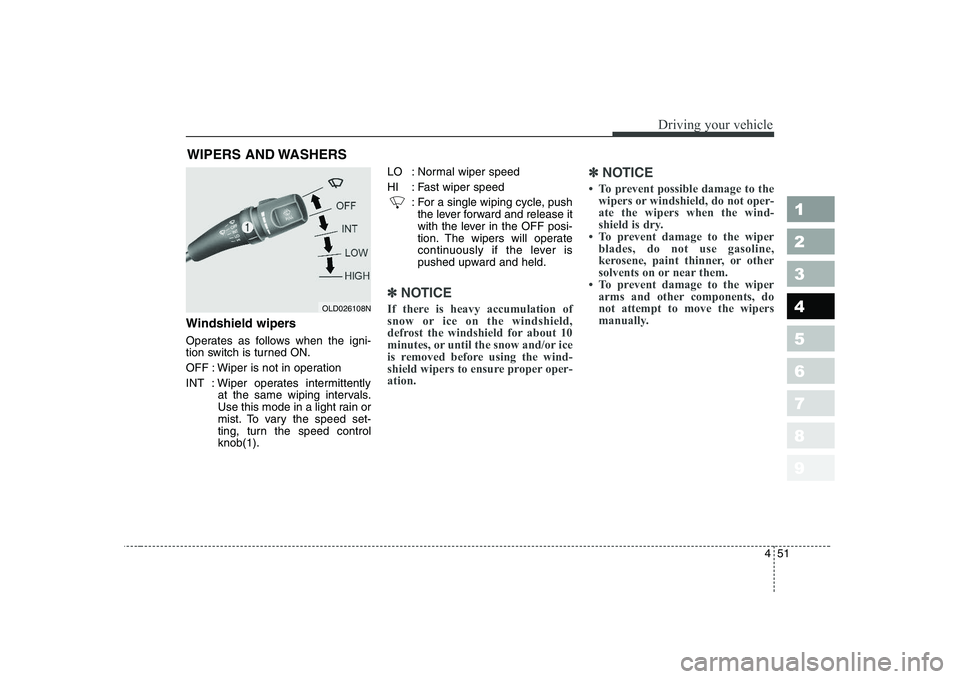
Windshield wipers
Operates as follows when the igni-
tion switch is turned ON.
OFF : Wiper is not in operation
INT : Wiper operates intermittentlyat the same wiping intervals.
Use this mode in a light rain or
mist. To vary the speed set-
ting, turn the speed controlknob(1). LO : Normal wiper speed
HI : Fast wiper speed
: For a single wiping cycle, pushthe lever forward and release it
with the lever in the OFF posi-
tion. The wipers will operate
continuously if the lever is
pushed upward and held.
✽✽ NOTICE
If there is heavy accumulation of
snow or ice on the windshield,
defrost the windshield for about 10
minutes, or until the snow and/or ice
is removed before using the wind-
shield wipers to ensure proper oper-ation. ✽
✽
NOTICE
Page 190 of 329
455
1 23456789
Driving your vehicle
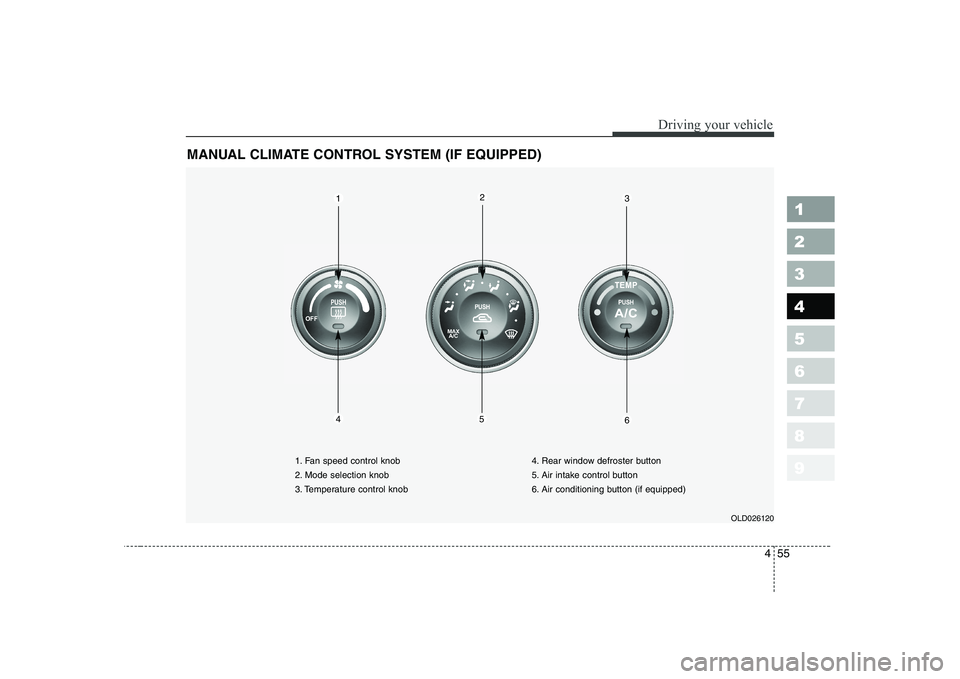
MANUAL CLIMATE CONTROL SYSTEM (IF EQUIPPED)
OLD026120
1. Fan speed control knob
2. Mode selection knob
3. Temperature control knob
4. Rear window defroster button
5. Air intake control button
6. Air conditioning button (if equipped)
123
546