engine KIA K900 2016 Owners Manual
[x] Cancel search | Manufacturer: KIA, Model Year: 2016, Model line: K900, Model: KIA K900 2016Pages: 542, PDF Size: 38.35 MB
Page 233 of 542
Features of your vehicle
4
4-153
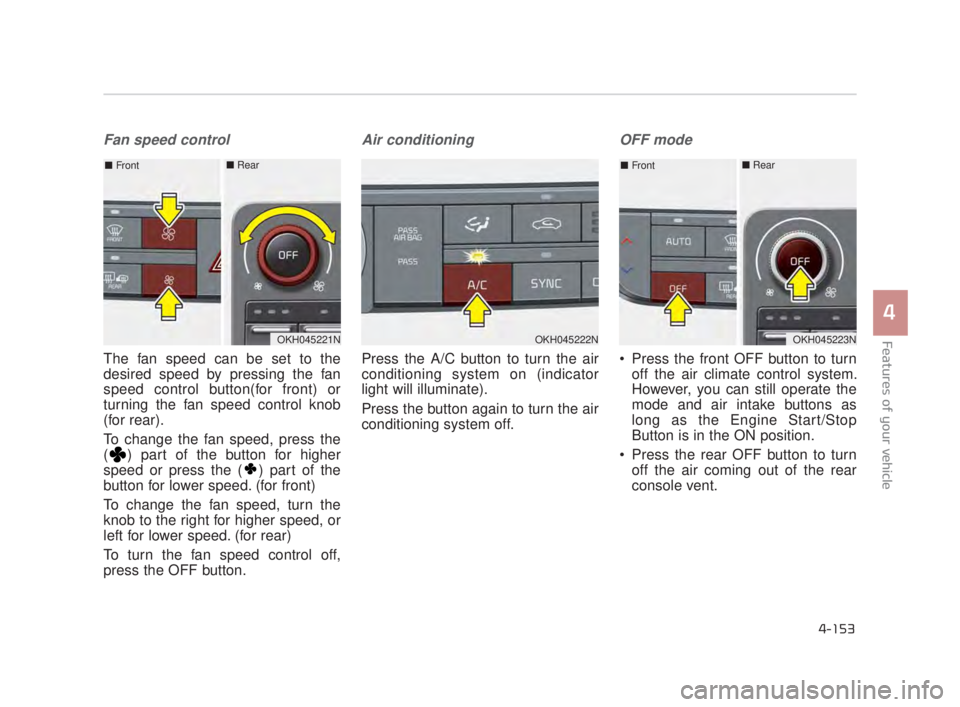
Fan speed control
The fan speed can be set to the
desired speed by pressing the fan
speed control button(for front) or
turning the fan speed control knob
(for rear).
To change the fan speed, press the
( ) part of the button for higher
speed or press the ( ) part of the
button for lower speed. (for front)
To change the fan speed, turn the
knob to the right for higher speed, or
left for lower speed. (for rear)
To turn the fan speed control off,
press the OFF button.
Air conditioning
Press the A/C button to turn the air
conditioning system on (indicator
light will illuminate).
Press the button again to turn the air
conditioning system off.
OFF mode
Press the front OFF button to turnoff the air climate control system.
However, you can still operate the
mode and air intake buttons as
long as the Engine Start/Stop
Button is in the ON position.
Press the rear OFF button to turn off the air coming out of the rear
console vent.
OKH045222NOKH045221N
■ Front■ Rear
OKH045223N
■Front■ Rear
KH USA 4:2015 3/24/2015 4:43 PM Page 153
Page 235 of 542
Features of your vehicle
4
4-155
Operation Tips
To keep dust or unpleasant fumesfrom entering the vehicle through
the ventilation system, temporarily
set the air intake control to the
recirculated air position. Be sure to
return the control to the fresh air
position when the irritation has
passed to keep fresh air in the
vehicle. This will help keep the driv-
er alert and comfortable.
Air for the heating/cooling system is drawn in through the grilles just
ahead of the windshield. Care
should be taken that these are not
blocked by leaves, snow, ice or
other obstructions.
To prevent interior fog on the wind- shield, set the air intake control to
the fresh air position and fan speed
to the desired position, turn on the
air conditioning system, and adjust
the temperature control to desired
temperature.Air conditioning (if equipped)
All Kia Air Conditioning Systems are
filled with R-134a refrigerant.
1.Start the engine. Press the air con-ditioning button.
2.Set the mode to the position.
3.Set the air intake control to the out- side air or recirculated air position.
4.Adjust the fan speed control and temperature control to maintain
maximum comfort. Air conditioning system operation tips
If the vehicle has been parked in
direct sunlight during hot weather,
open the windows for a short time
to let the hot air inside the vehicle
escape.
To help reduce moisture inside of the windows on rainy or humid
days, decrease the humidity inside
the vehicle by operating the air
conditioning system.
During air conditioning system operation, you may occasionally
notice a slight change in engine
speed as the air conditioning com-
pressor cycles. This is a normal
system operation characteristic.
Use the air conditioning system every month only for a few minutes
to ensure maximum system per-
formance.
Excessive A/C
When using the air conditioning
system, monitor the engine
coolant closely while driving up
hills or in heavy traffic when out-
side temperatures are high. Air
conditioning system operation
may cause engine overheating
and potential engine damage.
Continue to use the blower fan
but turn the air conditioning sys-
tem off if the engine coolant tem-
perature gauge indicates engine
overheating.
CAUTION
KH USA 4:2015 3/24/2015 4:43 PM Page 155
Page 240 of 542

Features of your vehicle
4-160
1. Turn the Engine Start/Stop Buttonto the ON position.
2. Press the defroster button ( ).
3. While pressing the air conditioning button (A/C), press the air intake
control button at least 5 times with-
in 3 seconds.
The indicator on the air intake button
blinks 3 times with 0.5 seconds of
interval. It indicates that the defog-
ging logic is canceled or returned to
the programmed status.
If the battery has been discharged or
disconnected, it resets to the defog
logic status.
Auto Defogging System
Auto Defogging reduces the proba-
bility of fogging up the inside of the
windshield by automatically sensing
the moisture of inside the windshield.
The Auto Defogging System oper-
ates when the heater or air condi-
tioning is on. This indicator illuminates
when the Auto Defogging
System senses moisture
inside the windshield and
the Auto Defogging
System starts to operate.
If more moisture is in the vehicle, the
higher steps operate as follow. For
example if auto defogging does not
defog inside the windshield at step 2
Outside air position, it tries to defog
again at step 1 Blowing air toward
the windshield.
Step 1 : Operating the air condition- ing
Step 2 : Outside air position
Step 3 : Blowing air toward the wind- shield
Step 4 : Increasing air flow toward the windshield
OKH043228N
OKH045227N
KH USA 4:2015 3/24/2015 4:43 PM Page 160
Page 241 of 542
Features of your vehicle
4
4-161
To cancel or reset the Auto Defogging
System
Press the front windshield defroster
button for 3 seconds when the
Engine Start/Stop button is in the ON
position. When the Auto Defogging
System is canceled, Front defroster
button will blink 6 times.
When the Auto Defogging System is
reset, Front defroster button will blink
3 times without a signal.✽NOTICE
If the A/C off or recirculated air
position is manually selected while
the auto defogging system is on, the
auto defogging indicator will blink 3
times to give notice that manual
operation is canceled.
Do not remove the sensor cover
located on the upper end of the
driver side windshield glass.
Damage to the system parts
could occur and may not be cov-
ered by your vehicle warranty.
CAUTION
KH USA 4:2015 3/24/2015 4:43 PM Page 161
Page 243 of 542

Features of your vehicle
4
4-163
Cluster ionizer
When the Engine Start/Stop button
is in the ON position, the clean air
function turns on automatically.
Also, the clean air function turns off
automatically, when the Engine
Start/Stop button is in the OFF posi-
tion.
Smart ventilation
When driving and the heater and air
conditioning system is off, the smart
ventilation system maintains pleas-
ant indoor aerial environment by
controlling the temperature, humidity
and CO2 of interior.
“SMART VENTILATION ON” mes-
sage is displayed on the AVN climate
monitor for 5 seconds when the
smart ventilation system operates.
Smart ventilation system ON/OFF
If you would like to cancel the smart
ventilation system, turn off the Smart
ventilation in the AVN climate moni-
tor.
Rear climate system ON/OFF
If you would like to cancel the rear
climate system, turn off the rear cli-
mate in the AVN climate monitor.
CLIMATE CONTROL ADDITIONAL FEATURES (IF EQUIPPED)
OKH045579NOKH045580N
KH USA 4:2015 3/24/2015 4:44 PM Page 163
Page 250 of 542

Features of your vehicle
4-170
The power outlets provide power for
mobile telephones or other devices
designed to operate with the vehi-
cle's electrical systems. These
devices should draw less than 10
amps while the engine is running.
Use the power outlet only when theengine is running and remove the
accessory plug after use. Using the
accessory plug for prolonged peri-
ods of time with the engine off
could cause the battery to dis-
charge.
Only use 12V electric accessories which are less than 10A in electric
capacity.
Adjust the air-conditioner or heater to the lowest operating level when
using the power outlet. Close the cover when not in use.
Some electronic devices can
cause electronic interference when
plugged into a vehicle’s power out-
let. These devices may cause
excessive audio static and mal-
functions in other electronic sys-
tems or devices used in your vehi-
cle.
Electric Shock
Do not put a finger or a foreign
element (pin, etc.) into a power
outlet and do not touch with a
wet hand. You may get an elec-
tric shock.
WARNING
KH USA 4:2015 3/24/2015 4:44 PM Page 170
Page 251 of 542
Features of your vehicle
4
4-171
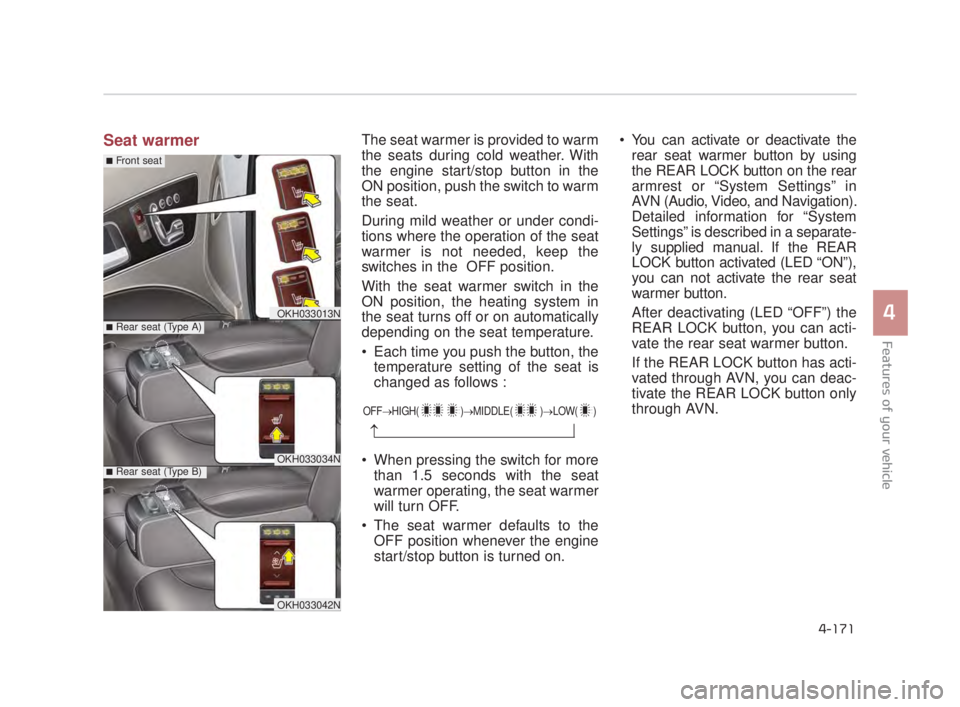
Seat warmerThe seat warmer is provided to warm
the seats during cold weather. With
the engine start/stop button in the
ON position, push the switch to warm
the seat.
During mild weather or under condi-
tions where the operation of the seat
warmer is not needed, keep the
switches in the OFF position.
With the seat warmer switch in the
ON position, the heating system in
the seat turns off or on automatically
depending on the seat temperature.
Each time you push the button, thetemperature setting of the seat is
changed as follows :
When pressing the switch for more than 1.5 seconds with the seat
warmer operating, the seat warmer
will turn OFF.
The seat warmer defaults to the OFF position whenever the engine
start/stop button is turned on. You can activate or deactivate the
rear seat warmer button by using
the REAR LOCK button on the rear
armrest or “System Settings” in
AVN (Audio, Video, and Navigation).
Detailed information for “System
Settings” is described in a separate-
ly supplied manual. If the REAR
LOCK button activated (LED “ON”),
you can not activate the rear seat
warmer button.
After deactivating (LED “OFF”) the
REAR LOCK button, you can acti-
vate the rear seat warmer button.
If the REAR LOCK button has acti-
vated through AVN, you can deac-
tivate the REAR LOCK button only
through AVN.
OFF→ HIGH( )→ MIDDLE( )→LOW( )
→
OKH033013N
OKH033034N
■Rear seat (Type A)
■Rear seat (Type B)
■Front seat
OKH033042N
KH USA 4:2015 3/24/2015 4:44 PM Page 171
Page 252 of 542

Features of your vehicle
4-172
Air ventilation seat (if equipped)
The air ventilation is provided to cool
the seats during hot weather by
blowing air through small vent holes
on the surface of the seats and seat-
backs. While the engine is running,
press the switch to cool the seat.
OKH033014N
OKH033043N
■Front seat
■Rear seat
Seat damage
When cleaning the seats, donot use an organic solvent
such as paint thinner, ben-
zene, alcohol and gasoline.
Doing so may damage the
surface of the heater or seats.
To prevent overheating the seat warmer, do not place any-
thing on the seats that insu-
lates against heat, such as
blankets, cushions or seat
covers on the seats while the
seat warmer is in operation.
Do not place heavy or sharp objects on the seat. Those
things may damage the seat
warmer system.
CAUTION
Seat warmer burns
The seat warmer may cause
burns, even at low tempera-
tures, if used over a long period
of time. Never allow passen-
gers who may not be able to
take care of themselves to be
exposed to the risk of seat
heater burns. These include:
1. Infants, children, elderly or disabled persons, or hospital
outpatients
2. Persons with sensitive skin or those that burn easily
3. Fatigued individuals
4. Intoxicated individuals
5. Individuals taking medica- tion that can cause drowsi-
ness or sleepiness (sleeping
pills, cold tablets, etc.)
WARNING
KH USA 4:2015 3/24/2015 4:44 PM Page 172
Page 253 of 542
Features of your vehicle
4
4-173
When the operation of the air ventila-
tion is not needed, keep the switches
in the OFF position.
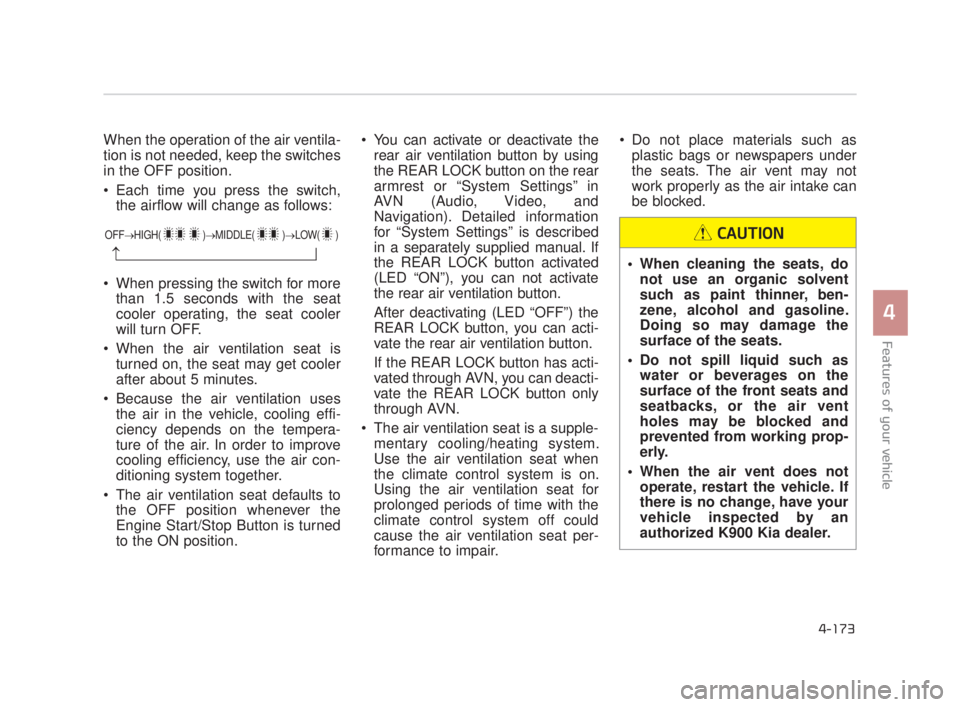
Each time you press the switch,the airflow will change as follows:
When pressing the switch for more than 1.5 seconds with the seat
cooler operating, the seat cooler
will turn OFF.
When the air ventilation seat is turned on, the seat may get cooler
after about 5 minutes.
Because the air ventilation uses the air in the vehicle, cooling effi-
ciency depends on the tempera-
ture of the air. In order to improve
cooling efficiency, use the air con-
ditioning system together.
The air ventilation seat defaults to the OFF position whenever the
Engine Start/Stop Button is turned
to the ON position. You can activate or deactivate the
rear air ventilation button by using
the REAR LOCK button on the rear
armrest or “System Settings” in
AVN (Audio, Video, and
Navigation). Detailed information
for “System Settings” is described
in a separately supplied manual. If
the REAR LOCK button activated
(LED “ON”), you can not activate
the rear air ventilation button.
After deactivating (LED “OFF”) the
REAR LOCK button, you can acti-
vate the rear air ventilation button.
If the REAR LOCK button has acti-
vated through AVN, you can deacti-
vate the REAR LOCK button only
through AVN.
The air ventilation seat is a supple- mentary cooling/heating system.
Use the air ventilation seat when
the climate control system is on.
Using the air ventilation seat for
prolonged periods of time with the
climate control system off could
cause the air ventilation seat per-
formance to impair. Do not place materials such as
plastic bags or newspapers under
the seats. The air vent may not
work properly as the air intake can
be blocked.
OFF→ HIGH( )→ MIDDLE( )→LOW( )
→ When cleaning the seats, do
not use an organic solvent
such as paint thinner, ben-
zene, alcohol and gasoline.
Doing so may damage the
surface of the seats.
Do not spill liquid such as water or beverages on the
surface of the front seats and
seatbacks, or the air vent
holes may be blocked and
prevented from working prop-
erly.
When the air vent does not operate, restart the vehicle. If
there is no change, have your
vehicle inspected by an
authorized K900 Kia dealer.
CAUTION
KH USA 4:2015 3/24/2015 4:44 PM Page 173
Page 259 of 542
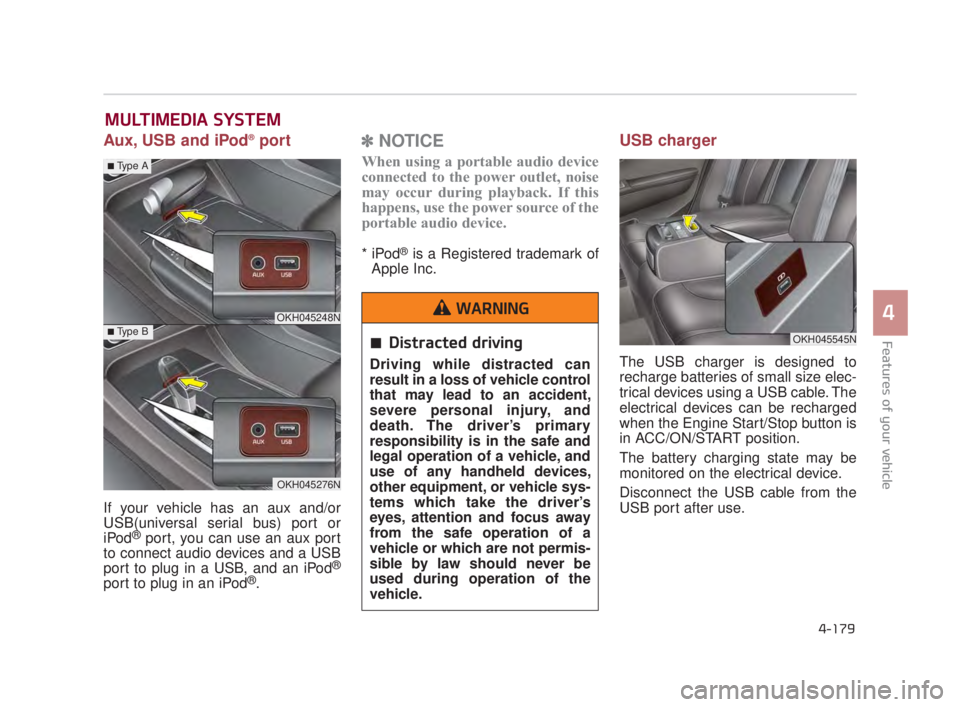
Aux, USB and iPod®port
If your vehicle has an aux and/or
USB(universal serial bus) port or
iPod
®port, you can use an aux port
to connect audio devices and a USB
port to plug in a USB, and an iPod
®
port to plug in an iPod®.
✽ NOTICE
When using a portable audio device
connected to the power outlet, noise
may occur during playback. If this
happens, use the power source of the
portable audio device.
* iPod®is a Registered trademark of
Apple Inc.
USB charger
The USB charger is designed to
recharge batteries of small size elec-
trical devices using a USB cable. The
electrical devices can be recharged
when the Engine Start/Stop button is
in ACC/ON/START position.
The battery charging state may be
monitored on the electrical device.
Disconnect the USB cable from the
USB port after use.
MULTIMEDIA SYSTEM
OKH045545N
OKH045248N
OKH045276N
■Type A
■Type B
4-179
4
Features of your vehicle
4
Distracted driving
Driving while distracted can
result in a loss of vehicle control
that may lead to an accident,
severe personal injury, and
death. The driver’s primary
responsibility is in the safe and
legal operation of a vehicle, and
use of any handheld devices,
other equipment, or vehicle sys-
tems which take the driver’s
eyes, attention and focus away
from the safe operation of a
vehicle or which are not permis-
sible by law should never be
used during operation of the
vehicle.
WARNING
KH USA 4:2015 3/24/2015 4:45 PM Page 179