mirror KIA K900 2016 Owner's Manual
[x] Cancel search | Manufacturer: KIA, Model Year: 2016, Model line: K900, Model: KIA K900 2016Pages: 542, PDF Size: 38.35 MB
Page 223 of 542
Features of your vehicle
4
4-143
✽NOTICE
If you want to defrost and defog the
front windshield, refer to
“Windshield Defrosting and
Defogging” in this section.
Rear window defroster
The defroster heats the window to
remove frost, fog and thin ice from
the rear window, while the engine is
running.
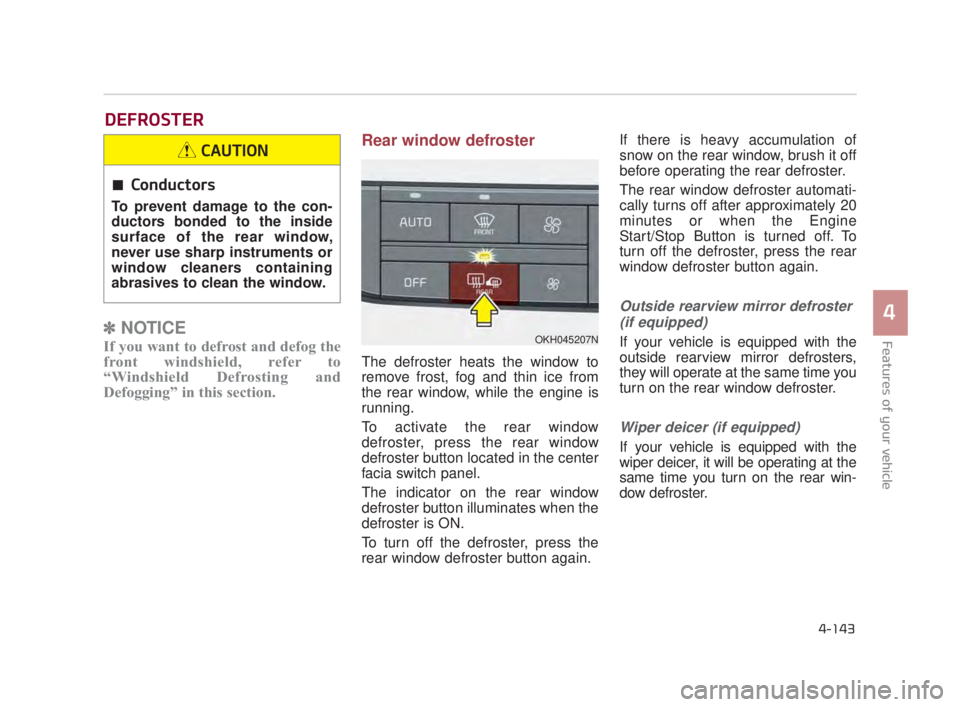
To activate the rear window
defroster, press the rear window
defroster button located in the center
facia switch panel.
The indicator on the rear window
defroster button illuminates when the
defroster is ON.
To turn off the defroster, press the
rear window defroster button again. If there is heavy accumulation of
snow on the rear window, brush it off
before operating the rear defroster.
The rear window defroster automati-
cally turns off after approximately 20
minutes or when the Engine
Start/Stop Button is turned off. To
turn off the defroster, press the rear
window defroster button again.
Outside rearview mirror defroster
(if equipped)
If your vehicle is equipped with the
outside rearview mirror defrosters,
they will operate at the same time you
turn on the rear window defroster.
Wiper deicer (if equipped)
If your vehicle is equipped with the
wiper deicer, it will be operating at the
same time you turn on the rear win-
dow defroster.
DEFROSTER
OKH045207N
Conductors
To prevent damage to the con-
ductors bonded to the inside
surface of the rear window,
never use sharp instruments or
window cleaners containing
abrasives to clean the window.
CAUTION
KH USA 4:2015 3/24/2015 4:42 PM Page 143
Page 238 of 542

Features of your vehicle
4-158
For maximum defrosting, set thetemperature control to the extreme
right/hot position and the fan speed
control to the highest speed.
If warm air to the floor is desired while defrosting or defogging, set
the mode to the floor-defrost posi-
tion.
Before driving, clear all snow and ice from the windshield, rear win-
dow, outside rear view mirrors, and
all side windows.
Clear all snow and ice from the hood and air inlet in the cowl grill to
improve heater and defroster effi-
ciency and to reduce the probabili-
ty of fogging up the inside of the
windshield. To defog inside windshield
1.Set the fan speed to the desiredposition.
2.Select desired temperature.
3.Press the defrost button ( ).
4.The air conditioning will be turned on according to the detected ambi-
ent temperature and outside (fresh)
air position will be selected auto-
matically.
OKH045225N
WINDSHIELD DEFROSTING AND DEFOGGING
Windshield heating
Do not use the or posi-
tion during cooling operation in
extremely humid weather. The
difference between the temper-
ature of the outside air and that
of the windshield could cause
the outer surface of the wind-
shield to fog up, causing loss of
visibility. In this case, set the
mode selection knob or button
to the position and fan
speed control knob or button to
the lower speed.
WARNING
KH USA 4:2015 3/24/2015 4:43 PM Page 158
Page 246 of 542
Features of your vehicle
4-166
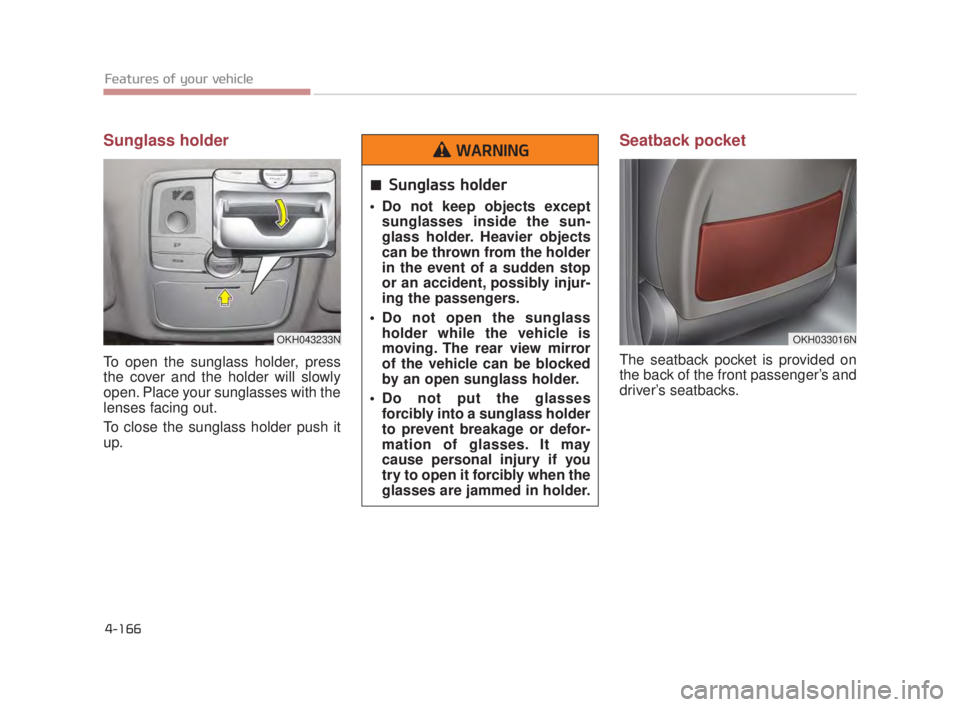
Sunglass holder
To open the sunglass holder, press
the cover and the holder will slowly
open. Place your sunglasses with the
lenses facing out.
To close the sunglass holder push it
up.
Seatback pocket
The seatback pocket is provided on
the back of the front passenger’s and
driver’s seatbacks.
OKH033016N
Sunglass holder
Do not keep objects exceptsunglasses inside the sun-
glass holder. Heavier objects
can be thrown from the holder
in the event of a sudden stop
or an accident, possibly injur-
ing the passengers.
Do not open the sunglass holder while the vehicle is
moving. The rear view mirror
of the vehicle can be blocked
by an open sunglass holder.
Do not put the glasses forcibly into a sunglass holder
to prevent breakage or defor-
mation of glasses. It may
cause personal injury if you
try to open it forcibly when the
glasses are jammed in holder.
WARNING
OKH043233N
KH USA 4:2015 3/24/2015 4:44 PM Page 166
Page 249 of 542
Features of your vehicle
4
4-169
Sunvisor
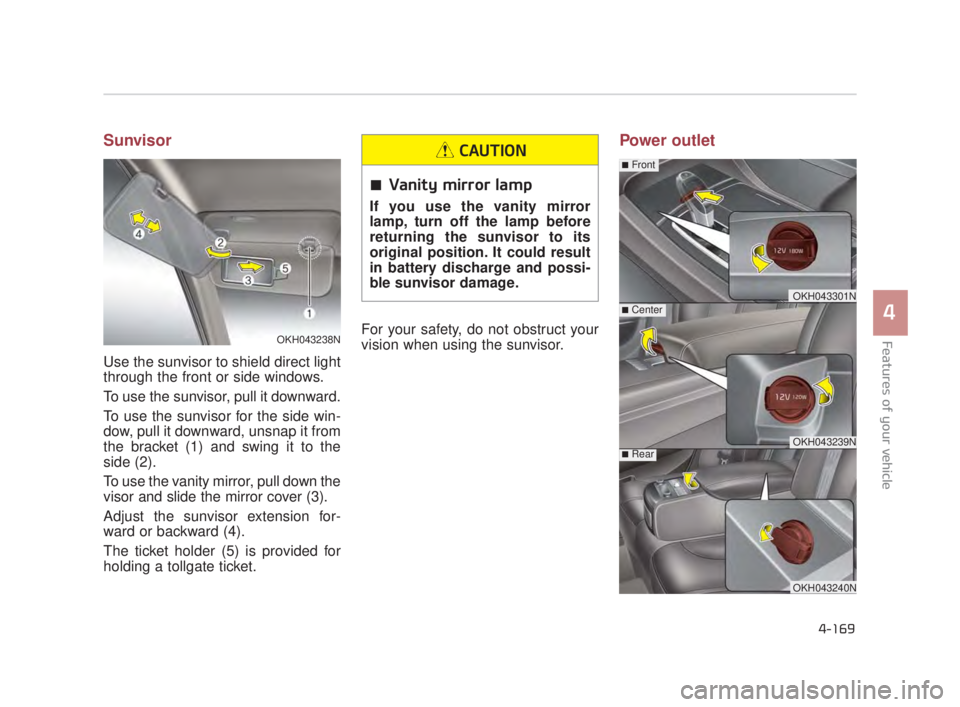
Use the sunvisor to shield direct light
through the front or side windows.
To use the sunvisor, pull it downward.
To use the sunvisor for the side win-
dow, pull it downward, unsnap it from
the bracket (1) and swing it to the
side (2).
To use the vanity mirror, pull down the
visor and slide the mirror cover (3).
Adjust the sunvisor extension for-
ward or backward (4).
The ticket holder (5) is provided for
holding a tollgate ticket.For your safety, do not obstruct your
vision when using the sunvisor.
Power outlet
OKH043301N
OKH043239N
■Center
■Rear
■Front
OKH043240N
OKH043238N
Vanity mirror lamp
If you use the vanity mirror
lamp, turn off the lamp before
returning the sunvisor to its
original position. It could result
in battery discharge and possi-
ble sunvisor damage.
CAUTION
KH USA 4:2015 3/24/2015 4:44 PM Page 169
Page 256 of 542
Features of your vehicle
4-176
The following must be observed
when installing ANY floor mat in the
vehicle.
Ensure that the floor mats aresecurely attached to the vehicle's
floor mat anchor(s) before driving
the vehicle.
Do not use ANY floor mat that can- not be firmly attached to the vehi-
cle's floor mat anchors.
Do not stack floor mats on top of one another (e.g. ,all-weather rub-
ber mat on top of a carpeted floor
mat). Only a single floor mat should
be installed in each position.
IMPORTANT - Your vehicle was
manufactured with driver's side floor
mat anchors that are designed to
securely hold the floor mat in place.
To avoid any interference with pedal
operation, Kia recommends that only
the Kia floor mat designed for use in
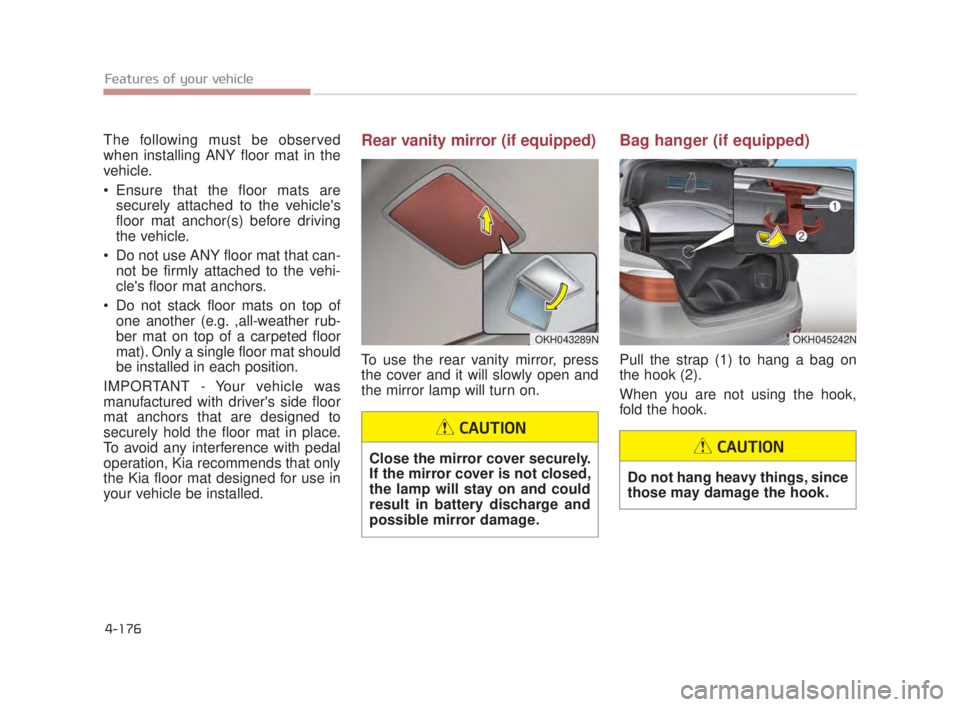
your vehicle be installed.Rear vanity mirror (if equipped)
To use the rear vanity mirror, press
the cover and it will slowly open and
the mirror lamp will turn on.
Bag hanger (if equipped)
Pull the strap (1) to hang a bag on
the hook (2).
When you are not using the hook,
fold the hook.
OKH043289NOKH045242N
Close the mirror cover securely.
If the mirror cover is not closed,
the lamp will stay on and could
result in battery discharge and
possible mirror damage.
CAUTION
Do not hang heavy things, since
those may damage the hook.
CAUTION
KH USA 4:2015 3/24/2015 4:44 PM Page 176
Page 267 of 542
5-4
Driving your vehicle
Before entering vehicle
Be sure that all windows, outsidemirror(s), and outside lights are
clean.
Check the condition of the tires.
Check under the vehicle for any sign of leaks.
Be sure there are no obstacles behind you if you intend to back up.
Necessary inspections
Fluid levels, such as engine oil,
engine coolant, brake fluid, and
washer fluid should be checked on a
regular basis, with the exact interval
depending on the fluid. Further
details are provided in Section 7,
“Maintenance”.
Before starting
Close and lock all doors.
Position the seat so that all con-trols are easily reached.
Buckle your seat belt.
Adjust the inside and outside rearview mirrors.
Be sure that all lights work.
Check all gauges.
Check the operation of warning lights when the Engine Start/Stop
button is turned to the ON position.
Release the parking brake and make sure the brake warning light
goes off.
For safe operation, be sure you are
familiar with your vehicle and its
equipment.
BEFORE DRIVING
Distracted driving
Focus on the road while driving.
The driver's primary responsi-
bility is in the safe and legal
operation of the vehicle. Use of
any hand held devices, other
equipment or vehicle systems
that distract the driver should
not be used during vehicle
operation.
WARNING
Check surrounding
Always check the surrounding
areas near your vehicle for peo-
ple, especially children, before
putting a vehicle into D (Drive)
or R (Reverse).
WARNING
KH USA 5:2015 3/25/2015 9:13 AM Page 4
Page 348 of 542
Driving your vehicle
5
5-85
The LDWS may not warn you
even if the vehicle leaves the
lane, or may warn you even if
the vehicle does not leave the
lane when;
The lane can't be visible due tosnow, rain, stain, a puddle or other
environmental conditions.
The brightness of the outside changes suddenly such as tunnel
enter/exit.
The headlights are off at night or in a tunnel.
The color of the lane marking from the road is difficult to distinguish.
Driving on a steep grade or a curve.
Light such as street light, sunlight or oncoming vehicle light reflects
from water on the road.
The lens or windshield is stained with foreign matter.
The sensor cannot detect the lane because of fog, heavy rain or
heavy snow. The surrounding of the inside rear
view mirror temperature is high
due to a direct ray of light.
The lane is very wide or narrow.
The lane line is damaged or indis- tinct.
The windshield is fogged by humid air in the vehicle.
The shadow is on the lane line by a median strip.
The sensor cannot distinguish the lane from the road due to the dust.
There is a mark similar to a lane line.
There is a boundary structure.
The distance from vehicle ahead is very short or the vehicle ahead
drives hiding the lane line.
The vehicle vibrates heavily due to road conditions.
The lane number increases or decreases or the lane lines are
crossing.
Putting something on the dash- board.
Driving with the sun in front of you. Driving in areas under construc-
tion.
The lane line is more than two in either side (Left/Right)
KH USA 5:2015 3/25/2015 9:17 AM Page 85
Page 350 of 542
Driving your vehicle
5
5-87
BSD (Blind Spot Detection) /
LCA (Lane Change Assist)
Operating conditions
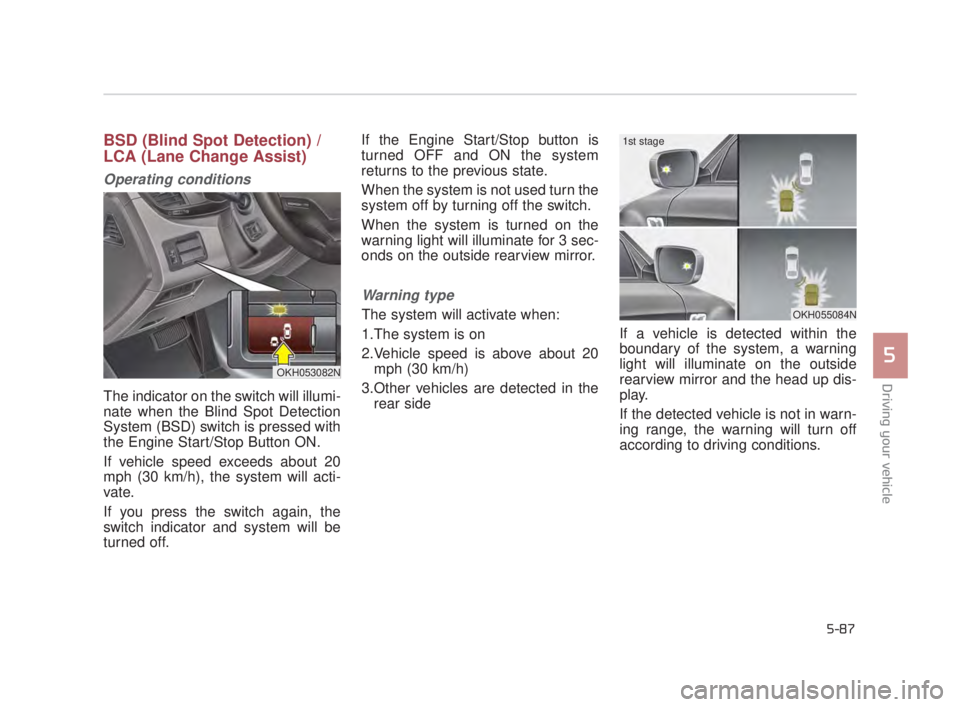
The indicator on the switch will illumi-
nate when the Blind Spot Detection
System (BSD) switch is pressed with
the Engine Start/Stop Button ON.
If vehicle speed exceeds about 20
mph (30 km/h), the system will acti-
vate.
If you press the switch again, the
switch indicator and system will be
turned off.If the Engine Start/Stop button is
turned OFF and ON the system
returns to the previous state.
When the system is not used turn the
system off by turning off the switch.
When the system is turned on the
warning light will illuminate for 3 sec-
onds on the outside rearview mirror.
Warning type
The system will activate when:
1.The system is on
2.Vehicle speed is above about 20
mph (30 km/h)
3.Other vehicles are detected in the rear side If a vehicle is detected within the
boundary of the system, a warning
light will illuminate on the outside
rearview mirror and the head up dis-
play.
If the detected vehicle is not in warn-
ing range, the warning will turn off
according to driving conditions.
OKH053082N
OKH055084N
1st stage
KH USA 5:2015 3/25/2015 9:17 AM Page 87
Page 351 of 542
5-88
Driving your vehicle
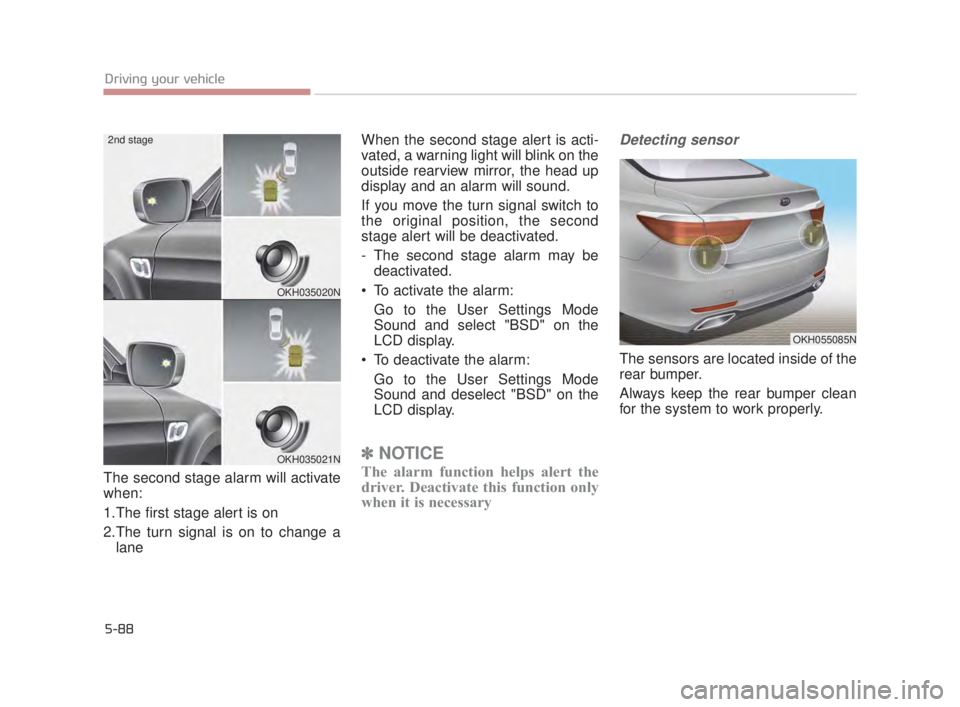
The second stage alarm will activate
when:
1.The first stage alert is on
2.The turn signal is on to change alane When the second stage alert is acti-
vated, a warning light will blink on the
outside rearview mirror, the head up
display and an alarm will sound.
If you move the turn signal switch to
the original position, the second
stage alert will be deactivated.
- The second stage alarm may be
deactivated.
To activate the alarm: Go to the User Settings Mode
Sound and select "BSD" on the
LCD display.
To deactivate the alarm: Go to the User Settings Mode
Sound and deselect "BSD" on the
LCD display.
✽ NOTICE
The alarm function helps alert the
driver. Deactivate this function only
when it is necessary
Detecting sensor
The sensors are located inside of the
rear bumper.
Always keep the rear bumper clean
for the system to work properly.
OKH035020N
OKH035021N
2nd stage
OKH055085N
KH USA 5:2015 3/25/2015 9:17 AM Page 88
Page 354 of 542
Driving your vehicle
5
5-91
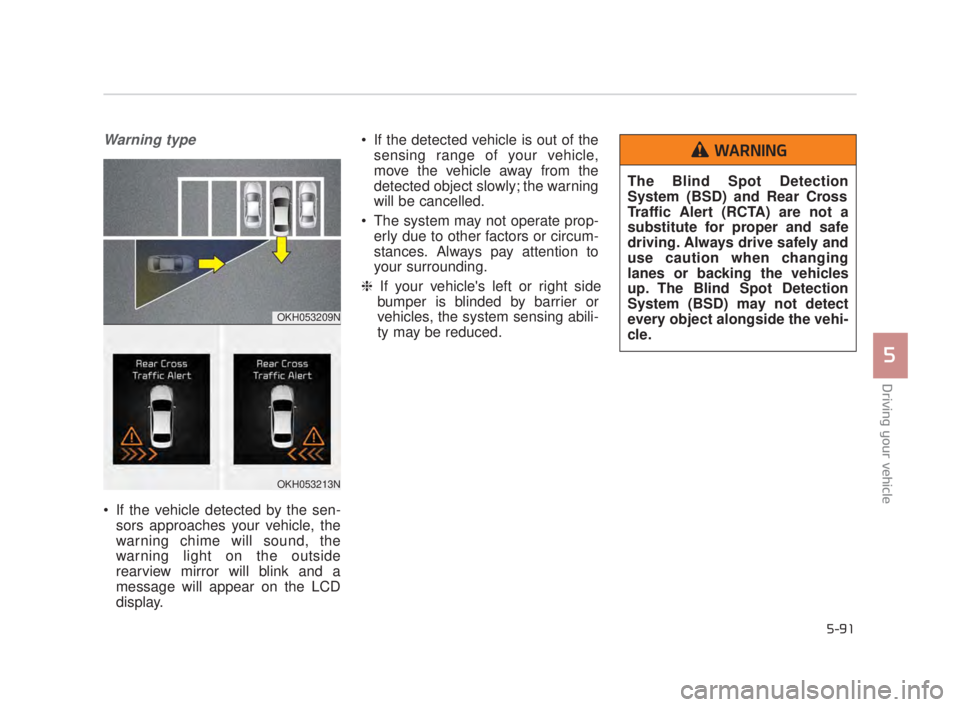
Warning type
If the vehicle detected by the sen-sors approaches your vehicle, the
warning chime will sound, the
warning light on the outside
rearview mirror will blink and a
message will appear on the LCD
display. If the detected vehicle is out of the
sensing range of your vehicle,
move the vehicle away from the
detected object slowly; the warning
will be cancelled.
The system may not operate prop- erly due to other factors or circum-
stances. Always pay attention to
your surrounding.
❈ If your vehicle's left or right side
bumper is blinded by barrier or
vehicles, the system sensing abili-
ty may be reduced.
OKH053209N
OKH053213N
The Blind Spot Detection
System (BSD) and Rear Cross
Traffic Alert (RCTA) are not a
substitute for proper and safe
driving. Always drive safely and
use caution when changing
lanes or backing the vehicles
up. The Blind Spot Detection
System (BSD) may not detect
every object alongside the vehi-
cle.
WARNING
KH USA 5:2015 3/25/2015 9:17 AM Page 91