mirror KIA K900 2016 User Guide
[x] Cancel search | Manufacturer: KIA, Model Year: 2016, Model line: K900, Model: KIA K900 2016Pages: 542, PDF Size: 38.35 MB
Page 136 of 542
Features of your vehicle
4-56
The transceiver has been tested and
complies with FCC and Industry
Canada rules. Changes or modifica-
tions not expressly approved by the
party responsible for compliance
could void the user's authority to
operate the device.
NVS
®and Z-NAV™ are registered
trademarks. Nav®are of Gentex
Corporation, Zeeland, Michigan.
HomeLink
®is a registered trade-
mark owned by Johnson Controls
Technology Company, Holland,
Michigan.
Electric chromic mirror (ECM) with
HomeLink® system, compass andUVO (for U.S.A, if equipped)
Your vehicle may be equipped with a
Gentex Automatic-Dimming Mirror
with a Z-Nav™ Electronic Compass
Display and an Integrated HomeLink
®
Wireless Control System. During
nighttime driving, this feature will
automatically detect and reduce
rearview mirror glare while the com-
pass indicates the direction the vehi-
cle is pointed. The HomeLink
®
Universal Transceiver allows you to
activate your garage door(s), electric
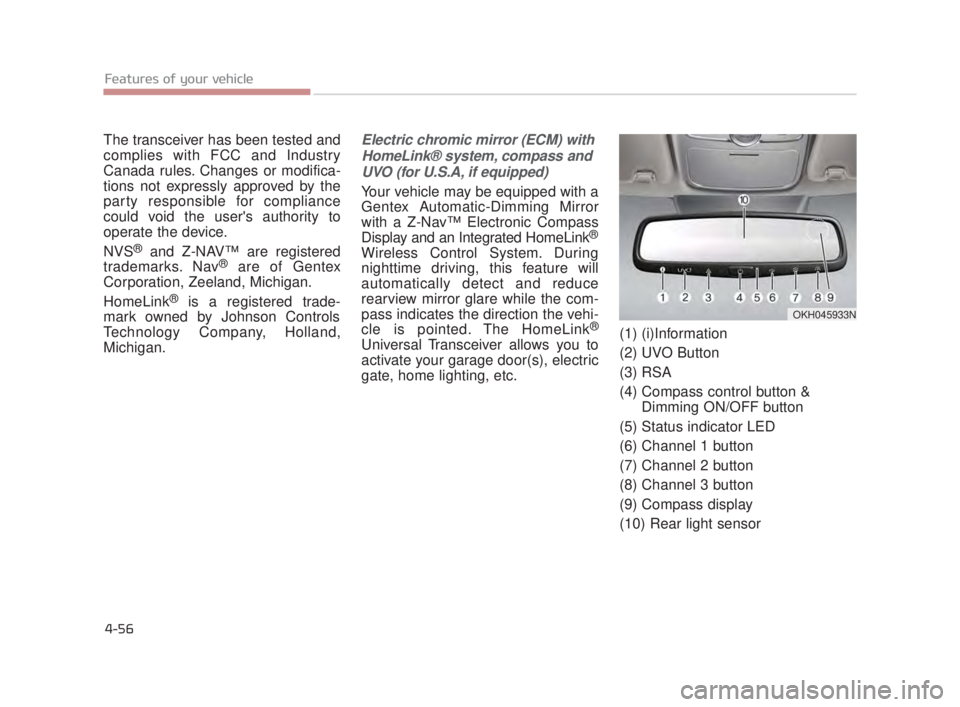
gate, home lighting, etc. (1) (i)Information
(2) UVO Button
(3) RSA
(4) Compass control button &
Dimming ON/OFF button
(5) Status indicator LED
(6) Channel 1 button
(7) Channel 2 button
(8) Channel 3 button
(9) Compass display
(10) Rear light sensor
OKH045933N
KH USA 4:2015 3/24/2015 4:37 PM Page 56
Page 137 of 542
Automatic-Dimming Night Vision
Safety™ (NVS®) Mirror (if equipped)
The NVS
®Mirror automaticallyre-
duces glare by monitoring light levels
in the front and the rear of the vehi-
cle. Any object that obstructs either
light sensor will degrade the auto-
matic dimming control feature.
For more information regarding
NVS
®mirrors and other applica-
tions, please refer to the Gentex
website:
www.gentex.com Your mirror will automatically dim
upon detecting glare from the vehi-
cles traveling behind you. The
autodimming function can be con-
trolled by pressing the Dimming
ON/OFF button:
1.Pressing and holding the button
for 3 seconds turns the auto-dim-
ming function OFF which is indicat-
ed by the green Status Indicator
LED turning off.
2.Pressing and holding the button for 3 seconds again turns the auto-
dimming function ON which is indi-
cated by the green Status Indicator
LED turning on.
The mirror defaults to the ON posi-
tion each time the vehicle is started. Z-Nav™ Compass Display
The NVS™ Mirror in your vehicle is
also equipped with a Z-Nav™
Compass that shows the vehicle
Compass heading in the Display
Window using the 8 basic cardinal
headings (N, NE, E, SE, etc.).
Features of your vehicle
4
4-57
KH USA 4:2015 3/24/2015 4:37 PM Page 57
Page 143 of 542
Erasing HomeLink®buttons
Individual buttons cannot be erased.
However, to erase all three pro-
grammed buttons:
1. Press and hold the two outerHomeLink
®buttons until the indi-
cator light begins to flash after 10
seconds.
2. Release both buttons. Do not hold for longer than 20 seconds.
The Integrated HomeLink
®Wireless
Control System is now in the training
(learn) mode and can be programmed
at any time following the appropriate
steps in the Programming chapters
above.
NVS
®is a registered trademark and
Z-Nav™ is a trademark of the Gentex
Corporation, Zeeland, Michigan.
HomeLink
®is a registered trade-
mark owned by Johnson Controls,
Incorporated, Milwaukee, Wisconsin.
FCC ID: NZLTLMHL4
IC: 4112A-TLMHL4
INFORMATION
This device complies with Part 15 of
the FCC Rules.
Operation is subject to the following
three conditions:
1. This device may not cause harm- ful interference, and
2. This device must accept any inter- ference received, including inter-
ference that may cause undesired
operation.
3. The transceiver has been tested and complies with FCC and
Industry Canada rules. Changes
or modifications not expressly
approved by the party responsible
for compliance could void the
user’s authority to operate the
device.
Outside rearview mirror
Be sure to adjust mirror angles before
driving.
Your vehicle is equipped with both
left-hand and right-hand outside
rearview mirrors. The mirrors can be
adjusted remotely with the remote
switch. The mirror heads can be fold-
ed to prevent damage during an auto-
matic car wash or when passing
through a narrow street.
The right outside rearview mirror is
convex. Objects seen in the mirror
are closer than they appear.
Use your interior rearview mirror or
direct observation to determine the
actual distance of following vehicles
when changing lanes.
i
Features of your vehicle
4
4-63
KH USA 4:2015 3/24/2015 4:38 PM Page 63
Page 144 of 542
Features of your vehicle
4-64
Adjusting outside rearview mirror
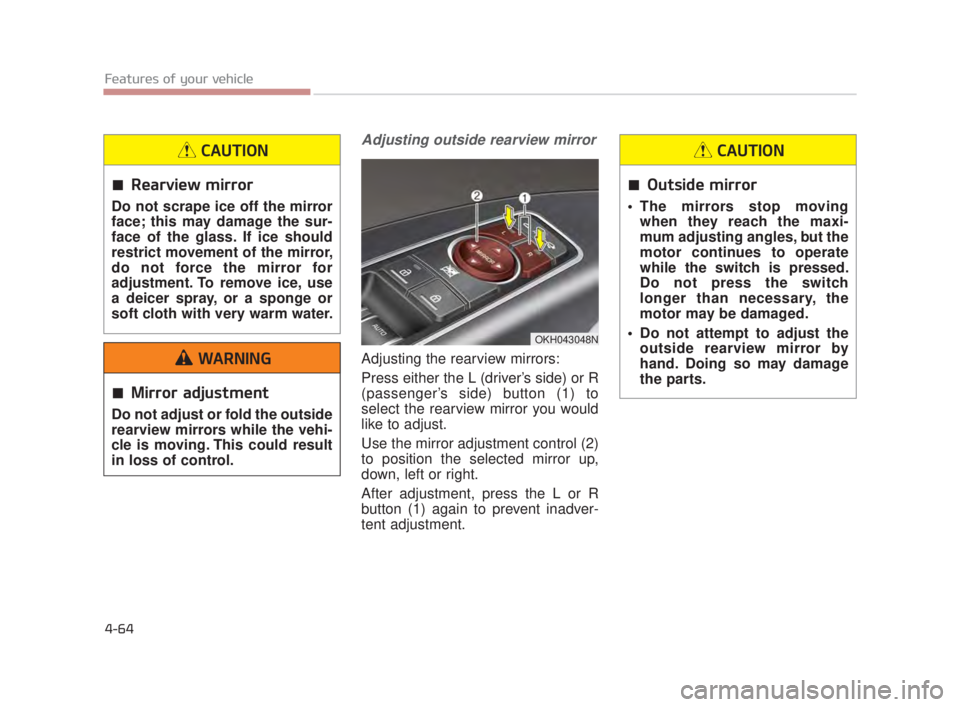
Adjusting the rearview mirrors:
Press either the L (driver’s side) or R
(passenger’s side) button (1) to
select the rearview mirror you would
like to adjust.
Use the mirror adjustment control (2)
to position the selected mirror up,
down, left or right.
After adjustment, press the L or R
button (1) again to prevent inadver-
tent adjustment.
OKH043048N
Rearview mirror
Do not scrape ice off the mirror
face; this may damage the sur-
face of the glass. If ice should
restrict movement of the mirror,
do not force the mirror for
adjustment. To remove ice, use
a deicer spray, or a sponge or
soft cloth with very warm water.
CAUTION
Outside mirror
The mirrors stop movingwhen they reach the maxi-
mum adjusting angles, but the
motor continues to operate
while the switch is pressed.
Do not press the switch
longer than necessary, the
motor may be damaged.
Do not attempt to adjust the outside rearview mirror by
hand. Doing so may damage
the parts.
CAUTION
Mirror adjustment
Do not adjust or fold the outside
rearview mirrors while the vehi-
cle is moving. This could result
in loss of control.
WARNING
KH USA 4:2015 3/24/2015 4:38 PM Page 64
Page 145 of 542
Features of your vehicle
4
4-65
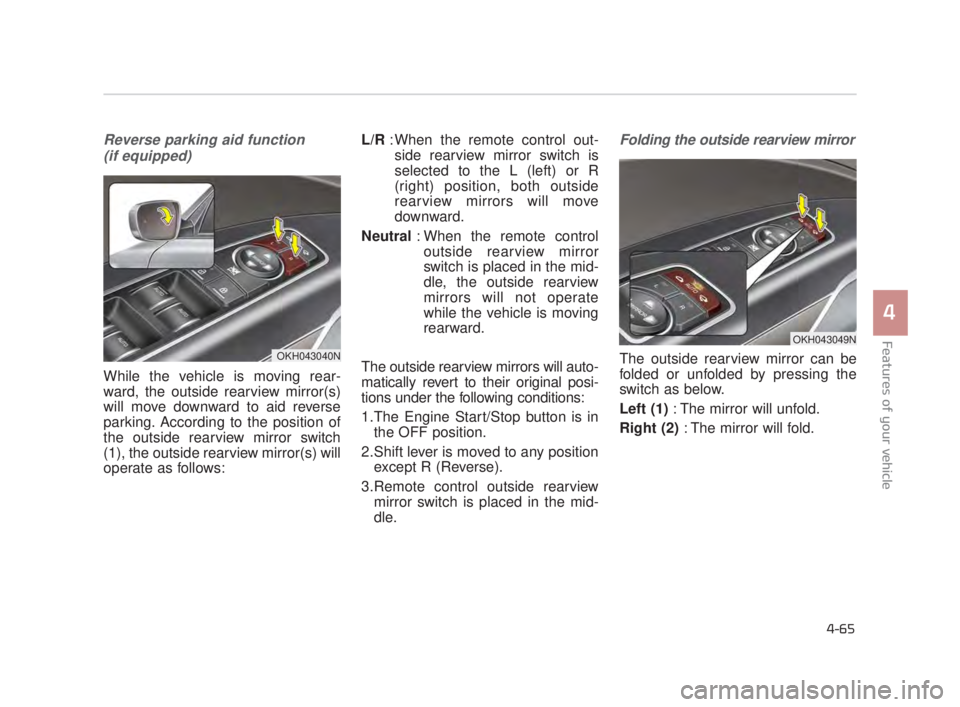
Reverse parking aid function (if equipped)
While the vehicle is moving rear-
ward, the outside rearview mirror(s)
will move downward to aid reverse
parking. According to the position of
the outside rearview mirror switch
(1), the outside rearview mirror(s) will
operate as follows: L/R
: When the remote control out-
side rearview mirror switch is
selected to the L (left) or R
(right) position, both outside
rearview mirrors will move
downward.
Neutral : When the remote control
outside rearview mirror
switch is placed in the mid-
dle, the outside rearview
mirrors will not operate
while the vehicle is moving
rearward.
The outside rearview mirrors will auto-
matically revert to their original posi-
tions under the following conditions:
1.The Engine Start/Stop button is in the OFF position.
2.Shift lever is moved to any position except R (Reverse).
3.Remote control outside rearview mirror switch is placed in the mid-
dle.
Folding the outside rearview mirror
The outside rearview mirror can be
folded or unfolded by pressing the
switch as below.
Left (1) : The mirror will unfold.
Right (2) : The mirror will fold.OKH043040N
OKH043049N
KH USA 4:2015 3/24/2015 4:38 PM Page 65
Page 146 of 542
Features of your vehicle
4-66
Center (AUTO, 3):
The mirror will fold or unfold auto-
matically as follows:
The mirror will fold or unfold when the door is locked or unlocked by
the smart key.
The mirror will fold or unfold when the door is locked or unlocked by the
button on the outside door handle.
The mirror will unfold when you approach the vehicle (all doors
closed and locked) with a smart
key in possession.Electric chromic mirror (ECM)
The electric chromic mirror automati-
cally controls the glare from the head-
lights of the car behind you in night-
time or low light driving conditions. The
sensor mounted in the mirror senses
the light level around the vehicle, and
automatically controls the headlight
glare from vehicles behind you.
When the engine is running, the glare
is automatically controlled by the sen-
sor mounted in the rearview mirror.
Whenever the shift lever is shifted
into R (Reverse), the mirror will auto-
matically go to the brightest setting in
order to improve the drivers view
behind the vehicle. If the ECM of
inside rear view mirror operates, it
will be working.
Electric type outside
rearview mirror
The electric type outside rearview
mirror operates even though the
engine start/stopo button is in the
OFF position. However, to prevent
unnecessary battery discharge,
do not adjust the mirrors longer
than necessary while the engine
is not running.
In case it is an electric type out-
side rearview mirror, don’t fold it
by hand. It could cause motor
failure.
CAUTION
When cleaning the mirror, use a
paper towel or similar material
dampened with glass cleaner.
Do not spray glass cleaner
directly on the mirror as that
may cause the liquid cleaner to
enter the mirror housing.
CAUTION
KH USA 4:2015 3/24/2015 4:38 PM Page 66
Page 203 of 542
Features of your vehicle
4
4-123
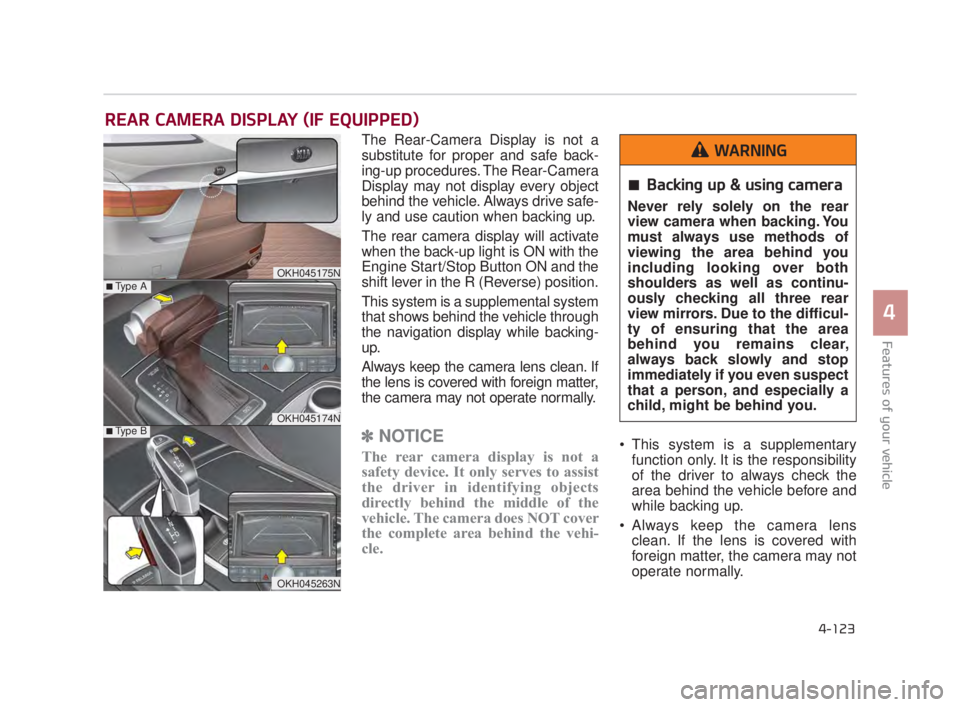
The Rear-Camera Display is not a
substitute for proper and safe back-
ing-up procedures. The Rear-Camera
Display may not display every object
behind the vehicle. Always drive safe-
ly and use caution when backing up.
The rear camera display will activate
when the back-up light is ON with the
Engine Start/Stop Button ON and the
shift lever in the R (Reverse) position.
This system is a supplemental system
that shows behind the vehicle through
the navigation display while backing-
up.
Always keep the camera lens clean. If
the lens is covered with foreign matter,
the camera may not operate normally.
✽NOTICE
The rear camera display is not a
safety device. It only serves to assist
the driver in identifying objects
directly behind the middle of the
vehicle. The camera does NOT cover
the complete area behind the vehi-
cle. This system is a supplementary
function only. It is the responsibility
of the driver to always check the
area behind the vehicle before and
while backing up.
Always keep the camera lens clean. If the lens is covered with
foreign matter, the camera may not
operate normally.
REAR CAMERA DISPLAY (IF EQUIPPED)
OKH045175N
OKH045174N
■Type A
■Type B
OKH045263N
Backing up & using camera
Never rely solely on the rear
view camera when backing. You
must always use methods of
viewing the area behind you
including looking over both
shoulders as well as continu-
ously checking all three rear
view mirrors. Due to the difficul-
ty of ensuring that the area
behind you remains clear,
always back slowly and stop
immediately if you even suspect
that a person, and especially a
child, might be behind you.
WARNING
KH USA 4:2015 3/24/2015 4:41 PM Page 123
Page 207 of 542
Features of your vehicle
4
4-127
The Surround View Monitoring
System (SVM) is not a substitute for
proper and safe parking procedures.
The Surround View Monitoring
System (SVM) may not detect every
object surrounding the vehicle.
Always drive safely and use caution
when parking.
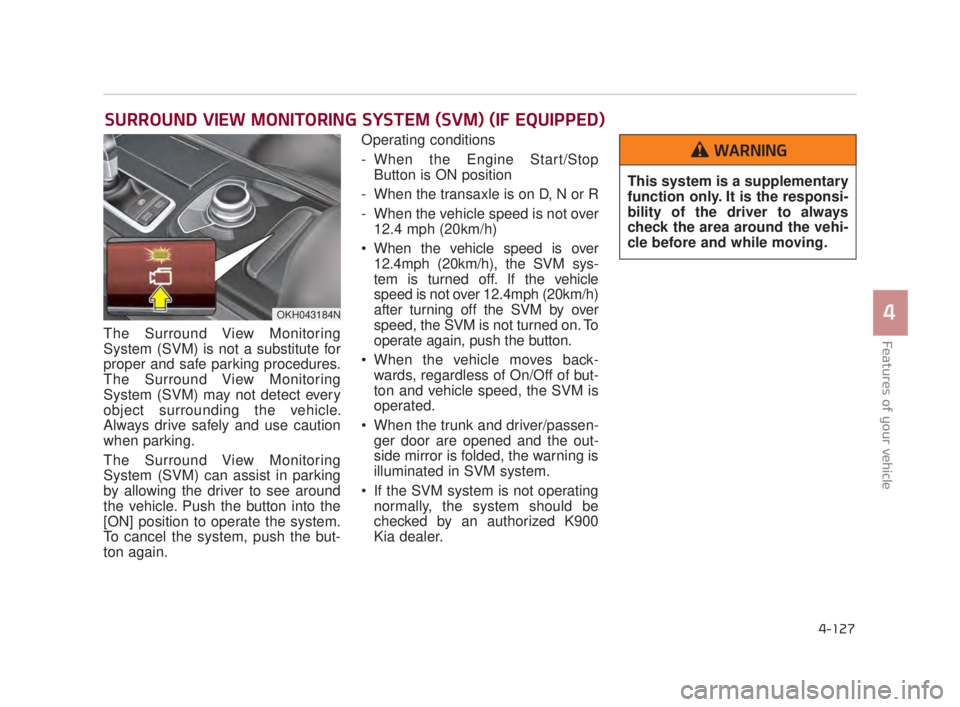
The Surround View Monitoring
System (SVM) can assist in parking
by allowing the driver to see around
the vehicle. Push the button into the
[ON] position to operate the system.
To cancel the system, push the but-
ton again.Operating conditions
- When the Engine Start/Stop
Button is ON position
- When the transaxle is on D, N or R
- When the vehicle speed is not over 12.4 mph (20km/h)
When the vehicle speed is over 12.4mph (20km/h), the SVM sys-
tem is turned off. If the vehicle
speed is not over 12.4mph (20km/h)
after turning off the SVM by over
speed, the SVM is not turned on. To
operate again, push the button.
When the vehicle moves back- wards, regardless of On/Off of but-
ton and vehicle speed, the SVM is
operated.
When the trunk and driver/passen- ger door are opened and the out-
side mirror is folded, the warning is
illuminated in SVM system.
If the SVM system is not operating normally, the system should be
checked by an authorized K900
Kia dealer.
SURROUND VIEW MONITORING SYSTEM (SVM) (IF EQUIPPED)
OKH043184N
This system is a supplementary
function only. It is the responsi-
bility of the driver to always
check the area around the vehi-
cle before and while moving.
WARNING
KH USA 4:2015 3/24/2015 4:41 PM Page 127
Page 208 of 542
Features of your vehicle
4-128
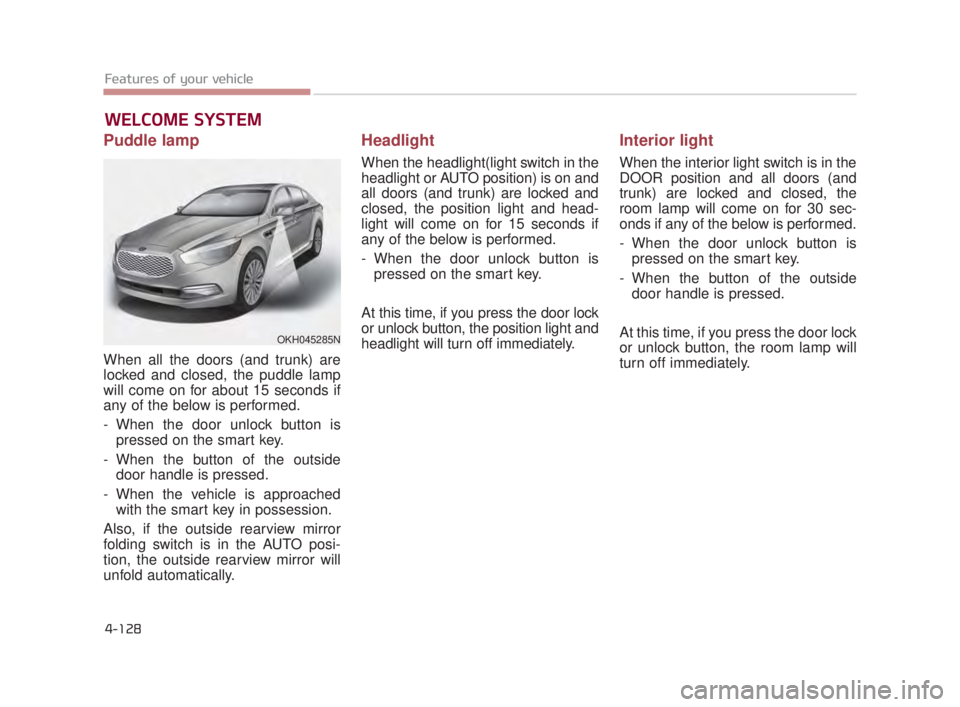
Puddle lamp
When all the doors (and trunk) are
locked and closed, the puddle lamp
will come on for about 15 seconds if
any of the below is performed.
- When the door unlock button ispressed on the smart key.
- When the button of the outside door handle is pressed.
- When the vehicle is approached with the smart key in possession.
Also, if the outside rearview mirror
folding switch is in the AUTO posi-
tion, the outside rearview mirror will
unfold automatically.
Headlight
When the headlight(light switch in the
headlight or AUTO position) is on and
all doors (and trunk) are locked and
closed, the position light and head-
light will come on for 15 seconds if
any of the below is performed.
- When the door unlock button is pressed on the smart key.
At this time, if you press the door lock
or unlock button, the position light and
headlight will turn off immediately.
Interior light
When the interior light switch is in the
DOOR position and all doors (and
trunk) are locked and closed, the
room lamp will come on for 30 sec-
onds if any of the below is performed.
- When the door unlock button is pressed on the smart key.
- When the button of the outside door handle is pressed.
At this time, if you press the door lock
or unlock button, the room lamp will
turn off immediately.
WELCOME SYSTEM
OKH045285N
KH USA 4:2015 3/24/2015 4:41 PM Page 128
Page 222 of 542
Features of your vehicle
4-142
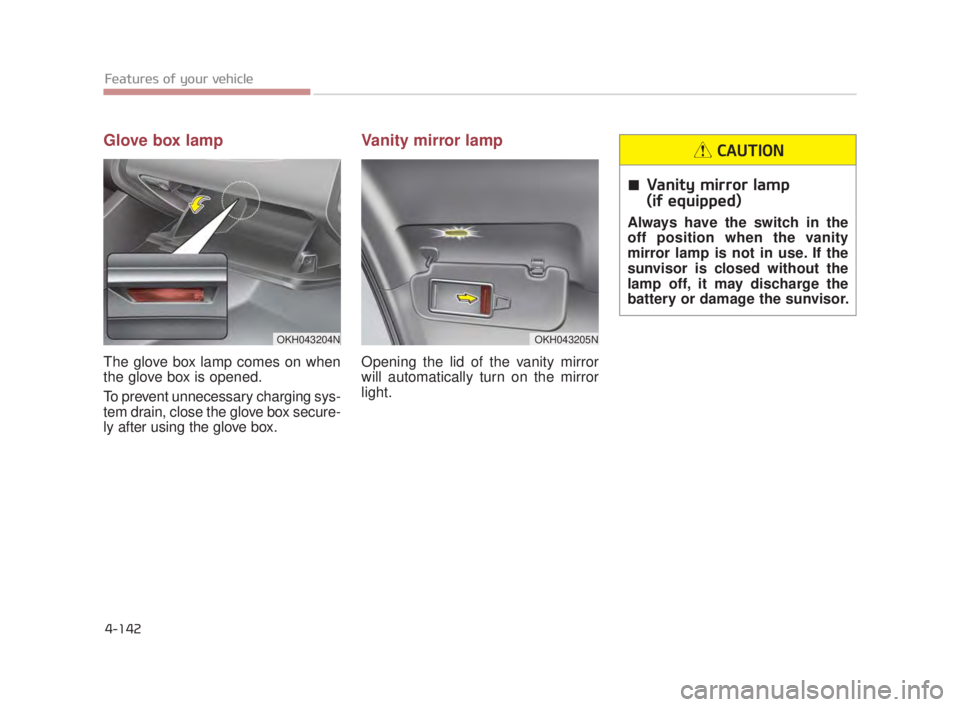
Glove box lamp
The glove box lamp comes on when
the glove box is opened.
To prevent unnecessary charging sys-
tem drain, close the glove box secure-
ly after using the glove box.
Vanity mirror lamp
Opening the lid of the vanity mirror
will automatically turn on the mirror
light.
Vanity mirror lamp
(if equipped)
Always have the switch in the
off position when the vanity
mirror lamp is not in use. If the
sunvisor is closed without the
lamp off, it may discharge the
battery or damage the sunvisor.
CAUTION
OKH043204NOKH043205N
KH USA 4:2015 3/24/2015 4:42 PM Page 142