lock KIA K900 2019 Repair Manual
[x] Cancel search | Manufacturer: KIA, Model Year: 2019, Model line: K900, Model: KIA K900 2019Pages: 580, PDF Size: 15.11 MB
Page 258 of 580
4165
Features of your vehicle
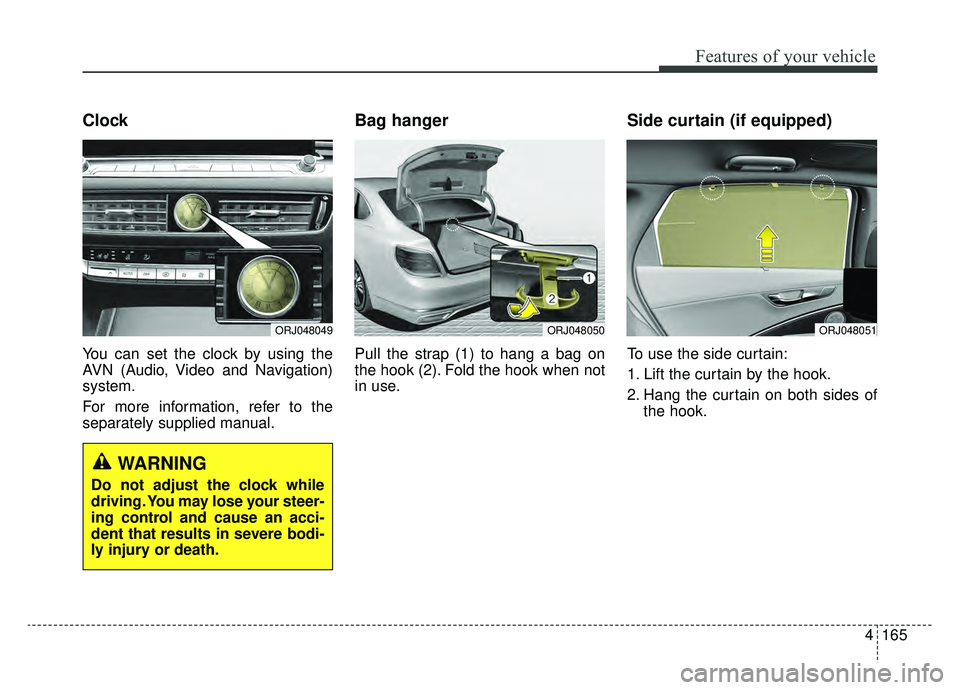
Clock
You can set the clock by using the
AVN (Audio, Video and Navigation)
system.
For more information, refer to the
separately supplied manual.
Bag hanger
Pull the strap (1) to hang a bag on
the hook (2). Fold the hook when not
in use.
Side curtain (if equipped)
To use the side curtain:
1. Lift the curtain by the hook.
2. Hang the curtain on both sides ofthe hook.
ORJ048050ORJ048051ORJ048049
WARNING
Do not adjust the clock while
driving. You may lose your steer-
ing control and cause an acci-
dent that results in severe bodi-
ly injury or death.
Page 263 of 580
Features of your vehicle
170
4
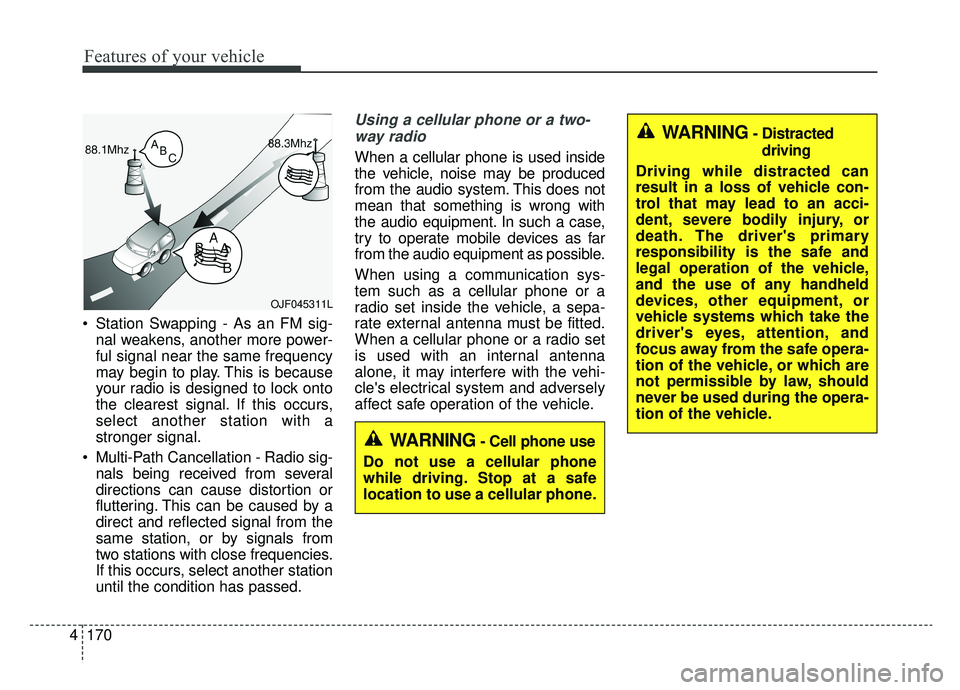
Station Swapping - As an FM sig-
nal weakens, another more power-
ful signal near the same frequency
may begin to play. This is because
your radio is designed to lock onto
the clearest signal. If this occurs,
select another station with a
stronger signal.
Multi-Path Cancellation - Radio sig- nals being received from several
directions can cause distortion or
fluttering. This can be caused by a
direct and reflected signal from the
same station, or by signals from
two stations with close frequencies.
If this occurs, select another station
until the condition has passed.
Using a cellular phone or a two-
way radio
When a cellular phone is used inside
the vehicle, noise may be produced
from the audio system. This does not
mean that something is wrong with
the audio equipment. In such a case,
try to operate mobile devices as far
from the audio equipment as possible.
When using a communication sys-
tem such as a cellular phone or a
radio set inside the vehicle, a sepa-
rate external antenna must be fitted.
When a cellular phone or a radio set
is used with an internal antenna
alone, it may interfere with the vehi-
cle's electrical system and adversely
affect safe operation of the vehicle.
OJF045311L
WARNING- Cell phone use
Do not use a cellular phone
while driving. Stop at a safe
location to use a cellular phone.
WARNING- Distracted driving
Driving while distracted can
result in a loss of vehicle con-
trol that may lead to an acci-
dent, severe bodily injury, or
death. The driver's primary
responsibility is the safe and
legal operation of the vehicle,
and the use of any handheld
devices, other equipment, or
vehicle systems which take the
driver's eyes, attention, and
focus away from the safe opera-
tion of the vehicle, or which are
not permissible by law, should
never be used during the opera-
tion of the vehicle.
Page 270 of 580
55
Driving your vehicle
Before entering vehicle
• Be sure that all windows, outsidemirror(s), and outside lights are
clean.
Check the condition of the tires.
Check under the vehicle for any sign of leaks.
Be sure there are no obstacles behind you if you intend to back up.
Necessary inspections
Fluid levels, such as engine oil,
engine coolant, brake fluid, and
washer fluid should be checked on a
regular basis, at the exact interval
depending on the fluid. Further
details are provided in chapter 7,
“Maintenance”.
Before starting
Close and lock all doors.
Position the seat so that all con-trols are easily reached.
Buckle your seat belt.
Adjust the inside and outside rearview mirrors.
Be sure that all lights work.
Check all gauges.
Check the operation of warning lights when the ignition switch is
turned to the ON position.
Release the parking brake and make sure the brake warning light
goes out.
For safe operation, be sure you are
familiar with your vehicle and its
equipment.
BEFORE DRIVING
WARNING - Distracted driving
Focus on the road while driving.
The driver's primary responsi-
bility is in the safe and legal
operation of the vehicle. Use of
any handled devices, other
equipment or vehicle systems
that distract the driver should
not be used during vehicle
operation.
Page 272 of 580
57
Driving your vehicle
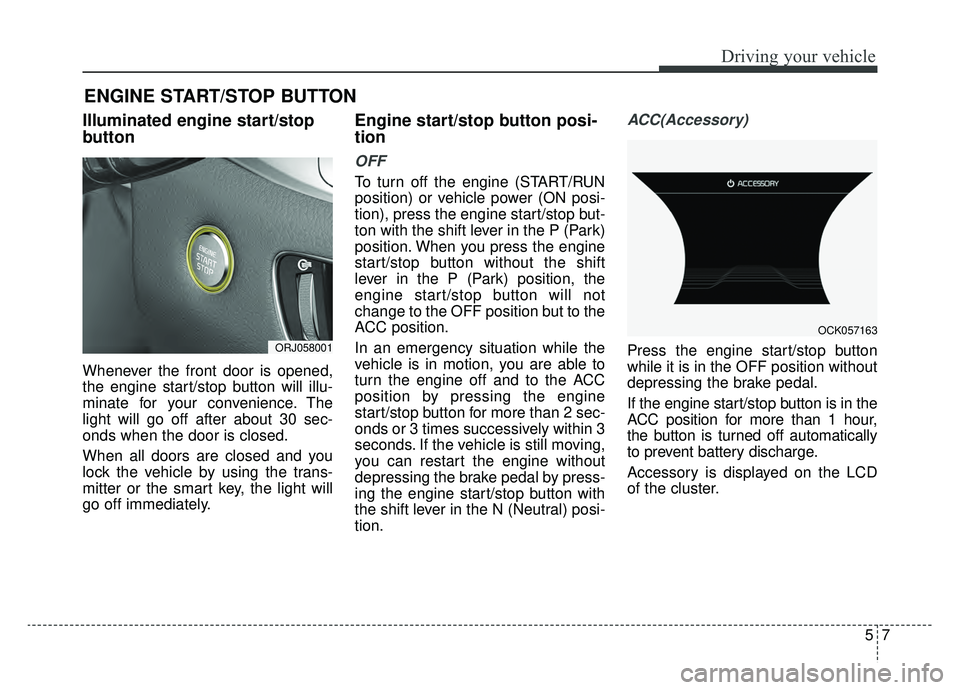
Illuminated engine start/stop
button
Whenever the front door is opened,
the engine start/stop button will illu-
minate for your convenience. The
light will go off after about 30 sec-
onds when the door is closed.
When all doors are closed and you
lock the vehicle by using the trans-
mitter or the smart key, the light will
go off immediately.
Engine start/stop button posi-
tion
OFF
To turn off the engine (START/RUN
position) or vehicle power (ON posi-
tion), press the engine start/stop but-
ton with the shift lever in the P (Park)
position. When you press the engine
start/stop button without the shift
lever in the P (Park) position, the
engine start/stop button will not
change to the OFF position but to the
ACC position.
In an emergency situation while the
vehicle is in motion, you are able to
turn the engine off and to the ACC
position by pressing the engine
start/stop button for more than 2 sec-
onds or 3 times successively within 3
seconds. If the vehicle is still moving,
you can restart the engine without
depressing the brake pedal by press-
ing the engine start/stop button with
the shift lever in the N (Neutral) posi-
tion.
ACC(Accessory)
Press the engine start/stop button
while it is in the OFF position without
depressing the brake pedal.
If the engine start/stop button is in the
ACC position for more than 1 hour,
the button is turned off automatically
to prevent battery discharge.
Accessory is displayed on the LCD
of the cluster.
ENGINE START/STOP BUTTON
ORJ058001
OCK057163
Page 275 of 580
Driving your vehicle
10
5
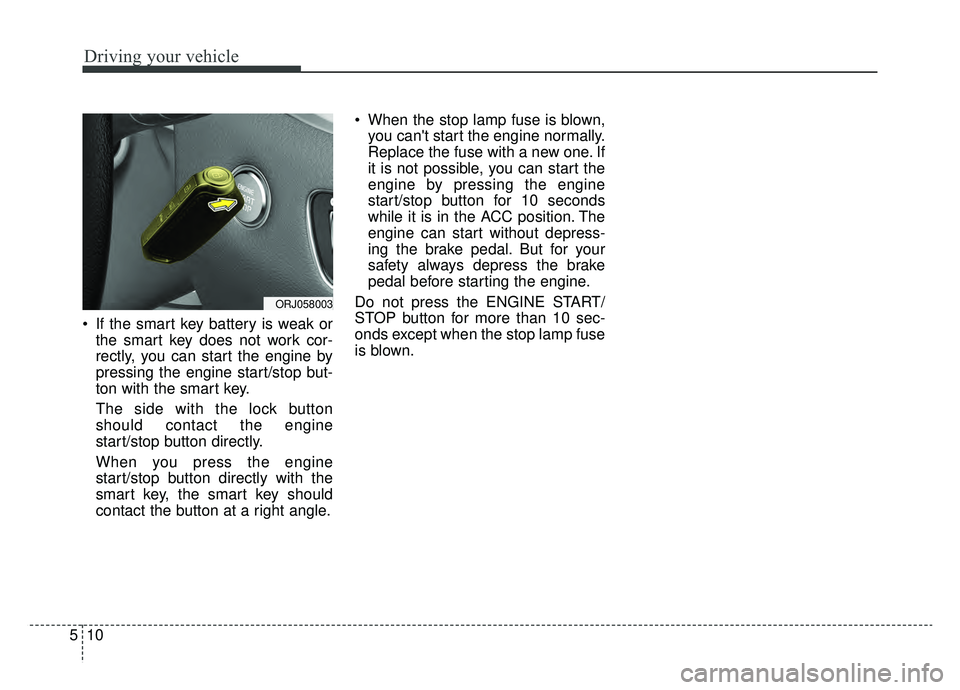
If the smart key battery is weak or
the smart key does not work cor-
rectly, you can start the engine by
pressing the engine start/stop but-
ton with the smart key.
The side with the lock button
should contact the engine
start/stop button directly.
When you press the engine
start/stop button directly with the
smart key, the smart key should
contact the button at a right angle. When the stop lamp fuse is blown,
you can't start the engine normally.
Replace the fuse with a new one. If
it is not possible, you can start the
engine by pressing the engine
start/stop button for 10 seconds
while it is in the ACC position. The
engine can start without depress-
ing the brake pedal. But for your
safety always depress the brake
pedal before starting the engine.
Do not press the ENGINE START/
STOP button for more than 10 sec-
onds except when the stop lamp fuse
is blown.
ORJ058003
Page 276 of 580
511
Driving your vehicle
Automatic transmission opera-
tion
The automatic transmission has 8
forward speeds and one reverse
speed.
The individual speeds are selected
automatically in the D (Drive) posi-
tion.
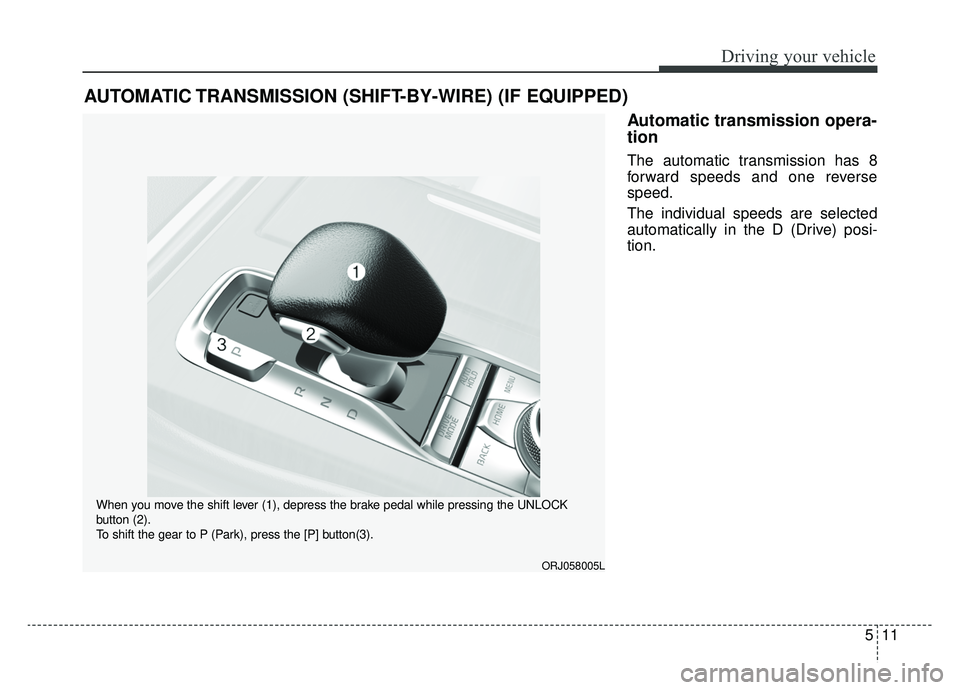
AUTOMATIC TRANSMISSION (SHIFT-BY-WIRE) (IF EQUIPPED)
ORJ058005L
When you move the shift lever (1), depress the brake pedal while pressing the UNLOCK
button (2).
To shift the gear to P (Park), press the [P] button(3).
Page 278 of 580
513
Driving your vehicle
To reduce rollaway risk, do not use
the P (Park) Position in place of the
parking brake.R (Reverse)
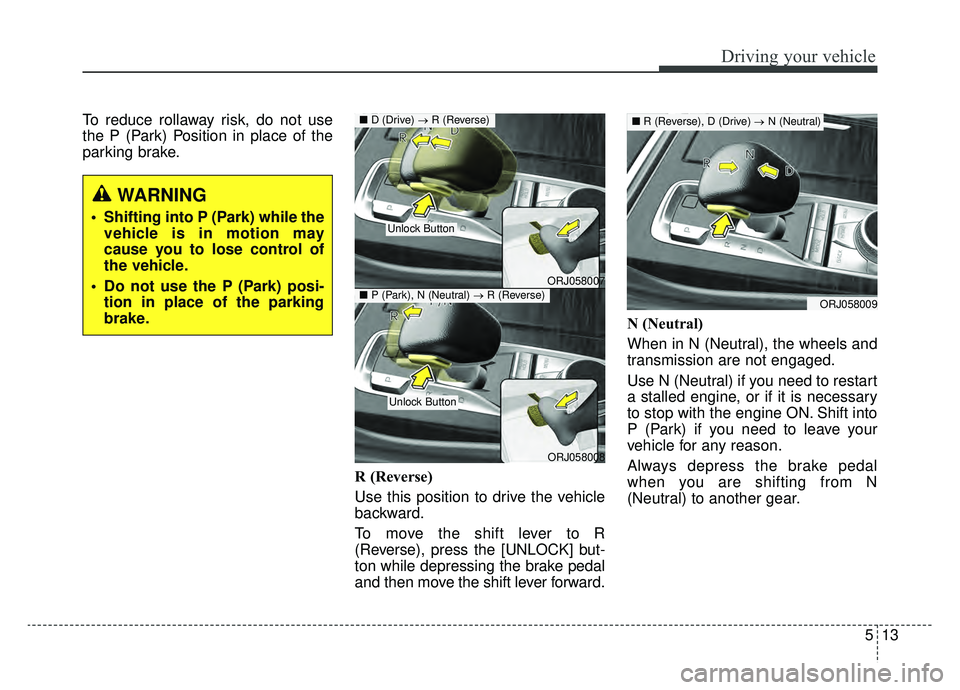
Use this position to drive the vehicle
backward.
To move the shift lever to R
(Reverse), press the [UNLOCK] but-
ton while depressing the brake pedal
and then move the shift lever forward.N (Neutral)
When in N (Neutral), the wheels and
transmission are not engaged.
Use N (Neutral) if you need to restart
a stalled engine, or if it is necessary
to stop with the engine ON. Shift into
P (Park) if you need to leave your
vehicle for any reason.
Always depress the brake pedal
when you are shifting from N
(Neutral) to another gear.
WARNING
Shifting into P (Park) while the
vehicle is in motion may
cause you to lose control of
the vehicle.
Do not use the P (Park) posi- tion in place of the parking
brake.
ORJ058007
ORJ058008
■ D (Drive) → R (Reverse)
Unlock Button
Unlock Button
■P (Park), N (Neutral) →R (Reverse)ORJ058009
■R (Reverse), D (Drive) →N (Neutral)
Page 279 of 580
![KIA K900 2019 Repair Manual Driving your vehicle
14
5
To turn off the engine, re-press the
engine start/stop button to the ON
position, press the [P] button, and
press the engine start/stop button to
the OFF position.
When eith](/img/2/55057/w960_55057-278.png "KIA K900 2019 Repair Manual Driving your vehicle
14
5
To turn off the engine, re-press the
engine start/stop button to the ON
position, press the [P] button, and
press the engine start/stop button to
the OFF position.
When eith")
Driving your vehicle
14
5
To turn off the engine, re-press the
engine start/stop button to the ON
position, press the [P] button, and
press the engine start/stop button to
the OFF position.
When either the driver's door or the
front passenger's door is opened
with the engine start/stop button in
the ACC position and the shift lever
in N (Neutral) position, the engine is
automatically turned OFF and the
transmission automatically changes
to the P (Park) position.
D (Drive)
This is the normal driving position. The
transmission will automatically shift
through a 8-gear sequence, providing
the best fuel economy and power.
WARNING
To avoid inadvertent vehiclemovement, do not shift into
gear unless your foot is firmly
on the brake pedal.
D not permit your vehicle to idle in the N (Neutral) position
for an extended period of
time as this will preclude the
wheels and the transmission
from engaging. While parking
the vehicle with the engine
running, depress the brake
pedal, shift the vehicle to the
P (Park) position and apply
the parking brake.
Do not drive with the shift lever in N (Neutral). The
engine brake will not work
and may lead to an accident.
ORJ058010
ORJ058011
■ R (Reverse) → D (Drive)
■P (Park), N (Neutral) →D (Drive)
Unlock Button
Unlock Button
Page 280 of 580
515
Driving your vehicle
For extra power when passing anoth-
er vehicle or driving uphill, depress
the accelerator pedal further until
you feel the transmission downshift
to a lower gear.
To shift into D (Drive), depress the
brake pedal and press the
[UNLOCK] button on the shift lever.
Move the shift lever backward.
To shift into D (Drive) from N
(Neutral), you must depress the
brake pedal.
✽ ✽NOTICE
Always come to complete stop
before shifting into D (Drive).
- Parking in N (Neutral) gear
Follow the steps below when parking
and you want the vehicle to move
when pushed.
1.After parking your vehicle, step on
the brake pedal and press the [P]
button with the ignition button in
[ON] or while the engine is running.
2.If the parking brake is applied unlock the parking brake.
- For EPB (Electronic ParkingBrake) equipped vehicles, push
the brake pedal with the ignition
button in [ON] or while the engine
is running to disengage the park-
ing brake. If [AUTO HOLD] func-
tion is used while driving (If
[AUTO HOLD] indicator is on in
the cluster), press [AUTO HOLD]
switch and [AUTO HOLD] func-
tion will be turned off.
3.While pressing the brake pedal, turn the ignition button [OFF].
- For smart key equipped vehicles,the ignition switch can be [OFF]
only after pressing the [P] button. 4.Remove the cap-cover and insert a
tool (e.g. flathead screwdriver) into
the access hole while depressing
the brake pedal. Then, the gear will
change to the N (Neutral) position.
The tool should be inserted into the
access hole within 3 minutes after
turning OFF the engine.
✽ ✽ NOTICE
When moving the shift lever to
N(Neutral) position, a normal
mechanical sound will occur.
CAUTION
For EPB (Electronic Parking
Brake) equipped vehicles with[AUTO HOLD] function usedwhile driving, if the ignition but-ton has been turned [OFF], theelectronic parking brake will beengaged automatically.Therefore, [AUTO HOLD] functionshould be turned off before theignition button is turned off.
Page 282 of 580
517
Driving your vehicle
Shift-lock system
For your safety, the automatic trans-
mission has a shift-lock system
which prevents shifting the transmis-
sion from P (Park) into R (Reverse)
or D (Drive) unless the [UNLOCK]
button is pressed while depressing
the brake pedal.
To shift the transmission from P
(Park) into R (Reverse) or D (Drive):
1. Depress and hold the brake pedal.
2. Start the engine or place theengine start/stop button in the ON
position.
3. Move the shift lever to R (Reverse) or D (Drive) while pressing the
[UNLOCK] button.
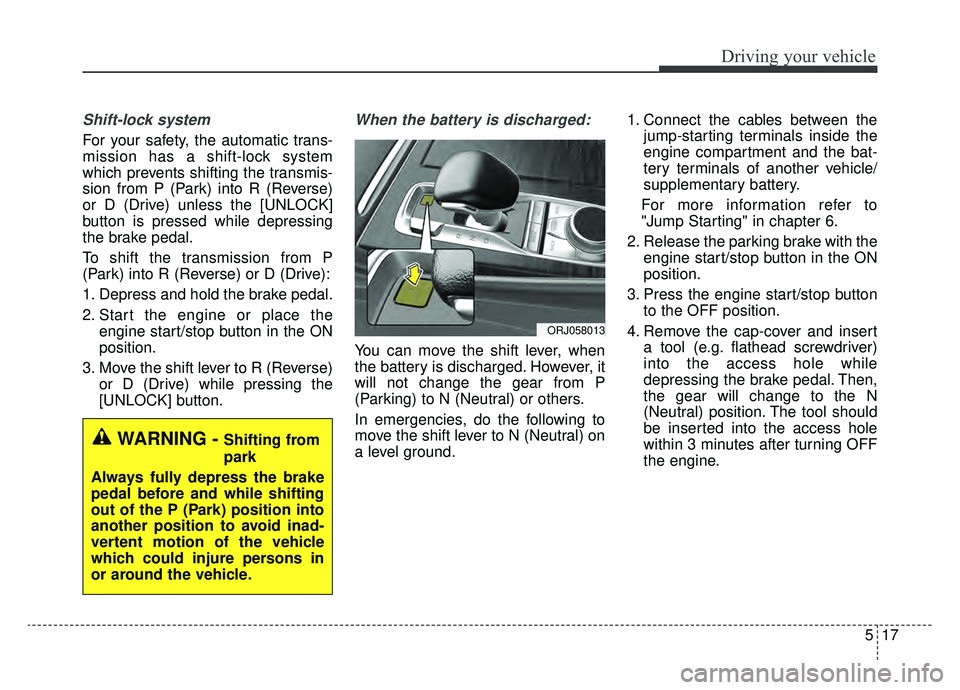
When the battery is discharged:
You can move the shift lever, when
the battery is discharged. However, it
will not change the gear from P
(Parking) to N (Neutral) or others.
In emergencies, do the following to
move the shift lever to N (Neutral) on
a level ground. 1. Connect the cables between the
jump-starting terminals inside the
engine compartment and the bat-
tery terminals of another vehicle/
supplementary battery.
For more information refer to
"Jump Starting" in chapter 6.
2. Release the parking brake with the engine start/stop button in the ON
position.
3. Press the engine start/stop button to the OFF position.
4. Remove the cap-cover and insert a tool (e.g. flathead screwdriver)
into the access hole while
depressing the brake pedal. Then,
the gear will change to the N
(Neutral) position. The tool should
be inserted into the access hole
within 3 minutes after turning OFF
the engine.
ORJ058013
WARNING - Shifting from
park
Always fully depress the brake
pedal before and while shifting
out of the P (Park) position into
another position to avoid inad-
vertent motion of the vehicle
which could injure persons in
or around the vehicle.