ESP KIA K900 2020 Owner's Manual
[x] Cancel search | Manufacturer: KIA, Model Year: 2020, Model line: K900, Model: KIA K900 2020Pages: 593, PDF Size: 14.99 MB
Page 204 of 593
4111
Features of your vehicle
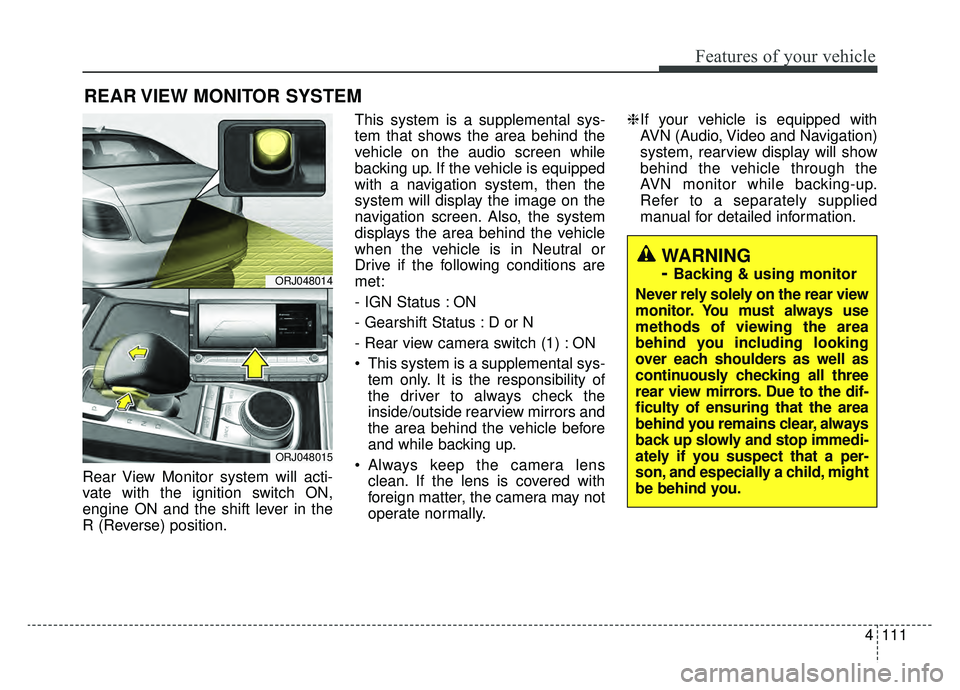
Rear View Monitor system will acti-
vate with the ignition switch ON,
engine ON and the shift lever in the
R (Reverse) position.This system is a supplemental sys-
tem that shows the area behind the
vehicle on the audio screen while
backing up. If the vehicle is equipped
with a navigation system, then the
system will display the image on the
navigation screen. Also, the system
displays the area behind the vehicle
when the vehicle is in Neutral or
Drive if the following conditions are
met:
- IGN Status : ON
- Gearshift Status : D or N
- Rear view camera switch (1) : ON
This system is a supplemental sys-
tem only. It is the responsibility of
the driver to always check the
inside/outside rearview mirrors and
the area behind the vehicle before
and while backing up.
Always keep the camera lens clean. If the lens is covered with
foreign matter, the camera may not
operate normally. ❈
If your vehicle is equipped with
AVN (Audio, Video and Navigation)
system, rearview display will show
behind the vehicle through the
AVN monitor while backing-up.
Refer to a separately supplied
manual for detailed information.
REAR VIEW MONITOR SYSTEM
ORJ048014
ORJ048015
WARNING
-
Backing & using monitor
Never rely solely on the rear view
monitor. You must always use
methods of viewing the area
behind you including looking
over each shoulders as well as
continuously checking all three
rear view mirrors. Due to the dif-
ficulty of ensuring that the area
behind you remains clear, always
back up slowly and stop immedi-
ately if you suspect that a per-
son, and especially a child, might
be behind you.
Page 205 of 593
Features of your vehicle
112
4
Surround View Monitor (SVM) sys-
tem is not a substitute for proper and
safe parking procedures. Surround
View Monitor (SVM) system may not
detect every object surrounding the
vehicle. Always drive safely and use
caution when parking. Surround View Monitor (SVM) sys-
tem can assist in parking by allowing
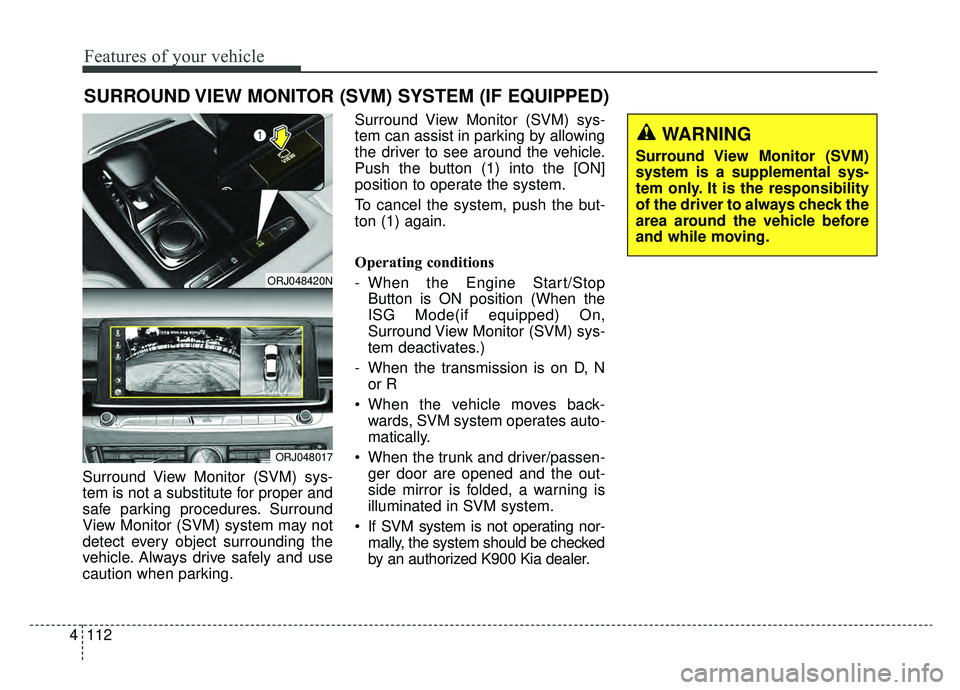
the driver to see around the vehicle.
Push the button (1) into the [ON]
position to operate the system.
To cancel the system, push the but-
ton (1) again.
Operating conditions
- When the Engine Start/Stop
Button is ON position (When the
ISG Mode(if equipped) On,
Surround View Monitor (SVM) sys-
tem deactivates.)
- When the transmission is on D, N or R
When the vehicle moves back- wards, SVM system operates auto-
matically.
When the trunk and driver/passen- ger door are opened and the out-
side mirror is folded, a warning is
illuminated in SVM system.
If SVM system is not operating nor- mally, the system should be checked
by an authorized K900 Kia dealer.
SURROUND VIEW MONITOR (SVM) SYSTEM (IF EQUIPPED)
ORJ048420N
ORJ048017
WARNING
Surround View Monitor (SVM)
system is a supplemental sys-
tem only. It is the responsibility
of the driver to always check the
area around the vehicle before
and while moving.
Page 206 of 593
4113
Features of your vehicle
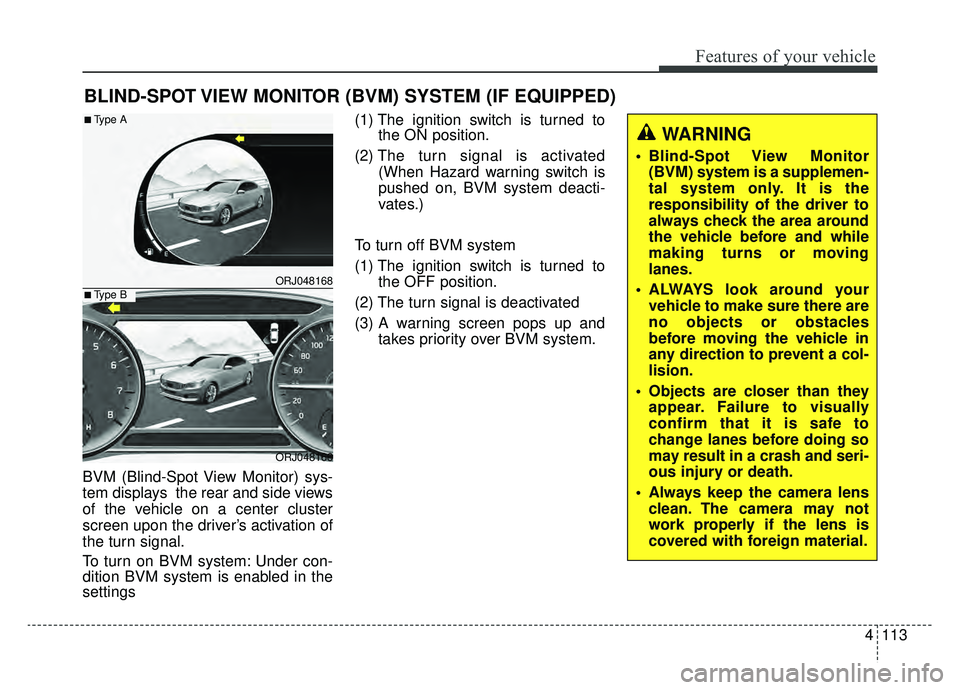
BVM (Blind-Spot View Monitor) sys-
tem displays the rear and side views
of the vehicle on a center cluster
screen upon the driver’s activation of
the turn signal.
To turn on BVM system: Under con-
dition BVM system is enabled in the
settings(1) The ignition switch is turned to
the ON position.
(2) The turn signal is activated
(When Hazard warning switch is
pushed on, BVM system deacti-
vates.)
To turn off BVM system
(1) The ignition switch is turned to the OFF position.
(2) The turn signal is deactivated
(3) A warning screen pops up and takes priority over BVM system.
BLIND-SPOT VIEW MONITOR (BVM) SYSTEM (IF EQUIPPED)
ORJ048168
ORJ048166
■Type A
■Type B
WARNING
Blind-Spot View Monitor(BVM) system is a supplemen-
tal system only. It is the
responsibility of the driver to
always check the area around
the vehicle before and while
making turns or moving
lanes.
ALWAYS look around your vehicle to make sure there are
no objects or obstacles
before moving the vehicle in
any direction to prevent a col-
lision.
Objects are closer than they appear. Failure to visually
confirm that it is safe to
change lanes before doing so
may result in a crash and seri-
ous injury or death.
Always keep the camera lens clean. The camera may not
work properly if the lens is
covered with foreign material.
Page 207 of 593
Features of your vehicle
114
4
Battery saver function
The purpose of this feature is to
prevent the battery from being dis-
charged if the lights are left in the
ON position. The system automati-
cally shuts off the parking lights 30
seconds after the ignition key is
removed and the driver’s door is
opened and closed.
With this feature, the parking lights will turn off automatically if the driver
parks on the side of the road at night
and opens the driver’s side door.
If necessary, to keep the parking
lights on when the ignition key is
removed, perform the following:
1) Open the driver-side door.
2) Turn the parking lights OFF and ON again using the light switch
on the steering column.
Daytime running light
The Daytime Running Lights (DRL)
can make it easier for others to see the
front of your vehicle during the day.
DRL can be helpful in many different
driving conditions, and it is especially
helpful after dawn and before sunset.
The DRL system will turn the dedi-
cated lamp OFF when :
1.The headlight switch is on
- It includes that the headlight is onin the dark when the headlight
switch is in the auto light position.
2.The engine is off
3.The parking brake is engaged.
Lighting control
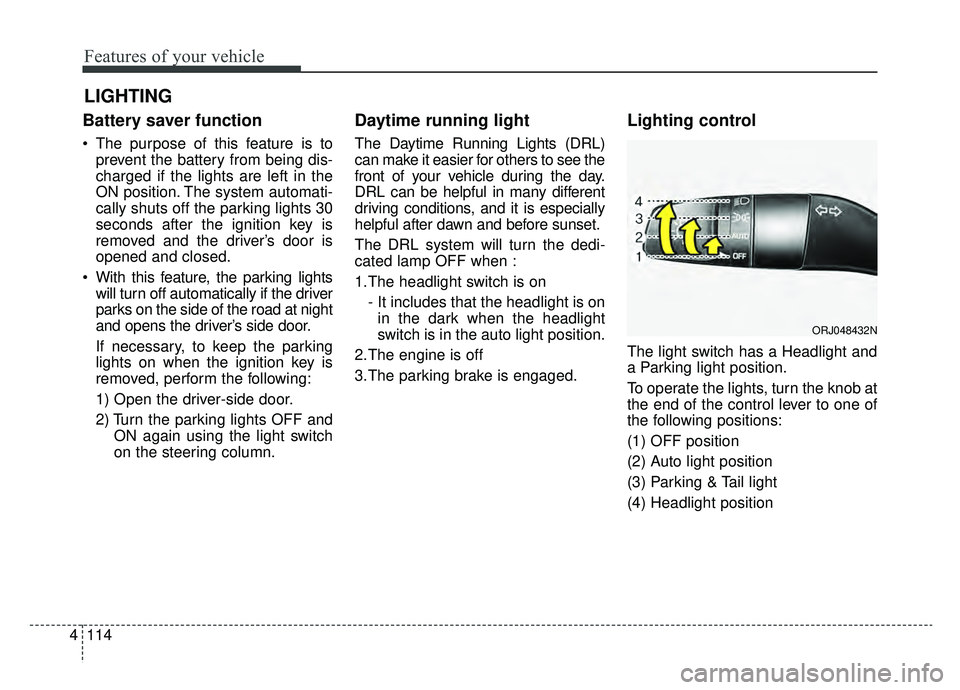
The light switch has a Headlight and
a Parking light position.
To operate the lights, turn the knob at
the end of the control lever to one of
the following positions:
(1) OFF position
(2) Auto light position
(3) Parking & Tail light
(4) Headlight position
LIGHTING
ORJ048432N
Page 213 of 593
Features of your vehicle
120
4
Turn signals and lane change
signals
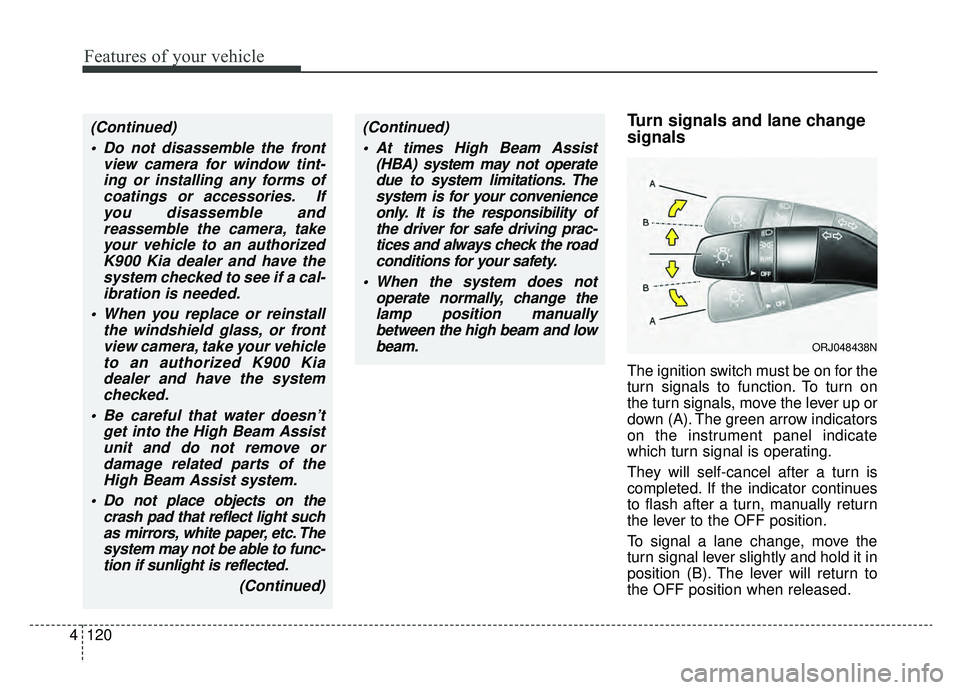
The ignition switch must be on for the
turn signals to function. To turn on
the turn signals, move the lever up or
down (A). The green arrow indicators
on the instrument panel indicate
which turn signal is operating.
They will self-cancel after a turn is
completed. If the indicator continues
to flash after a turn, manually return
the lever to the OFF position.
To signal a lane change, move the
turn signal lever slightly and hold it in
position (B). The lever will return to
the OFF position when released.
(Continued)
Do not disassemble the front view camera for window tint-ing or installing any forms ofcoatings or accessories. Ifyou disassemble andreassemble the camera, takeyour vehicle to an authorizedK900 Kia dealer and have thesystem checked to see if a cal-ibration is needed.
When you replace or reinstall the windshield glass, or frontview camera, take your vehicleto an authorized K900 Kiadealer and have the systemchecked.
Be careful that water doesn’t get into the High Beam Assistunit and do not remove ordamage related parts of theHigh Beam Assist system.
Do not place objects on the crash pad that reflect light suchas mirrors, white paper, etc. Thesystem may not be able to func-tion if sunlight is reflected.
(Continued)(Continued) At times High Beam Assist (HBA) system may not operatedue to system limitations. Thesystem is for your convenienceonly. It is the responsibility ofthe driver for safe driving prac-tices and always check the roadconditions for your safety.
When the system does not operate normally, change thelamp position manuallybetween the high beam and lowbeam.
ORJ048438N
Page 240 of 593
4147
Features of your vehicle
If the air conditioning and outside
(fresh) air position are not selected
automatically, adjust the correspon-
ding button manually. If the posi-
tion is selected, lower fan speed is
adjusted to a higher fan speed.To defrost outside windshield
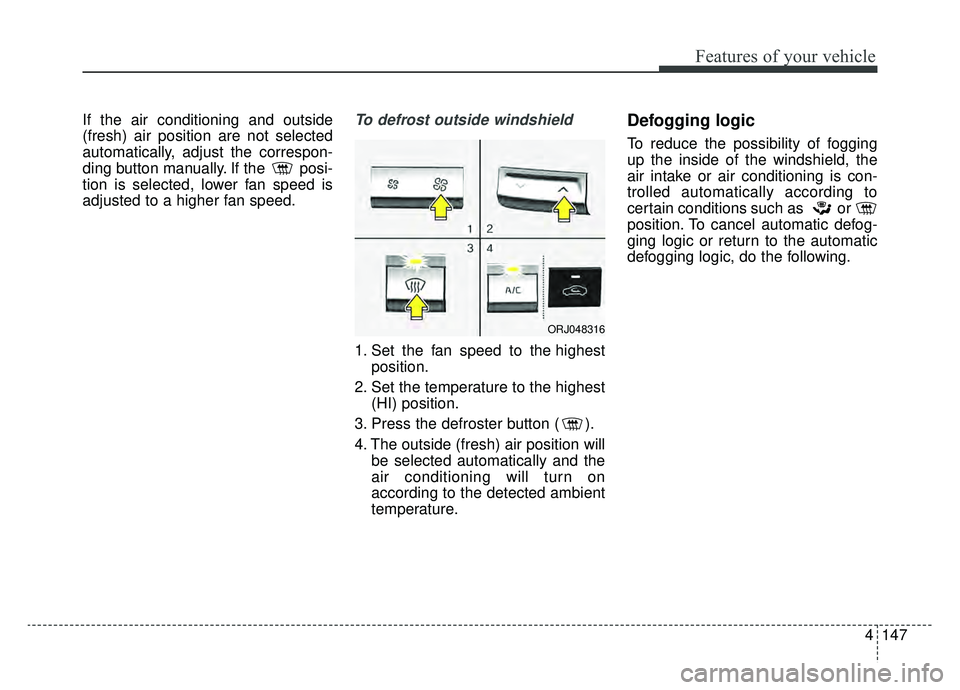
1. Set the fan speed to the highestposition.
2. Set the temperature to the highest (HI) position.
3. Press the defroster button ( ).
4. The outside (fresh) air position will be selected automatically and the
air conditioning will turn on
according to the detected ambient
temperature.
Defogging logic
To reduce the possibility of fogging
up the inside of the windshield, the
air intake or air conditioning is con-
trolled automatically according to
certain conditions such as or
position. To cancel automatic defog-
ging logic or return to the automatic
defogging logic, do the following.
ORJ048316
Page 253 of 593
Features of your vehicle
160
4
Wireless smart phone charging
1. Remove any object on the smart
phone charging pad including the
smart key. If there is any foreign
object on the pad other than a
smart phone, the wireless charging
function may not operate properly.
2. Place the smart phone on the cen- ter of the wireless charging pad.
3. The indicator light will change to orange once the wireless charging
begins. After the charging is com-
plete, the orange light will change
to green.
4. You can choose to turn the wireless charging function to either ON or
OFF by selecting it on the AVN.
(Please refer to the AVN manual for
more details.)
If the wireless charging does not
work, gently move your smart phone
around the pad until the charging indi-
cator light turns yellow. Depending on
the smart phone, the charging indica-
tor light may not turn green even after
the charging is complete. If the wireless charging is not func-
tioning properly, the orange light will
blink and flash for ten seconds, then
turn off. If that occurs, remove the
smart phone from the pad and
replace it on the pad again, or double
check the charging status.
If you leave the smart phone on the
charging pad when the vehicle igni-
tion is in OFF, the vehicle will alert
you through warning messages and
sound (applicable for vehicles with
voice guidance function) after the
‘Good bye’ function on the instru-
ment cluster ends. However, it does
not alert for every smart phone. It is
not a malfunction of the system, but
the smart phone soft ware incompat-
ibility.WARNING - Distracted
driving
Driving while distracted can
result in a loss of vehicle con-
trol that may lead to an acci-
dent, severe bodily injury, and
death. The driver's primary
responsibility is in the safe and
legal operation of the vehicle,
and any handheld devices,
other equipment, or vehicle sys-
tems which take the driver's
eyes, attention, and focus away
from the safe operation of the
vehicle, or which are not per-
missible by law, should never
be used during operation of the
vehicle.
Page 264 of 593

4171
Features of your vehicle
Station Swapping - As an FM sig-nal weakens, another more power-
ful signal near the same frequency
may begin to play. This is because
your radio is designed to lock onto
the clearest signal. If this occurs,
select another station with a
stronger signal.
Multi-Path Cancellation - Radio sig- nals being received from several
directions can cause distortion or
fluttering. This can be caused by a
direct and reflected signal from the
same station, or by signals from
two stations with close frequencies.
If this occurs, select another station
until the condition has passed.
Using a cellular phone or a two-
way radio
When a cellular phone is used inside
the vehicle, noise may be produced
from the audio system. This does not
mean that something is wrong with
the audio equipment. If this occurs, try
using the cellular phone as far away
as possible from the audio equip-
ment. When using a communication
system such as a cellular phone or a
radio set inside the vehicle, a sepa-
rate external antenna must be fitted.
When a cellular phone or a radio set
is used with an internal antenna
alone, it may interfere with the vehi-
cle's electrical system and adversely
affect safe operation of the vehicle.
OJF045311L
WARNING- Cell phone use
Do not use a cellular phone
while driving. Stop at a safe
location to use a cellular phone.
WARNING- Distracted driving
Driving while distracted can
result in a loss of vehicle con-
trol that may lead to an acci-
dent, severe bodily injury, or
death. The driver's primary
responsibility is in the safe and
legal operation of the vehicle,
and any handheld devices,
other equipment, or vehicle sys-
tems which take the driver's
eyes, attention, and focus away
from the safe operation of the
vehicle, or which are not per-
missible by law, should never
be used during operation of the
vehicle.
Page 271 of 593
55
Driving your vehicle
Before entering vehicle
• Be sure that all windows, outsidemirror(s), and outside lights are
clean.
Check the condition of the tires.
Check under the vehicle for any sign of leaks.
Be sure there are no obstacles behind you if you intend to back up.
Necessary inspections
Fluid levels, such as engine oil,
engine coolant, brake fluid, and
washer fluid should be checked on a
regular basis, at the exact interval
depending on the fluid. Further
details are provided in chapter 7,
“Maintenance”.
Before starting
Close and lock all doors.
Position the seat so that all con-trols are easily reached.
Buckle your seat belt.
Adjust the inside and outside rearview mirrors.
Be sure that all lights work.
Check all gauges.
Check the operation of warning lights when the ignition switch is
turned to the ON position.
Release the parking brake and make sure the brake warning light
goes out.
Input any phone numbers or map locations (if vehicle equipped with
a navigation system) that you may
need during your trip.
For safe operation, be sure you are
familiar with your vehicle and its
equipment.
BEFORE DRIVING
WARNING - Distracted driving
Focus on the road while driving.
The driver's primary responsi-
bility is in the safe and legal
operation of the vehicle. Any
handheld devices, other equip-
ment or vehicle systems that
distract the driver should not be
used during vehicle operation.
Page 272 of 593
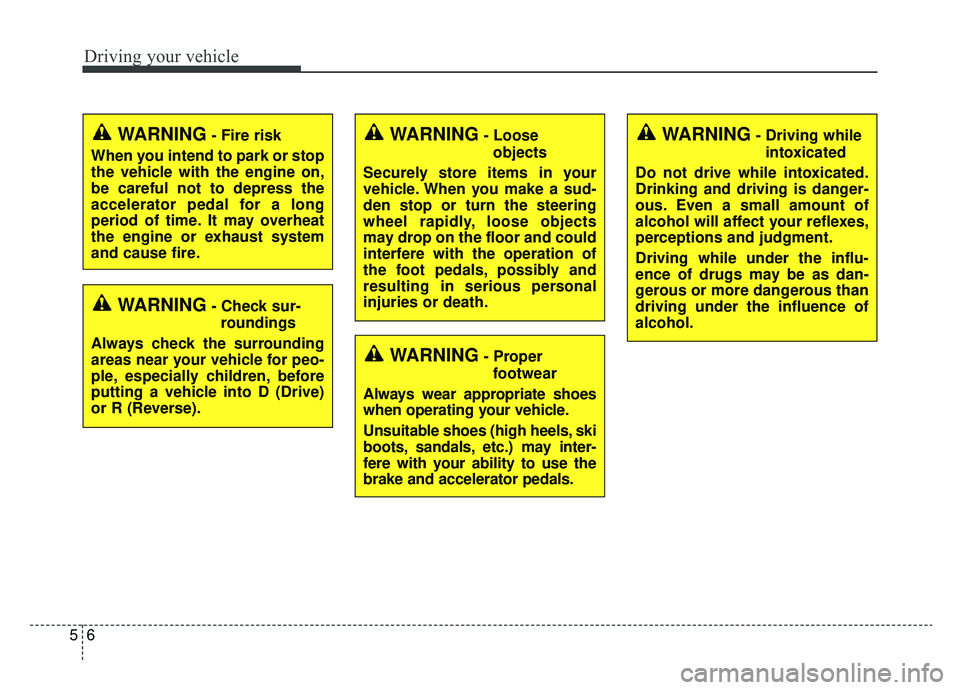
Driving your vehicle
65
WARNING- Check sur-roundings
Always check the surrounding
areas near your vehicle for peo-
ple, especially children, before
putting a vehicle into D (Drive)
or R (Reverse).
WARNING- Fire risk
When you intend to park or stop
the vehicle with the engine on,
be careful not to depress the
accelerator pedal for a long
period of time. It may overheat
the engine or exhaust system
and cause fire.WARNING- Loose objects
Securely store items in your
vehicle. When you make a sud-
den stop or turn the steering
wheel rapidly, loose objects
may drop on the floor and could
interfere with the operation of
the foot pedals, possibly and
resulting in serious personal
injuries or death.WARNING- Driving while intoxicated
Do not drive while intoxicated.
Drinking and driving is danger-
ous. Even a small amount of
alcohol will affect your reflexes,
perceptions and judgment.
Driving while under the influ-
ence of drugs may be as dan-
gerous or more dangerous than
driving under the influence of
alcohol.
WARNING- Proper footwear
Always wear appropriate shoes
when operating your vehicle.
Unsuitable shoes (high heels, ski
boots, sandals, etc.) may inter-
fere with your ability to use the
brake and accelerator pedals.