alarm KIA NIRO 2020 Owner's Manual
[x] Cancel search | Manufacturer: KIA, Model Year: 2020, Model line: NIRO, Model: KIA NIRO 2020Pages: 687, PDF Size: 11.43 MB
Page 383 of 687
573
Driving your vehicle
- For pedestrians and cyclists, thevehicle speed is greater than or
equal to 5 mph (8 km/h) and less
than 45 mph (70 km/h).
(Depending on the condition of
pedestrians and bike riders and
the surrounding environment the
possible maximum operating
speed may be reduced.)
FCA system controls the brakes within certain limit to release shock
from the collision.
- If you select “Warning Only”, FCAsystem activates and produces
only warning alarms in accor-
dance with the collision risk lev-
els. You should control the brake
directly because FCA system do
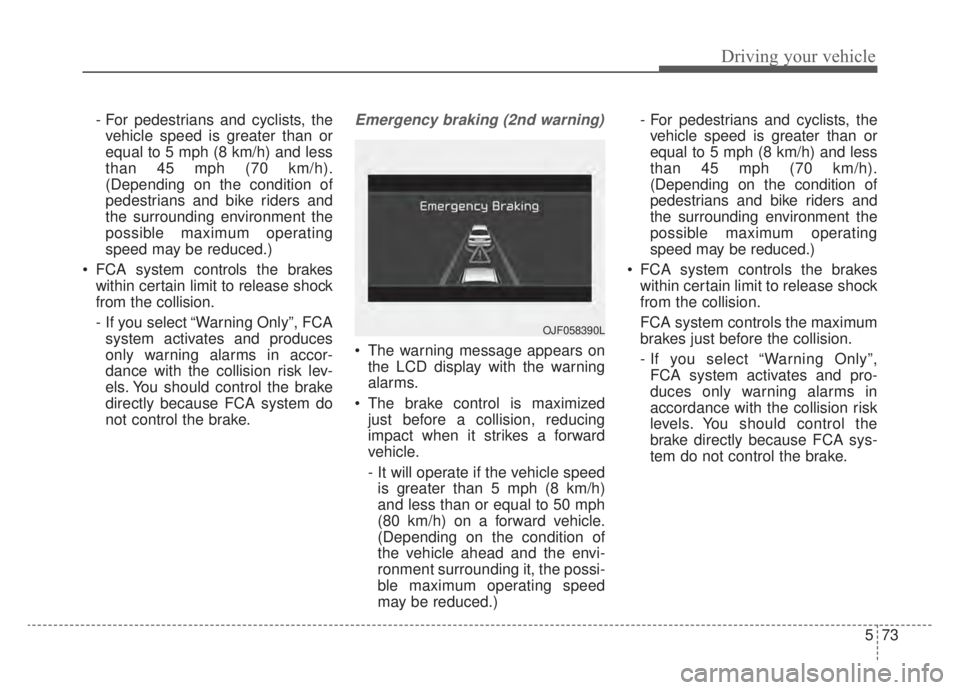
not control the brake.Emergency braking (2nd warning)
The warning message appears on the LCD display with the warning
alarms.
The brake control is maximized just before a collision, reducing
impact when it strikes a forward
vehicle.
- It will operate if the vehicle speedis greater than 5 mph (8 km/h)
and less than or equal to 50 mph
(80 km/h) on a forward vehicle.
(Depending on the condition of
the vehicle ahead and the envi-
ronment surrounding it, the possi-
ble maximum operating speed
may be reduced.) - For pedestrians and cyclists, the
vehicle speed is greater than or
equal to 5 mph (8 km/h) and less
than 45 mph (70 km/h).
(Depending on the condition of
pedestrians and bike riders and
the surrounding environment the
possible maximum operating
speed may be reduced.)
FCA system controls the brakes within certain limit to release shock
from the collision.
FCA system controls the maximum
brakes just before the collision.
- If you select “Warning Only”,FCA system activates and pro-
duces only warning alarms in
accordance with the collision risk
levels. You should control the
brake directly because FCA sys-
tem do not control the brake.
OJF058390L
Page 384 of 687
Driving your vehicle
74
5
Brake operation
In an urgent situation, the braking
system enters into the ready status
for prompt reaction to assist the driv-
er in depressing the brake pedal.
FCA system provides additional braking power for optimum braking
performance, when the driver
depresses the brake pedal.
The braking control is automatical- ly deactivated, when the driver
sharply depresses the accelerator
pedal, or when the driver abruptly
operates the steering wheel.
The braking control is automatical- ly canceled, when risk factors dis-
appear.
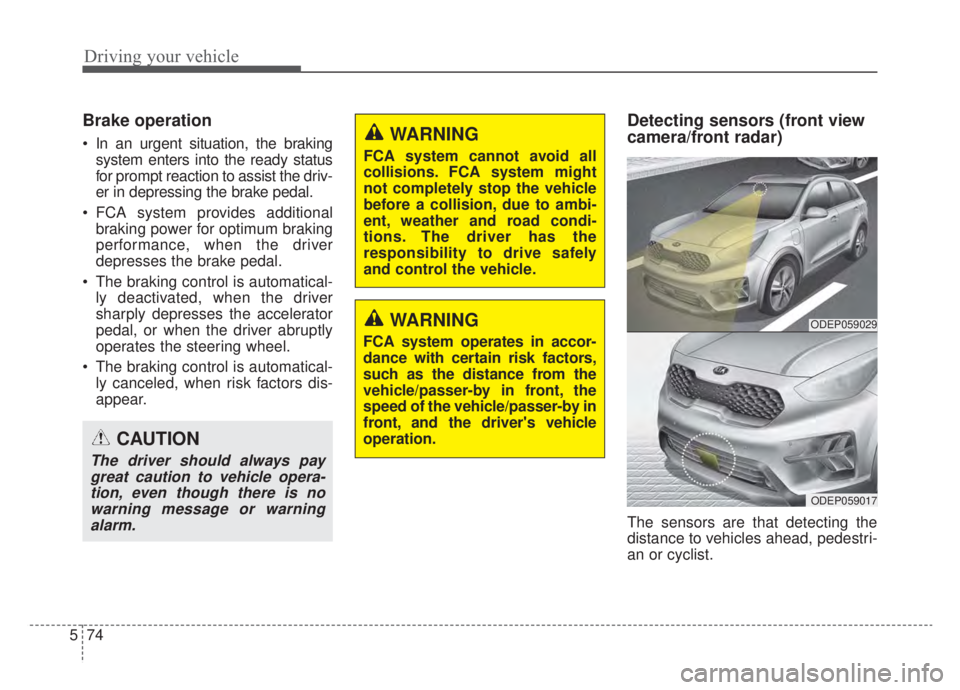
Detecting sensors (front view
camera/front radar)
The sensors are that detecting the
distance to vehicles ahead, pedestri-
an or cyclist.
CAUTION
The driver should always paygreat caution to vehicle opera-tion, even though there is nowarning message or warningalarm.
WARNING
FCA system cannot avoid all
collisions. FCA system might
not completely stop the vehicle
before a collision, due to ambi-
ent, weather and road condi-
tions. The driver has the
responsibility to drive safely
and control the vehicle.
WARNING
FCA system operates in accor-
dance with certain risk factors,
such as the distance from the
vehicle/passer-by in front, the
speed of the vehicle/passer-by in
front, and the driver's vehicle
operation.
ODEP059029
ODEP059017
Page 385 of 687

575
Driving your vehicle
In bad weather conditions such as
heavy rain, heavy snow, and fog, or
when sensor is covered by foreign
material, dust, tec., the sensors will
be degraded and the system will be
temporarily disabled.
Always keep the sensor clean.✽ ✽NOTICE
• Do not install any accessories,
such as license plate molding or
sticker, on the sensor area. Nor
arbitrarily replace the bumper.
Those may adversely affect the
sensing performance.
• Always keep the sensor/bumper area clean.
• Use only soft cloths to wash the vehicle. Also, do not spray highly-
pressurized water on the sensor
installed on the bumper.
• Be careful not to apply unneces- sary force on the frontal sensor
area. When the sensor moves out
of the correct position due to
external force, the system may not
normally operate even without the
warning light or message. In this
case, have your vehicle inspected
by an authorized Kia dealer.
• Use only the genuine Kia sensor cover. Do not arbitrarily apply
paint on the sensor cover. (Continued)(Continued)
• Do not tint the window or install
stickers, accessories around the
inside mirror where the camera is
installed.
• Make sure the frontal camera installation point does not get wet.
• Do not impact or arbitrarily remove any radar/camera compo-
nents.
• Do not place reflective objects(white paper or mirror etc.)
on the crash pad.
The system may activate unneces-
sarily due to reflect of the sunlight.
• Excessive audio volume may dis- turb the sound of the system warn-
ing alarm.
• For more cautions for the camera sensor, refer to the “Lane Keeping
Assist (LKA)” in this chapter.
Page 387 of 687

577
Driving your vehicle
WARNING
FCA system is only a supple-mental system for the driver’s
convenience. The driver has
the ultimate responsibility to
control and operate the vehi-
cle safely. Do not solely
depend on FCA system.
Rather, maintain a safe brak-
ing distance, and, if neces-
sary, depress the brake pedal
to lower the driving speed.
In certain instances and under certain driving condi-
tions, FCA system may acti-
vate unintentionally. This ini-
tial warning message appears
on the LCD display with a
warning chime.
(Continued)
(Continued)Also, in certain instances the
front radar sensor or camera
recognition system may not
detect the vehicle, pedestrian
or cyclist (if equipped) ahead.
FCA system may not activate
and the warning message will
not be displayed.
FCA system may unnecessar- ily produce the warning mes-
sage and the warning alarms.
Also, due to the sensing limi-
tation, FCA system may not
produce the warning message
and the warning alarm at all.
When there is a malfunction with FCA system, the braking
control does not operate upon
detecting a collision risk even
with other braking systems
normally operating.
(Continued)(Continued)
FCA system operates only forthe vehicle/pedestrian in
front, while driving forward. It
does not operate for any ani-
mals or vehicles in the oppo-
site direction.
FCA system does not recog- nize the vehicle, which trans-
versally drives across the
crossroad, or the vehicle,
which is parked in the trans-
versal direction.
If the vehicle in front stops suddenly, you may have less
control of the brake system.
Therefore, always keep safe
distance between your vehicle
and the vehicle in front of you.
FCA system may activate dur- ing braking and the vehicle
may stop suddenly. And the
load in the vehicle may endan-
ger passengers. Therefore,
always be mindful of the load
volume in the vehicle.
(Continued)
Page 391 of 687

581
Driving your vehicle
- Driving on a curve
The performance of Forward
Collision-Avoidance Assist system
may be limited when driving on a
curved road.
The front view camera or front radar
sensor recognition system may not
detect the vehicle, pedestrian or
cyclist traveling in front on a curved
road.
This may result in no alarm and brak-
ing when necessary.
Always pay attention to road and
driving conditions, and if necessary,
depress the brake pedal to reduce
your driving speed in order to main-
tain a safe distance.Forward Collision-Avoidance Assist
system may recognize a vehicle or
pedestrian or cyclist in the next lane
or outside the lane when driving on a
curved road.
If this occurs, the system may unnec-
essarily alarm the driver and apply
the brake. Always pay attention to
road and driving conditions, while
driving.
OHM059353L
OHM059352L
OHM059354L
Page 392 of 687
Driving your vehicle
82
5
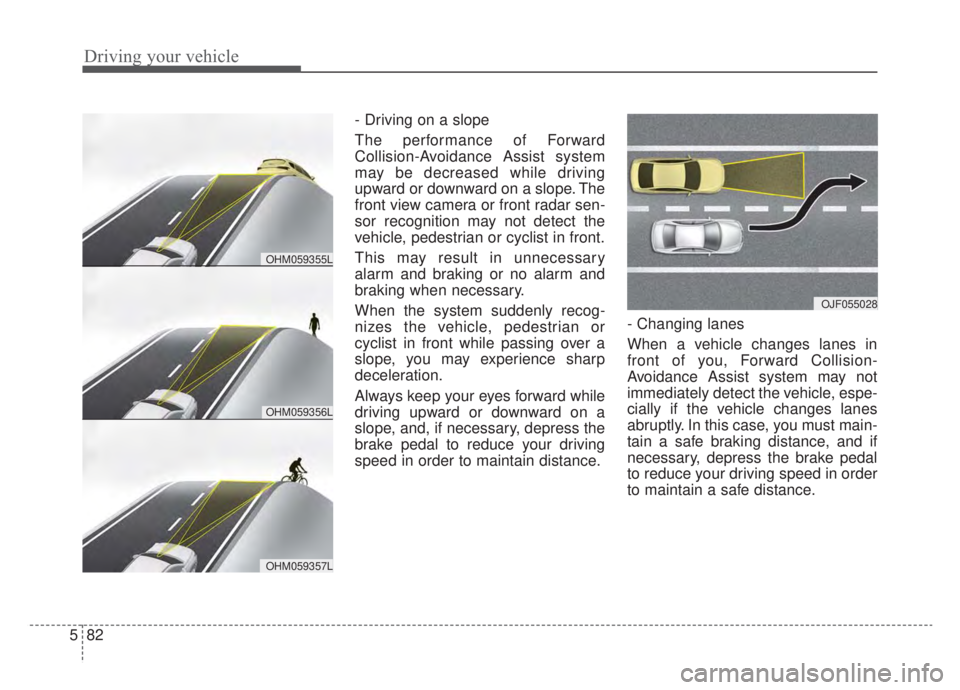
- Driving on a slope
The performance of Forward
Collision-Avoidance Assist system
may be decreased while driving
upward or downward on a slope. The
front view camera or front radar sen-
sor recognition may not detect the
vehicle, pedestrian or cyclist in front.
This may result in unnecessary
alarm and braking or no alarm and
braking when necessary.
When the system suddenly recog-
nizes the vehicle, pedestrian or
cyclist in front while passing over a
slope, you may experience sharp
deceleration.
Always keep your eyes forward while
driving upward or downward on a
slope, and, if necessary, depress the
brake pedal to reduce your driving
speed in order to maintain distance. - Changing lanes
When a vehicle changes lanes in
front of you, Forward Collision-
Avoidance Assist system may not
immediately detect the vehicle, espe-
cially if the vehicle changes lanes
abruptly. In this case, you must main-
tain a safe braking distance, and if
necessary, depress the brake pedal
to reduce your driving speed in order
to maintain a safe distance.
OJF055028
OHM059356L
OHM059355L
OHM059357L
Page 398 of 687
Driving your vehicle
88
5
(Continued)
The system detects lane
markers and controls the
steering wheel by a front view
camera, therefore, if the lane
markers are hard to detect,
the system may not work
properly. Always be cautious
when using the system.
When the lane markers are hard to detect, please refer to
“DRIVER’S ATTENTION”.
Do not remove or damage the related parts of the front view
camera system.
Do not place objects on the crash pad that reflect light
such as mirrors, white paper,
etc. it may cause malfunction
of LKA system if sunlight is
reflected.
(Continued)(Continued)
You may not hear warningsound of LKA system because
of the excessive audio sound.
If other beeps such as the seat belt warning sound are in
operation and override LKA
alarming system, LKA beeps
may not occur.
At high vehicle speeds, the steering torque needed for
assistance may not be suffi-
cient to keep your vehicle
within the lane. If so, the vehi-
cle may move out of its lane.
Always obey the speed limit
when using LKA system.
(Continued)(Continued)
If you attach objects to thesteering wheel, the system
may not assist steering.
If you attach objects to the steering wheel, hands off
alarm may not work properly.
Page 411 of 687

5101
Driving your vehicle
Detecting Sensor
The rear corner radars are the sen-
sors inside the rear bumper for
detecting the side/rear areas. Always
keep the rear bumper clean for prop-
er operation of the system.
CAUTION
The driver should always useextreme caution while operat-ing the vehicle, whether or notthe warning light on the out-side rearview mirror illumi-nates or there is a warningalarm.
Playing the vehicle audio sys- tem at high volume may offsetBlind-Spot Collision Warningsystem warning sounds.
The warning of the Blind-Spot Collision Warning system maynot sound while other sys-tem's warning sounds.
ODEP059158
■Rear corner radarsCAUTION
The system may not work properly when the bumper hasbeen damaged, or if the rearbumper has been replaced orrepaired.
The sensing range differs some- what according to the width ofthe road. When the road is nar-row, the system may detectother vehicles in the next lane.
The system may turn off due to strong electromagnetic waves.
Always keep the sensor or near the sensor clean.
NEVER arbitrarily disassem- ble the sensor component norapply any impact on the sen-sor component.
Be careful not to apply unnec- essary force on the radar sen-sor or sensor cover. If the sen-sor is forcibly moved out ofproper alignment, the systemmay not operate correctly. Inthis case, a warning messagemay not be displayed.
(Continued)
Page 453 of 687
5143
Driving your vehicle
LFA system operation
To use Lane Following Assist two
steps are necessary:
(1) LFA system has to be enabled,and
(2) SCC system has to be activated
With the ignition switch or ENGINE
START/STOP button in the [ON],
select or release the setting from
“User setting → Driver Assistance →
Driving Assist →Lane Following
Assist”.
Select LFA system in the user setting
of the instrument panel.
The LFA system status is remem-
bered by the system and therefore
does not need to be enabled again
for each new journey.
(Continued)
- Depending on your surround- ings and road conditions, LFAsystem could fail to recognizethe lane and stop working. Inturn, extra caution is requiredwhile driving with LFA systemon.
- Be sure to check the non- operating conditions and cau-tions for the driver beforeusing LFA system.
- Do not place reflective materi- als such as white paper ormirror on the crash pad.Sunlight reflections can causea malfunction in LFA system.
- Too big sound from the sound system can interrupt thealarming sound from LFA sys-tem.
(Continued)(Continued)- Keeping your hands off the wheel while driving will triggerthe hands-off warning anddeactivate the steering-assistsystem. Put your hands backon the wheel, then the steer-ing-assist system will be re-activated.
- When driving at a high speed, the steering assist force canbecome weak and the vehiclecan drive out of its lane. Extracaution is required, and com-ply with the speed limit.
- Attaching an object to the steering wheel could detersteering assistance.
- Attaching an object to the steering wheel could deter thehands-off alarming system.
Page 469 of 687

5159
Driving your vehicle
Warning message and system
control
Rear Cross-Traffic CollisionWarning system
If the vehicle detected by the sensors
approaches from the rear left/right
side of your vehicle, the warning
chime will sound, the warning light
on the outside rearview mirror will
blink and a message will appear on
the LCD display. If the rear view mon-
itor system is in activation, a mes-
sage will also appear on the
‘Infortainment System’.
The warning will stop when:
- The vehicle moving at the rear left/right side of your vehicle is not
in the detection range.
- The vehicle is right behind your vehicle.
- The vehicle is not driving towards your vehicle.
- The vehicle’s approaching speed is decreased.CAUTION
When the operation condition of RCCW is met, the warningwill occur every time a vehicleapproaches the side or rear ofyour stopped (0 mph (0 km/h)vehicle speed) vehicle.
The system's warning or brake may not operate properly if theleft or right of your vehicle'srear bumper is blocked by avehicle or obstacle.
The driver should always use extreme caution while operat-ing the vehicle, whether or notthe warning light on the outerside view mirror illuminates orthere is a warning alarm.
Playing the vehicle audio sys- tem at high volume may pre-vent occupants from hearingthe system's warning sounds.
If any other warning sound such as seat belt warningchime is already generated,the RCCW warning may notsound.
OSK3058093L
OSK3058094L
■ Left
■ Right