ESP KIA NIRO HYBRID EV 2022 Owner's Manual
[x] Cancel search | Manufacturer: KIA, Model Year: 2022, Model line: NIRO HYBRID EV, Model: KIA NIRO HYBRID EV 2022Pages: 684, PDF Size: 9.67 MB
Page 199 of 684
461
Features of your vehicle
✽ ✽
NOTICE
Industry Canada licence-exempt
RSS standard(s).
Operation is subject to the following
three conditions:
1. This device may not cause harm-
ful interference, and
2. This device must accept any inter-
ference received, including inter-
ference that may cause undesired
operation.
3. The transceiver has been tested
and complies with FCC and
Industry Canada rules. Changes
or modifications not expressly
approved by the party responsible
for compliance could void the
user's authority to operate the
device.
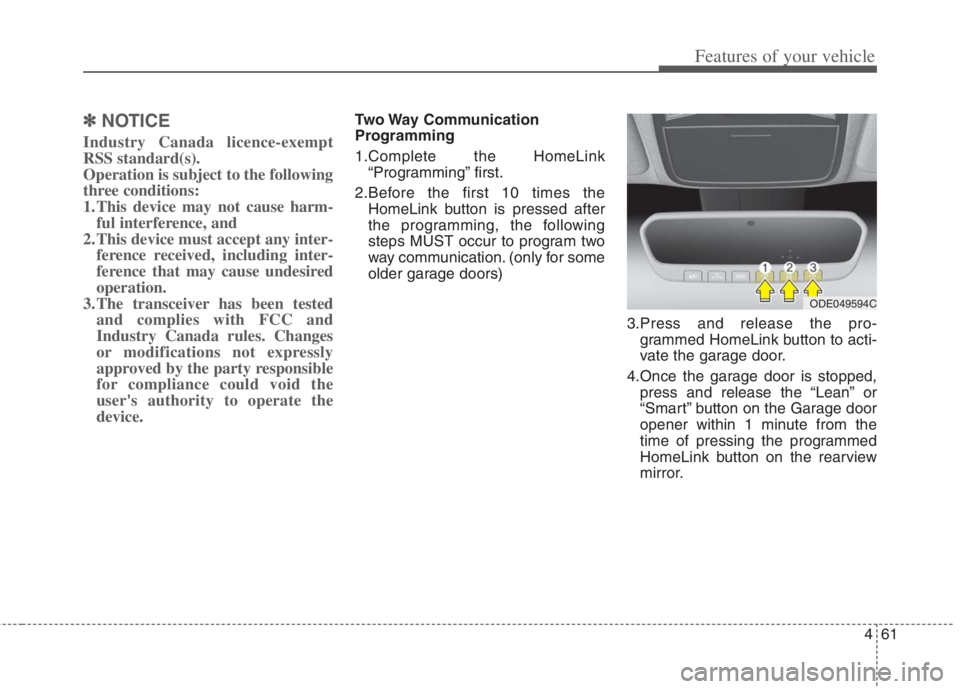
Two Way Communication
Programming
1.Complete the HomeLink
“Programming” first.
2.Before the first 10 times the
HomeLink button is pressed after
the programming, the following
steps MUST occur to program two
way communication. (only for some
older garage doors)
3.Press and release the pro-
grammed HomeLink button to acti-
vate the garage door.
4.Once the garage door is stopped,
press and release the “Lean” or
“Smart” button on the Garage door
opener within 1 minute from the
time of pressing the programmed
HomeLink button on the rearview
mirror.
ODE049594C
Page 202 of 684
Features of your vehicle
64 4
Outside rearview mirror
Be sure to adjust the mirror angles
before driving.
Your vehicle is equipped with both
left-hand and right-hand outside
rearview mirrors. The mirrors can be
adjusted remotely with the remote
switch. The mirror heads can be fold-
ed back to prevent damage during an
automatic vehicle wash or when
passing through a narrow street.
The right outside rearview mirror is
convex. Objects seen in the mirror
are closer than they appear.
Use your interior rearview mirror or
direct observation to determine the
actual distance of following vehicles
when changing lanes.If the mirror is jammed with ice, do
not adjust the mirror by force. Use an
approved spray de-icer (not radiator
antifreeze) to release the frozen
mechanism or move the vehicle to a
warm place and allow the ice to melt.
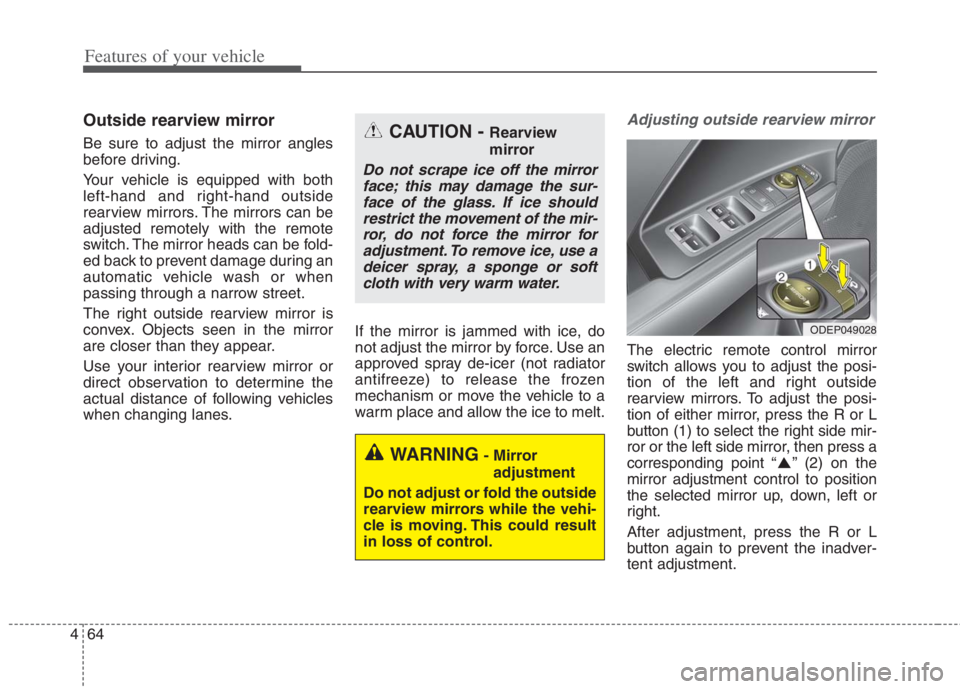
Adjusting outside rearview mirror
The electric remote control mirror
switch allows you to adjust the posi-
tion of the left and right outside
rearview mirrors. To adjust the posi-
tion of either mirror, press the R or L
button (1) to select the right side mir-
ror or the left side mirror, then press a
corresponding point “ ” (2) on the
mirror adjustment control to position
the selected mirror up, down, left or
right.
After adjustment, press the R or L
button again to prevent the inadver-
tent adjustment.
WARNING- Mirror
adjustment
Do not adjust or fold the outside
rearview mirrors while the vehi-
cle is moving. This could result
in loss of control.
CAUTION - Rearview
mirror
Do not scrape ice off the mirror
face; this may damage the sur-
face of the glass. If ice should
restrict the movement of the mir-
ror, do not force the mirror for
adjustment. To remove ice, use a
deicer spray, a sponge or soft
cloth with very warm water.
ODEP049028
Page 211 of 684
473
Features of your vehicle
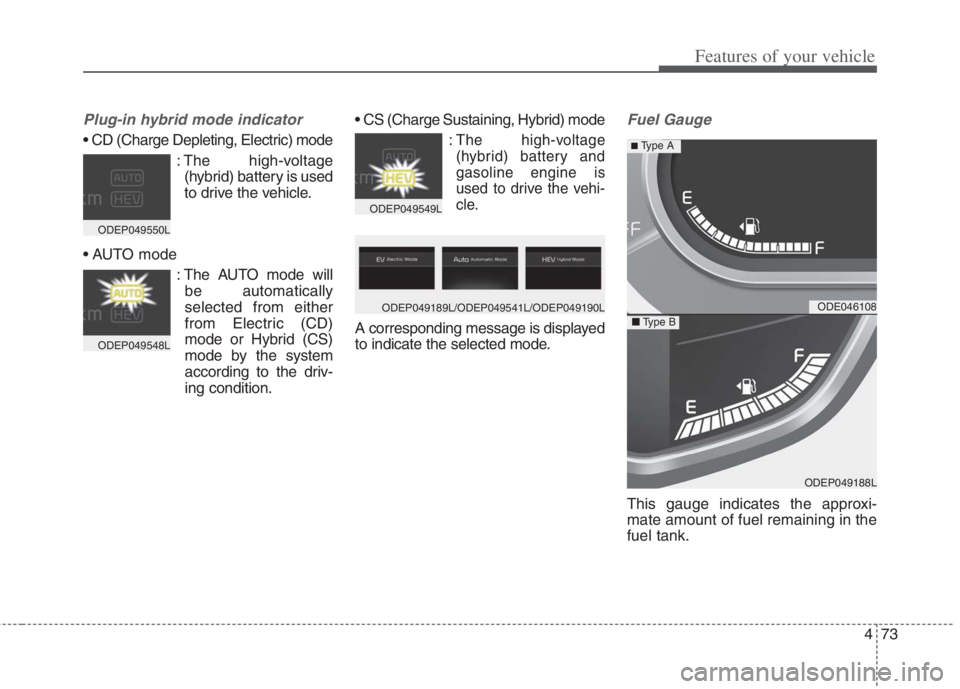
Plug-in hybrid mode indicator
: The high-voltage
(hybrid) battery is used
to drive the vehicle.
: The AUTO mode will
be automatically
selected from either
from Electric (CD)
mode or Hybrid (CS)
mode by the system
according to the driv-
ing condition.
:The high-voltage
(hybrid) battery and
gasoline engine is
used to drive the vehi-
cle.
A corresponding message is displayed
to indicate the selected mode.
Fuel Gauge
This gauge indicates the approxi-
mate amount of fuel remaining in the
fuel tank.
ODE046108
ODEP049188L
■Type B
■ Type A
ODEP049550L
ODEP049548L
ODEP049549L
ODEP049189L/ODEP049541L/ODEP049190L
Page 242 of 684
Features of your vehicle
104 4
Shift to P to charge
(Plug-in hybrid)
The message is displayed when the
charging connector is plugged with
the shift lever in R (Reverse), N
(Neutral) or D (Drive). Move the shift
lever to P (Park) and re-start the
charging process.
Electric Mode/Automatic
Mode/Hybrid Mode
(Plug-in hybrid)
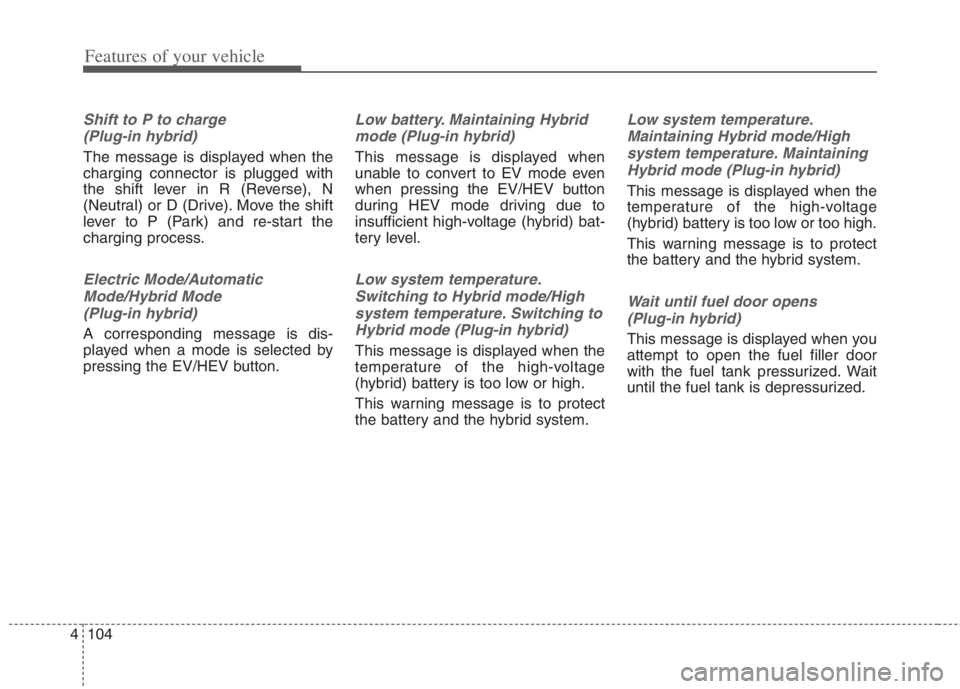
A corresponding message is dis-
played when a mode is selected by
pressing the EV/HEV button.
Low battery. Maintaining Hybrid
mode (Plug-in hybrid)
This message is displayed when
unable to convert to EV mode even
when pressing the EV/HEV button
during HEV mode driving due to
insufficient high-voltage (hybrid) bat-
tery level.
Low system temperature.
Switching to Hybrid mode/High
system temperature. Switching to
Hybrid mode (Plug-in hybrid)
This message is displayed when the
temperature of the high-voltage
(hybrid) battery is too low or high.
This warning message is to protect
the battery and the hybrid system.
Low system temperature.
Maintaining Hybrid mode/High
system temperature. Maintaining
Hybrid mode (Plug-in hybrid)
This message is displayed when the
temperature of the high-voltage
(hybrid) battery is too low or too high.
This warning message is to protect
the battery and the hybrid system.
Wait until fuel door opens
(Plug-in hybrid)
This message is displayed when you
attempt to open the fuel filler door
with the fuel tank pressurized. Wait
until the fuel tank is depressurized.
Page 260 of 684
Features of your vehicle
122 4
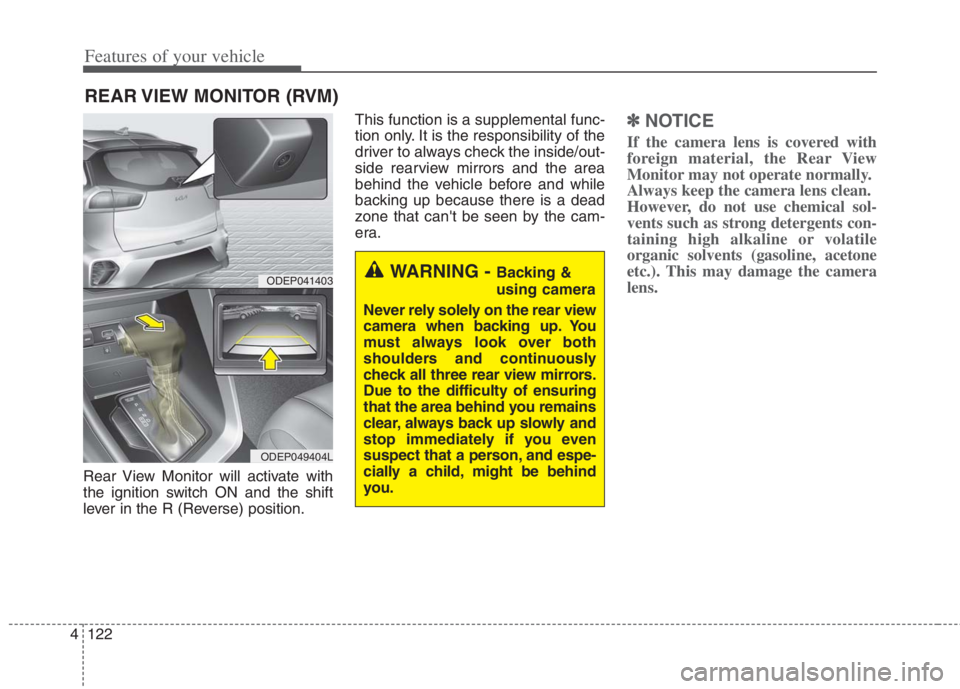
Rear View Monitor will activate with
the ignition switch ON and the shift
lever in the R (Reverse) position.This function is a supplemental func-
tion only. It is the responsibility of the
driver to always check the inside/out-
side rearview mirrors and the area
behind the vehicle before and while
backing up because there is a dead
zone that can't be seen by the cam-
era.
✽ ✽
NOTICE
If the camera lens is covered with
foreign material, the Rear View
Monitor may not operate normally.
Always keep the camera lens clean.
However, do not use chemical sol-
vents such as strong detergents con-
taining high alkaline or volatile
organic solvents (gasoline, acetone
etc.). This may damage the camera
lens.
REAR VIEW MONITOR (RVM)
WARNING - Backing &
using camera
Never rely solely on the rear view
camera when backing up. You
must always look over both
shoulders and continuously
check all three rear view mirrors.
Due to the difficulty of ensuring
that the area behind you remains
clear, always back up slowly and
stop immediately if you even
suspect that a person, and espe-
cially a child, might be behind
you.ODEP041403
ODEP049404L
Page 264 of 684
![KIA NIRO HYBRID EV 2022 Owners Manual Features of your vehicle
126 4
[1] : Front ultrasonic sensors
[2] : Rear ultrasonic sensors
Forward/Reverse Parking Distance
Warning assists the driver during
movement of the vehicle by chiming
if any](/img/2/58909/w960_58909-263.png "KIA NIRO HYBRID EV 2022 Owners Manual Features of your vehicle
126 4
[1] : Front ultrasonic sensors
[2] : Rear ultrasonic sensors
Forward/Reverse Parking Distance
Warning assists the driver during
movement of the vehicle by chiming
if any")
Features of your vehicle
126 4
[1] : Front ultrasonic sensors
[2] : Rear ultrasonic sensors
Forward/Reverse Parking Distance
Warning assists the driver during
movement of the vehicle by chiming
if any object is sensed within the dis-
tance of 100 cm (40 in.) in front and
120 cm (48 in.) behind the vehicle.This function is a supplemental func-
tion and it is not intended to nor does
it replace the need for extreme care
and attention of the driver.
The sensing range and objects
detectable by the sensors (1) are lim-
ited. Whenever moving pay as much
attention to what is in front and
behind of you as you would in a vehi-
cle without a Forward/Reverse
Parking Distance Warning.
FORWARD/REVERSE PARKING DISTANCE WARNING (PDW) (IF EQUIPPED)
ODEP041401
ODEP041400
■Front
■Rear
WARNING
Forward/Reverse Parking Distance
Warning is a supplemental func-
tion only. The operation of
Forward/Reverse Parking Distance
Warning can be affected by sever-
al factors (including environmental
conditions). It is the responsibility
of the driver to always check the
front and rear views before and
while parking.
Page 268 of 684

Features of your vehicle
130 4
✽
✽
NOTICE
1. The warning may not sound
sequentially depending on the
speed and shapes of the objects
detected.
2. Forward/Reverse Parking
Distance Warning may malfunc-
tion if the vehicle bumper height
or sensor installation has been
modified. Any nonfactory
installed equipment or accessories
may also interfere with the sensor
performance.
3. Sensor may not recognize objects
less than 30 cm (12 in) from the
sensor, or it may sense an incor-
rect distance. Use with caution.
4. When the sensor is frozen or
stained with snow or water, the
sensor may be inoperative until
the stains are removed using a
soft cloth.
5. Do not push, scratch or strike the
sensor with any hard objects that
could damage the surface of the
sensor. Sensor damage could
occur.
Pay close attention when the vehicle
is driven close to objects on the road,
particularly pedestrians, and espe-
cially children. Be aware that some
objects may not be detected by the
sensors, due to the objects distance,
size or material, all of which can limit
the effectiveness of the sensor.
Always perform a visual inspection to
make sure the vehicle is clear of all
obstructions before moving the vehi-
cle in any direction.Self-diagnosis
When you shift the gear to the R
(Reverse) position and if one or more
of the below occurs you may have a
malfunction in Forward/Reverse
Parking Distance Warning.
You don't hear an audible warning
sound or if the buzzer sounds inter-
mittently.
If this occurs, we recommend that
the system be checked by an author-
ized Kia dealer.
✽ ✽
NOTICE
Your new vehicle warranty does not
cover any accidents or damage to
the vehicle or injuries to its occu-
pants related to Forward/Reverse
Parking Distance Warning. Always
drive safely and cautiously.
is displayed. (if equipped)
(blinks)
Page 269 of 684
4131
Features of your vehicle
Battery saver function
The purpose of this feature is to pre-
vent the battery from being dis-
charged if the lights are left in the ON
position.
The system automatically shuts off
the parking lights after the engine is
off and the driver's door is opened.
However, the position lamps stay ON
even when the driver-side door is
opened if the light switch is operated
after the engine is turned off.
If necessary, to keep the lamps on
turn the position lamps OFF and ON
again using the headlamp switch on
the steering column after the engine
is turned off.
Headlight escort function
(if equipped)
If you turn the ignition switch to the
ACC or OFF position with the head-
lights ON, the headlights remain on
for about 5 minutes. However, if the
driver's door is opened and closed,
the headlights are turned off after 15
seconds.
The headlights can be turned off by
pressing the lock button on the trans-
mitter (or smart key) one more or
turning the light switch to the OFF
position.
Daytime running light (DRL)
The Daytime Running Lights (DRL)
can make it easier for others to see the
front of your vehicle during the day.
DRL can be helpful in many different
driving conditions, and it is especially
helpful after dawn and before sunset.
The DRL system will turn the dedi-
cated lamp OFF when:
1. The headlight switch is on
2. The engine is off
3. The front fog light is on.
4. Engaging the Parking Brake
LIGHTING
Page 302 of 684
Features of your vehicle
164 4
If the air conditioning and outside
(fresh) air position are not selected
automatically, adjust the correspon-
ding button manually. If the posi-
tion is selected, lower fan speed is
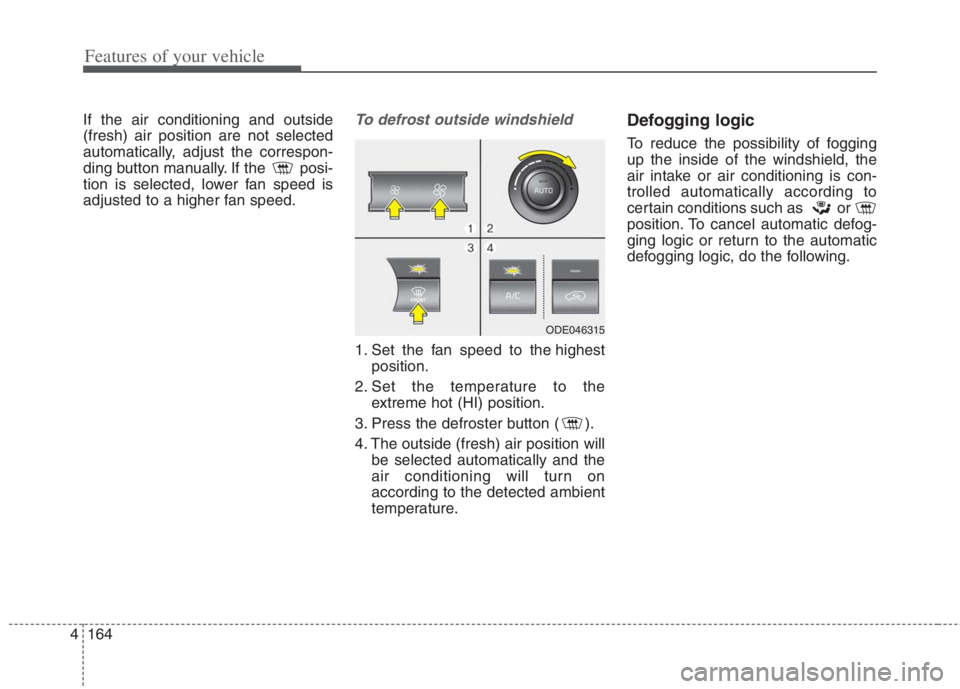
adjusted to a higher fan speed.To defrost outside windshield
1. Set the fan speed to the highest
position.
2. Set the temperature to the
extreme hot (HI) position.
3. Press the defroster button ( ).
4. The outside (fresh) air position will
be selected automatically and the
air conditioning will turn on
according to the detected ambient
temperature.
Defogging logic
To reduce the possibility of fogging
up the inside of the windshield, the
air intake or air conditioning is con-
trolled automatically according to
certain conditions such as or
position. To cancel automatic defog-
ging logic or return to the automatic
defogging logic, do the following.
ODE046315
Page 316 of 684
Features of your vehicle
178 4
✽
✽
NOTICE
• When the interior temperature of
the wireless charging system rises
above a set temperature, the wire-
less charging will cease to func-
tion. After the interior tempera-
ture drops below the threshold,
the wireless charging function will
resume.
• The wireless charging may not
function properly when there is a
heavy accessory cover on the
smart phone.
• The wireless charging will stop
when using the wireless smart key
search function to prevent radio
wave disruption.
• The wireless charging will stop
when the smart key is moved out
of the vehicle with the ignition in
ON.
• The wireless charging will stop
when any of the doors is opened
(applicable for vehicles equipped
with smart keys).
(Continued)CAUTION - Liquid in
Wireless Smart Phone
Charger
To prevent liquid from damag-
ing the wireless smart phone
charging system in your vehi-
cle, be sure not to spill liquid
over the charging system when
charging your phone.
CAUTION - Metal in
Wireless Charging System
If any metallic object such as a
coin is located between the
wireless charging system and
the smart phone, the charging
may be disrupted. Also, the
metallic object may heat up and
potentially damage the charging
system. If there is any metallic
object between the smart phone
and the charging pad, immedi-
ately remove the smart phone.
Remove the metallic object after
it has cooled down.
WARNING - Distracted
driving
Driving while distracted can
result in a loss of vehicle con-
trol that may lead to an acci-
dent, severe personal injury, or
death. The driver's primary
responsibility is in the safe and
legal operation of a vehicle. Any
use of handheld devices, other
equipment, or vehicle systems
that take the driver's eyes,
attention, and focus away from
the safe operation of a vehicle
are not permissible by law.
These should never be used
during the operation of the vehi-
cle.