ESP KIA NIRO HYBRID EV 2022 Service Manual
[x] Cancel search | Manufacturer: KIA, Model Year: 2022, Model line: NIRO HYBRID EV, Model: KIA NIRO HYBRID EV 2022Pages: 684, PDF Size: 9.67 MB
Page 379 of 684
Driving your vehicle
52 5
Malfunction indicator
The VSM can be deactivated even if
you don’t cancel the VSM operation
by pressing the ESC OFF button. It
indicates that a malfunction has
been detected somewhere in the
Electric Power Steering system or
VSM system. If the ESC indicator
light ( ) or EPS warning light
remains on, take your vehicle to an
authorized Kia dealer and have the
system checked. The Vehicle Stability Management
system is not a substitute for safe
driving practices but a supplemen-
tary function only. It is the responsi-
bility of the driver to always check
the speed and the distance to the
vehicle ahead. Always hold the
steering wheel firmly while driving.
Your vehicle is designed to activate
according to the driver’s intention,
even with installed VSM. Always fol-
low all the normal precautions for
driving at safe speeds for the condi-
tions – including driving in inclement
weather and on a slippery road.
Hill-start Assist Control (HAC)
A vehicle has the tendency to roll
back on a steep hill when it starts to
go after stopping. The Hill-start
Assist Control (HAC) prevents the
vehicle from rolling back by applying
the brakes automatically for about 2
seconds. The brakes are released
when the accelerator pedal is
depressed or after about 2 seconds.
The HAC is activated only for about 2
seconds, so when the vehicle is
starting off always depress the accel-
erator pedal.
WARNING
For maximum protection,
always wear your seat belt. No
system, no matter how
advanced, can compensate for
all driver error and/or driving
conditions. Always drive
responsibly.
WARNING- Maintaining
Brake Pressure on Incline
HAC does not replace the need
to apply brakes while stopped on
an incline. While stopped, make
sure you maintain brake pres-
sure sufficient to prevent your
vehicle from rolling backward
and causing an accident. Don’t
release the brake pedal until you
are ready to accelerate forward.
Page 386 of 684
559
Driving your vehicle
Brake operation
In an urgent situation, the braking
system enters into the ready status
for prompt reaction to assist the driv-
er in depressing the brake pedal.
Forward Collision-Avoidance
Assist provides additional braking
power for optimum braking per-
formance, when the driver
depresses the brake pedal.
The braking control is automatical-
ly deactivated, when the driver
sharply depresses the accelerator
pedal, or when the driver abruptly
operates the steering wheel.
The braking control is automatical-
ly canceled, when risk factors dis-
appear.
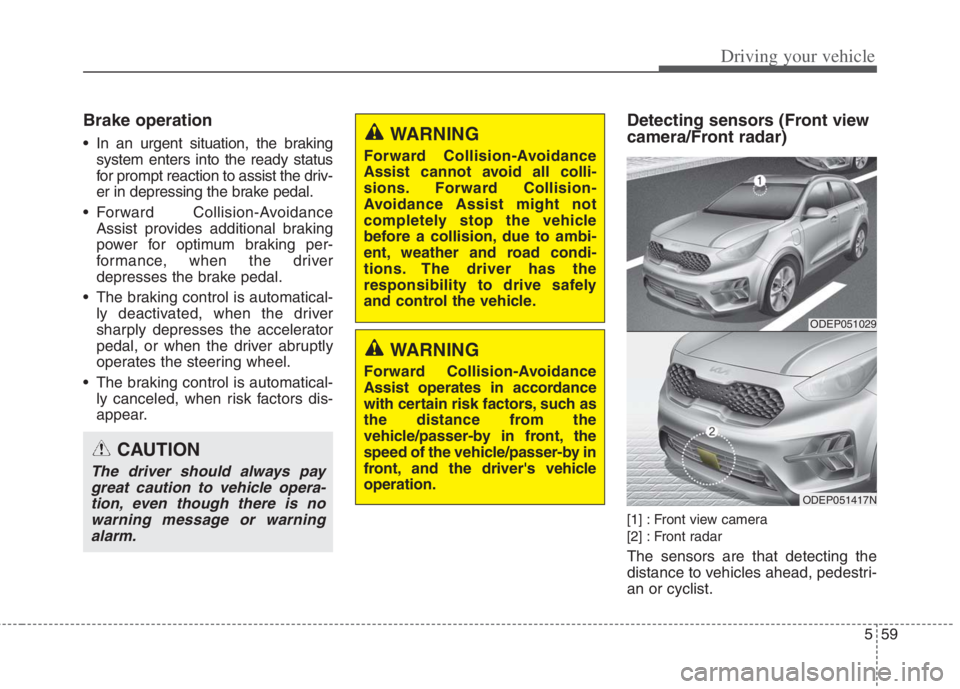
Detecting sensors (Front view
camera/Front radar)
[1] : Front view camera
[2] : Front radar
The sensors are that detecting the
distance to vehicles ahead, pedestri-
an or cyclist.
CAUTION
The driver should always pay
great caution to vehicle opera-
tion, even though there is no
warning message or warning
alarm.
WARNING
Forward Collision-Avoidance
Assist cannot avoid all colli-
sions. Forward Collision-
Avoidance Assist might not
completely stop the vehicle
before a collision, due to ambi-
ent, weather and road condi-
tions. The driver has the
responsibility to drive safely
and control the vehicle.
WARNING
Forward Collision-Avoidance
Assist operates in accordance
with certain risk factors, such as
the distance from the
vehicle/passer-by in front, the
speed of the vehicle/passer-by in
front, and the driver's vehicle
operation.
ODEP051029
ODEP051417N
Page 389 of 684
Driving your vehicle
62 5
WARNING
Forward Collision-Avoidance
Assist is only a supplemental
function for the driver’s con-
venience. The driver has the
ultimate responsibility to con-
trol and operate the vehicle
safely. Do not solely depend on
Forward Collision-Avoidance
Assist. Rather, maintain a safe
braking distance, and, if neces-
sary, depress the brake pedal
to lower the driving speed.
In certain instances and under
certain driving conditions,
Forward Collision-Avoidance
Assist may activate uninten-
tionally. This initial warning
message appears on the LCD
display with a warning chime.
(Continued)
(Continued)
Also, in certain instances the
front view camera or front
radar recognition function may
not detect the vehicle, pedestri-
an or cyclist (if equipped)
ahead. Forward Collision-
Avoidance Assist may not acti-
vate and the warning message
will not be displayed.
Forward Collision-Avoidance
Assist may unnecessarily pro-
duce the warning message
and the warning alarms. Also,
due to the sensing limitation,
Forward Collision-Avoidance
Assist may not produce the
warning message and the
warning alarm at all.
When there is a malfunction
with Forward Collision-
Avoidance Assist, the braking
control does not operate upon
detecting a collision risk even
with other braking systems
normally operating.
(Continued)(Continued)
Forward Collision-Avoidance
Assist operates only for the
vehicle/pedestrian in front, while
driving forward. It does not oper-
ate for any animals or vehicles
in the opposite direction.
Forward Collision-Avoidance
Assist does not recognize the
vehicle, which transversally
drives across the crossroad,
or the vehicle, which is parked
in the transversal direction.
If the vehicle in front stops
suddenly, you may have less
control of the brake system.
Therefore, always keep safe
distance between your vehicle
and the vehicle in front of you.
Forward Collision-Avoidance
Assist may activate during
braking and the vehicle may
stop suddenly. And the load in
the vehicle may endanger pas-
sengers. Therefore, always be
mindful of the load volume in
the vehicle.
(Continued)
Page 390 of 684
563
Driving your vehicle
Limitation of Forward
Collision-Avoidance Assist
Forward Collision-Avoidance Assist
is an assistant function for a driver in
a certain risky driving condition and it
does not take every responsibility for
all risks from driving condition.
Forward Collision-Avoidance Assist
monitors the driving situations
through the front radar and the front
view camera sensor. Thus, for a situ-
ation out of the sensing range,
Forward Collision-Avoidance Assist
may not normally operate. The driver
should pay great caution in the fol-
lowing situations. Forward Collision-
Avoidance Assist operation may be
limited.
(Continued)
Forward Collision-Avoidance
Assist may not activate if the
driver applies the brake pedal
to avoid risk of collision.
Forward Collision-Avoidance
Assist does not operate when
the vehicle is in reverse. In
these circumstances, you
must maintain a safe braking
distance, and if necessary,
depress the brake pedal to
reduce the driving speed in
order to maintain a safe dis
tance.
The regular braking function
will operate normally even if
There is a problem with
Forward Collision-Avoidance
Assist brake control function
or other functions. In this
case, the braking control will
not operate in an imminent
collision.
(Continued)(Continued)
Forward Collision-Avoidance
Assist may not activate
according to driving condi-
tion, traffic on the road,
weather, road condition, etc.
Forward Collision-Avoidance
Assist may not activate in
response to all types of vehi-
cles.
Page 394 of 684
567
Driving your vehicle
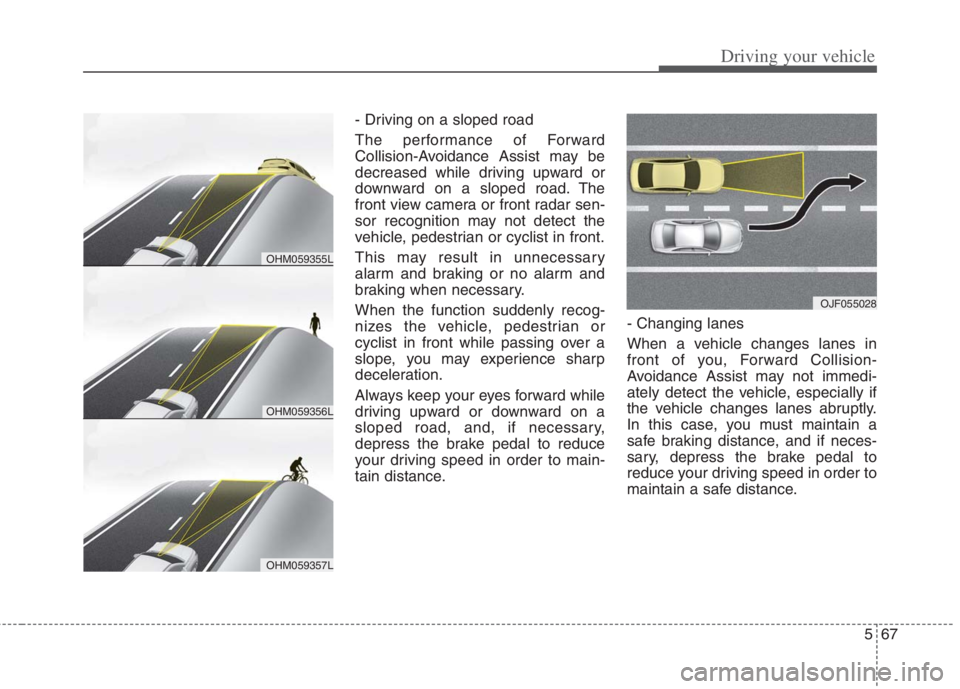
- Driving on a sloped road
The performance of Forward
Collision-Avoidance Assist may be
decreased while driving upward or
downward on a sloped road. The
front view camera or front radar sen-
sor recognition may not detect the
vehicle, pedestrian or cyclist in front.
This may result in unnecessary
alarm and braking or no alarm and
braking when necessary.
When the function suddenly recog-
nizes the vehicle, pedestrian or
cyclist in front while passing over a
slope, you may experience sharp
deceleration.
Always keep your eyes forward while
driving upward or downward on a
sloped road, and, if necessary,
depress the brake pedal to reduce
your driving speed in order to main-
tain distance.- Changing lanes
When a vehicle changes lanes in
front of you, Forward Collision-
Avoidance Assist may not immedi-
ately detect the vehicle, especially if
the vehicle changes lanes abruptly.
In this case, you must maintain a
safe braking distance, and if neces-
sary, depress the brake pedal to
reduce your driving speed in order to
maintain a safe distance.
OJF055028
OHM059356L
OHM059355L
OHM059357L
Page 397 of 684
Driving your vehicle
70 5
✽
✽
NOTICE
In some instances, Forward
Collision-Avoidance Assist may be
cancelled when subjected to electro-
magnetic interference.
This device complies with
Industry Canada licence-exempt
RSS standard(s).
Operation is subject to the following
conditions:
1. This device may not cause inter-
ference, and
2. This device must accept any inter-
ference, including interference that
may cause undesired operation of
the device.
3. Changes or modifications not
expressly approved by the party
responsible for compliance could
void the user's authority to operate
the device.(Continued)
Never try to test the operation
of Forward Collision-Avoidance
Assist. Doing so may cause
severe injury or death.
If the front bumper, front glass,
front view camera or front
radar have been replaced or
repaired, have your vehicle
inspected by an authorized Kia
dealer.
If the function detects an
object that has a similar
shape or characteristics of a
vehicle or a pedestrian,
Forward Collision-Avoidance
Assist may operate.WARNING
Do not use Forward Collision
avoidance Assist when towing a
vehicle. Application of Forward
Collision-Avoidance Assist
while towing may adversely
affect the safety of your vehicle
or the towing vehicle.
Use extreme caution when the
vehicle in front of you has
cargo that extends rearward
from the cab, or when the
vehicle in front of you has
higher ground clearance.
Forward Collision-Avoidance
Assist is designed to detect
and monitor the vehicle ahead
or detect a pedestrian or
cyclist in the roadway through
front view camera recognition
and front radar signals. It may
not always detect bicycles,
motorcycles, or smaller
wheeled objects such as lug-
gage bags, shopping carts, or
strollers.
(Continued)
Page 398 of 684
571
Driving your vehicle
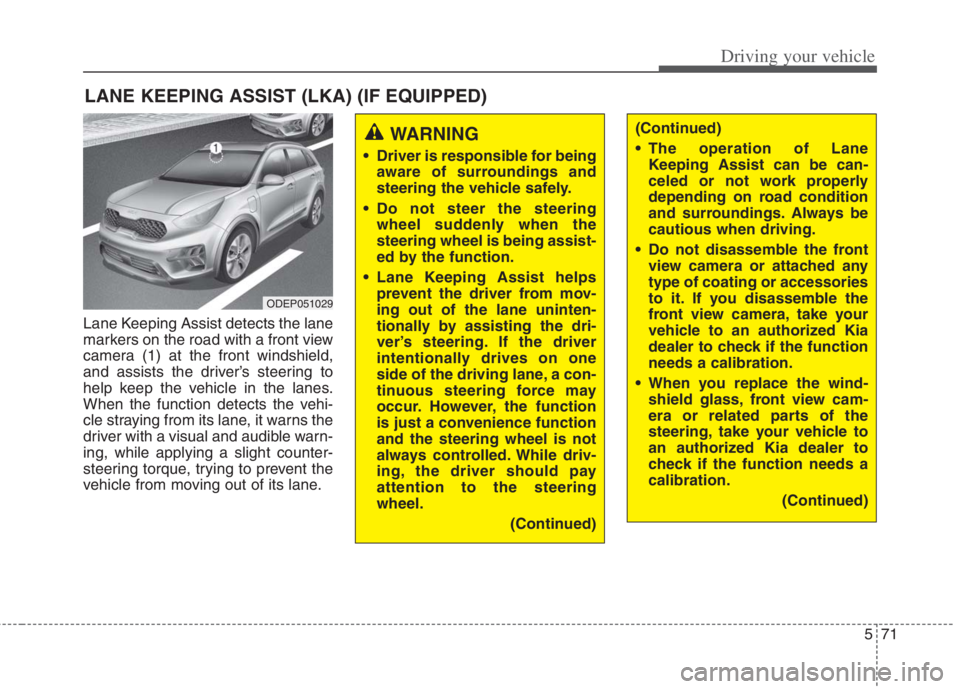
Lane Keeping Assist detects the lane
markers on the road with a front view
camera (1) at the front windshield,
and assists the driver’s steering to
help keep the vehicle in the lanes.
When the function detects the vehi-
cle straying from its lane, it warns the
driver with a visual and audible warn-
ing, while applying a slight counter-
steering torque, trying to prevent the
vehicle from moving out of its lane.
LANE KEEPING ASSIST (LKA) (IF EQUIPPED)
WARNING
Driver is responsible for being
aware of surroundings and
steering the vehicle safely.
Do not steer the steering
wheel suddenly when the
steering wheel is being assist-
ed by the function.
Lane Keeping Assist helps
prevent the driver from mov-
ing out of the lane uninten-
tionally by assisting the dri-
ver’s steering. If the driver
intentionally drives on one
side of the driving lane, a con-
tinuous steering force may
occur. However, the function
is just a convenience function
and the steering wheel is not
always controlled. While driv-
ing, the driver should pay
attention to the steering
wheel.
(Continued)
(Continued)
The operation of Lane
Keeping Assist can be can-
celed or not work properly
depending on road condition
and surroundings. Always be
cautious when driving.
Do not disassemble the front
view camera or attached any
type of coating or accessories
to it. If you disassemble the
front view camera, take your
vehicle to an authorized Kia
dealer to check if the function
needs a calibration.
When you replace the wind-
shield glass, front view cam-
era or related parts of the
steering, take your vehicle to
an authorized Kia dealer to
check if the function needs a
calibration.
(Continued)
ODEP051029
Page 403 of 684
Driving your vehicle
76 5
✽
✽
NOTICE
• Even though the steering is assist-
ed by the function, the driver may
control the steering.
• The steering wheel may feel heav-
ier when the steering wheel is
assisted by the function than when
it is not. WARNING
The driver is responsible for
accurate steering.
Even though the steering is
assisted by the function, the
driver may control the steer-
ing wheel.
Turn off the function and drive
the vehicle in the below situa-
tions:
- In bad weather
- In bad road conditions
- When the steering wheel
needs to be controlled by the
driver frequently.
- When towing a vehicle or
trailer.
The steering wheel may feel
heavier when the steering
wheel is assisted by the func-
tion than when it is not.
WARNING
The hands-off warning mes-
sage may be delayed accord-
ing to road conditions.
Therefore, always have your
hands on the steering wheel
while driving.
If you hold the steering wheel
lightly, the function may dis-
play the hands off warning
because Lane Keeping Assist
may believe you are not grab-
bing the wheel.
Page 421 of 684
Driving your vehicle
94 5
WARNING
Driver Attention Warning is
not a substitute for safe driv-
ing practices, but a conven-
ience function only. It is the
driver's responsibility to
always drive cautiously and
safely.
A fatigued driver should take
a break, even if there is no
suggestion to do so by Driver
Attention Warning.
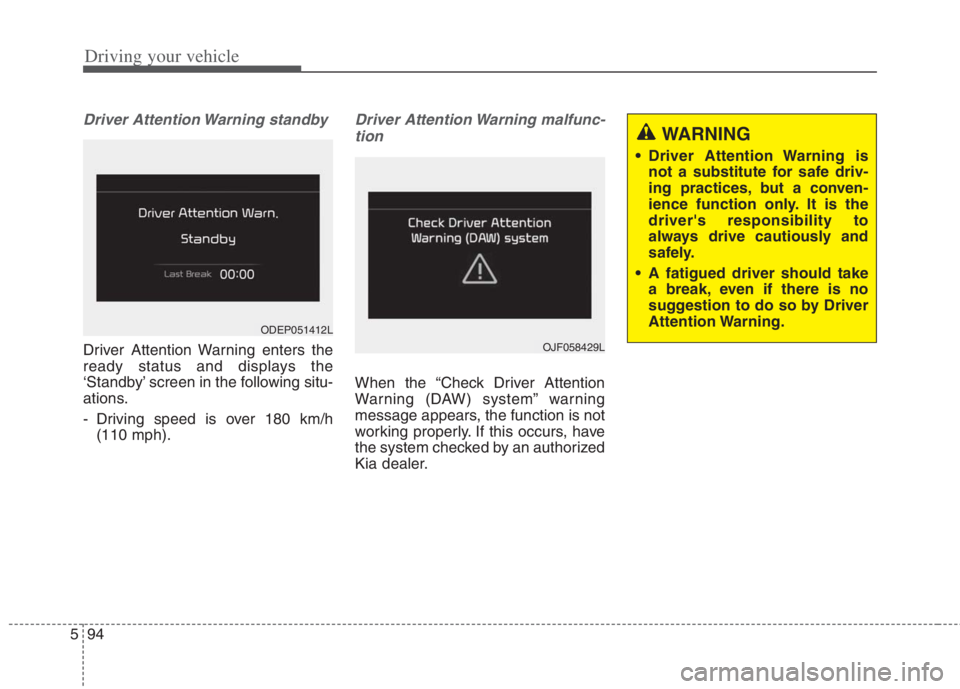
Driver Attention Warning standby
Driver Attention Warning enters the
ready status and displays the
‘Standby’ screen in the following situ-
ations.
- Driving speed is over 180 km/h
(110 mph).
Driver Attention Warning malfunc-
tion
When the “Check Driver Attention
Warning (DAW) system” warning
message appears, the function is not
working properly. If this occurs, have
the system checked by an authorized
Kia dealer.
OJF058429L
ODEP051412L
Page 437 of 684
Driving your vehicle
110 5
(Continued)
- Highway interchange and
tollgate
- Road surrounded by multi-
ple steel constructions (sub-
way construction, steel tun-
nel, etc)
- Parking lot
- Lanes beside guard rail on a
road
- Slippery road with rain, ice,
or snow covered
- Abrupt curved road
- Steep hills
- Windy roads
- Off roads
- Rods under construction
- Rumble strip
- When driving near crash bar-
riers
(Continued)(Continued)
- When the vehicle sensing
ability decreases due to
vehicle modification that
causes a difference in the
level of the vehicle's front
and rear
- When driving with limited
view (possibly due to bad
weather, such as fog, snow,
rain or sandstorm)
Pay particular attention to the
driving conditions whenever
using Smart Cruise Control.
Smart Cruise Control is not a
substitute for safe driving. It is
the responsibility of the driver
to always check the speed
and distance of the vehicle
ahead.
Be careful when driving
downhill using Smart Cruise
Control.
(Continued)(Continued)
Smart Cruise Control should
not be used when the vehicle
is being towed.
Always set the vehicle speed
under the applicable speed
limit.
Unexpected situations may
lead to accidents. Pay contin-
uous attention to road condi-
tions and your surroundings
even when Smart Cruise
Control is operating.