climate KIA NIRO HYBRID EV 2022 Owners Manual
[x] Cancel search | Manufacturer: KIA, Model Year: 2022, Model line: NIRO HYBRID EV, Model: KIA NIRO HYBRID EV 2022Pages: 684, PDF Size: 9.67 MB
Page 37 of 684

H34
Switching to Hybrid mode to allow
heating (Plug-in hybrid vehicle)
When the coolant temperature is
lower than outdoor temperature is
lower than -13°C (8.6°F) On for
heating, this message will be dis-
played in the cluster. Then, the
vehicle will automatically switch to
HEV mode.
When the outdoor temperature is
higher than -10°C (14°F), or you
turn the climate control Off, the
vehicle will automatically return to
EV mode.
Wait until fuel door opens
(Plug-in hybrid vehicle)
This message is displayed when you
attempt to open the fuel filler lid with
the fuel tank pressurized. Wait until
the fuel tank is depressurized.
✽ ✽
NOTICE
• It may take up to 20 seconds to
open fuel filler lid.
• When the fuel filler lid is frozen
and does not open after 20 seconds
at freezing temperature, slightly
tap the fuel filler lid and then
attempt to open it.
Fuel door open
(Plug-in hybrid vehicle)
This message is displayed when the
fuel filler lid is opened.
Also means "Ready to refuel".
Check fuel door
(Plug-in hybrid vehicle)
This message is displayed when the
fuel filler lid is open or an abnormal-
ity has occurred.
Charging Door Open
(Plug-in hybrid vehicle)
This message indicates that the
charging door is open.
(Driving with the charging door open
may result in moisture inflow or dam-
age. This message is used to prevent
such occurrences.)
DRIVING THE HYBRID/PLUG-IN HYBRID VEHICLE (CONT.)
Page 64 of 684
25
Your vehicle at a glance
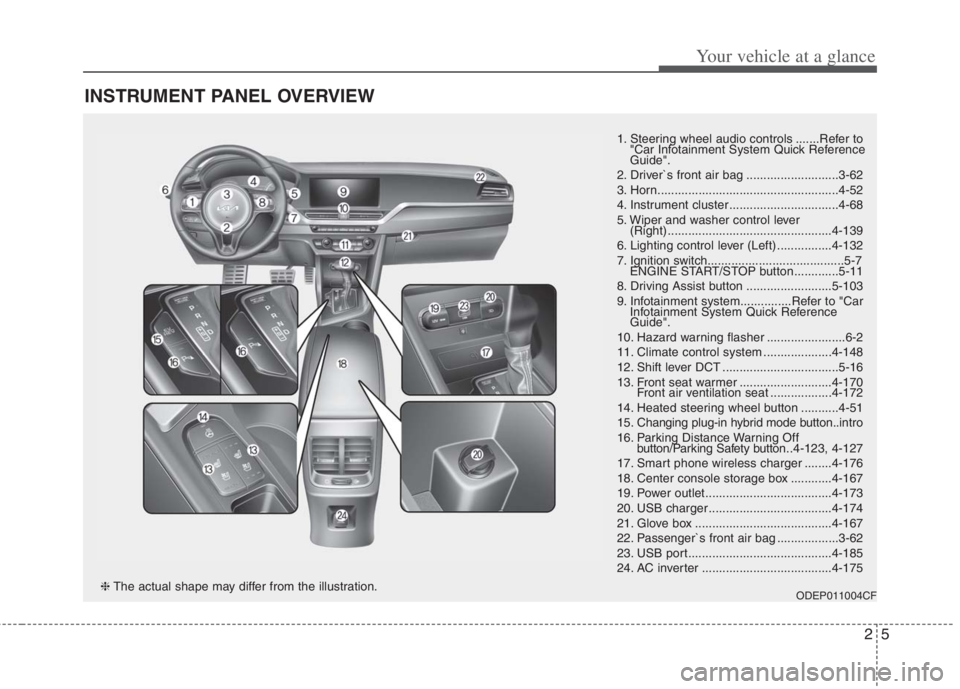
INSTRUMENT PANEL OVERVIEW
1. Steering wheel audio controls .......Refer to
"Car Infotainment System Quick Reference
Guide".
2. Driver`s front air bag ...........................3-62
3. Horn.....................................................4-52
4. Instrument cluster ................................4-68
5. Wiper and washer control lever
(Right) ................................................4-139
6. Lighting control lever (Left) ................4-132
7. Ignition switch........................................5-7
ENGINE START/STOP button .............5-11
8. Driving Assist button .........................5-103
9. Infotainment system...............Refer to "Car
Infotainment System Quick Reference
Guide".
10. Hazard warning flasher .......................6-2
11. Climate control system ....................4-148
12. Shift lever DCT ..................................5-16
13. Front seat warmer ...........................4-170
Front air ventilation seat ..................4-172
14. Heated steering wheel button ...........4-51
15. Changing plug-in hybrid mode button..intro
16. Parking Distance Warning Off
button/Parking Safety button..4-123, 4-127
17. Smart phone wireless charger ........4-176
18. Center console storage box ............4-167
19. Power outlet.....................................4-173
20. USB charger ....................................4-174
21. Glove box ........................................4-167
22. Passenger`s front air bag ..................3-62
23. USB port..........................................4-185
24. AC inverter ......................................4-175
ODEP011004CF❈The actual shape may differ from the illustration.
Page 141 of 684
. . . . . . . . . . . . . . . . . . . . . . . . . . . . . . . 4-146
. . . . . . . . . . . . . . . . . . . . . . . . . . . . . . . . 4-146
Defroster . . . . . . . . . . . . . . . . . . . . . . . . . . . . . . . . 4-147
. . . . . . . . . . . . . . . . . . . . . . . 4-147
Automatic climate control system. . . . . . . . . . . . 4-148
. . . . . . . . . 4-149
. . . . . . . . . . . 4-151
. . . . . . . . . . . . . . . . . . . . . . . . . . . . 4-157
. . . . . . . . . . . . . . . . . . . . . . . . 4-159
. . . . . . . . . . . . . . . . 4-160
. . . . . . . . . . 4-160
. . . . . . . . . . . . . . . . . . . . . . 4-161
and compressor lubricant. . . . . . . . . . . . . . . . . . . . 4-162
Windshield defrosting and defogging . . . . . . . . . 4-163
. . . . . . . . . . . . . . 4-163
Storage compartments . . . . . . . . . . . . . . . . . . . . . 4-167
. . . . . . . . . . . . . . . . . . . . . . . 4-167
. . . . . . . . . . . . . . . . . . . . . . . . . . . . . . . . . . 4-16\
7
. . . . . . . . . . . . . . . . . . . . . . . . . . . . . 4-168
. . . . . . . . . . . . . . . . . . . . . . . . . . . . . . . . 4-169
Interior features . . . . . . . . . . . . . . . . . . . . . . . . . . 4-170
. . . . . . . . . . . . . . . . . . . . . . . . . . . . . . . . . 4-170
. . . . . . . . . . . . . . . . . . . . . . . . . . . . . . . . 4-170 . . . . . . . . . . . . . . . . . . . . . . . . . . 4-172
. . . . . . . . . . . . . . . . . . . . . . . . . . . . . . . . . . . 4-\
173
. . . . . . . . . . . . . . . . . . . . . . . . . . . . . . . . 4-173
. . . . . . . . . . . . . . . . . . . . . . . . . . . . . . . . 4-174
. . . . . . . . . . . . . . . . . . . . . . . . . . . . . . . . . 4-175
. . . . . . . . . . 4-176
. . . . . . . . . . . . . . . . . . . . . . . . . . . . . . 4-180
. . . . . . . . . . . . . . . . . . . . . . . . . . 4-181
. . . . . . . . . . . . . . . . . . . . . . . . 4-182
Exterior features. . . . . . . . . . . . . . . . . . . . . . . . . . 4-183
. . . . . . . . . . . . . . . . . . . . . . . . . . . . . . . . . . 4-18\
3
Infotainment system . . . . . . . . . . . . . . . . . . . . . . . 4-185
. . . . . . . . . . . . . . . . . . . . . . . . . . . . . . . . . . . 4-\
185
. . . . . . . . . . . . . . . . . . . . . 4-186
Declaration of Conformity . . . . . . . . . . . . . . . . . 4-189
4
Page 160 of 684
Features of your vehicle
22 4
DOOR LOCKS
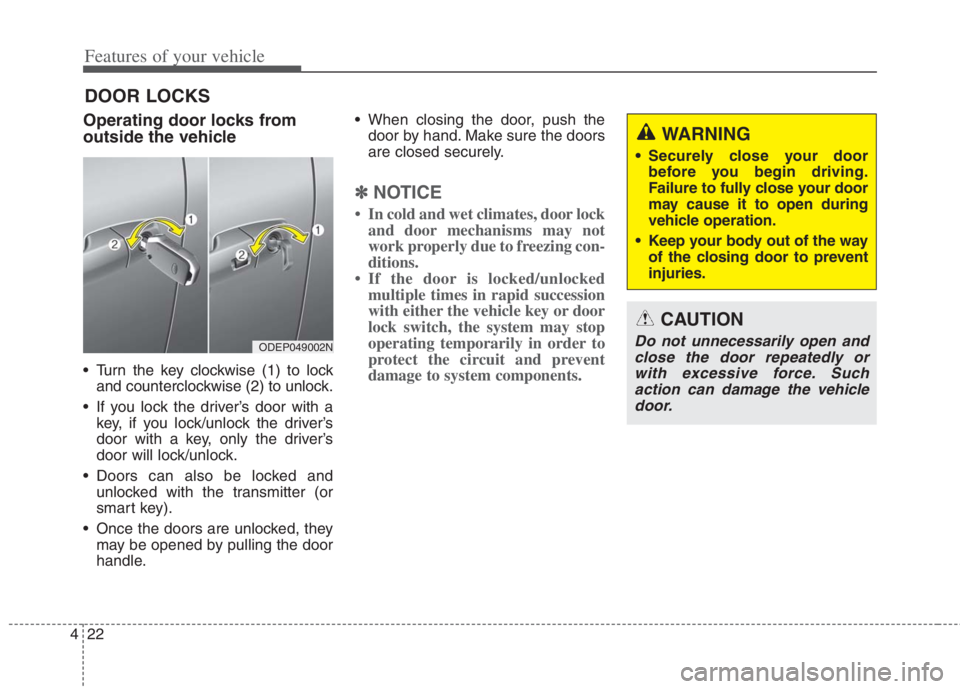
Operating door locks from
outside the vehicle
Turn the key clockwise (1) to lock
and counterclockwise (2) to unlock.
If you lock the driver’s door with a
key, if you lock/unlock the driver’s
door with a key, only the driver’s
door will lock/unlock.
Doors can also be locked and
unlocked with the transmitter (or
smart key).
Once the doors are unlocked, they
may be opened by pulling the door
handle. When closing the door, push the
door by hand. Make sure the doors
are closed securely.
✽ ✽
NOTICE
• In cold and wet climates, door lock
and door mechanisms may not
work properly due to freezing con-
ditions.
• If the door is locked/unlocked
multiple times in rapid succession
with either the vehicle key or door
lock switch, the system may stop
operating temporarily in order to
protect the circuit and prevent
damage to system components.
ODEP049002N
WARNING
Securely close your door
before you begin driving.
Failure to fully close your door
may cause it to open during
vehicle operation.
Keep your body out of the way
of the closing door to prevent
injuries.
CAUTION
Do not unnecessarily open and
close the door repeatedly or
with excessive force. Such
action can damage the vehicle
door.
Page 166 of 684
Features of your vehicle
28 4
Opening the liftgate
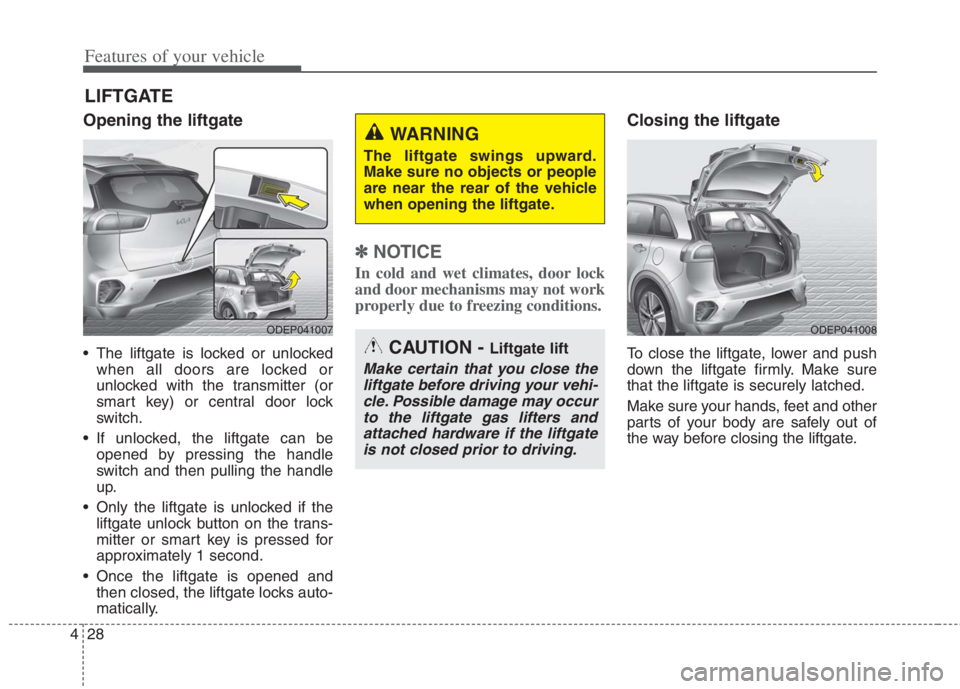
The liftgate is locked or unlocked
when all doors are locked or
unlocked with the transmitter (or
smart key) or central door lock
switch.
If unlocked, the liftgate can be
opened by pressing the handle
switch and then pulling the handle
up.
Only the liftgate is unlocked if the
liftgate unlock button on the trans-
mitter or smart key is pressed for
approximately 1 second.
Once the liftgate is opened and
then closed, the liftgate locks auto-
matically.
✽ ✽
NOTICE
In cold and wet climates, door lock
and door mechanisms may not work
properly due to freezing conditions.
Closing the liftgate
To close the liftgate, lower and push
down the liftgate firmly. Make sure
that the liftgate is securely latched.
Make sure your hands, feet and other
parts of your body are safely out of
the way before closing the liftgate.
LIFTGATE
ODEP041007ODEP041008
CAUTION - Liftgate lift
Make certain that you close the
liftgate before driving your vehi-
cle. Possible damage may occur
to the liftgate gas lifters and
attached hardware if the liftgate
is not closed prior to driving.
WARNING
The liftgate swings upward.
Make sure no objects or people
are near the rear of the vehicle
when opening the liftgate.
Page 169 of 684
431
Features of your vehicle
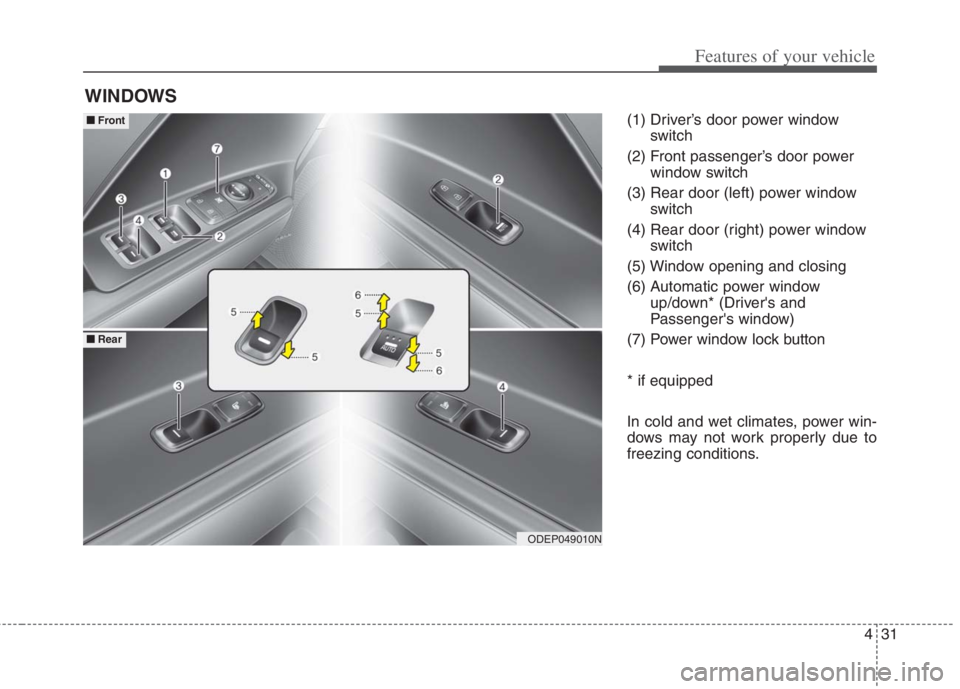
(1) Driver’s door power window
switch
(2) Front passenger’s door power
window switch
(3) Rear door (left) power window
switch
(4) Rear door (right) power window
switch
(5) Window opening and closing
(6) Automatic power window
up/down* (Driver's and
Passenger's window)
(7) Power window lock button
* if equipped
In cold and wet climates, power win-
dows may not work properly due to
freezing conditions.
WINDOWS
ODEP049010N
■ ■
Front
■ ■
Rear
Page 244 of 684
Features of your vehicle
106 4
Switching to Hybrid mode to
allow heating or air conditioning
(Plug-in hybrid)
When the outdoor temperature is
lower than -13°C (8.6°F), and you
turn the climate control On for
heating, the above message will be
displayed in the cluster. Then, the
vehicle will automatically switch to
HEV mode.
When the outdoor temperature is
higher than -10°C (14°F), or you
turn the climate control Off, the
vehicle will automatically return to
EV mode.
Switching to Hybrid mode for
self-diagnosis (Plug-in hybrid)
This message is displayed for self-
diagnosis of the hybrid mode sys-
tem.
Page 286 of 684
Features of your vehicle
148 4
AUTOMATIC CLIMATE CONTROL SYSTEM
ODEP049300N
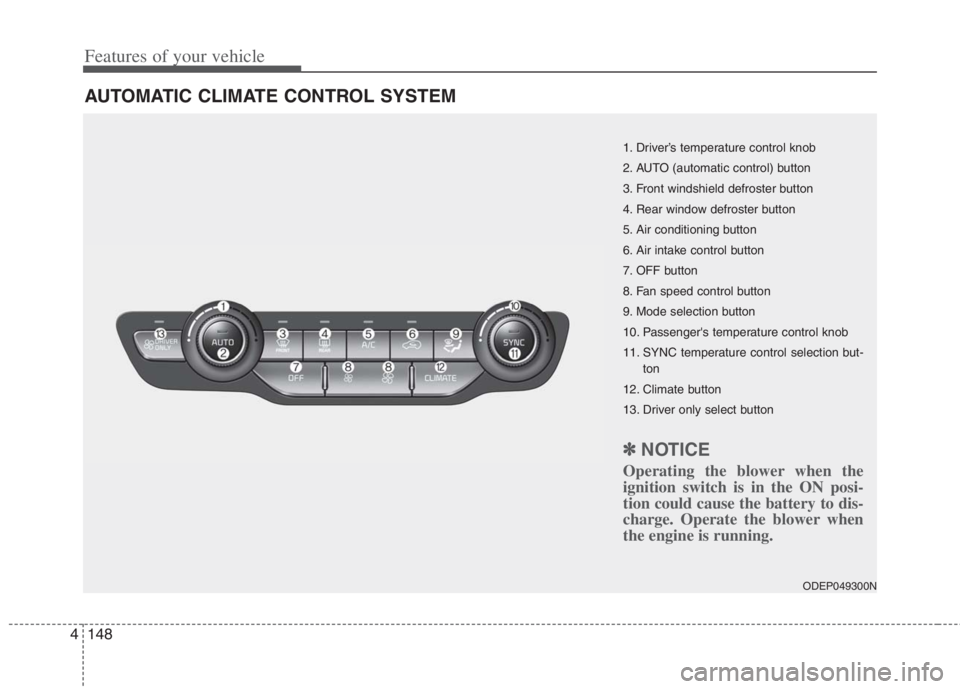
1. Driver’s temperature control knob
2. AUTO (automatic control) button
3. Front windshield defroster button
4. Rear window defroster button
5. Air conditioning button
6. Air intake control button
7. OFF button
8. Fan speed control button
9. Mode selection button
10. Passenger's temperature control knob
11. SYNC temperature control selection but-
ton
12. Climate button
13. Driver only select button
✽ ✽
NOTICE
Operating the blower when the
ignition switch is in the ON posi-
tion could cause the battery to dis-
charge. Operate the blower when
the engine is running.
Page 287 of 684
4149
Features of your vehicle
Automatic heating and air con-
ditioning
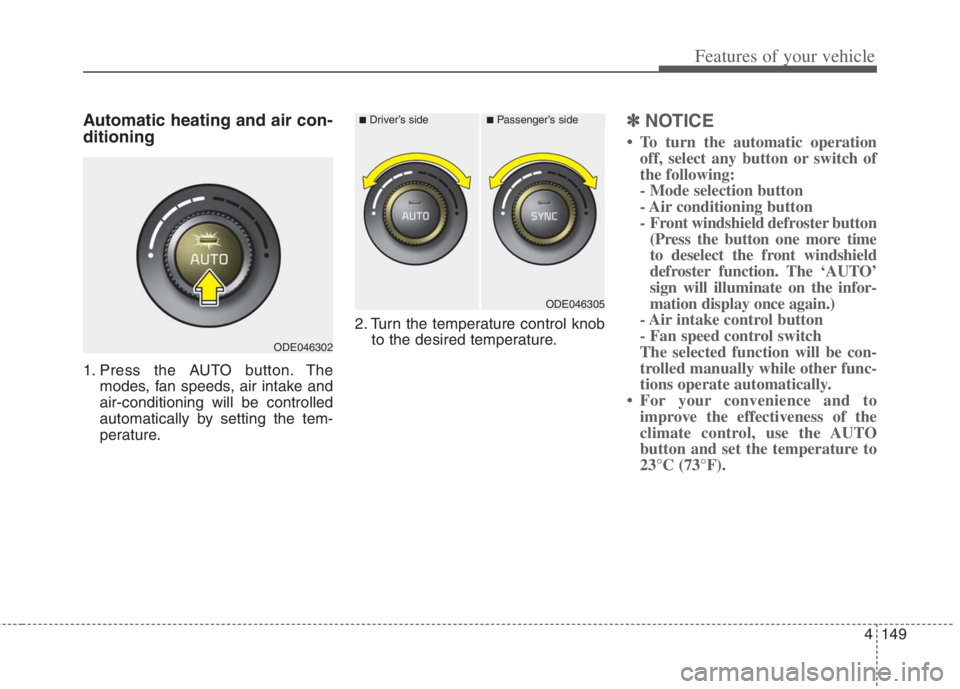
1. Press the AUTO button. The
modes, fan speeds, air intake and
air-conditioning will be controlled
automatically by setting the tem-
perature.2. Turn the temperature control knob
to the desired temperature.
✽ ✽
NOTICE
• To turn the automatic operation
off, select any button or switch of
the following:
- Mode selection button
- Air conditioning button
- Front windshield defroster button
(Press the button one more time
to deselect the front windshield
defroster function. The ‘AUTO’
sign will illuminate on the infor-
mation display once again.)
- Air intake control button
- Fan speed control switch
The selected function will be con-
trolled manually while other func-
tions operate automatically.
• For your convenience and to
improve the effectiveness of the
climate control, use the AUTO
button and set the temperature to
23°C (73°F).
ODE046302
■Driver’s side■Passenger’s side
ODE046305
Page 294 of 684

Features of your vehicle
156 4
Air conditioning
Press the A/C button to turn the air
conditioning system on (indicator
light will illuminate).
Press the button again to turn the air
conditioning system off.
OFF mode
Press the front blower OFF button to
turn off the front air climate control
system. However, you can still oper-
ate the mode and air intake buttons
as long as the ignition switch is in the
ON position.
WARNING - Recirculated
Air
Continued use of the climate
control system in the recirculat-
ed air position can cause
drowsiness or sleepiness, and
loss of vehicle control. Set the
air intake control to the outside
(fresh) air position as much as
possible while driving.
WARNING - Sleeping with
A/C on
Do not sleep in a vehicle with
the air conditioning or heating
on as this may cause serious
harm or death due to a drop in
your oxygen level and/or body
temperature.
WARNING -Reduced
Visibility
Continuous use of the climate
control system in the recirculat-
ed air position may allow
humidity to increase inside the
vehicle which may fog the glass
and obscure visibility.
ODE046309ODE046310