ignition KIA Optima 2012 3.G Owner's Guide
[x] Cancel search | Manufacturer: KIA, Model Year: 2012, Model line: Optima, Model: KIA Optima 2012 3.GPages: 382, PDF Size: 8.75 MB
Page 90 of 382
43
Features of your vehicle
Immobilizer system (if equipped)
Your vehicle may be equipped with an
electronic engine immobilizer system to
reduce the risk of unauthorized vehicle
use.
Your immobilizer system is comprised of
a small transponder in the ignition key
and electronic devices inside the vehicle.
With the immobilizer system, whenever
you insert your ignition key into the igni-
tion switch and turn it to ON, it checks
and determines and verifies if the ignition
key is valid or not.
If the key is determined to be valid, the
engine will start.
If the key is determined to be invalid, the
engine will not start.
To activate the immobilizer system:
Turn the ignition key to the OFF position.
The immobilizer system activates auto-
matically. Without a valid ignition key for
your vehicle, the engine will not start.
To deactivate the immobilizer sys-tem:
Insert the ignition key into the key cylin-
der and turn it to the ON position.
✽ ✽ NOTICE
When starting the engine, do not use the
key with other immobilizer keys around.
Otherwise the engine may not start or
may stop soon after it starts. Keep each
key separate in order to avoid a starting
malfunction.
✽ ✽NOTICE
If you need additional keys or lose your
keys, consult an authorized Kia dealer.
WARNING
Use only Kia original parts for the
ignition key in your vehicle. If an
aftermarket key is used, the ignition
switch may not return to ON after
START. If this happens, the starter
will continue to operate causing
damage to the starter motor and
possible fire due to excessive cur-
rent in the wiring.
WARNING
In order to prevent theft of your
vehicle, do not leave spare keys
anywhere in your vehicle. Your
immobilizer password is a cus-
tomer unique password and should
be kept confidential. Do not leave
this number anywhere in your vehi-
cle.
CAUTION
Do not put metal accessories near
the ignition switch. Metal acces- sories may interrupt the transpon-der signal and may prevent the engine from being started.
CAUTION
The transponder in your ignitionkey is an important part of theimmobilizer system. It is designedto give years of trouble-free service, however you should avoid expo-sure to moisture, static electricity and rough handling. Immobilizersystem malfunction could occur.
Page 91 of 382
Features of your vehicle
44
This device complies with Industry
Canada Standard RSS-210.
Operation is subject to the following two
conditions:
1. This device may not cause harmfulinterference, and
2. This device must accept any interfer- ence received, including interference
that may cause undesired operation.
Limp home (override) procedure
When you turn the ignition switch to the
ON position, if the immobilizer indicator
( ) goes off after blinking 5 times,
your transponder equipped in the ignition
key is out of order. You cannot start the
engine without the limp home procedure.
To start the engine, you have to input
your password by using the ignition
switch. Your password is only available
from an authorized Kia dealership.
Contact an authorized dealer for more
information.
The following procedure is how to input
your password of “2345” as an example.
1. Turn the ignition s witch to the ON posi-
tion. The immobilizer indicator ( )
will blink 5 times and go off indicating
the beginning of the limp home proce-
dure.
2. Turn the ignition switch to the ACC position.
3. To enter the first digit (in this example “2”), turn the ignition switch to the ON
and ACC position twice. Perform the
same procedure for the next digits
between 3 seconds and 10 seconds
(for example, for “3”, turn the ignition
ON and ACC 3 times). 4. If all of the digits have been input suc-
cessfully, you have to start the engine
within 30 seconds. If you attempt to
start the engine after 30 seconds, the
engine will not start and you will have
to input your password again.
After performing the limp home proce-
dure, you have to see an authorized Kia
dealer immediately to inspect and repair
your ignition key or immobilizer system.
WARNING
Changes or modifications not
expressly approved by the party
responsible for compliance could
void the user's authority to operate
the equipment.
CAUTION
Do not change, alter or adjust the immobilizer system because itcould cause the immobilizer sys-tem to malfunction and should onlybe serviced by an authorized Kia dealer.
Malfunctions caused by improperalterations, adjustments or modifi-cations to the immobilizer systemare not covered by your vehiclemanufacturer warranty.
Page 92 of 382
45
Features of your vehicle
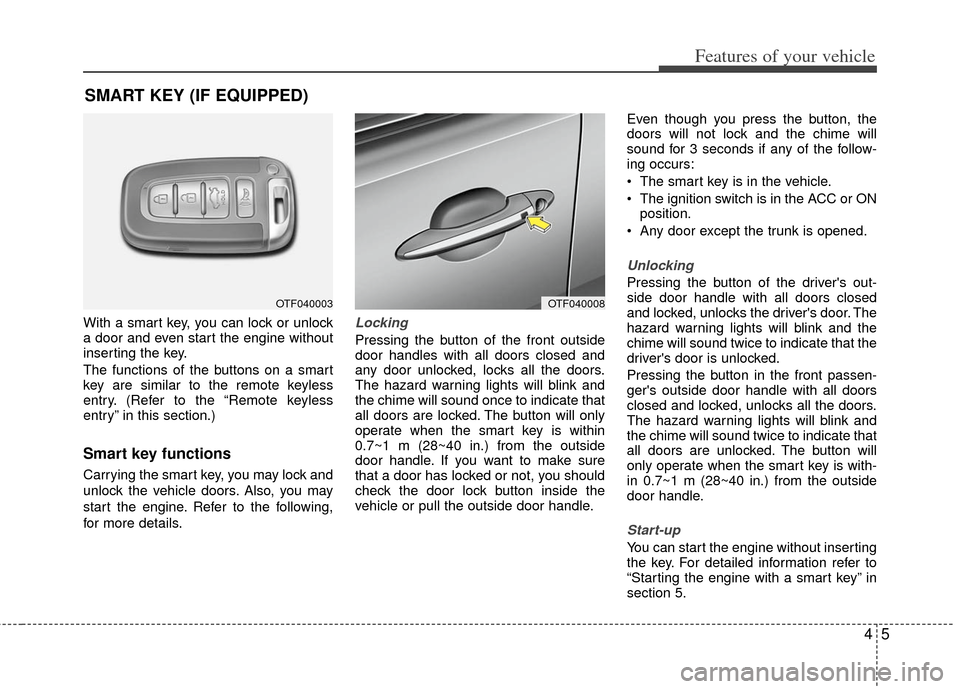
With a smart key, you can lock or unlock
a door and even start the engine without
inserting the key.
The functions of the buttons on a smart
key are similar to the remote keyless
entry. (Refer to the “Remote keyless
entry” in this section.)
Smart key functions
Carrying the smart key, you may lock and
unlock the vehicle doors. Also, you may
start the engine. Refer to the following,
for more details.
Locking
Pressing the button of the front outside
door handles with all doors closed and
any door unlocked, locks all the doors.
The hazard warning lights will blink and
the chime will sound once to indicate that
all doors are locked. The button will only
operate when the smart key is within
0.7~1 m (28~40 in.) from the outside
door handle. If you want to make sure
that a door has locked or not, you should
check the door lock button inside the
vehicle or pull the outside door handle.Even though you press the button, the
doors will not lock and the chime will
sound for 3 seconds if any of the follow-
ing occurs:
The smart key is in the vehicle.
The ignition switch is in the ACC or ON
position.
Any door except the trunk is opened.
Unlocking
Pressing the button of the driver's out-
side door handle with all doors closed
and locked, unlocks the driver's door. The
hazard warning lights will blink and the
chime will sound twice to indicate that the
driver's door is unlocked.
Pressing the button in the front passen-
ger's outside door handle with all doors
closed and locked, unlocks all the doors.
The hazard warning lights will blink and
the chime will sound twice to indicate that
all doors are unlocked. The button will
only operate when the smart key is with-
in 0.7~1 m (28~40 in.) from the outside
door handle.
Start-up
You can start the engine without inserting
the key. For detailed information refer to
“Starting the engine with a smart key” in
section 5.
SMART KEY (IF EQUIPPED)
OTF040003OTF040008
Page 95 of 382
Features of your vehicle
84
Precautions
✽
✽NOTICE
The transmitter (or smart key) will not
work if any of following occurs:
• The ignition key is in the ignition
switch.
• You exceed the operating distance limit (about 30 m [90 feet]).
• The battery in the transmitter (or smart key) is weak.
• Other vehicles or objects may be blocking the signal.
• The weather is extremely cold.
• The transmitter (or smart key) is close to a radio transmitter such as a radio
station or an airport which can inter-
fere with normal operation of the
transmitter.
When the transmitter (or smart key)
does not work properly, open and close
the door with the ignition key. If you
have a problem with the transmitter (or
smart key), contact an authorized Kia
dealer.
This device complies with Industry
Canada Standard RSS-210.
Operation is subject to the following two
conditions:
1. This device may not cause harmful
interference, and
2. This device must accept any interfer- ence received, including interference
that may cause undesired operation.
CAUTION
Changes or modifications notexpressly approved by the partyresponsible for compliance could void the user’s authority to operatethe equipment. If the keyless entrysystem is inoperative due to changes or modifications notexpressly approved by the party responsible for compliance, it willnot be covered by your manufactur- er’s vehicle warranty.
CAUTION
Keep the transmitter (or smart key)away from water or any liquid. If thekeyless entry system is inoperativedue to exposure to water or liquids,it will not be covered by your manu- facturer’s vehicle warranty.
Page 97 of 382
Features of your vehicle
10
4
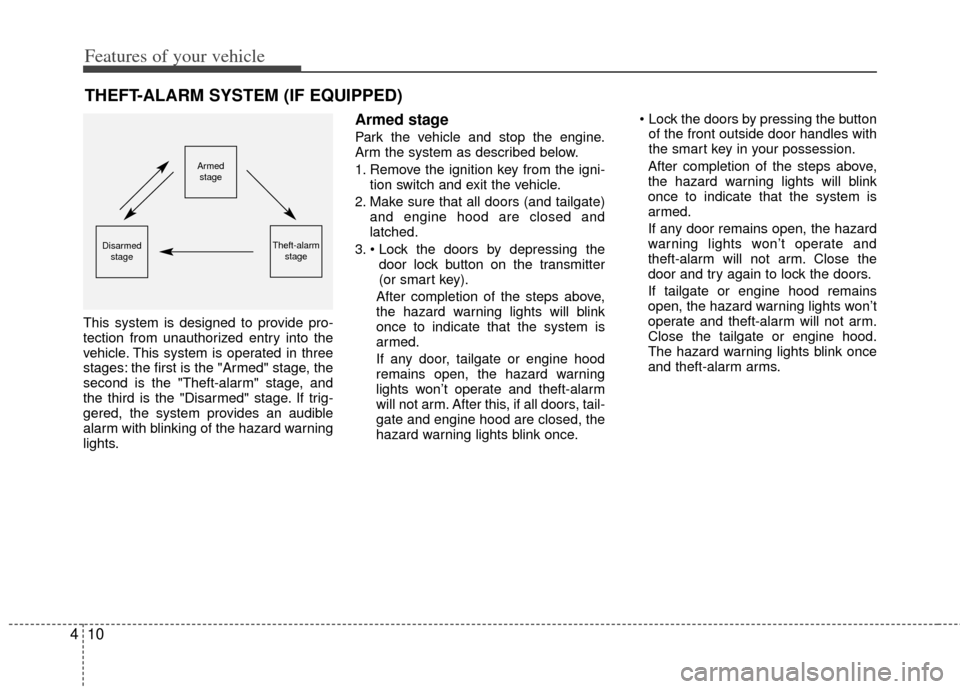
This system is designed to provide pro-
tection from unauthorized entry into the
vehicle. This system is operated in three
stages: the first is the "Armed" stage, the
second is the "Theft-alarm" stage, and
the third is the "Disarmed" stage. If trig-
gered, the system provides an audible
alarm with blinking of the hazard warning
lights.
Armed stage
Park the vehicle and stop the engine.
Arm the system as described below.
1. Remove the ignition key from the igni-
tion switch and exit the vehicle.
2. Make sure that all doors (and tailgate) and engine hood are closed and
latched.
3. door lock button on the transmitter
(or smart key).
After completion of the steps above,
the hazard warning lights will blink
once to indicate that the system is
armed.
If any door, tailgate or engine hood
remains open, the hazard warning
lights won’t operate and theft-alarm
will not arm. After this, if all doors, tail-
gate and engine hood are closed, the
hazard warning lights blink once.
of the front outside door handles with
the smart key in your possession.
After completion of the steps above,
the hazard warning lights will blink
once to indicate that the system is
armed.
If any door remains open, the hazard
warning lights won’t operate and
theft-alarm will not arm. Close the
door and try again to lock the doors.
If tailgate or engine hood remains
open, the hazard warning lights won’t
operate and theft-alarm will not arm.
Close the tailgate or engine hood.
The hazard warning lights blink once
and theft-alarm arms.
THEFT-ALARM SYSTEM (IF EQUIPPED)
Armed stage
Theft-alarm stageDisarmedstage
Page 98 of 382
411
Features of your vehicle
✽
✽NOTICE
The theft-alarm system by the key can be
activated by an authorized Kia dealer.
If you want this feature, consult an
authorized Kia dealer.
Do not arm the system until all pas-
sengers have left the vehicle. If the
system is armed while a passenger(s)
remains in the vehicle, the alarm may
be activated when the remaining pas-
senger(s) leaves the vehicle. If any
door (or tailgate) or engine hood is
opened within 30 seconds after the
system enters the armed stage, the
system will be disarmed to prevent
unnecessary alarm.
Theft-alarm stage
The alarm will be activated if any of the
following occurs while the system is
armed.
A front or rear door is opened without
using the transmitter (or smart key).
The tailgate is opened without using the transmitter (or smart key).
The engine hood is opened.
The horn will sound and the hazard
warning lights will blink continuously for
approximately 27 seconds. To turn off the
system, unlock the doors with the trans-
mitter (or smart key).
Disarmed stage
The system will be disarmed when:
Transmitter
- The door unlock button is pressed.
- The engine is started. (within 3 sec- onds)
- The ignition switch is in the “ON” posi- tion for 30 seconds or more.
Smart key
- The door unlock button is pressed.
- The button of the front outside door ispressed while carrying the smart key.
- The engine is started. (within 3 sec- onds)
After the doors are unlocked, the hazard
warning lights will blink twice to indicate
that the system is disarmed.
After pressing the unlock button, if any
door (or tailgate) is not opened within 30
seconds, the system will be rearmed.
Page 99 of 382
Features of your vehicle
12
4
✽
✽
NOTICE - Non-immobilizer
system
• Avoid trying to start the engine while
the alarm is activated. The vehicle
starting motor is disabled during the
theft-alarm stage.
If the system is not disarmed with the
transmitter, insert the key into the
ignition switch, turn the ignition
switch to the ON position and wait for
30 seconds. Then the system will be
disarmed.
• If you lose your keys, consult your authorized Kia dealer.
✽ ✽ NOTICE- Immobilizer system
• If the system is not disarmed with the
transmitter, insert the key into the
ignition switch and start the engine.
Then the system will be disarmed.
• If you lose your keys, consult your authorized Kia dealer.
✽ ✽ NOTICE
Always remove the ignition key, engage
the parking brake, close all windows
and lock all doors when leaving your
vehicle unattended.
CAUTION
Do not change, alter or adjust the
theft-alarm system because it couldcause the theft-alarm system tomalfunction and should only beserviced by an authorized Kia deal- er.
Malfunctions caused by improperalterations, adjustments or modifi-cations to the theft-alarm systemare not covered by your vehiclemanufacturer warranty.
Page 101 of 382
Features of your vehicle
14
4
Operating door locks from inside
the vehicle
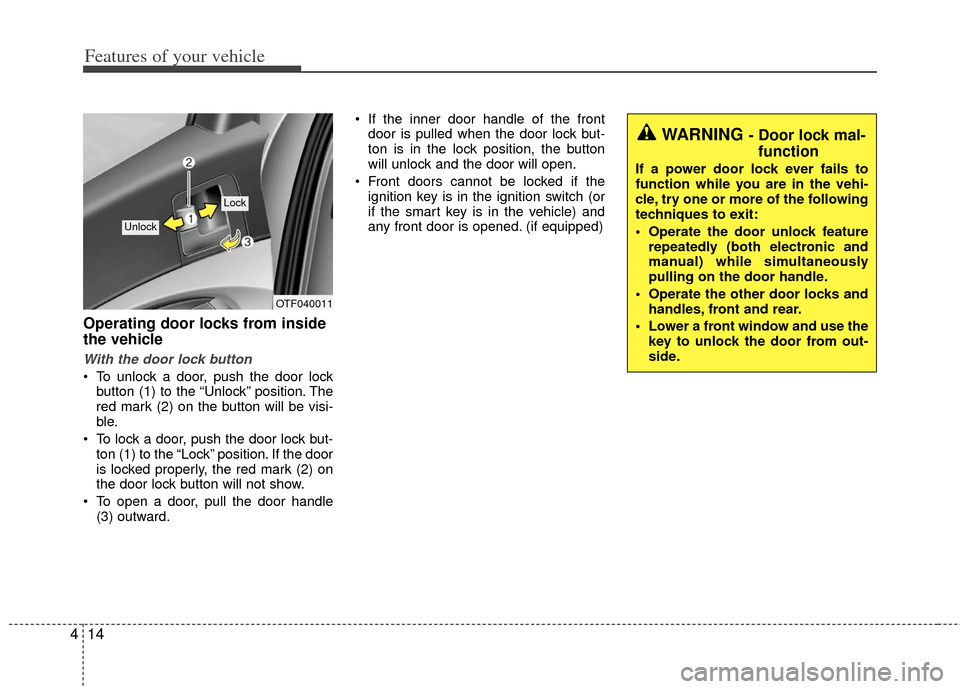
With the door lock button
To unlock a door, push the door lock
button (1) to the “Unlock” position. The
red mark (2) on the button will be visi-
ble.
To lock a door, push the door lock but- ton (1) to the “Lock” position. If the door
is locked properly, the red mark (2) on
the door lock button will not show.
To open a door, pull the door handle (3) outward. If the inner door handle of the front
door is pulled when the door lock but-
ton is in the lock position, the button
will unlock and the door will open.
Front doors cannot be locked if the ignition key is in the ignition switch (or
if the smart key is in the vehicle) and
any front door is opened. (if equipped)
WARNING - Door lock mal-function
If a power door lock ever fails to
function while you are in the vehi-
cle, try one or more of the following
techniques to exit:
Operate the door unlock feature
repeatedly (both electronic and
manual) while simultaneously
pulling on the door handle.
Operate the other door locks and handles, front and rear.
Lower a front window and use the key to unlock the door from out-
side.
OTF040011
Lock
Unlock
Page 102 of 382
415
Features of your vehicle
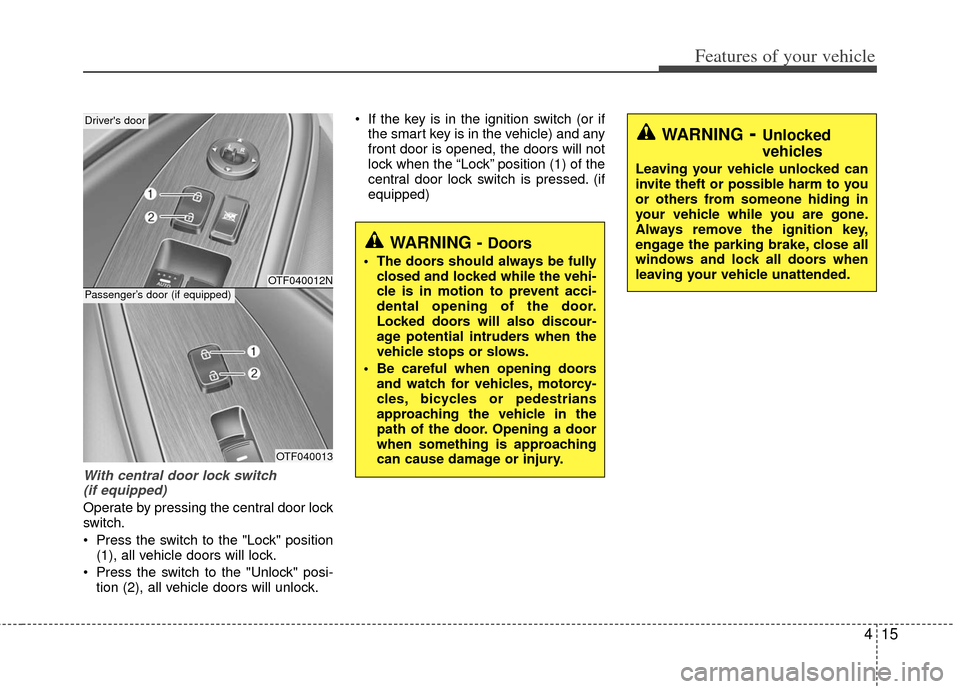
With central door lock switch (if equipped)
Operate by pressing the central door lock
switch.
Press the switch to the "Lock" position (1), all vehicle doors will lock.
Press the switch to the "Unlock" posi- tion (2), all vehicle doors will unlock. If the key is in the ignition switch (or if
the smart key is in the vehicle) and any
front door is opened, the doors will not
lock when the “Lock” position (1) of the
central door lock switch is pressed. (if
equipped)
WARNING- Unlocked
vehicles
Leaving your vehicle unlocked can
invite theft or possible harm to you
or others from someone hiding in
your vehicle while you are gone.
Always remove the ignition key,
engage the parking brake, close all
windows and lock all doors when
leaving your vehicle unattended.
WARNING - Doors
The doors should always be fullyclosed and locked while the vehi-
cle is in motion to prevent acci-
dental opening of the door.
Locked doors will also discour-
age potential intruders when the
vehicle stops or slows.
Be careful when opening doors and watch for vehicles, motorcy-
cles, bicycles or pedestrians
approaching the vehicle in the
path of the door. Opening a door
when something is approaching
can cause damage or injury.
OTF040012N
OTF040013
Driver's door
Passenger’s door (if equipped)
Page 103 of 382
Features of your vehicle
16
4
Impact sensing door unlock sys-
tem (if equipped)
All doors will automatically unlock when
an impact causes the air bags to deploy.
Auto door lock/unlock feature
(if equipped)
All doors will automatically lock when
the transaxle shift lever is shifted out of
P (Park).
All doors will automatically unlock when the transaxle shift lever is shifted
into P (Park).
Speed sensing door lock system
(if equipped)
All doors will be automatically locked
after the vehicle speed exceeds 15 km/h
(9.3 mi/h). And all doors will be automat-
ically unlocked when you turn the engine
off or when you remove the ignition key.
(if equipped)
✽ ✽ NOTICE
An authorized Kia dealer can activate
or deactivate some auto door lock/
unlock features as follows;
• Auto door unlock by using the dri-
ver's door lock button
• Auto door lock/unlock by shifting the transaxle shift lever out of P (Park) or
into P (Park)
• Auto door unlock when the ignition key is removed from the ignition
switch (for smart key, when the
ENGINE START/STOP button is
turned to the OFF position)
If you want to activate or deactivate
some door lock/unlock feature, consult
an authorized Kia dealer.WARNING- Unattended
children
An enclosed vehicle can become
extremely hot, causing death or
severe injury to unattended chil-
dren or animals who cannot escape
the vehicle. Furthermore, children
might operate features of the vehi-
cle that could injure them, or they
could encounter other harm, possi-
bly from someone gaining entry to
the vehicle. Never leave children or
animals unattended in your vehicle.