lane KIA OPTIMA 2020 Features and Functions Guide
[x] Cancel search | Manufacturer: KIA, Model Year: 2020, Model line: OPTIMA, Model: KIA OPTIMA 2020Pages: 591, PDF Size: 14.1 MB
Page 360 of 591
Driving your vehicle
104
5
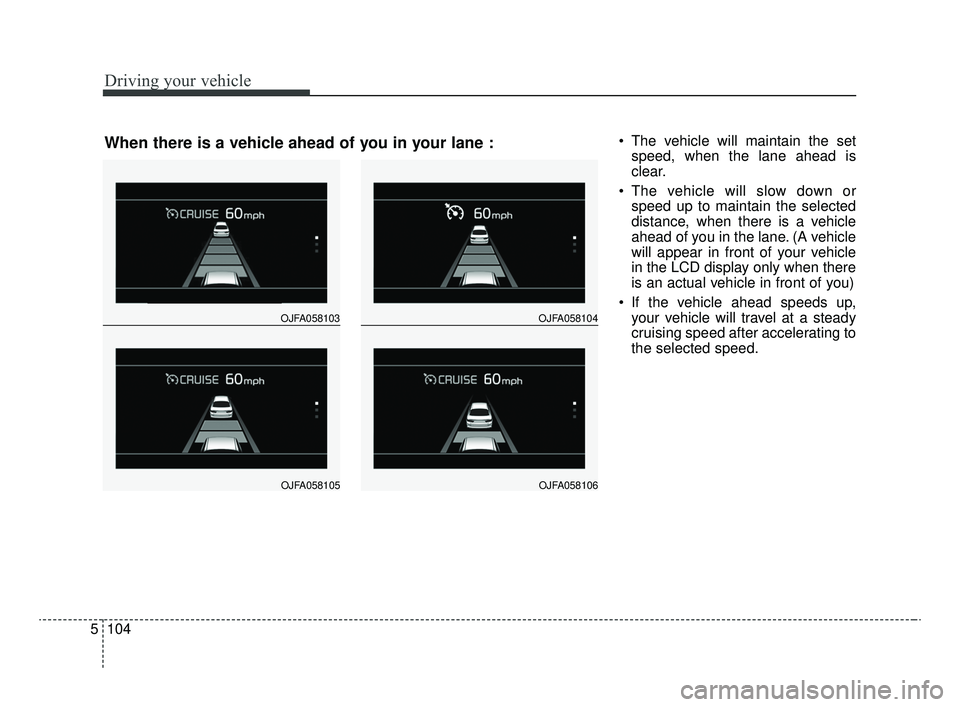
The vehicle will maintain the set
speed, when the lane ahead is
clear.
The vehicle will slow down or speed up to maintain the selected
distance, when there is a vehicle
ahead of you in the lane. (A vehicle
will appear in front of your vehicle
in the LCD display only when there
is an actual vehicle in front of you)
If the vehicle ahead speeds up, your vehicle will travel at a steady
cruising speed after accelerating to
the selected speed.
OJFA058103
OJFA058105
OJFA058104
OJFA058106
When there is a vehicle ahead of you in your lane :
JFa PE USA 5.QXP 5/15/2019 3:26 PM Page 104
Page 361 of 591
5105
Driving your vehicle
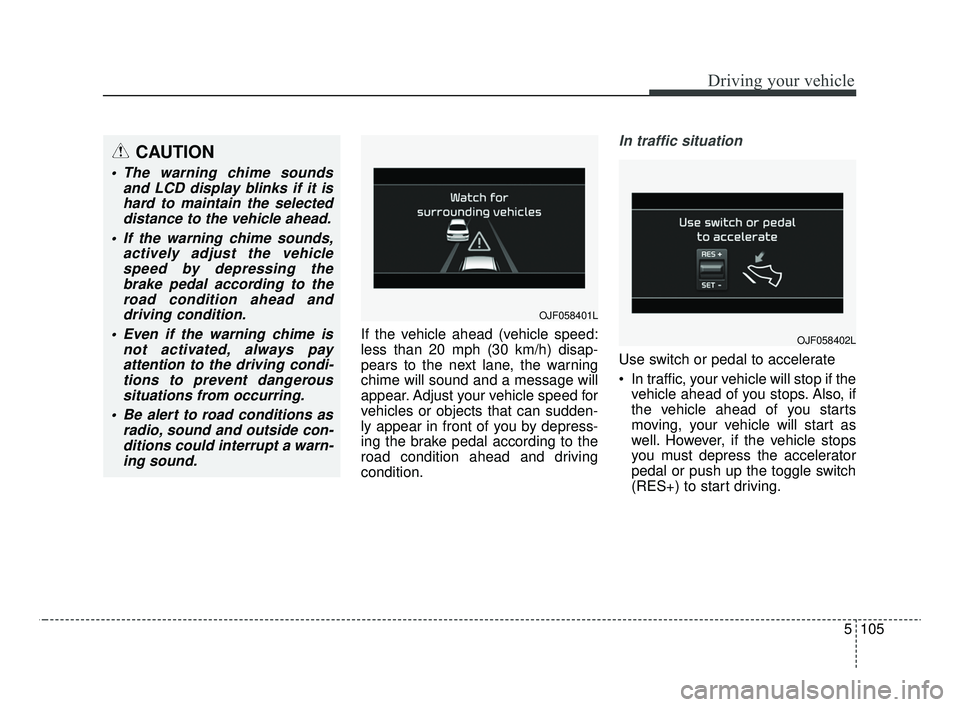
If the vehicle ahead (vehicle speed:
less than 20 mph (30 km/h) disap-
pears to the next lane, the warning
chime will sound and a message will
appear. Adjust your vehicle speed for
vehicles or objects that can sudden-
ly appear in front of you by depress-
ing the brake pedal according to the
road condition ahead and driving
condition.
In traffic situation
Use switch or pedal to accelerate
In traffic, your vehicle will stop if thevehicle ahead of you stops. Also, if
the vehicle ahead of you starts
moving, your vehicle will start as
well. However, if the vehicle stops
you must depress the accelerator
pedal or push up the toggle switch
(RES+) to start driving.
CAUTION
The warning chime sounds and LCD display blinks if it ishard to maintain the selecteddistance to the vehicle ahead.
If the warning chime sounds, actively adjust the vehiclespeed by depressing thebrake pedal according to theroad condition ahead anddriving condition.
Even if the warning chime is not activated, always payattention to the driving condi-tions to prevent dangeroussituations from occurring.
Be alert to road conditions as radio, sound and outside con-ditions could interrupt a warn-ing sound.
OJF058401L
OJF058402L
JFa PE USA 5.QXP 5/15/2019 3:26 PM Page 105
Page 366 of 591
Driving your vehicle
110
5
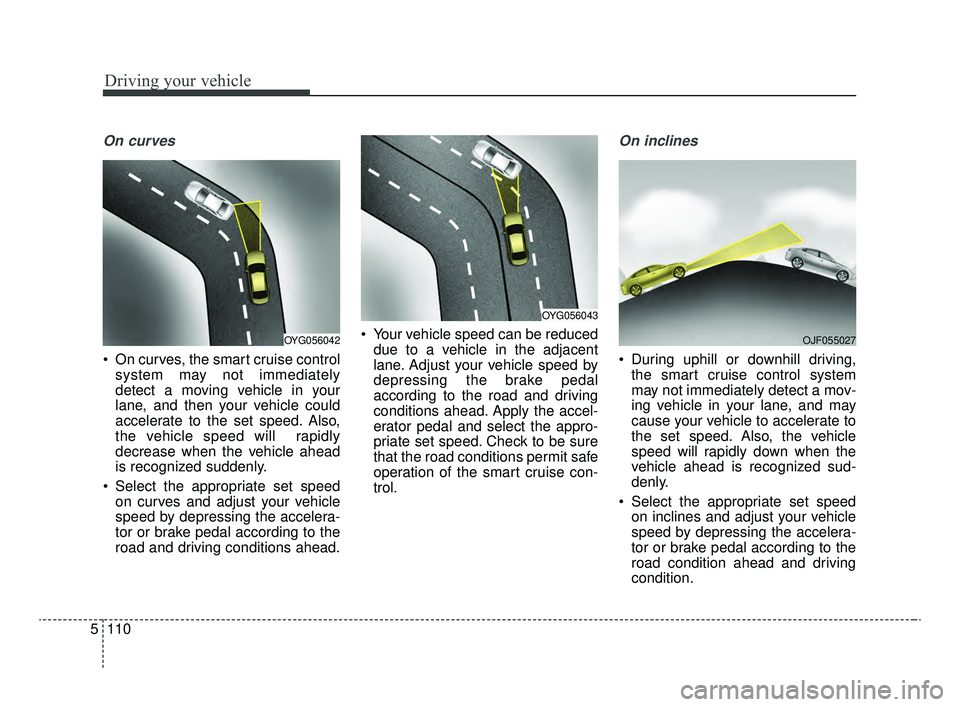
On curves
On curves, the smart cruise control
system may not immediately
detect a moving vehicle in your
lane, and then your vehicle could
accelerate to the set speed. Also,
the vehicle speed will rapidly
decrease when the vehicle ahead
is recognized suddenly.
Select the appropriate set speed on curves and adjust your vehicle
speed by depressing the accelera-
tor or brake pedal according to the
road and driving conditions ahead. Your vehicle speed can be reduced
due to a vehicle in the adjacent
lane. Adjust your vehicle speed by
depressing the brake pedal
according to the road and driving
conditions ahead. Apply the accel-
erator pedal and select the appro-
priate set speed. Check to be sure
that the road conditions permit safe
operation of the smart cruise con-
trol.
On inclines
During uphill or downhill driving,the smart cruise control system
may not immediately detect a mov-
ing vehicle in your lane, and may
cause your vehicle to accelerate to
the set speed. Also, the vehicle
speed will rapidly down when the
vehicle ahead is recognized sud-
denly.
Select the appropriate set speed on inclines and adjust your vehicle
speed by depressing the accelera-
tor or brake pedal according to the
road condition ahead and driving
condition.
OYG056043
OYG056042OJF055027
JFa PE USA 5.QXP 5/15/2019 3:26 PM Page 110
Page 367 of 591
5111
Driving your vehicle
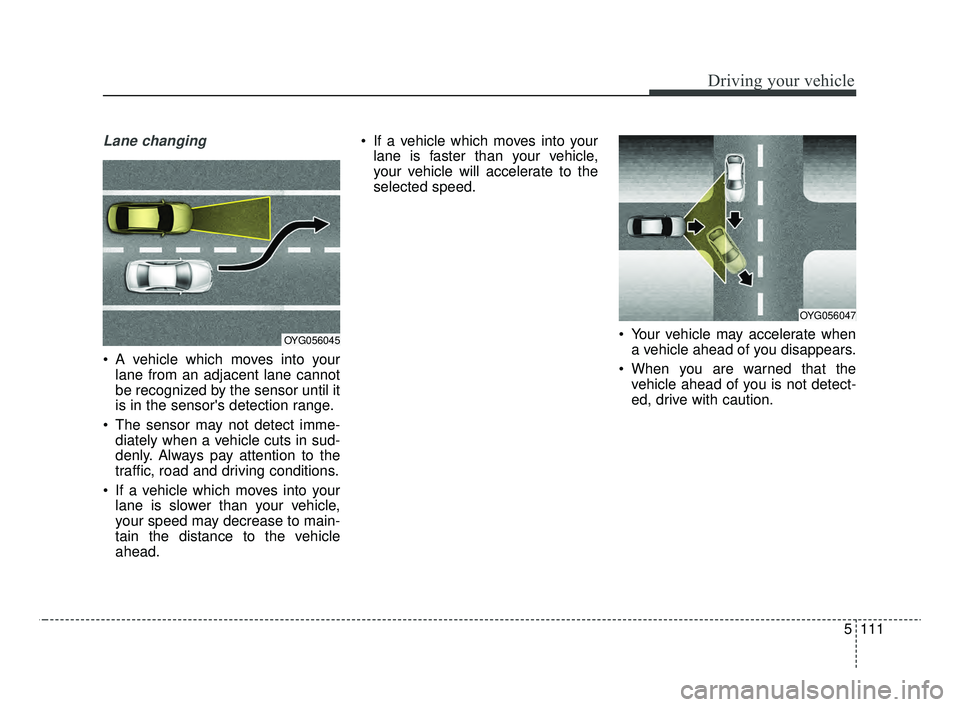
Lane changing
A vehicle which moves into yourlane from an adjacent lane cannot
be recognized by the sensor until it
is in the sensor's detection range.
The sensor may not detect imme- diately when a vehicle cuts in sud-
denly. Always pay attention to the
traffic, road and driving conditions.
If a vehicle which moves into your lane is slower than your vehicle,
your speed may decrease to main-
tain the distance to the vehicle
ahead. If a vehicle which moves into your
lane is faster than your vehicle,
your vehicle will accelerate to the
selected speed.
Your vehicle may accelerate whena vehicle ahead of you disappears.
When you are warned that the vehicle ahead of you is not detect-
ed, drive with caution.
OYG056045
OYG056047
JFa PE USA 5.QXP 5/15/2019 3:26 PM Page 111
Page 368 of 591
Driving your vehicle
112
5
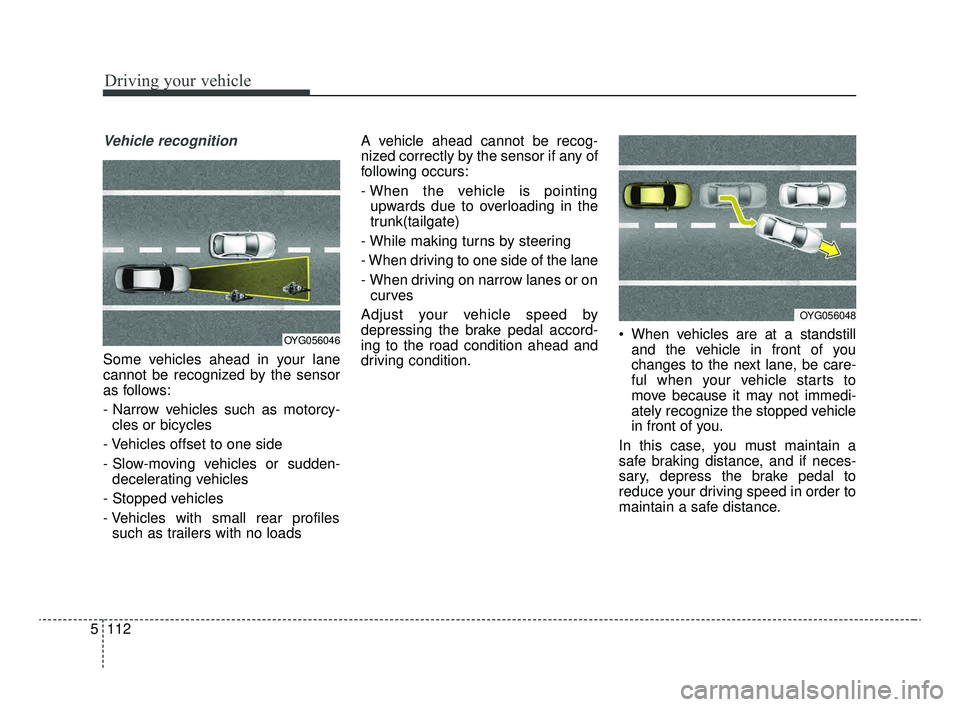
Vehicle recognition
Some vehicles ahead in your lane
cannot be recognized by the sensor
as follows:
- Narrow vehicles such as motorcy-
cles or bicycles
- Vehicles offset to one side
- Slow-moving vehicles or sudden- decelerating vehicles
- Stopped vehicles
- Vehicles with small rear profiles such as trailers with no loads A vehicle ahead cannot be recog-
nized correctly by the sensor if any of
following occurs:
- When the vehicle is pointing
upwards due to overloading in the
trunk(tailgate)
- While making turns by steering
- When driving to one side of the lane
- When driving on narrow lanes or on curves
Adjust your vehicle speed by
depressing the brake pedal accord-
ing to the road condition ahead and
driving condition. When vehicles are at a standstill
and the vehicle in front of you
changes to the next lane, be care-
ful when your vehicle starts to
move because it may not immedi-
ately recognize the stopped vehicle
in front of you.
In this case, you must maintain a
safe braking distance, and if neces-
sary, depress the brake pedal to
reduce your driving speed in order to
maintain a safe distance.
OYG056046
OYG056048
JFa PE USA 5.QXP 5/15/2019 3:27 PM Page 112
Page 370 of 591
Driving your vehicle
114
5
✽ ✽
NOTICE
The Smart Cruise Control System
may not operate temporarily due to:
• Electrical interference.
• Modifying the suspension.
• Differences of tire abrasion or tire
pressure.
• Installing different type of tires.(Continued)
The Smart Cruise Control sys-
tem may not recognize com-
plex driving situations so
always pay attention to driv-
ing conditions and control
your vehicle speed.
For safe operation, carefully read and follow the instruc-
tions in this manual before
use.(Continued)
Always look ahead cautiously
to prevent unexpected and
sudden situations from occur-
ring.
Vehicles moving in front of you with a frequent lane
change may cause a delay in
the system's reaction or may
cause the system to react to a
vehicle actually in an adjacent
lane.
Always drive cautiously to
pre-vent unexpected and sud-
den situations from occur-
ring.
Always be aware of the select- ed speed and vehicle to vehi-
cle distance. The driver
should not solely rely on the
system but always pay atten-
tion to driving conditions and
control your vehicle speed.
(Continued)
JFa PE USA 5.QXP 5/15/2019 3:27 PM Page 114
Page 380 of 591
Driving your vehicle
124
5
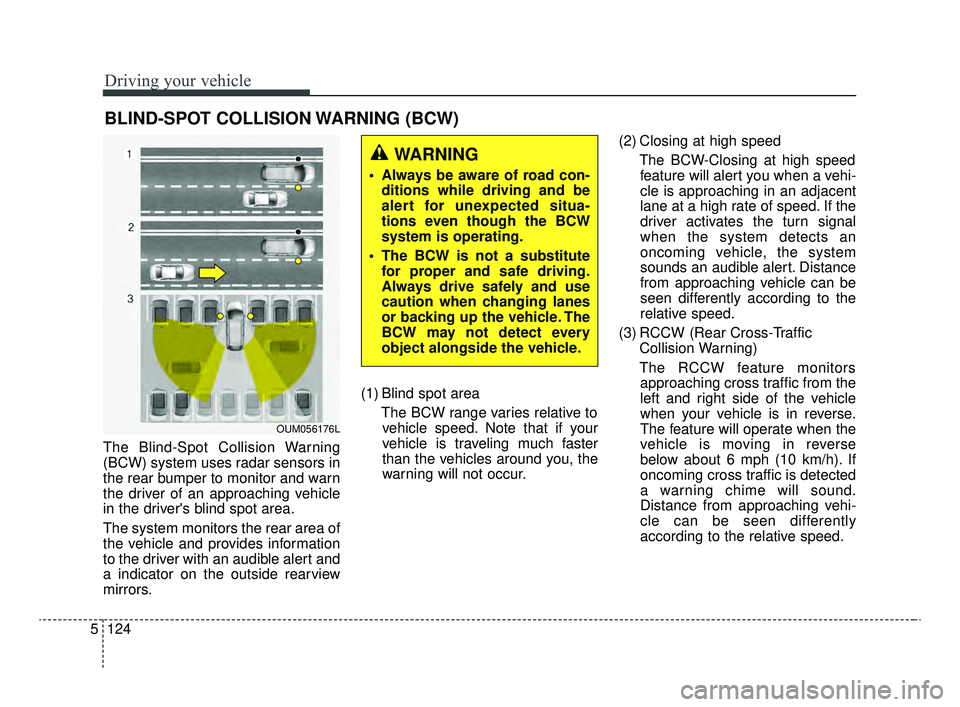
The Blind-Spot Collision Warning
(BCW) system uses radar sensors in
the rear bumper to monitor and warn
the driver of an approaching vehicle
in the driver's blind spot area.
The system monitors the rear area of
the vehicle and provides information
to the driver with an audible alert and
a indicator on the outside rearview
mirrors. (1) Blind spot area
The BCW range varies relative tovehicle speed. Note that if your
vehicle is traveling much faster
than the vehicles around you, the
warning will not occur. (2) Closing at high speed
The BCW-Closing at high speedfeature will alert you when a vehi-
cle is approaching in an adjacent
lane at a high rate of speed. If the
driver activates the turn signal
when the system detects an
oncoming vehicle, the system
sounds an audible alert. Distance
from approaching vehicle can be
seen differently according to the
relative speed.
(3) RCCW (Rear Cross-Traffic Collision Warning)
The RCCW feature monitors approaching cross traffic from the
left and right side of the vehicle
when your vehicle is in reverse.
The feature will operate when the
vehicle is moving in reverse
below about 6 mph (10 km/h). If
oncoming cross traffic is detected
a warning chime will sound.
Distance from approaching vehi-
cle can be seen differently
according to the relative speed.
BLIND-SPOT COLLISION WARNING (BCW)
WARNING
Always be aware of road con- ditions while driving and be
alert for unexpected situa-
tions even though the BCW
system is operating.
The BCW is not a substitute for proper and safe driving.
Always drive safely and use
caution when changing lanes
or backing up the vehicle. The
BCW may not detect every
object alongside the vehicle.
OUM056176L
JFa PE USA 5.QXP 5/15/2019 3:27 PM Page 124
Page 381 of 591

5125
Driving your vehicle
BCW (Blind-Spot Collision
Warning) / LCA (Lane Change
Assist)
Operating conditions
The indicator on the switch will illumi-
nate when the BCW (Blind-Spot
Collision Warning) system switch is
pressed with the ignition switch ON.
If the vehicle speed exceeds 20 mph
(30 km/h), the system will activate.
If you press the switch again, the
switch indicator and system will be
turned off.If the ignition switch is turned OFF
and ON the system returns to the
previous state.
When the system is not used turn the
system off by pressing the switch.
When the system is turned on the
warning light will illuminate for 3 sec-
onds on the outside rearview mirror.
WARNING
Always check the road condi-
tion while driving for unex-
pected situations even though
the BCW (Blind-Spot Collision
Warning) system is operating.
BCW (Blind-Spot Collision Warning) system is a system
made for convenience. Do not
solely rely on the system but
always pay attention to drive
safely.
Distance from the approach- ing vehicle may be inexact
due to the changing relative
speeds of both vehicles.
OJF058309
JFa PE USA 5.QXP 5/15/2019 3:27 PM Page 125
Page 382 of 591

Driving your vehicle
126
5
Warning type
The system will activate when:
1.The system is on
2.Vehicle speed is above 20 mph (30
km/h)
3.Other vehicles are detected in the rear side
First stage alert
If a vehicle is detected within the
boundary of the system, a yellow
warning light will illuminate on the
outside rearview mirror.
Once the detected vehicle is no
longer within the blind spot area, the
warning will turn off according to the
driving conditions of the vehicle.
WARNING
Always check the road condi-tion while driving for unex-
pected situations even
though the Blind-Spot
Collision Warning System
(BCW) is operating.
The Blind-Spot Collision Warning System (BCW) is a
supplemental system to
assist you. Do not entirely rely
on the system. Always pay
attention, while driving, for
your safety.
(Continued)
(Continued)
The Blind-Spot CollisionWarning System (BCW) is not
a substitute for proper and
safe driving. Always drive
safely and use caution when
changing lanes or backing the
vehicle up. The Blind-Spot
Collision Warning System
(BCW) may not detect every
object alongside the vehicle.
OJF055213
1st stage
JFa PE USA 5.QXP 5/15/2019 3:27 PM Page 126
Page 385 of 591
5129
Driving your vehicle
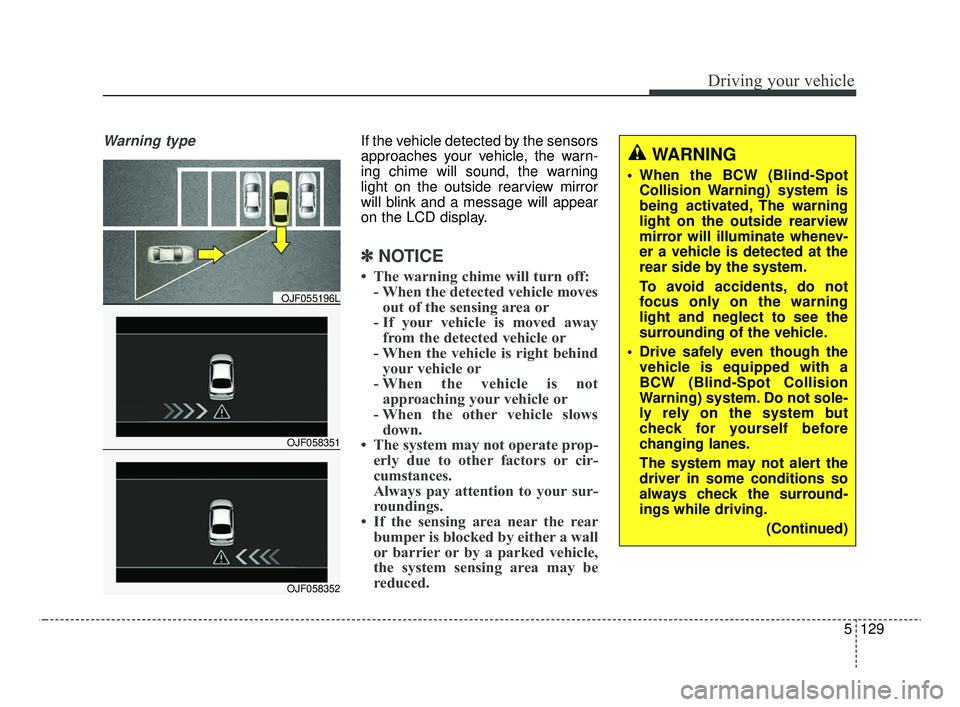
Warning typeIf the vehicle detected by the sensors
approaches your vehicle, the warn-
ing chime will sound, the warning
light on the outside rearview mirror
will blink and a message will appear
on the LCD display.
✽ ✽
NOTICE
• The warning chime will turn off:
- When the detected vehicle movesout of the sensing area or
- If your vehicle is moved away from the detected vehicle or
- When the vehicle is right behind your vehicle or
- When the vehicle is not approaching your vehicle or
- When the other vehicle slows down.
• The system may not operate prop- erly due to other factors or cir-
cumstances.
Always pay attention to your sur-
roundings.
• If the sensing area near the rear bumper is blocked by either a wall
or barrier or by a parked vehicle,
the system sensing area may be
reduced.
WARNING
When the BCW (Blind-Spot
Collision Warning) system is
being activated, The warning
light on the outside rearview
mirror will illuminate whenev-
er a vehicle is detected at the
rear side by the system.
To avoid accidents, do not
focus only on the warning
light and neglect to see the
surrounding of the vehicle.
Drive safely even though the vehicle is equipped with a
BCW (Blind-Spot Collision
Warning) system. Do not sole-
ly rely on the system but
check for yourself before
changing lanes.
The system may not alert the
driver in some conditions so
always check the surround-
ings while driving.
(Continued)
OJF058351
OJF055196L
OJF058352
JFa PE USA 5.QXP 5/15/2019 3:27 PM Page 129