lane KIA OPTIMA 2020 Features and Functions Guide
[x] Cancel search | Manufacturer: KIA, Model Year: 2020, Model line: OPTIMA, Model: KIA OPTIMA 2020Pages: 591, PDF Size: 14.1 MB
Page 325 of 591

569
Driving your vehicle
Limitation of the system
The Forward Collision-Avoidance
Assist (FCA) system is designed to
monitor the vehicle or pedestrians
ahead in the roadway through cam-
era recognition to warn the driver
that a collision is imminent, and if
necessary, apply emergency brak-
ing.
In certain situations, the camera may
not be able to detect the vehicle or
pedestrians ahead. In these cases,
the FCA system may not operate
normally. The driver must pay careful
attention in the following situations
where the FCA operation may be
limited.
Detecting vehicles
The sensor may be limited when:
The camera is covered object ordebris
Inclement weather such as heavy rain or snow obscures the field of
view of the camera
The camera recognition is limited
The vehicle in front is too small to be detected (for example a motor-
cycle or a bicycle, etc.)
The vehicle in front is an oversize vehicle or trailer that is too big to
be detected by the camera recog-
nition system. (for example a trac-
tor, trailer, etc.)
The camera's field of view is not well illuminated (either too dark or too
much reflection or too much back-
light that obscures the field of view)
The vehicle in front does not have their rear lights properly turned ON
or their rear lights are located
unusually.
The outside brightness changes suddenly, for example when enter-
ing or exiting a tunnelWARNING
The FCA system does notoperate when the vehicle is in
reverse.
The FCA system is not designed to detect other
objects on the road such as
animals.
The FCA system does not detect vehicles in the opposite
lane.
The FCA system does not detect cross traffic vehicles
that are approaching.
The FCA system cannot detect the driver approaching the side
view of a parked vehicle (for
example on a dead end street.)
In these cases, you must main-
tain a safe braking distance,
and if necessary, depress the
brake pedal to reduce the driv-
ing speed in order to maintain a
safe distance.
JFa PE USA 5.QXP 5/15/2019 3:24 PM Page 69
Page 326 of 591
Driving your vehicle
70
5
When light coming from a street
light or an oncoming vehicle is
reflected on a wet road surface
such as a puddle in the road.
The field of view in front is obstructed by sun glare or head-
light of oncoming vehicle.
The windshield glass is fogged up.
The vehicle in front is driving errat- ically.
The vehicle is on unpaved or uneven rough surfaces, or roads
with sudden gradient changes.
The vehicle is drives inside a build- ing, such as a basement parking lot
The camera does not recognize the entire vehicle in front.
The camera is damaged.
The brightness outside is too low such as when the headlamps are
not on at night or the vehicle is
going through a tunnel.
Adverse road conditions cause excessive vehicle vibrations while
driving
The sensor recognition changes suddenly when passing over a
speed bump The shadow is on the road by a
median strip, trees, etc.
The vehicle drives through a toll- gate.
The rear part of the vehicle in front is not fully visible.
The vehicle in front is moving verti- cally to the driving direction
The vehicle in front is stopped ver- tically
The vehicle in front is driving towards your vehicle or reversing
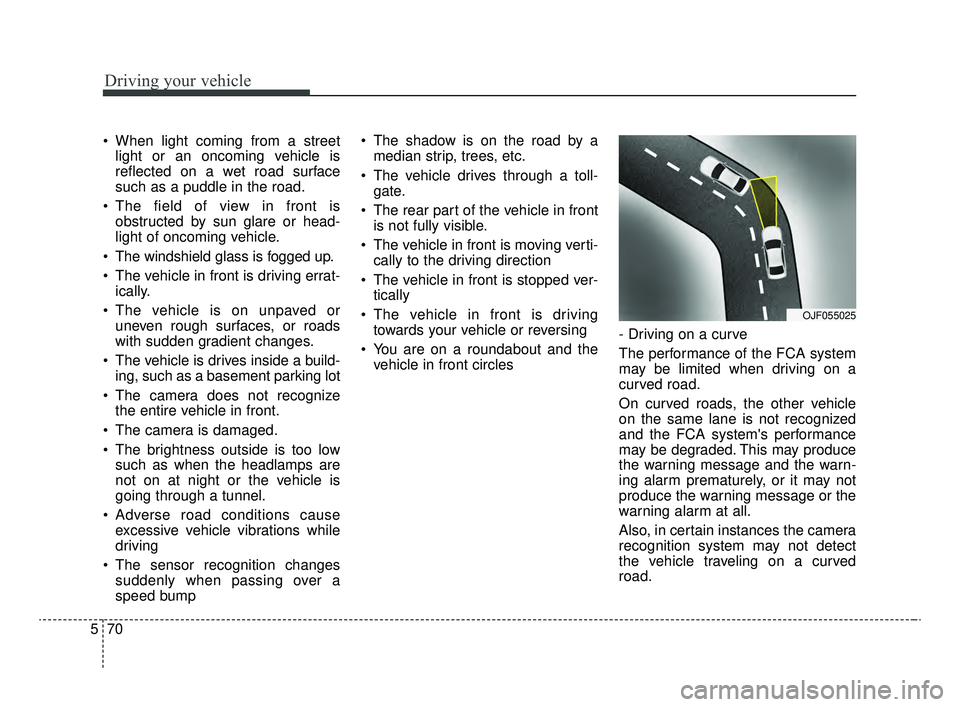
You are on a roundabout and the vehicle in front circles - Driving on a curve
The performance of the FCA system
may be limited when driving on a
curved road.
On curved roads, the other vehicle
on the same lane is not recognized
and the FCA system's performance
may be degraded. This may produce
the warning message and the warn-
ing alarm prematurely, or it may not
produce the warning message or the
warning alarm at all.
Also, in certain instances the camera
recognition system may not detect
the vehicle traveling on a curved
road.
OJF055025
JFa PE USA 5.QXP 5/15/2019 3:24 PM Page 70
Page 327 of 591
571
Driving your vehicle
When driving on a curve, exercise
caution, maintain a safe braking dis-
tance, and if necessary, depress the
brake pedal to reduce your driving
speed in order to maintain a safe dis-
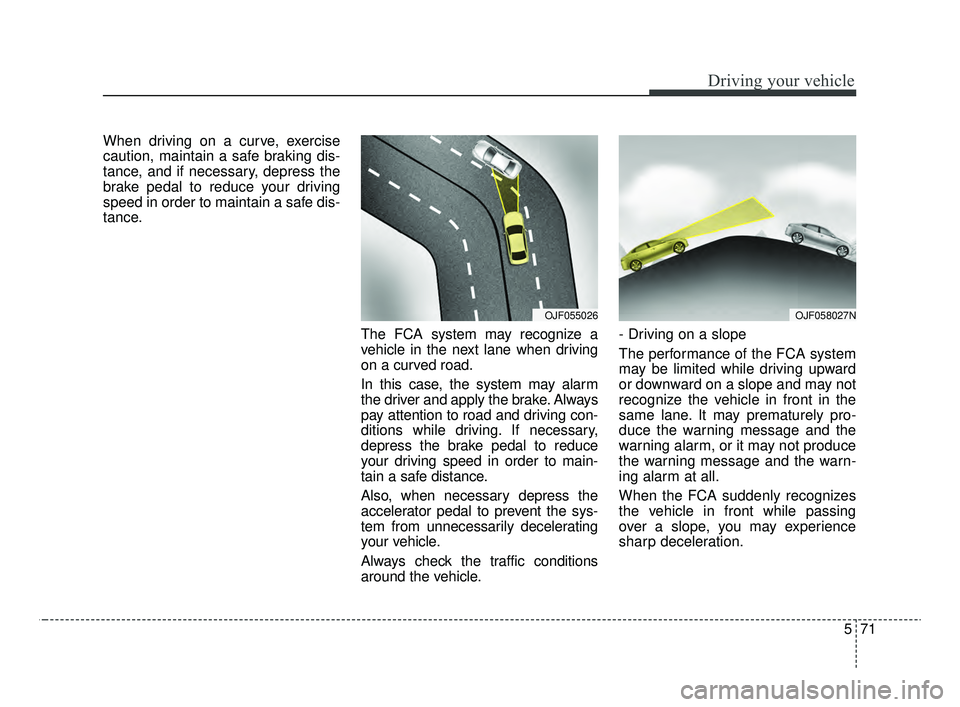
tance.The FCA system may recognize a
vehicle in the next lane when driving
on a curved road.
In this case, the system may alarm
the driver and apply the brake. Always
pay attention to road and driving con-
ditions while driving. If necessary,
depress the brake pedal to reduce
your driving speed in order to main-
tain a safe distance.
Also, when necessary depress the
accelerator pedal to prevent the sys-
tem from unnecessarily decelerating
your vehicle.
Always check the traffic conditions
around the vehicle.- Driving on a slope
The performance of the FCA system
may be limited while driving upward
or downward on a slope and may not
recognize the vehicle in front in the
same lane. It may prematurely pro-
duce the warning message and the
warning alarm, or it may not produce
the warning message and the warn-
ing alarm at all.
When the FCA suddenly recognizes
the vehicle in front while passing
over a slope, you may experience
sharp deceleration.
OJF055026OJF058027N
JFa PE USA 5.QXP 5/15/2019 3:24 PM Page 71
Page 328 of 591
Driving your vehicle
72
5
Always keep your eyes forward while
driving upward or downward on a
slope, and, if necessary, depress the
brake pedal to reduce your driving
speed in order to maintain distance.
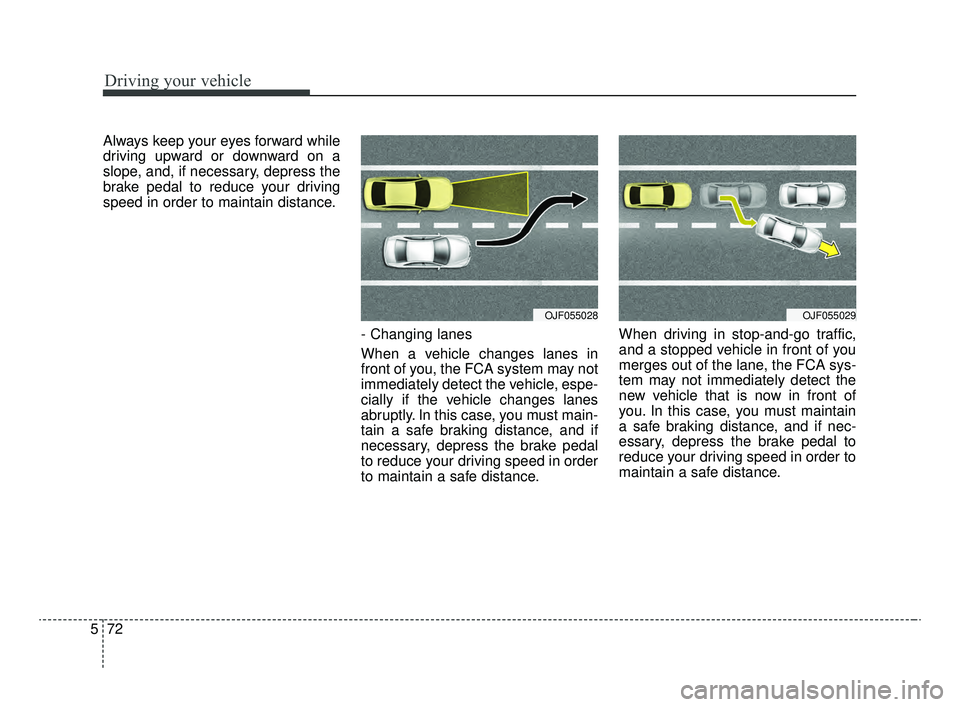
- Changing lanes
When a vehicle changes lanes in
front of you, the FCA system may not
immediately detect the vehicle, espe-
cially if the vehicle changes lanes
abruptly. In this case, you must main-
tain a safe braking distance, and if
necessary, depress the brake pedal
to reduce your driving speed in order
to maintain a safe distance.When driving in stop-and-go traffic,
and a stopped vehicle in front of you
merges out of the lane, the FCA sys-
tem may not immediately detect the
new vehicle that is now in front of
you. In this case, you must maintain
a safe braking distance, and if nec-
essary, depress the brake pedal to
reduce your driving speed in order to
maintain a safe distance.
OJF055028OJF055029
JFa PE USA 5.QXP 5/15/2019 3:24 PM Page 72
Page 340 of 591

Driving your vehicle
84
5
Limitation of the system
The Forward Collision-Avoidance
Assist (FCA) system is designed to
monitor the vehicle or a pedestrian
ahead in the roadway through radar
signals and camera recognition to
warn the driver that a collision is
imminent, and if necessary, apply
emergency braking.
In certain situations, the radar sen-
sor or the camera may not be able to
detect the vehicle ahead. In these
cases, the FCA system may not
operate normally. The driver must
pay careful attention in the following
situations where the FCA operation
may be limited.WARNING
The FCA system does not
operate when the vehicle is in
reverse.
The FCA system is not designed to detect other
objects on the road such as
animals.
The FCA system does not detect vehicles in the opposite
lane.
The FCA system does not detect cross traffic vehicles
that are approaching.
The FCA system cannot detect the driver approaching the side
view of a parked vehicle (for
example on a dead end street.)
In these cases, you must main-
tain a safe braking distance,
and if necessary, depress the
brake pedal to reduce the driv-
ing speed in order to maintain a
safe distance.
(Continued)
If the vehicle in front stops suddenly, you may have less
control of the brake system.
Therefore, always keep a safe
distance between your vehicle
and the vehicle in front of you.
Occupants may get injured, if the vehicle abruptly stops by
the activated FCA system. Pay
extreme caution.
The FCA system operates only to detect vehicles and
pedestrian in front of the vehi-
cle.
The FCA system may not acti- vate to all types of vehicles.
JFa PE USA 5.QXP 5/15/2019 3:25 PM Page 84
Page 342 of 591
Driving your vehicle
86
5
The vehicle in front is moving verti-
cally to the driving direction
The vehicle in front is stopped ver- tically
The vehicle in front is driving towards your vehicle or reversing
You are on a roundabout and the vehicle in front circles
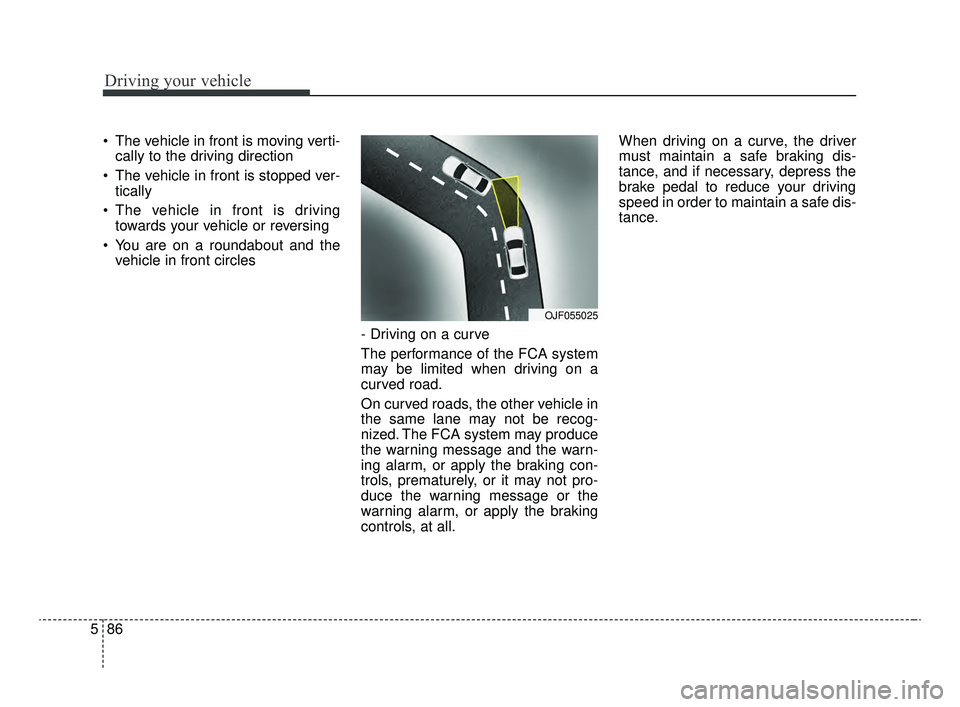
- Driving on a curve
The performance of the FCA system
may be limited when driving on a
curved road.
On curved roads, the other vehicle in
the same lane may not be recog-
nized. The FCA system may produce
the warning message and the warn-
ing alarm, or apply the braking con-
trols, prematurely, or it may not pro-
duce the warning message or the
warning alarm, or apply the braking
controls, at all. When driving on a curve, the driver
must maintain a safe braking dis-
tance, and if necessary, depress the
brake pedal to reduce your driving
speed in order to maintain a safe dis-
tance.
OJF055025
JFa PE USA 5.QXP 5/15/2019 3:25 PM Page 86
Page 343 of 591
587
Driving your vehicle
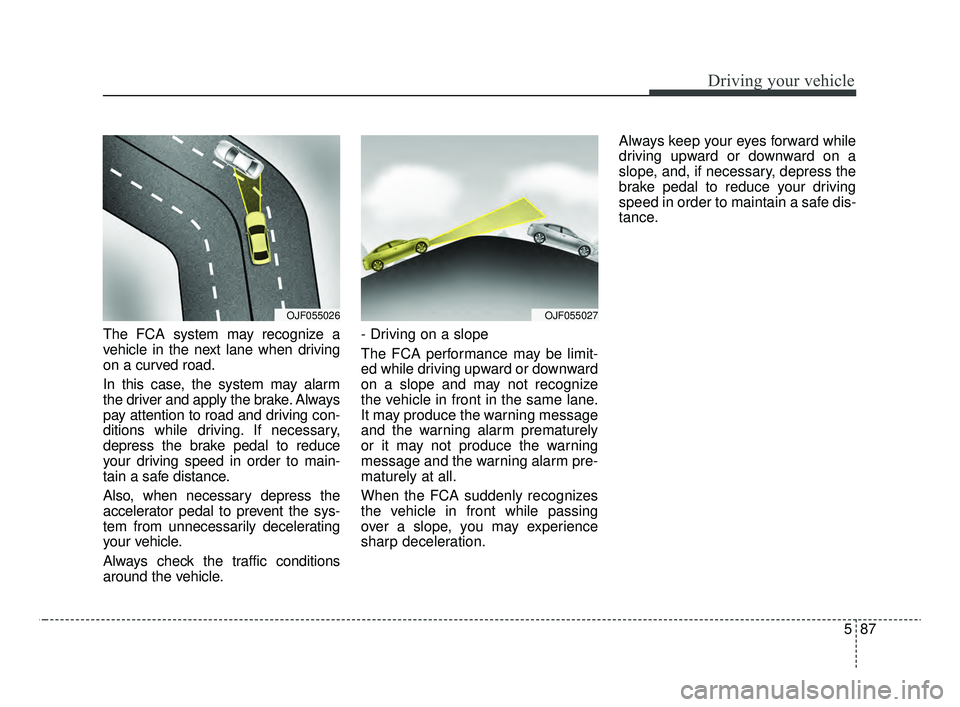
The FCA system may recognize a
vehicle in the next lane when driving
on a curved road.
In this case, the system may alarm
the driver and apply the brake. Always
pay attention to road and driving con-
ditions while driving. If necessary,
depress the brake pedal to reduce
your driving speed in order to main-
tain a safe distance.
Also, when necessary depress the
accelerator pedal to prevent the sys-
tem from unnecessarily decelerating
your vehicle.
Always check the traffic conditions
around the vehicle.- Driving on a slope
The FCA performance may be limit-
ed while driving upward or downward
on a slope and may not recognize
the vehicle in front in the same lane.
It may produce the warning message
and the warning alarm prematurely
or it may not produce the warning
message and the warning alarm pre-
maturely at all.
When the FCA suddenly recognizes
the vehicle in front while passing
over a slope, you may experience
sharp deceleration.Always keep your eyes forward while
driving upward or downward on a
slope, and, if necessary, depress the
brake pedal to reduce your driving
speed in order to maintain a safe dis-
tance.
OJF055026OJF055027
JFa PE USA 5.QXP 5/15/2019 3:25 PM Page 87
Page 344 of 591
Driving your vehicle
88
5
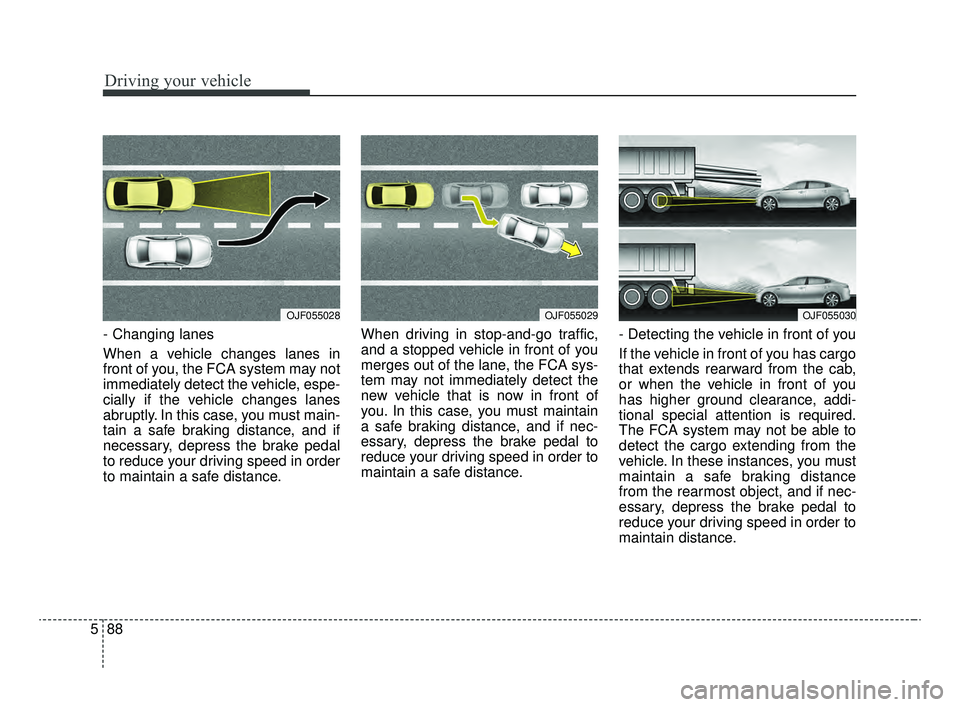
- Changing lanes
When a vehicle changes lanes in
front of you, the FCA system may not
immediately detect the vehicle, espe-
cially if the vehicle changes lanes
abruptly. In this case, you must main-
tain a safe braking distance, and if
necessary, depress the brake pedal
to reduce your driving speed in order
to maintain a safe distance. When driving in stop-and-go traffic,
and a stopped vehicle in front of you
merges out of the lane, the FCA sys-
tem may not immediately detect the
new vehicle that is now in front of
you. In this case, you must maintain
a safe braking distance, and if nec-
essary, depress the brake pedal to
reduce your driving speed in order to
maintain a safe distance.
- Detecting the vehicle in front of you
If the vehicle in front of you has cargo
that extends rearward from the cab,
or when the vehicle in front of you
has higher ground clearance, addi-
tional special attention is required.
The FCA system may not be able to
detect the cargo extending from the
vehicle. In these instances, you must
maintain a safe braking distance
from the rearmost object, and if nec-
essary, depress the brake pedal to
reduce your driving speed in order to
maintain distance.
OJF055029OJF055030OJF055028
JFa PE USA 5.QXP 5/15/2019 3:25 PM Page 88
Page 352 of 591

Driving your vehicle
96
5
(Continued)
- Parking lot
- Lanes beside guard rail on aroad
- Slippery road with rain, ice, or snow
- Abrupt curved road
- Steep hills
- Windy roads
- Off roads
- Rods under construction
- Rumble strip
- When driving near crash barriers
- When driving on a sharp curve
- When the vehicle sensing ability decreases due to
vehicle modification result-
ing level difference of the
vehicle's front and rear
(Continued)(Continued)- When driving in heavy trafficor when traffic conditions
make it difficult to drive at a
constant speed
- Limited visibility (rain, snow, smog, etc.)
Pay particular attention to the driving conditions whenever
using the smart cruise control
system.
Be careful when driving downhill using the SCC.
Cruise function should not be used when the vehicle is
being towed to prevent any
damage.
Always set the vehicle speed under the speed limit in your
country.
Always pay continuous atten- tion to road and driving condi-
tions even when the smart
cruise control system is being
operated.WARNING
If the smart cruise control isleft on, (cruise indicator in the
instrument cluster illuminat-
ed) the smart cruise control
can be activated unintention-
ally. Keep the smart cruise
control system off (cruise
indicator off) when the smart
cruise control is not being
used.
Use the smart cruise control system only when traveling
on open highways in good
weather.
Do not use the smart cruise control when it may not be
safe to keep the car at a con-
stant speed. For instance.
- Highway interchange andtollgate
- Road surrounded by multi- ple steel constructions (sub-
way construction, steel tun-
nel, etc)
(Continued)
JFa PE USA 5.QXP 5/15/2019 3:25 PM Page 96
Page 359 of 591
5103
Driving your vehicle
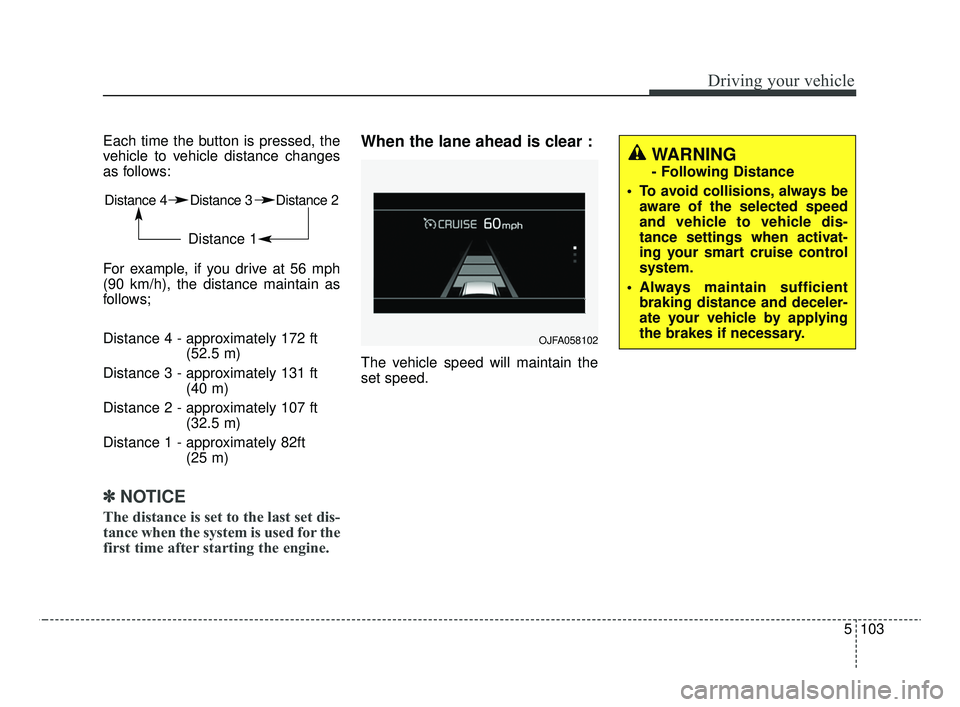
Each time the button is pressed, the
vehicle to vehicle distance changes
as follows:
For example, if you drive at 56 mph
(90 km/h), the distance maintain as
follows;
Distance 4 - approximately 172 ft(52.5 m)
Distance 3 - approximately 131 ft (40 m)
Distance 2 - approximately 107 ft (32.5 m)
Distance 1 - approximately 82ft (25 m)
✽ ✽NOTICE
The distance is set to the last set dis-
tance when the system is used for the
first time after starting the engine.
When the lane ahead is clear :
The vehicle speed will maintain the
set speed.
Distance 4 Distance 3 Distance 2
Distance 1
OJFA058102
WARNING
- Following Distance
To avoid collisions, always be aware of the selected speed
and vehicle to vehicle dis-
tance settings when activat-
ing your smart cruise control
system.
Always maintain sufficient braking distance and deceler-
ate your vehicle by applying
the brakes if necessary.
JFa PE USA 5.QXP 5/15/2019 3:26 PM Page 103