ignition KIA OPTIMA PHEV 2020 Owner's Guide
[x] Cancel search | Manufacturer: KIA, Model Year: 2020, Model line: OPTIMA PHEV, Model: KIA OPTIMA PHEV 2020Pages: 597, PDF Size: 14.2 MB
Page 310 of 597

515
Driving your vehicle
✽ ✽NOTICE
• After the ignition switch has been
turned off, the electronic parking
brake cannot be disengaged.
• For EPB (Electronic Parking Brake) equipped vehicles with
AUTO HOLD function used while
driving, if the ignition button has
been turned OFF, the electronic
parking brake will be engaged
automatically. Therefore, AUTO
HOLD function should be turned
off before the ignition button is
turned off.
D (Drive)
This is the normal forward driving
position. The transmission will auto-
matically shift through a 6-gear
sequence, providing the best fuel
economy and power.
For extra power when passing anoth-
er vehicle or climbing grades,
depress the accelerator fully, at
which time the transmission will
automatically downshift to the next
lower gear.
WARNING - Parking in
Neutral
With the exception of parking in neutral gear, always park the
vehicle in [P] (Park) for safety
and apply the parking brake.
Before parking in [N] (Neutral) gear, first make sure the park-
ing ground is level and flat. Do
not park in [N] gear on any
slopes or gradients. If parked
and left in [N], the vehicle may
move and cause serious dam-
age or injury.
CAUTION- Starter
If the engine stalls while thevehicle is in motion, do notattempt to move the shift leverto the P (Park) position. If thetraffic and road conditions per-mit, you may put the shift leverin the N (Neutral) position whilethe vehicle is still moving andpress the ENGINE START/STOPbutton in an attempt to restartthe engine.
Page 312 of 597

517
Driving your vehicle
Shift lock system
For your safety, the automatic trans-
mission has a shift lock system
which prevents shifting the transmis-
sion from P (Park) into R (Reverse)
unless the brake pedal is depressed.
To shift the transmission from P
(Park) into R (Reverse):
1. Depress and hold the brake pedal.
2. Start the hybrid system or turn theignition switch to the ON position.
3. Move the shift lever.
If the brake pedal is repeatedly
depressed and released with the
shift lever in the P (Park) position, a
chattering noise & vibration near the
shift lever may be heard. It is a nor-
mal condition. Shift-lock override
If the shift lever cannot be moved
from the P (Park) position into R
(Reverse) position with the brake
pedal depressed, continue depress-
ing the brake, then do the following:
1. Place the engine start/stop button
in the OFF position.
2. Apply the parking brake.
3. Carefully remove the cap (1) cov- ering the shift-lock release access
hole.
4. Insert a tool (e.g. flathead screw- driver) into the access hole and
press down on the tool.WARNING- Shifting from
park
Always fully depress the brake
pedal before and while shifting
out of the P (Park) position into
another position to avoid inad-
vertent motion of the vehicle
which could injure persons in
or around the vehicle.
OJFA055013
Page 319 of 597

Driving your vehicle
24
5
To release EPB (electronic parking
brake) automatically:
Shift lever in P (Park)
With the engine running depress
the brake pedal and shift out of P
(Park) to R (Reverse) or D (Drive).
Shift lever in N (Neutral) With the engine running depress
the brake pedal and shift out of N
(Neutral) to R (Reverse) or D
(Drive).
Automatic Transmission 1. Start the engine.
2. Fasten the driver's seat belt.
3. Close the driver's door, engine hood and trunk.
4. Depress the accelerator pedal while the shift lever is in R (Rear),
D (Drive) or Sports mode.
Make sure the brake warning light
goes off.✽ ✽ NOTICE
• For your safety, you can engage
the EPB even though the engine
stop/start button is in the OFF
position, but you cannot release it.
• For your safety, depress the brake pedal and release the parking
brake manually with the EPB
switch when you drive downhill or
when backing up the vehicle.
Do not follow the above procedure
when driving on a flat level ground.
The vehicle may suddenly move for-
ward.
✽ ✽ NOTICE
If the parking brake warning light is
still on even though the EPB has
been released, have the system
checked by an authorized Kia dealer.
EPB (electronic parking brake) may
be automatically applied when:
The EPB is overheated
Requested by other systems
The hybrid system is turned off
with the EPB applied
✽ ✽ NOTICE
For EPB equipped vehicles with the
AUTO HOLD function used while
driving, if the ignition button has
been turned OFF, the EPB will be
engaged automatically. Therefore,
the AUTO HOLD function should
be turned off before the ignition but-
ton is turned OFF.
CAUTION
Do not drive your vehicle with
the EPB applied. It may causeexcessive brake pad and brakerotor wear.
Page 332 of 597
537
Driving your vehicle
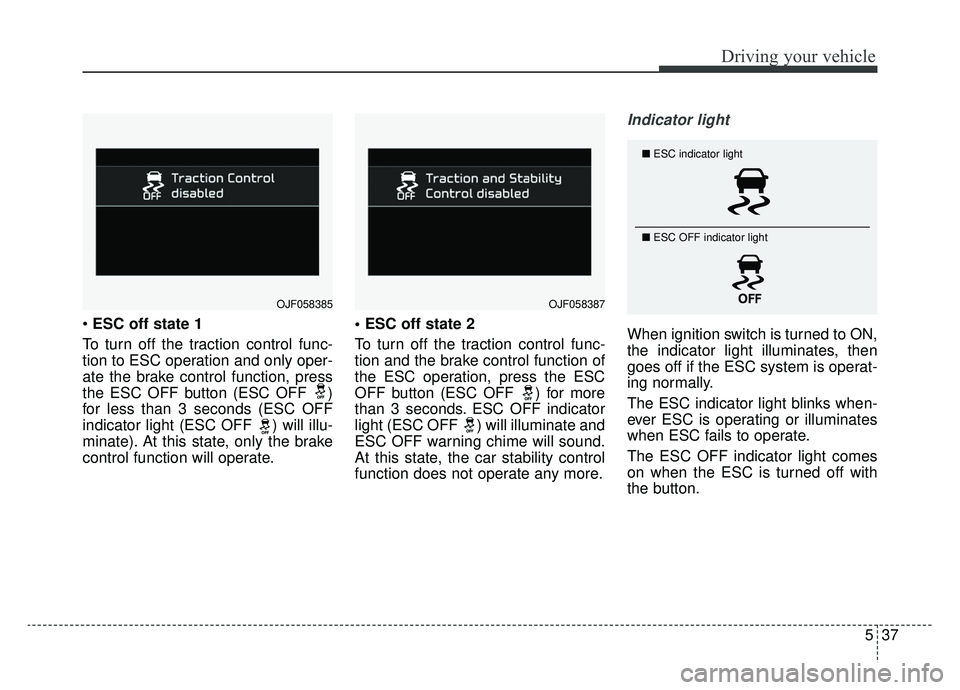
ESC off state 1
To turn off the traction control func-
tion to ESC operation and only oper-
ate the brake control function, press
the ESC OFF button (ESC OFF )
for less than 3 seconds (ESC OFF
indicator light (ESC OFF ) will illu-
minate). At this state, only the brake
control function will operate.
To turn off the traction control func-
tion and the brake control function of
the ESC operation, press the ESC
OFF button (ESC OFF ) for more
than 3 seconds. ESC OFF indicator
light (ESC OFF ) will illuminate and
ESC OFF warning chime will sound.
At this state, the car stability control
function does not operate any more.
Indicator light
When ignition switch is turned to ON,
the indicator light illuminates, then
goes off if the ESC system is operat-
ing normally.
The ESC indicator light blinks when-
ever ESC is operating or illuminates
when ESC fails to operate.
The ESC OFF indicator light comes
on when the ESC is turned off with
the button.
■
ESC indicator light
■ ESC OFF indicator light
OJF058385OJF058387
Page 338 of 597
543
Driving your vehicle
The Forward Collision-Avoidance
Assist (FCA) system is designed to
help detect and monitor the vehicle
or pedestrians ahead in the roadway
through camera recognition to warn
the driver that a collision is imminent,
and if necessary, apply emergency
braking.System setting and activation
System setting
placing the ignition switch to the ON
position and by selecting:
'User Settings →Driver Assistance
→ Forward Collision-Avoidance
Assist' The FCA system deactivates,
when the driver cancels the system
setting.
FORWARD COLLISION-AVOIDANCE ASSIST (FCA) SYSTEM
WARNING
Take the following precaution-
swhen using the Forward
Collision-Avoidance Assist
(FCA) system:
This system is only a supple- mental system and it is not
intended to, nor does it replace
the need for extreme care and
attention of the driver. The
sensing range and objects
detectable by the sensors are
limited. Pay attention to the
road conditions at all times.
Never drive too fast in accor- dance with the road condi-
tions or while cornering.
Always drive cautiously to prevent unexpected and sud-
den situations from occur-
ring. FCA does not stop the
vehicle completely and is not
a collision avoidance system.
Page 352 of 597
557
Driving your vehicle
The Forward Collision-Avoidance
Assist (FCA) system is designed to
help detect and monitor the vehicle
or pedestrians ahead in the roadway
through camera recognition to warn
the driver that a collision is imminent,
and if necessary, apply emergency
braking.System setting and activation
System setting
placing the ignition switch to the ON
position and by selecting:
'User Settings →Driver Assistance
→ Forward Collision-Avoidance
Assist' The FCA system deactivates,
when the driver cancels the system
setting.
FORWARD COLLISION-AVOIDANCE ASSIST (FCA) SYSTEM - SENSOR FUSION TYPE
(FRONT RADAR+FRONT VIEW CAMERA) (IF EQUIPPED)
WARNING
Take the following precaution-
swhen using the Forward
Collision-Avoidance Assist
(FCA) system:
This system is only a supple- mental system and it is not
intended to, nor does it replace
the need for extreme care and
attention of the driver. The
sensing range and objects
detectable by the sensors are
limited. Pay attention to the
road conditions at all times.
Never drive too fast in accor- dance with the road condi-
tions or while cornering.
Always drive cautiously to prevent unexpected and sud-
den situations from occur-
ring. FCA does not avoid all
collisions because of system
limitations.
Page 367 of 597
Driving your vehicle
72
5
CRUISE CONTROL SYSTEM
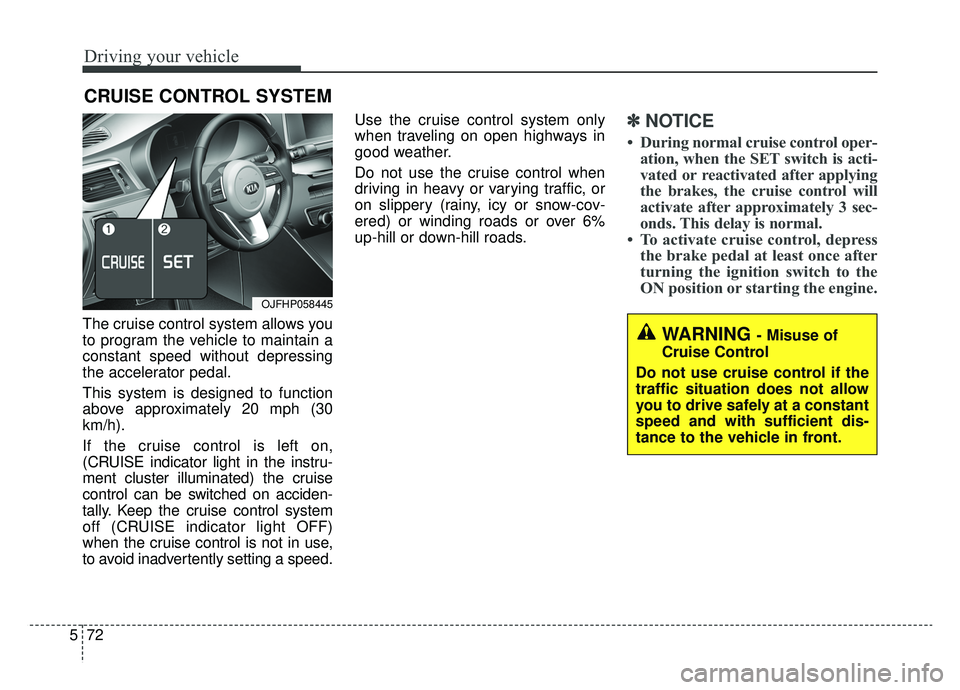
The cruise control system allows you
to program the vehicle to maintain a
constant speed without depressing
the accelerator pedal.
This system is designed to function
above approximately 20 mph (30
km/h).
If the cruise control is left on,
(CRUISE indicator light in the instru-
ment cluster illuminated) the cruise
control can be switched on acciden-
tally. Keep the cruise control system
off (CRUISE indicator light OFF)
when the cruise control is not in use,
to avoid inadvertently setting a speed. Use the cruise control system only
when traveling on open highways in
good weather.
Do not use the cruise control when
driving in heavy or varying traffic, or
on slippery (rainy, icy or snow-cov-
ered) or winding roads or over 6%
up-hill or down-hill roads.
✽ ✽
NOTICE
• During normal cruise control oper-
ation, when the SET switch is acti-
vated or reactivated after applying
the brakes, the cruise control will
activate after approximately 3 sec-
onds. This delay is normal.
• To activate cruise control, depress the brake pedal at least once after
turning the ignition switch to the
ON position or starting the engine.
WARNING - Misuse of
Cruise Control
Do not use cruise control if the
traffic situation does not allow
you to drive safely at a constant
speed and with sufficient dis-
tance to the vehicle in front.
OJFHP058445
Page 370 of 597
575
Driving your vehicle
Each of these actions will cancelcruise control operation (the SETindicator light in the instrument clus-ter will go off), but it will not turn thesystem off. If you wish to resumecruise control operation, move thelever up (to RES+). You will return toyour previously preset speed.To resume cruising speed at
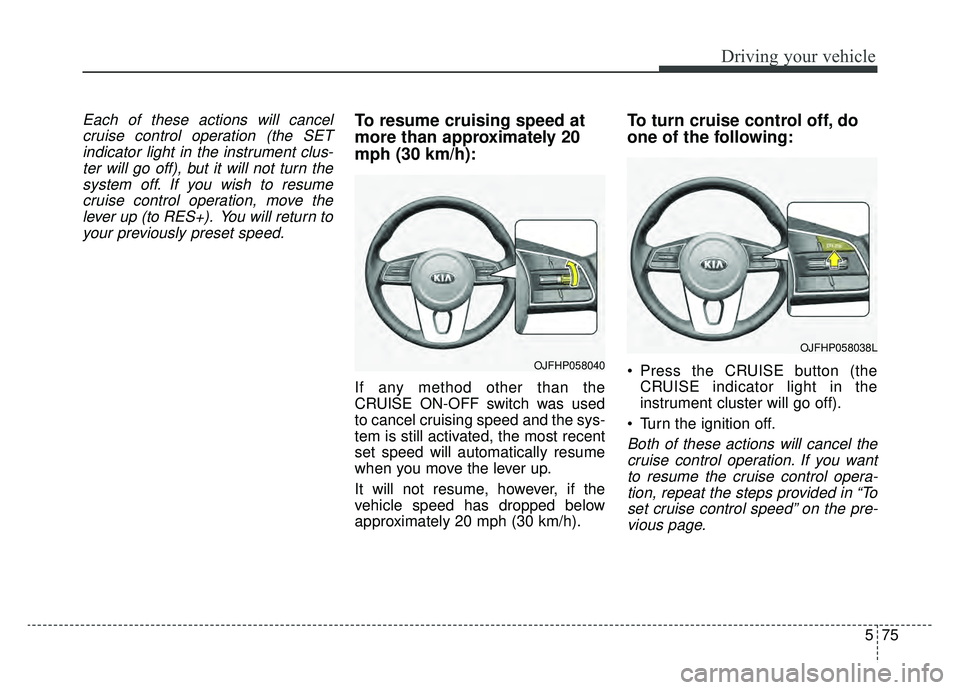
more than approximately 20
mph (30 km/h):
If any method other than the
CRUISE ON-OFF switch was used
to cancel cruising speed and the sys-
tem is still activated, the most recent
set speed will automatically resume
when you move the lever up.
It will not resume, however, if the
vehicle speed has dropped below
approximately 20 mph (30 km/h).
To turn cruise control off, do
one of the following:
Press the CRUISE button (the CRUISE indicator light in the
instrument cluster will go off).
Turn the ignition off.
Both of these actions will cancel the cruise control operation. If you wantto resume the cruise control opera-tion, repeat the steps provided in “Toset cruise control speed” on the pre-vious page.
OJFHP058040
OJFHP058038L
Page 371 of 597
Driving your vehicle
76
5
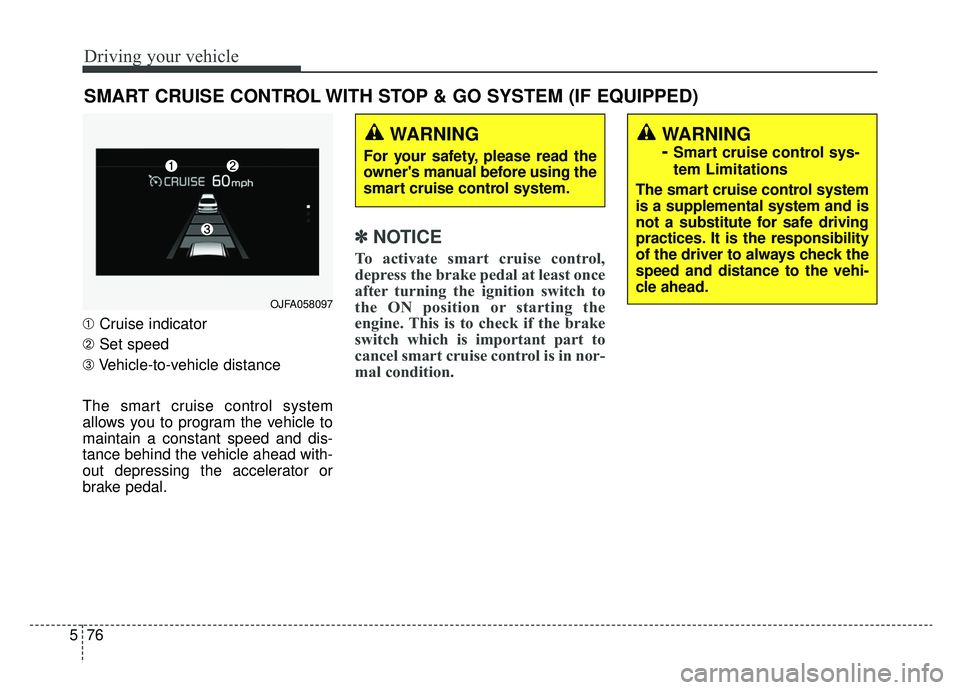
➀ Cruise indicator
➁ Set speed
\b Vehicle-to-vehicle distance
The smart cruise control system
allows you to program the vehicle to
maintain a constant speed and dis-
tance behind the vehicle ahead with-
out depressing the accelerator or
brake pedal.
✽ ✽ NOTICE
To activate smart cruise control,
depress the brake pedal at least once
after turning the ignition switch to
the ON position or starting the
engine. This is to check if the brake
switch which is important part to
cancel smart cruise control is in nor-
mal condition.
SMART CRUISE CONTROL WITH STOP & GO SYSTEM (IF EQUIPPED)
WARNING
For your safety, please read the
owner's manual before using the
smart cruise control system.
WARNING
-
Smart cruise control sys-
tem Limitations
The smart cruise control system
is a supplemental system and is
not a substitute for safe driving
practices. It is the responsibility
of the driver to always check the
speed and distance to the vehi-
cle ahead.
OJFA058097
Page 396 of 597
5101
Driving your vehicle
System setting and activation
System setting
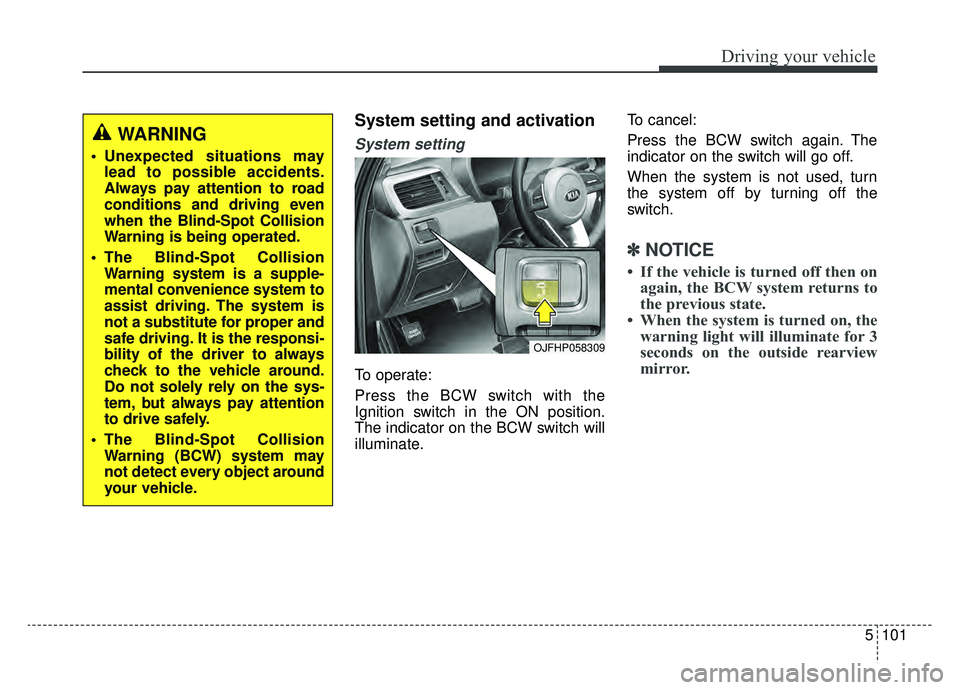
To operate:
Press the BCW switch with the
Ignition switch in the ON position.
The indicator on the BCW switch will
illuminate.To cancel:
Press the BCW switch again. The
indicator on the switch will go off.
When the system is not used, turn
the system off by turning off the
switch.
✽ ✽
NOTICE
• If the vehicle is turned off then on
again, the BCW system returns to
the previous state.
• When the system is turned on, the warning light will illuminate for 3
seconds on the outside rearview
mirror.
OJFHP058309
WARNING
Unexpected situations may
lead to possible accidents.
Always pay attention to road
conditions and driving even
when the Blind-Spot Collision
Warning is being operated.
The Blind-Spot Collision Warning system is a supple-
mental convenience system to
assist driving. The system is
not a substitute for proper and
safe driving. It is the responsi-
bility of the driver to always
check to the vehicle around.
Do not solely rely on the sys-
tem, but always pay attention
to drive safely.
The Blind-Spot Collision Warning (BCW) system may
not detect every object around
your vehicle.