Panel KIA PICANTO 2016 Owner's Manual
[x] Cancel search | Manufacturer: KIA, Model Year: 2016, Model line: PICANTO, Model: KIA PICANTO 2016Pages: 488, PDF Size: 31.22 MB
Page 154 of 488
479
Features of your vehicle
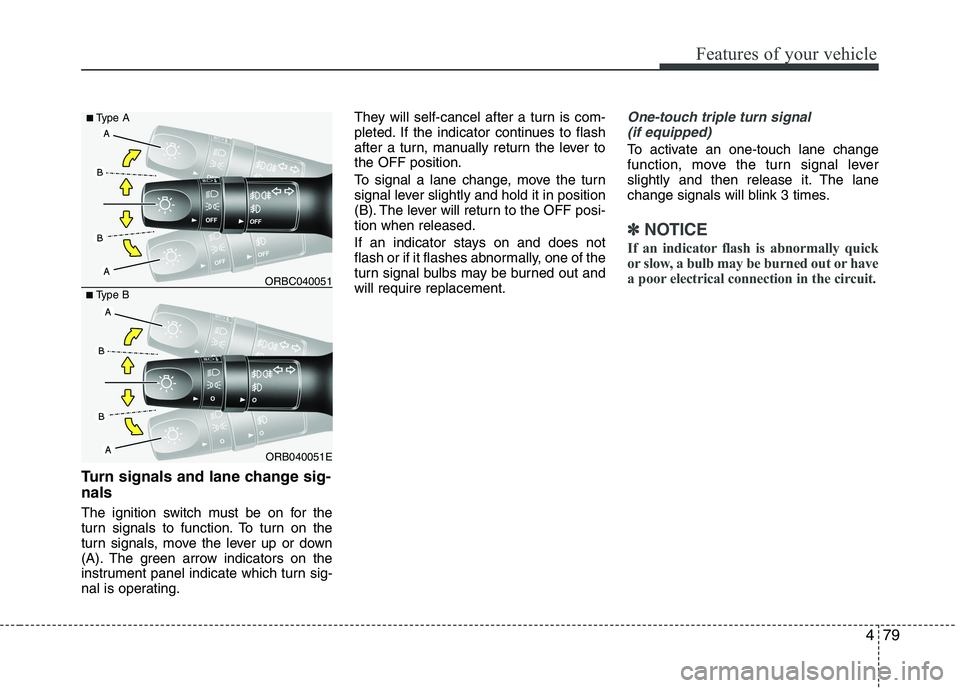
Turn signals and lane change sig- nals
The ignition switch must be on for the
turn signals to function. To turn on the
turn signals, move the lever up or down
(A). The green arrow indicators on the
instrument panel indicate which turn sig-
nal is operating.They will self-cancel after a turn is com-
pleted. If the indicator continues to flash
after a turn, manually return the lever tothe OFF position.
To signal a lane change, move the turn
signal lever slightly and hold it in position
(B). The lever will return to the OFF posi-tion when released.
If an indicator stays on and does not
flash or if it flashes abnormally, one of the
turn signal bulbs may be burned out andwill require replacement.
One-touch triple turn signal
(if equipped)
To activate an one-touch lane change
function, move the turn signal lever
slightly and then release it. The lane
change signals will blink 3 times.
✽✽ NOTICE
If an indicator flash is abnormally quick
or slow, a bulb may be burned out or have
a poor electrical connection in the circuit.
ORB040051E
■
Type B ORBC040051
■
Type A
Page 169 of 488
Features of your vehicle
94
4
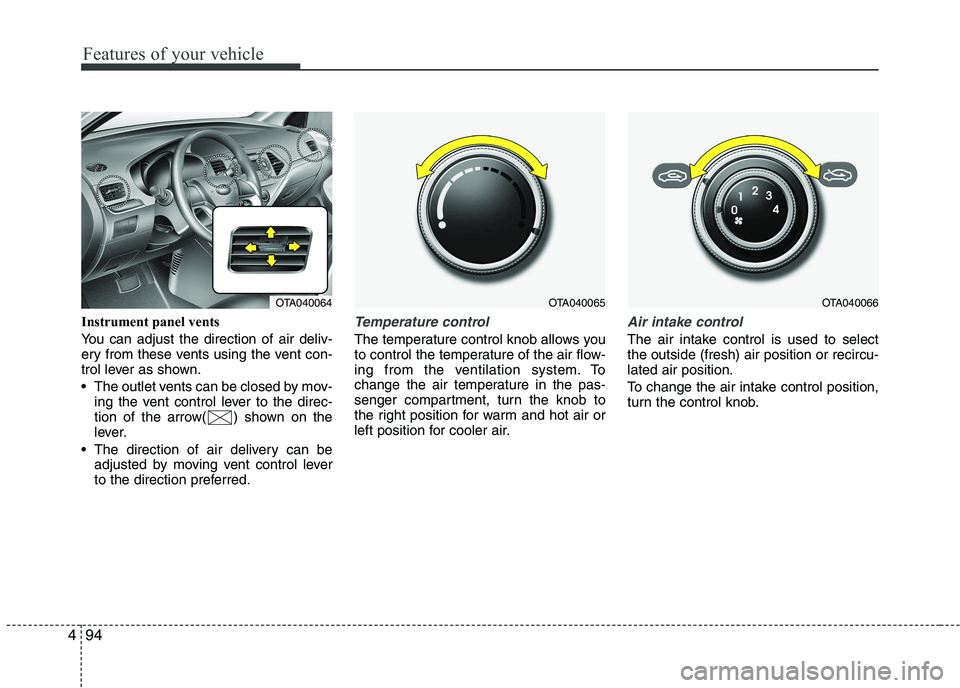
Instrument panel vents
You can adjust the direction of air deliv-
ery from these vents using the vent con-
trol lever as shown.
The outlet vents can be closed by mov-
ing the vent control lever to the direc-
tion of the arrow( ) shown on the
lever.
The direction of air delivery can be adjusted by moving vent control lever
to the direction preferred.Temperature control
The temperature control knob allows you
to control the temperature of the air flow-
ing from the ventilation system. To
change the air temperature in the pas-
senger compartment, turn the knob to
the right position for warm and hot air or
left position for cooler air.
Air intake control
The air intake control is used to select the outside (fresh) air position or recircu-lated air position.
To change the air intake control position,
turn the control knob.
OTA040065OTA040066OTA040064
Page 177 of 488
Features of your vehicle
102
4
✽✽
NOTICE
Never place anything over the sensor
located on the instrument panel to
ensure better control of the heating and
cooling system.
Manual heating and air condition- ing The heating and cooling system can be
controlled manually by pushing buttons
other than the AUTO button. In this case,
the system works sequentially according
to the order of buttons selected.
When pressing any button (or turning
any knob) except the AUTO button while
using automatic operation, the functionsnot selected will be controlled automati-
cally.
1. Start the engine.
2. Set the mode to the desired position. To improve the effectiveness of heat-ing and cooling:
- Heating:- Cooling:
3. Set the temperature control to the desired position.
4. Set the air intake control to the outside (fresh) air position.
5. Set the fan speed control to the desired speed.
6. If air conditioning is desired, turn the air conditioning system on.
Press the AUTO button in order to con-
vert to full automatic control of the sys-tem.
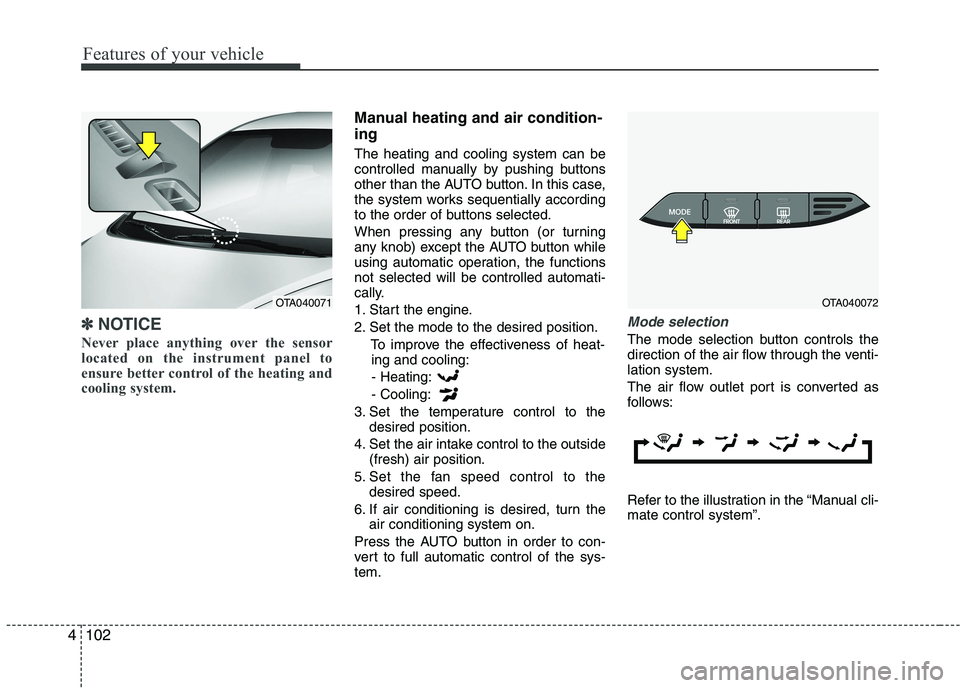
Mode selection
The mode selection button controls the
direction of the air flow through the venti-lation system.
The air flow outlet port is converted as
follows:
Refer to the illustration in the “Manual cli- mate control system”.
OTA040072OTA040071
Page 178 of 488
4103
Features of your vehicle
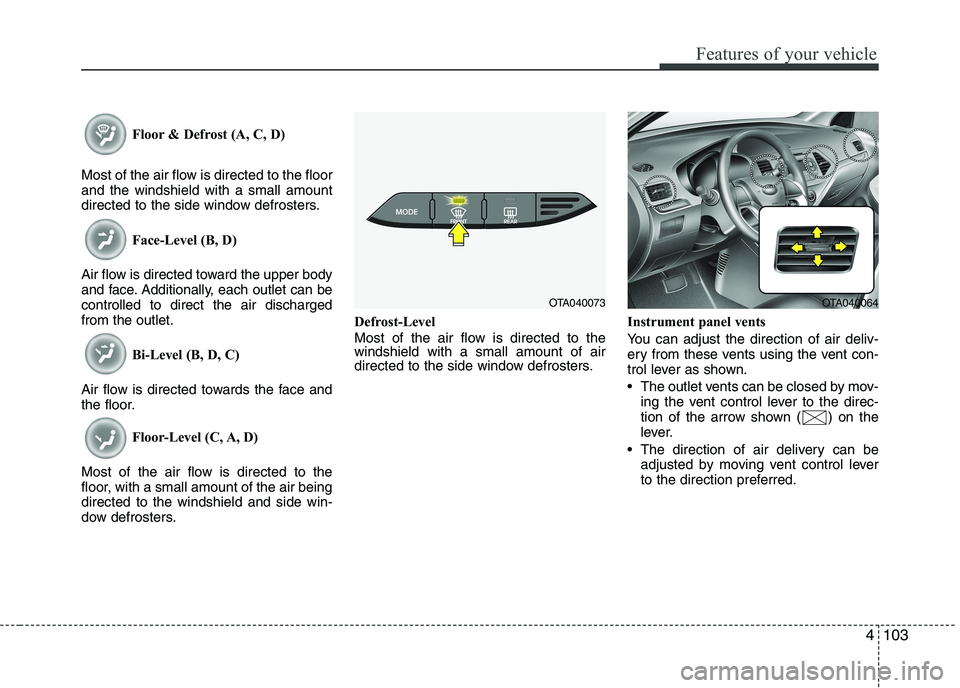
Floor & Defrost (A, C, D)
Most of the air flow is directed to the floor and the windshield with a small amount
directed to the side window defrosters. Face-Level (B, D)
Air flow is directed toward the upper body
and face. Additionally, each outlet can becontrolled to direct the air dischargedfrom the outlet. Bi-Level (B, D, C)
Air flow is directed towards the face and
the floor. Floor-Level (C, A, D)
Most of the air flow is directed to the
floor, with a small amount of the air beingdirected to the windshield and side win-
dow defrosters. Defrost-Level
Most of the air flow is directed to the windshield with a small amount of air
directed to the side window defrosters.
Instrument panel vents
You can adjust the direction of air deliv-
ery from these vents using the vent con-
trol lever as shown.
The outlet vents can be closed by mov-
ing the vent control lever to the direc-
tion of the arrow shown ( ) on the
lever.
The direction of air delivery can be adjusted by moving vent control lever
to the direction preferred.
OTA040073OTA040064
Page 202 of 488
127
Features of your vehicle
4
(Continued) Turn on the car ignition before using this device. Do not operatethe audio system for long periodsof time with the ignition turned off
as such operations may lead tobattery discharge.
Do not subject the device to severe shock or impact. Direct
pressure onto the front side ofthe monitor may cause damage tothe LCD or touch screen.
When cleaning the device, make sure to turn off the device and
use a dry and smooth cloth.Never use tough materials, chem- ical cloths, or solvents (alcohol,benzene, thinners, etc.) as such
materials may damage the devicepanel or cause color/quality dete-rioration
(Continued)(Continued) Do not place beverages close to the audio system. Spilling bever-ages may lead to system mal-function.
In case of product malfunction, please contact your place of pur-chase or After Service center.
Placing the audio system within an electromagnetic environment
may result in noise interference.CAUTION
Operating the device while driv- ing could lead to accidents due to
a lack of attention to external sur-roundings. First park the vehiclebefore operating the device.
Adjust the volume to levels that allow the driver to hear soundsfrom outside of the vehicle.Driving in a state where external sounds cannot be heard may lead
to accidents.
Pay attention to the volume set- ting when turning the device on.A sudden output of extreme vol-ume upon turning the device on
could lead to hearing impairment.(Adjust the volume to a suitablelevels before turning off the device.)
If you want to change the position of device installation, pleaseinquire with your place of pur-chase or service maintenancecenter. Technical expertise is
required to install or disassemblethe device.
(Continued)
Page 298 of 488
Driving your vehicle
16
5
Fuelling systems and corresponding
adapters vary from country to country. As
not all service stations abroad will pro-
vide you with the required adapter for
your liquefied gas equipment we suggest
that you buy the necessary adapter
before travelling abroad.
Please check whether the adapters fit
your filling equipment.
✽✽
NOTICE
In Europe the most common adapter
types are ACME (1), Dish Coupling (2),
and Bayonet (3).
It is generally advisable to always carry
all three adapters on board as the pro-
liferation of filling systems varies from
country to country.
LPG safety precaution
Refill LPG only 80% of the tank.
Do not remove the valve to over refill. If you refill more than you are permitted,
the fuel tank may explode.
Turn the engine off while refilling.
Avoid heat and direct sunlight the fuel tank may pressure up.
Avoid underground parking lots or closed places when you need to park
your vehicle for a very long time.
If you smell LPG inside your vehicle open the windows. If you notice a leak,
we recommend that the system be
checked by an authorized Kia dealer.
Make sure your vehicle is parked on a level surface and nothing flammable is
near while you check your vehicle.CAUTION
When an adapter is used, the user
needs to be aware of the following:
Worn out adapters must not be used.
Due to use of an adapter the released volume of gas is muchgreater compared to a direct con-
nection with the vehicle fillingconnector.
The nozzle must be disconnected from the car before the adapter isremoved.
Some vehicles only have a very small diameter thread to fix anadaptor.
In this case, the user should takeextra care.
The added length of the adapterprovides a greater bending moment. If the fill coupling has not been properly installed, thiscan distort the panel of the car or
even cause the thread of theadapter to shear.
If the vehicle drives away stillconnected then the adapter mayshear unwontedly before the
break-away coupling parts.
Page 346 of 488
What to do in an emergency
2
6
ROAD WARNING
Hazard warning flasher
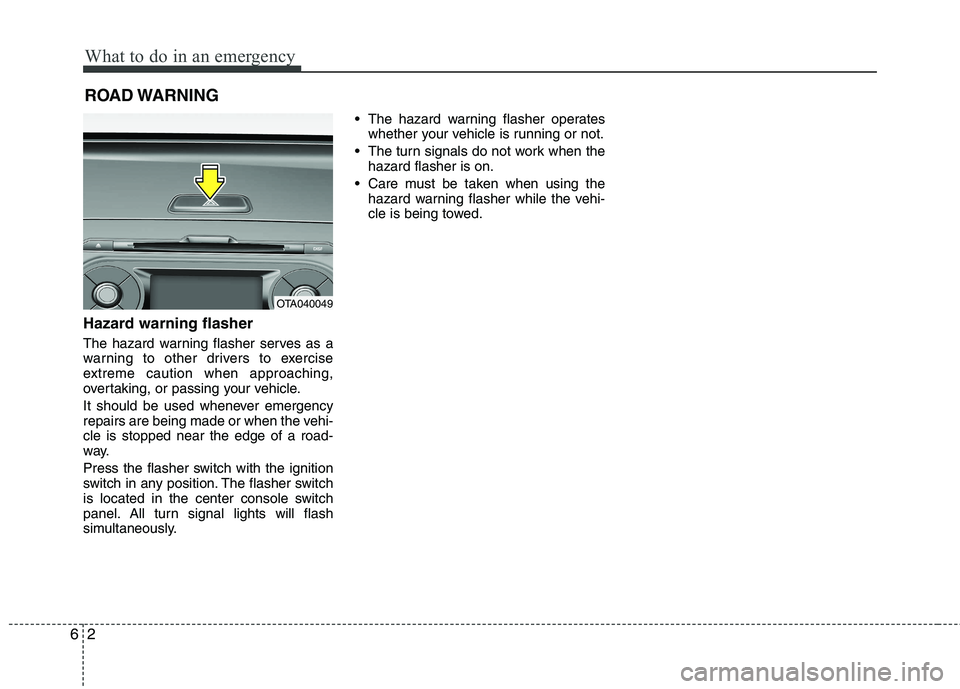
The hazard warning flasher serves as a
warning to other drivers to exercise
extreme caution when approaching,
overtaking, or passing your vehicle.
It should be used whenever emergency
repairs are being made or when the vehi-cle is stopped near the edge of a road-
way.
Press the flasher switch with the ignition
switch in any position. The flasher switch
is located in the center console switch
panel. All turn signal lights will flash
simultaneously. • The hazard warning flasher operates
whether your vehicle is running or not.
The turn signals do not work when the hazard flasher is on.
Care must be taken when using the hazard warning flasher while the vehi-
cle is being towed.
OTA040049
Page 370 of 488
What to do in an emergency
26
6
✽✽
NOTICE
If the TPMS indicator does not illu-
minate for 3 seconds when the igni-
tion switch is turned to the ON posi-
tion or engine is running, or if it
comes on after blinking for approxi-
mately one minute, we recommend
that you contact an authorized Kia
dealer.Low tire pressure telltale
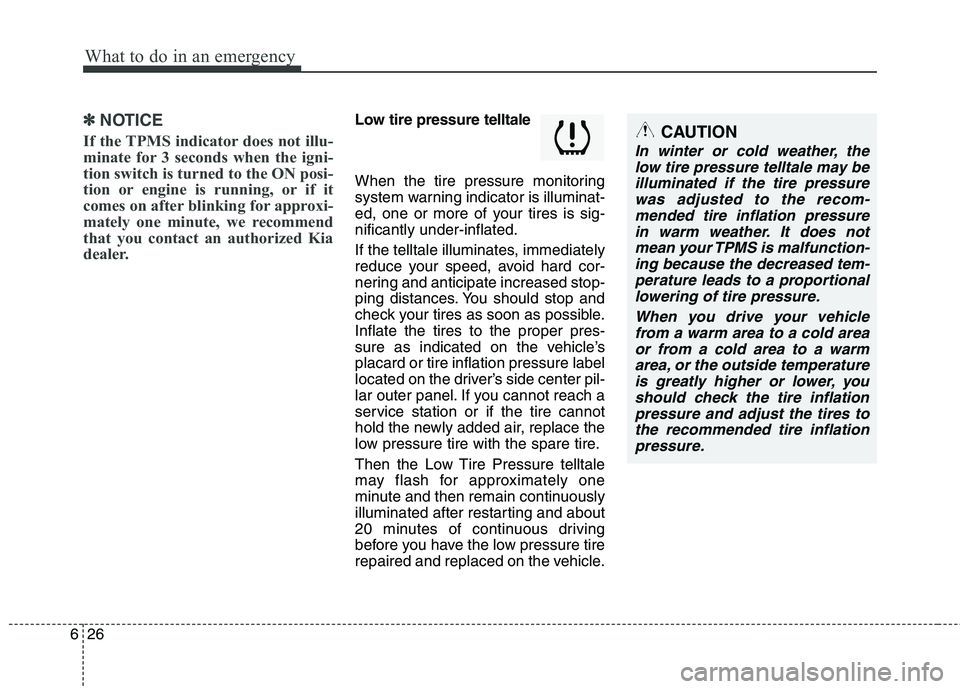
When the tire pressure monitoring
system warning indicator is illuminat-
ed, one or more of your tires is sig-nificantly under-inflated.
If the telltale illuminates, immediately
reduce your speed, avoid hard cor-
nering and anticipate increased stop-
ping distances. You should stop and
check your tires as soon as possible.Inflate the tires to the proper pres-
sure as indicated on the vehicle’splacard or tire inflation pressure label
located on the driver’s side center pil-
lar outer panel. If you cannot reach a
service station or if the tire cannot
hold the newly added air, replace the
low pressure tire with the spare tire.
Then the Low Tire Pressure telltale
may flash for approximately one
minute and then remain continuously
illuminated after restarting and about
20 minutes of continuous driving
before you have the low pressure tire
repaired and replaced on the vehicle.CAUTION
In winter or cold weather, the low tire pressure telltale may beilluminated if the tire pressurewas adjusted to the recom- mended tire inflation pressurein warm weather. It does notmean your TPMS is malfunction- ing because the decreased tem-perature leads to a proportionallowering of tire pressure.
When you drive your vehiclefrom a warm area to a cold area or from a cold area to a warmarea, or the outside temperatureis greatly higher or lower, you should check the tire inflationpressure and adjust the tires tothe recommended tire inflation pressure.
Page 432 of 488
Maintenance
54
7
FUSES
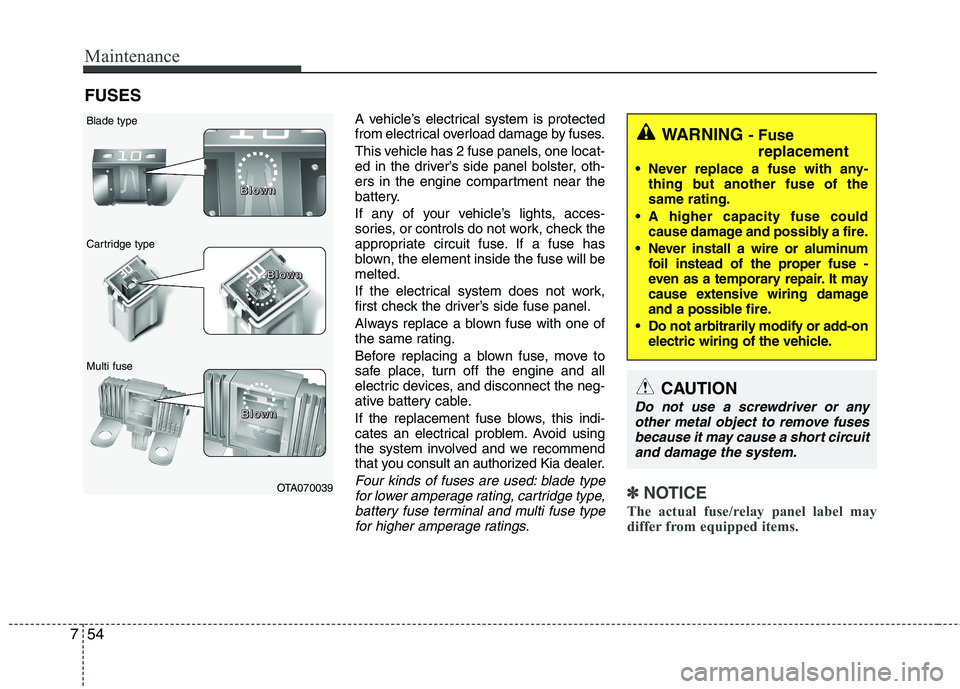
A vehicle’s electrical system is protected
from electrical overload damage by fuses.
This vehicle has 2 fuse panels, one locat-
ed in the driver’s side panel bolster, oth-
ers in the engine compartment near the
battery.
If any of your vehicle’s lights, acces-
sories, or controls do not work, check the
appropriate circuit fuse. If a fuse has
blown, the element inside the fuse will bemelted.
If the electrical system does not work,
first check the driver’s side fuse panel.
Always replace a blown fuse with one of
the same rating.
Before replacing a blown fuse, move to
safe place, turn off the engine and all
electric devices, and disconnect the neg-
ative battery cable.
If the replacement fuse blows, this indi-
cates an electrical problem. Avoid using
the system involved and we recommend
that you consult an authorized Kia dealer.
Four kinds of fuses are used: blade typefor lower amperage rating, cartridge type,battery fuse terminal and multi fuse typefor higher amperage ratings.✽✽ NOTICE
The actual fuse/relay panel label may
differ from equipped items.
WARNING - Fuse
replacement
Never replace a fuse with any- thing but another fuse of the same rating.
A higher capacity fuse could cause damage and possibly a fire.
Never install a wire or aluminum foil instead of the proper fuse -
even as a temporary repair. It may
cause extensive wiring damage
and a possible fire.
Do not arbitrarily modify or add-on electric wiring of the vehicle.
CAUTION
Do not use a screwdriver or any
other metal object to remove fuses because it may cause a short circuit
and damage the system.
OTA070039
Blade type
Cartridge type Multi fuse
BBBBlllloooowwwwnnnn
BBBBlllloooowwwwnnnn
BBBBlllloooowwwwnnnn
Page 433 of 488
755
Maintenance
Instrument panel fuse replace- ment
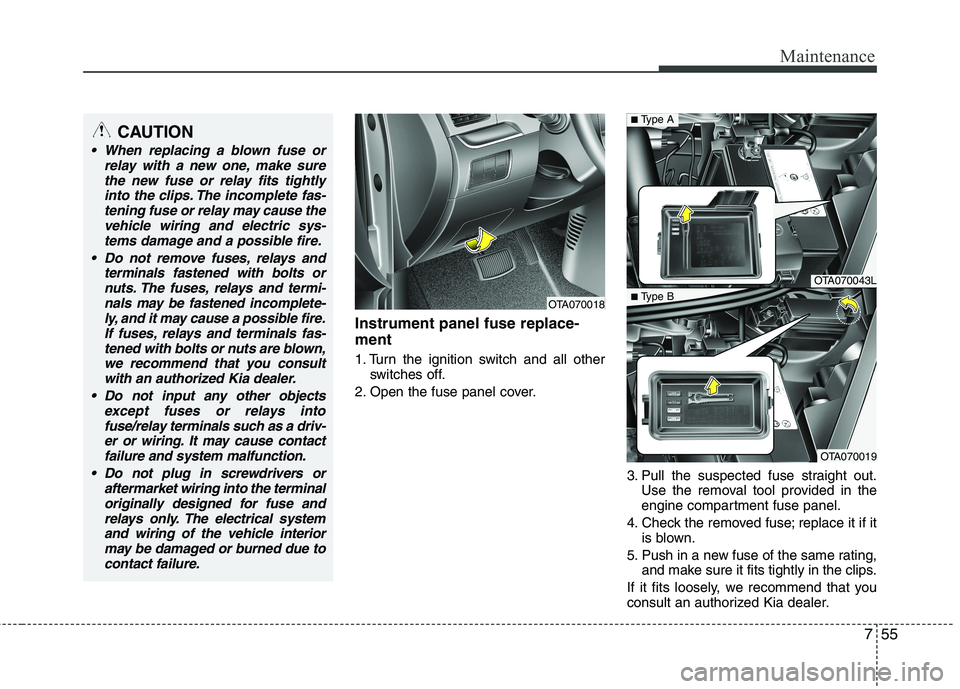
1. Turn the ignition switch and all otherswitches off.
2. Open the fuse panel cover.
3. Pull the suspected fuse straight out.Use the removal tool provided in the
engine compartment fuse panel.
4. Check the removed fuse; replace it if it is blown.
5. Push in a new fuse of the same rating, and make sure it fits tightly in the clips.
If it fits loosely, we recommend that you
consult an authorized Kia dealer.
OTA070018
OTA070043L
OTA070019
■ Type A
■ Type BCAUTION
When replacing a blown fuse or
relay with a new one, make sure
the new fuse or relay fits tightlyinto the clips. The incomplete fas-tening fuse or relay may cause the vehicle wiring and electric sys-
tems damage and a possible fire.
Do not remove fuses, relays and terminals fastened with bolts ornuts. The fuses, relays and termi-
nals may be fastened incomplete-ly, and it may cause a possible fire.If fuses, relays and terminals fas-tened with bolts or nuts are blown,
we recommend that you consult with an authorized Kia dealer.
Do not input any other objects except fuses or relays intofuse/relay terminals such as a driv-
er or wiring. It may cause contactfailure and system malfunction.
Do not plug in screwdrivers or aftermarket wiring into the terminaloriginally designed for fuse and
relays only. The electrical systemand wiring of the vehicle interiormay be damaged or burned due to
contact failure.